
Payroll By Administrative Regions
by Viindoo
| Lines of Code | 946 |
| Technical name | viin_hr_payroll_administrative_region |
| License | OPL-1 |
| Website | https://viindoo.com/apps/app/17.0/viin_hr_payroll_administrative_region |
| Read description for | v 13.0 v 14.0 v 15.0 v 16.0 v 18.0 |
| Required Apps | Time Off (hr_holidays) Discuss (mail) Calendar (calendar) Employees (hr) Employee Contracts (hr_contract) |
| Included Dependencies | Payroll Employee Relatives Viindoo Base HR Contracts (Viindoo) Advanced HR Management Work Entry Work Entry - Contract Base Addendum Viindoo Holiday & WorkDay Manager Viin Time-Off Administrative Region Management Viin - Holiday Work Entry |
| Extensions | Vietnam Payroll by Administrative Regions |

Payroll By Administrative Regions
Integrate the Payroll app and the Administrative Region app for applying administrative rules for salary and employee contribution calculation.
This module integrates the Payroll app (to_hr_payroll) https://viindoo.com/apps/app/17.0/to_hr_payroll and the Administrative Region app (viin_adminitrative_region) https://viindoo.com/apps/app/17.0/viin_administrative_region to manage the minimum wage, the contribution from the minimum/maximum wage for each Administrative region, serving the salary calculation in the enterprise.
Key Features
Built natively on Odoo/Viindoo to streamline real business operations:
Allow to declare the minimum wage by Administrative region
Allow to declare the minimum/maximum contribution base, the maximum contribution value of employees and company by Administrative region for contributions deducted from salary such as social insurance, unemployment insurance, v.v
Based on the above declarations, the Payroll app will automatically calculate and identify the actual contribution levels that apply to each employee contract
Benefits
Automatically applies regional rules for minimum wages and contributions, ensuring adherence to local labor laws.
Eliminates manual adjustments, minimizing errors in payroll calculations and reporting.
Adapts seamlessly to multiple administrative regions with varying regulations.
Simplifies payroll workflows by directly integrating regional rules into the calculation process.
Provides clear insights into payroll contributions and costs by region, empowering better decision-making and resource allocation.
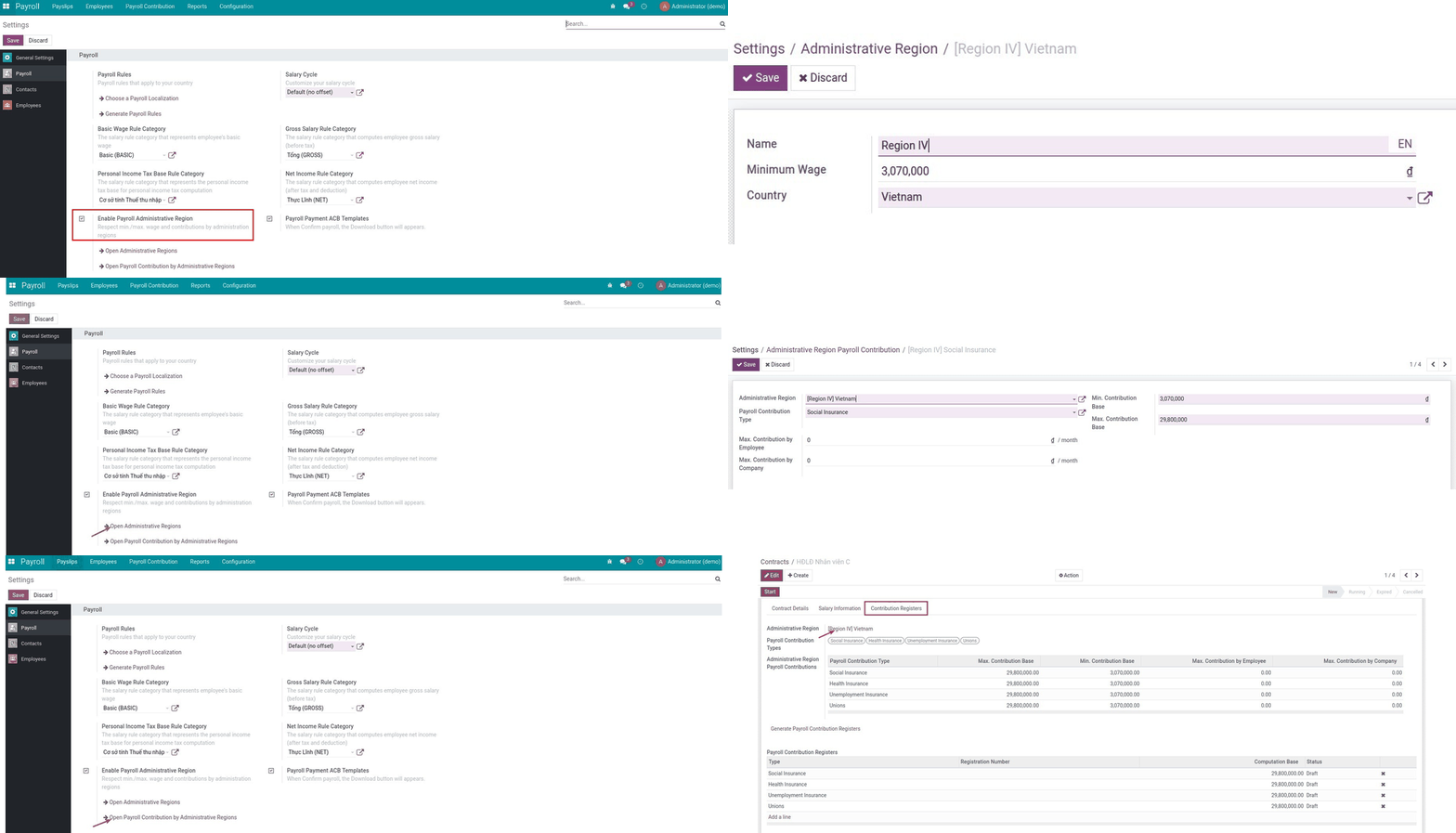
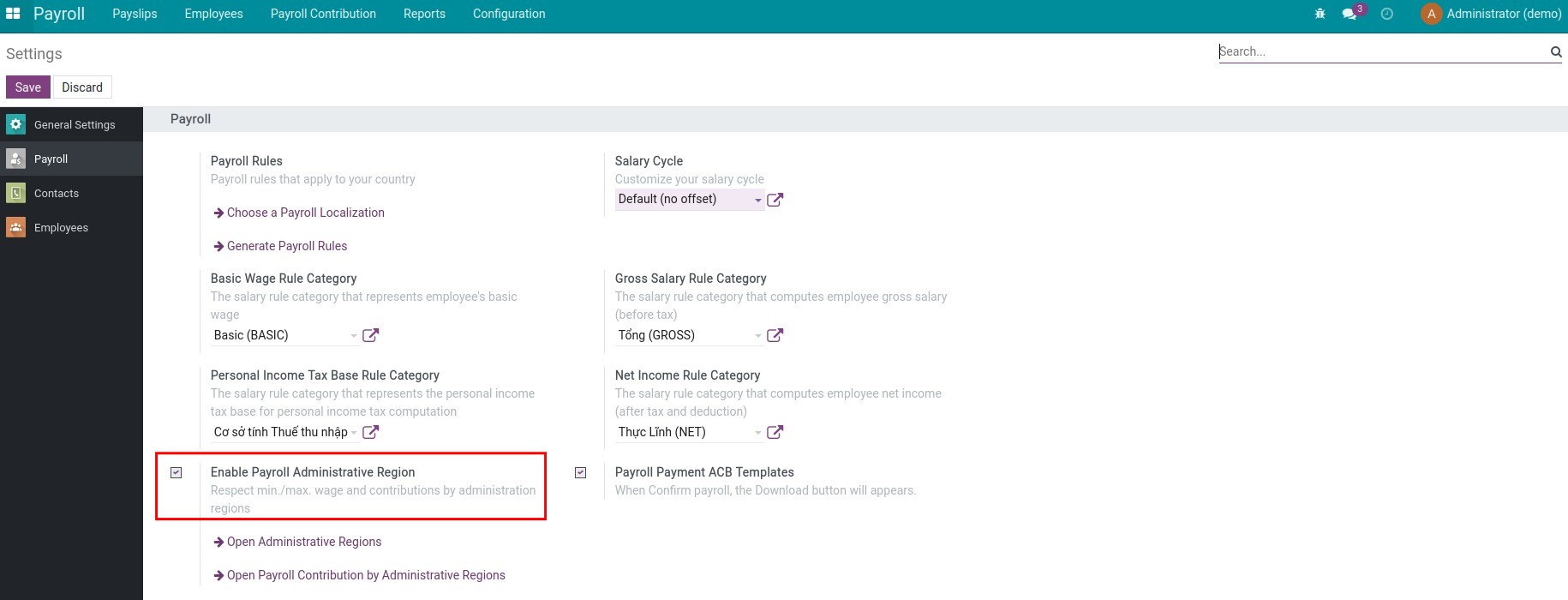
Kich hoat tinh nang luong theo vung hanh chinh
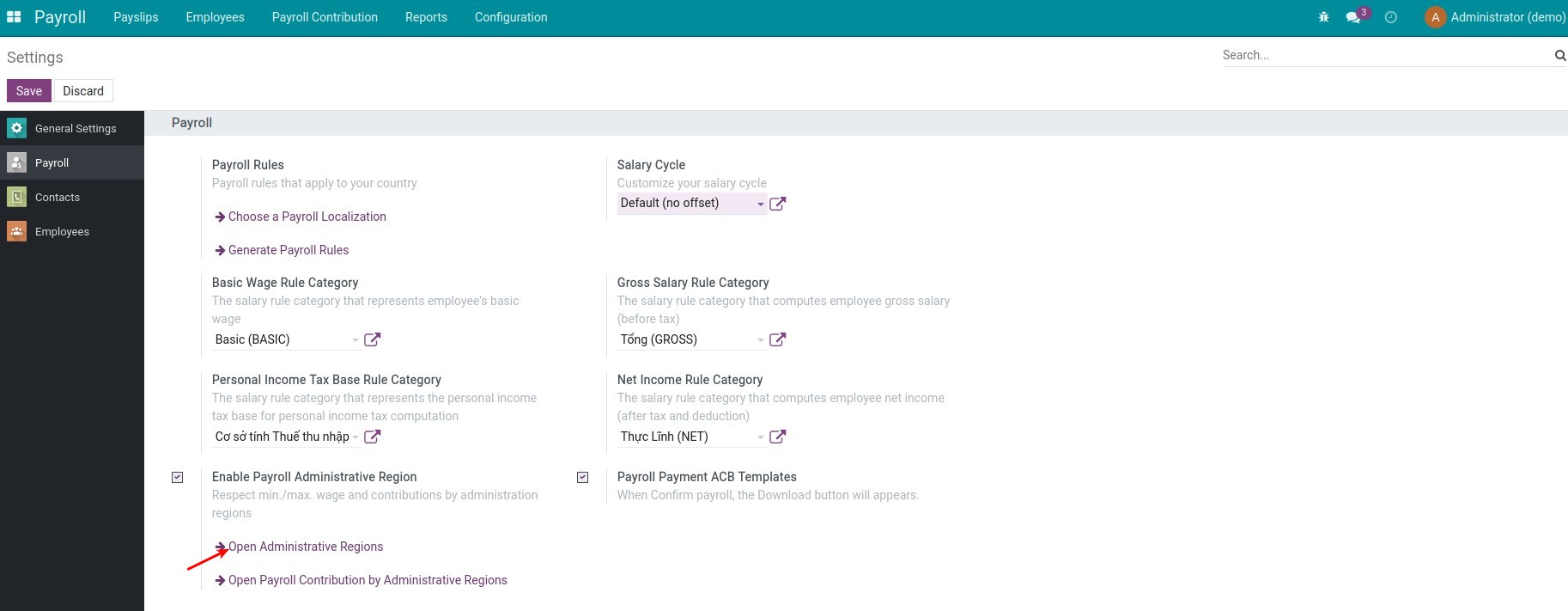
Setting the minimum wage by Administrative region
Open Administrative Regions
Setting the min/max contribution base
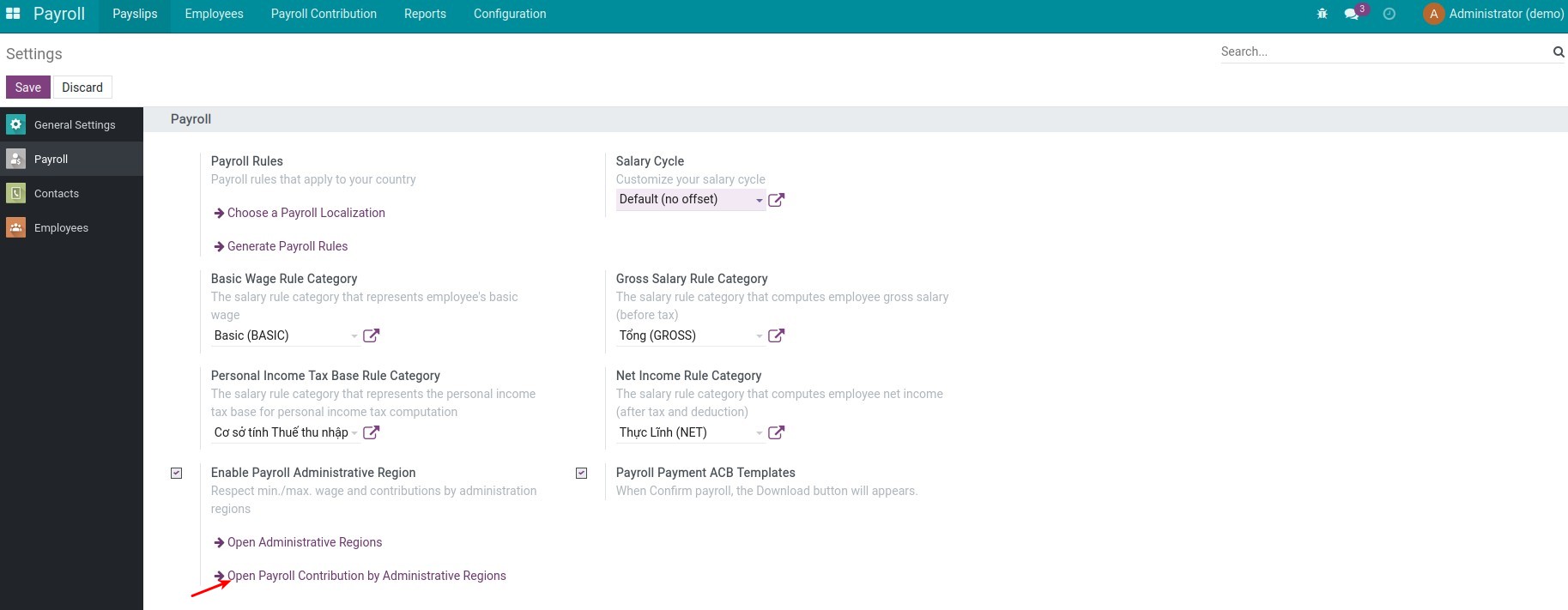
Open Payroll Contribution by Administrative
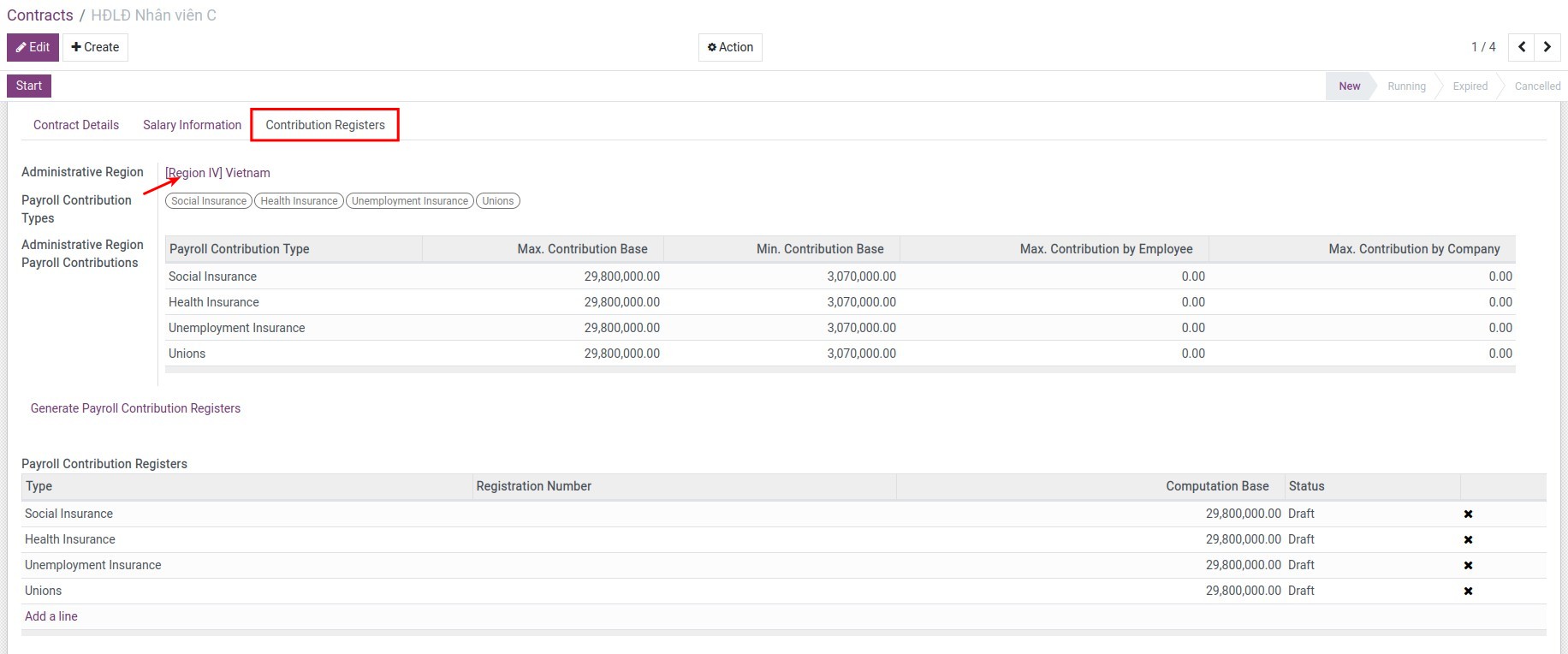
Apply to the employee contract
See Payroll By Administrative Regions in Action
See how this module solves real business problems in a working Viindoo environment.
Need help with Payroll By Administrative Regions?
For questions, implementation support, or consulting services, contact Viindoo.
Pre-Sales & Partnership
When contacting us, please include:
- Odoo/Viindoo version (CE/EE).
- Number of users and business scope.
- Other modules currently in use.
Technical Support
For faster troubleshooting, please provide:
- Order number or app reference.
- Odoo/Viindoo version & edition.
- Steps to reproduce the issue.
- Screenshots/logs if available.
Technical Requirement
Works Great With These Modules
Extend Payroll By Administrative Regions with complementary Viindoo apps:
Vietnam Payroll by Administrative Regions
Localize the Payroll By Administrative Regions for Vietnam
Module l10n_vn_viin_hr_payroll_administrative_regionWho Should Use This Module?
Built for teams that need this capability fully integrated into their Odoo/Viindoo stack.
Multi-Region Enterprises
Businesses operating in multiple administrative regions with diverse labor and wage requirements.
HR and Payroll Teams
Organizations looking to automate payroll compliance with regional wage and contribution rules.
Compliance-Focused Companies
Firms aiming to minimize regulatory risks by adhering to local labor laws.
Data-Driven Decision Makers
Companies requiring detailed analysis and management of payroll costs and contributions by region.
Growing Organizations
Enterprises expanding into new regions needing scalable and adaptable payroll solutions.
Installation
- Navigate to Apps.
- Search with keyword viin_hr_payroll_administrative_region.
- Press Install.
Instruction
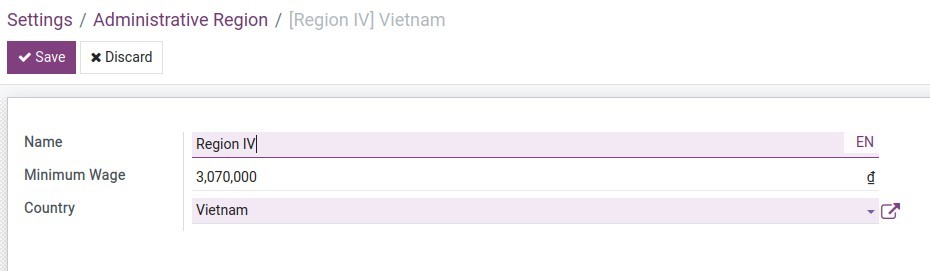
1. Setting the minimum wage by Administrative region
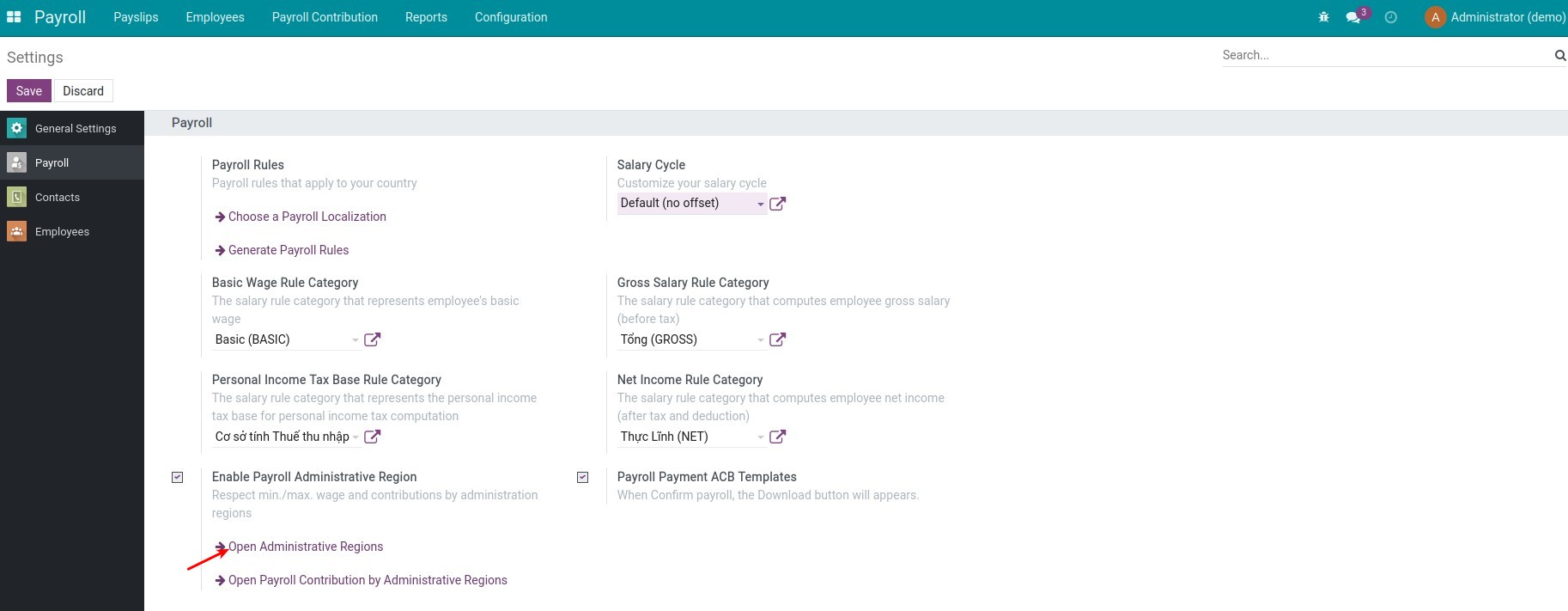
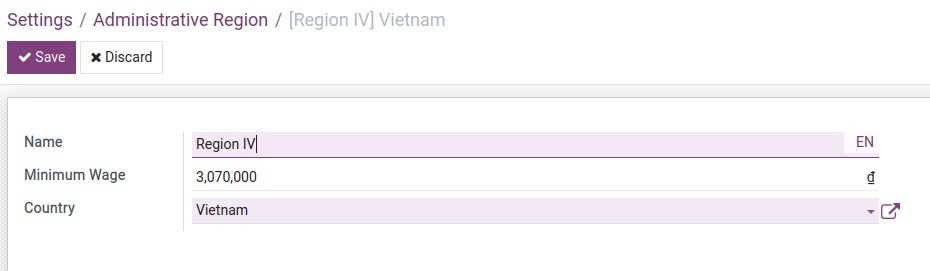
Navigate to Payroll ‣ Configuration ‣ Settings, choose Open Administrative Regions, then press Create to create Administrative regions and set the corresponding minimum wage:
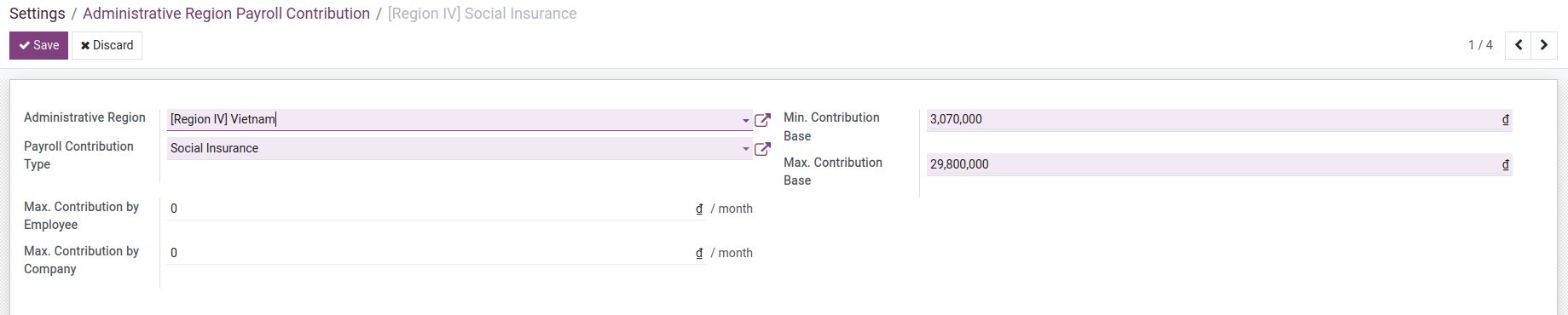
2. Setting the min/max contribution base
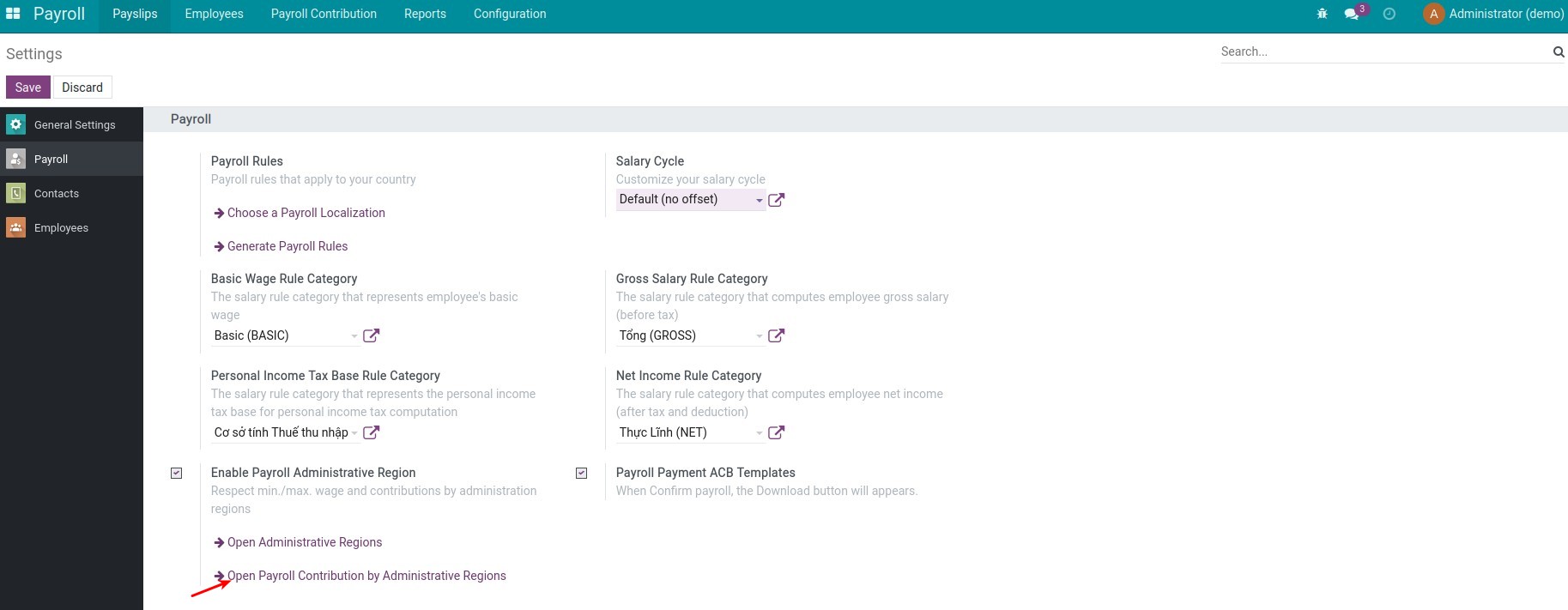
Navigate to Payroll ‣ Configuration ‣ Settings, choose Open Payroll Contribution by Administrative to create the Administrative region payroll contribution:
Setting the contribution bases:
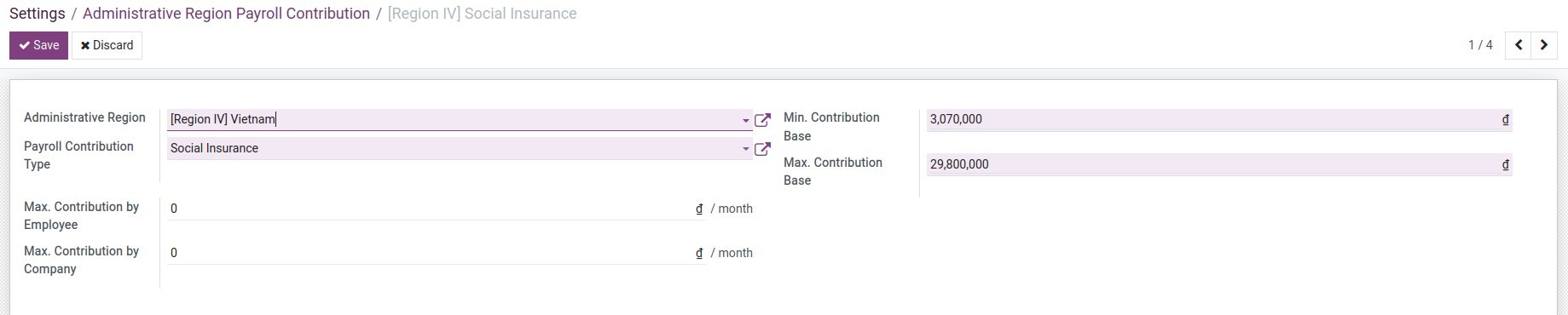
- Min. Contribution Base: Minimum level as a basis for calculating contributions. If the computation base is lower than the minimum, contributions will be calculated based on the minimum.
- Max. Contribution Base: Maximum level as a basis for calculating salary contributions. If the computation base is higher than the maximum, contributions will be calculated based on the maximum.
- Max. Contribution by Employee: Contribution deduction from the maximum salary that employees have to pay. If the calculated employee contribution is higher than this, the actual contribution deduction will be equal to this maximum contribution. Set to 0 if not specified.
- Max. Contribution by Company: Contribution deduction from the maximum salary that the company has to pay. If the calculated company contribution is higher than this, the actual contribution deduction will be equal to this maximum contribution. Set to 0 if not specified.
3. Apply to the employee contracts
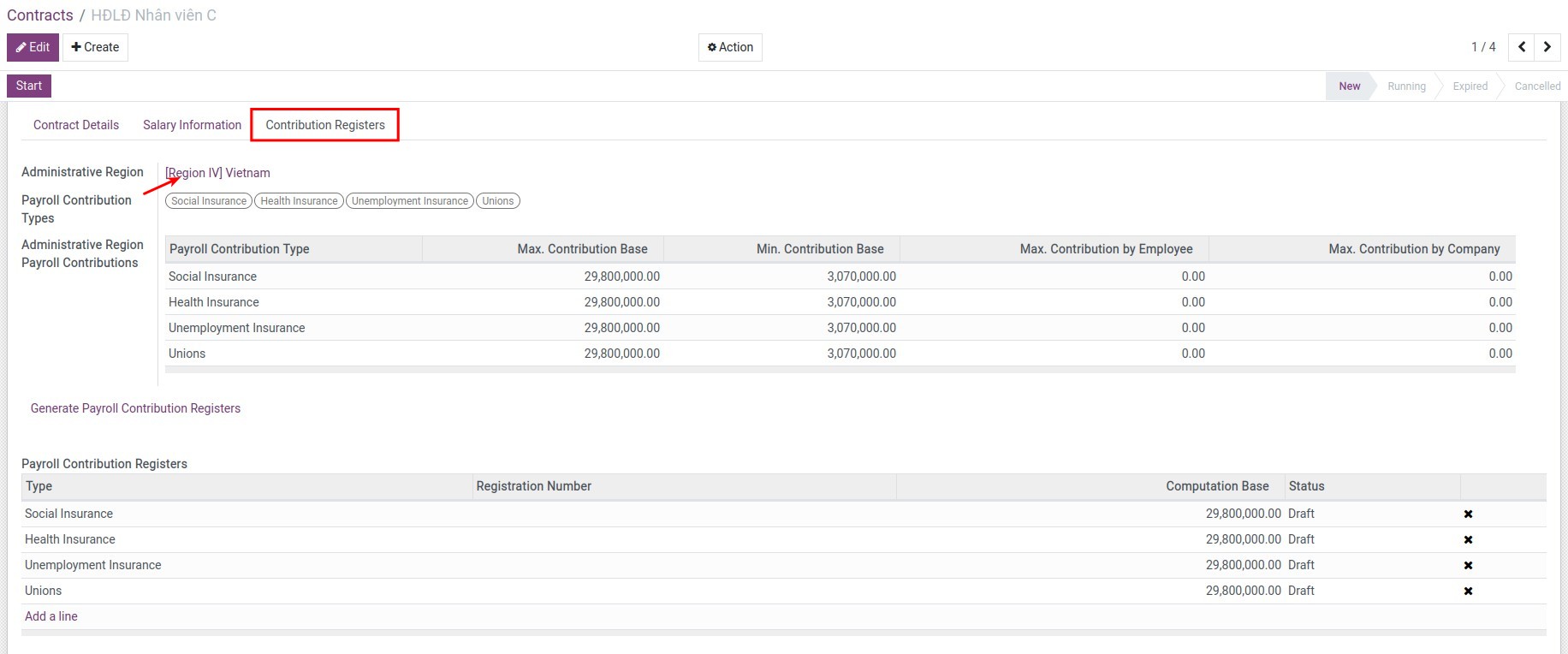
Navigate to Payroll ‣ Employees ‣ Contracts to select an existing contract or create a new one. At the Contribution Registers tab, select the corresponding Administrative region for the employee, then select Payroll contribution types:
This software and associated files (the "Software") may only be used (executed, modified, executed after modifications) if you have purchased a valid license from the authors, typically via Odoo Apps, or if you have received a written agreement from the authors of the Software (see the COPYRIGHT file).
You may develop Odoo modules that use the Software as a library (typically by depending on it, importing it and using its resources), but without copying any source code or material from the Software. You may distribute those modules under the license of your choice, provided that this license is compatible with the terms of the Odoo Proprietary License (For example: LGPL, MIT, or proprietary licenses similar to this one).
It is forbidden to publish, distribute, sublicense, or sell copies of the Software or modified copies of the Software.
The above copyright notice and this permission notice must be included in all copies or substantial portions of the Software.
THE SOFTWARE IS PROVIDED "AS IS", WITHOUT WARRANTY OF ANY KIND, EXPRESS OR IMPLIED, INCLUDING BUT NOT LIMITED TO THE WARRANTIES OF MERCHANTABILITY, FITNESS FOR A PARTICULAR PURPOSE AND NONINFRINGEMENT. IN NO EVENT SHALL THE AUTHORS OR COPYRIGHT HOLDERS BE LIABLE FOR ANY CLAIM, DAMAGES OR OTHER LIABILITY, WHETHER IN AN ACTION OF CONTRACT, TORT OR OTHERWISE, ARISING FROM, OUT OF OR IN CONNECTION WITH THE SOFTWARE OR THE USE OR OTHER DEALINGS IN THE SOFTWARE.