
Overtime Timesheet
by Viindoo
| Lines of Code | 1529 |
| Technical name | viin_hr_overtime_timesheet |
| License | OPL-1 |
| Website | https://viindoo.com/apps/modules/19.0/viin_hr_overtime_timesheet |
| Read description for | v 13.0 v 14.0 v 15.0 v 16.0 v 17.0 v 18.0 |
| Required Apps | Time Off (hr_holidays) Project (project) Discuss (mail) Employees (hr) Calendar (calendar) |
| Included Dependencies | Viindoo Base Overtime Advanced HR Management HR Contracts (Viindoo) HR Timesheet Timer Work Entry Work Entry - Contract Base Addendum Viindoo Holiday & WorkDay Manager Safe IR Metadata Proxies Countup Timer Widget |
| Extensions | Overtime Timesheet Approval Overtime Management With Attendance & Timesheets |

Overtime counted from the hours people actually log
For project-driven teams, project managers, payroll and finance
Recognise real overtime from project timesheets, for staff whose extra work happens on a task, not at a badge reader.
Overtime Timesheet is an app for Odoo 19.0 Community and Enterprise, built for the consultant, project manager, payroll officer and finance lead.
Builds on Overtime & HR Timesheet Timer.
Is this you?
Your people work late on a client project, but there is no badge reader to prove it.
Overtime is planned in one place and the real hours live in timesheets somewhere else.
Payroll asks which hours really happened inside the approved window, and nobody can answer quickly.
Leave and public-holiday entries must never be mistaken for extra work.
Finance wants overtime cost tied to the project that caused it.
What changes
Overtime is planned in one place and the real hours live in timesheets somewhere else.
→ Actual overtime follows the timesheet hours that fall inside each planned period.
Payroll asks which hours really happened inside the approved window.
→ Every plan line shows its matched and unmatched timesheet hours side by side.
Leave and public-holiday entries must never be mistaken for extra work.
→ Time off and public-holiday timesheets are never recognised as overtime.
Finance wants overtime cost tied to the project that caused it.
→ Each plan carries its project, and some reasons can require one.
How it works
Choose the mode
Administrator sets Timesheet as the overtime recognition mode for the company, or forces it for one reason or one plan.
Plan the overtime
Team approver plans the period and the project, alone or for several employees at once.
People log time
Employee logs time with a start time on project tasks, as they already do.
Hours are matched
Team approver sees matched and unmatched hours per plan line and recognises the overtime.
Review the totals
Overtime officer compares planned, actual and matched hours per employee and month.
Key Features
Timesheet recognition mode
Recognise actual overtime from project timesheets, set for the company, per reason or per plan.
Automatic matching
Timesheet entries are matched to plan lines and recalculated whenever a timesheet or a plan line changes. Match or rematch on demand.
Required project, never a dead end
A plan whose reason requires a project is saved without it, shows a clear warning and is listed under the Missing required project filter.
Leave never counts
Time off and public-holiday timesheets are excluded from recognition.
Matched and unmatched hours
See which timesheet entries cross a plan line, and how many hours fall inside or outside it.
Several people, one project
Plan overtime for several employees on the same project in one step.
Who it is for
Consultant
Extra hours on a client project are counted without a badge reader.
Project manager
Overtime stays tied to the project and the task that caused it.
Payroll
One overtime process for office and field staff, with the matched hours visible.
Finance
Overtime cost lands on the project it belongs to.
Best for: Consultant; Project manager; Payroll; Finance
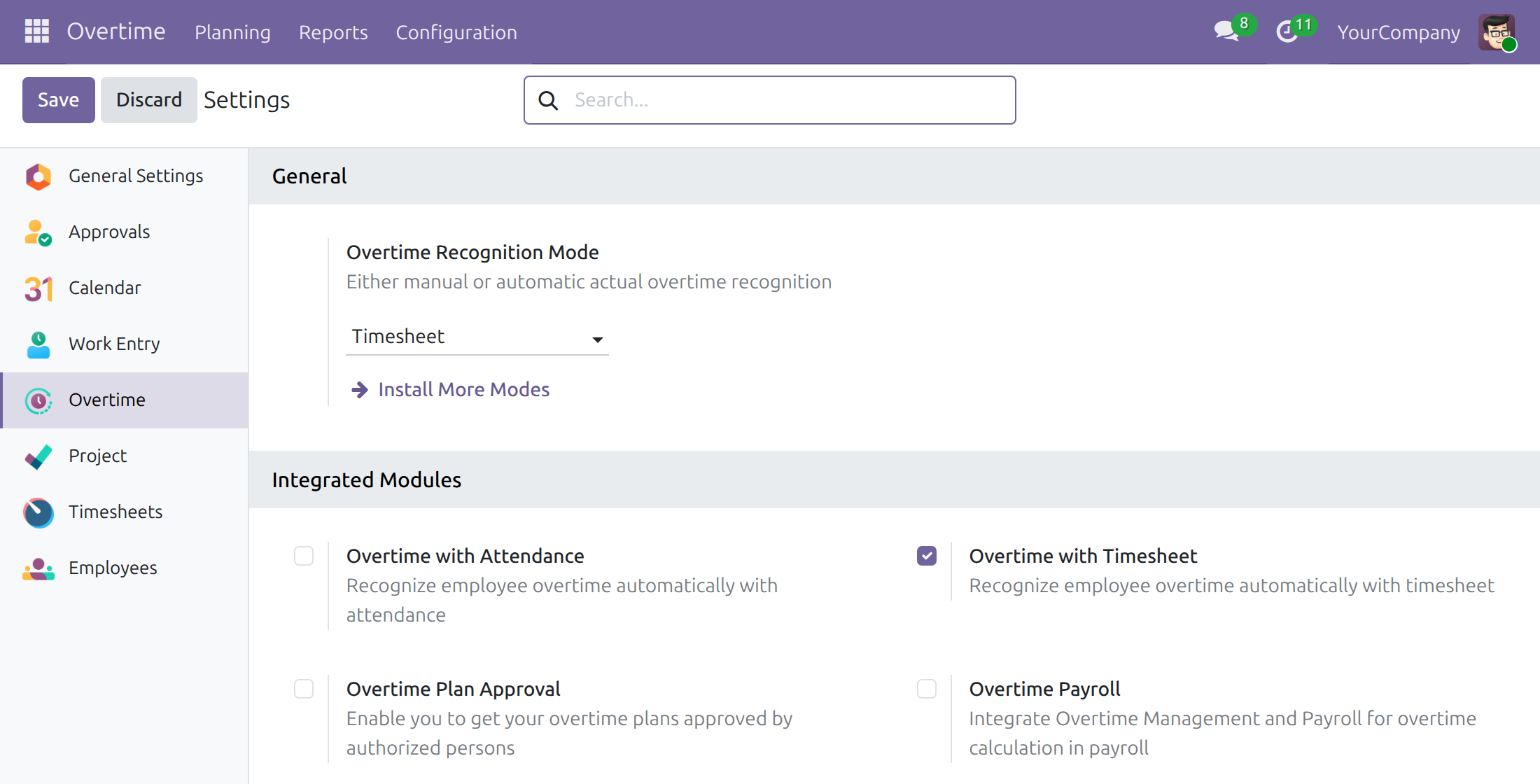
Switch on the Timesheet mode
Choose Timesheet as the overtime recognition mode in the Overtime settings.
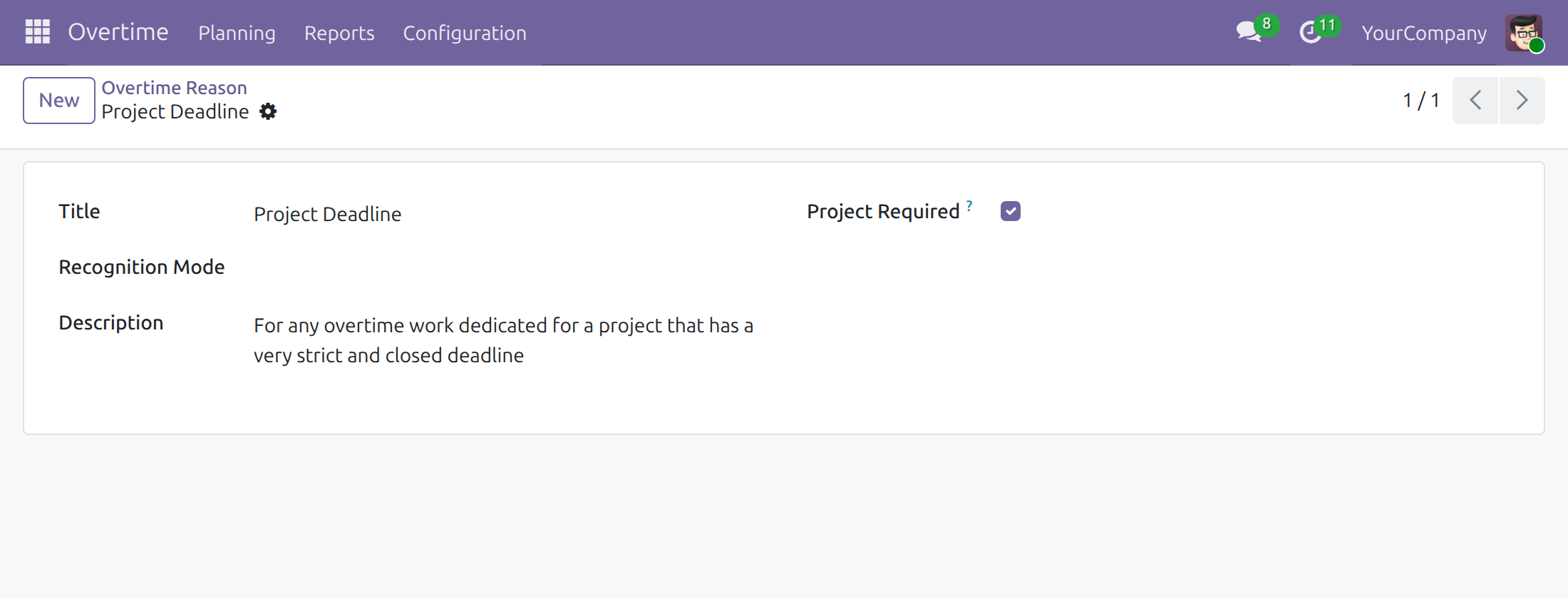
Require a project per reason
An overtime reason can require a project and force the recognition mode.
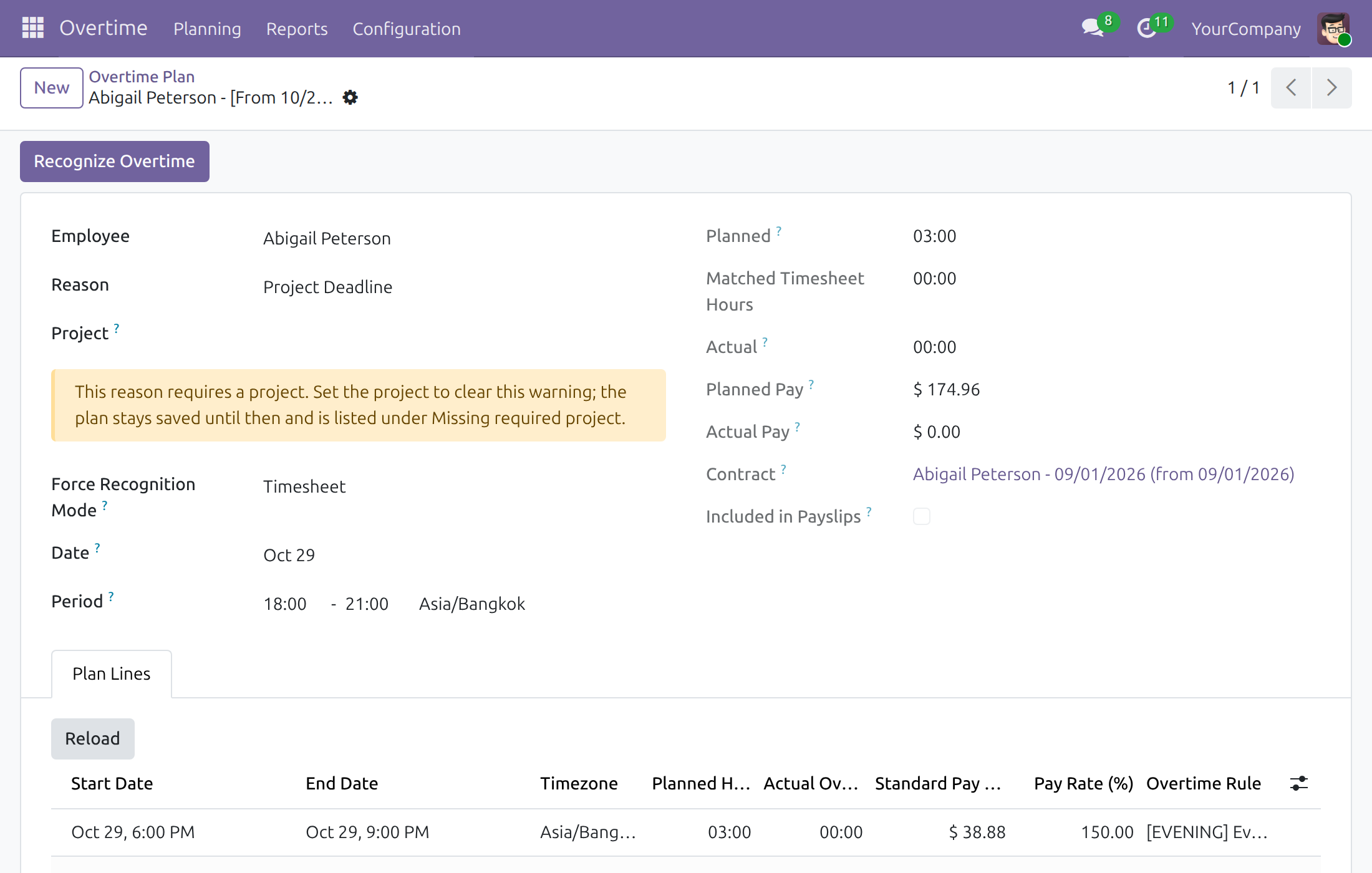
A plan that still needs its project
The plan is saved, shows a warning, and recognises nothing until the project is set.
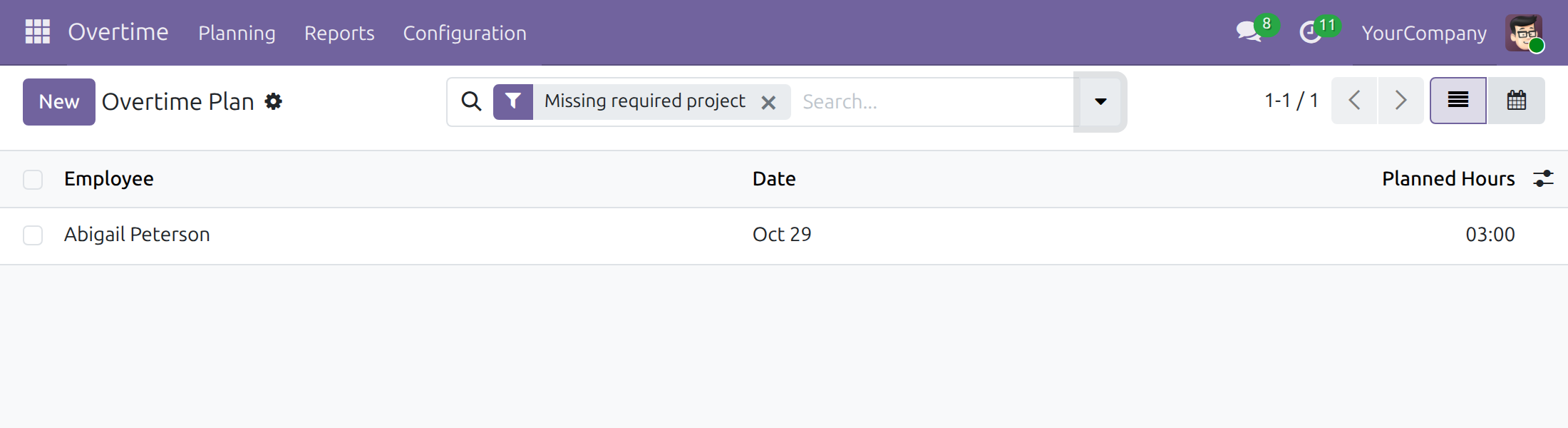
Find the plans missing a project
The Missing required project filter lists every plan waiting for its project.
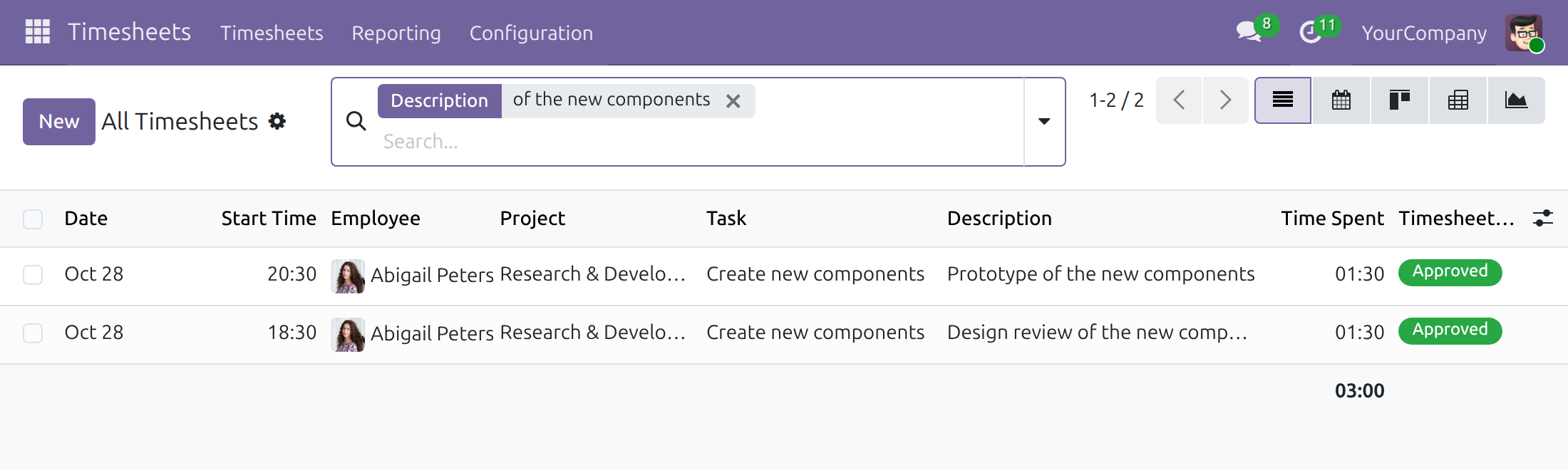
The timesheets behind the hours
Time logged on project tasks is what the recognition is computed from.
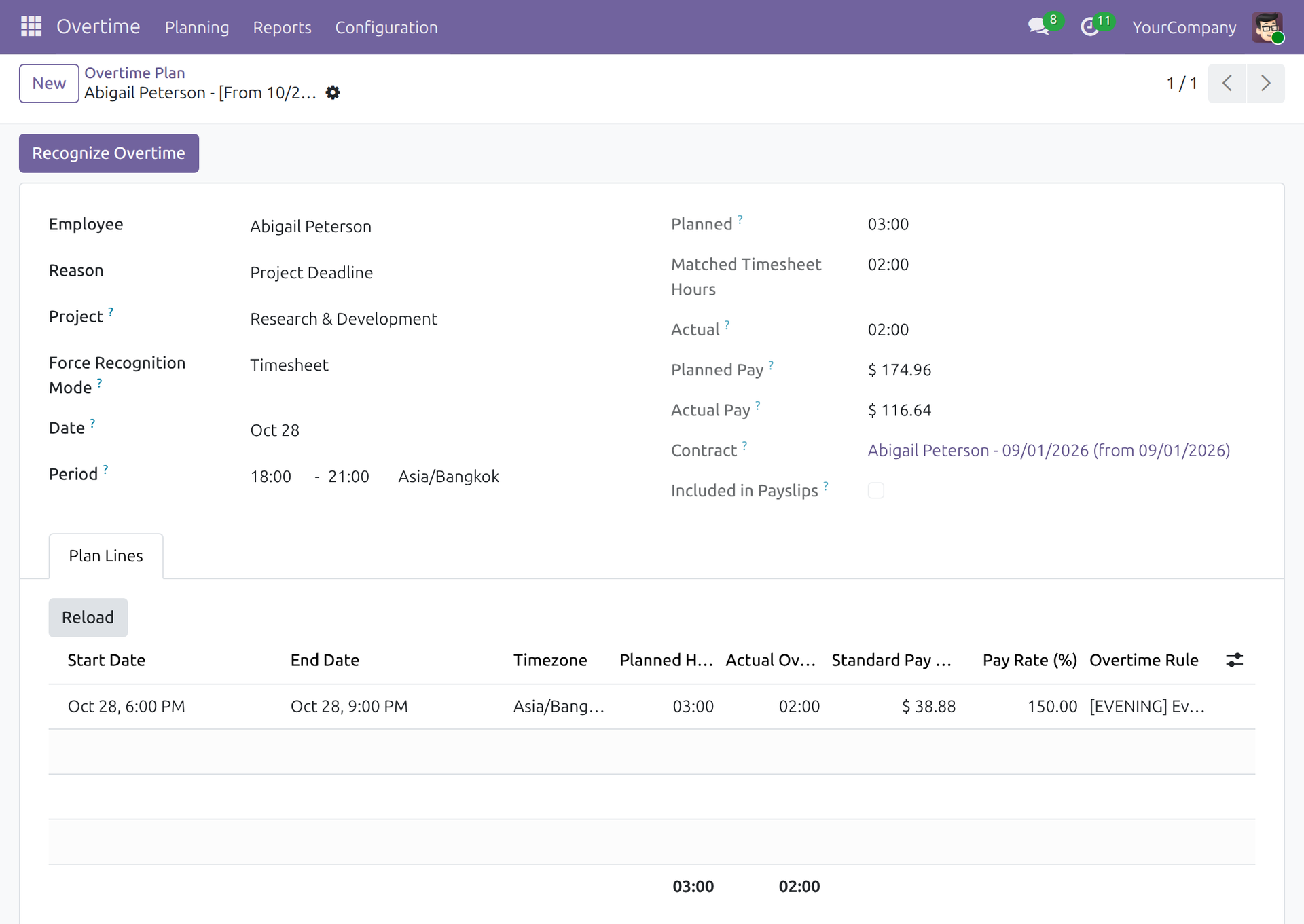
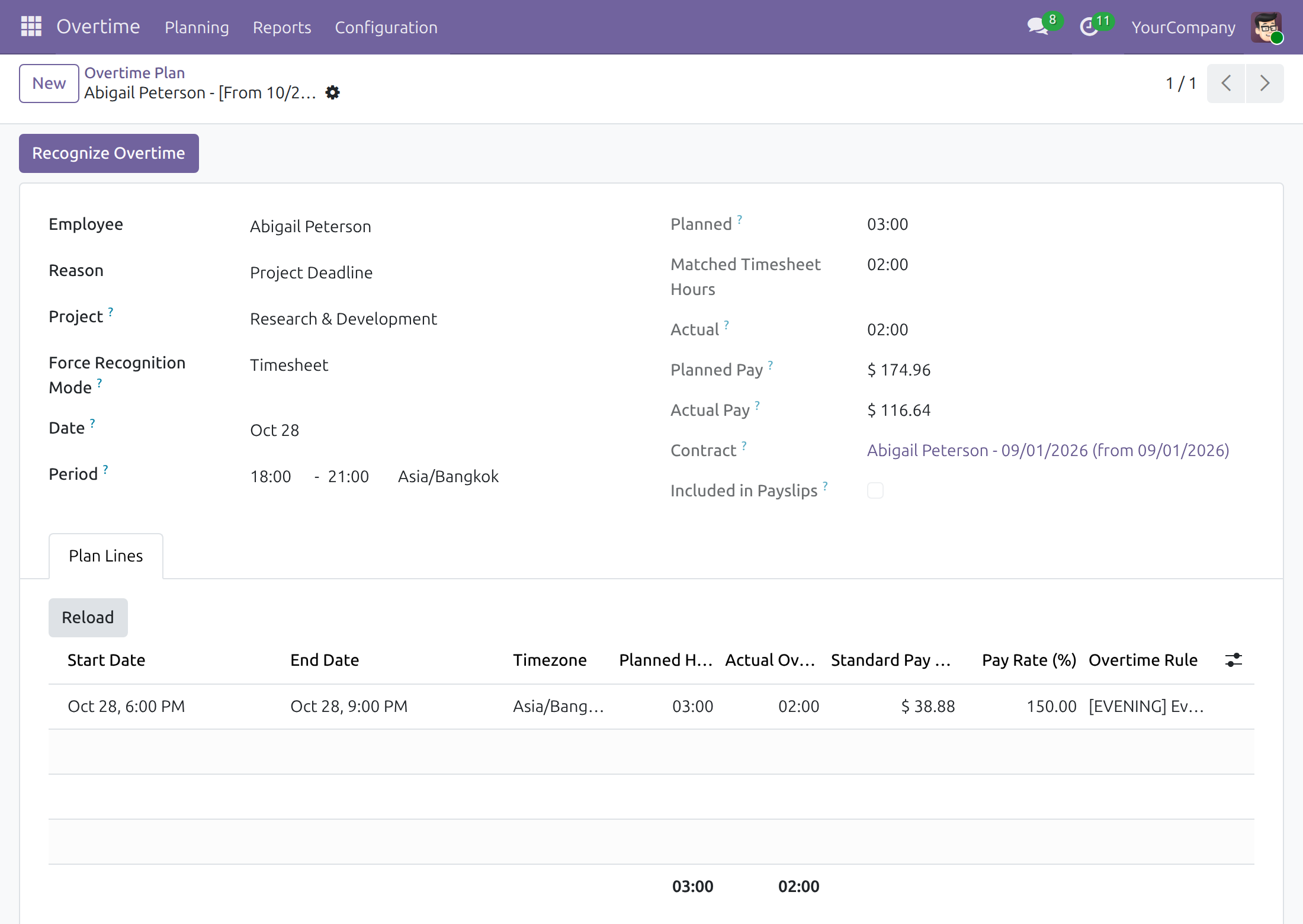
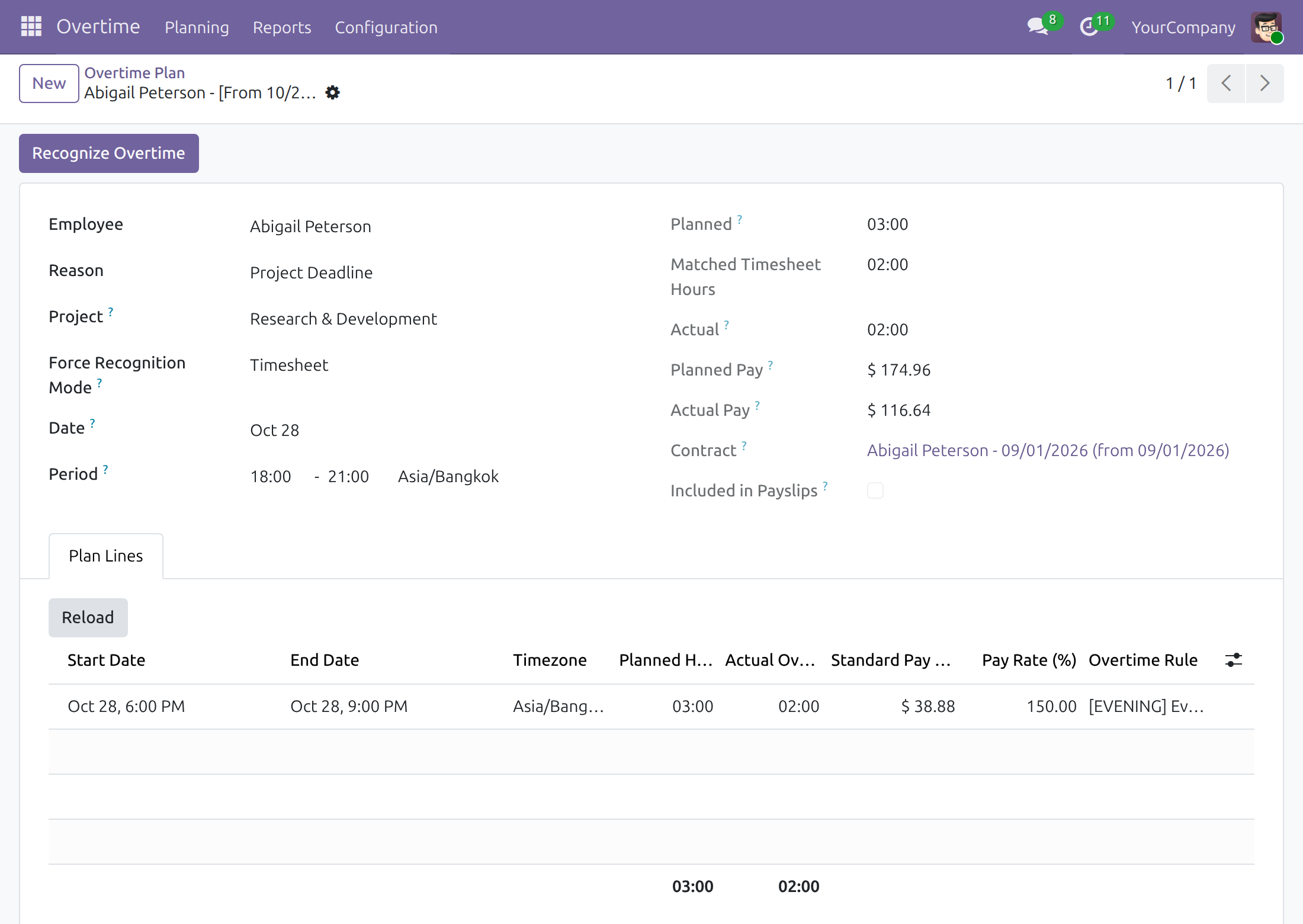
Actual hours from matched timesheets
The plan shows planned, matched timesheet and actual hours.
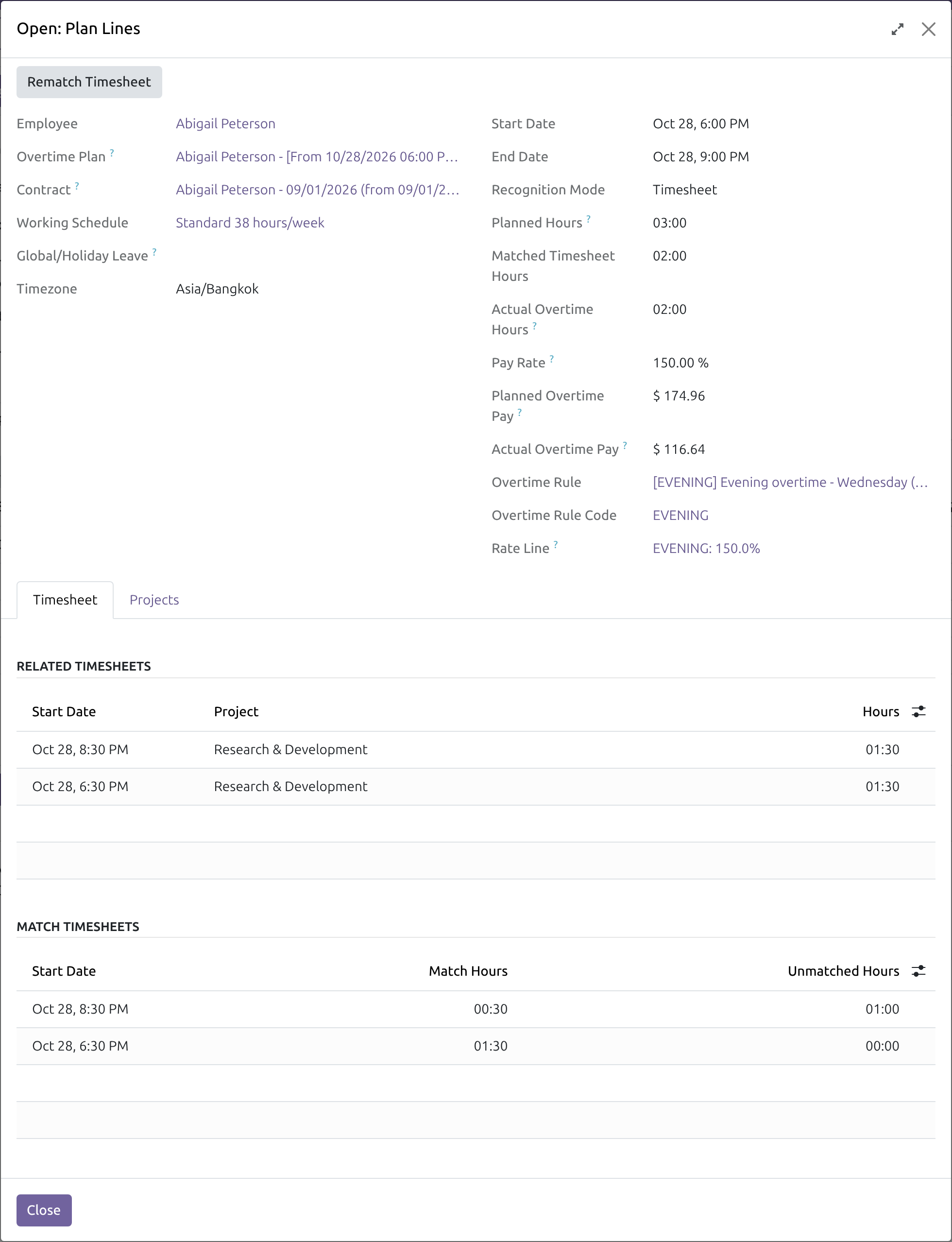
Match a plan line to its timesheets
The Timesheet tab lists each entry with its matched and unmatched hours; Match or Rematch Timesheet refreshes them.
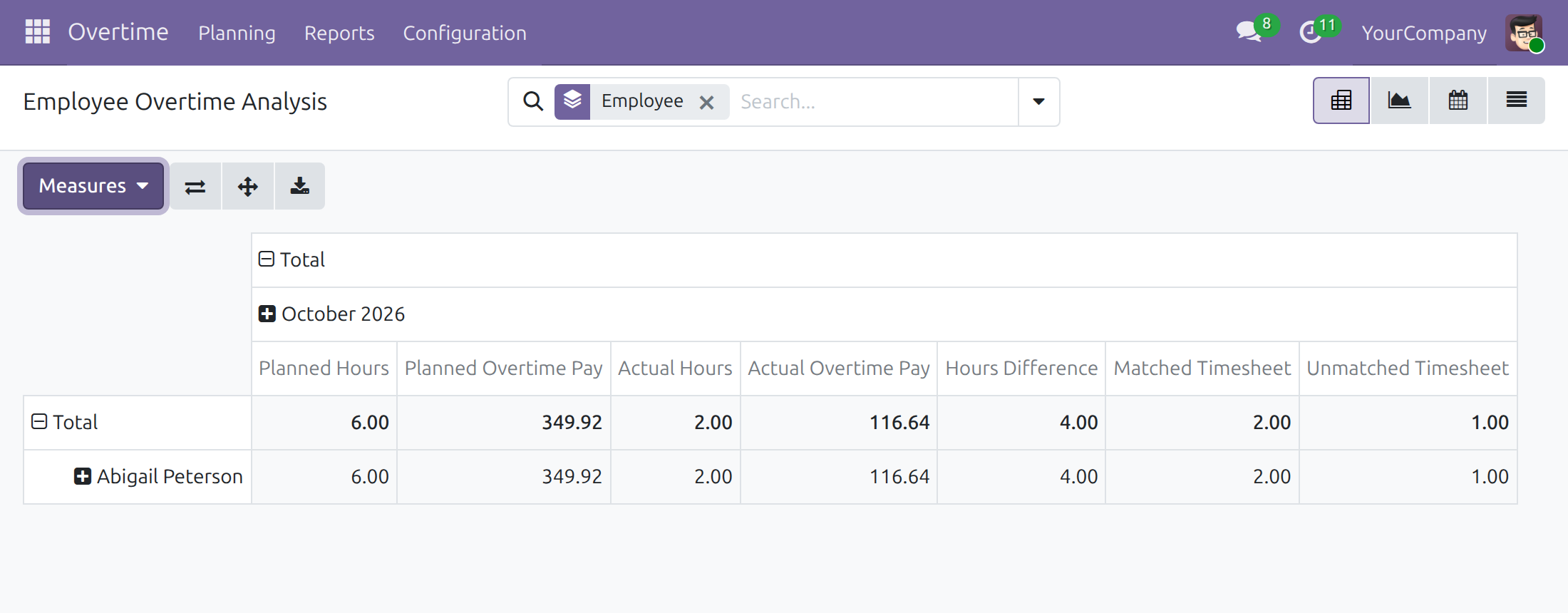
Compare planned, actual and matched
Overtime Analysis adds matched and unmatched timesheet measures per employee and month.
See Overtime Timesheet in Action
Live demo: v19demo-int.viindoo.com/web#action=viin_hr_overtime.action_hr_overtime_plan
Frequently Asked Questions
What does Overtime Timesheet do?
It recognises actual overtime from the project timesheets people log, by matching them against the overtime plans.
Is leave counted as overtime?
No. Timesheets written by time off and by public holidays are never recognised as overtime.
What happens if a plan has no project?
When the reason requires a project, the plan is still saved. It shows a warning and appears under the Missing required project filter until the project is set.
Do I have to match timesheets by hand?
No. Matching is recalculated whenever a timesheet or a plan line changes. Match Timesheet and Rematch Timesheet are there when you want to refresh a line on demand.
Does it replace attendance-based recognition?
No. It adds a mode for staff who log time on projects. Pick the mode that fits each population, or combine both with the attendance and timesheet bridge.
Does it compute pay?
No. It recognises the hours; the payroll side of the Overtime app turns them into pay.
Which editions and series does it support?
Odoo 19.0, Community and Enterprise.
Can I try it first?
Yes. The live demo link on this page opens the module on a working database.
Need help with Overtime Timesheet?
For questions, implementation support or a custom feature, contact Viindoo.
Pre-Sales & Partnership
https://viindoo.com/contactusTechnical Support
https://viindoo.com/ticketAll Viindoo apps: Viindoo Apps
Technical Requirement
- Odoo version: 19.0
- Editions: Odoo Community, Odoo Enterprise
- Required modules: Overtime, HR Timesheet Timer, Time Off and Timesheets (Odoo core: project_timesheet_holidays)
- License: OPL-1
Changelog
19.0
- New Timesheets written by time off and public holidays never count as overtime.
- New A plan saved without its required project proceeds, shows a warning and is listed under the Missing required project filter.
- New Timesheet lines are matched to plan lines, with Match / Rematch Timesheet and matched and unmatched hours.
- New Overtime Analysis gains matched and unmatched timesheet measures.
Extend it further
Overtime Management With Attendance & Timesheets
Recognise overtime from attendance for office staff and from timesheets for project staff, in one process.
Overtime Timesheet Approval
Count only the timesheets that have been approved first.
This guide is written for overtime administrators, overtime officers, team leads and project managers: the people who decide how overtime is recognised, plan it for employees and follow it up from the timesheets the employees log on project tasks.
Note
Extends Overtime (viin_hr_overtime) - see its documentation for overtime codes, rules, plans and the approval of plans.
Note
Extends HR Timesheet Timer (viin_hr_timesheet_timer) - see its documentation for logging time with a start time.
Installation
- Navigate to Apps.
- Search with keyword viin_hr_overtime_timesheet.
- Press Install.
The module also installs by itself once the apps it connects are installed. An overtime administrator can switch it on from Overtime ‣ Configuration ‣ Settings, in the block Integrated Modules, with the option Overtime with Timesheet.
Instruction
Instruction video: Overtime Timesheet
1. Select the Overtime Recognition Mode
For the overtime administrator. With the recognition mode Timesheet, the actual overtime of an employee is the time logged on project tasks inside the planned overtime period.
- To recognise overtime from timesheets for the whole company, navigate to Overtime ‣ Configuration ‣ Settings, and in the field Overtime Recognition Mode select Timesheet.
- To use the Timesheet mode for the plans of one overtime reason only, select it in the field Recognition Mode of that reason (navigate to Overtime ‣ Configuration ‣ Overtime Reasons).
- To use it for a single overtime plan, select it in the field Force Recognition Mode of the plan (navigate to Overtime ‣ Planning ‣ Planning).
A plan that does not force a mode takes the mode of its reason, else the one of the contract of the employee, else the one of the company.
2. Configure the Overtime Reasons
For the overtime administrator. Navigate to Overtime ‣ Configuration ‣ Overtime Reasons, choose a reason from the list or create a new one. Tick Project Required when the overtime work of that reason is always done for a project: the plans of the reason then ask for a project.
3. Create an Overtime Plan
For team leads, who plan for their subordinates, and for overtime officers, who plan for any employee. Navigate to Overtime ‣ Planning ‣ Planning, or Overtime ‣ Planning ‣ Mass Schedule to plan for several employees at once. Fill in the following information:
- Employee;
- Reason: the reason for the overtime;
- Project: the project the overtime is worked for. The field appears when the reason requires a project;
- Force Recognition Mode: leave it as it is when the mode of the company is Timesheet. Select Timesheet when the plan must be recognised from timesheets although the company uses another mode;
- Date and Period: the day and the hours of the overtime.
A plan without its required project. A plan whose reason requires a project is saved even when the project is empty. The plan shows a warning under the field Project, and it is listed under the filter Missing required project of the list of plans. Set the project to clear the warning.
To review all the plans that still miss their project, navigate to Overtime ‣ Planning ‣ Planning and select the filter Missing required project.
4. Log timesheets on the project tasks
For employees and project managers. Employees log the time they work on the tasks of the project, with the start time of each entry: on the task, or in Timesheets ‣ Timesheets ‣ My Timesheets. Officers and managers follow every entry in Timesheets ‣ Timesheets ‣ All Timesheets.
A timesheet entry counts as overtime only when:
- it is logged by the employee of the plan, on a project, with its start time;
- it is not written by a time off or by a public holiday: those entries never count as overtime;
- it falls inside the period of an overtime plan. Only the part inside the period is recognised, the rest is shown as unmatched.
5. Recognise and match the timesheets
Each time a timesheet entry is logged, changed or deleted, and each time a plan is created or changed, the system matches the entries with the plan and recalculates the actual overtime. The plan shows:
- Matched Timesheet Hours: the hours of the timesheet entries that fall inside the planned period;
- Actual: the actual overtime, equal to the matched hours in the Timesheet mode, with the Actual Pay that follows;
- Recognize Overtime: the button that matches the plan with the timesheets again.
In the tab Plan Lines of the plan, open a line to see how the timesheets were matched. In the tab Timesheet:
- Related Timesheets lists the entries that cross the line;
- Match Timesheets lists, for each entry, the Matched Hours inside the line and the Unmatched Hours outside of it;
- Rematch Timesheet (Match Timesheet while no entry is matched) matches the line again, then reports how many timesheet entries are matched. Only a user who may edit the plan can do it; otherwise ask the owner of the plan or an overtime officer.
The tab Projects lists the tasks the matched entries were logged on.
6. See the Overtime Report
For overtime officers. Navigate to Overtime ‣ Reports ‣ Overtime Analysis. In the menu Measures, add Matched Timesheet and Unmatched Timesheet next to the planned and actual hours:
This software and associated files (the "Software") may only be used (executed, modified, executed after modifications) if you have purchased a valid license from the authors, typically via Odoo Apps, or if you have received a written agreement from the authors of the Software (see the COPYRIGHT file).
You may develop Odoo modules that use the Software as a library (typically by depending on it, importing it and using its resources), but without copying any source code or material from the Software. You may distribute those modules under the license of your choice, provided that this license is compatible with the terms of the Odoo Proprietary License (For example: LGPL, MIT, or proprietary licenses similar to this one).
It is forbidden to publish, distribute, sublicense, or sell copies of the Software or modified copies of the Software.
The above copyright notice and this permission notice must be included in all copies or substantial portions of the Software.
THE SOFTWARE IS PROVIDED "AS IS", WITHOUT WARRANTY OF ANY KIND, EXPRESS OR IMPLIED, INCLUDING BUT NOT LIMITED TO THE WARRANTIES OF MERCHANTABILITY, FITNESS FOR A PARTICULAR PURPOSE AND NONINFRINGEMENT. IN NO EVENT SHALL THE AUTHORS OR COPYRIGHT HOLDERS BE LIABLE FOR ANY CLAIM, DAMAGES OR OTHER LIABILITY, WHETHER IN AN ACTION OF CONTRACT, TORT OR OTHERWISE, ARISING FROM, OUT OF OR IN CONNECTION WITH THE SOFTWARE OR THE USE OR OTHER DEALINGS IN THE SOFTWARE.