
Bảng lương - Chấm công Làm việc tại nhà
bởi Viindoo
| Số dòng Code | 1255 |
| Tên kỹ thuật | viin_hr_payroll_timesheet_wfh |
| Giấy phép | OPL-1 |
| Website | https://viindoo.com/apps/app/17.0/viin_hr_payroll_timesheet_wfh |
| Đọc mô tả cho | v 13.0 v 14.0 v 15.0 v 16.0 |
| Yêu cầu các App | Time Off (hr_holidays) Project (project) Discuss (mail) Employees (hr) Calendar (calendar) Employee Contracts (hr_contract) |
| Bao gồm Các phụ thuộc | Bảng lương Người thân của nhân viên Mô-đun Cơ Sở Tích hợp Chấm công với Bảng lương Hợp đồng Lao động (Viindoo) Quản trị Nhân sự Nâng cao Nhật ký Công việc Hợp đồng - nhật ký công việc Ứng dụng Phụ lục Cơ sở Chấm công Nghỉ cho Dự án Quản lý lịch làm việc & ngày nghỉ Viin - Thời Gian Nghỉ Viin - Nhật ký công việc nghỉ |

Payroll - Work From Home Timesheet
Manage and calculate Time Off's working time with timesheet for the time off that is considered as working time (e.g. Work From Home)
In some cases (for example, the Covid epidemic), employees cannot come to the company to work directly, but the human resources department still needs to manage their actual working time on the software for salary calculation. Therefore, Viindoo developed the viin_hr_payroll_timesheet_wfh module to meet that need.

Key Features
Built natively on Odoo/Viindoo to streamline real business operations:
Allow configuring the time-off types that require timesheet records (*hr_timesheet* module) to record PoW (Proof of Work), when an employee registers for these time-off types, timesheet records will be required to prove their working time
Allow to choose whether or not to apply this feature for each job position (For example, General Director or Manager will not have to record timesheet when not working at the company: Business trip or Working from home, etc.)
Add the salary rule *Missing PoW Timesheet* to calculate the amount deducted according to the formula: *Missing PoW Timesheet x Timesheet Cost per hour*
Integrate with Payroll application (to_hr_payroll) https://viindoo.com/apps/app/17.0/to_hr_payroll for automatic calculation of the following information on payslips
Details of PoW Timesheet:
- Required PoW Timesheet Days/Hours.
- Recorded PoW Timesheet Days/Hours.
- Missed PoW Timesheet Days/Hours.
- Missed PoW Timesheet amount.
Benefits
Supports businesses in managing and monitoring work-from-home activities effectively, ensuring accurate payroll processing even during remote working scenarios.
Tracks and calculates missed PoW (Proof of Work) timesheets to maintain fair compensation for employees.
Ensures that employees follow company policies for recording work-from-home hours with proper documentation.
Automates integration of PoW timesheet data into payroll, reducing manual errors and administrative workload.
Allows for tailored configurations to apply or exclude PoW requirements based on job positions and organizational policies.
Configure the time-off type required PoW- Viindoo Payroll Software


Dang ky nghi co pow bang luong viindoo
Apply the feature to employees - Viindoo Payroll Software

Register for time off with PoW - Viindoo Payroll Software
Details of PoW hours - Viindoo Payroll Software
Deducted amount if any missing PoW timesheet - Viindoo Payroll Software
See Payroll - Work From Home Timesheet in Action
See how this module solves real business problems in a working Viindoo environment.
Need help with Payroll - Work From Home Timesheet?
For questions, implementation support, or consulting services, contact Viindoo.
Pre-Sales & Partnership
When contacting us, please include:
- Odoo/Viindoo version (CE/EE).
- Number of users and business scope.
- Other modules currently in use.
Technical Support
For faster troubleshooting, please provide:
- Order number or app reference.
- Odoo/Viindoo version & edition.
- Steps to reproduce the issue.
- Screenshots/logs if available.
Technical Requirement
Who Should Use This Module?
Built for teams that need this capability fully integrated into their Odoo/Viindoo stack.
POW stands for Proof-Of-Work, referring to the validation of an employee's working hours during remote or time-off scenarios. This concept ensures accurate payroll calculations based on recorded work activities.
Cài đặt
- Truy cập Ứng dụng;
- Tìm từ khóa viin_hr_payroll_timesheet_wfh;
- Bấm chọn Cài đặt.
Hướng dẫn sử dụng
Video hướng dẫn: Bảng lương - Chấm công Làm việc tại nh
1. Tạo kiểu nghỉ bắt buộc PoW
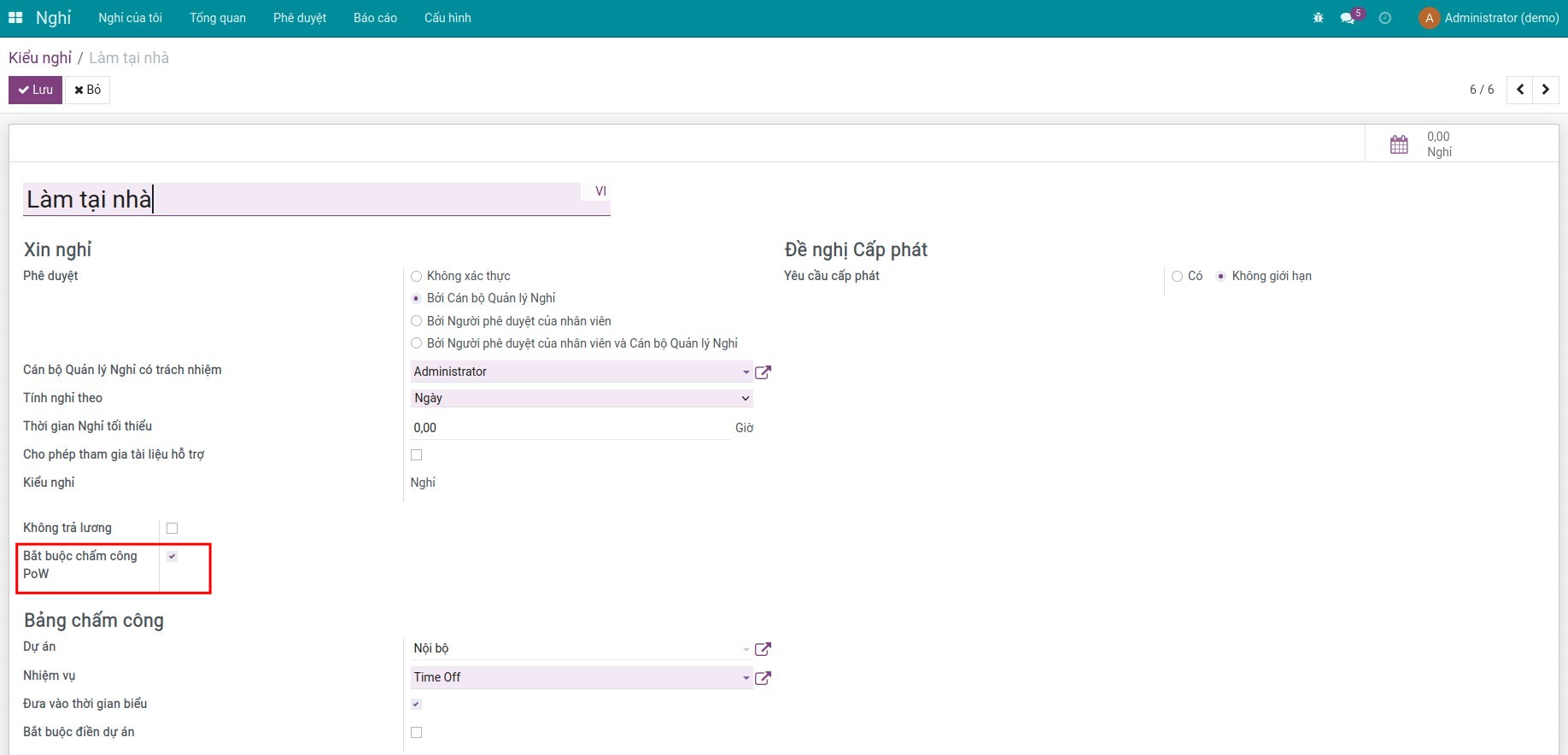
Truy cập Nghỉ ‣ Cấu hình ‣ Kiểu nghỉ để tạo mới một kiểu nghỉ (Ví dụ: Làm tại nhà) và kích hoạt tính năng Bắt buộc chấm công PoW:
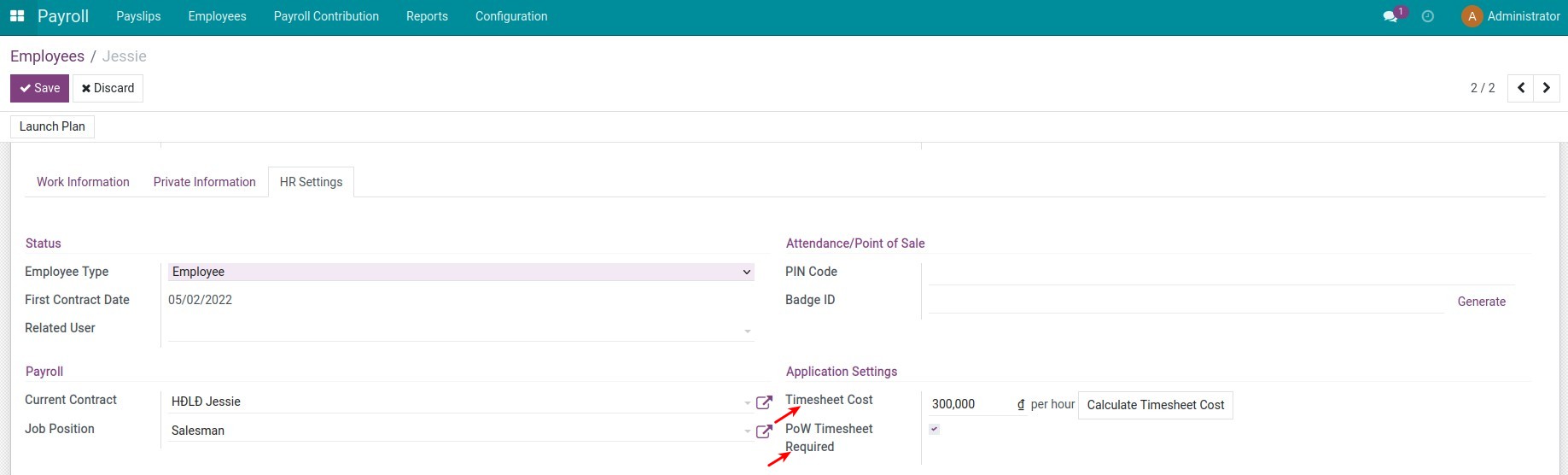
Bạn có thể áp dụng hoặc không áp dụng tính năng này cho một số nhân viên bằng cách truy cập Bảng lương ‣ Nhân viên ‣ Nhân viên, mở hồ sơ của một nhân viên, chuyển sang tab Thiết lập nhân lực để lựa chọn:
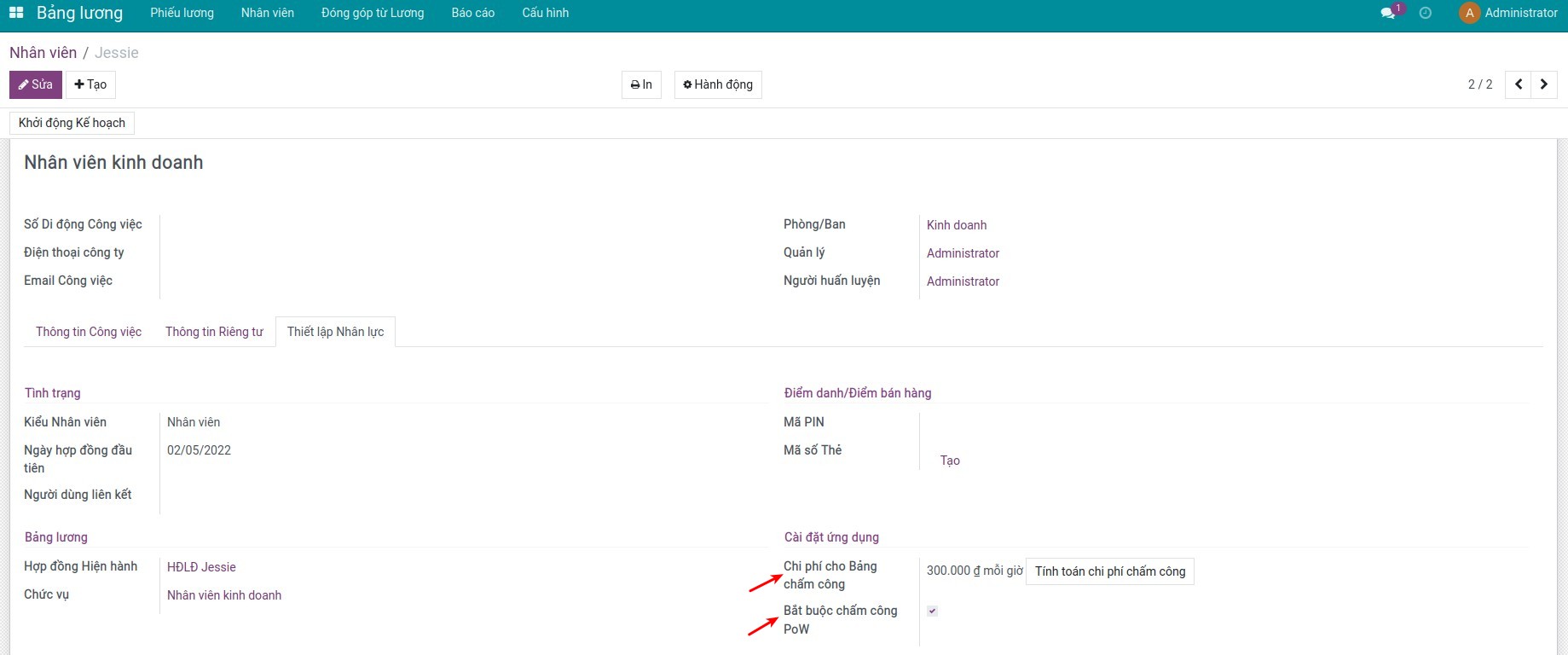
Ngoài ra, tại đây, bộ phận nhân sự cũng sẽ thiết lập được chi phí chấm công cho nhân viên tại trường Chi phí cho Bảng chấm công.
2. Nhân viên thực hiện tạo Nghỉ và chấm công làm việc
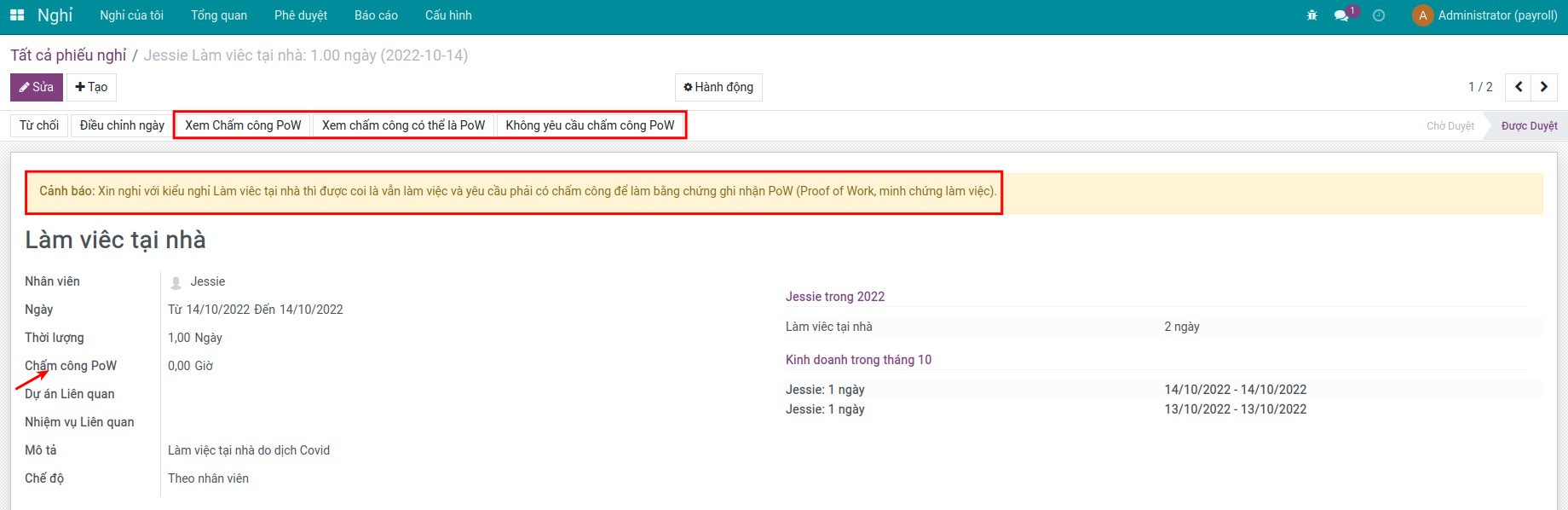
Tạo phiếu xin nghỉ. Sau khi được phê duyệt, trên phiếu sẽ có trường thống kê số giờ PoW, các nút thống kê các bản ghi chấm công PoW:
Xem thêm tại bài viết về Hướng dẫn tạo Nghỉ.
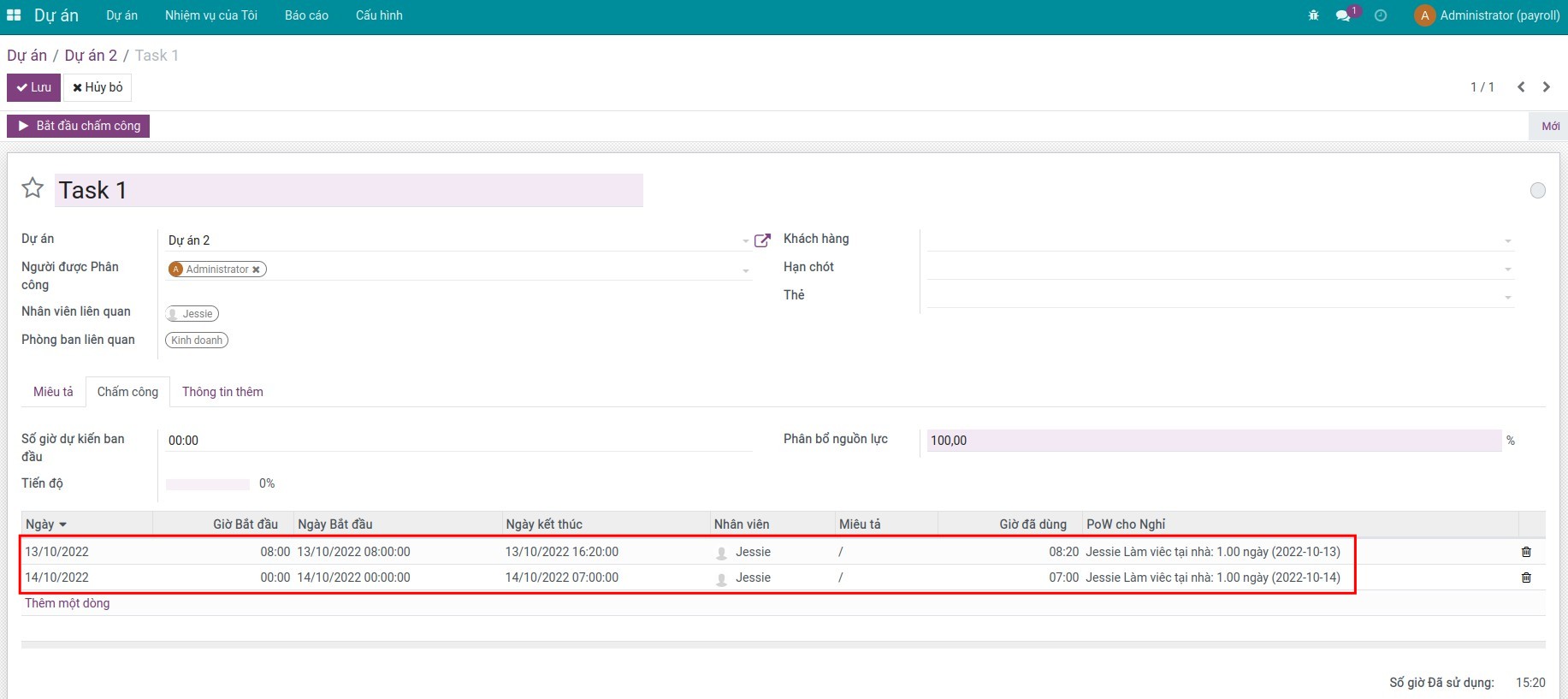
Khi thực hiện làm việc tại nhà hoặc đi công tác..., bạn cần chấm công trên các nhiệm vụ mà mình thực hiện:
Xem thêm bài viết về Chấm công khi thực hiện nhiệm vụ.
3. Bộ phận nhân sự tạo phiếu tính lương
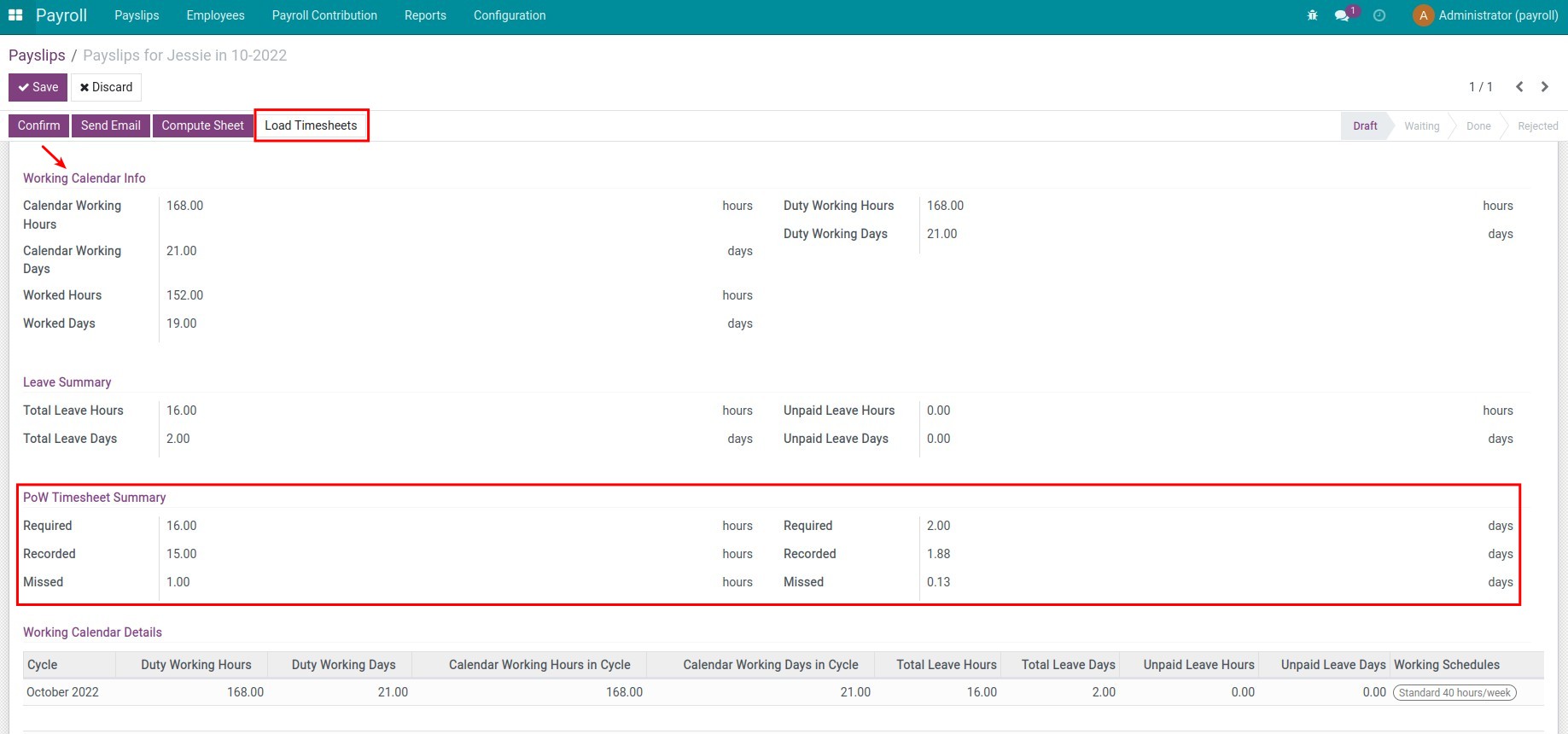
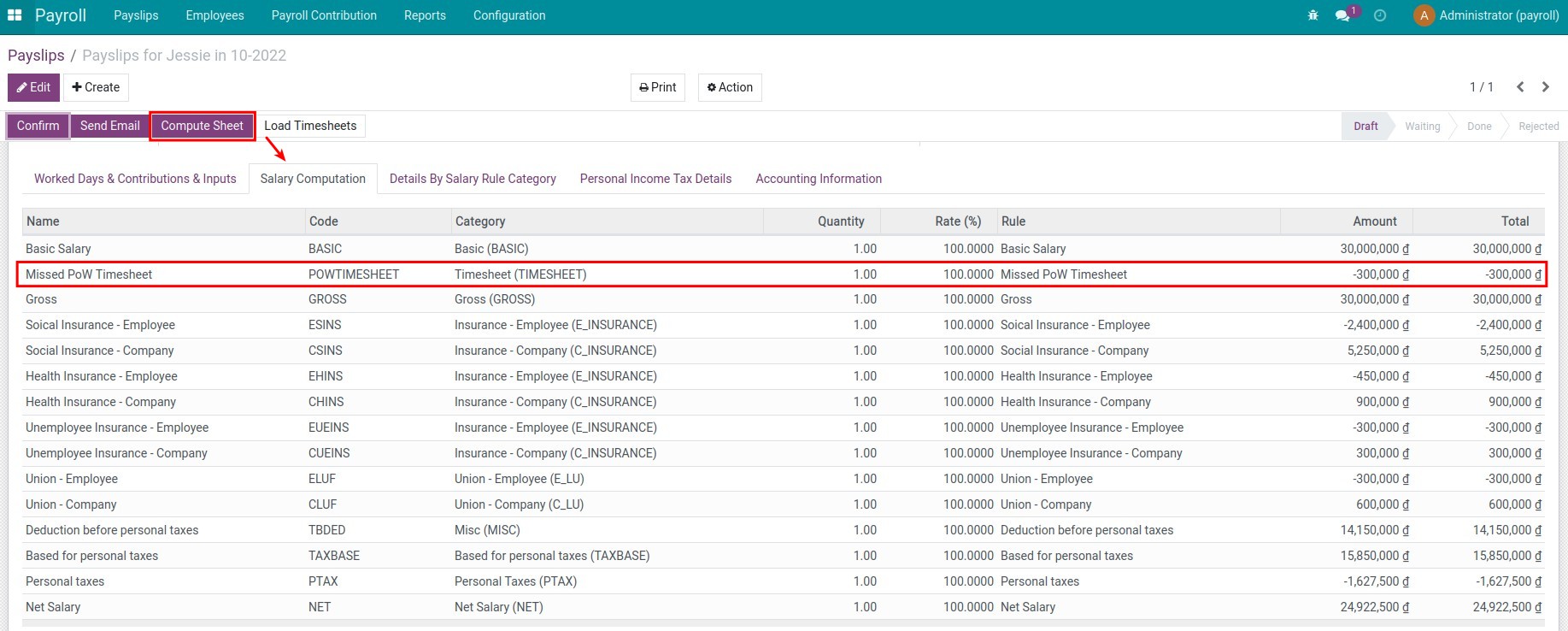
Truy cập Bảng lương ‣ Phiếu lương ‣ Phiếu lương để tạo mới phiếu tính lương. Trên phiếu lương, bạn sẽ thấy:
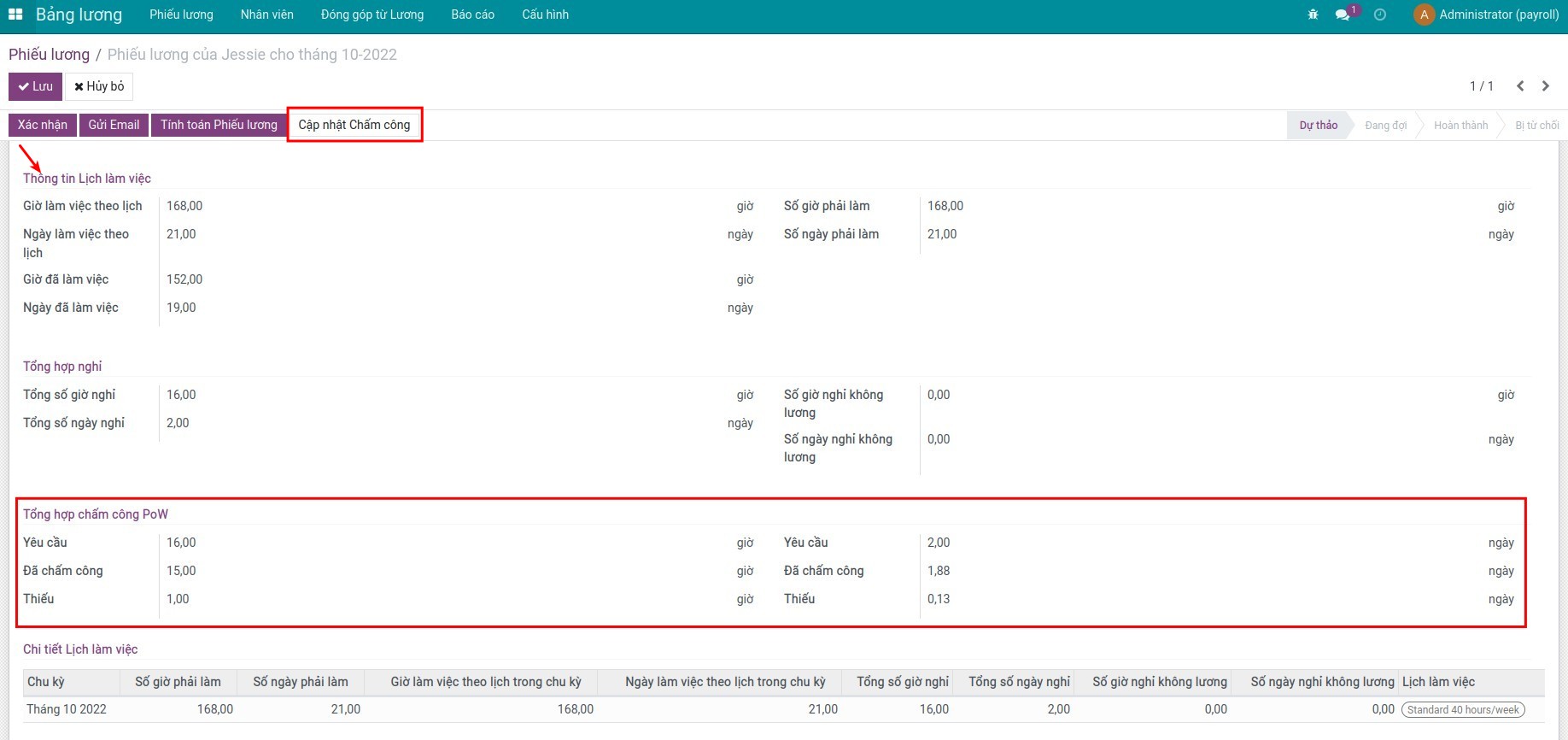
Chi tiết số giờ PoW khi ấn Cập nhật Chấm công
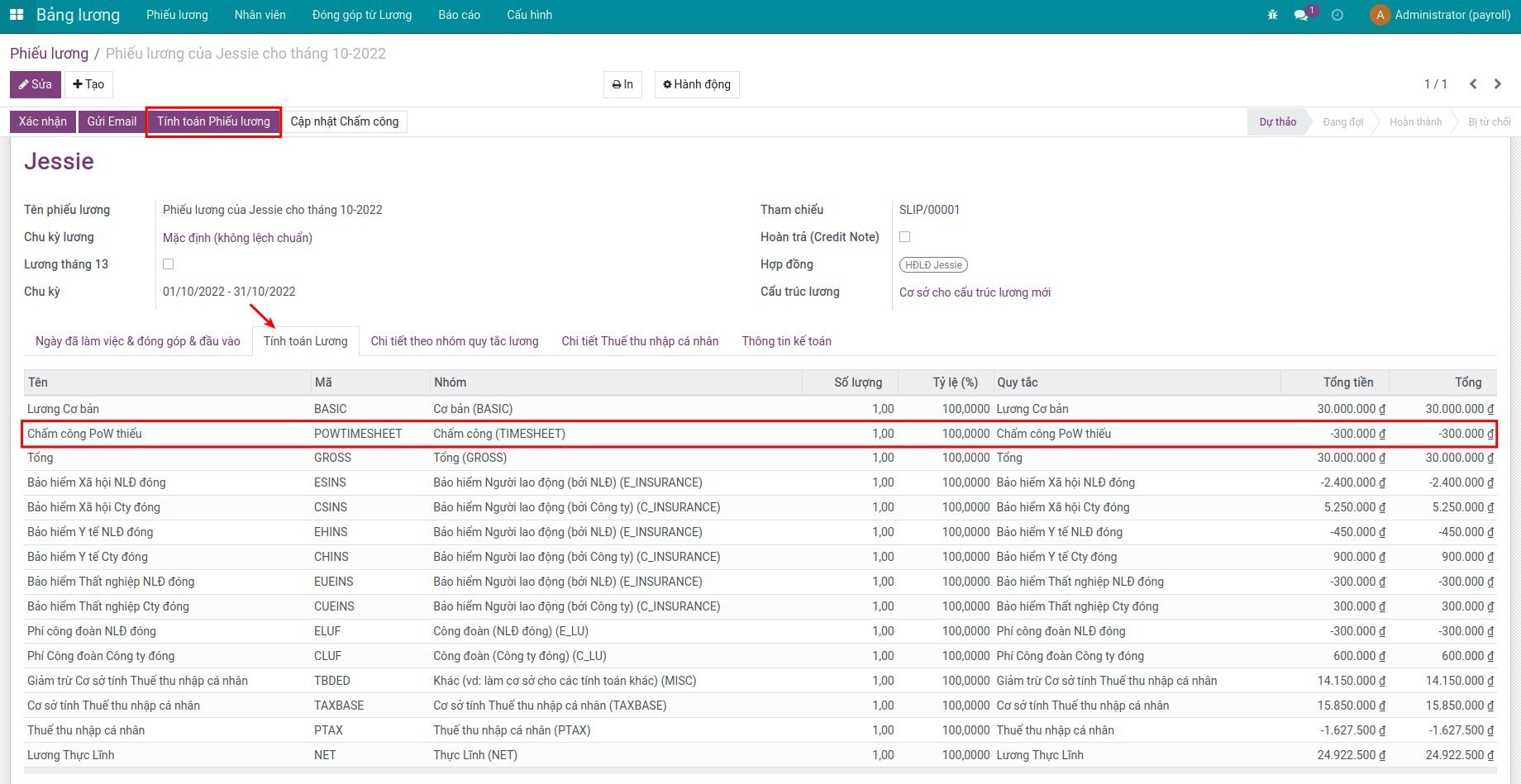
Số tiền bị trừ nếu chấm công PoW thiếu khi ấn Tính toán Phiếu lương
Phần mềm này và các tệp liên kết ("Phần mềm") được sử dụng (chạy, tuỳ biến, chạy sau khi được tuỳ biến) chỉ khi bạn mua được giấy phép có hiệu lực từ tác giả, điển hình như qua các Ứng dụng Odoo, hoặc trong trường hợp bạn nhận được thoả thuận bằng văn bản từ tác giả của Phần mềm (chi tiết tại tệp COPYRIGHT).
Bạn có thể phát triển các phân hệ Odoo có sử dụng Phần mềm như một Thư viện (thường là phụ thuộc vào, nhập vào và sử dụng nguồn của nó) nhưng không sao chéo bất kỳ mã nguồn hay tài liệu nào thuộc Phần mềm. Bạn có thể phân phối những phân hệ này theo giấy phép mà bạn lựa chọn, miễn sao nội dung giấy phép đó tương tích với điều khoản của Giấy phép Phần mềm Độc quyền Odoo (ví dụ: LGPL, MIT hay bất kỳ loại giấy phép phần mềm độc quyền nào tương tự vậy).
Nghiêm cấm phát hành, phân phối, cấp phép lại hoặc bán bản sao của Phần mềm hoặc bản sao Phần mềm đã được sửa đổi.
Thông báo bản quyền và chấp thuận nêu trên buộc phải được bao gồm trong tất cả các bản sao hoặc các phần quan trọng của Phần mềm.
PHẦN MỀM ĐƯỢC CUNG CẤP "NGUYÊN TRẠNG", KHÔNG BẢO ĐẢM DƯỚI BẤT KỲ HÌNH THỨC NÀO, ĐƯỢC THỂ HIỆN RÕ RÀNG HOẶC NGỤ Ý, KHÔNG GIỚI HẠN ĐẢM BẢO VỀ CÁC BẢO ĐẢM NGỤ Ý VỀ KHẢ NĂNG THƯƠNG MẠI, PHÙ HỢP VỚI MỤC ĐÍCH CỤ THỂ VÀ KHÔNG VI PHẠM. TRONG MỌI TRƯỜNG HỢP SẼ KHÔNG CÓ TÁC GIẢ HOẶC CHỦ SỞ HỮU BẢN QUYỀN NÀO CHỊU TRÁCH NHIỆM VỀ BẤT KỲ KHIẾU NẠI, THIỆT HẠI HOẶC TRÁCH NHIỆM PHÁP LÝ KHÁC NÀO TRONG PHẠM VI HỢP ĐỒNG, CÁC THIỆT HẠI HOẶC CÁCH KHÁC, PHÁT SINH TỪ, NGOÀI HOẶC CÓ LIÊN KẾT VỚI PHẦN MỀM HOẶC VIỆC SỬ DỤNG HOẶC KINH DOANH KHÁC TẠI PHẦN MỀM.