What it does
A shop that ships a hundred parcels a day does not open a hundred transfers. It
picks them in batches, and this app makes the carrier follow: one click books
every parcel in the batch, one click prints every waybill, one click asks where
they all are.
Key Features
- Book the batch in one action: every transfer in it that is not already
booked is sent to its carrier. Each one is committed on its own, so a parcel
the carrier refuses does not undo the ninety-nine it accepted - the batch
reports exactly which failed and why, and booking again picks up only those.
- Every waybill as one document: the labels of the whole batch are fetched
and merged into a single PDF, in the batch's own order, so they come off the
printer in the order the parcels are stacked.
- Refresh the whole batch: ask every carrier where its parcels are, in one
action, without walking the list.
- Counters that say what is left: how many transfers in the batch are ready
to book, already booked, or failed, shown on the batch itself.
Editions Supported
- Community Edition
- Enterprise Edition
Vietnam Delivery in Batches
A shop that ships a hundred parcels a day does not open a hundred transfers. This app makes the
carrier follow the batch: one action books every parcel in it, one prints every waybill, one asks
where they all are.
It assumes a Vietnam carrier connector is installed.
Installation
- Go to Apps, remove the default Apps filter, search for Vietnam Delivery in Batches and
click Install. Odoo installs Batch Transfers with it if it is not there already.
Daily use
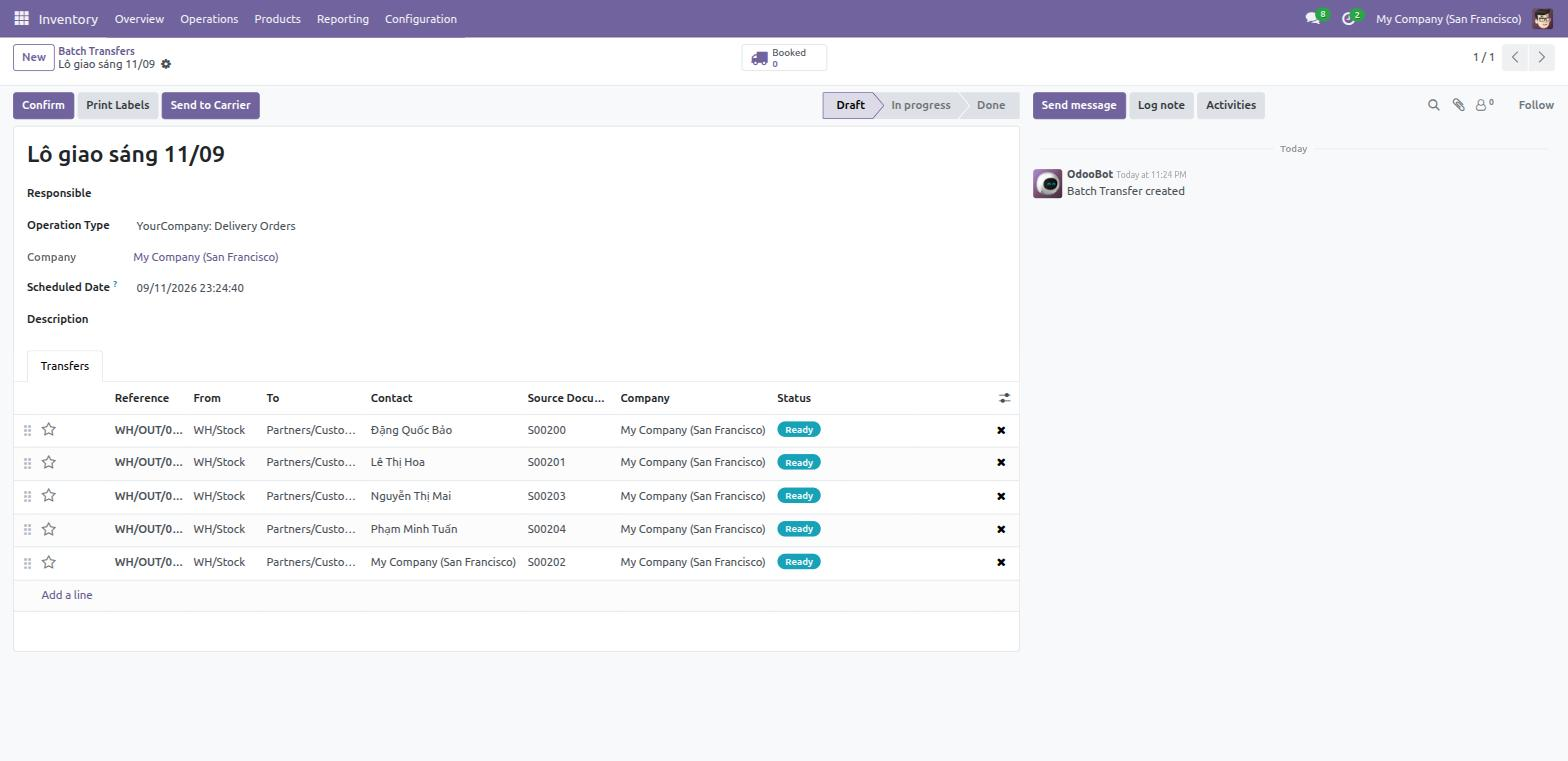
- Build a batch as usual: Inventory > Operations > Batch Transfers, or select several transfers
in the list and Add to batch.
- Open the batch. Three buttons appear once it holds transfers shipped by a Vietnamese carrier:
- Send to Carrier - books every parcel in the batch that is not booked yet.
- Print Waybills - fetches every label and hands them back as one PDF, in the batch's order.
- Refresh Status - asks every carrier where its parcels are.
- The stat button shows how many of the batch's parcels are booked.
What happens when one parcel is refused
Each transfer is committed on its own. A carrier refusing one parcel costs exactly that parcel: the
others keep their waybills, and the batch posts a message naming what failed and why.
Press Send to Carrier again after fixing the problem. Only the transfers that still have no
tracking reference are sent, so nothing is booked twice.
This is the whole point of the app. Rolling the entire batch back because the ninety-seventh address
was malformed would mean re-booking ninety-six parcels that were already accepted - and, at carriers
that charge on booking, paying for them twice.
Printing
The waybills are merged into a single PDF in the batch's own order, so they come off the printer in
the order the parcels are stacked. A carrier that returns no label for a parcel does not stop the
others: the message on the batch names which ones are missing.
Troubleshooting
"Every Vietnamese parcel is already booked"
Exactly that - there is nothing left to send. Use Refresh Status to see where they are.
One parcel never books, however often it is retried
The reason is in the batch message and, in full, under Inventory > Configuration > Vietnam
Shipping > API Calls filtered on Failed. It is usually an address the carrier cannot route.
This software and associated files (the "Software") may only be
used
(executed, modified, executed after modifications) if you have
purchased a
valid license from the authors, typically via Odoo Apps,
or if you
have
received a written agreement from the authors of the
Software (see the
COPYRIGHT file).
You may develop Odoo modules that use the Software as a library
(typically
by depending on it, importing it and using its
resources), but
without
copying any source code or material from the
Software. You may distribute
those modules under the license of your
choice, provided that this
license
is compatible with the terms of
the Odoo Proprietary License (For
example:
LGPL, MIT, or proprietary
licenses similar to this one).
It is forbidden to publish, distribute, sublicense, or sell
copies of the
Software or modified copies of the Software.
The above copyright notice and this permission notice must be
included in
all copies or substantial portions of the Software.
THE SOFTWARE IS PROVIDED "AS IS", WITHOUT WARRANTY OF ANY KIND,
EXPRESS OR
IMPLIED, INCLUDING BUT NOT LIMITED TO THE WARRANTIES OF
MERCHANTABILITY,
FITNESS FOR A PARTICULAR PURPOSE AND
NONINFRINGEMENT. IN NO EVENT
SHALL THE
AUTHORS OR COPYRIGHT HOLDERS
BE LIABLE FOR ANY CLAIM, DAMAGES OR OTHER
LIABILITY, WHETHER IN AN
ACTION OF CONTRACT, TORT OR OTHERWISE,
ARISING
FROM, OUT OF OR IN
CONNECTION WITH THE SOFTWARE OR THE USE OR OTHER
DEALINGS IN THE
SOFTWARE.