
API Request Logger
by Viindoo
| Lines of Code | 1366 |
| Technical name | viin_api_request_logger |
| License | OPL-1 |
| Website | https://viindoo.com/apps/modules/18.0/viin_api_request_logger |
| Read description for | v 17.0 v 19.0 |
| Extensions | Vietnamese E-Invoice Integration Viindoo Unified Routing Framework Bank Connector Integration with Zalo OA SeaRoutes Ocean Routing Integration Google Drive Vietnam Delivery Connectors HERE Routing API Integration Google Routes API Integration Vietmap Matrix & Routing API Integration Mapbox Matrix API Integration |
See what every integration sent and received, with its secrets masked
For administrators and consultants who debug the API calls of their instance from the screen, without access to the server
Centralized logging of API requests for debugging, analysis, and compliance.
Odoo Community · Odoo Enterprise · OPL-1 · English, Vietnamese
What changes for your team
Find out why a call failed, from the screen
Without it, a failed call is a black box: someone with server access has to dig through the server logs, or the call is reproduced by hand.
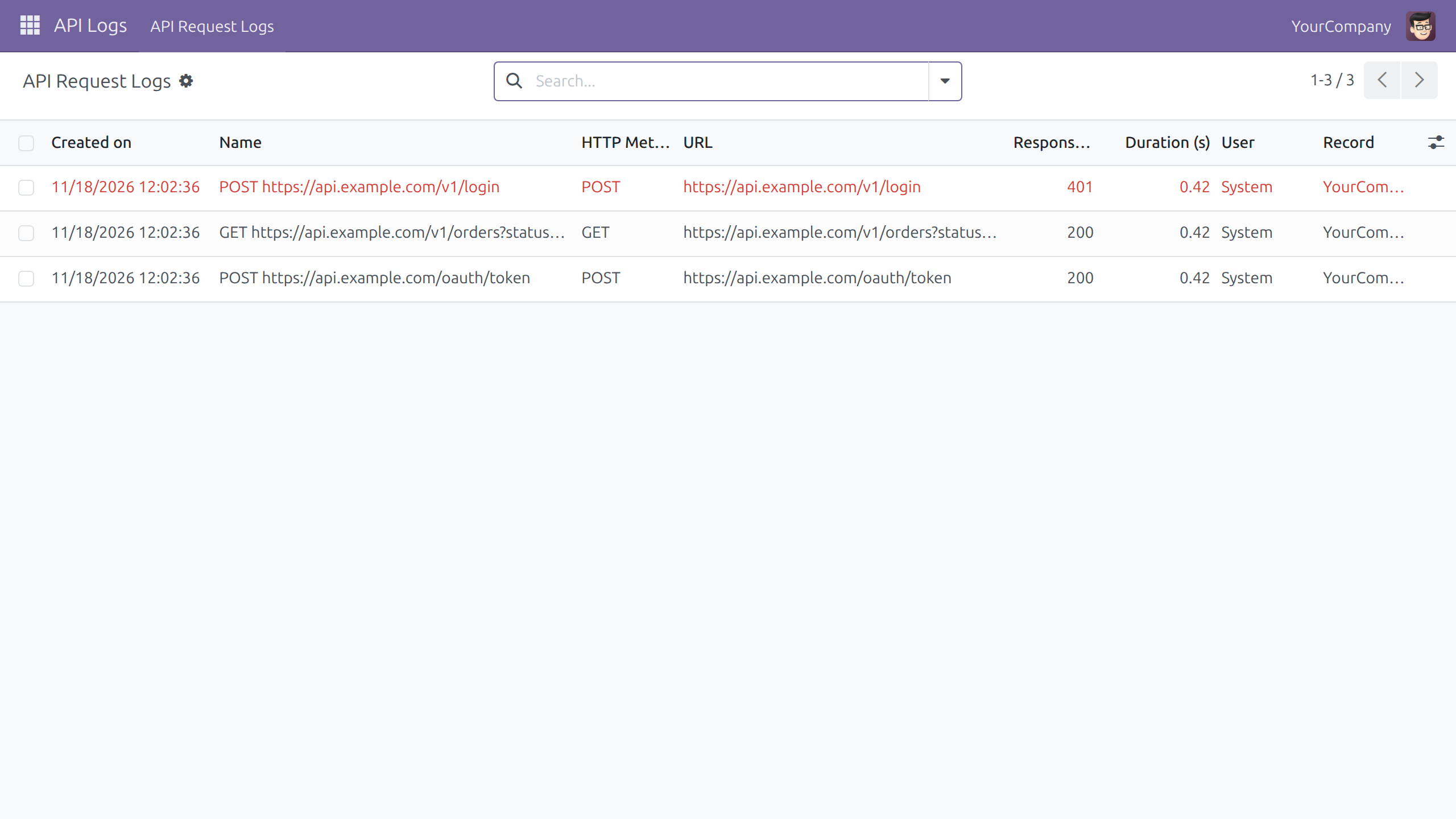
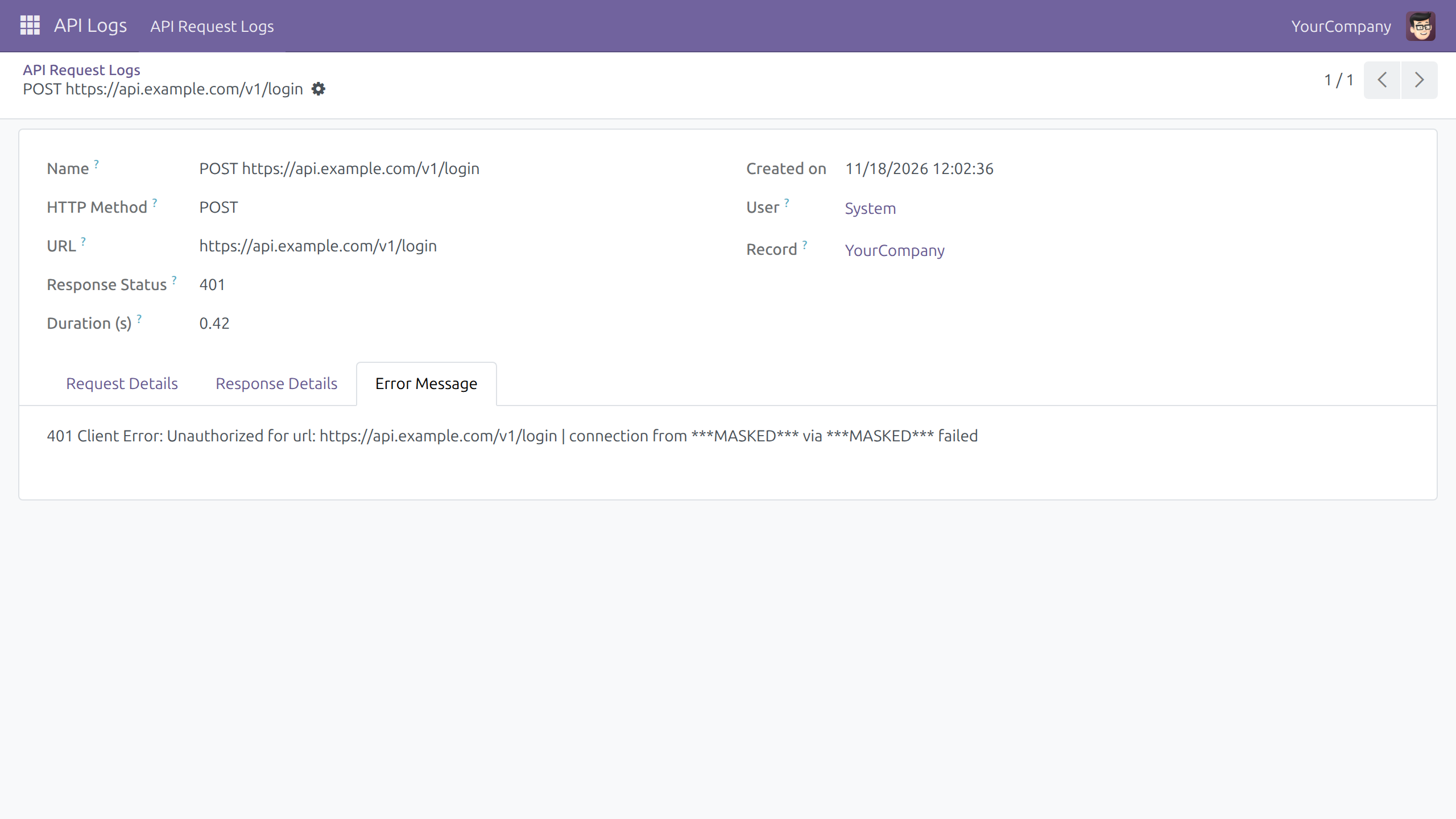
→ Each call has its own log: the address, the status, the duration, who started it and from which record. A failed call shows in red, with the error text the vendor returned.
Read the call, never the secret
A raw log would show tokens, passwords and keys to everyone who reads it.
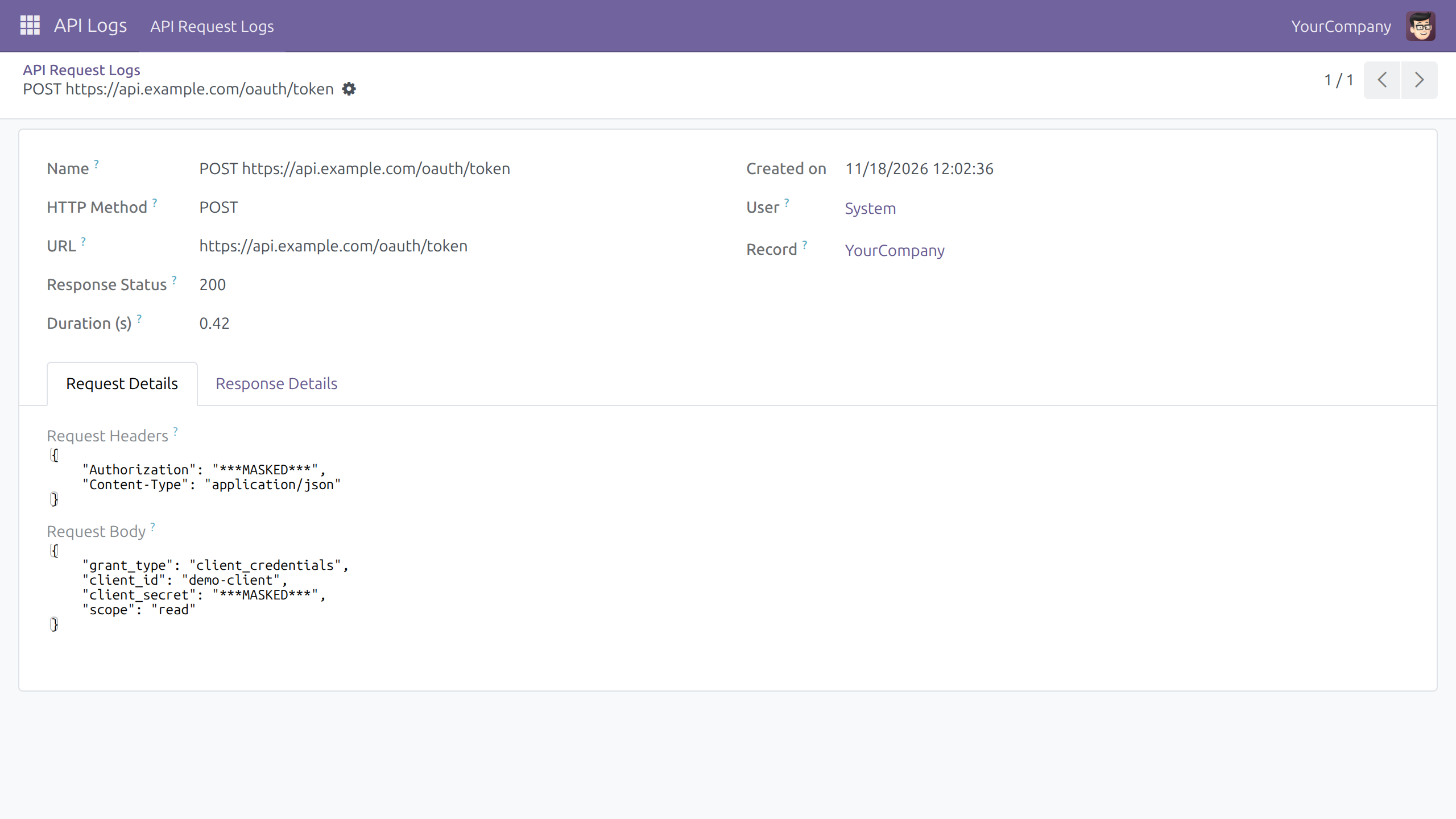
→ One masking rule cleans every row before it is stored, whichever integration wrote it. A secret shows as ***MASKED***; its name and the rest of the message stay readable.
Your servers stay private in error texts
A connection error often carries file paths, internal addresses and proxy details.
→ These are masked in the stored error text. The address the call was sent to stays readable, so you still know which service failed.
Features
Reading a call
- ✓ Every call of each integration built on it, in one list
- ✓ Address, method, status, duration, user and originating record
- ✓ Request and response headers and bodies
- ✓ Failed calls in red, with their error text
- ✓ Long bodies shortened, with the size cut off noted
Masked
- ✓ Values of secret-named fields in headers, URL parameters and bodies
- ✓ JSON, form, XML and multipart bodies alike
- ✓ Bearer, Basic, Token, Digest credentials and private keys, under any name
- ✓ File paths, internal addresses and proxies in error texts
Kept readable
- ✓ Field names and the structure of every message
- ✓ Token types, expiry times, scopes and rate limits
- ✓ The called host, status codes and the vendor's messages
- ✓ Text in any language, accents included
Safe to run
- ✓ Read-only logs, for holders of the API Log Viewer right
- ✓ Each user sees the logs of their own companies only
- ✓ Logs older than 90 days deleted daily; the period is adjustable
- ✓ Writing the log never stops the integration call
Ready on day one
The API Logs app
The administrator holds the viewer right from installation and reads the logs at once.
Daily clean-up
A scheduled action removes old logs, so the table does not grow without limit.
First step for the administrator
Give the API Log Viewer right to whoever debugs integrations. The Documentation tab shows how to change the retention period and the body size limit.
Integrations that write to this log
Google Drive
Attaches Google Drive documents to records from templates.
Google Routes API Integration
Directions, travel time and route lines from Google Maps.
HERE Routing API Integration
Routing with HERE Maps for trucking and logistics.
Mapbox Matrix API Integration
Distance matrices and routing from Mapbox for fleets and deliveries.
SeaRoutes Ocean Routing Integration
Ocean routes, distances and durations from SeaRoutes.
Before you decide
Where are the logs stored?
In the database of your instance, next to your other records. The module sends them nowhere.
Can a secret still reach a log?
A secret is recognised by its name or by its shape. A secret sent in a body under a generic name such as "key" is not recognised; the integration can declare its own secret names. A value that cannot be masked is stored as ***MASKED***.
Will the masking hide something I need?
Rarely, and on purpose: the rule prefers hiding too much to leaking. Fields named pin, sign or pass are masked even when harmless, and so is an amount written like a private network address in an error text.
Who can read and delete the logs?
Holders of the API Log Viewer right read them, within their companies. Nobody edits a log; only administrators can delete one.
How much space do the logs take?
Logs are kept 90 days by default, and a body above 256 KB is shortened. Both limits are system parameters the administrator can change.
Try it, then ask us
The Documentation tab explains what is masked, what stays readable and how an integration joins the log. The live preview of this listing opens the log list on a demo database.
Pre-sales & partnership
viindoo.com/contactusTechnical support
viindoo.com/ticketAPI Request Logger
Audience: the administrator of an Odoo instance who needs to see what the connected integrations sent and received, without access to the server.
Overview
Integrations such as shipping, payment, bank or messaging connectors call external services over HTTP. Each call is recorded in API Logs > API Request Logs: who triggered it, the address called, the headers and body sent, the status, headers and data received, how long it took and, when it failed, the error text. This lets you find out why a call failed from the screen alone.
Because a log is meant to be read, it must never expose a secret. Every row is cleaned by one masking rule before it is stored, whichever integration wrote it. A masked value is shown as ***MASKED***. The name of the field and the structure around it stay readable, so you can still see that a token was sent and what the rest of the message looked like.
Who can see the logs
The logs are for users holding the API Log Viewer access right; the administrator has it by default. Records are read-only and a user sees only the logs of the companies they are allowed to work in. Logs older than 90 days are deleted automatically every day.
Reading a log
- Open API Logs > API Request Logs. Rows whose call failed are shown in red. Use the column selector to show or hide Duration (s), User, Record and Error Message.
- Click a row to open the log.
- The upper part shows Name, HTTP Method, URL, Response Status, Duration (s), Created on, User and the Record that started the call.
- Request Details shows Request Headers and Request Body; Response Details shows Response Headers and Response Data; Error Message appears only when the call failed.
What is masked
The rule applies to the name, the URL, the request and response headers, the request body, the response data and the error message of every log. The HTTP method, the status, the duration, the user, the company and the record are not text from the call and are stored as they are.
A field counts as secret by its name. A name is secret when it contains one of: token, secret, session, api key, password, passphrase, passcode, credential, signature, private key, code verifier; when one of its words is pwd, pass, otp, pin, cvv, cvc, sig or jwt; or when its last word is sign. Names that the integration lists explicitly are secret too: the headers Authorization, X-API-Key, api-key, X-Goog-Api-Key, Cookie, Set-Cookie and Proxy-Authorization, and the URL parameters key, apikey, api_key and access_token.
The value of a secret name is masked in:
- headers, and the URL query parameters;
- form bodies (name=value), JSON bodies, JSON written inside a text value, XML elements and multipart form parts, and lists of name and value pairs;
- the name, the URL and the error text, wherever they contain such a pair.
Further rules:
- Inside a JSON field with a secret name (a credentials container, for example), every text or number below it is masked, whatever its own name. Empty values, true, false and null stay as they are.
- The whole value of any header whose name contains authorization is masked.
- Some values are masked wherever they appear, under any name: the password in an address such as scheme://user:password@host, Bearer credentials, Basic, Token and Digest credentials after Authorization, and private key blocks.
- In the error text, the absolute file paths of the server, the memory address of connection objects, the proxy host and port, and the addresses localhost, loopback, private and link-local network addresses are masked. The address the call was sent to stays readable, even when it is a local one.
What stays readable
So that a call can still be debugged, these are kept:
- field names and the structure of headers and bodies;
- names that describe a secret without being one: a name ending with type, status, count, length, ttl, timeout, method, alg, algorithm or version (token_type, session_timeout), a name telling when a secret expires (expires_in, token_expiration), token counts such as max_tokens, rate-limit names (X-RateLimit-Remaining) and Access-Control-* headers;
- a generic name such as key in a body (it is masked only as a URL parameter or in an error text);
- the vendor's own messages, the host that was called, the status codes and text in any language, accents included;
- the word after Bearer when it is plain wording such as token, realm or error.
Good to know
- Some harmless values are masked too. The rule prefers hiding too much to leaking a secret: fields named pin, sign or pass, the otp component of a message template, and an amount written like a private network address in an error text (for example 10.0.0.5) are masked.
- Logs stored earlier keep what they hold. The rule applies to rows written from now on.
- Writing the log never stops an integration. A value that cannot be masked is stored as ***MASKED*** rather than readable, and a failure while writing a log is reported in the server log without stopping the call.
- Long bodies are shortened. A request body or response data above 262144 bytes is cut and ends with ...[truncated N bytes]. A response read as a stream is summarised (number of chunks, number of bytes and whether it ended normally, with an error or was abandoned) instead of being stored.
Settings for the administrator
Two system parameters, under Settings > Technical > Parameters > System Parameters (developer mode), change the defaults:
- api_request_logger.retention_days: days a log is kept (default 90; a value of 0 or less is ignored and nothing is deleted);
- api_request_logger.body_max_bytes: size above which a body is shortened (default 262144).
For developers
A model joins the log by inheriting api.request.mixin and sending its HTTP calls with make_request; the masking is applied when the row is written, so overriding _prepare_log_values needs no masking of its own. To mask provider-specific names, override _get_sensitive_header_keys and _get_sensitive_query_param_keys. Inheriting api.log.viewer.mixin adds the last log of a record and the action_view_api_logs action.
class ExampleIntegration(models.AbstractModel):
    _name = 'example.integration'
    _inherit = 'api.request.mixin'

    def example_api_call(self):
        response = self.make_request(
            method="GET",
            url="https://api.example.com/data",
            headers={"Authorization": "Bearer <token>"},
            params={"page": 1},
        )
        return response.json() if response is not None else None
make_request returns None when the call fails without a response. A call made with stream_response=True returns the response un-drained and writes its single log row when the body has been read.
This software and associated files (the "Software") may only be used (executed, modified, executed after modifications) if you have purchased a valid license from the authors, typically via Odoo Apps, or if you have received a written agreement from the authors of the Software (see the COPYRIGHT file).
You may develop Odoo modules that use the Software as a library (typically by depending on it, importing it and using its resources), but without copying any source code or material from the Software. You may distribute those modules under the license of your choice, provided that this license is compatible with the terms of the Odoo Proprietary License (For example: LGPL, MIT, or proprietary licenses similar to this one).
It is forbidden to publish, distribute, sublicense, or sell copies of the Software or modified copies of the Software.
The above copyright notice and this permission notice must be included in all copies or substantial portions of the Software.
THE SOFTWARE IS PROVIDED "AS IS", WITHOUT WARRANTY OF ANY KIND, EXPRESS OR IMPLIED, INCLUDING BUT NOT LIMITED TO THE WARRANTIES OF MERCHANTABILITY, FITNESS FOR A PARTICULAR PURPOSE AND NONINFRINGEMENT. IN NO EVENT SHALL THE AUTHORS OR COPYRIGHT HOLDERS BE LIABLE FOR ANY CLAIM, DAMAGES OR OTHER LIABILITY, WHETHER IN AN ACTION OF CONTRACT, TORT OR OTHERWISE, ARISING FROM, OUT OF OR IN CONNECTION WITH THE SOFTWARE OR THE USE OR OTHER DEALINGS IN THE SOFTWARE.