
HR Accounting
by Viindoo
| Lines of Code | 1885 |
| Technical name | viin_hr_account |
| License | OPL-1 |
| Website | https://viindoo.com/apps/app/18.0/viin_hr_account |
| Read description for | v 13.0 v 14.0 v 15.0 v 16.0 v 17.0 |
| Required Apps | Invoicing (account) Discuss (mail) Employees (hr) |
| Included Dependencies | Viindoo Base Accounting Foundation Advanced HR Management |
| Extensions | OmniApproval™ - Employee Advance Management |

HR Accounting
Base module integrating accounting management into HR management
The HR Accounting module, developed by Viindoo, is a comprehensive solution built on the Odoo platform. It enables businesses to tightly integrate accounting and HR. This module helps manage departmental costs, employee payments, and automated financial allocations, ensuring accuracy and transparency in financial data.
Key Features
Built natively on Odoo/Viindoo to streamline real business operations:
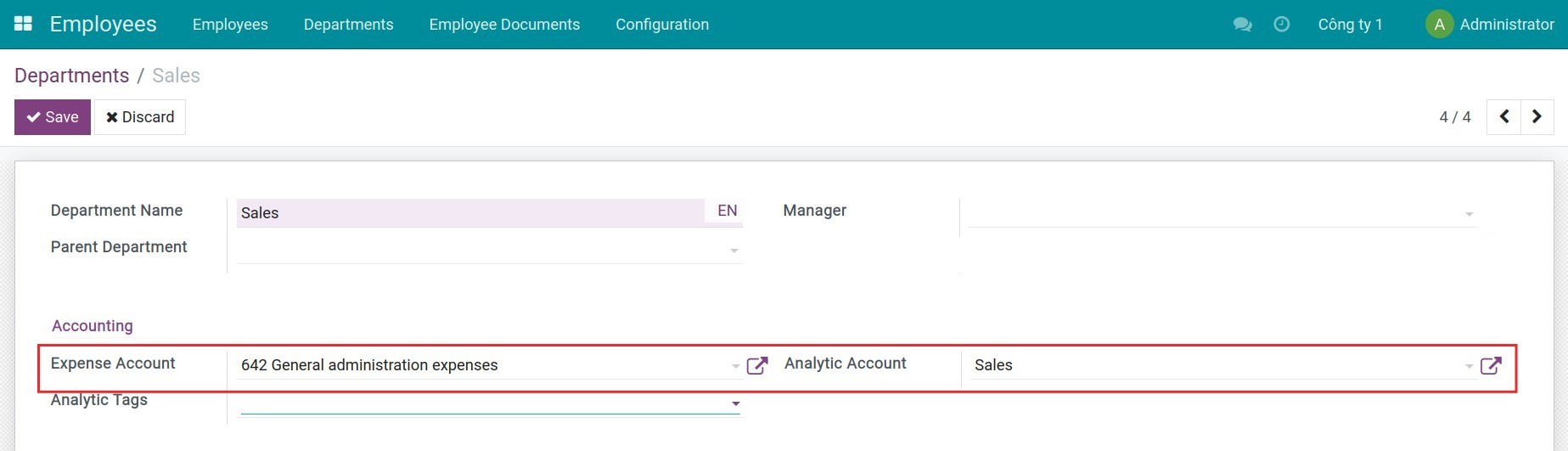
Configure information to manage costs by department
- Expense Account:
- Assign a default expense account to each department to record costs such as salaries, operations, or other related expenses.
- Classify expenses by department to facilitate financial reporting and budget control.
- Analytic Account:
- Automatically create an analytic account when a new department is created.
- Sync the analytic account name with the department name for detailed cost tracking.
- Department Data Synchronization:
- Automatically update the analytic account name when the department name changes.
- Ensure each analytic account is linked to only one department to avoid errors.
Set up advance accounts and manage employee payments
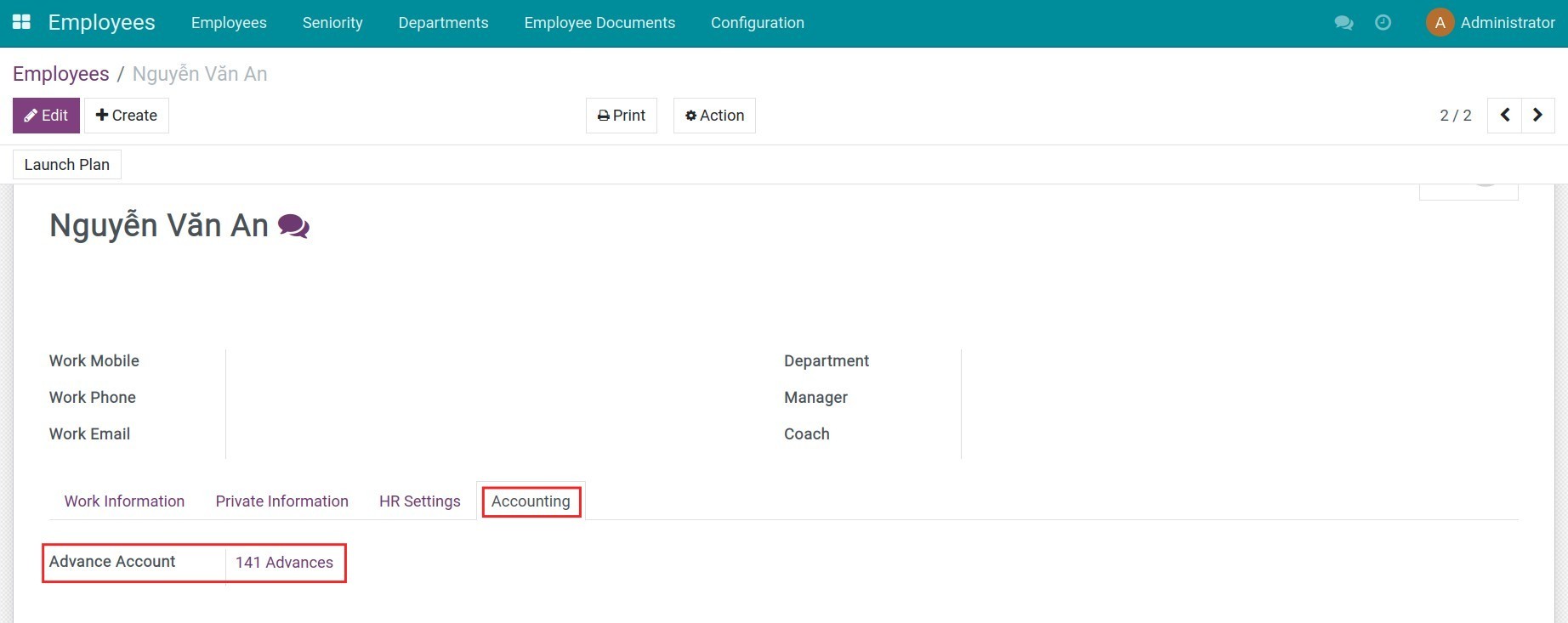
- Advance Account:
- Assign a personal advance account to each employee to track and manage prepayments.
- Ensure effective management of receivables from employees.
- Payable Account:
- Configure a payable account for employees to handle payments such as salaries, bonuses, or allowances.
- Employee Payments:
- Add a new partner type "Employee" in the accounting module to enable direct payments to employees.
- Automatically select the appropriate counterpart account (receivable or payable) during transactions.
Configure a common analytic accounting plan for departments
- Provide an option to configure a default Analytic Accounting Plan in the general settings of the Accounting application.
- This plan is automatically applied when creating analytic accounts linked to departments.
Automated calculation of managerial accounting allocation ratios
- Automate the calculation of allocation ratios based on predefined allocation models.
- Ensure costs are accurately and reasonably allocated across departments.
Benefits
Reduce manual work by automating account creation and cost allocation.
Ensure financial data is recorded and allocated correctly.
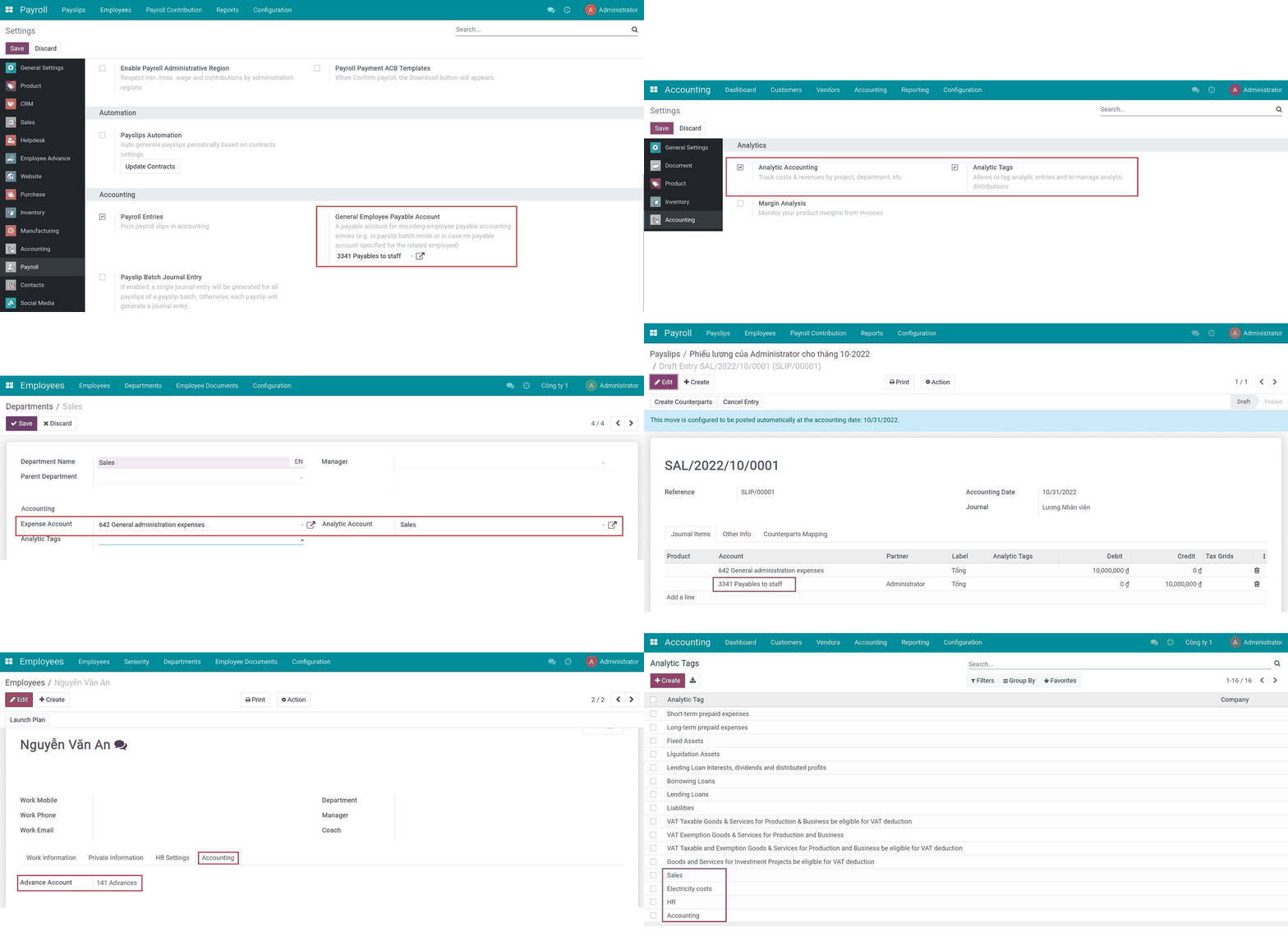
General employee payable account Viindoo
Activate Analytic accounting feature
Analytic account by the department
Salary journal entries
Advance account on the employee's profile
Create an analytic tag
See HR Accounting in Action
See how this module solves real business problems in a working Viindoo environment.
Need help with HR Accounting?
For questions, implementation support, or consulting services, contact Viindoo.
Pre-Sales & Partnership
When contacting us, please include:
- Odoo/Viindoo version (CE/EE).
- Number of users and business scope.
- Other modules currently in use.
Technical Support
For faster troubleshooting, please provide:
- Order number or app reference.
- Odoo/Viindoo version & edition.
- Steps to reproduce the issue.
- Screenshots/logs if available.
Technical Requirement
Changes log
We continuously improve this module. Recent updates from the official Viindoo repository:
- 2026-03-02 Improved Multi-create handling in hr.department and remove redundant write operation.
- 2025-10-29 Fixed Tree view should use column_invisible instead.
- 2025-10-29 Fixed Use sudo when writing to analytic accounts to prevent permission errors.
- 2025-01-08 Fixed Error check company.
- 2024-12-02 Improved Manage subsidiary companies.
Works Great With These Modules
Extend HR Accounting with complementary Viindoo apps:
Vietnam - HR Accounting
Extending Human Resource Accounting according to Vietnam Accounting Standards
Module l10n_vn_viin_hr_accountOmniApproval™ - Employee Advance Management
Streamline employee advance requests, approvals, and reconciliations with seamless financial integration
Module to_hr_employee_advanceHR Payroll Accounting
Allows the entire Payroll Accounting to be automatically calculated through pre-established rules
Module to_hr_payroll_accountOmniApproval™ - Accounting Approvals
Approve journal entries, invoices, and payments directly in OmniApproval™. Bring accounting visibility, control, and audit trails into approvals.
Module viin_approval_accountProject Timesheet & HR Accounting Integration
Automatically attach department analytic accounts to employee timesheet records
Module viin_hr_project_timesheet_accountRecognition & Discipline (HR)
Manage employee recognition and discipline decisions
Module viin_hr_recognition_disciplineWho Should Use This Module?
Built for teams that need this capability fully integrated into their Odoo/Viindoo stack.
Detailed management of departmental costs and budgets.
Efficient handling of employee advances and payments.
Automated and transparent financial allocation and management.
Installation
- Navigate to Apps.
- Search with keyword viin_hr_account.
- Press Install.
Instructions
Configure employee payable account
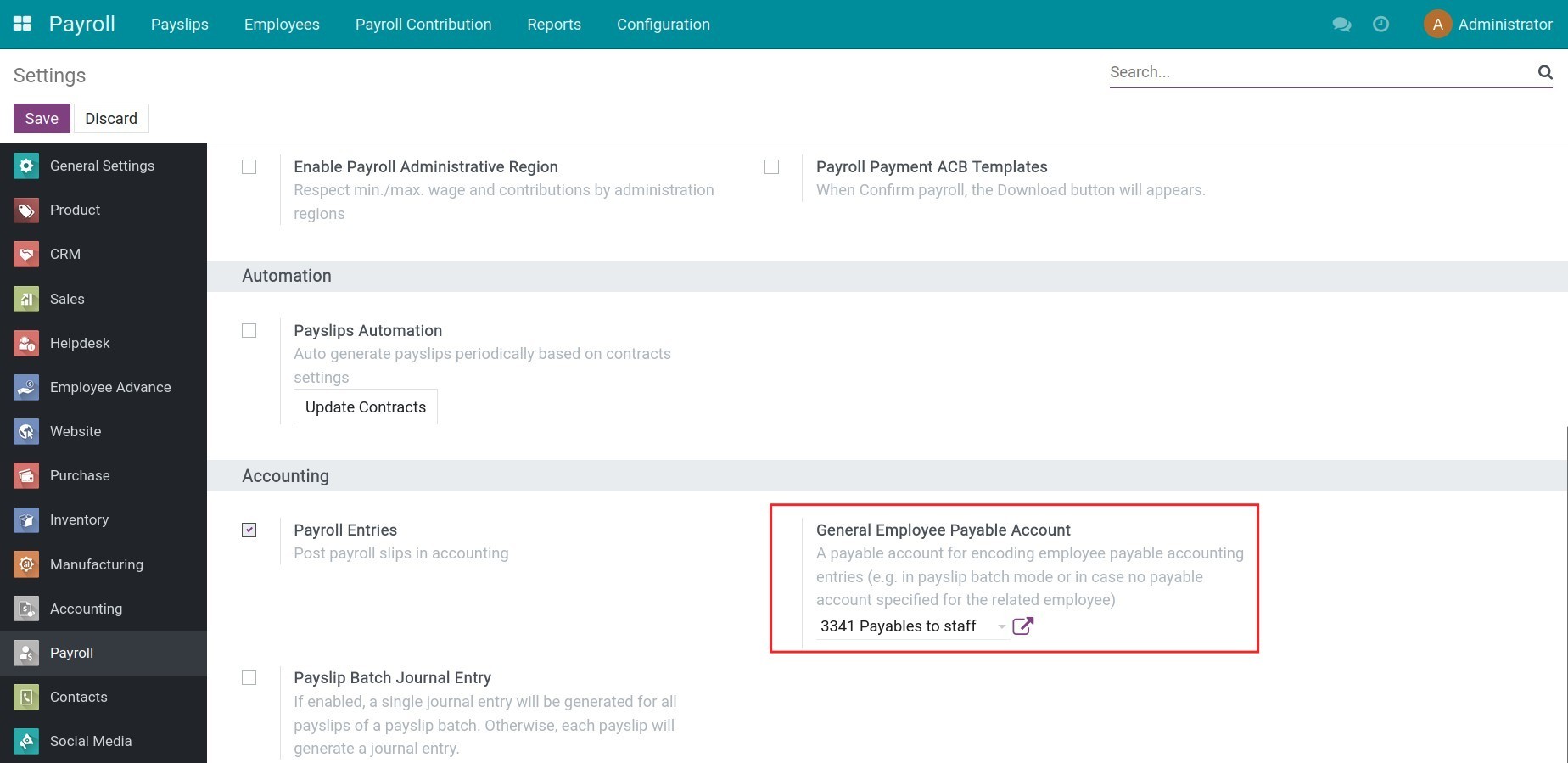
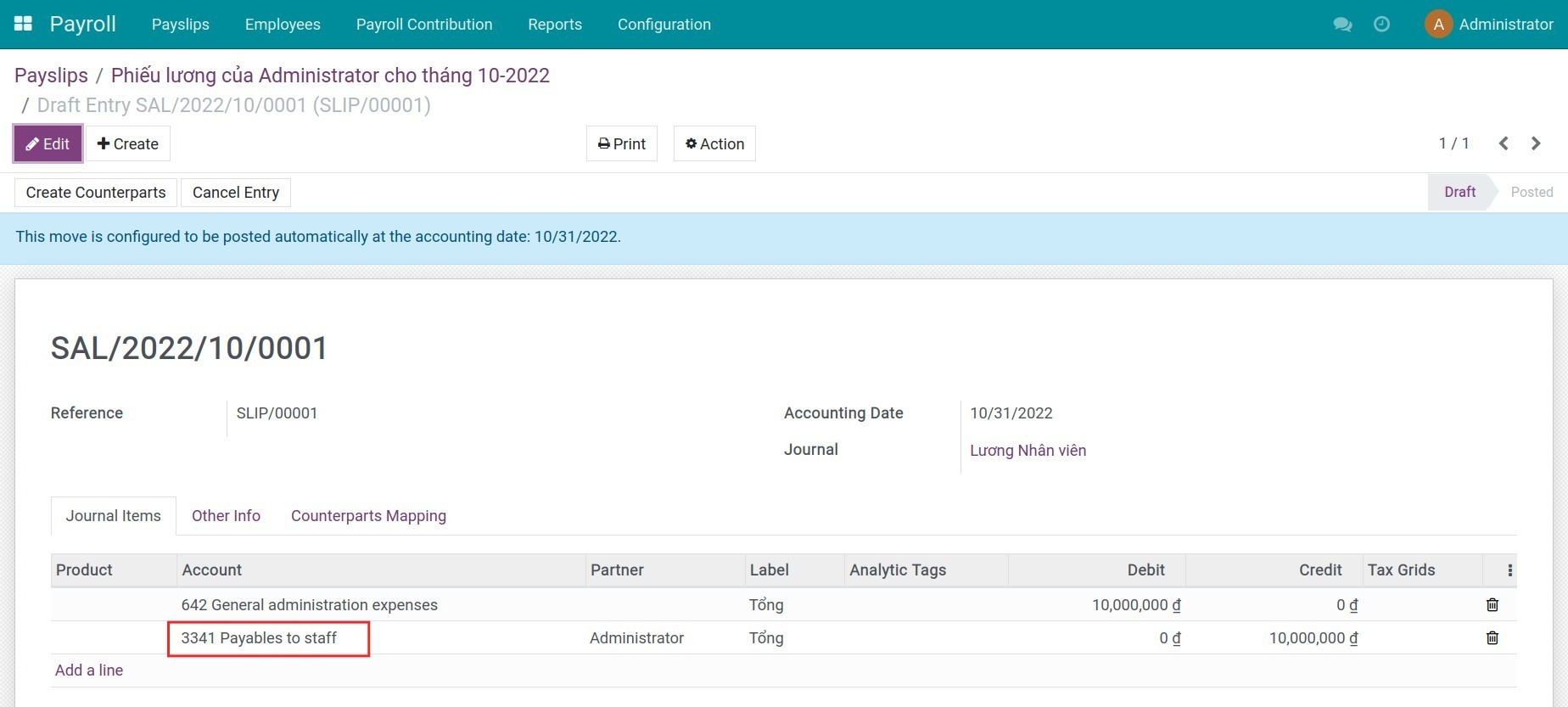
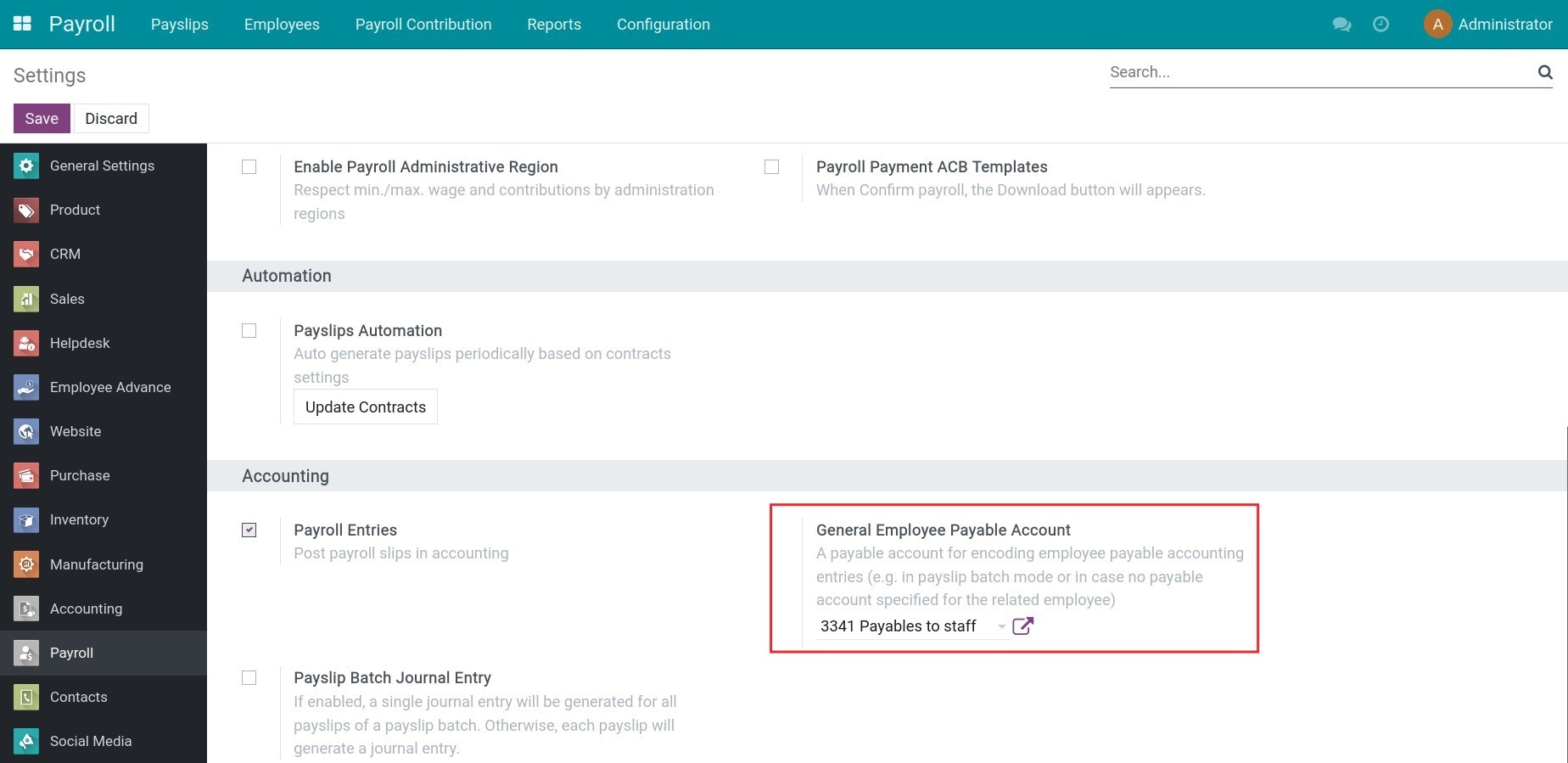
According to Vietnam accounting regulations, the 334 account registers the amounts of money a company needs to pay to its employees. After installing the application, navigate to Payroll > Configuration > Settings, the 3341 or 334 account is automatically suggested at the General Employee Payable Account section. You can change this default account depending on your company's usage.
While creating and confirming a payslip, journal entries will be created and register the employee payable amount in the 3341 account.
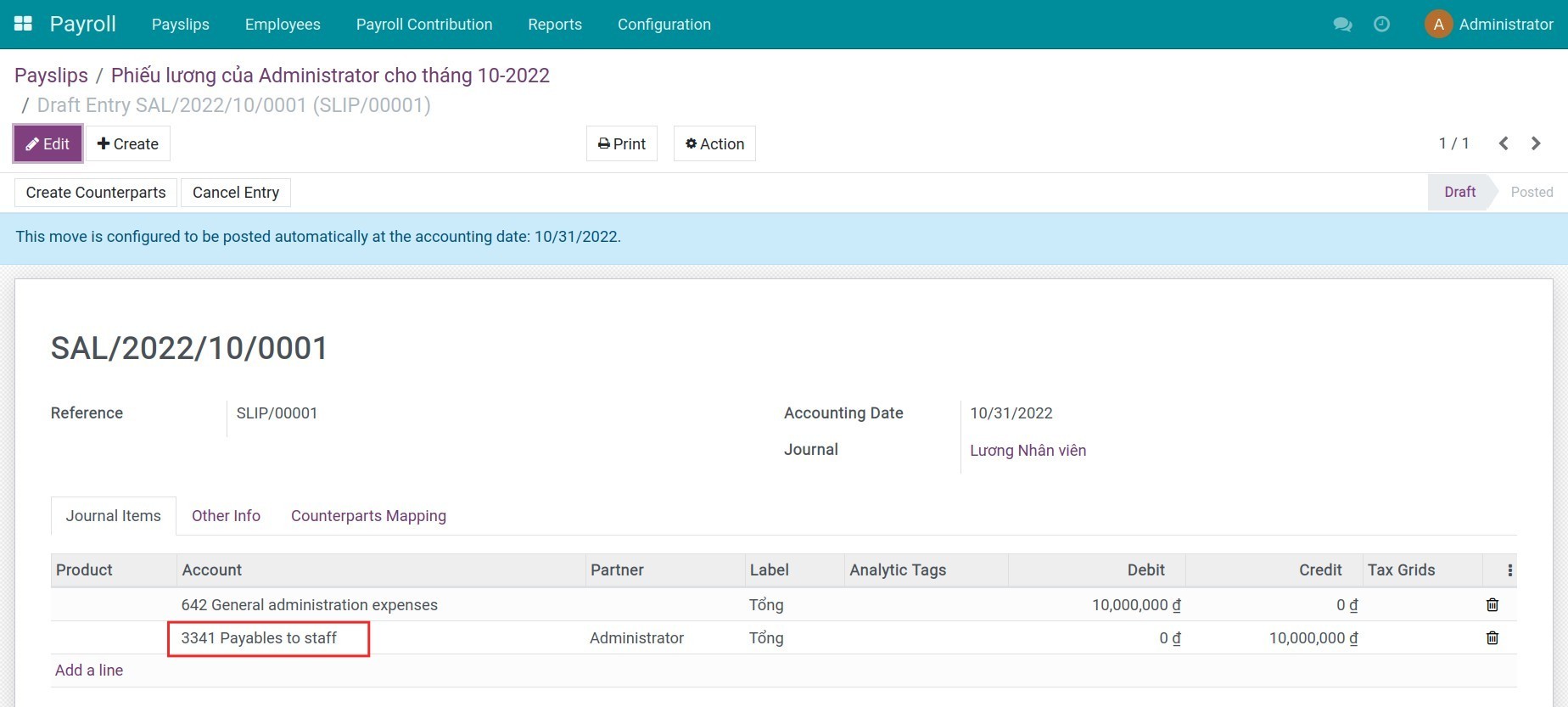
Note: You need to install the Payroll management app to_hr_payroll.
Configure default advance account on employee's profile
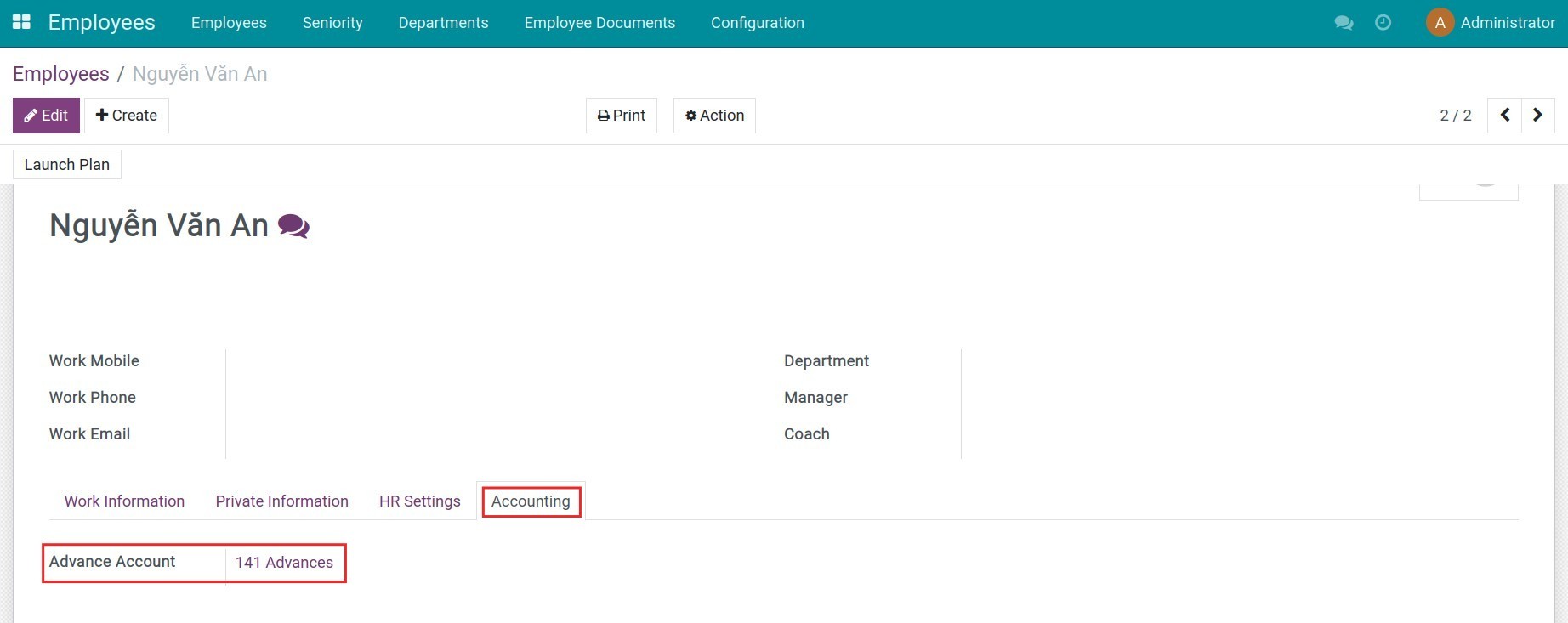
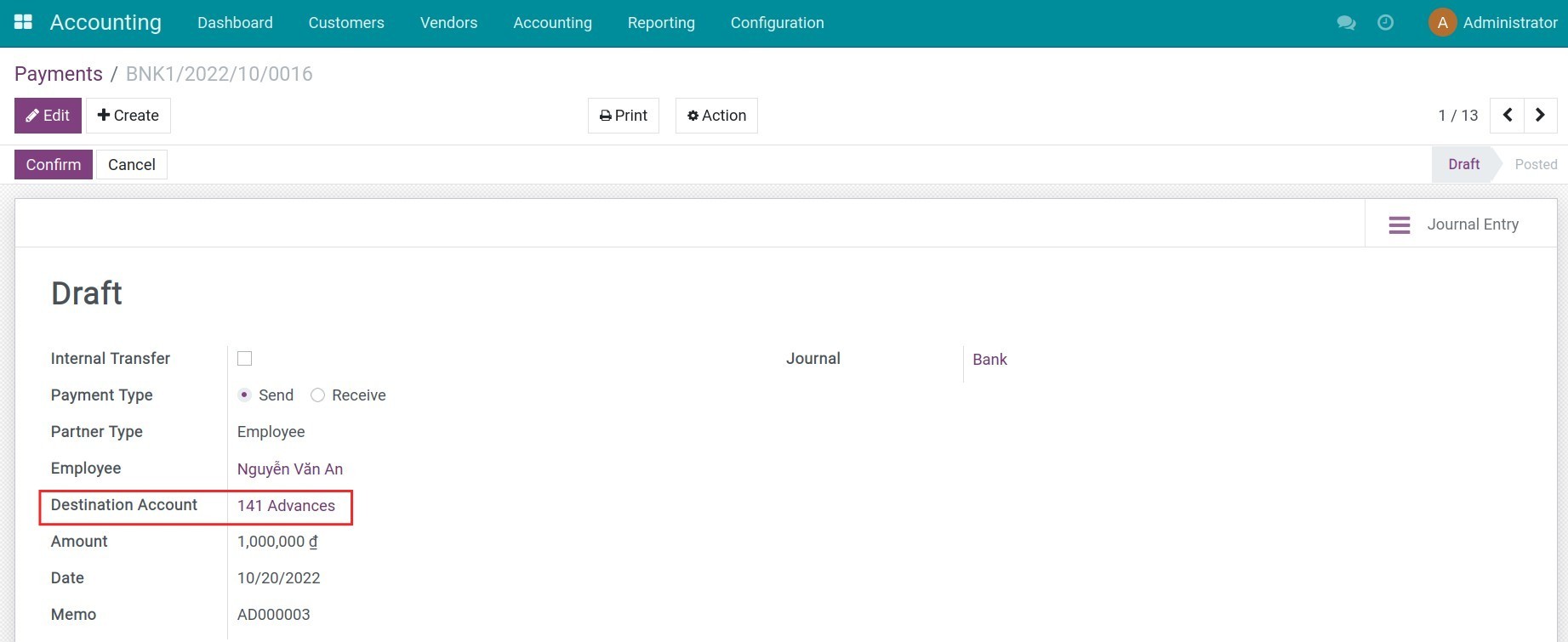
For the employee advance payment, the accountant needs to register the total amount in the 141 account according to VAS. Navigate to Employees > Employees, and select an employee to see the advance account 141 automatically selected at the Advance Account field in the Accounting tab.
While doing the employee advance process, journal entries recording the advance payment will be automatically created and the advance amount will be registered in the 141 account.
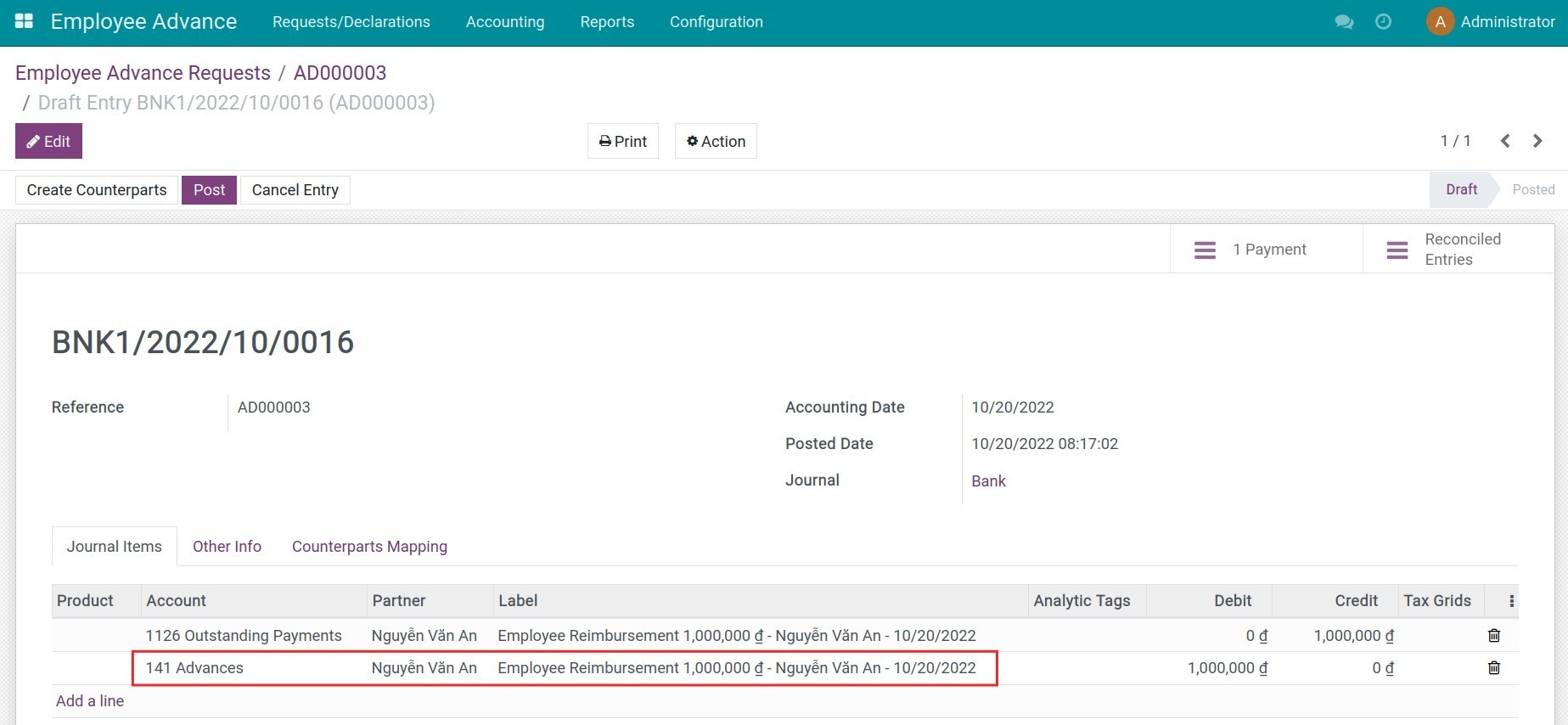
Note: You need to install the Employee Advance app (viin_approval_employee_advance).
Besides, the 141 account will also be used as the destination account to record the employee's payment to the company.
Configure expense account, analytic account in each department
1. Create a department and configure an analytic account
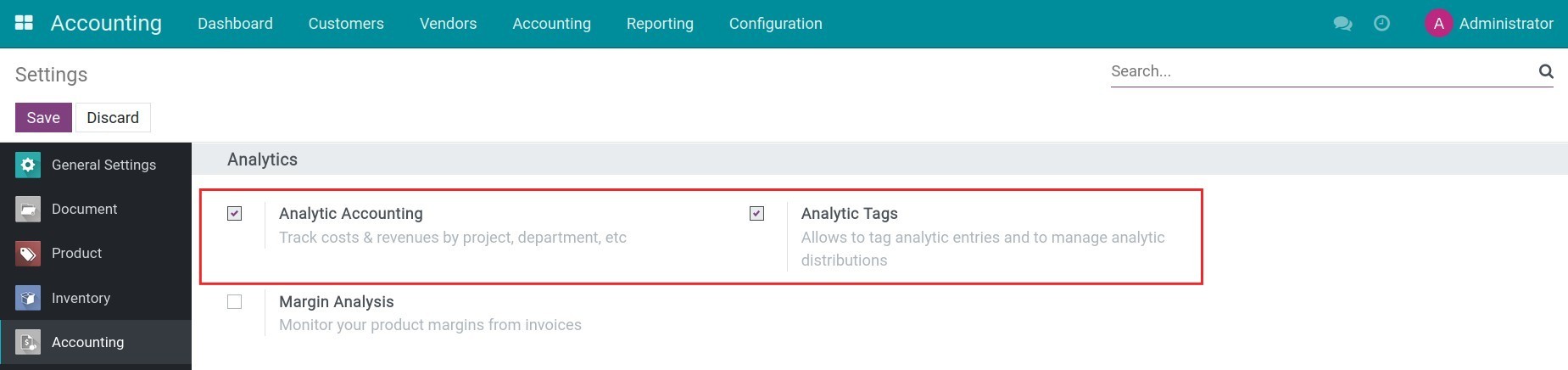
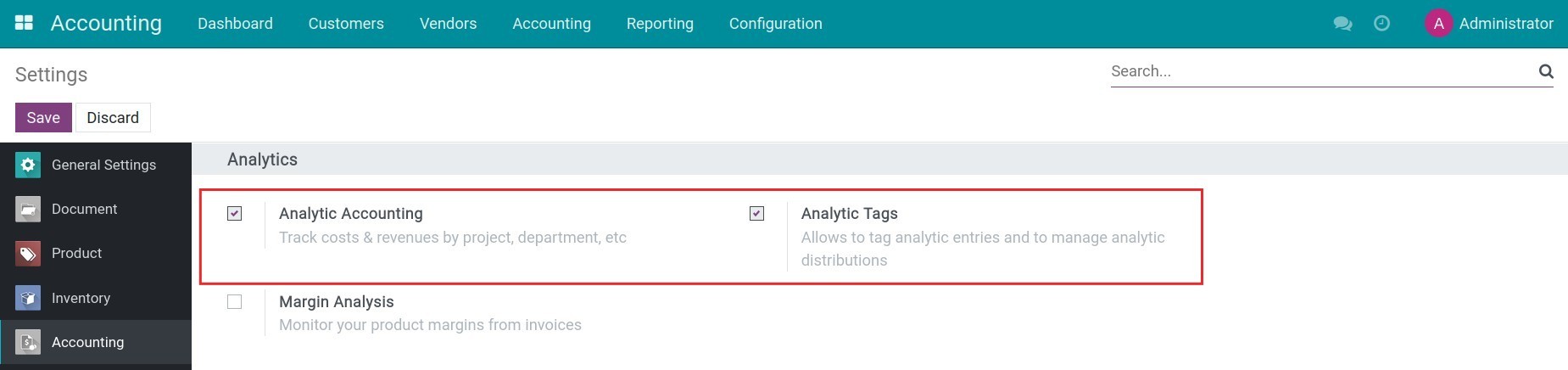
Navigate to Accounting > Configuration > Settings, activate the Analytic Accounting and Analytic Tags feature.
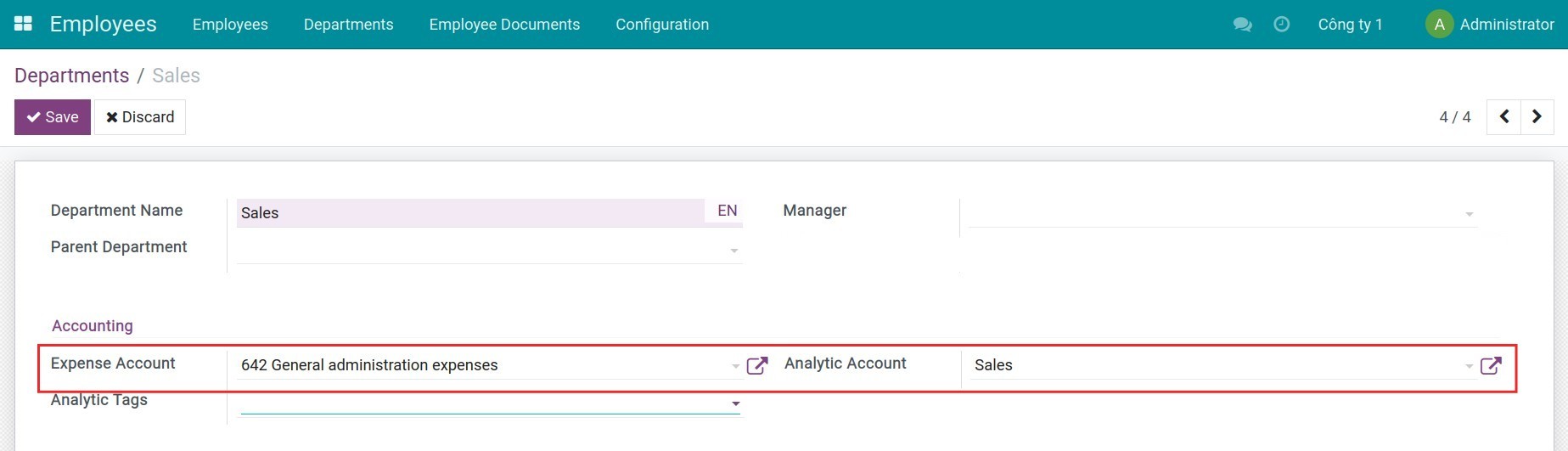
Navigate to Employees > Configuration > Departments, and press Create to generate a new department. From here, you can select an accounting to register the expenses of this department. Once done, press Save, and the respective analytic account of the department are also automatically created.
To learn how to use the analytic accounting feature in the Viindoo Accounting software, you can refer to the Analytic account in Viindoo article.
2. Create analytic tags by departments and the distribution percentage
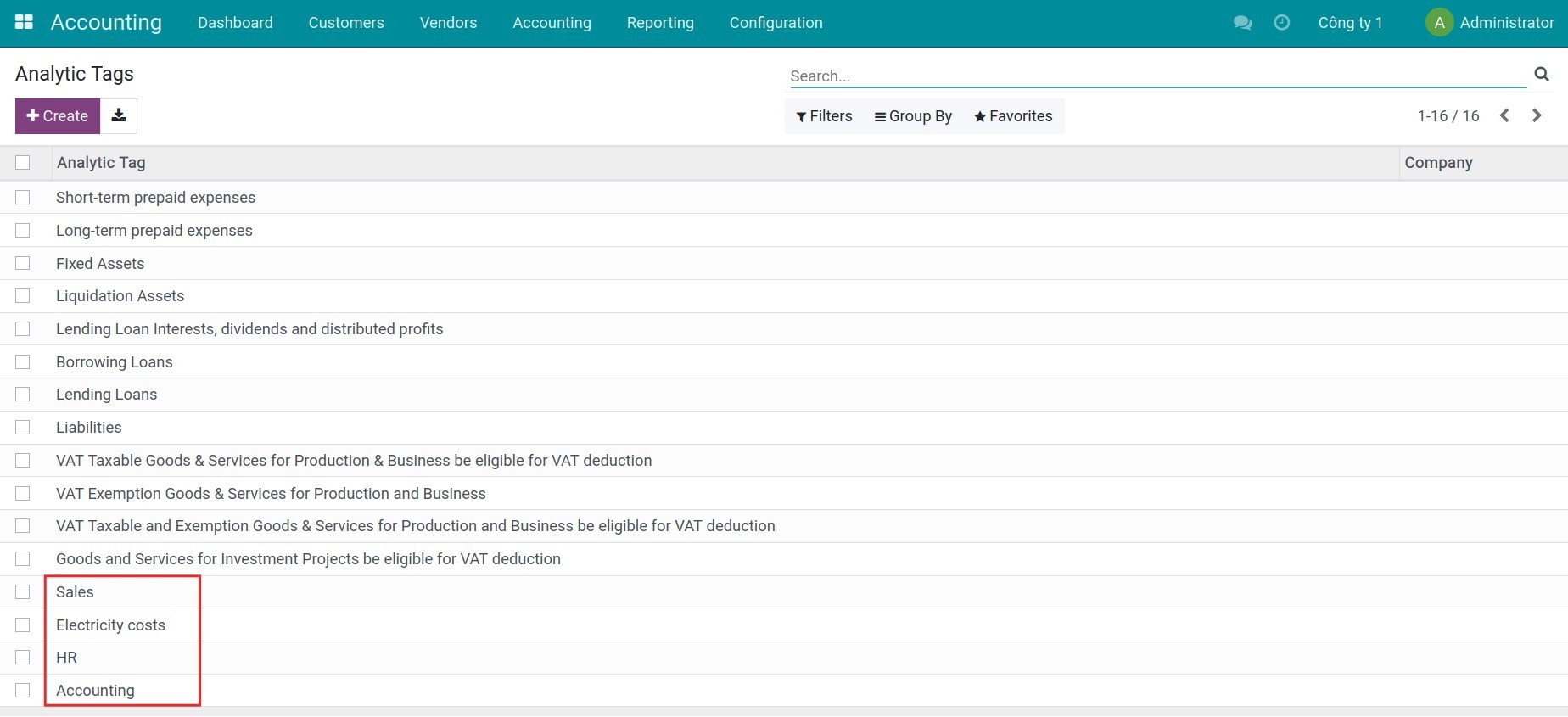
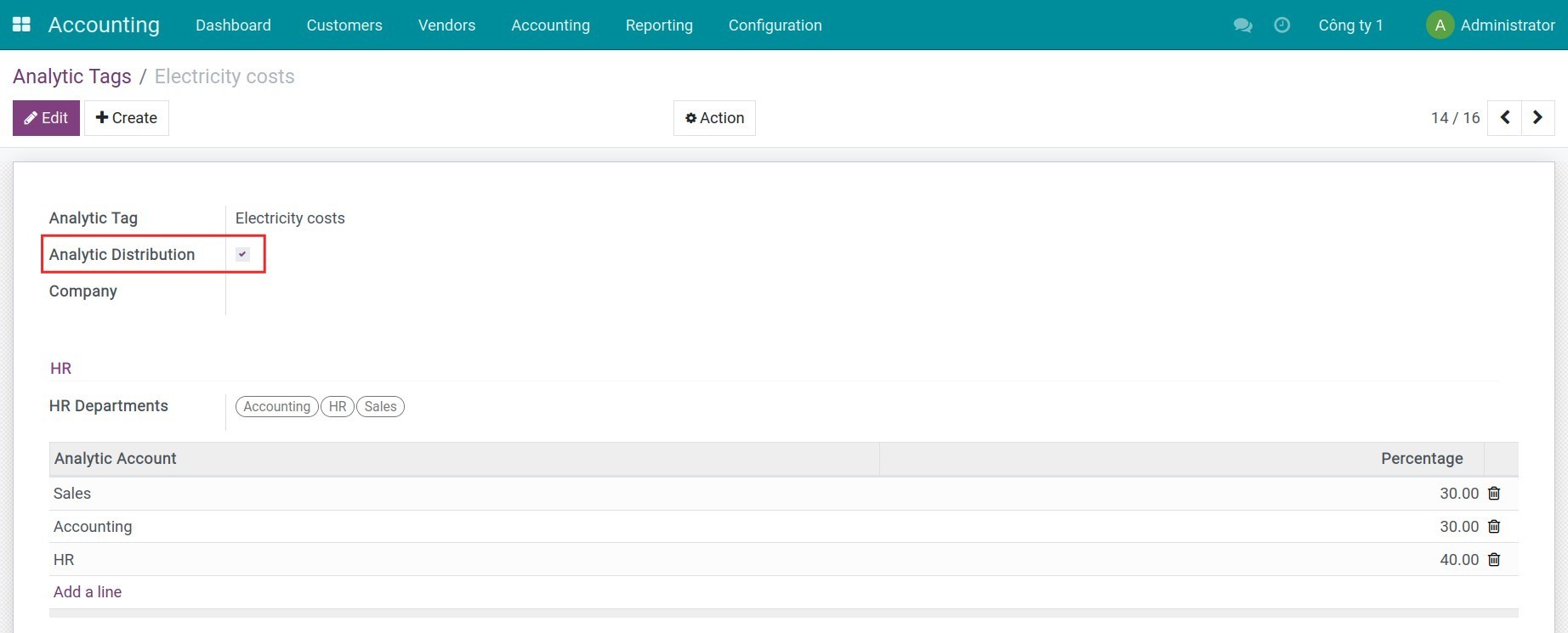
Navigate to Accounting > Configuration > Analytic Tags, press Create to create a new analytic tag. For example, if you want to analyze the revenues/expenses of the Accounting & HR department, you need to create the following analytic tags:
- Analytic tags for each department: Sales, Accounting, and HR;
- Shared analytic tag for both departments: Electricity costs (expenses that should be distributed to all departments).
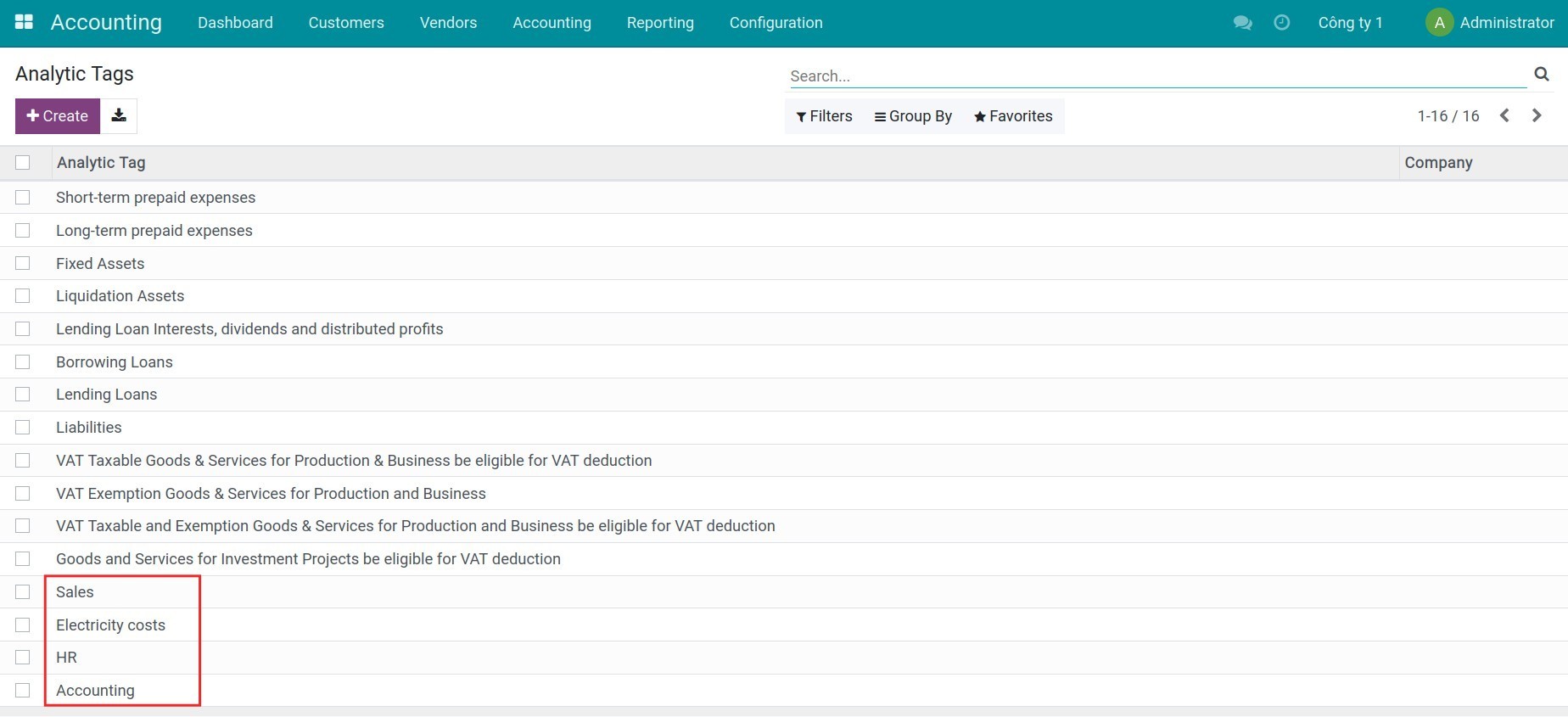
In the Electricity costs, enable the Analytic Distribution feature then indicate the percentage for each department.
3. Create revenues/expenses linked for respective department
Create a vendor bill and add the shared analytic tag on the invoice line. Then confirm and record payments of this bill.
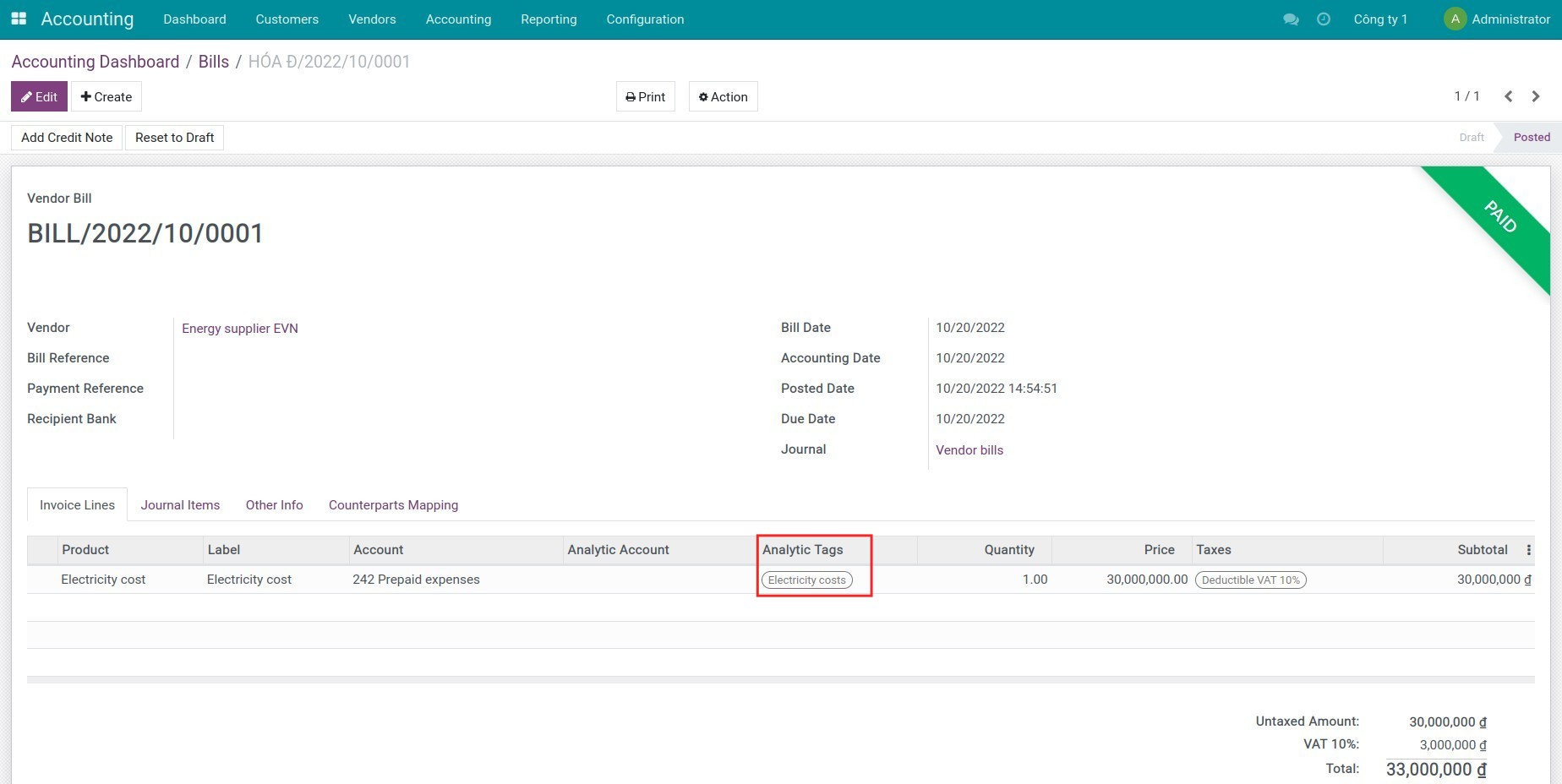
You can also do similar steps with the customer invoices.
4. View revenues/expenses report by department
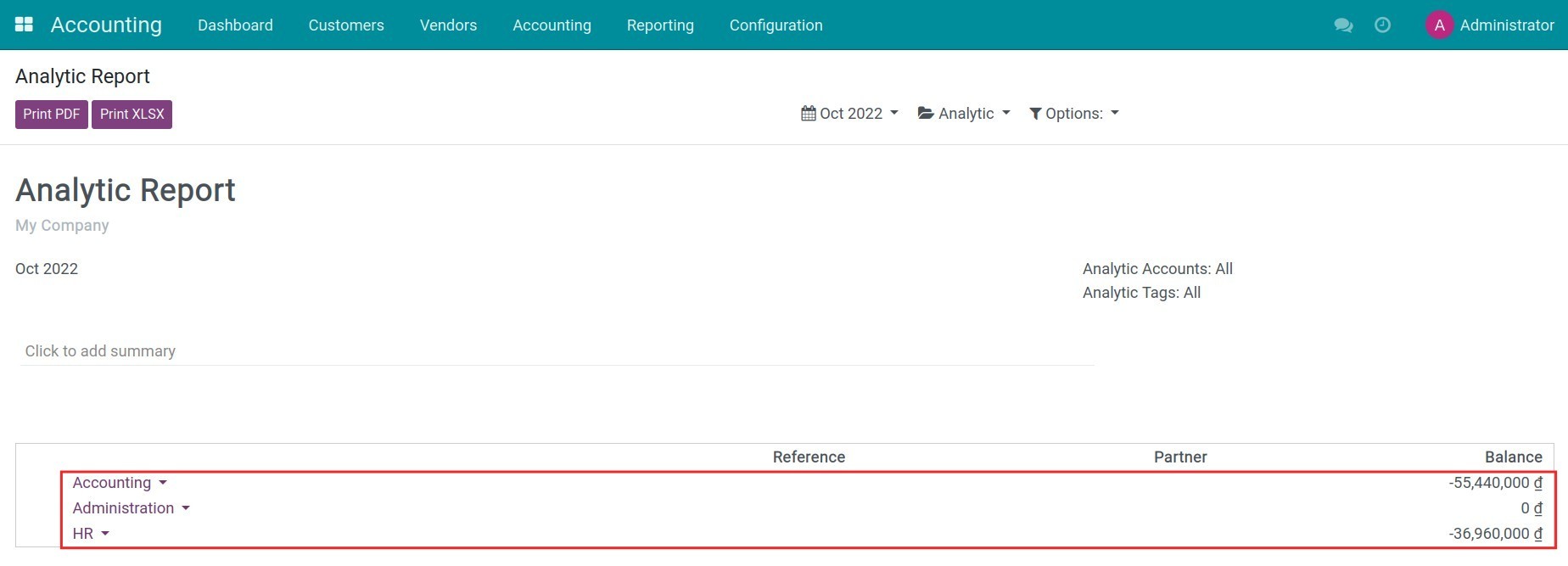
Navigate to Accounting > Reporting > Analytic Report to see each department's revenues/expenses.
This software and associated files (the "Software") may only be used (executed, modified, executed after modifications) if you have purchased a valid license from the authors, typically via Odoo Apps, or if you have received a written agreement from the authors of the Software (see the COPYRIGHT file).
You may develop Odoo modules that use the Software as a library (typically by depending on it, importing it and using its resources), but without copying any source code or material from the Software. You may distribute those modules under the license of your choice, provided that this license is compatible with the terms of the Odoo Proprietary License (For example: LGPL, MIT, or proprietary licenses similar to this one).
It is forbidden to publish, distribute, sublicense, or sell copies of the Software or modified copies of the Software.
The above copyright notice and this permission notice must be included in all copies or substantial portions of the Software.
THE SOFTWARE IS PROVIDED "AS IS", WITHOUT WARRANTY OF ANY KIND, EXPRESS OR IMPLIED, INCLUDING BUT NOT LIMITED TO THE WARRANTIES OF MERCHANTABILITY, FITNESS FOR A PARTICULAR PURPOSE AND NONINFRINGEMENT. IN NO EVENT SHALL THE AUTHORS OR COPYRIGHT HOLDERS BE LIABLE FOR ANY CLAIM, DAMAGES OR OTHER LIABILITY, WHETHER IN AN ACTION OF CONTRACT, TORT OR OTHERWISE, ARISING FROM, OUT OF OR IN CONNECTION WITH THE SOFTWARE OR THE USE OR OTHER DEALINGS IN THE SOFTWARE.