
Tự Động Gửi Email Chúc Mừng Sinh Nhật
| Số dòng Code | 696 |
| Tên kỹ thuật | to_partner_dob_send_email |
| Giấy phép | OPL-1 |
| Website | https://viindoo.com/apps/app/18.0/to_partner_dob_send_email |
| Đọc mô tả cho | v 13.0 v 14.0 v 15.0 v 16.0 v 17.0 |
| Yêu cầu các App | Discuss (mail) |
| Bao gồm Các phụ thuộc | Ngày Sinh Của Đối Tác Mô-đun Cơ Sở |

Auto Send Happy Birthday Email
Automatically Send Happy Birthday Email to your partners
This module helps businesses automatically send birthday greeting emails to their partners based on the birth dates stored in the system. This feature not only enables businesses to show appreciation to customers and partners but also strengthens relationships, enhances personalized experiences, and provides complete automation without manual intervention. Businesses can easily set up default birthday email templates for the company, customize email content as needed, or configure specific preferences for each partner. The module supports multi-language, multi-company environments and allows image integration, ensuring that birthday greetings are professional and aligned with the company's brand identity.
Key Features
Built natively on Odoo/Viindoo to streamline real business operations:
Default Company Setup
- Enable or disable automatic birthday email sending for all partners within the company.
- Once enabled, the system automatically sends birthday greeting emails to all contacts (individuals and companies) with a configured birth date.
Predefined Birthday Email Template
- The module provides a default email template for birthday greetings.
- Businesses can create or modify email templates in the configuration settings as needed.
Partner-Specific Customization
In each partner's profile, you can:
- Enable/disable birthday email sending individually.
- Choose a specific email template if you prefer not to use the default one.
Full Multi-Company Support
- Each company can configure its settings separately, ensuring no overlap between companies.
- A single partner can receive birthday emails from different companies, each with unique content.
Rich Content & Multi-Language Support
Birthday email templates can include text, images, and support multiple languages, allowing businesses to personalize messages based on their customer’s preferences.
Benefits
Retaining customers is not just about selling great products—it's about showing appreciation. A well-timed birthday email can make customers feel special, increasing their loyalty to your business without additional advertising costs. Instead of tracking hundreds of birth dates and sending emails manually, the system handles everything—checking birth dates daily, automatically sending emails, and ensuring no important customer is overlooked.
Beyond a simple birthday greeting, this module can also be a subtle yet effective sales booster. By including a discount voucher or special offer with the birthday email, you can encourage customers to revisit your store. Moreover, businesses can customize email content based on different customer segments, ensuring the message is personal and aligns with your brand identity.
This module is especially useful for businesses with multiple brands or branches. A single partner can receive different birthday greetings from multiple companies, each tailored to the brand they are associated with. The entire process is automated, allowing you to stay connected with your customers without manual effort.
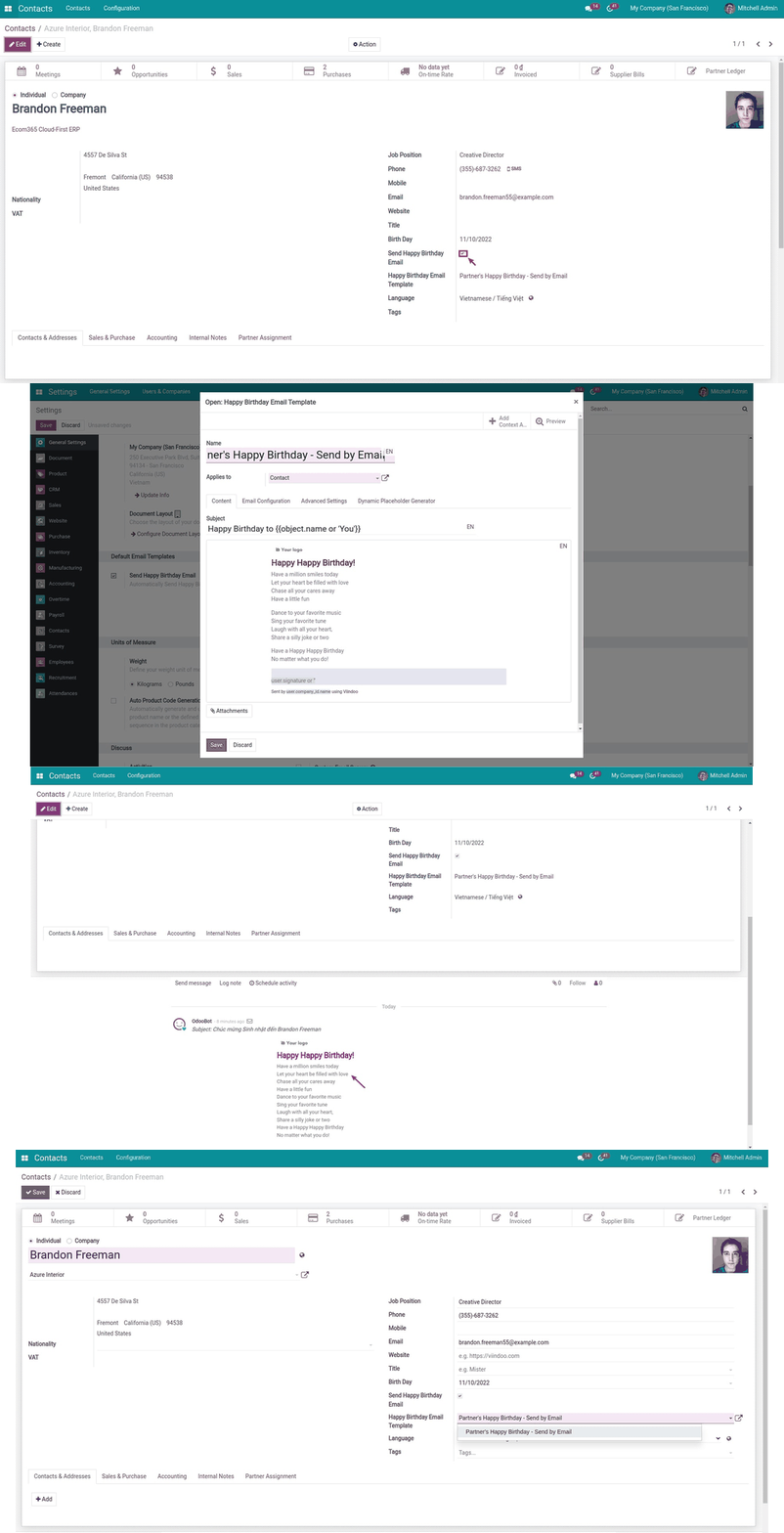
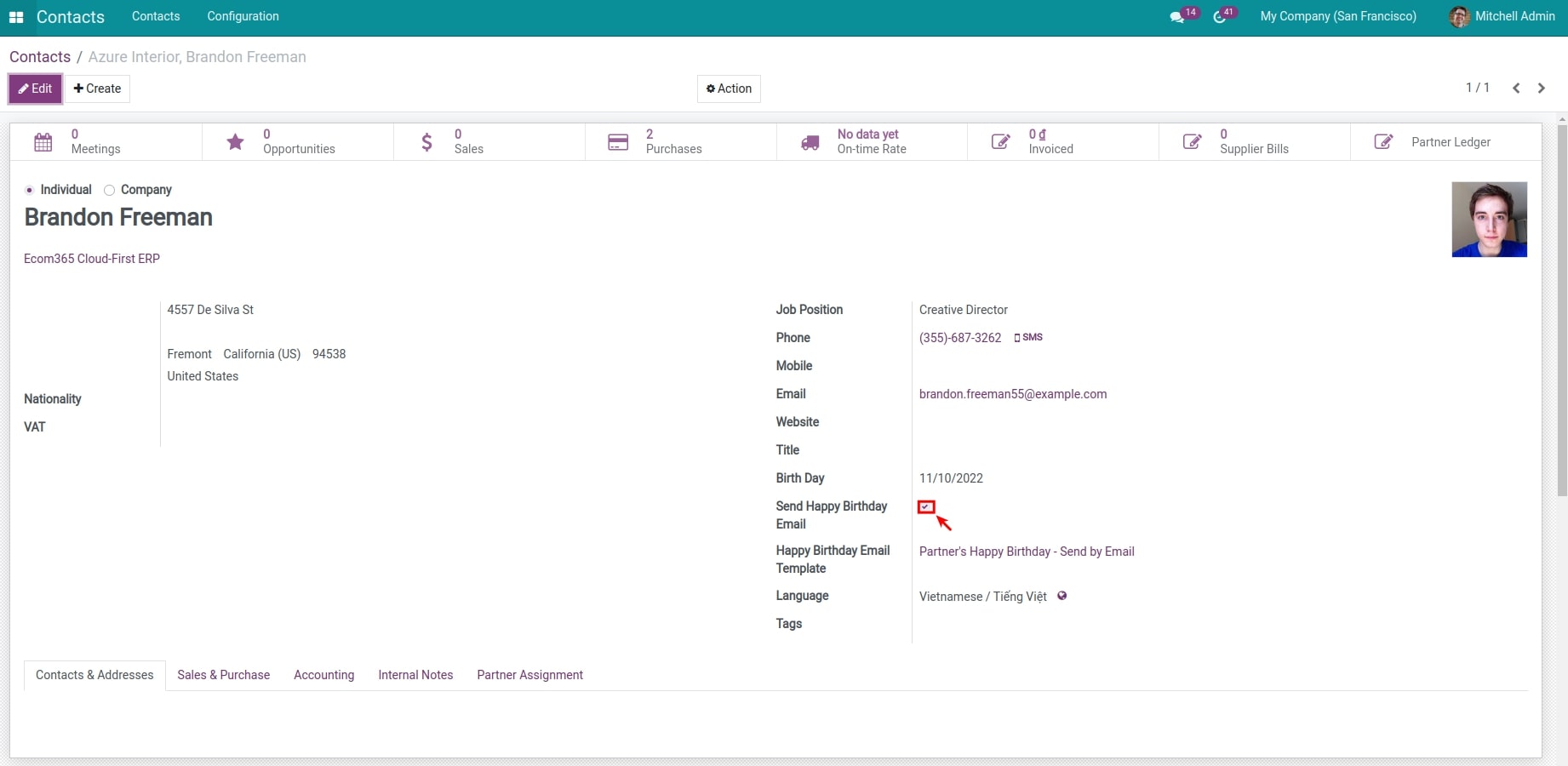
Enable/disable auto-send happy birthday email
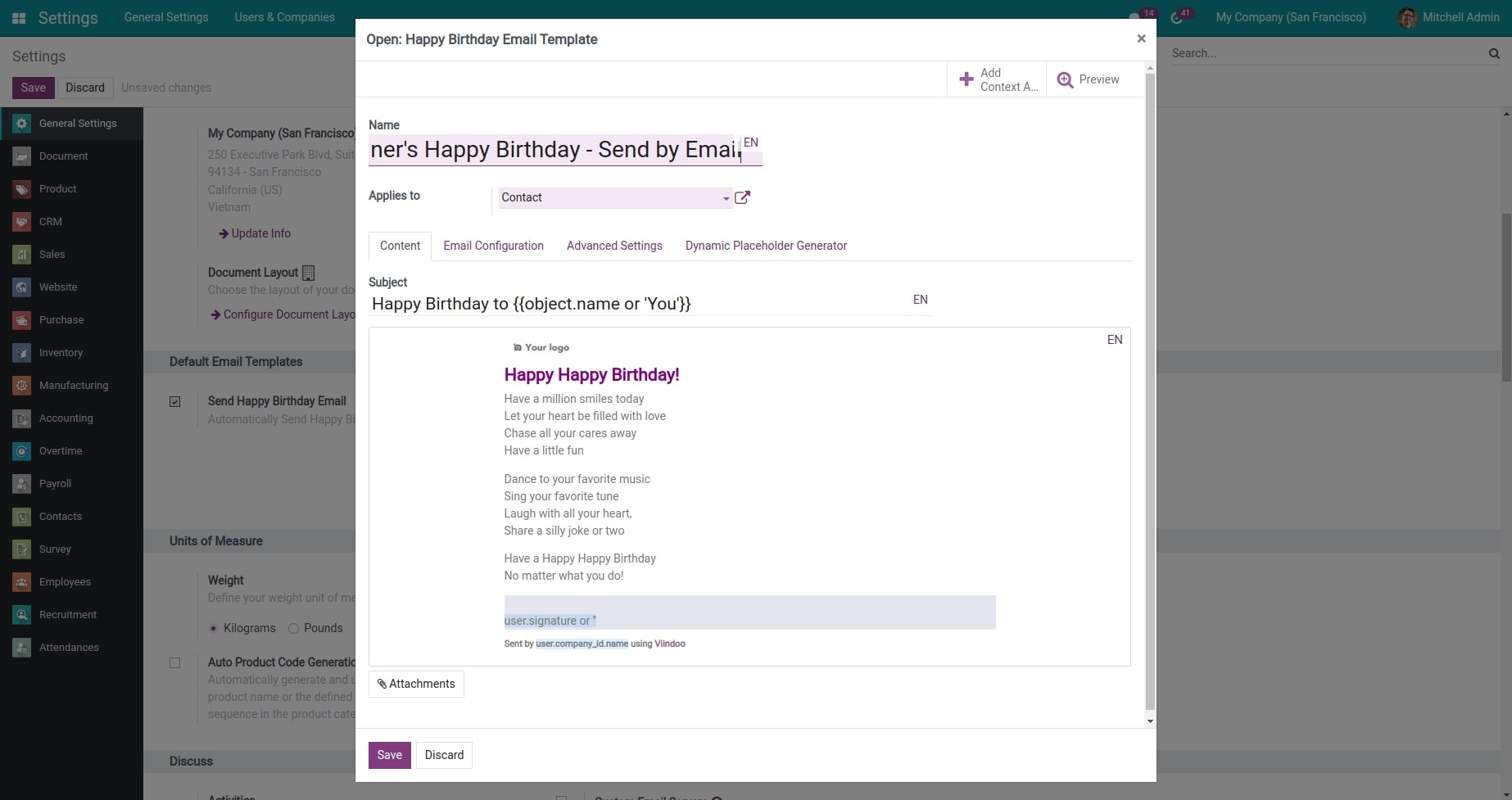
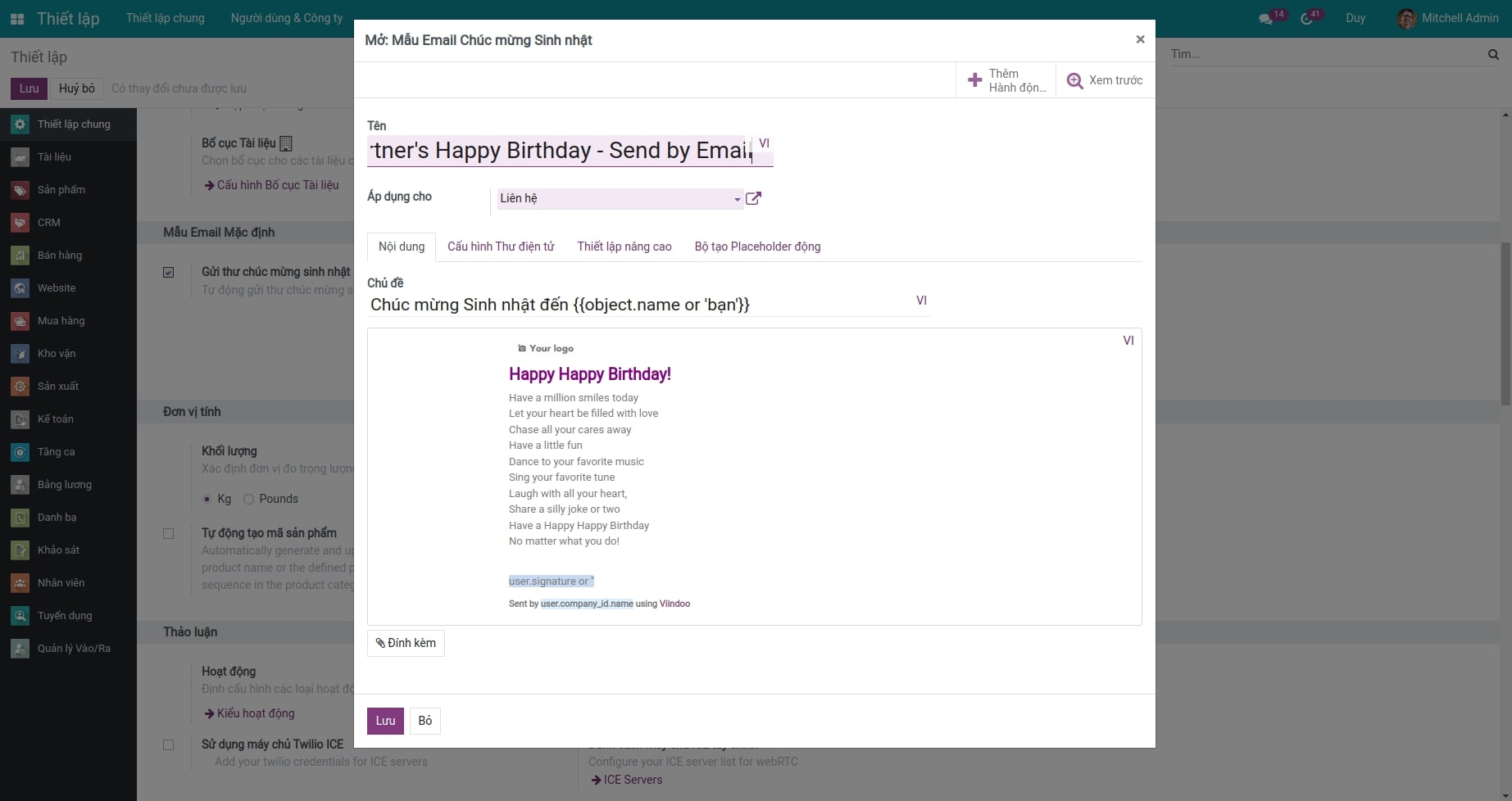
Configure happy birthday mail template
Check the sent mail
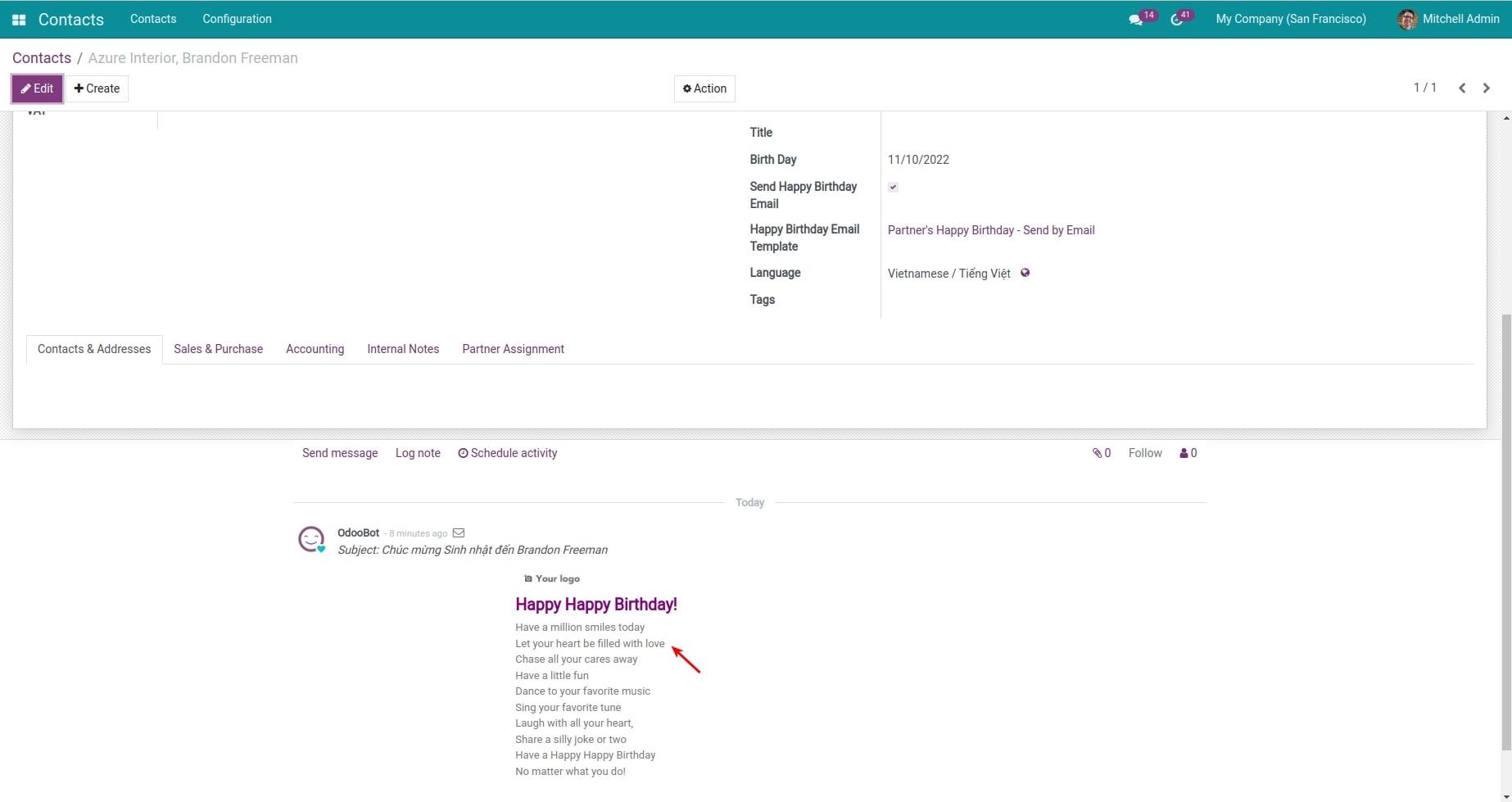
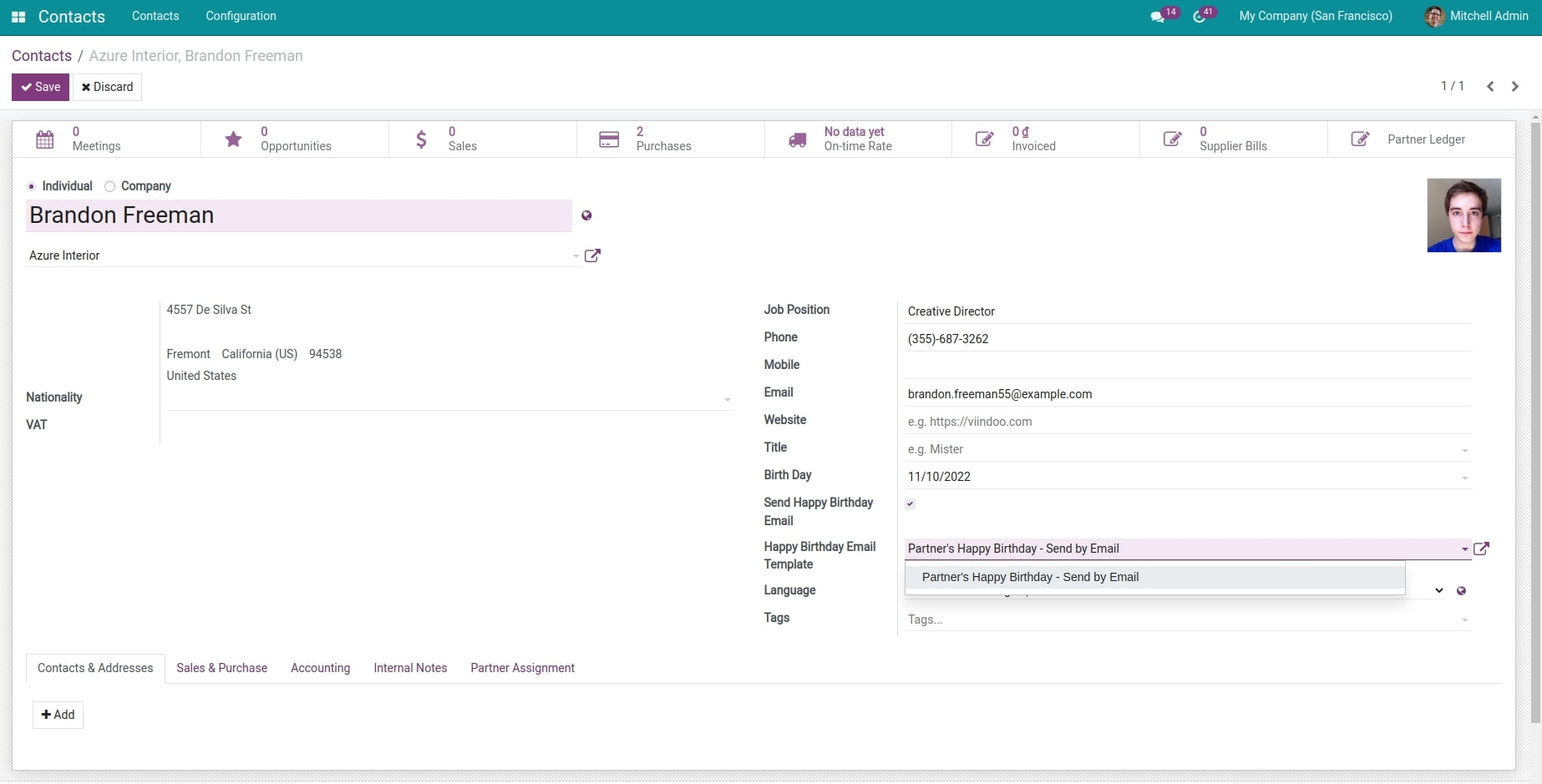
Set up the mail template in the partner profile.
See Auto Send Happy Birthday Email in Action
See how this module solves real business problems in a working Viindoo environment.
Need help with Auto Send Happy Birthday Email?
For questions, implementation support, or consulting services, contact Viindoo.
Pre-Sales & Partnership
When contacting us, please include:
- Odoo/Viindoo version (CE/EE).
- Number of users and business scope.
- Other modules currently in use.
Technical Support
For faster troubleshooting, please provide:
- Order number or app reference.
- Odoo/Viindoo version & edition.
- Steps to reproduce the issue.
- Screenshots/logs if available.
Technical Requirement
Who Should Use This Module?
Built for teams that need this capability fully integrated into their Odoo/Viindoo stack.
Businesses
Businesses aiming to strengthen customer and partner relationships through automated engagement.
Companies with large customer databases
Companies with large customer databases that cannot manually manage birthday greetings but want a personalized experience.
Retail, e-commerce, and service-based businesses
looking to use birthday emails as a soft marketing opportunity, possibly with special promotions.
Multi-brand and multi-branch companies
needing to send customized birthday greetings for each entity without confusion.
Cài đặt
- Truy cập Ứng dụng.
- Tìm từ khóa to_partner_dob_send_email.
- Nhấn Cài đặt.
Hướng dẫn sử dụng
Video hướng dẫn: Tự Động Gửi Email Chúc Mừng Sinh Nhật
- Sau khi cài đặt xong module, vào Thiết lập > Thiết lập chung > Mẫu mail mặc định. Trong menu Mẫu email mặc định, tích chọn Gửi email chúc mừng sinh nhật và chọn Mẫu email chúc mừng sinh nhật. Đây là mẫu mặc định nếu không có lựa chọn mẫu cụ thể trên từng đối tác.
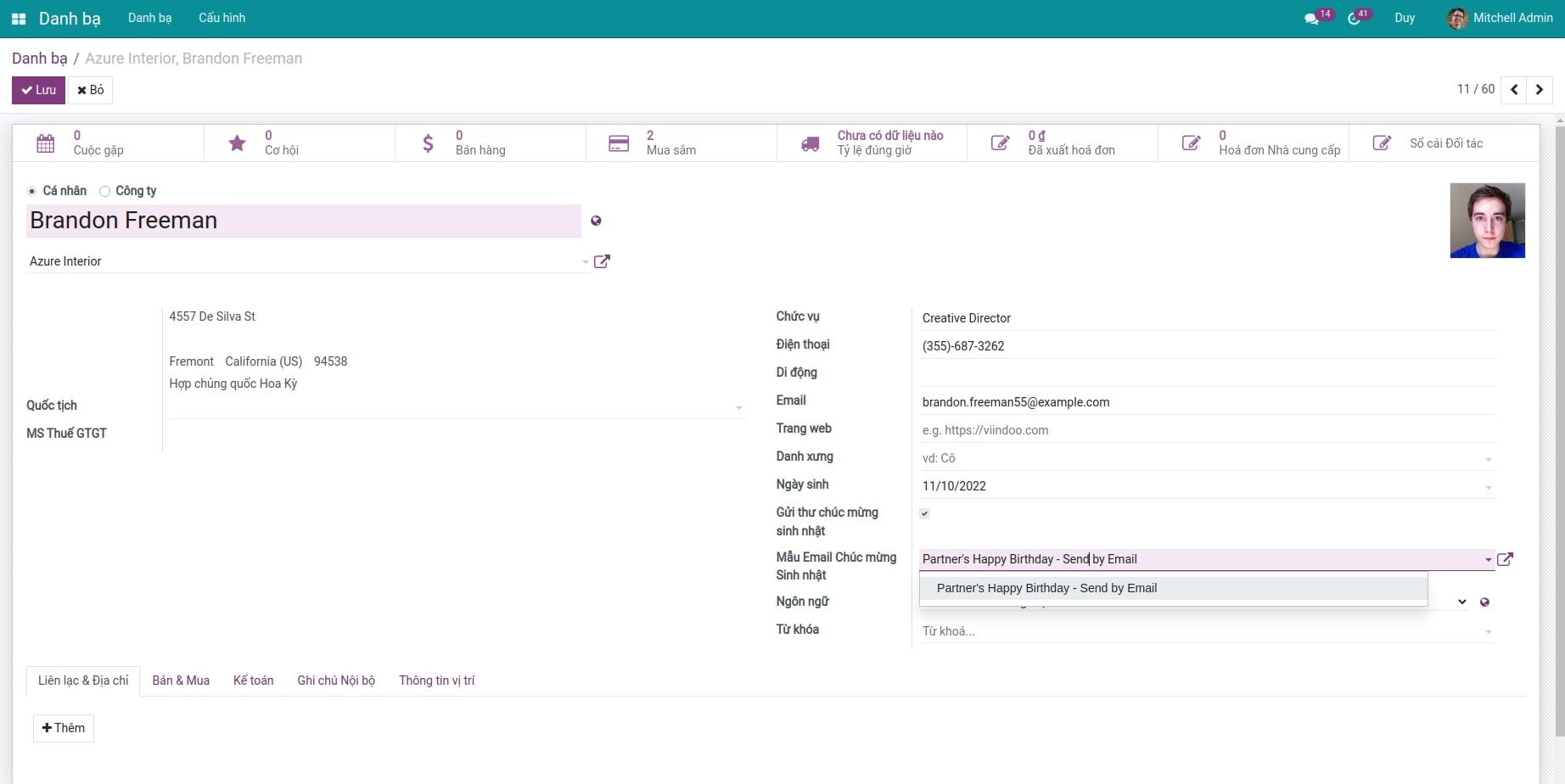
- Mở hồ sơ đối tác, nhập ngày sinh và thiết lập mẫu mail chúc mừng sinh nhật cho đối tác. Tại đây, bạn có thể chọn lựa hoặc cấu hình các mẫu mail riêng cho đối tác này.
Lưu ý: Đối tác ở đây phải là cá nhân.
- Khi thiết lập xong, tới ngày sinh của đối tác, hệ thống sẽ tự động gửi email chúc mừng sinh nhật địa chỉ mail của đối tác. Người quản trị có thể kiểm tra lại ở khu vực trao đổi thông tin trong hồ sơ đối tác đó.
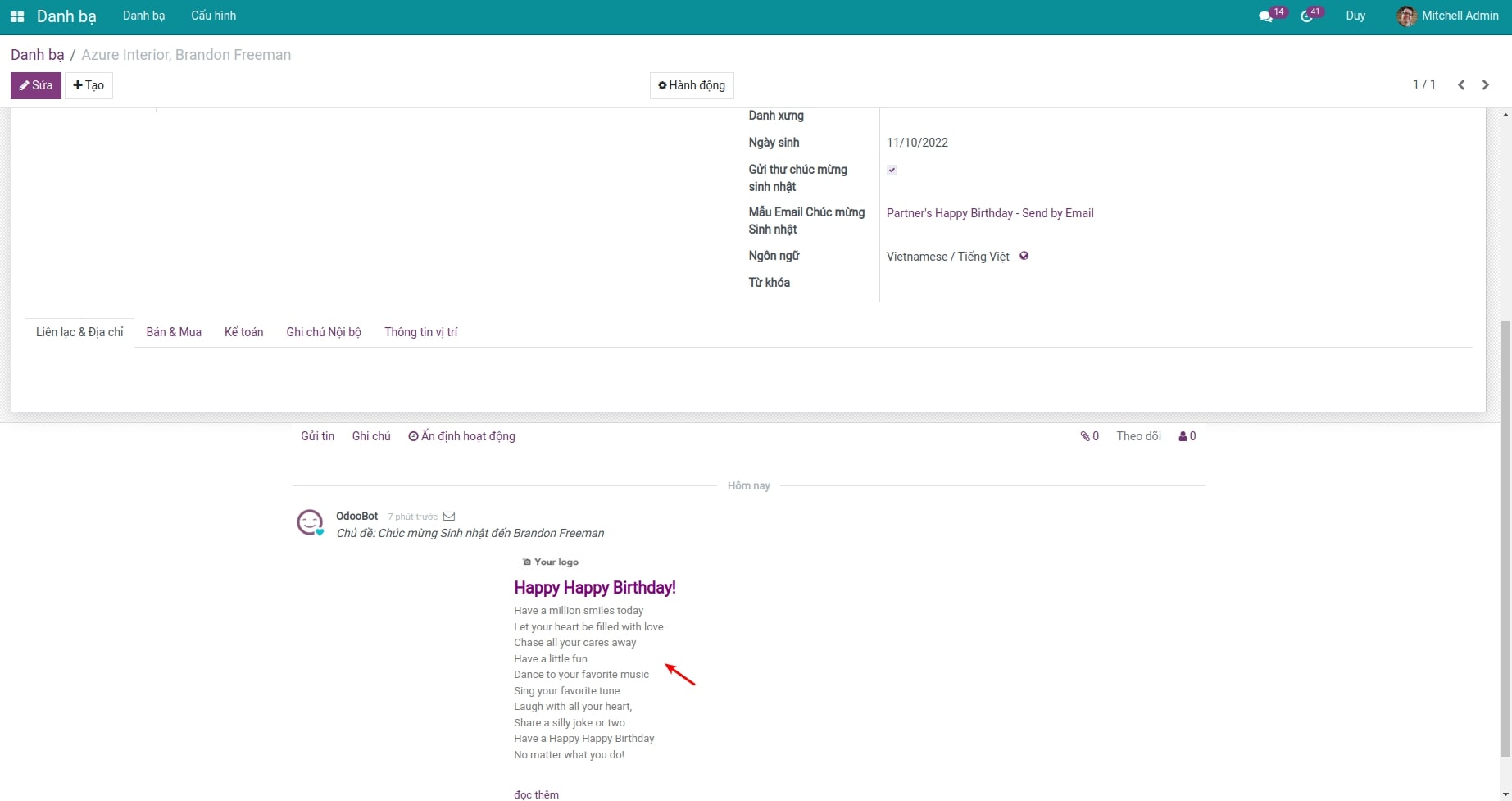
- Ngoài ra, cùng một đối tác nhưng ở các công ty khác nhau có thể lựa chọn các mẫu email khác nhau.
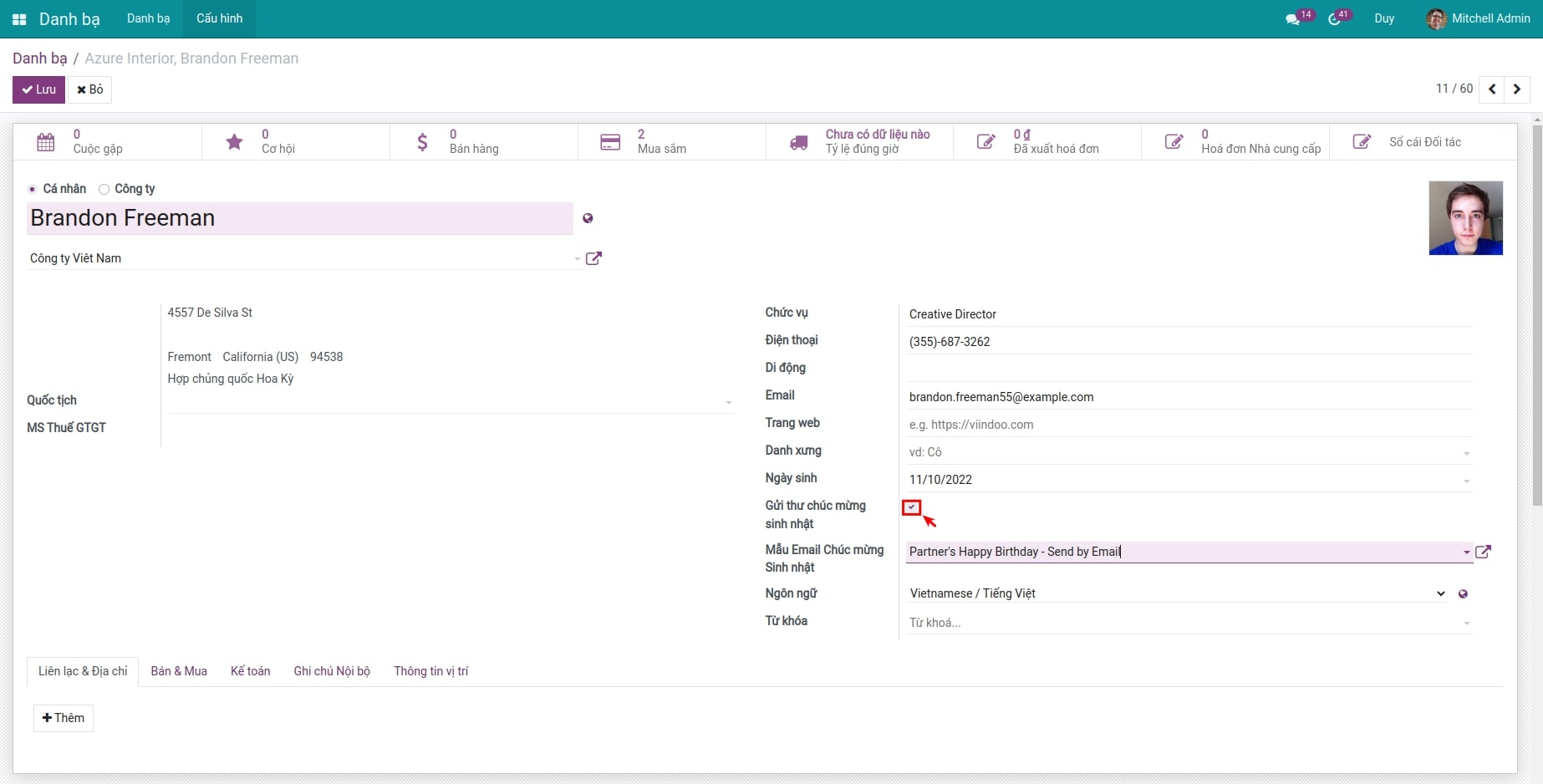
- Nếu không sử dụng tự động gửi mail cho từng đối tác, bạn truy cập vào Danh bạ > Chọn hồ sơ đối tác, bấm nút Gửi thư chúc mừng sinh nhật.
Phần mềm này và các tệp liên kết ("Phần mềm") được sử dụng (chạy, tuỳ biến, chạy sau khi được tuỳ biến) chỉ khi bạn mua được giấy phép có hiệu lực từ tác giả, điển hình như qua các Ứng dụng Odoo, hoặc trong trường hợp bạn nhận được thoả thuận bằng văn bản từ tác giả của Phần mềm (chi tiết tại tệp COPYRIGHT).
Bạn có thể phát triển các phân hệ Odoo có sử dụng Phần mềm như một Thư viện (thường là phụ thuộc vào, nhập vào và sử dụng nguồn của nó) nhưng không sao chéo bất kỳ mã nguồn hay tài liệu nào thuộc Phần mềm. Bạn có thể phân phối những phân hệ này theo giấy phép mà bạn lựa chọn, miễn sao nội dung giấy phép đó tương tích với điều khoản của Giấy phép Phần mềm Độc quyền Odoo (ví dụ: LGPL, MIT hay bất kỳ loại giấy phép phần mềm độc quyền nào tương tự vậy).
Nghiêm cấm phát hành, phân phối, cấp phép lại hoặc bán bản sao của Phần mềm hoặc bản sao Phần mềm đã được sửa đổi.
Thông báo bản quyền và chấp thuận nêu trên buộc phải được bao gồm trong tất cả các bản sao hoặc các phần quan trọng của Phần mềm.
PHẦN MỀM ĐƯỢC CUNG CẤP "NGUYÊN TRẠNG", KHÔNG BẢO ĐẢM DƯỚI BẤT KỲ HÌNH THỨC NÀO, ĐƯỢC THỂ HIỆN RÕ RÀNG HOẶC NGỤ Ý, KHÔNG GIỚI HẠN ĐẢM BẢO VỀ CÁC BẢO ĐẢM NGỤ Ý VỀ KHẢ NĂNG THƯƠNG MẠI, PHÙ HỢP VỚI MỤC ĐÍCH CỤ THỂ VÀ KHÔNG VI PHẠM. TRONG MỌI TRƯỜNG HỢP SẼ KHÔNG CÓ TÁC GIẢ HOẶC CHỦ SỞ HỮU BẢN QUYỀN NÀO CHỊU TRÁCH NHIỆM VỀ BẤT KỲ KHIẾU NẠI, THIỆT HẠI HOẶC TRÁCH NHIỆM PHÁP LÝ KHÁC NÀO TRONG PHẠM VI HỢP ĐỒNG, CÁC THIỆT HẠI HOẶC CÁCH KHÁC, PHÁT SINH TỪ, NGOÀI HOẶC CÓ LIÊN KẾT VỚI PHẦN MỀM HOẶC VIỆC SỬ DỤNG HOẶC KINH DOANH KHÁC TẠI PHẦN MỀM.