
Production Cost Dashboard
by Viindoo
| Lines of Code | 697 |
| Technical name | viin_spreadsheet_dashboard_mrp_account |
| License | OPL-1 |
| Website | https://viindoo.com/apps/modules/19.0/viin_spreadsheet_dashboard_mrp_account |
| Required Apps | Manufacturing (mrp) Invoicing (account) Discuss (mail) Inventory (stock) |
| Included Dependencies | Advanced MRP Accounting Viindoo Manufacturing Viindoo Base Viin Warehouse Web Gantt Viin Warehouse Accounting Viin Warehouse Accounting - Enterprise Presentation |

Know what production cost this period, and what it is made of
For manufacturers who follow production cost month by month
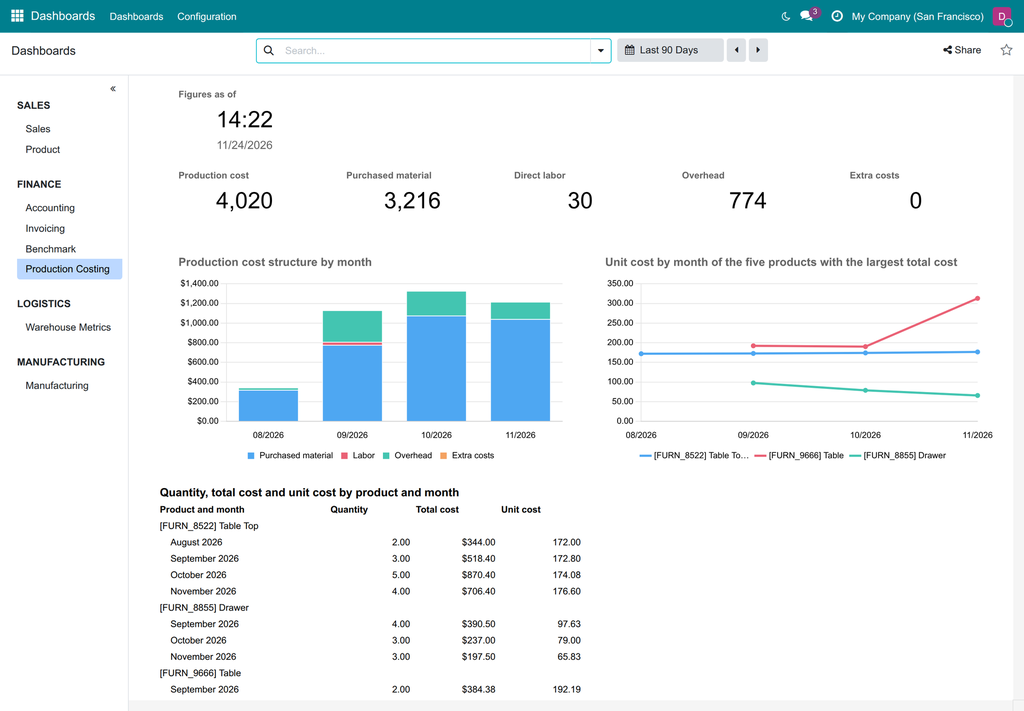
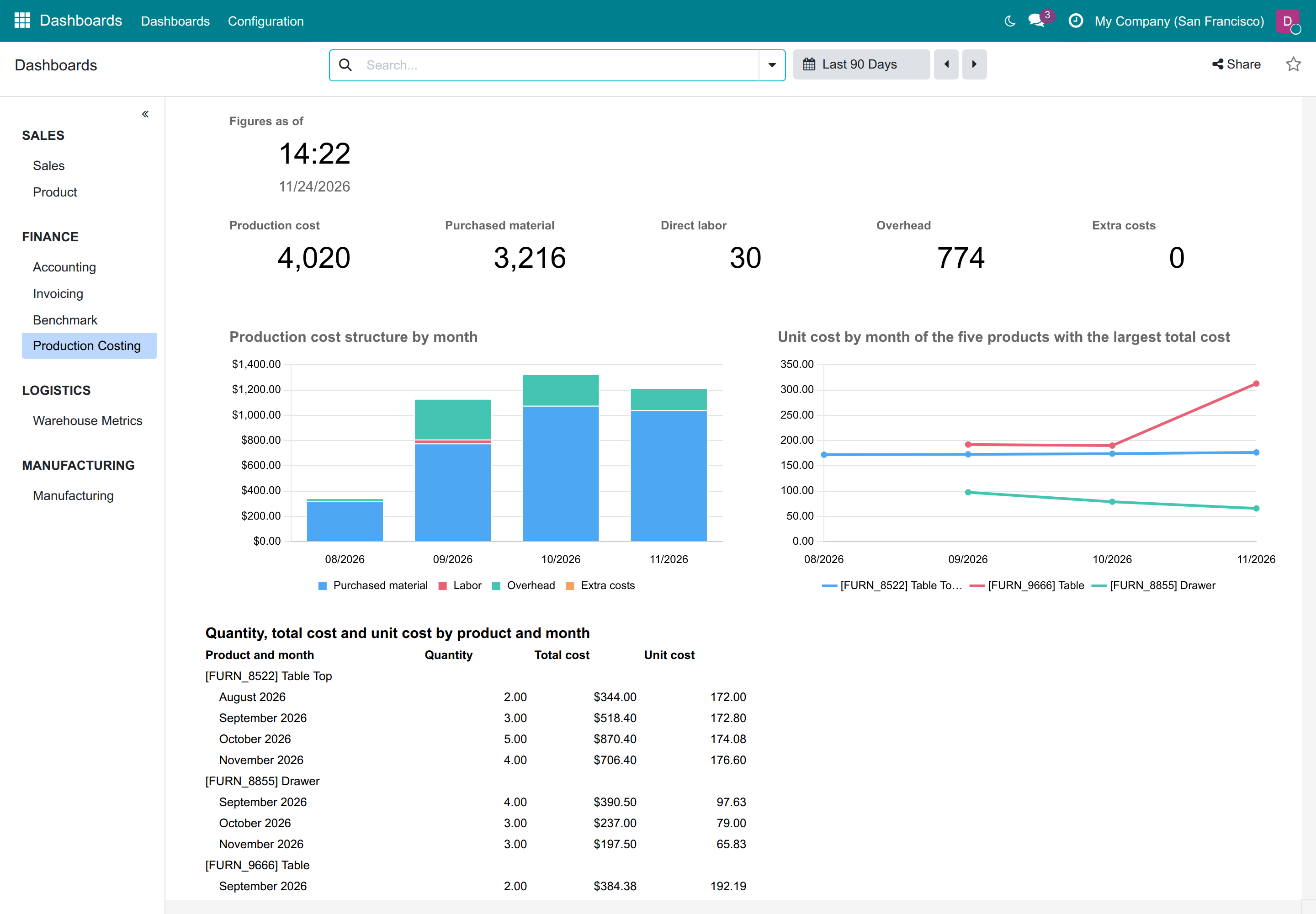
Production cost dashboard: cost of the period, its structure by month and the unit cost by product, equal to the Production Cost Report.
Community Edition, Viindoo Cloud · OPL-1 · English, Vietnamese
Reads the Production Cost Report of Advanced MRP Accounting.
Includes the costs allocated with Production Cost Allocation, when it is installed.
What changes for your team
The cost of a period and its make-up, at a glance
Today: the cost of a quarter is assembled from one report per month.
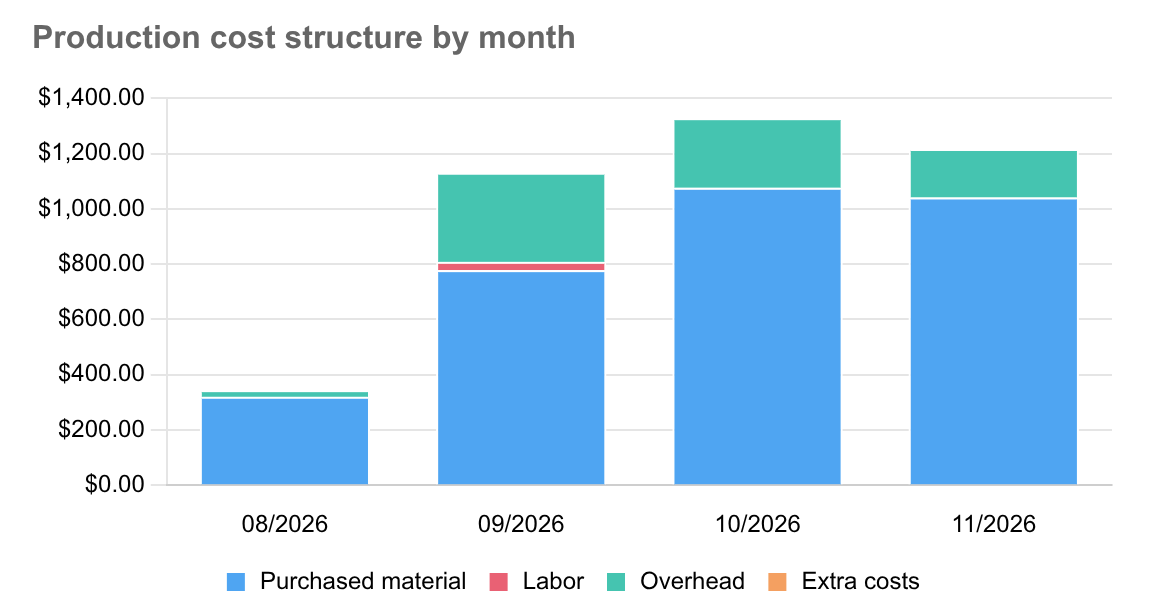
→ The production cost of the period, its four parts, and their structure month by month.
Unit costs that agree with the report
Today: a unit cost quoted in a meeting is checked again against the report.
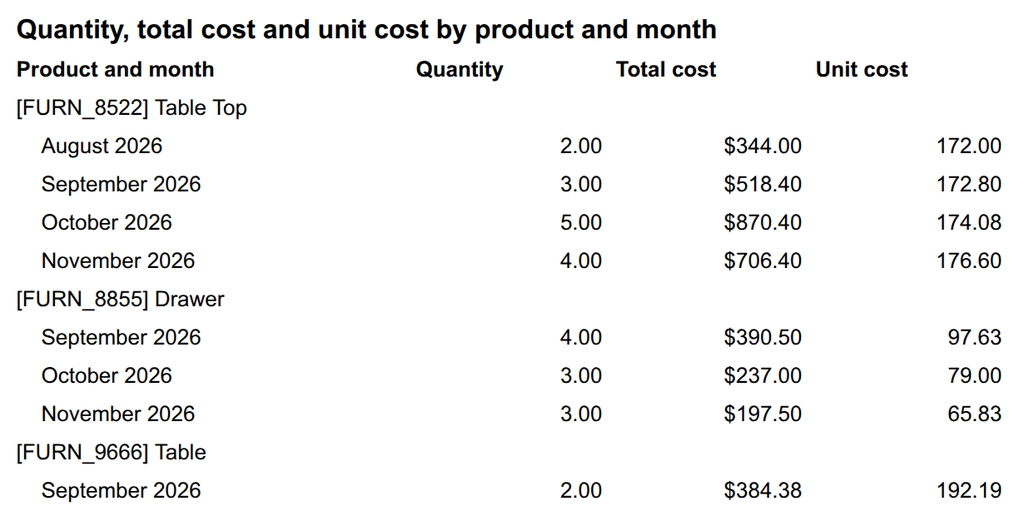
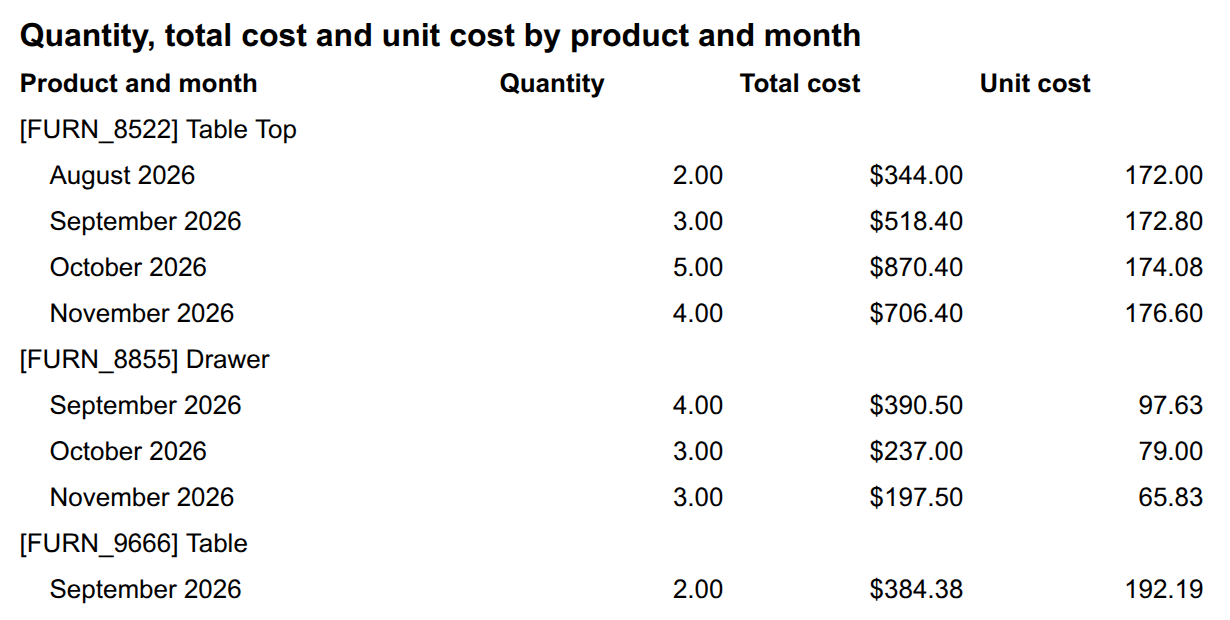
→ Quantity, total cost and unit cost by product and month, each line equal to the Production Cost Report.
Any period, any product
Today: another period means another report, exported and sorted again.
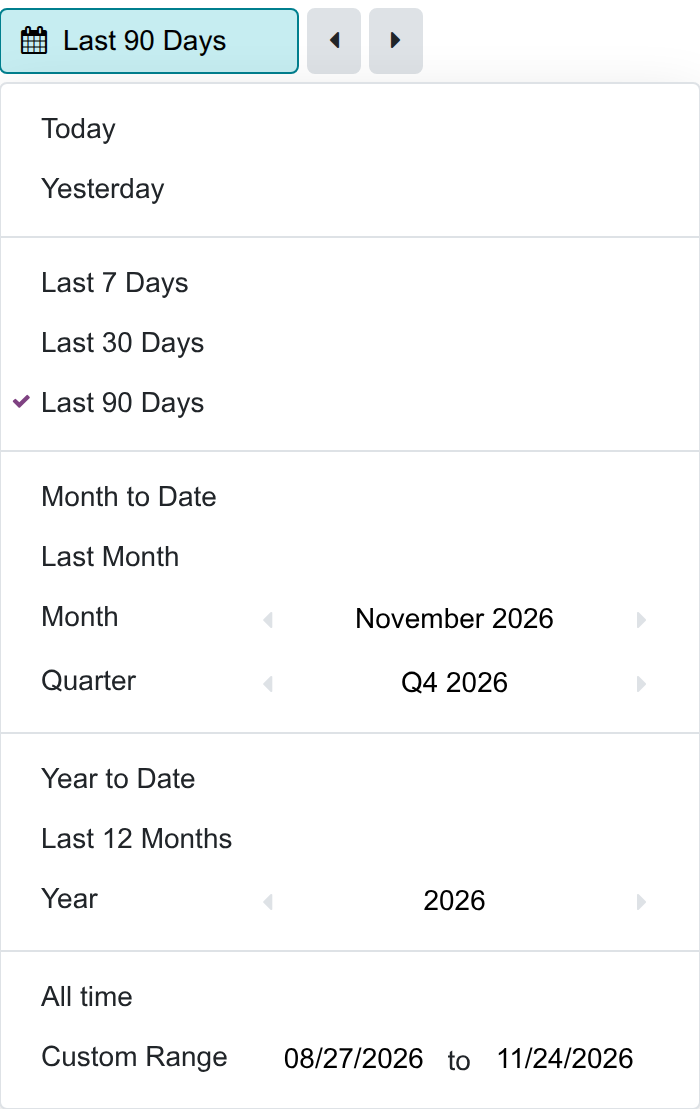
→ Pick a month, a quarter, a year or a custom range, or one product; every figure follows.
What you see as a manager

What did production cost in the period, and what is it made of?
The orders done in the period, in the company's currency; semi-finished products made and consumed in-house count once.
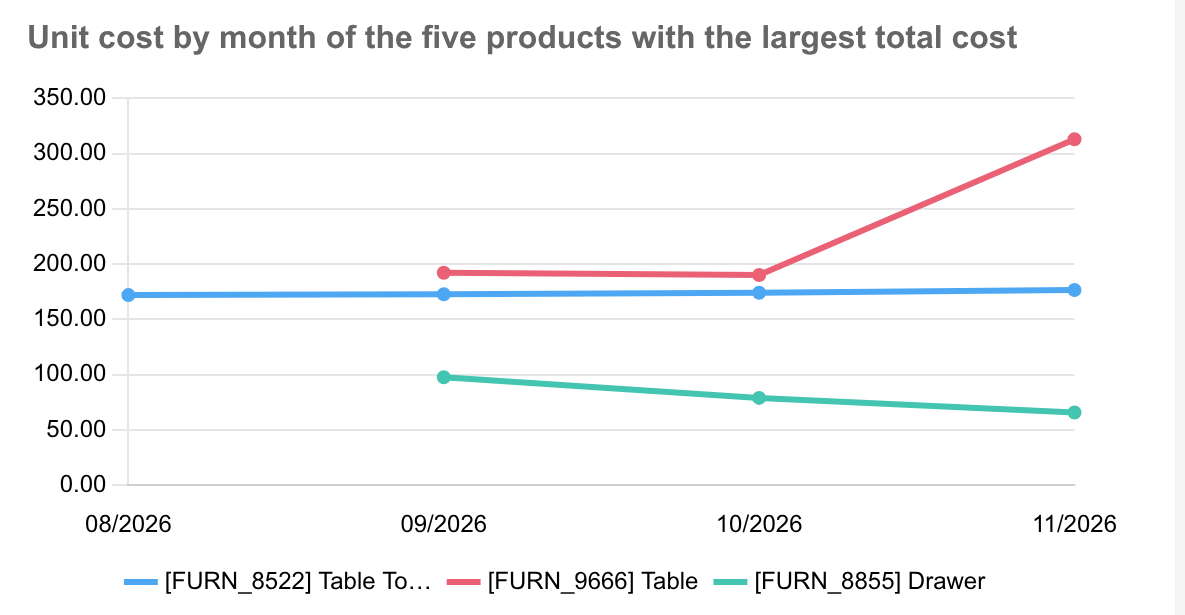
Which products are getting more expensive to make?
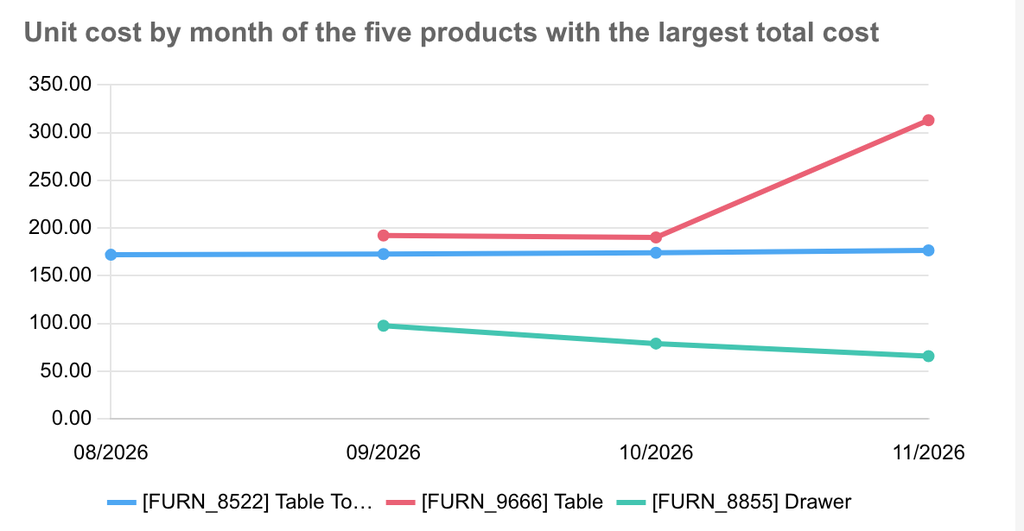
The unit cost by month of the five products with the largest total cost in the period.
Features
Reading the period
- ✓ Production cost of the orders done in the period
- ✓ Its parts: purchased material, direct labor, overhead, extra costs
- ✓ Semi-finished products made and consumed in-house counted once
- ✓ Figures in the company's own currency
Following the trend
- ✓ Structure of the production cost by month
- ✓ Unit cost by month of the five costliest products
- ✓ Quantity, total cost and unit cost by product and month
- ✓ Each table line equals the Production Cost Report
Choosing what to look at
- ✓ Period filter, the last 90 days by default
- ✓ Month, quarter, year, all time or a custom range
- ✓ Product filter to follow one product
Built for daily use
- ✓ Cost changes of done orders arrive, usually within a minute
- ✓ Figures as of shows the time the figures are current to
- ✓ Daily refresh of the orders done since the start of the previous month
- ✓ Each reader sees the current company's figures only
- ✓ Read-only, for users with an Accounting access right
Ready on day one
The dashboard, filled
Production Costing sits under Finance in the Dashboards app, with the orders already done computed right after installation.
What the administrator sets first
An Accounting access right for each reader: Auditor - Readonly or Invoicing & Banks. Nothing else is configured.
Before you decide
Are the figures real time?
No. A scheduled job computes them: a cost change of a done order usually arrives within a minute; a new rate on a closed time record arrives with the daily refresh. The Production Cost Report is exact at all times.
Will it agree with our Production Cost Report?
Yes, product by product and month by month, as the report reads without the breakdown of semi-finished products. The dashboard counts the orders done in the period.
Who sees our costs?
Users with the Accounting right Auditor - Readonly or Invoicing & Banks, for the company they are working in. A user with manufacturing rights only does not see the dashboard.
Does it change how costs are calculated or posted?
No. It reads the costs Advanced MRP Accounting already calculates and writes no journal entry.
What must be installed?
The Dashboards app and Advanced MRP Accounting. No extra Python package or server program.
Try it, then ask us
The Documentation tab walks the accountant and the administrator through the dashboard. Live demo: v19demo-int.viindoo.com/odoo/action-spreadsheet_dashboard.ir_actions_dashboard_action
Pre-sales & partnership
viindoo.com/contactusTechnical support
viindoo.com/ticketProduction Cost Dashboard
For business owners and chief accountants who read the production cost of a period on one screen, for cost accountants who check it, and for the administrator who turns it on.
Note
Extends the Production Cost Report of Advanced MRP Accounting - see its documentation. When Production Cost Allocation is in use, the costs it allocates are on the dashboard too.
Overview
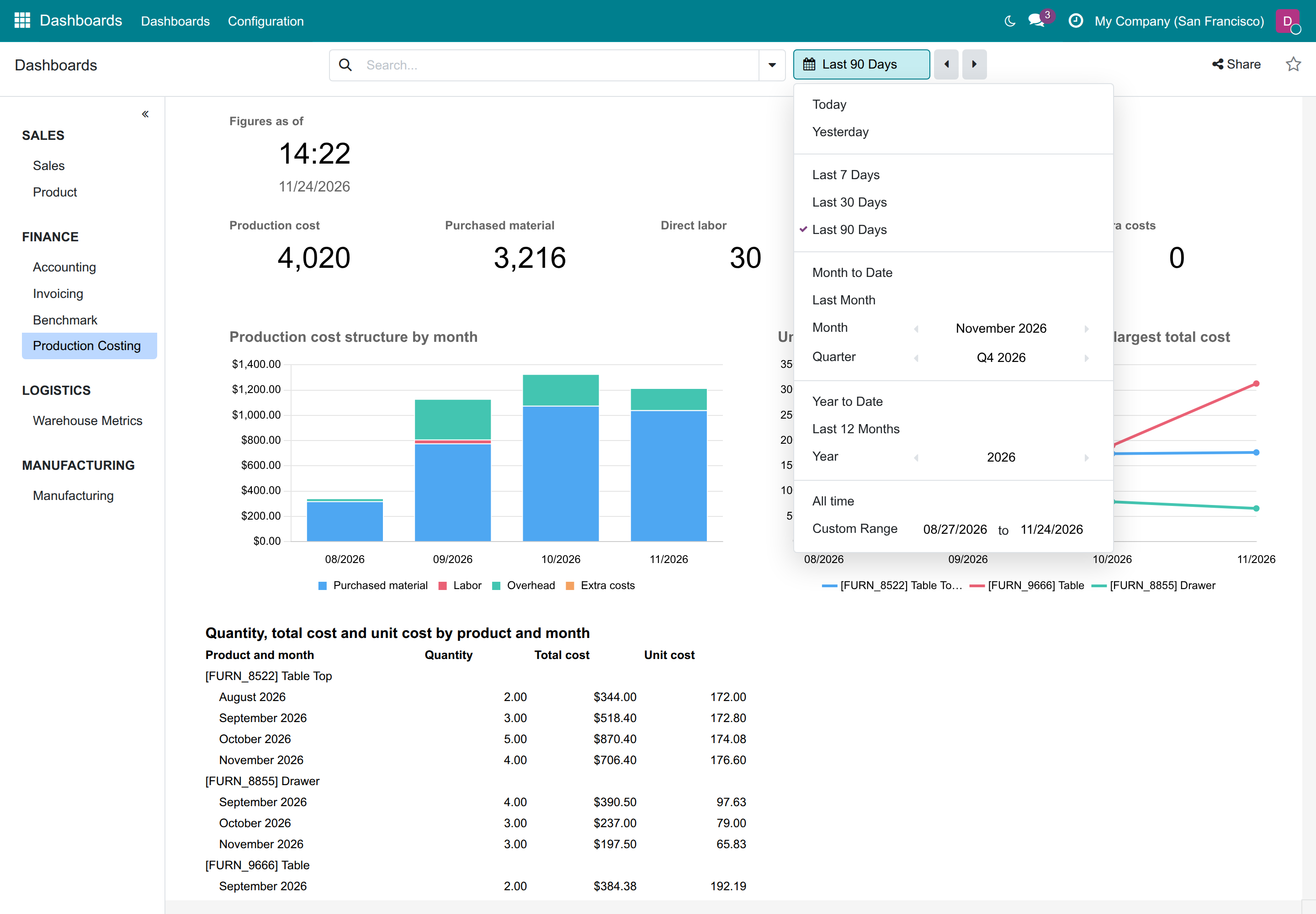
The Production Cost Report answers "what did this product cost in this month" one report at a time. The Production Costing dashboard puts the answer on one screen: what the period's production cost, what that cost is made of, how it moves from month to month and what one unit of each product cost.
Its figures are those of the Production Cost Report (without the breakdown of semi-finished products) for the manufacturing orders done in the period, in the current company and in that company's currency. The dashboard shows:
- Production cost: the total cost of the orders done in the period, less the value of the semi-finished products the company made itself and other orders then consumed, so that the same cost is not counted twice.
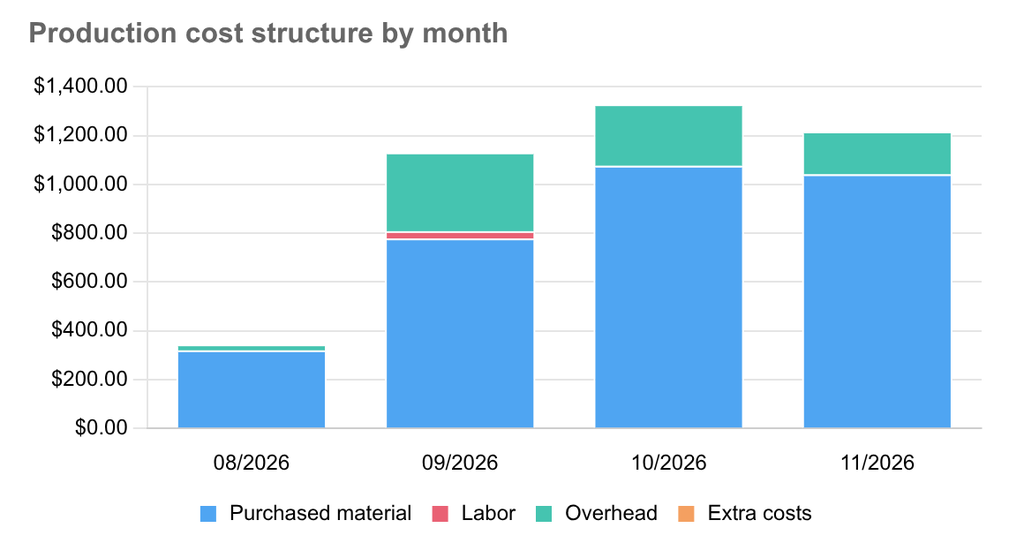
- The four parts of that cost: Purchased material, Direct labor, Overhead and Extra costs.
- Production cost structure by month: a column chart of the same four parts for each month.
- Unit cost by month of the five products with the largest total cost: a line chart.
- Quantity, total cost and unit cost by product and month: a table that holds, for each product and month, the quantity made, its total cost and its unit cost. Each line equals the product's line in the Production Cost Report of that month.
- Figures as of: the time up to which the figures are up to date.
| Role | What they do | Access right to assign |
|---|---|---|
| System Administrator | Turns the dashboard on and checks that its figures are refreshed. | Administration / Settings |
| Business Owner, Chief Accountant (reader) | Reads the dashboard to follow the production cost, its structure and the unit costs. | Accounting / Auditor - Readonly |
| Cost Accountant | Reads the dashboard and compares it with the Production Cost Report. | Accounting / Invoicing & Banks |
Setup (for the Administrator)
- Open Manufacturing > Configuration > Settings, turn on Production Cost Dashboard and click Save. The dashboard is also installed with Apps (search "Production Cost Dashboard" and click Install). It needs Advanced MRP Accounting.
- Give each reader an access right of the Accounting application: Auditor - Readonly or Invoicing & Banks (Settings > Users & Companies > Users, tab Access Rights). A user who has only manufacturing access rights does not see the dashboard in the Dashboards application. When Accounting Accountant is installed, the Accounting Administrator also reads it.
- Nothing else is to be configured. Costs of the orders already done are on the dashboard shortly after the installation.
How fresh the figures are
- A change of a done order that changes its cost - a consumed quantity, a work order, an extra cost, the finished date, a production cost allocation - reaches the dashboard in about a minute.
- A cost that no change of an order announces, such as a new rate of a time record that is already closed or another manufacturing cost type of a work center, reaches the dashboard with the daily refresh of the orders done since the start of the previous month.
- For an older order, the Production Cost Report is the exact figure at all times.
The two jobs that do this are in Settings > Technical > Scheduled Actions (developer mode): Production Cost Dashboard: compute the figures of changed orders and Production Cost Dashboard: refresh the figures of recent orders. Leave both active.
Business Owner and Accountant: read the production cost
Read the production cost of a period
- Open the Dashboards application. In the left panel, under Finance, click Production Costing.
- Wait a moment: the dashboard draws its figures as soon as they are loaded. The period is the Last 90 Days, so the dashboard opens with the orders done today.
- Read the five figures at the top: the production cost of the period and its four parts.
- Read the charts below: the structure of the cost by month and the unit cost by month of the five products with the largest total cost.
- Scroll down to the table to read the quantity, the total cost and the unit cost of each product in each month.
- Check Figures as of: every change of an order saved before that time is on the dashboard.
Look at another period or product
- Click the period button (Last 90 Days by default) and choose another period: a month, a quarter, a year, All time or a Custom Range. Use the arrows beside it to move to the previous or next period.
- Type a product in the search box to follow one product.
All figures, charts and the table follow the filters.
Check the dashboard against the Production Cost Report
Open the Production Cost Report for a month and compare a product's line with the same product and month in the table of the dashboard: the quantity, the total cost and the unit cost are equal. The dashboard shows the whole company's cost in one place, and the report is the detailed document to open when a figure must be explained.
Troubleshooting and FAQ
- The dashboard shows zeros or "Loading..." for a few seconds.
- It is being drawn. The figures appear within a few seconds of opening it.
- The dashboard does not list "Production Costing".
- The user has no access right of the Accounting application (Auditor - Readonly or Invoicing & Banks), or the dashboard is not turned on. A user with manufacturing access rights only does not see it.
- A recent change is not on the dashboard yet.
- Look at Figures as of. A change of an order reaches the dashboard in about a minute; a new rate of a closed time record reaches it with the daily refresh. The Production Cost Report is exact at all times.
- The server log shows an error that the cost of an order changed while its figures were computed.
- The order was changed while the job computed it. Nothing is lost: the order keeps waiting and the next run of the job computes it.
- Why is the production cost smaller than the sum of the total costs in the table?
- The table shows every product, including the semi-finished products. The production cost of the period leaves out the semi-finished products the company made that other orders consumed, which is already in the cost of those orders.
- Whose figures are these?
- Those of the current company, in its currency. Switch the company to read another one.
This software and associated files (the "Software") may only be used (executed, modified, executed after modifications) if you have purchased a valid license from the authors, typically via Odoo Apps, or if you have received a written agreement from the authors of the Software (see the COPYRIGHT file).
You may develop Odoo modules that use the Software as a library (typically by depending on it, importing it and using its resources), but without copying any source code or material from the Software. You may distribute those modules under the license of your choice, provided that this license is compatible with the terms of the Odoo Proprietary License (For example: LGPL, MIT, or proprietary licenses similar to this one).
It is forbidden to publish, distribute, sublicense, or sell copies of the Software or modified copies of the Software.
The above copyright notice and this permission notice must be included in all copies or substantial portions of the Software.
THE SOFTWARE IS PROVIDED "AS IS", WITHOUT WARRANTY OF ANY KIND, EXPRESS OR IMPLIED, INCLUDING BUT NOT LIMITED TO THE WARRANTIES OF MERCHANTABILITY, FITNESS FOR A PARTICULAR PURPOSE AND NONINFRINGEMENT. IN NO EVENT SHALL THE AUTHORS OR COPYRIGHT HOLDERS BE LIABLE FOR ANY CLAIM, DAMAGES OR OTHER LIABILITY, WHETHER IN AN ACTION OF CONTRACT, TORT OR OTHERWISE, ARISING FROM, OUT OF OR IN CONNECTION WITH THE SOFTWARE OR THE USE OR OTHER DEALINGS IN THE SOFTWARE.