
Vietnam - Overtime
by Viindoo
| Lines of Code | 1718 |
| Technical name | l10n_vn_viin_hr_overtime |
| License | OPL-1 |
| Website | https://viindoo.com/apps/modules/19.0/l10n_vn_viin_hr_overtime |
| Required Apps | Discuss (mail) Employees (hr) |
| Included Dependencies | Viindoo Base Overtime Advanced HR Management HR Contracts (Viindoo) Work Entry Work Entry - Contract Base Addendum Viindoo Holiday & WorkDay Manager Safe IR Metadata Proxies |

Vietnam's legal overtime rates, ready on install and dated, so the next change is just data
For HR and payroll administrators of companies in Vietnam, and the consultants who set them up
Vietnamese overtime codes, legal pay rates and overtime rules as editable dated data
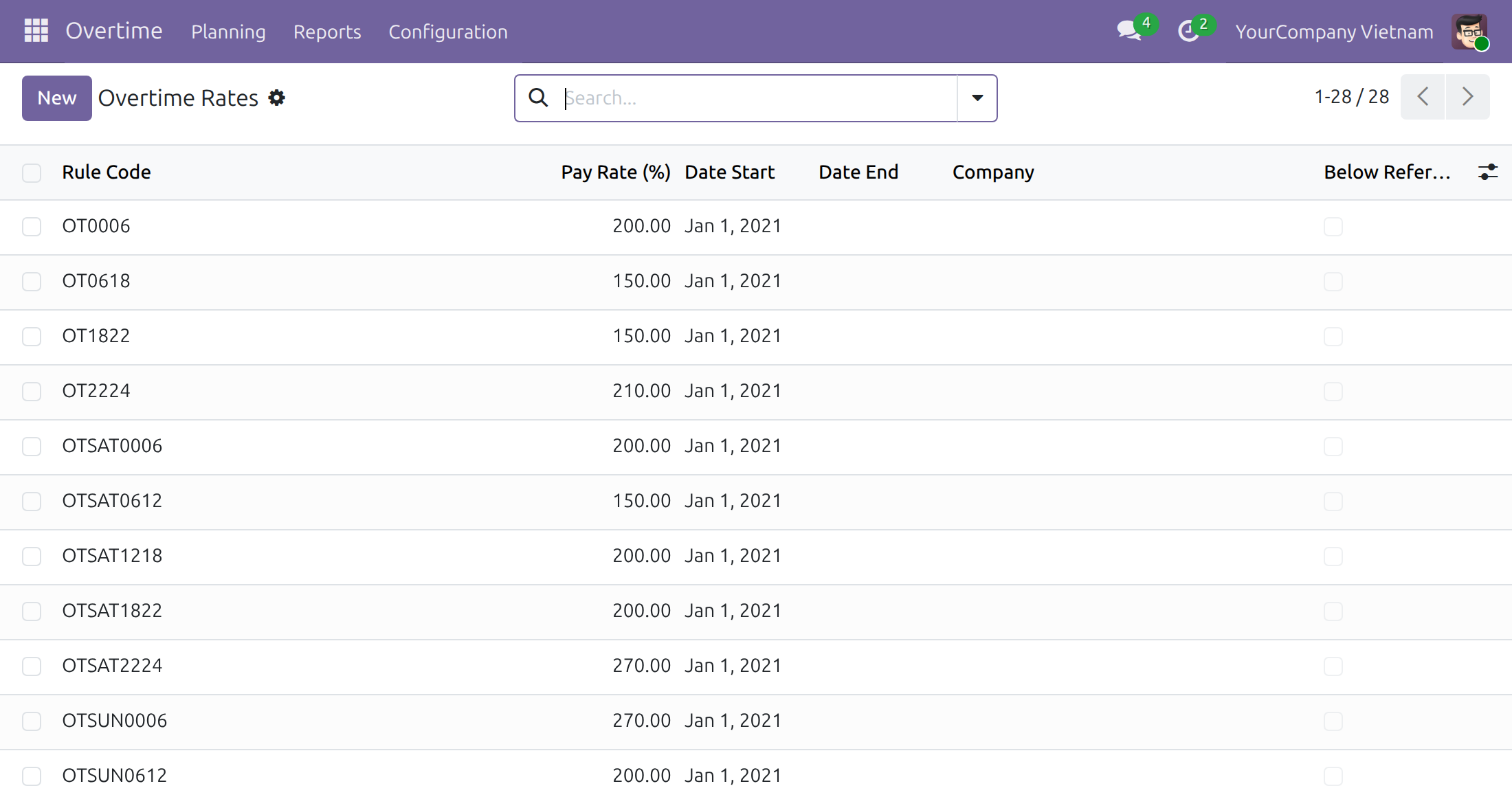
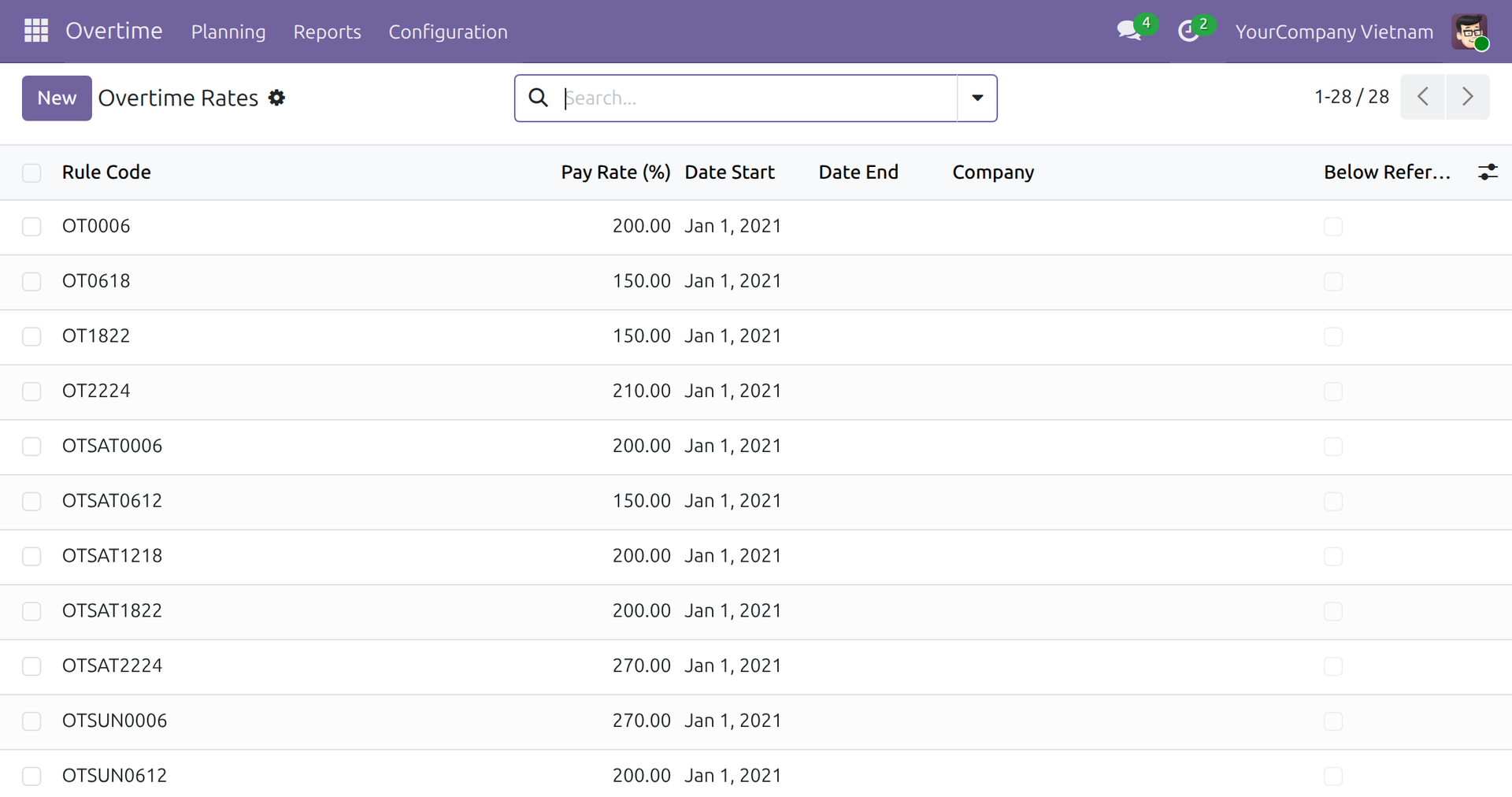
Works inside Overtime: the Vietnamese codes, rates, rules and work entry types its plans are priced with, installed with it for a company in Vietnam.
Is this you?
Before the first overtime plan, someone has to type every code, rate and rule - and hope none is wrong.
Is a Sunday night paid like a Saturday afternoon? The rate table lives in a spreadsheet nobody fully trusts.
When a rate changes, you either overwrite the old one and lose the history, or rebuild the sheet.
Your work rules set a weekly rest day that the standard setup does not assume.
Payroll needs workday, rest day and holiday hours apart, but overtime arrives as one lump.
What changes
Before the first overtime plan, someone has to type every code, rate and rule - and hope none is wrong.
→ Install, then plan: the codes, rates, rules and work entry types are already there for every company in Vietnam.
Is a Sunday night paid like a Saturday afternoon? The rate table lives in a spreadsheet nobody fully trusts.
→ Each code carries the legal minimum for its kind of day and time band, with the articles it rests on cited in the user guide.
When a rate changes, you either overwrite the old one and lose the history, or rebuild the sheet.
→ Add a rate with a start date: plans from that date use it, plans already made keep theirs.
Your work rules set a weekly rest day that the standard setup does not assume.
→ Edit the rules on screen to the company's own weekly rest day; the code keeps the day type right.
Payroll needs workday, rest day and holiday hours apart, but overtime arrives as one lump.
→ Overtime work entries are typed by day kind, by day and by night, so payroll can pay each separately.
Key Features
Ready-made overtime codes
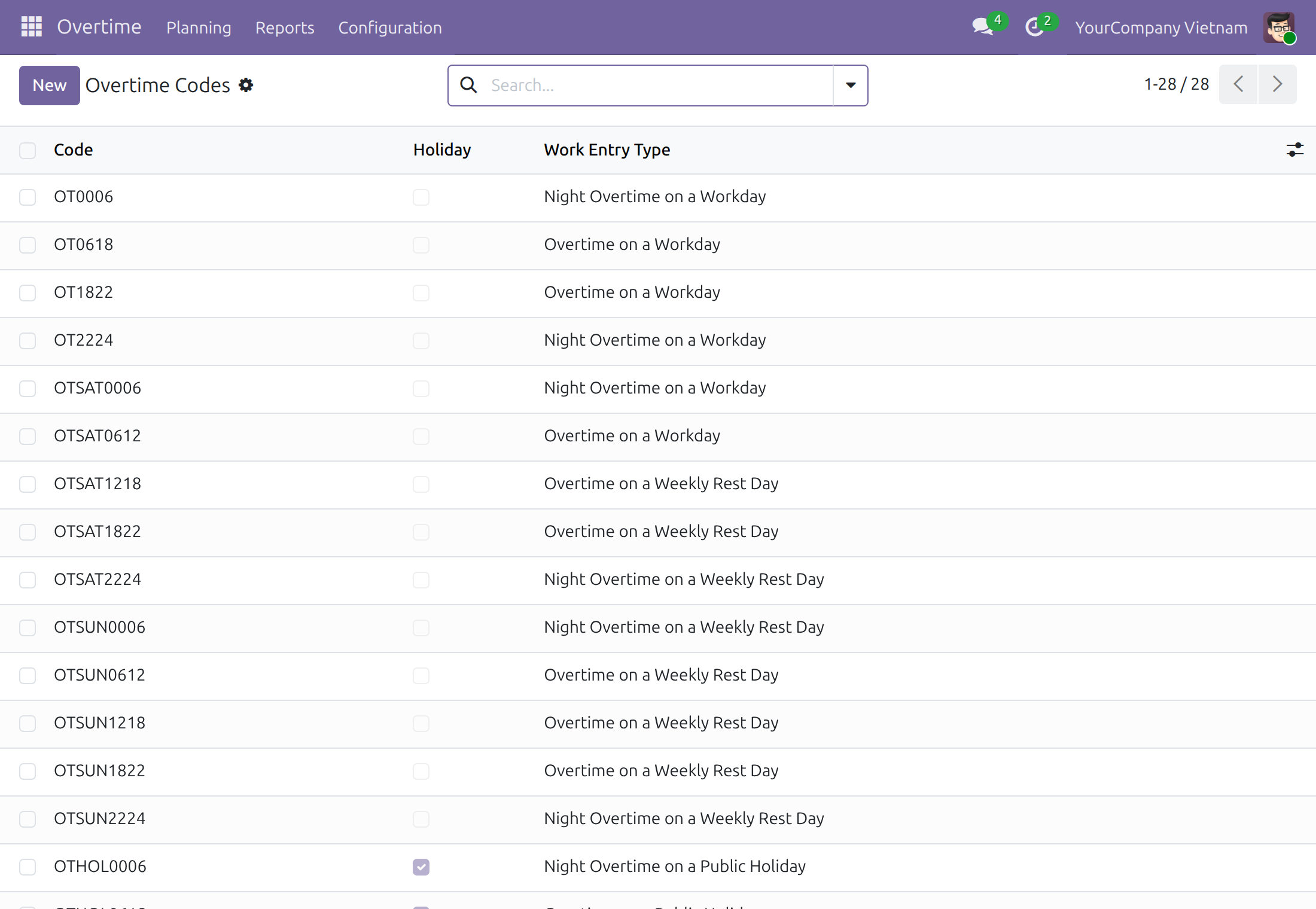
One code per kind of day and time band: workday, Saturday, Sunday, public holiday, and a public holiday that falls on a Saturday or a Sunday.
Legal minimum rates, with a start date
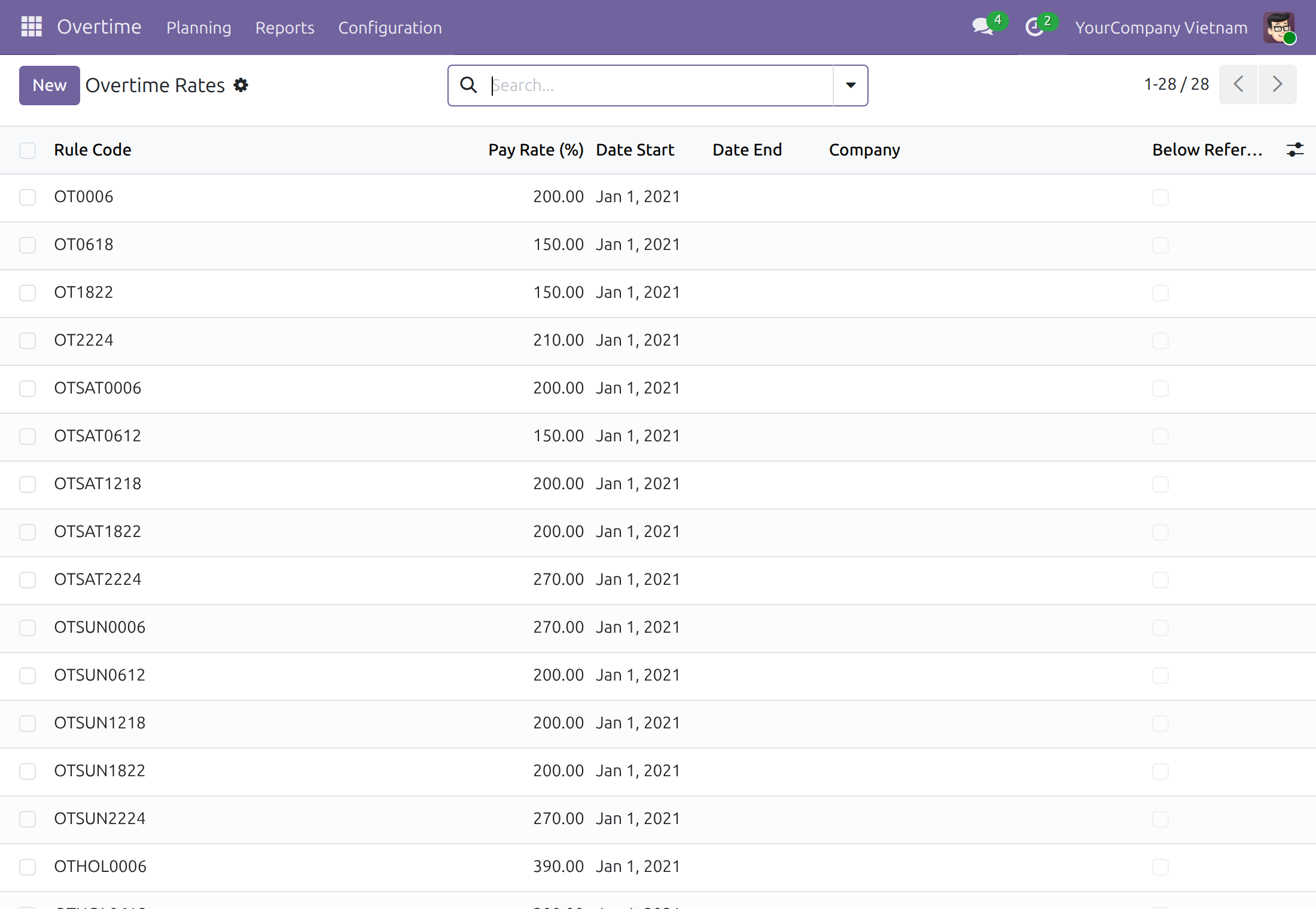
Workday 150%, weekly rest day 200%, public holiday 300%, and the night rates 210%, 270% and 390%, in force from 1 January 2021 and shared by every company.
Rules for every Vietnamese company
Every weekday and time band, for normal days and public holidays, is mapped to a code. Existing companies receive them at install, new ones when created, never twice.
Work entry types by day kind
Overtime is typed as workday, weekly rest day or public holiday, each by day and by night, so payroll can treat them separately.
Yours to adjust
Set a higher company rate, move the weekly rest day, end a rule and start another. Later updates never overwrite what you changed.
Safe beside what you already have
A code of the same name that already exists is kept and used, with its shared rate. When that rate is below the legal one, a note on it says so.
Who it is for
HR administrator
Starts overtime planning without typing codes and rules first, then adapts them to the company's work rules.
Payroll administrator
Gets overtime work entries already separated by day kind and rates dated, so a payslip figure can be traced to a rate.
Implementation consultant
Delivers a Vietnamese overtime setup on day one and spends the saved time on the client's own rest-day and rate decisions.
HR manager or finance lead
Sees the legal minimums, with their source articles, in one editable table instead of in someone's spreadsheet.
Best for: companies in Vietnam that plan overtime in Odoo and want the legal rates and rules in place from the first plan.
A code for every kind of day and time band
Legal pay rates, each with a start date
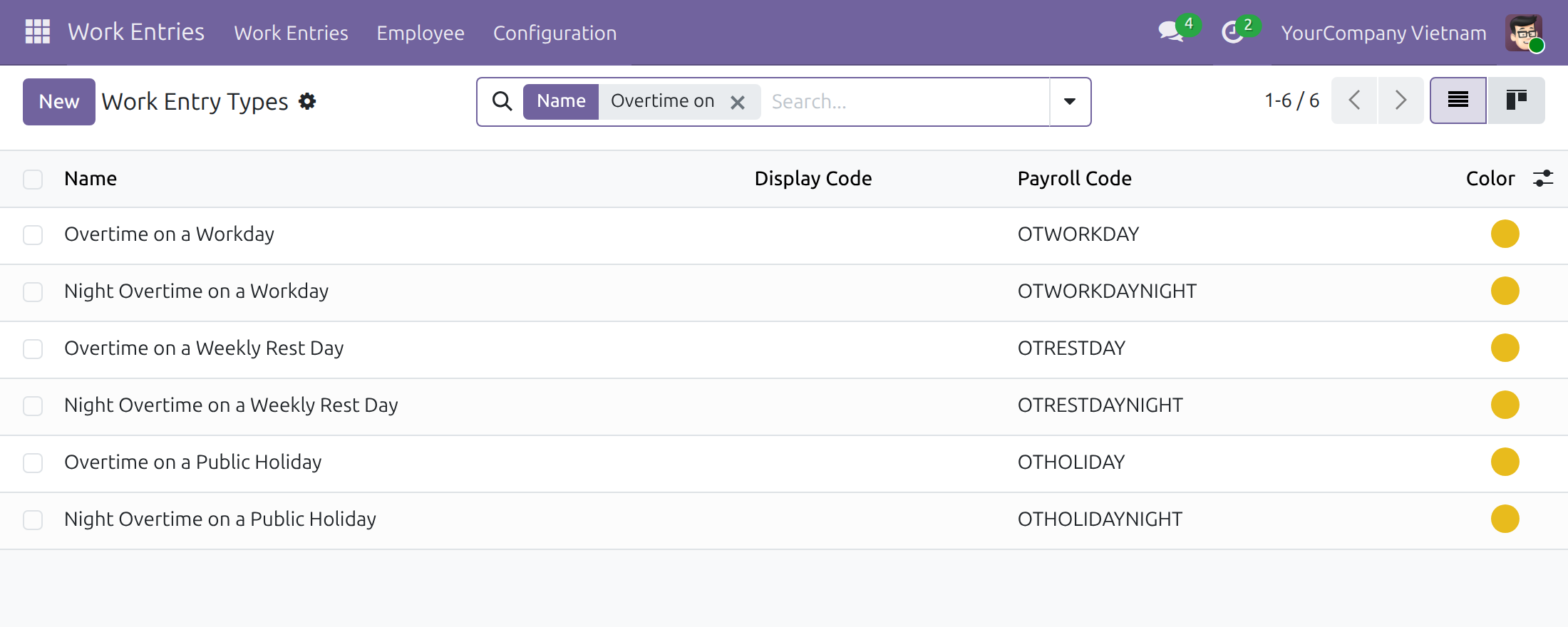
Overtime work entry types that payroll can pay separately
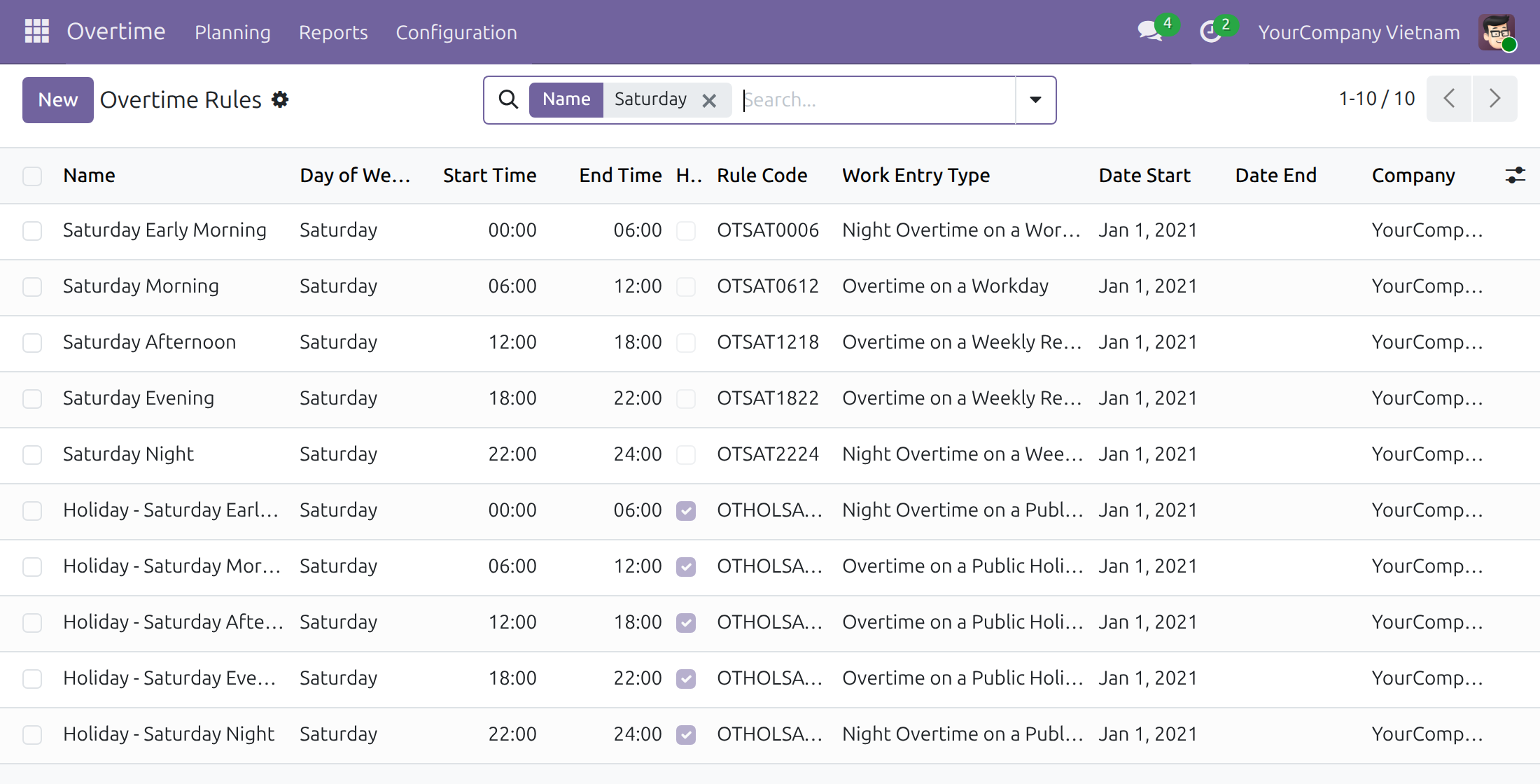
Rules that map each weekday and time band to a code
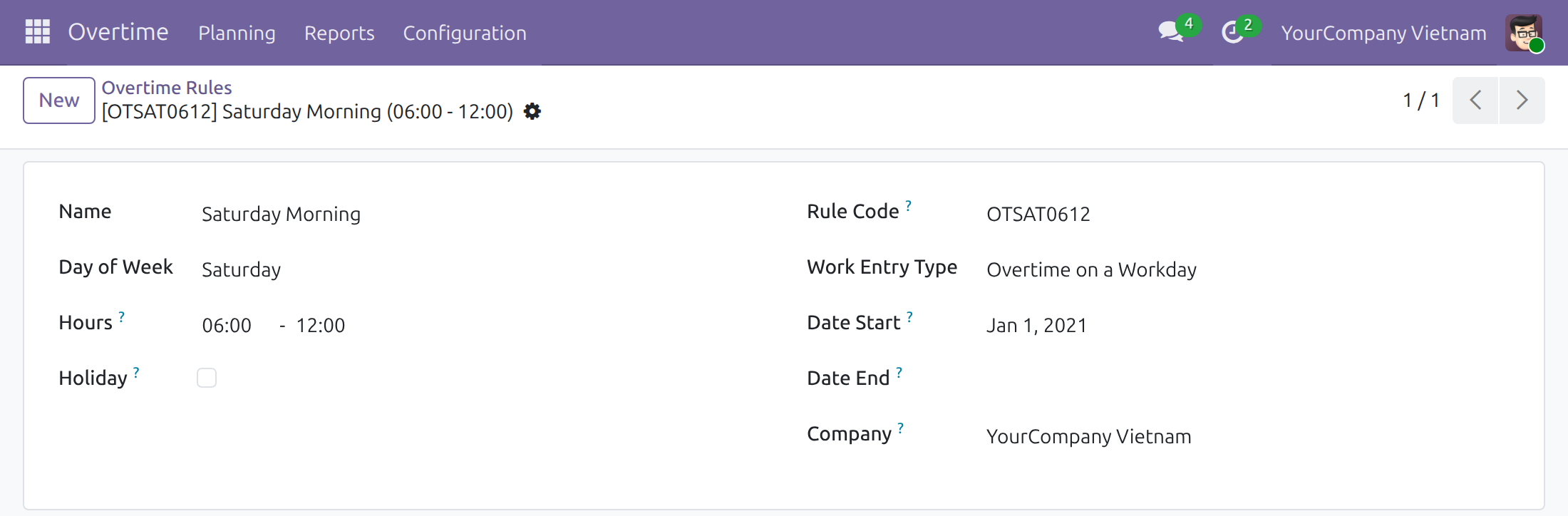
Edit a rule to fit the company's weekly rest day
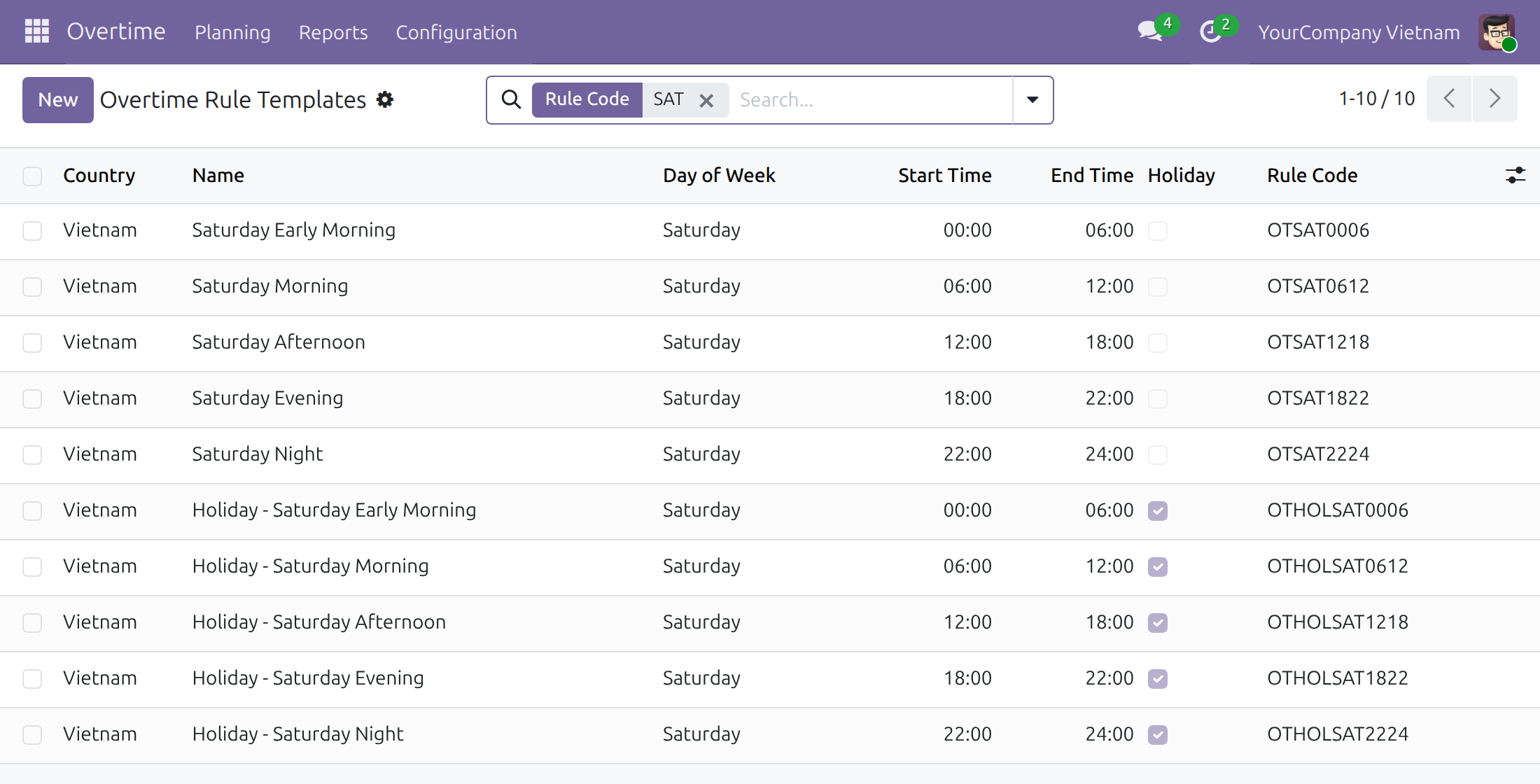
Templates that every new Vietnamese company copies its rules from
Frequently Asked Questions
Which pay rates does it set?
The legal minimums of the Labour Code 45/2019/QH14 (articles 98 and 106) and Decree 145/2020/ND-CP (articles 55 and 57), in force from 1 January 2021: 150% on a workday, 200% on a weekly rest day, 300% on a public holiday, and for night overtime 210%, 270% and 390%. The night rate of a workday is 210% when daytime overtime came before it the same day and 200% when none did; the hours from 00:00 to 06:00 open their own calendar day and are paid at 200%.
What happens when the law changes a rate?
An overtime administrator adds a rate with its start date. Plans from that date use it; plans already made keep the rate they had, and the rate list shows both.
Our weekly rest day is not Saturday afternoon and Sunday. Can we change it?
Yes. The shipped rules treat Saturday from 12:00 and Sunday as the weekly rest day, and the law lets each employer choose in its work rules. End the Saturday rules the day before your work rules apply, then add rules for the same hours from that day with the weekly rest day codes: the code, not only the rate, sets the day type of the work entry.
Can the company pay more than the legal minimum?
Yes. Set a company rate on a code. A company rate below the shared one is flagged Below Reference Rate for review; it is not blocked.
How is a substitute day off or another paid day off priced?
Enter it as a company-wide public holiday in the working schedule, and overtime on that day is priced with the public holiday codes.
We already created some overtime codes. Will installing this duplicate them?
No. A code of the same name is kept as it is and the module's data attaches to it; archived codes stay archived. A code of that name that belongs to another country stops the installation with a message naming it, so you can rename it or clear its country first.
Does an update overwrite what we edited?
No. The shipped data is loaded once and left to the company; later updates do not overwrite your edits.
Does it put overtime on payslips and handle tax?
This module supplies the codes, rates, rules and work entry types. Carrying recognised overtime into payslips is the job of Overtime Payroll, and the personal income tax treatment of overtime pay for Vietnam comes with Vietnam - Overtime Payroll Localization.
Do we need to install it ourselves?
No. It installs with Overtime when the database has a company in Vietnam. A company created in Vietnam later receives its rules when it is created.
Which Odoo version and editions are supported?
Odoo 19.0, Community and Enterprise editions.
Need help with Vietnam - Overtime?
Pre-Sales & Partnership
viindoo.com/contactusTechnical Support
viindoo.com/ticketTechnical Requirement
- Odoo version: 19.0
- Editions: Odoo Community, Odoo Enterprise
- Required modules: Overtime
- Installation: Installs automatically with Overtime when the database has a company in Vietnam.
- License: OPL-1
Vietnam - Overtime
Who this guide is for: the HR administrators and payroll administrators of a company in Vietnam who check the overtime codes, pay rates and overtime rules of the Vietnamese Labour Code, and adjust them to the company's own weekly rest day. They hold the access right Overtime / Administrator.
Note
Extends Overtime (viin_hr_overtime) - see its documentation for planning overtime, the overtime analysis report and the way dated rates and rules work.
Overview
Vietnamese labour law sets a minimum pay rate for overtime that depends on the kind of day and on the time of day, and pays night overtime more than daytime overtime. Typing 28 codes, their rates and 60 rules by hand before the first overtime plan is slow and easy to get wrong. This module gives every company in Vietnam all of them as ordinary data, ready for the first overtime plan and editable on the screen when the law or the company's work rules change.
The pay rates shipped with the module are the legal minimums (Labour Code 45/2019/QH14, articles 98 and 106, and Decree 145/2020/NĐ-CP, articles 55 and 57), in force from January 1, 2021, as a percentage of the standard hour pay:
| Kind of day | Overtime in the day (06:00 - 22:00) | Night overtime (22:00 - 06:00) |
|---|---|---|
| Workday | 150% | 210% (200% from 00:00 to 06:00) |
| Weekly rest day | 200% | 270% |
| Public holiday, including one that falls on a weekly rest day | 300% | 390% |
The night rate of a workday is 210% when daytime overtime came before it the same day and 200% when none did; the hours from 00:00 to 06:00 open their own calendar day, so they are paid at 200%.
The module also ships:
- the overtime codes: one per kind of day and time band, named after both, for example OT1822 for a workday evening, OTSUN0612 for a Sunday morning or OTHOLSUN0612 for a public holiday morning that falls on a Sunday. HOL marks a public holiday, SAT and SUN the day of the week, and the four digits the band;
- the overtime rule templates and the overtime rules generated from them: every weekday is divided into the bands 00:00 - 06:00, 06:00 - 18:00, 18:00 - 22:00 and 22:00 - 24:00 (Saturday and Sunday also 06:00 - 12:00 and 12:00 - 18:00), once for normal days and once for public holidays;
- six work entry types that type the overtime work entries of each kind of day, so that payroll can pay each kind separately.
By default the weekly rest day is Saturday afternoon (from 12:00) and Sunday. The law lets each employer choose its weekly rest day in its work rules, so the rules of a company are meant to be edited to its own choice; see Set the weekly rest day of the company below.
| Role | What they do | Access right to assign |
|---|---|---|
| Overtime Administrator | Checks the Vietnamese overtime data after installation, adjusts the rules to the company's weekly rest day and adds a dated rate when the law changes | Overtime / Administrator |
Setup (for the Overtime Administrator)
Installation
The module installs by itself, together with the Overtime application, when the database has a company whose country is Vietnam. To install it by hand, navigate to Apps, search for Vietnam - Overtime and press Install.
On installation the companies in Vietnam that already exist receive their overtime rules; a company created in Vietnam later receives them when it is created. A rule that a company already has for the same hours of the same day is never created twice and never changed.
Note
Every record shipped by the module is ordinary data: a later update of the module never overwrites what you edit. The company must have Vietnam as its country when it is created: the rules are generated at that moment.
Access right
Everything below is reached from Overtime ‣ Configuration, which needs the access right Overtime / Administrator. To give it, open Settings ‣ Users & Companies ‣ Users, open the user, go to the Access Rights tab and choose Administrator for Overtime.
Overtime Administrator: check and adjust the Vietnamese overtime data
Check the codes
- Navigate to Overtime ‣ Configuration ‣ Overtime Codes.
- The list shows the 28 codes, whether each one is for a public holiday (Holiday) and the Work Entry Type that types the overtime work entries priced by it.
Open a code to see its dated rates in the Rates tab.
Check the rates
- Navigate to Overtime ‣ Configuration ‣ Overtime Rates.
- Each code has one shared line (Company empty) with its Pay Rate (%), starting on Date Start January 1, 2021 and with no Date End.
To change a rate from a given day, end the older line the day before and add a new line starting on that day: plans already made keep the rate they were made with. A company may add its own rate, which wins over the shared one for that company, and a company rate lower than the shared one is flagged Below Reference Rate. See the documentation of viin_hr_overtime for the details of dated rates. Keep every rate at or above the legal minimum of the table in the overview.
Review the overtime rules of the company
- Switch to the company in Vietnam, then navigate to Overtime ‣ Configuration ‣ Overtime Rules.
- Search for a day, for example Saturday, to see its rules: for each band the Day of Week, the Start Time and End Time, whether the rule is for a Holiday, its Rule Code and its Work Entry Type.
The rules of a new company are copied from the Overtime Rule Templates. The templates are listed in Overtime ‣ Configuration ‣ Overtime Rule Templates, a menu shown in developer mode.
Set the weekly rest day of the company
The rules of a company start with Saturday afternoon and Sunday as the weekly rest day. If the work rules of your company make the whole Saturday a weekly rest day, change the Saturday rules from the day your work rules apply:
Navigate to Overtime ‣ Configuration ‣ Overtime Rules and search for Saturday.
Open the rule Saturday Early Morning (00:00 - 06:00) and set its Date End to the day before your work rules apply. Do the same for Saturday Morning (06:00 - 12:00).
Press New and add a rule for Saturday 00:00 - 06:00 with Date Start on the day your work rules apply and the Rule Code OTSAT2224 (night overtime on a weekly rest day).
Add a second rule for Saturday 06:00 - 12:00 with the same Date Start and the Rule Code OTSAT1218 (overtime on a weekly rest day).
Choose a rule code instead of only changing a rate: the code also decides the work entry type, and so the kind of day, of the overtime work entries. The weekday of a rule is free, so any other day can be made the weekly rest day in the same way, by pointing its rules to the rest day codes. Two rules of a company cannot cover the same hours of the same day in the same period; end the old rule first.
Public holidays and substitute days off
Overtime is paid with the public holiday codes on a day that the working schedule of the employee lists as a company-wide time off with Holiday ticked. Enter a public holiday, a substitute day off for a public holiday that falls on a weekly rest day, or another paid day off for the whole company in that way: in developer mode, navigate to Settings ‣ Technical ‣ Resource ‣ Resource Time Off, choose the Working Hours of the schedule, leave Resource empty and tick Holiday.
Check the work entry types
Navigate to Work Entries ‣ Configuration ‣ Work Entry Type and search for Overtime on. The six overtime types type the overtime work entries:
- Overtime on a Workday and Night Overtime on a Workday;
- Overtime on a Weekly Rest Day and Night Overtime on a Weekly Rest Day;
- Overtime on a Public Holiday and Night Overtime on a Public Holiday.
Changing a work entry type needs the access right Employees / Administrator.
A database that already has codes of the same name
A database that already holds an overtime code with one of the shipped names keeps it: the code stays as it is, archived or not, and the shipped records attach to it. If that code already has a shared pay rate over the same days, the rate is kept as well; when it is lower than the shipped one, a note on that rate says so. You then end that rate the day before the shipped start date and add a shared rate at the legal level, or leave it as it is.
A code of the same name that belongs to another country stops the installation with a message that names the code: rename the code or clear its country, then install again.
Troubleshooting
The company has no overtime rules. The rules are generated when the module is installed and when a company is created, for companies whose country is Vietnam at that moment. For a company that was set to Vietnam later, add the rules in Overtime ‣ Configuration ‣ Overtime Rules.
Saving a rule shows "The rule ... overlaps the hours of the rule ... on the same day in the same period". Two rules of the company cover the same hours of the same day. End or archive the older rule, or change its hours, then save again.
Overtime between 22:00 and 24:00 on a workday is paid at 210% and not at 200%. The night rate of a workday is 210% when daytime overtime came before it the same day; the hours from 00:00 to 06:00 are paid at 200%.
FAQ
Can I pay more than the legal minimum? Yes. Add a company rate above the shared one, or change the shared rate from a date; keep every rate at or above the minimum of the table in the overview.
Will an update of the module undo my changes? No. The shipped data is never overwritten once it is installed.
Which rules does a public holiday use? The rules marked Holiday: a public holiday that falls on a Saturday or a Sunday uses the codes OTHOLSAT... or OTHOLSUN..., paid at the holiday rate.
This software and associated files (the "Software") may only be used (executed, modified, executed after modifications) if you have purchased a valid license from the authors, typically via Odoo Apps, or if you have received a written agreement from the authors of the Software (see the COPYRIGHT file).
You may develop Odoo modules that use the Software as a library (typically by depending on it, importing it and using its resources), but without copying any source code or material from the Software. You may distribute those modules under the license of your choice, provided that this license is compatible with the terms of the Odoo Proprietary License (For example: LGPL, MIT, or proprietary licenses similar to this one).
It is forbidden to publish, distribute, sublicense, or sell copies of the Software or modified copies of the Software.
The above copyright notice and this permission notice must be included in all copies or substantial portions of the Software.
THE SOFTWARE IS PROVIDED "AS IS", WITHOUT WARRANTY OF ANY KIND, EXPRESS OR IMPLIED, INCLUDING BUT NOT LIMITED TO THE WARRANTIES OF MERCHANTABILITY, FITNESS FOR A PARTICULAR PURPOSE AND NONINFRINGEMENT. IN NO EVENT SHALL THE AUTHORS OR COPYRIGHT HOLDERS BE LIABLE FOR ANY CLAIM, DAMAGES OR OTHER LIABILITY, WHETHER IN AN ACTION OF CONTRACT, TORT OR OTHERWISE, ARISING FROM, OUT OF OR IN CONNECTION WITH THE SOFTWARE OR THE USE OR OTHER DEALINGS IN THE SOFTWARE.