

Manufacturing Backdate
| Lines of Code | 664 |
| Technical name | to_mrp_backdate |
| License | OPL-1 |
| Website | https://viindoo.com/apps/modules/18.0/to_mrp_backdate |
| Read description for | v 11.0 v 12.0 v 13.0 v 14.0 v 15.0 v 16.0 v 17.0 v 19.0 |
| Required Apps | Manufacturing (mrp) Discuss (mail) Inventory (stock) |
| Included Dependencies | Inventory Backdate Backdate Operations Access Rights |
| Extensions | Shop Floor Control - Backdate |
Enter past manufacturing on the dates it happened
For administrators and consultants bringing a company's production history into Odoo during the initial deployment
MRP backdate operations, incl. posting inventory, mark MO as done, backdate work orders
Odoo Community · Odoo Enterprise · OPL-1 · English, Vietnamese
Extends Inventory Backdate, which dates the stock moves of past operations.
Extends Backdate Operations Access Rights, which holds the access rule and the uninstall of the whole back-date cluster.
Purpose and life cycle
Back-dating is a discouraged operation. A manufacturing order or a work order recorded on a past date is not recorded when the work happened, so routine use weakens the reliability of production times, costs and stock figures.
This module serves one situation: the initial deployment, when a company enters its past manufacturing data, for example the orders completed last month. When that work is done, the administrator uninstalls the back-date modules from Apps. They can be installed again later if the need returns.
Keep it for the data entry, not for day-to-day production, and grant the back-date group only to the people who do that entry.
What changes for your team
Past orders and work orders keep their real dates
Without it, every completion, start or pause is stamped with the moment the button is clicked, so history entered today is dated today.
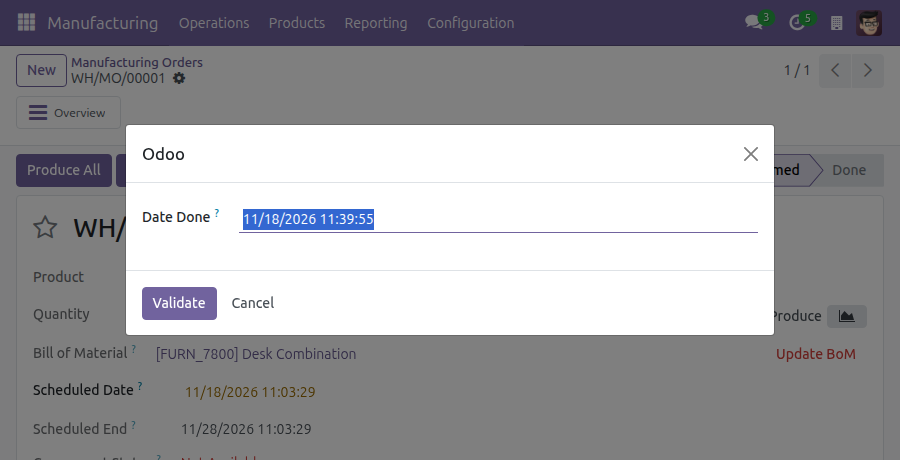
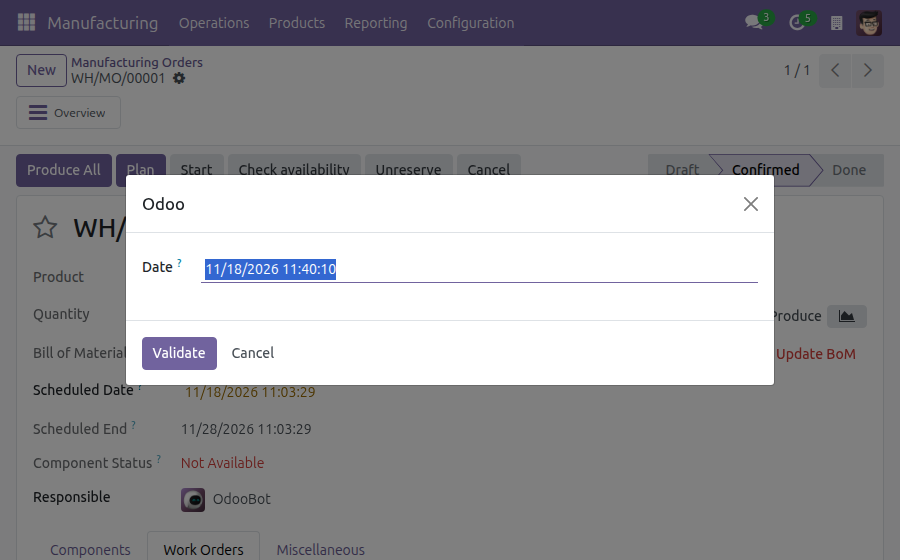
→ Completing an order, and starting, pausing or finishing a work order, asks for the date it really happened. The order's finish date and its stock moves take that date.
Past downtime is recorded when it happened
A stoppage entered after the fact would start at the time of data entry.
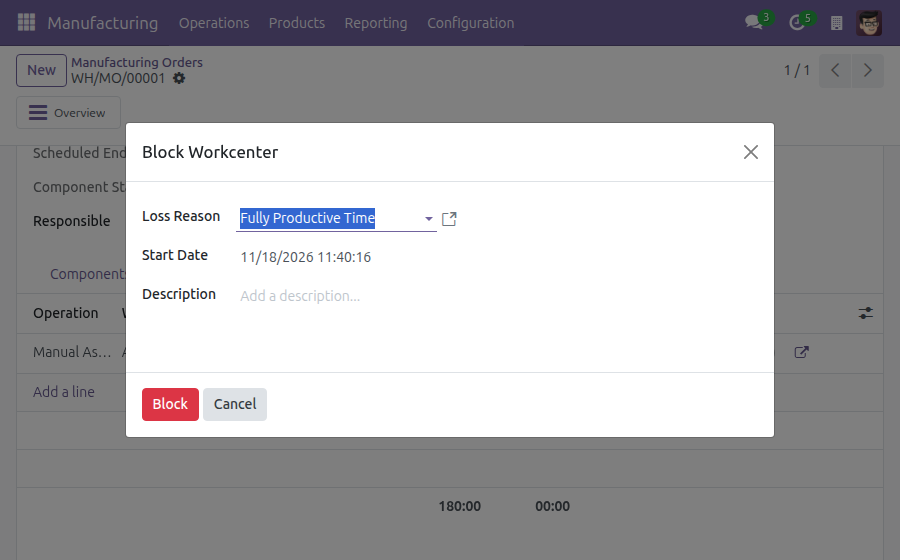
→ Blocking a work center takes the date it stopped, and unblocking asks for the date it ran again. Work running on it stops at that date. The Start Date of a block is open to every Manufacturing user, not only to members of the back-date group.
You decide who may enter a past date
Without a rule, anyone who completes production could also choose its date.
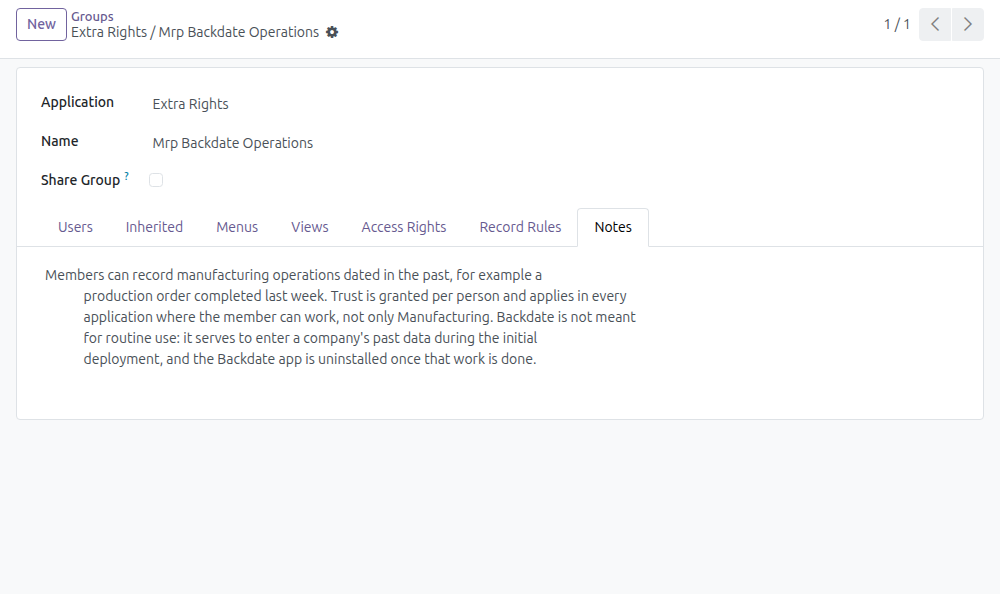
→ Only members of the manufacturing back-date group get the date dialog. Trust is per person: a member can back-date in every application they work in, not only Manufacturing.
Features
Recording past production
- ✓ Manufacturing orders completed on a past date and time
- ✓ Work orders started, paused and finished on past dates
- ✓ Work centers blocked and unblocked on past dates
- ✓ The date field starts at the current date and time
- ✓ A date in the future is refused
Where the date lands
- ✓ The finish date of the manufacturing order
- ✓ The stock moves of components and finished products
- ✓ The order's start, when its first work order starts
- ✓ The real duration of each work order
Control and exit
- ✓ One group grants the right, person by person
- ✓ A completion earlier than the order's start is refused
- ✓ Uninstalling keeps every order, work order and their dates
Ready on day one
The date dialog
It opens on the existing Produce, Start, Pause, Done and Unblock buttons of Manufacturing. The module adds no menu.
First step for the administrator
Add the people who enter past production data to the group Mrp Backdate Operations, and remove them when their entry is done. The group also gives Manufacturing user access.
Before you decide
Should we keep it installed after go-live?
No. It is meant for entering past manufacturing data during the initial deployment. Uninstall the back-date modules when that is done; they can be installed again if the need returns.
Can I allow back-dating in Manufacturing only?
No. Membership of a back-date group lets that person back-date in every application where they can work. Give it only to people you trust with a past date on any document.
What do we lose when we uninstall?
No manufacturing order or work order, none of their dates and recorded times, and none of the stock moves they produced. The group, its membership and the date dialogs go; afterwards every manufacturing action is recorded at the moment it is done.
Does it change anything for the rest of the production team?
A person outside the group completes orders and works on work orders as usual, at the current date and time, without the date dialog.
Which dates are refused?
A date in the future, and a completion date earlier than the order's start date. The message of the second shows both dates.
Try it, then ask us
The Documentation tab holds the guide for administrators and data-entry staff. The live preview of this listing opens the manufacturing orders list on a demo database.
Pre-sales & partnership
viindoo.com/contactusTechnical support
viindoo.com/ticketManufacturing Backdate
For administrators who set up back-dating, and for the production people they trust to enter past manufacturing data.
Manufacturing Backdate lets a trusted person record manufacturing work on a date in the past: start, pause, block, unblock and finish a work order, and mark a manufacturing order as done. Without it, the system stamps each of these actions with the moment the button is clicked.
Note
Extends Inventory Backdate - see its documentation - and Backdate Operations Access Rights - see its documentation. The second guide covers the cluster as a whole, including the steps to uninstall it.
Purpose and life cycle
Back-dating is a discouraged operation. A manufacturing order or a work order recorded on a past date was not recorded when the work happened, so routine use weakens the reliability of production times, costs and stock figures.
This module exists for one situation: the initial deployment, when a company enters its past manufacturing data (for example the orders completed last month). When that work is done, the administrator uninstalls the back-date modules from Apps. They can be installed again later if the need returns.
Do not keep the module installed for day-to-day production work, and do not grant the back-date group as a convenience.
What is removed by the uninstall and what stays is listed in When the data entry is done. The steps are in the guide of Backdate Operations Access Rights.
Who can back-date
Back-dating manufacturing operations is a right granted to a person through one group:
| Group | Lets its members |
|---|---|
| Mrp Backdate Operations | Record manufacturing operations dated in the past |
The group also gives the Manufacturing user access, so a member can work in the Manufacturing application.
Important
Trust is granted per person. Being a member of a back-date group lets that person back-date in every application where they can work, not only in Manufacturing. Give the group only to people you would trust with a past date in any document.
A person who is not a member of the group works as usual: every action is recorded at the current date and time, with no dialog.
Setup (for the Administrator)
Open Apps, search for Manufacturing Backdate and click Install. Inventory Backdate and Backdate Operations Access Rights are installed with it.
Activate the developer mode, then open Settings > Users & Companies > Groups.
Open Extra Rights / Mrp Backdate Operations. The Notes tab states what the members can do.
In the Users tab, add the people who enter the past data.
Remove them from the group when their data entry is done.
Manufacturing operations dated in the past
For a member of the group, the actions below open a dialog with one date field, filled with the current date and time. Keep it to record the action at the current time, or enter the date and time at which it really happened, then click Validate. Cancel closes the dialog and records nothing. A date in the future is refused with the message "You may not be able to specify a date in the future!".
Mark a manufacturing order as done on a past date
- Open Manufacturing > Operations > Manufacturing Orders and open the order.
- Click the button that completes the order (Produce or Produce All, depending on the order). The dialog opens.
- Enter the real completion date and time in Date Done and click Validate.
The order is done at that date: its finish date, and the date of the stock moves of its components and finished products, are the date you entered. The date cannot be earlier than the start date of the order; the system then refuses with a message that shows both dates.
Record work orders on past dates
On the Work Orders tab of a manufacturing order, these actions of a work order ask for a date:
- Start - the date at which the work began. If the order had not started yet, its start date becomes this date.
- Pause and Done - the date at which the work stopped or finished. The Real Duration of the work order is the time between the start and this date.
- Unblock - the date at which the blockage of the work center ended.
Block a work center on a past date
- On the Work Orders tab, open the menu at the end of the work order line and click Block.
- Choose the Loss Reason, set Start Date to the date at which the work center stopped, and click Block.
Work that was running on the work center stops at that date. A Start Date in the future is refused with the message "You cannot specify a start date in the future!". The Start Date of a block is available to every Manufacturing user, not only to members of the back-date group, just as every Manufacturing user can record past times in the Time Tracking tab of a work order.
When the data entry is done
Uninstalling the back-date modules (see the guide of Backdate Operations Access Rights) keeps every manufacturing order and work order with its dates and recorded times, and the stock moves and valuation they produced. It removes the group Mrp Backdate Operations, with the back-date membership of every person, and the back-date dialogs: afterwards every manufacturing action is recorded at the moment it is done. Installing the modules again requires granting the group again.
FAQ
- A user does not get the date dialog when completing an order.
- The dialog is for members of the group Mrp Backdate Operations. Add the user to the group.
- Can I give a user back-date access for Manufacturing only?
- No. A back-date group applies in every application where its member can work.
This software and associated files (the "Software") may only be used (executed, modified, executed after modifications) if you have purchased a valid license from the authors, typically via Odoo Apps, or if you have received a written agreement from the authors of the Software (see the COPYRIGHT file).
You may develop Odoo modules that use the Software as a library (typically by depending on it, importing it and using its resources), but without copying any source code or material from the Software. You may distribute those modules under the license of your choice, provided that this license is compatible with the terms of the Odoo Proprietary License (For example: LGPL, MIT, or proprietary licenses similar to this one).
It is forbidden to publish, distribute, sublicense, or sell copies of the Software or modified copies of the Software.
The above copyright notice and this permission notice must be included in all copies or substantial portions of the Software.
THE SOFTWARE IS PROVIDED "AS IS", WITHOUT WARRANTY OF ANY KIND, EXPRESS OR IMPLIED, INCLUDING BUT NOT LIMITED TO THE WARRANTIES OF MERCHANTABILITY, FITNESS FOR A PARTICULAR PURPOSE AND NONINFRINGEMENT. IN NO EVENT SHALL THE AUTHORS OR COPYRIGHT HOLDERS BE LIABLE FOR ANY CLAIM, DAMAGES OR OTHER LIABILITY, WHETHER IN AN ACTION OF CONTRACT, TORT OR OTHERWISE, ARISING FROM, OUT OF OR IN CONNECTION WITH THE SOFTWARE OR THE USE OR OTHER DEALINGS IN THE SOFTWARE.