
Master Production Schedule - Subcontracting
by Viindoo
| Lines of Code | 465 |
| Technical name | viin_mrp_mps_subcontracting |
| License | OPL-1 |
| Website | https://viindoo.com/apps/modules/19.0/viin_mrp_mps_subcontracting |
| Required Apps | Manufacturing (mrp) Invoicing (account) Purchase (purchase) Discuss (mail) Inventory (stock) |
| Included Dependencies | Master Production Schedule |

Components ready before your subcontractor starts
For manufacturers who subcontract part of their production and plan it on the Master Production Schedule
The Master Production Schedule plans the components a warehouse supplies to its subcontractors.

Odoo 19.0 · Odoo Community · Viindoo Cloud · OPL-1
Extends Master Production Schedule.
What changes for your team
Subcontracted products raise demand for their components
Today: the components a subcontractor needs are worked out by hand from its bill of materials, outside the plan.
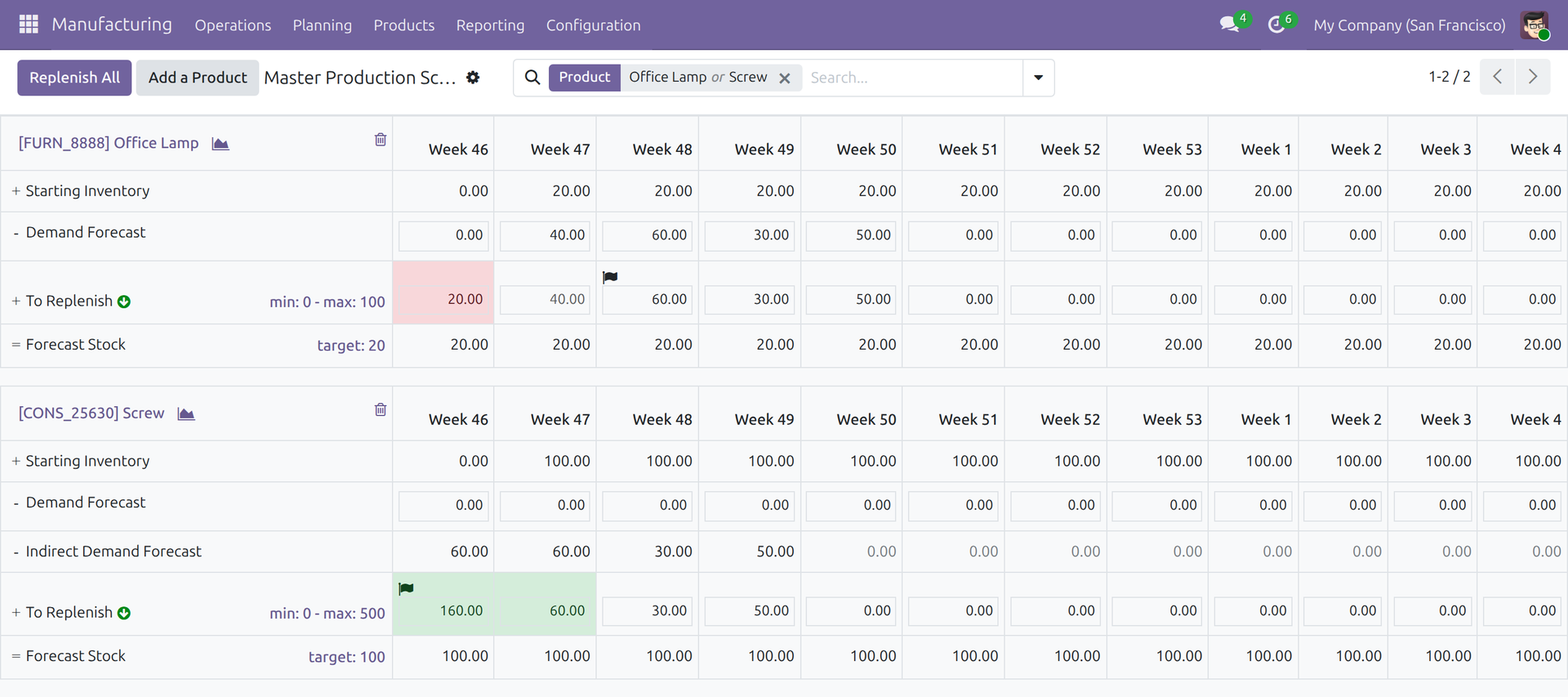
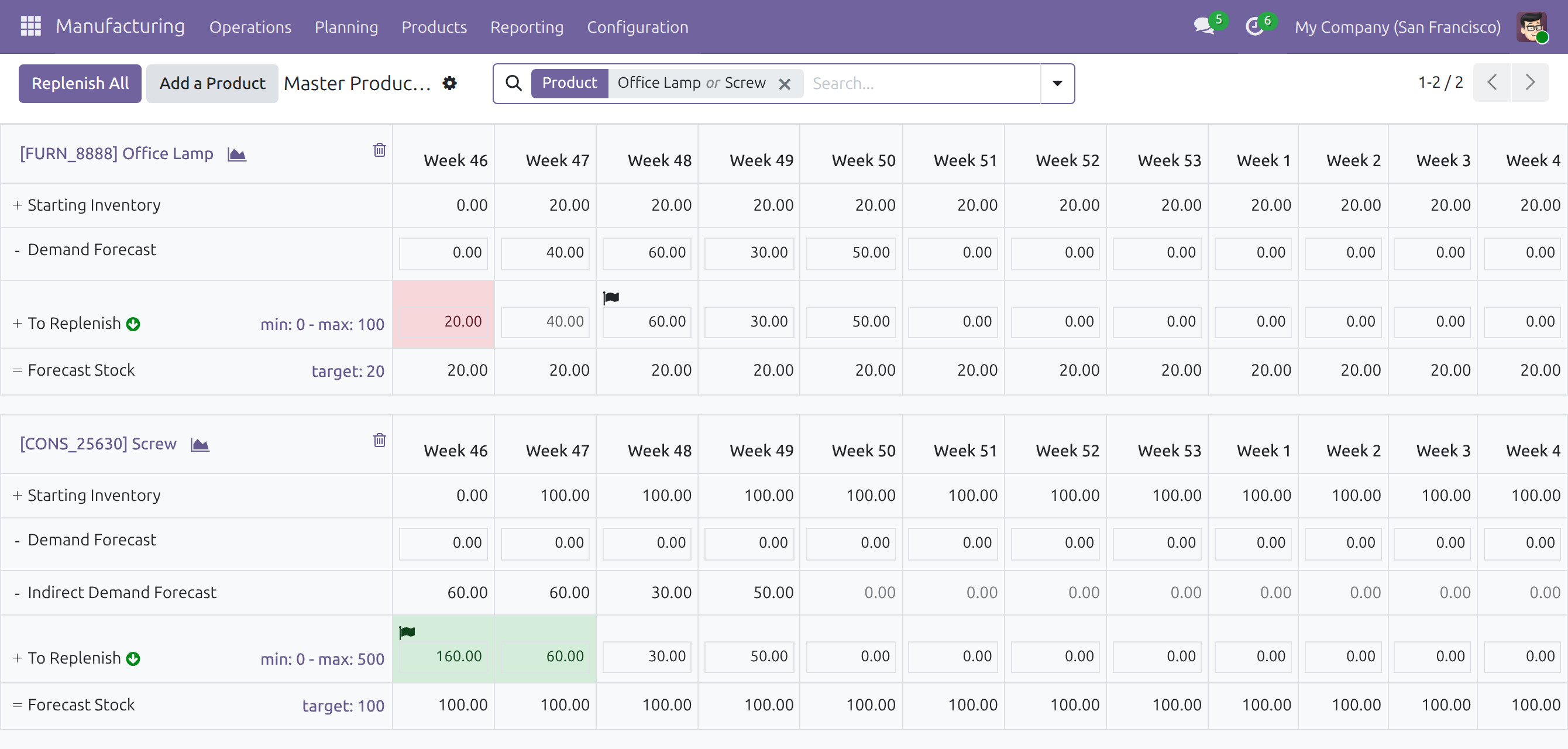
→ Each component the warehouse supplies shows on its own schedule as Indirect Demand Forecast, in the period the subcontractor needs it: the manufacturing lead time of the subcontracting bill of materials before the product's period, never before today.
The plan uses the subcontractor and bill of materials of the order
Today: the planner has to know which subcontractor gets the order and which bill of materials it works from.
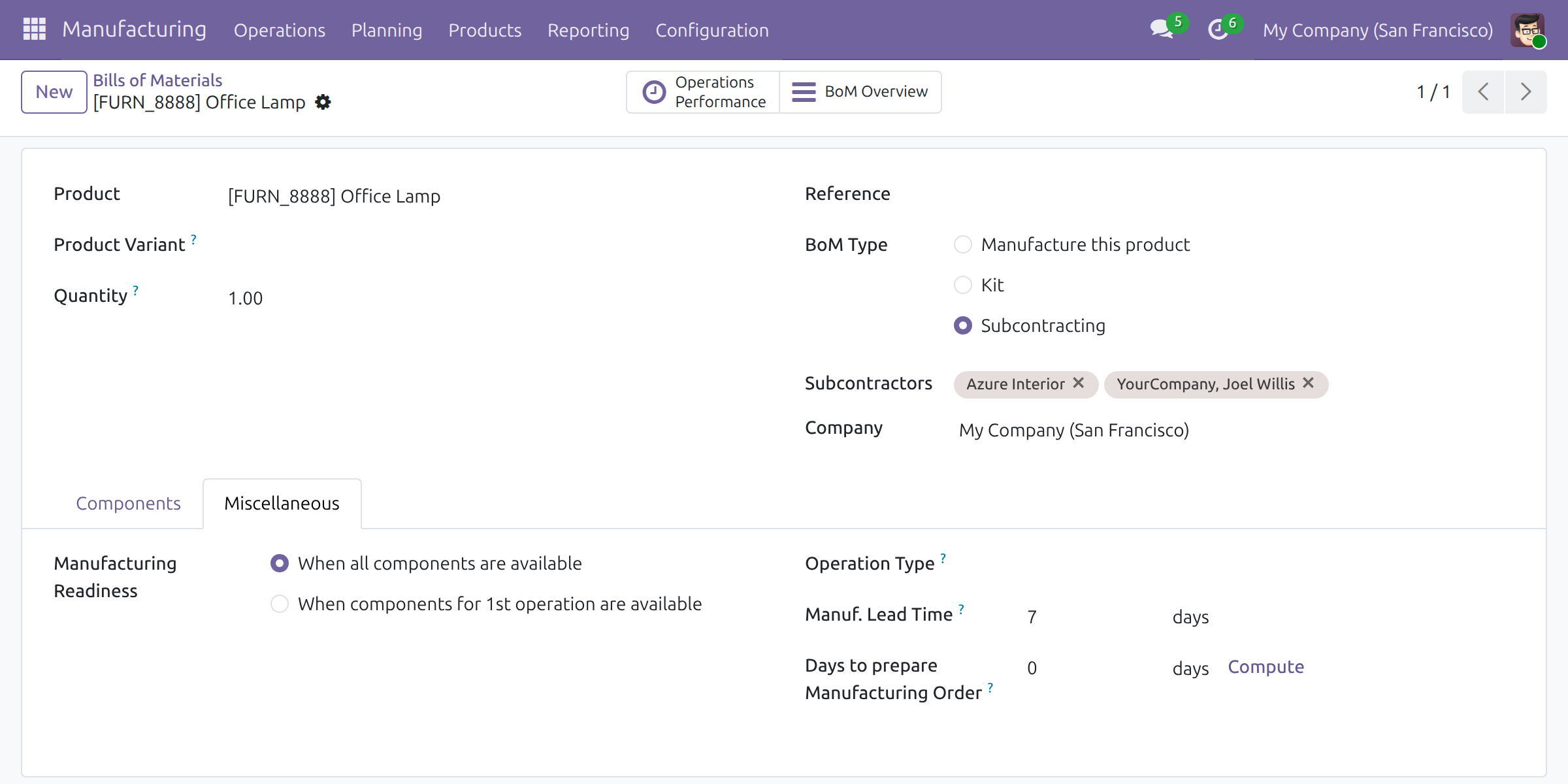
→ The plan takes the product's first vendor and the subcontracting bill of materials that names it; a kit inside it is planned as its components. A product your company manufactures keeps its own bill of materials and timing.
Only what the warehouse really supplies
Today: the planner checks product by product which components the warehouse sends and which reach the subcontractor another way.
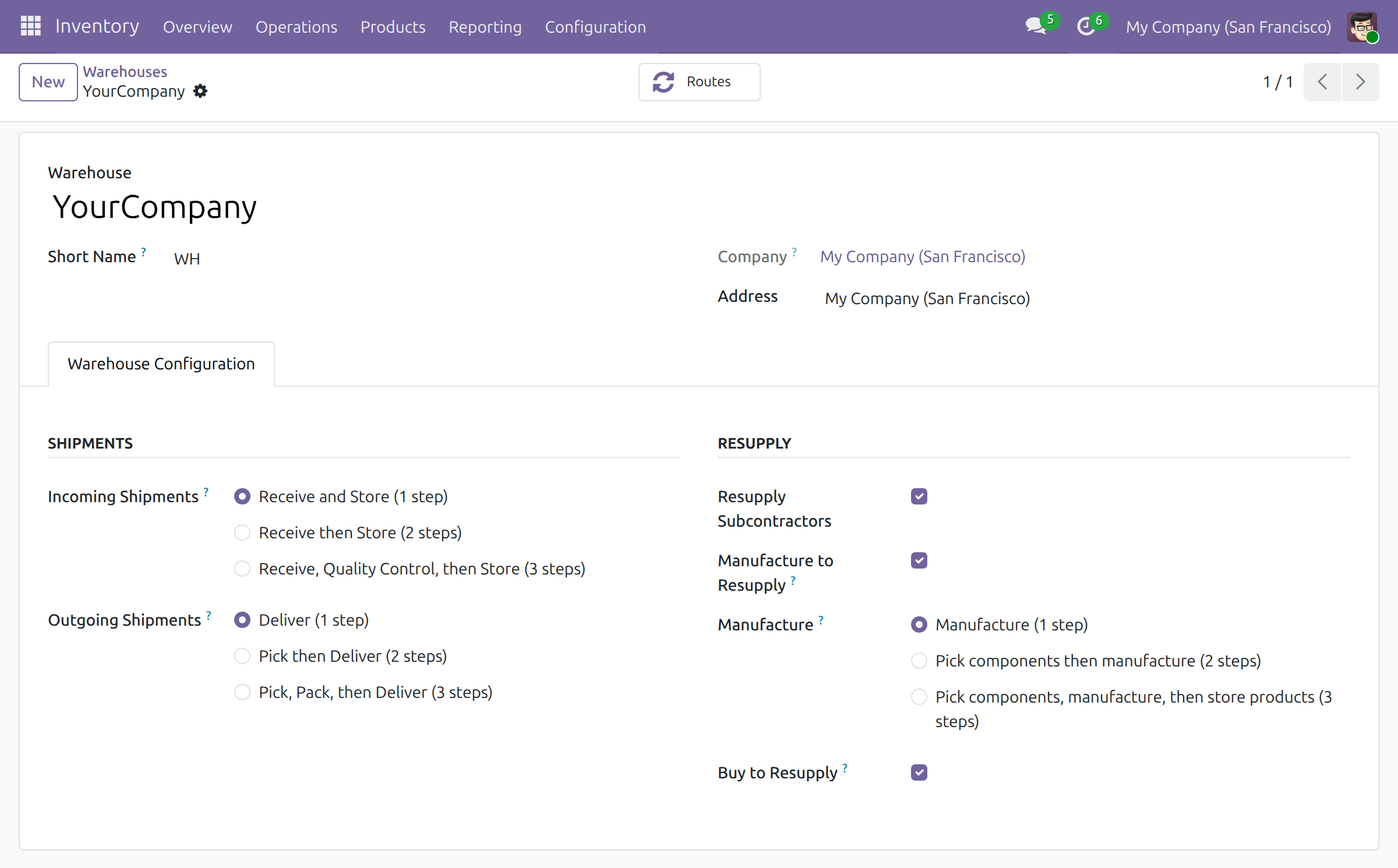
→ A component counts only when the warehouse supplies it to the subcontractor, as the routes of Odoo and the warehouse setting Resupply Subcontractors decide. Parts a vendor delivers straight to the subcontractor, or that another warehouse supplies, stay out of this warehouse's plan.
Ready on day one
Installs by itself
It installs once Master Production Schedule and Purchase and Subcontracting Management are both installed. It adds no menu: the result shows in the plan.
A demo plan
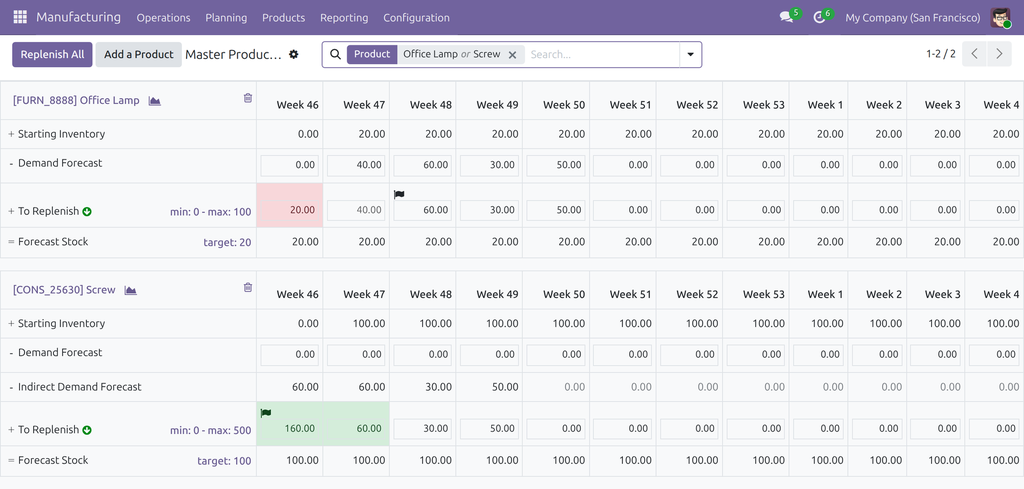
With demo data, Office Lamp, made by a subcontractor, is planned on weekly forecasts next to the Screw it is made from.
What you set first
Plan each component in the warehouse that supplies it, keep the subcontractor first in the product's vendor list, and set the manufacturing lead time of the subcontracting bill of materials.
What is included
Component demand of subcontracted products in the plan, timed by the subcontracting bill of materials; the subcontractor and bill of materials of the replenishment; only the components the warehouse supplies; and transfers to subcontractors kept out of Actual Demand, so each component is counted once.
Before you decide
Does the plan order anything on its own?
No. Nothing is created until a planner presses Replenish Product or Replenish All; for a subcontracted product, that creates a request for quotation to the subcontractor.
Who sees and changes what?
Planners with the Manufacturing / Administrator access right read the plan and launch orders; the module adds no access right. Whether a warehouse supplies its subcontractors is set on the warehouse by an Inventory / Administrator.
Where does the data live?
In your Odoo database. The module calls no outside service and stores no data of its own.
Which languages does it ship?
English and Vietnamese.
What are the limits?
The plan takes the product's first vendor whatever the quantity, while the order picks its vendor by quantity and date: keep the subcontractor first in the vendor list. Switch Resupply Subcontractors off on every warehouse or on none: with it off on only some warehouses, Odoo refuses to confirm their subcontracting orders. A component is planned only when it has a schedule of its own.
Try it, then ask us
The Documentation tab walks through the setup and the planner's tasks, screen by screen.
Pre-sales & partnership
viindoo.com/contactusTechnical support
viindoo.com/ticketTechnical requirements
- Odoo version: 19.0
- Editions: Odoo Community, Viindoo Cloud
- Required modules: Master Production Schedule, Purchase and Subcontracting Management
- License: OPL-1
- Languages: English, Vietnamese
Master Production Schedule - Subcontracting
Note
Extends Master Production Schedule - see its documentation: Master Production Schedule. This guide describes only what the subcontracting bridge adds. Planning a product, the rows, the periods and the replenishment buttons are explained there.
A company that subcontracts part of its production buys the finished product from the subcontractor and supplies the subcontractor with the components. Master Production Schedule - Subcontracting makes the schedule plan those components. A product bought from a subcontractor keeps raising demand for its components, in the warehouse that supplies them, so the planner sees what the warehouse has to hold ready before the subcontractor starts. The module adds no menu and no screen: its result shows in the Master Production Schedule.
This guide is written for three kinds of reader:
- System administrators switch Subcontracting on, which installs the module by itself. See "Setup".
- Warehouse managers (people with the access right Inventory / Administrator) decide whether each warehouse supplies components to its subcontractors. See "Setup".
- Production planners (people with the access right Manufacturing / Administrator) plan the subcontracted product and its components, read the demand of the components and launch the replenishment. See "Tasks for production planners".
The screenshots use the demo data of a standard database: the product Office Lamp, which a subcontractor makes from one Screw, planned together with the screw in the warehouse of My Company (San Francisco), with weekly columns.
Overview
Without this module, a product that Odoo buys raises no demand for its components on the schedule: the supply to the subcontractor shows only in the row Actual Demand, once its transfer exists. With the module, the work goes in four steps:
- Plan. The production planner adds the subcontracted product and each of its components to the schedule of the warehouse that supplies them.
- Read. Each component shows, in the row Indirect Demand Forecast, the quantity the subcontractor needs of it, in the period the subcontractor needs it.
- Launch. The production planner presses Replenish Product or Replenish All. Odoo creates a request for quotation to the subcontractor.
- Confirm. The buyer confirms the request for quotation. Odoo creates the subcontracting order and the transfer that supplies the components from the warehouse. The period stays launched in the schedule and the demand of the components stays as it was. This step belongs to Purchase and Inventory and is unchanged.
| Role | What they do | Access right to assign |
|---|---|---|
| System administrator | Switches Subcontracting on, which installs the module by itself | Role / Administrator |
| Warehouse manager | Decides whether each warehouse supplies components to its subcontractors | Inventory / Administrator |
| Production planner | Plans the subcontracted product and its components, reads the demand of the components, launches the replenishment | Manufacturing / Administrator |
Setup (for the system administrator and the warehouse manager)
Installation
Master Production Schedule must be installed first (see its documentation).
- Open Manufacturing ‣ Configuration ‣ Settings.
- In the block Operations, tick Subcontracting.
- Click Save.
Odoo installs Subcontracting and its purchase side. Master Production Schedule - Subcontracting then installs by itself: it needs no other step and adds no menu.
Access rights are the ones of Master Production Schedule: give each production planner the access right Manufacturing / Administrator.
What the plan needs
The schedule counts the components of a product when everything below holds for that product in the warehouse of its schedule:
- Odoo replenishes the product by buying it, not by manufacturing it.
- The first vendor of the product is the subcontractor. The vendor list is on the product form.
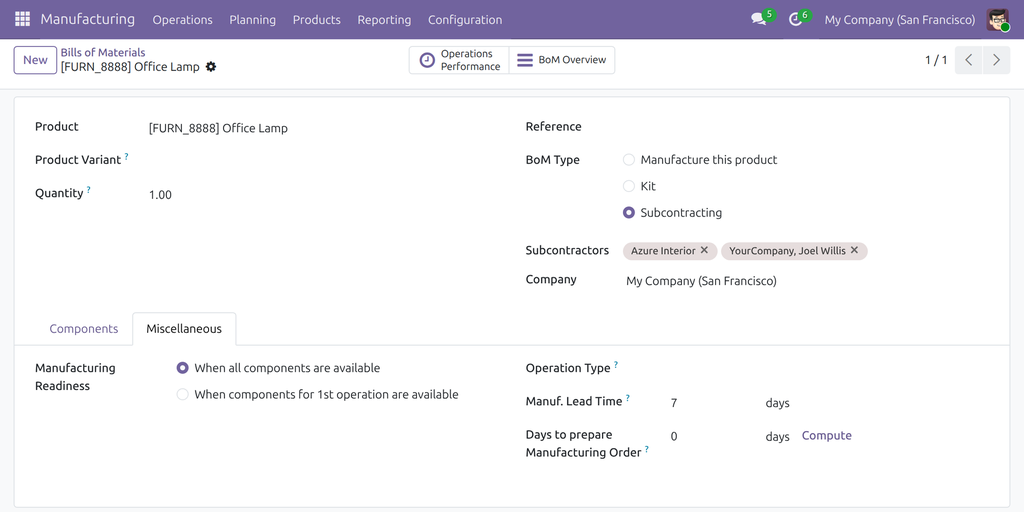
- A bill of materials of type Subcontracting lists that vendor under Subcontractors, with the components and the quantity of each for one unit of the product.
- Each component has a schedule of its own in the same warehouse. A component that is not planned has no schedule to show its demand on.
- The warehouse supplies components to its subcontractors (see the next section).
To read or set the bill of materials, open Manufacturing ‣ Products ‣ Bills of Materials, choose the bill of materials, and look at BoM Type and Subcontractors on the form, and at Manuf. Lead Time on the tab Miscellaneous. The manufacturing lead time decides when the components are needed; see "Read the demand of the components".
The warehouse supplies its subcontractors
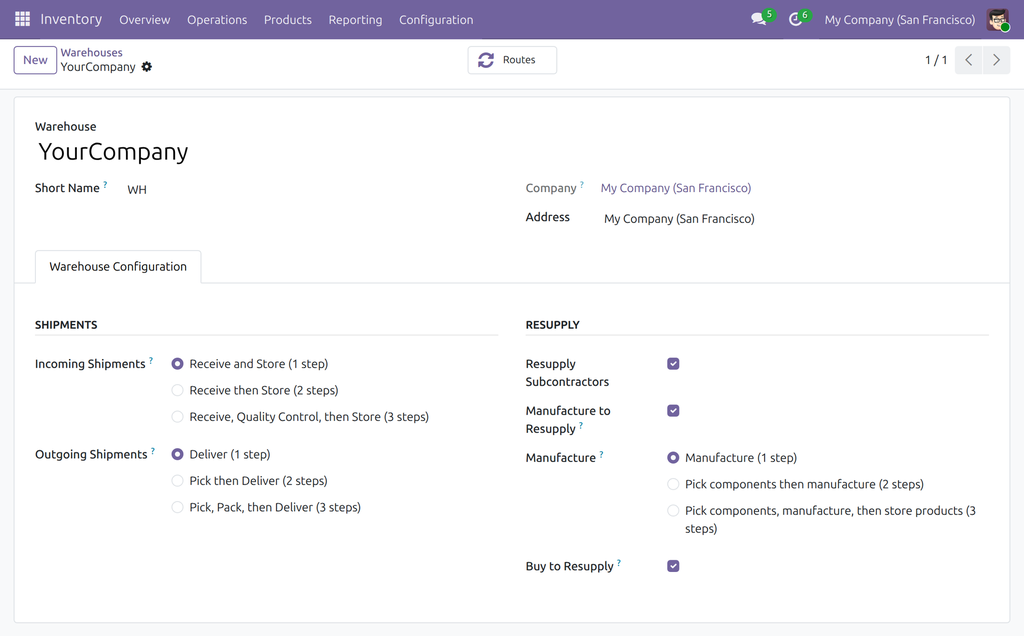
The plan counts a component only when the warehouse supplies it to the subcontractor. Each warehouse has the setting Resupply Subcontractors, ticked for every warehouse when Subcontracting is installed.
- Open Inventory ‣ Configuration ‣ Warehouse Management ‣ Warehouses and open the warehouse.
- Open the tab Warehouse Configuration and find the section Resupply.
- Tick or untick Resupply Subcontractors, then click Save.
The tab appears when Multi-Step Routes is switched on in Inventory ‣ Configuration ‣ Settings, or when a company has several warehouses. Editing a warehouse needs the access right Inventory / Administrator.
Note
Switch Resupply Subcontractors off on every warehouse, or on none. When it is off on one warehouse while another warehouse still supplies subcontractors, Odoo itself refuses to confirm the subcontracting purchase order of the first warehouse: it finds no rule to supply the components there. The schedule shows no component demand for that warehouse. To stop supplying subcontractors, switch the setting off on every warehouse. With the setting off everywhere, the order is confirmed and the subcontractor receives no components from you.
Tasks for production planners
Plan a subcontracted product and its components
Add the subcontracted product and each of its components to the schedule, as described in the documentation of Master Production Schedule: Add a Product for one, or Add to Master Production Schedule from a product list for many.
For the subcontracted product, the field Bill of Materials does not appear: the schedule uses the subcontracting bill of materials of its first vendor. In a warehouse that manufactures the product, the schedule plans its manufacturing bill of materials only, as it does without this module.
Read the demand of the components
Open Manufacturing ‣ Planning ‣ Master Production Schedule. In the block of a component, the row Indirect Demand Forecast shows, period by period, the quantity the subcontractor needs of it for the quantities you replenish. The row appears in a block only when the component has indirect demand.
How the quantity is worked out:
- Each unit of the subcontracted product to replenish needs the quantity of the component that the subcontracting bill of materials gives: one Screw for one Office Lamp in the demo data. A kit inside the bill of materials is replaced by its components.
- The quantity falls in the period in which the subcontracting order needs the components: the start of the period of the subcontracted product, minus the manufacturing lead time of the subcontracting bill of materials, and never before today. For example, with weekly columns and a manufacturing lead time of 7 days, the lamps to replenish in one week make the planner count their screws in the week before.
- A quantity that would fall before today is counted in the first column, so the first column can add up several periods of the subcontracted product.
- A product that your company manufactures keeps the usual rule: its components are counted its whole lead time before its period.
Which subcontractor and which bill of materials
The schedule plans with the subcontractor and the bill of materials of the replenishment:
- The subcontractor is the first vendor line of the product, whatever the quantity.
- The bill of materials is the subcontracting bill of materials that lists that vendor under Subcontractors.
- If the first vendor is not a subcontractor of any subcontracting bill of materials of the product, the product is an ordinary purchase and raises no component demand.
The real order picks its vendor differently: by the quantity ordered and the date. A vendor whose minimum quantity is above the quantity ordered is skipped, and the order may go to another vendor. Keep the subcontractor that should receive the orders first in the vendor list of the product, so that the plan and the order agree.
What the plan counts and what it leaves out
A component counts only when the warehouse of the schedule really supplies it to the subcontractor, the way Odoo does when the order is confirmed.
| Component | In the schedule |
|---|---|
| Supplied from the warehouse to the subcontractor | Counted in Indirect Demand Forecast |
| Received by the subcontractor from its own vendor, or delivered to it straight by the vendor of the component | Not counted: the warehouse does not handle it |
| Supplied by another warehouse | Not counted in this warehouse |
| Any component of a warehouse that does not supply subcontractors | Not counted |
Launch the replenishment of a subcontracted product
A subcontracted product is bought, so replenishing it creates a request for quotation to the subcontractor, not a manufacturing order.
- In the block of the subcontracted product, click the green arrow Replenish Product beside To Replenish.
- Read the notification The following replenishment order has been generated and open the request for quotation.
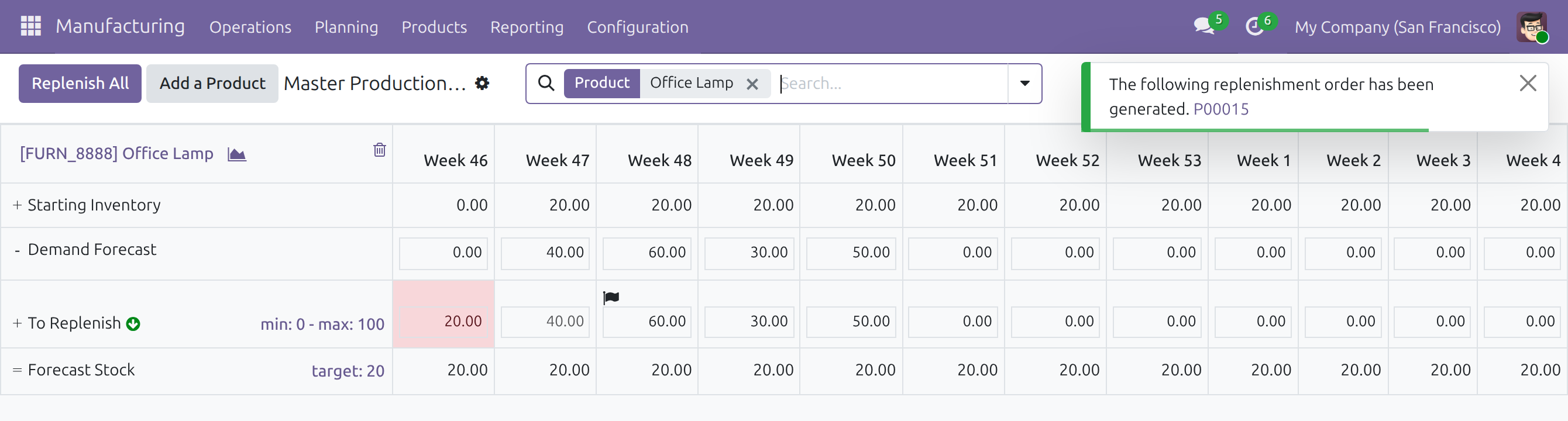
The two buttons do different things:
- Replenish Product launches one period of one product: the flagged period, the first of the row still to launch. It shows a notification with the request for quotation.
- Replenish All, at the top of the schedule, launches every period that starts within the lead time, for all the products on the page. It shows no notification: open the requests for quotation from Purchase ‣ Orders ‣ Purchase Orders, where their source is MPS.
The subcontracted product is launched according to its replenishment lead time. Odoo takes the longer of two durations: the delivery delay of the vendor, or the manufacturing lead time of the bill of materials plus the days to prepare its components. It then adds the days to purchase. The components are counted by the manufacturing lead time alone.
The schedule of a component replenishes the stock that the warehouse supplies to the subcontractor. Replenish the component too, from its own block.
After the buyer confirms the order
The buyer opens Purchase ‣ Orders ‣ Purchase Orders and clicks Confirm Order on the request for quotation. Odoo then creates the subcontracting manufacturing order with the subcontracting bill of materials, and a transfer that supplies the components from the warehouse to the subcontractor. In the schedule, the period of the subcontracted product stays launched, and the Indirect Demand Forecast of the components stays as it was.
Actual Demand leaves out the supply of subcontractors
Every transfer into the subcontracting locations of the company is left out of the row Actual Demand and of the list of transfers behind it. This holds whether or not the warehouse plans the subcontracted product. For a product the warehouse plans, the components are already in Indirect Demand Forecast, so they are counted once. Transfers to customers and to other warehouses stay in Actual Demand.
The row Actual Demand is hidden by default. Show it from the search options of the schedule (see the documentation of Master Production Schedule).
Troubleshooting
A component shows no Indirect Demand Forecast. Check, in this order: the component has a schedule in the same warehouse; the subcontracted product is planned and has a quantity to replenish; Odoo replenishes the subcontracted product by buying it in that warehouse; its first vendor is a subcontractor of a bill of materials of type Subcontracting; the warehouse has Resupply Subcontractors ticked; the component is not delivered to the subcontractor by its own vendor.
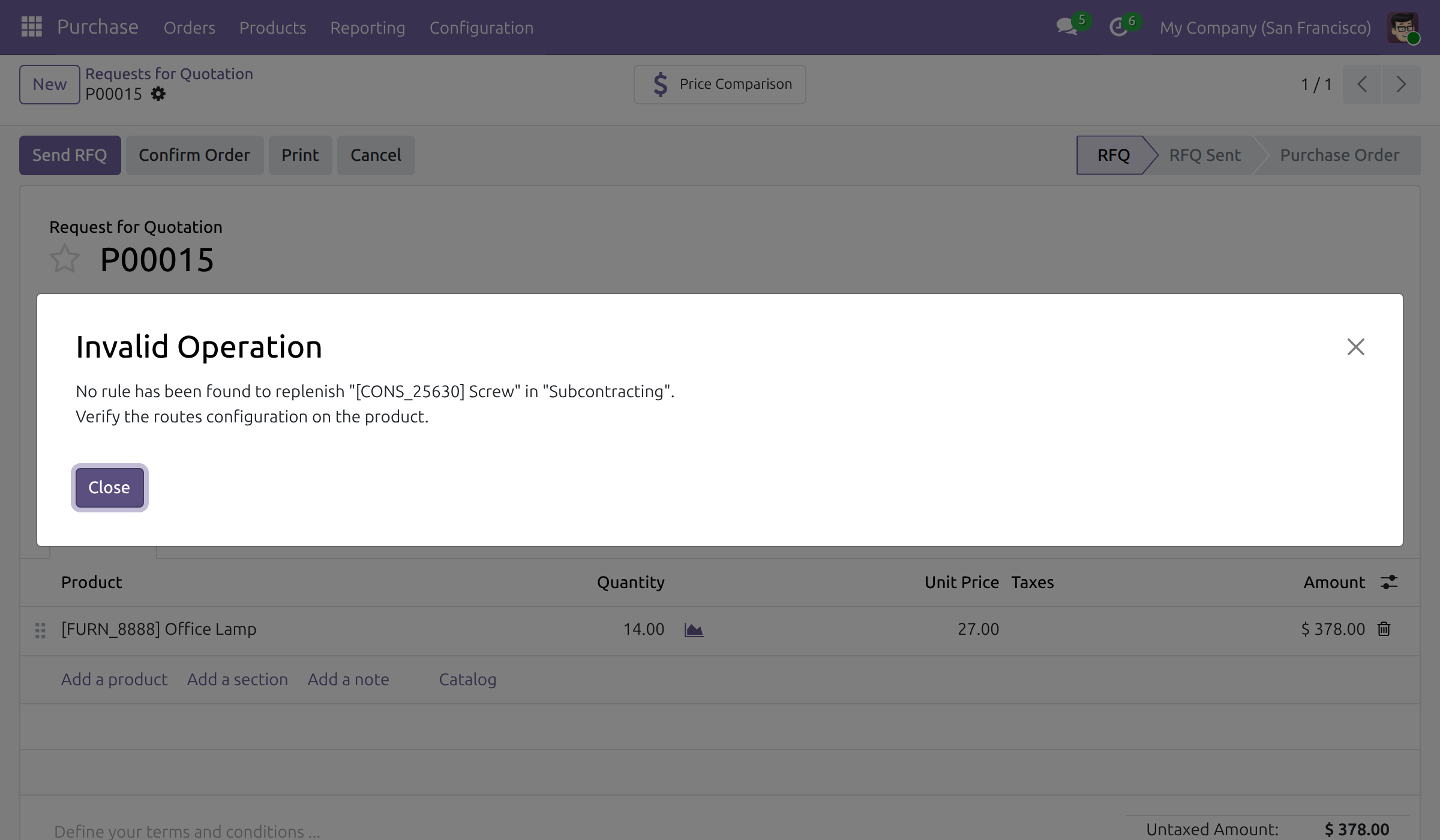
"No rule has been found to replenish ..." when the buyer confirms the order. A dialog titled Invalid Operation names a component and the subcontracting location. Odoo raises it when Resupply Subcontractors is off on the warehouse of the order while another warehouse still supplies subcontractors. Switch the setting off on every warehouse, or on again on the warehouse of the order. The schedule shows no component demand for such a warehouse.
The order went to another vendor than the plan assumed. The schedule uses the first vendor line of the product whatever the quantity; the order uses the quantity and the date. See "Which subcontractor and which bill of materials".
The components are counted earlier than expected. They fall the manufacturing lead time of the subcontracting bill of materials before the period of the subcontracted product, and a quantity that would fall before today is counted in the first column. Open the bill of materials and read Manuf. Lead Time on the tab Miscellaneous.
The supply transfers are not in Actual Demand. This is intended: they are counted as the Indirect Demand Forecast of the components.
The field Bill of Materials is missing on the schedule of the subcontracted product. The warehouse buys the product, so the schedule uses the subcontracting bill of materials of its first vendor and offers no choice.
FAQ
- Does the module create orders?
- No. Nothing is created until a planner presses Replenish Product or Replenish All, and the transfers to the subcontractor are created by Odoo when the buyer confirms the request for quotation.
- Which components appear in the schedule?
- Those the warehouse really supplies to the subcontractor. A component the subcontractor buys itself, or that its vendor delivers to it straight, does not.
- Does the demand of the components change when the order is confirmed?
- No. The same quantities stay in Indirect Demand Forecast, in the same periods.
- Why is the subcontracted product due earlier than its components are needed?
- It is launched according to its replenishment lead time, which includes the delivery delay of the vendor and the days to purchase. Its components are counted by the manufacturing lead time of the bill of materials only.
- Can the same product be manufactured in one warehouse and subcontracted in another?
- Yes. In a warehouse that manufactures it, the schedule plans its manufacturing bill of materials. In a warehouse that only buys it, the schedule plans the subcontracting bill of materials of its first vendor.
This software and associated files (the "Software") may only be used (executed, modified, executed after modifications) if you have purchased a valid license from the authors, typically via Odoo Apps, or if you have received a written agreement from the authors of the Software (see the COPYRIGHT file).
You may develop Odoo modules that use the Software as a library (typically by depending on it, importing it and using its resources), but without copying any source code or material from the Software. You may distribute those modules under the license of your choice, provided that this license is compatible with the terms of the Odoo Proprietary License (For example: LGPL, MIT, or proprietary licenses similar to this one).
It is forbidden to publish, distribute, sublicense, or sell copies of the Software or modified copies of the Software.
The above copyright notice and this permission notice must be included in all copies or substantial portions of the Software.
THE SOFTWARE IS PROVIDED "AS IS", WITHOUT WARRANTY OF ANY KIND, EXPRESS OR IMPLIED, INCLUDING BUT NOT LIMITED TO THE WARRANTIES OF MERCHANTABILITY, FITNESS FOR A PARTICULAR PURPOSE AND NONINFRINGEMENT. IN NO EVENT SHALL THE AUTHORS OR COPYRIGHT HOLDERS BE LIABLE FOR ANY CLAIM, DAMAGES OR OTHER LIABILITY, WHETHER IN AN ACTION OF CONTRACT, TORT OR OTHERWISE, ARISING FROM, OUT OF OR IN CONNECTION WITH THE SOFTWARE OR THE USE OR OTHER DEALINGS IN THE SOFTWARE.