
Vietnamese E-Invoice Integration
| Lines of Code | 3057 |
| Technical name | l10n_vn_viin_edi |
| License | OPL-1 |
| Website | https://viindoo.com/apps/modules/19.0/l10n_vn_viin_edi |
| Read description for | v 13.0 v 14.0 v 15.0 v 16.0 v 17.0 v 18.0 |
| Required Apps | Invoicing (account) Discuss (mail) |
| Included Dependencies | Partner Budget Code Partner Identity Information Viindoo Base Accounting Foundation API Request Logger Legal Invoice Number |
| Extensions | E-Invoice - Viettel S-Invoice Integrator Show EInvoice Information on POS Receipt E-Invoice - Misa meInvoice Integrator E-Invoice - VNIs VN-Invoice Integrator Vietnam E-invoice - Sale Vietnam Electronic Invoice Line Grouping [TEST] Vietnamese E-Invoice Provider Test Adapter |

Vietnamese E-Invoice Integration
Seamless integration with Vietnamese e-invoice providers (Viettel S-Invoice, VNInvoice, MISA E-Invoice, etc), ensuring compliance and efficiency in invoicing workflows
At a Glance
The facts of Vietnamese E-Invoice Integration, version 1.1.7, in one place. Published by Viindoo.
Key Features
Built natively on Odoo/Viindoo to streamline real business operations:
Provider Integration
Preconfigured for popular Vietnamese e-invoice providers like Viettel S-Invoice, VNInvoice, and MISA E-Invoice, with tools to extend compatibility to new providers.
Easy VietNam E-invoice configuration
config E-invoice serial, type and template with ease.
Enhanced Accounting Fields for E-Invoicing
- In Customer Invoice:
- E-Invoice Issuance Date: Tracks the issuance date of the electronic invoice.
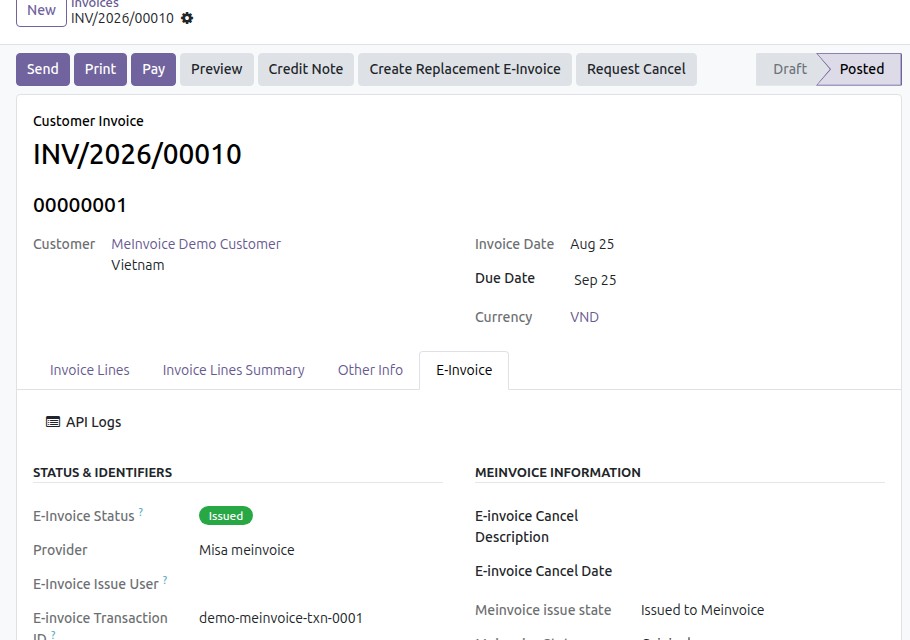
- E-invoice Transaction ID: Tracks the E-invoice Transaction ID of the electronic invoice.
- E-Invoice Issue User: Tracks the E-Invoice Issue User of the electronic invoice.
- E-Invoice Representation File: Stores the representation file generated for the invoice.
- E-Invoice Converted File: Stores the printable version of the e-invoice in PDF format.
- In Account Journal:
- E-Invoice Provider: Specifies the e-invoice provider (e.g., MISA, VNIs, Viettel).
- Default E-Invoice Type: Sets the default type of e-invoice (e.g., VAT Invoice, Sale Invoice).
- Default Template: Assigns the default e-invoice template for all invoices under this journal.
- Default E-Invoice Serial: Links to the e-invoice serial for compliance and traceability.
Real-Time Status Tracking
Monitor issuance in real time and filter every invoice by one normalized E-Invoice Status - to issue, issued, adjusted, replaced, cancelled or error - across all providers.
Benefits
The module ensures businesses fully comply with Vietnam's e-invoice regulations, avoiding legal violations and risks.
Eliminate manual processes such as printing, storing, and delivering paper invoices, helping businesses save operational time and costs.
Easily issue, adjust, and cancel e-invoices directly within the system, ensuring quick and accurate processing.
Real-time tracking of invoice status minimizes errors and enhances financial transparency.
Flexibly expand to integrate with additional e-invoice providers or customize workflows to meet specific business needs.
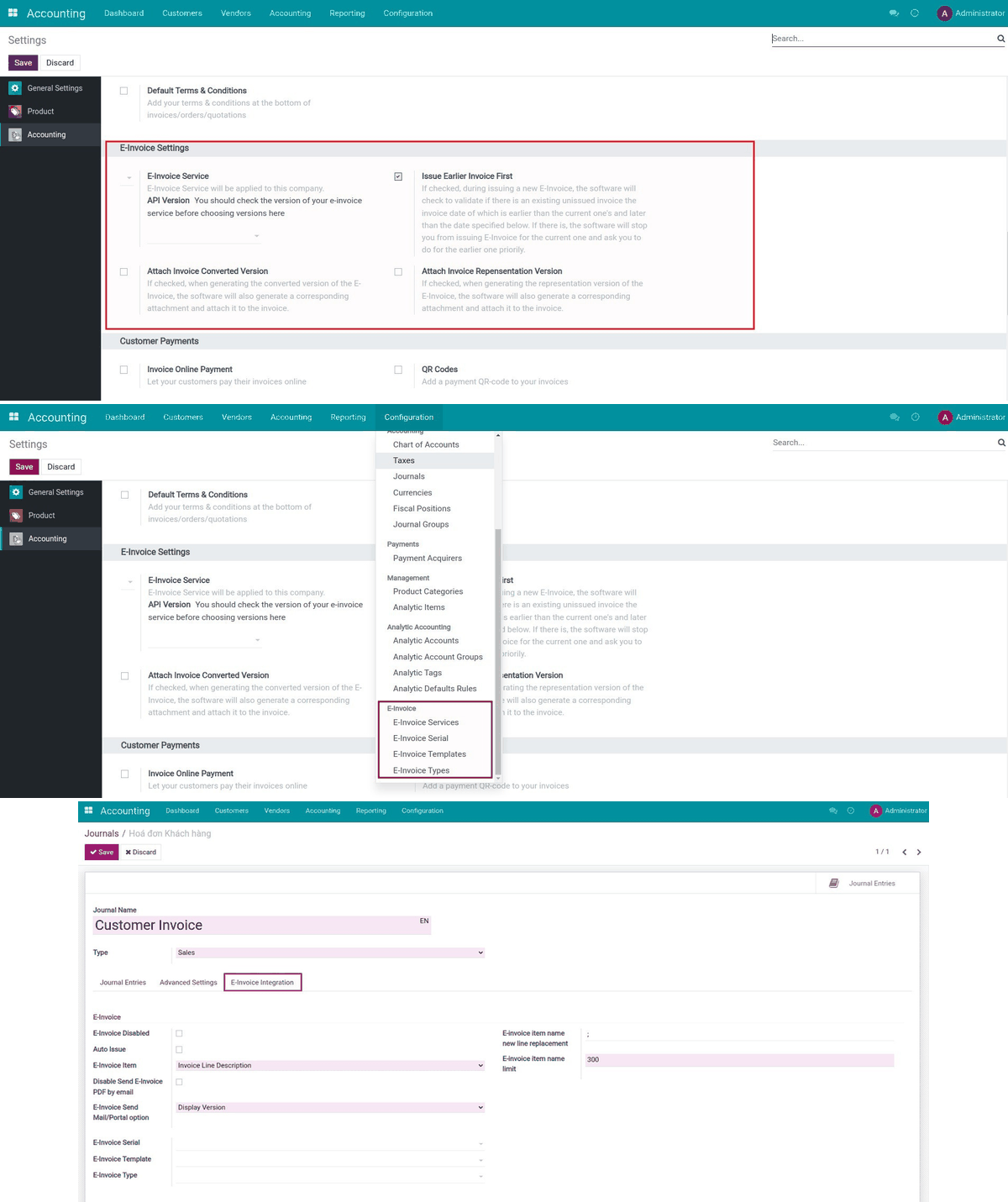
Vietnam E-Invoicing settings
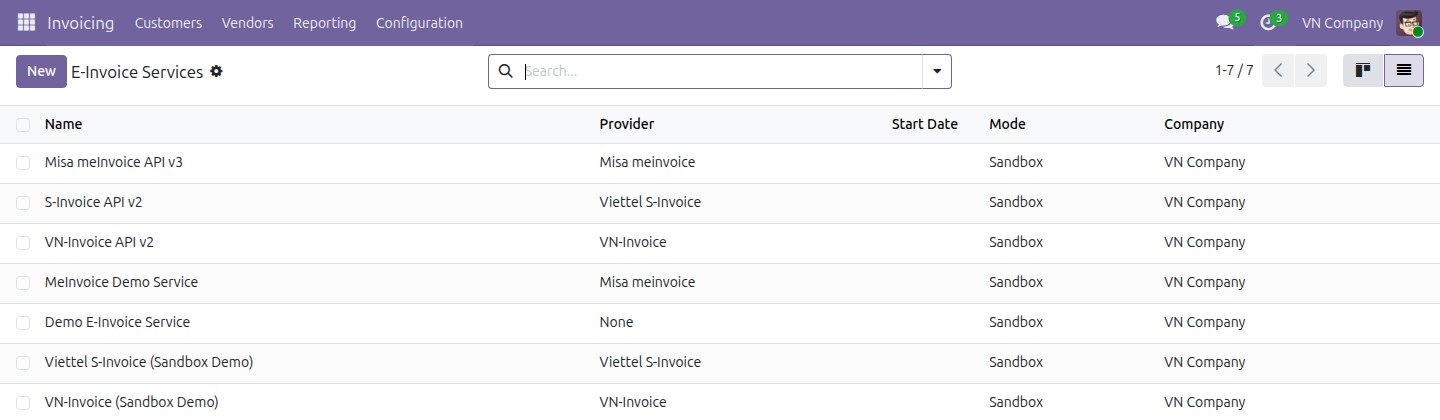
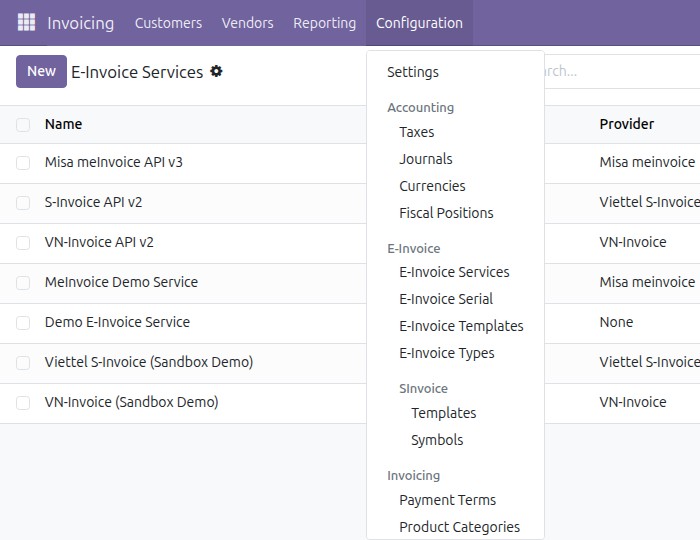
Unified E-Invoice menu
Merged E-Invoice tab
See Vietnamese E-Invoice Integration in Action
See how this module solves real business problems in a working Viindoo environment.
Need help with Vietnamese E-Invoice Integration?
For questions, implementation support, or consulting services, contact Viindoo.
Pre-Sales & Partnership
sales@viindoo.comWhen contacting us, please include:
- Odoo/Viindoo version (CE/EE).
- Number of users and business scope.
- Other modules currently in use.
Technical Support
apps.support@viindoo.comFor faster troubleshooting, please provide:
- Order number or app reference.
- Odoo/Viindoo version & edition.
- Steps to reproduce the issue.
- Screenshots/logs if available.
Technical Requirement
Changes log
We continuously improve this module. Recent updates from the official Viindoo repository:
- 2026-07-05 Improved Upgraded to Odoo 19.0: unified E-Invoice menu, one merged notebook tab, a single E-Invoice status filter, a consolidated Vietnam E-Invoicing settings and partner section, and the e-invoice cancel-guard.
- 2026-02-24 Fixed TypeError: object of type 'bool' has no len() while downloading invoice on portal.
- 2026-01-30 Improved E-Invoice validation flow: check on issuance instead of journal posting.
- 2026-01-07 Performance Speed up the pre_init_hook method by ignoring null values.
- 2026-01-05 Fixed Update journal dashboard view to be compatible with v17.0.
- 2025-11-21 Improved Performance by replacing binary attachment domain with filename check.
- 2025-09-11 Added Identification, passport, budget code for Vietnam edi.
Works Great With These Modules
Extend Vietnamese E-Invoice Integration with complementary Viindoo apps:
Vietnam Electronic Invoice Line Grouping
Provide options to issue an e-invoice on a detailed or line-grouped form
Module l10n_vn_edi_line_groupingE-Invoice - Viettel S-Invoice Integrator
Issue Vietnamese e-invoices through Viettel S-Invoice on top of Odoo core, fully integrated with the unified E-Invoice interface
Module l10n_vn_viin_accounting_sinvoiceShow EInvoice Information on POS Receipt
General Information of EInvoice on POS Receipt
Module l10n_vn_viin_edi_posVietnam E-invoice - Sale
Automatically add Vietnamese descriptions when creating invoices from sales orders for compliance and efficiency.
Module l10n_vn_viin_einvoice_saleWho Should Use This Module?
Built for teams that need this capability fully integrated into their Odoo/Viindoo stack.
Executives & Business Owners
Need clear visibility into operations and a stack that scales without bespoke development.
Operations / Department Leaders
Want to streamline daily workflows, remove manual handoffs, and keep data consistent across teams.
Implementers & Odoo Partners
Looking for production-ready Viindoo modules to deliver projects faster and at lower risk.
Installation
- Navigate to Apps.
- Search with keyword l10n_vn_viin_edi.
- Press Install.
Instruction
Instruction video: E-Invoice common
This module provides the provider-agnostic backbone for Vietnamese e-invoicing. Once a provider module is installed alongside it - Viettel S-Invoice, VNInvoice (VNIs) or MISA meInvoice - every provider is configured, issued, tracked, adjusted, replaced and cancelled from the same unified E-Invoice interface described below, instead of one separate screen per provider.
1. Set up the E-Invoice Service, Serial and default assignment.
- Go to Accounting ‣ Configuration ‣ E-Invoice ‣ E-Invoice Services. Installing a provider's own module (MISA meInvoice, VNIs VN-Invoice or Viettel S-Invoice) adds a ready-made service row for that provider here.
- Open the service row for your provider, choose the Mode (Sandbox or Production) and fill in the connection credentials - Username/Password for Production, or Sandbox Username/Sandbox Password for Sandbox. Some providers add a one-click helper on this same screen - for example MISA meInvoice's Get meInvoice template/serial button, which creates a matching template and serial automatically; see that provider's own guide for details.
- Go to Accounting ‣ Configuration ‣ E-Invoice ‣ E-Invoice Serial and create a serial that references the service above together with an e-invoice template.
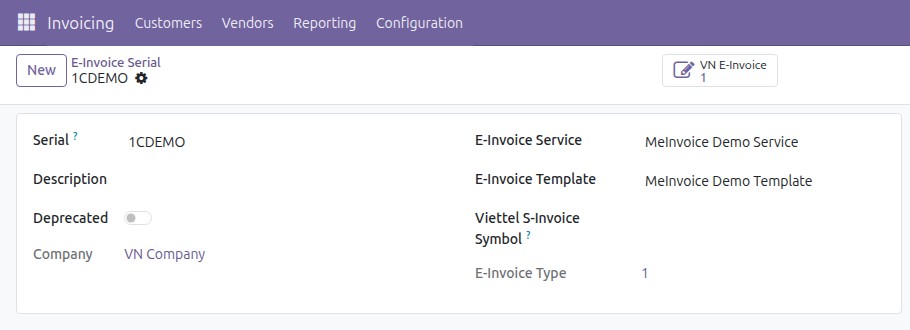
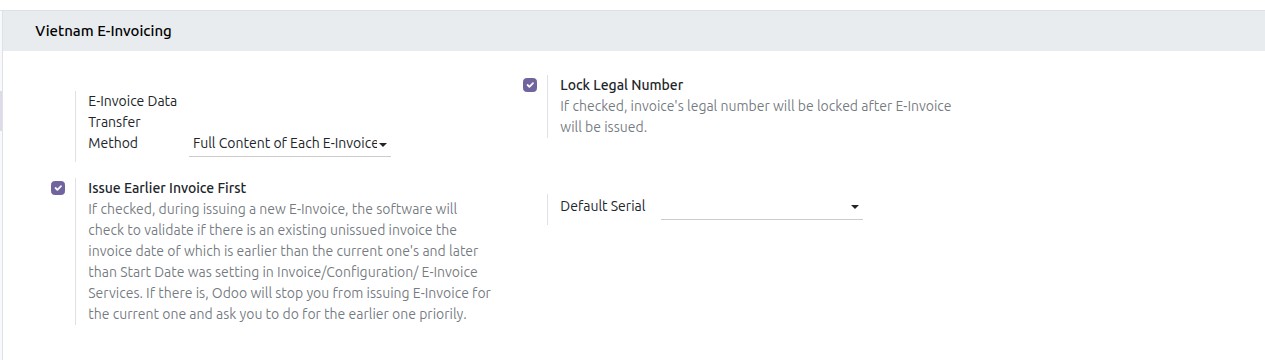
- Assign the serial either directly on a sales journal's E-Invoice Serial field, or as the company-wide fallback in Accounting ‣ Configuration ‣ Settings ‣ Vietnam E-Invoicing ‣ Default Serial.
2. Use the unified E-Invoice menu.
- A single E-Invoice menu now groups every e-invoice configuration and operation - services, serials, templates and types - replacing the former per-provider menus.
3. Fill in e-invoice information on the customer invoice.
- Open a customer invoice. The E-Invoice notebook tab gathers, in one place, the status and identifiers, the correction information, the provider sub-group and the generated documents - no matter which provider issued the invoice.
4. Track e-invoice status across every provider.
- On the customer invoice list, use the E-Invoice Status filter and group-by to see, in one normalized view, which invoices are still to issue, issued, adjusted, replaced, cancelled or in error - regardless of the underlying provider.

5. Adjust or replace instead of cancelling an issued e-invoice.
- An already-issued e-invoice can no longer be simply cancelled, regardless of when it was issued. Clicking Request Cancel on an issued e-invoice blocks the cancel action and guides you to issue an adjustment or a replacement e-invoice instead, keeping your books compliant.
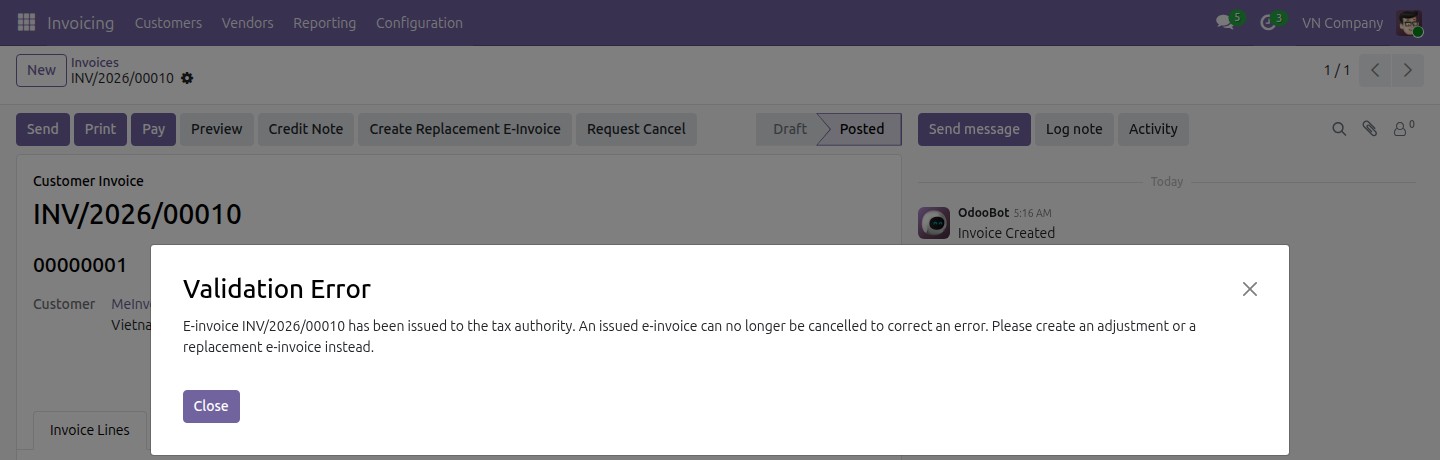
- An adjustment e-invoice states, line by line, what it changes on the original e-invoice, so raise the credit note from the original invoice with its Credit Note button. A product line of the credit note that is not linked to a line of the original invoice is refused before anything is sent to the provider, and the message names that line.
Legal basis
Vietnamese e-invoicing runs under two instruments in force from 1 July 2026:
- Decree 254/2026/ND-CP (Nghị định 254/2026/NĐ-CP), which repeals Decree 123/2020/ND-CP in full, Article 1 of Decree 41/2022/ND-CP, and Decree 70/2025/ND-CP in full.
- Circular 91/2026/TT-BTC (Thông tư 91/2026/TT-BTC), which ends Circular 32/2025/TT-BTC.
Three of their provisions shape how this module behaves.
A written agreement comes before an adjustment or a replacement. Where the buyer is an economic organisation, another organisation, a business household or an individual trader, the seller and the buyer draw up a written agreement identifying the error before the corrected e-invoice is issued; a private individual buyer receives a notice instead. Note that an individual trader counts as a business buyer here, not as a private individual. This requirement applies only to a point-b) correction; a point-a) error is notify-only and never produces a corrected e-invoice. No written agreement is required when the seller transfers e-invoice data through the E-Invoice Data Summary Table, when it transfers transaction-detail data through the Transaction Detail Information Table, or for goods sold on an e-commerce platform or another digital platform. Two settings tell the module which of those applies to you. Set E-Invoice Data Transfer Method in the Vietnam E-Invoicing settings to record how your company reports to the tax authority - it is your standing registration, so it applies to every invoice until you change it. Tick Sold on an E-Commerce or Digital Platform on the invoice itself for a sale made through a platform, because the same seller trades on and off a platform on the same day. When one of them applies the wizard proceeds without an agreement name; otherwise it asks for one and will not continue until you supply it. (Point b.2, Clause 1, Article 10, Circular 91/2026/TT-BTC, whose closing paragraph refers to Points a.1 and a.2, Clause 3, Article 16, Decree 254/2026/ND-CP.)
An issued e-invoice is corrected, never cancelled. Correction is by adjustment or by replacement, whenever the invoice was originally issued - an invoice first issued under Decree 51/2010/ND-CP, Decree 04/2014/ND-CP, Decree 123/2020/ND-CP, Decree 70/2025/ND-CP or Circular 32/2025/TT-BTC is corrected the same way (Clause 2, Article 24, Circular 91/2026/TT-BTC). This is why, from 1 July 2026, the cancel action is blocked once an e-invoice has been issued. Before that date the cancel action behaves as it did, because an earlier Decree provided for it; what changed on 1 July 2026 is the law, not your past records. Clause 1, Article 10 enumerates every route open to a seller who finds an issued e-invoice wrong - notify the buyer, issue an adjustment, or issue a replacement - and cancellation is not among them (Clause 1, Article 10, Circular 91/2026/TT-BTC).
A replacement e-invoice carries the prescribed notation. The replacement states Thay thế cho hóa đơn Mẫu số... ký hiệu... số... ngày... tháng... năm, with the date written day, then month, then year. The module fills this in for you from the invoice being replaced. (Point b.2, Clause 1, Article 10, Circular 91/2026/TT-BTC.)
Keep the written agreement available: the tax authority, or another competent state agency, may ask the seller to produce it.
This software and associated files (the "Software") may only be used (executed, modified, executed after modifications) if you have purchased a valid license from the authors, typically via Odoo Apps, or if you have received a written agreement from the authors of the Software (see the COPYRIGHT file).
You may develop Odoo modules that use the Software as a library (typically by depending on it, importing it and using its resources), but without copying any source code or material from the Software. You may distribute those modules under the license of your choice, provided that this license is compatible with the terms of the Odoo Proprietary License (For example: LGPL, MIT, or proprietary licenses similar to this one).
It is forbidden to publish, distribute, sublicense, or sell copies of the Software or modified copies of the Software.
The above copyright notice and this permission notice must be included in all copies or substantial portions of the Software.
THE SOFTWARE IS PROVIDED "AS IS", WITHOUT WARRANTY OF ANY KIND, EXPRESS OR IMPLIED, INCLUDING BUT NOT LIMITED TO THE WARRANTIES OF MERCHANTABILITY, FITNESS FOR A PARTICULAR PURPOSE AND NONINFRINGEMENT. IN NO EVENT SHALL THE AUTHORS OR COPYRIGHT HOLDERS BE LIABLE FOR ANY CLAIM, DAMAGES OR OTHER LIABILITY, WHETHER IN AN ACTION OF CONTRACT, TORT OR OTHERWISE, ARISING FROM, OUT OF OR IN CONNECTION WITH THE SOFTWARE OR THE USE OR OTHER DEALINGS IN THE SOFTWARE.