
Theo Dõi Thanh Toán và Báo Cáo Tổ Hợp Bán Hàng
| Số dòng Code | 891 |
| Tên kỹ thuật | viin_sale_ee |
| Giấy phép | OPL-1 |
| Website | https://viindoo.com/apps/modules/18.0/viin_sale_ee |
| Đọc mô tả cho | |
| Yêu cầu các App | Invoicing (account) Discuss (mail) |
| Bao gồm Các phụ thuộc | Mô-đun Cơ Sở Nền tảng Kế toán Báo Cáo Bán Hàng Kích hoạt các tính năng liên quan đến sản phẩm Viin Giao diện Cohort |
Sales Payment Tracking and Cohort Reports
Track how much cash has really landed against each sales order line, and analyse sales cohorts.
Knowing an order has been invoiced is not the same as knowing it has been paid. This module answers the second question, down to the individual order line, so sales and finance always agree on where the cash actually stands.
Key Features
Seven ways this module sharpens the sales order and its reporting - from a real, reconciled payment figure on every order to how fast orders close and what they were worth before discount.
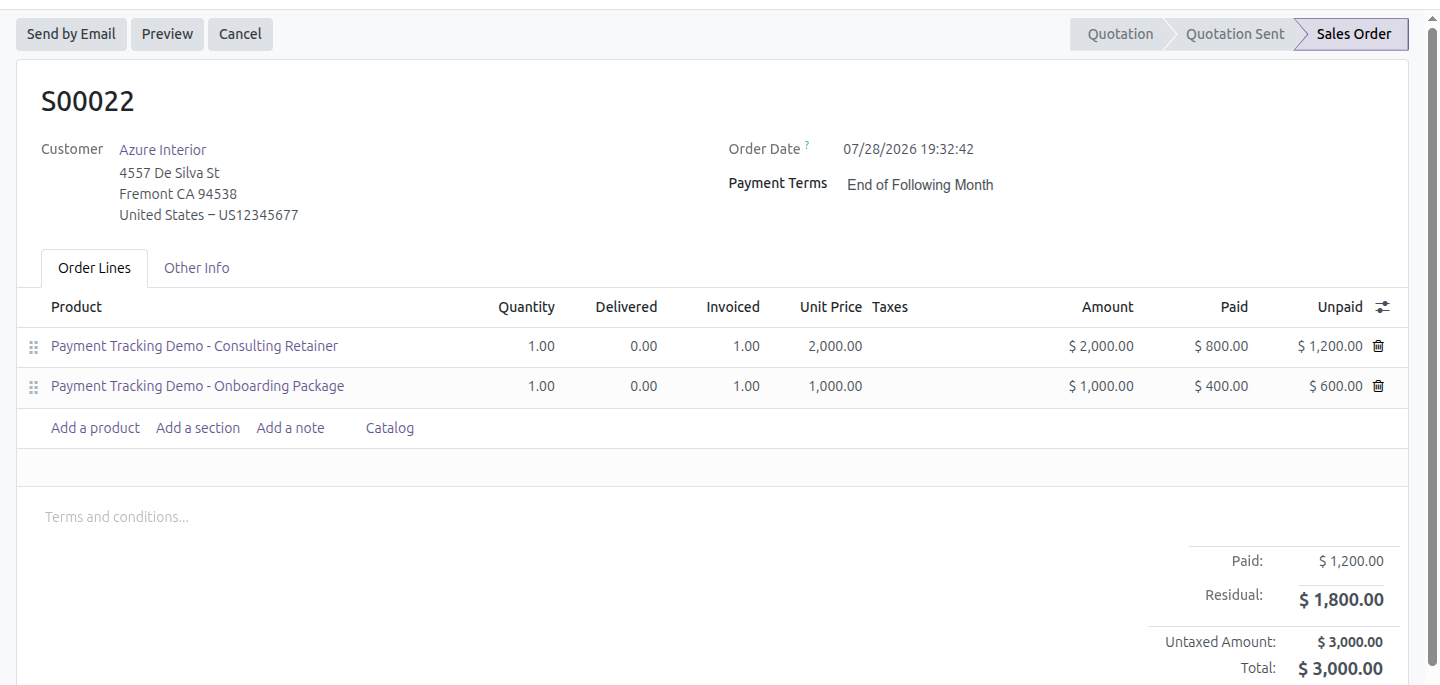
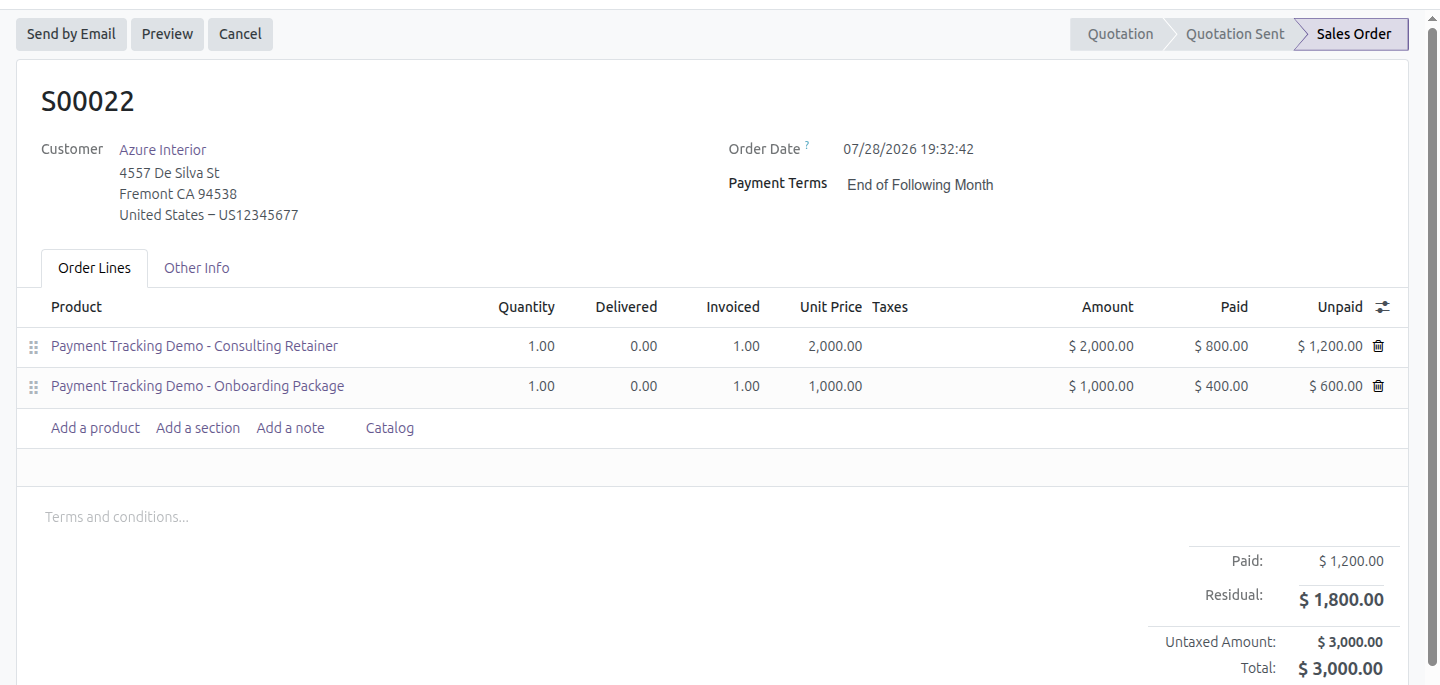
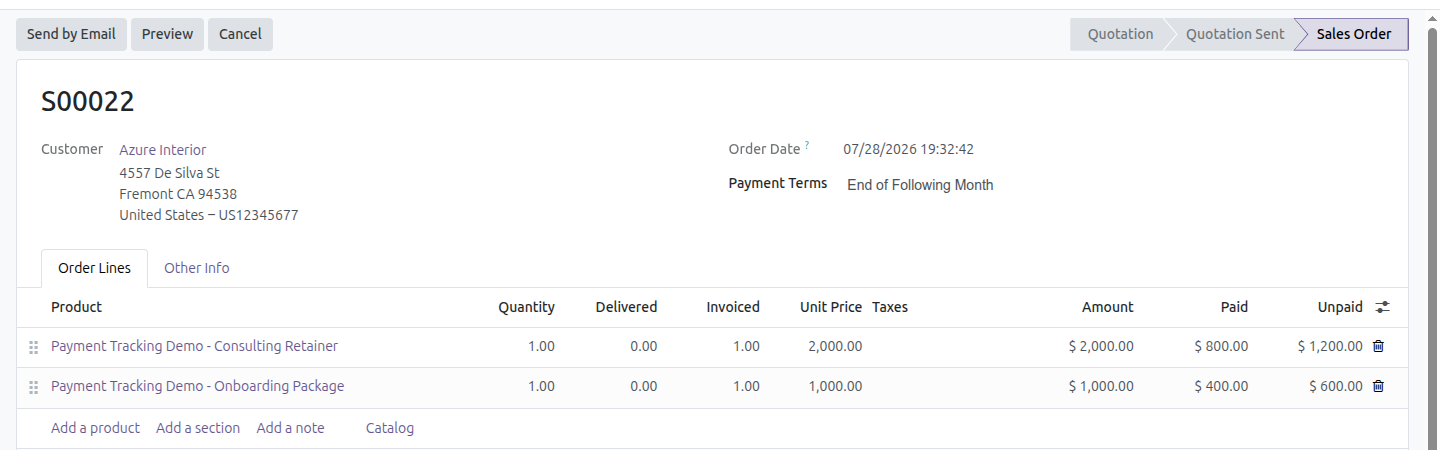
Paid & Unpaid on order lines
Two optional columns on the sales order lines, so a partially settled order can be read line by line.
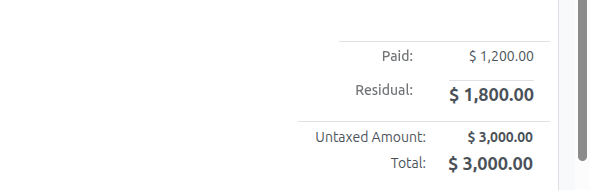
Paid & Residual on the order total
The order form's totals block adds Paid and Residual right next to the order total, at a glance.
Paid & Unpaid on the orders list
The same two columns, plus column totals, on the Quotations/Orders list - scan a whole batch at once.
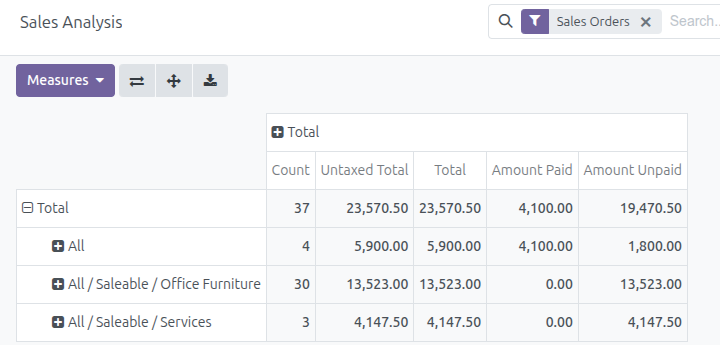
Payment measures in Sales Analysis
Amount Paid and Amount Unpaid join the graph, pivot and Sales Analysis report, converted to company currency.
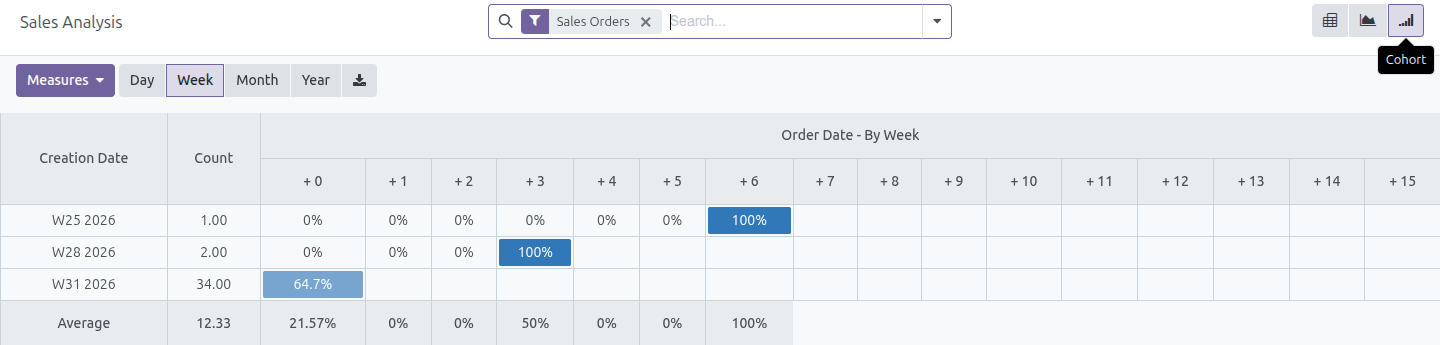
Cohort view on the dashboard
A cohort view sits alongside the graph and pivot on Reporting / Dashboard, to follow order churn week by week.
Days To Confirm
A Sales Analysis measure counting the days from order creation to confirmation, so closing speed can be tracked per salesperson, customer or period.
Total before discount
Whenever an order carries a discount, the pre-discount total appears struck through in the order form totals and on the quotation and sales order PDF - so the customer sees what was given away.
Figures You Can Trust
The numbers follow the money wherever it goes, not just the paperwork trail.
See Paid and Unpaid line by line
Turn on the Paid and Unpaid columns on any order's lines to read a partially settled order the way finance sees it - which line is covered, and which is still owed.
Paid and Residual on the order form
Next to the order's Total, a Paid and a Residual figure make the cash position obvious without opening a single invoice.
Payment measures in Sales Analysis
Amount Paid and Amount Unpaid become regular measures on the Sales Analysis pivot and graph, grouped, filtered and exported exactly like every other measure.
Cohort view on the dashboard
A weekly cohort, right next to the graph and pivot on Reporting / Dashboard, tracks how each batch of orders behaves over time.
Need help with this module?
For questions, implementation support, or consulting services, contact Viindoo.
Pre-Sales & Partnership
When contacting us, please include:
- Odoo/Viindoo version (CE/EE).
- Number of users and business scope.
- Other modules currently in use.
Technical Support
For faster troubleshooting, please provide:
- Order number or app reference.
- Odoo/Viindoo version & edition.
- Steps to reproduce the issue.
- Screenshots/logs if available.
Technical Requirement
Who Should Use This Module?
Built for anyone who needs to answer "has this actually been paid?" without leaving the Sales app.
Sales Managers
See at a glance which confirmed orders are still waiting on cash, without opening every invoice one by one.
Accounts Receivable & Finance
Check what sales believes is outstanding against the real, reconciled invoice state - down to the order line.
Odoo/Viindoo Partners & Implementers
Add production-ready payment visibility and cohort analysis to a sales cluster without building the reconciliation logic yourself.
Phần mềm này và các tệp liên kết ("Phần mềm") được sử dụng (chạy, tuỳ biến, chạy sau khi được tuỳ biến) chỉ khi bạn mua được giấy phép có hiệu lực từ tác giả, điển hình như qua các Ứng dụng Odoo, hoặc trong trường hợp bạn nhận được thoả thuận bằng văn bản từ tác giả của Phần mềm (chi tiết tại tệp COPYRIGHT).
Bạn có thể phát triển các phân hệ Odoo có sử dụng Phần mềm như một Thư viện (thường là phụ thuộc vào, nhập vào và sử dụng nguồn của nó) nhưng không sao chéo bất kỳ mã nguồn hay tài liệu nào thuộc Phần mềm. Bạn có thể phân phối những phân hệ này theo giấy phép mà bạn lựa chọn, miễn sao nội dung giấy phép đó tương tích với điều khoản của Giấy phép Phần mềm Độc quyền Odoo (ví dụ: LGPL, MIT hay bất kỳ loại giấy phép phần mềm độc quyền nào tương tự vậy).
Nghiêm cấm phát hành, phân phối, cấp phép lại hoặc bán bản sao của Phần mềm hoặc bản sao Phần mềm đã được sửa đổi.
Thông báo bản quyền và chấp thuận nêu trên buộc phải được bao gồm trong tất cả các bản sao hoặc các phần quan trọng của Phần mềm.
PHẦN MỀM ĐƯỢC CUNG CẤP "NGUYÊN TRẠNG", KHÔNG BẢO ĐẢM DƯỚI BẤT KỲ HÌNH THỨC NÀO, ĐƯỢC THỂ HIỆN RÕ RÀNG HOẶC NGỤ Ý, KHÔNG GIỚI HẠN ĐẢM BẢO VỀ CÁC BẢO ĐẢM NGỤ Ý VỀ KHẢ NĂNG THƯƠNG MẠI, PHÙ HỢP VỚI MỤC ĐÍCH CỤ THỂ VÀ KHÔNG VI PHẠM. TRONG MỌI TRƯỜNG HỢP SẼ KHÔNG CÓ TÁC GIẢ HOẶC CHỦ SỞ HỮU BẢN QUYỀN NÀO CHỊU TRÁCH NHIỆM VỀ BẤT KỲ KHIẾU NẠI, THIỆT HẠI HOẶC TRÁCH NHIỆM PHÁP LÝ KHÁC NÀO TRONG PHẠM VI HỢP ĐỒNG, CÁC THIỆT HẠI HOẶC CÁCH KHÁC, PHÁT SINH TỪ, NGOÀI HOẶC CÓ LIÊN KẾT VỚI PHẦN MỀM HOẶC VIỆC SỬ DỤNG HOẶC KINH DOANH KHÁC TẠI PHẦN MỀM.