
Báo Cáo Tuổi Tồn Kho
| Số dòng Code | 1516 |
| Tên kỹ thuật | to_stock_age_report |
| Giấy phép | OPL-1 |
| Website | https://viindoo.com/apps/modules/18.0/to_stock_age_report |
| Đọc mô tả cho | v 17.0 |
| Yêu cầu các App | Invoicing (account) Discuss (mail) Inventory (stock) |
| Bao gồm Các phụ thuộc | Mô-đun Cơ Sở Viin Kho Vận |

How old is the stock you are holding?
Quantity and valuation bucketed by age - 0-30, 30-60, 60-90, 90-120, 120+ days - per product and category, printable and exportable.
Stock Age Report (technical name to_stock_age_report) is an Odoo 18.0 app for Odoo Community and Viindoo Cloud, built for inventory manager, financial controller, buyer, auditor.
At a Glance
The facts of Stock Age Report, version 0.1.2, in one place. Published by Viindoo.
How It Works
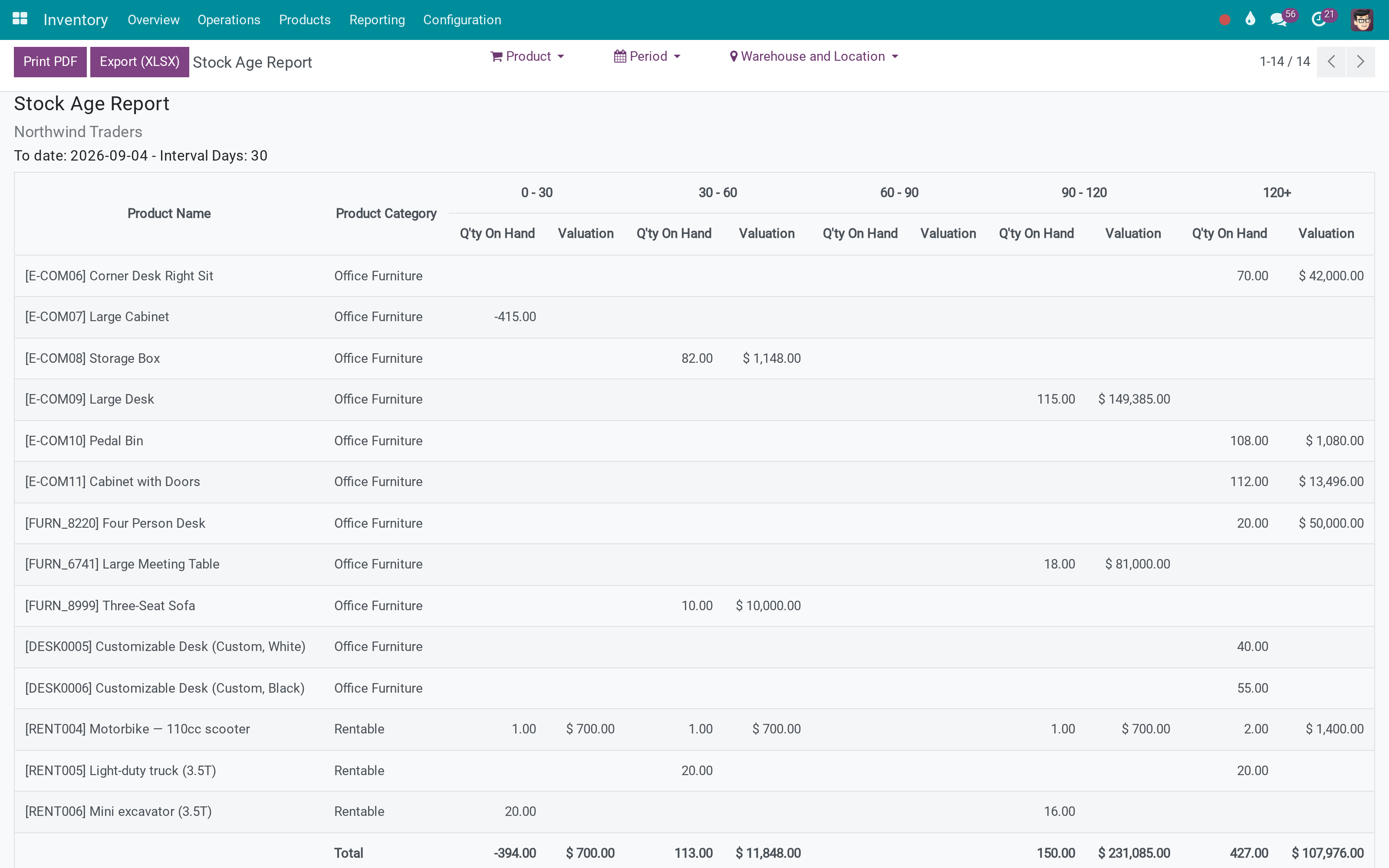
One screen, three filters.
Read the ageing
Each product's quantity and valuation, split by how long it has been in stock. The total line ties back to the inventory valuation.
Check it against the stock itself
The report reads the same valuation layers the on-hand figures come from, so the two agree.
What You Get
Quantity on hand and valuation, split into age buckets per product
Interval length and number of periods are yours to set - 30 days and five buckets by default
Filters by product, by period, and by warehouse or location
Grouped by product category, with a total line that ties to the valuation
Print to PDF and export to XLSX from the report itself
Reads the valuation layers, so it agrees with the inventory valuation report
More Screens
Everything below was taken on a database seeded with real business data, on this series - not a mock-up and not a screenshot from an older version.
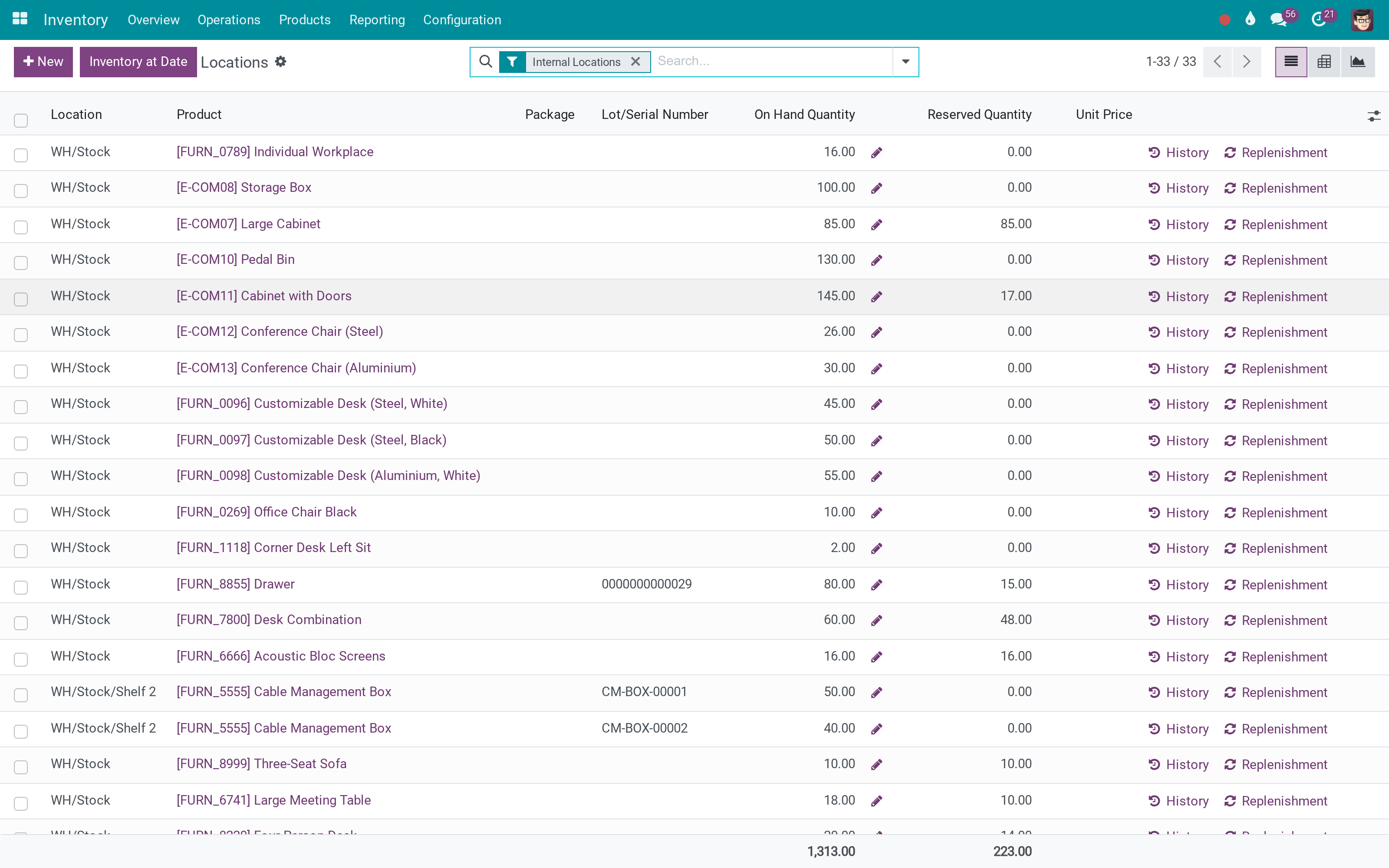
On-hand stock
What This App Does Not Do
Read this before you buy. Everything below is something the app deliberately leaves to another app or to you.
A product that was received and partly consumed shows the age of what remains; it is not a turnover report.
No write-down is posted and no rule is enforced - the numbers are the input to that decision.
The figures come from the valuation layers, so standard, FIFO or average cost all read as configured.
Works Well With
Apps from the same stack, built to fit this one:
Who Should Use Stock Age Report?
Inventory manager
Sees what has not moved in four months, by value.
Financial controller
Has the ageing basis for a provision, not an anecdote.
Buyer
Stops reordering what is already sitting in the racks.
Auditor
Gets the ageing table as a PDF or a spreadsheet.
Frequently Asked Questions
What does Stock Age Report do?
Quantity and valuation bucketed by age - 0-30, 30-60, 60-90, 90-120, 120+ days - per product and category, printable and exportable.
What does Stock Age Report not do?
It measures age, not movement. A product that was received and partly consumed shows the age of what remains; it is not a turnover report. It is a report, not a policy. No write-down is posted and no rule is enforced - the numbers are the input to that decision. Valuation follows your costing method. The figures come from the valuation layers, so standard, FIFO or average cost all read as configured.
Who is Stock Age Report for?
Inventory manager: Sees what has not moved in four months, by value. Financial controller: Has the ageing basis for a provision, not an anecdote. Buyer: Stops reordering what is already sitting in the racks. Auditor: Gets the ageing table as a PDF or a spreadsheet.
Which Odoo version and editions does it support?
Odoo 18.0 - Odoo Community, Viindoo Cloud. Upgrades to a newer Odoo series are a separate purchase for that series.
What does it depend on?
It installs on top of: viin_stock, stock_account, to_base. Odoo installs them with it.
How do I set it up?
One screen, three filters.
What works well with it?
Accounting Foundation (viin_account): Account types the valuation posts to.
Can I try it before buying?
Yes - the Live Preview button at the top of this page opens the module's own screen on a working database.
How do I get support?
Write to apps.support@viindoo.com with your Odoo version and the technical name to_stock_age_report; pre-sales questions go to sales@viindoo.com.
See Stock Age Report in Action
or use the Live Preview button at the top of this page
Need help with Stock Age Report?
For questions, implementation support or a custom feature, contact Viindoo.
Pre-Sales & Partnership
sales@viindoo.comUpgrades to a newer Odoo series are a separate purchase for that series.
All Viindoo apps: Viindoo Apps
Technical Requirement
Changes log
0.1.2 - Latest on the 18.0 line
- Document attachment IDOR, share allow-list, appointment partner overwrite, report model allow-list.
- Add test case.
- Only load product when selected a product category.
- Cannot update pageSize when changing product category.
- Add pager The issue with the client action is that it tries to load all the products (250k) at once.
Cài đặt
- Truy cập Ứng dụng.
- Tìm từ khóa to_stock_age_report.
- Ấn Cài đặt.
Hướng dẫn sử dụng
Video hướng dẫn: Báo Cáo Tuổi Tồn Kho
Nhập kho sản phẩm
Trước tiên, bạn cần lựa chọn quy trình nhập kho phù hợp để áp dụng cho doanh nghiệp bạn. Sau đó, bạn tiến hành nhập kho sản phẩm.
Xem báo cáo tuổi tồn kho
Trong quá trình quản lý hàng tồn kho, bạn có nhu cầu xem báo cáo tuổi tồn kho sẽ truy cập vào Kho vận > Báo cáo > Báo cáo Tuổi tồn kho. Phần mềm ERP Viindoo cung cấp công cụ bộ lọc hỗ trợ bạn lọc, nhóm các thông tin trên báo cáo theo các tiêu chí khác nhau:
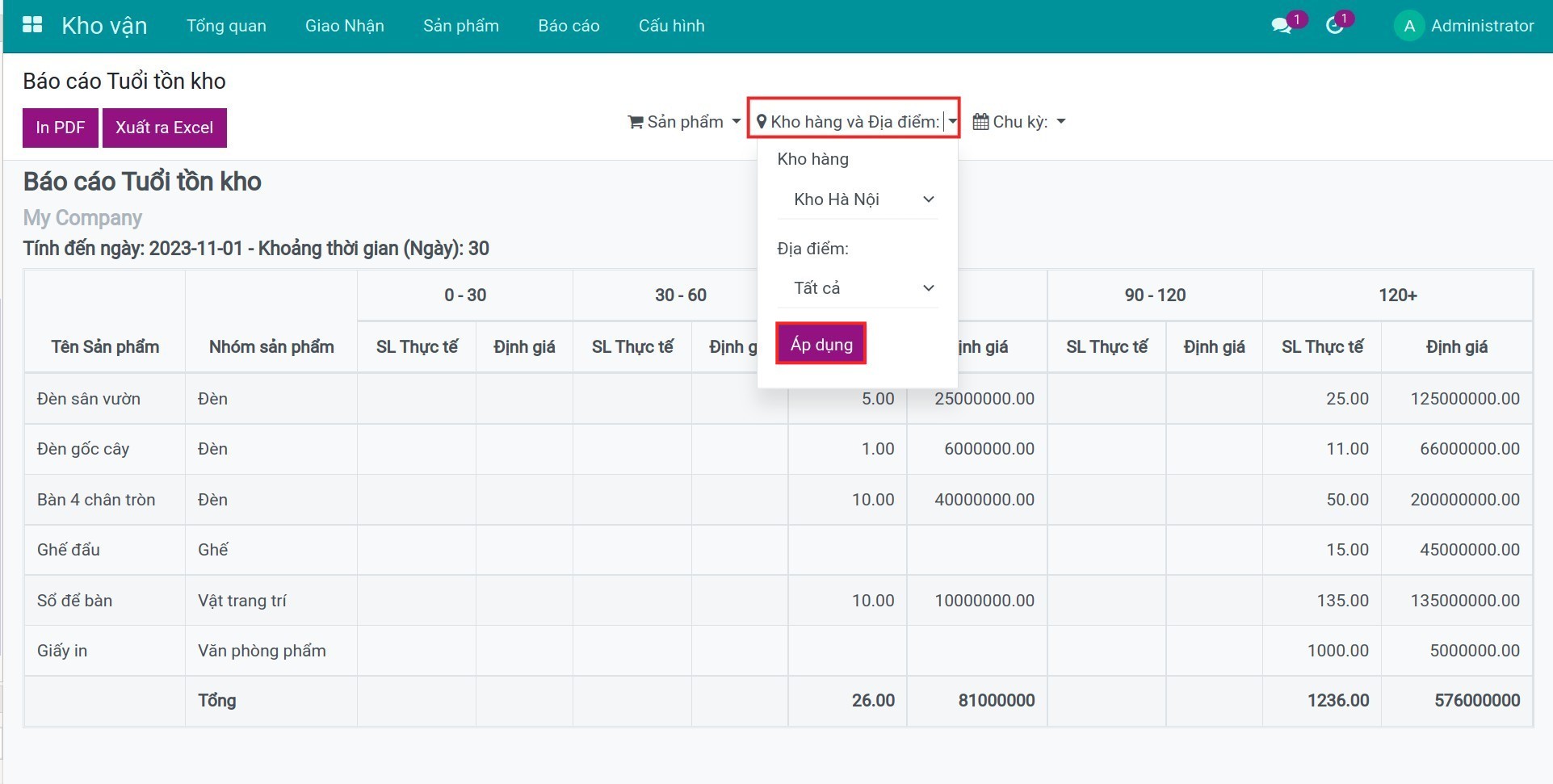
- Sản phẩm: bạn có thể chọn xem báo cáo theo một nhóm sản phẩm/sản phẩm cụ thể hoặc xem tất cả.
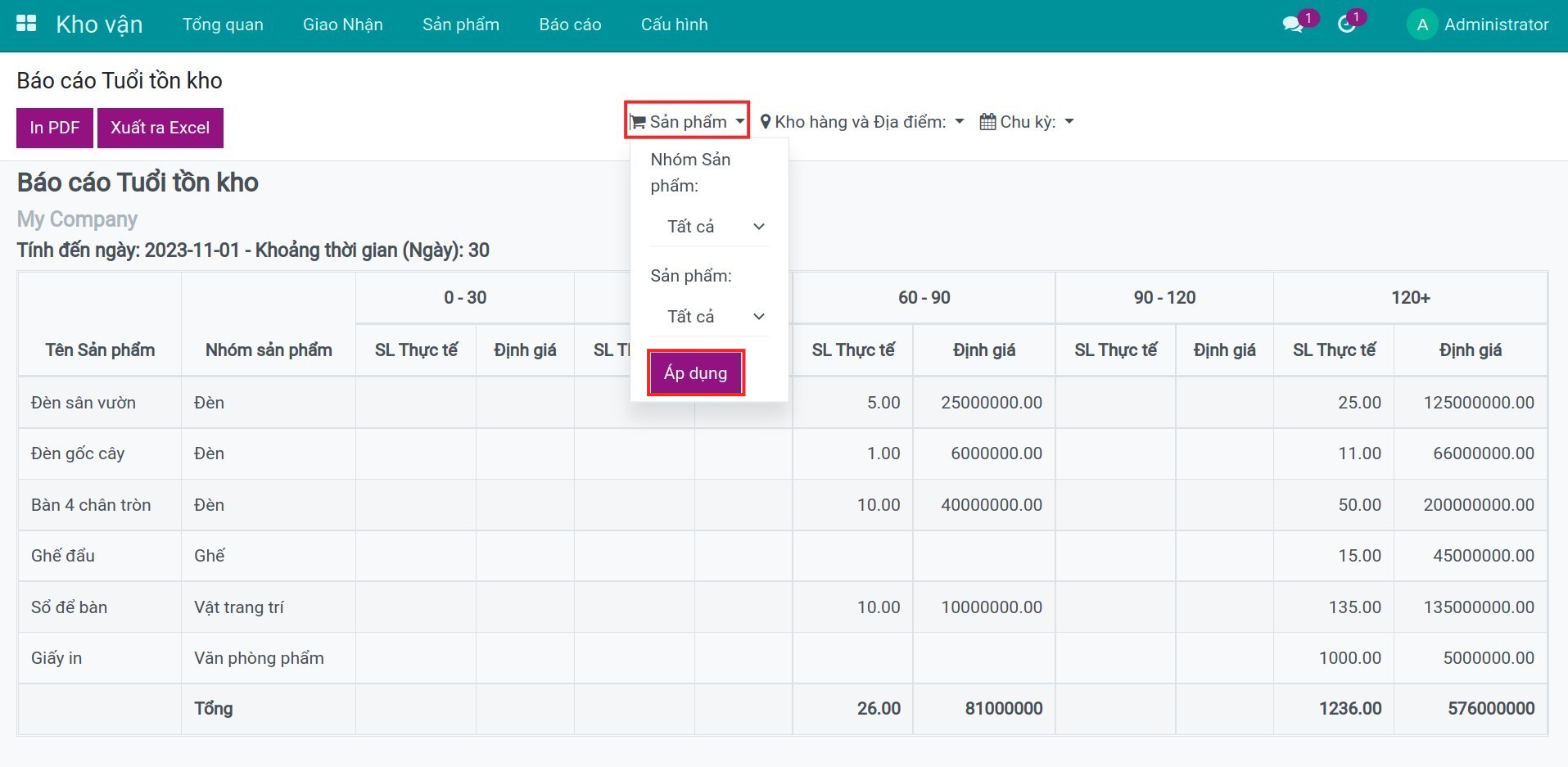
- Kho hàng và Địa điểm: bạn có thể chọn xem báo cáo ở một kho hàng/địa điểm cụ thể hoặc xem tất cả.
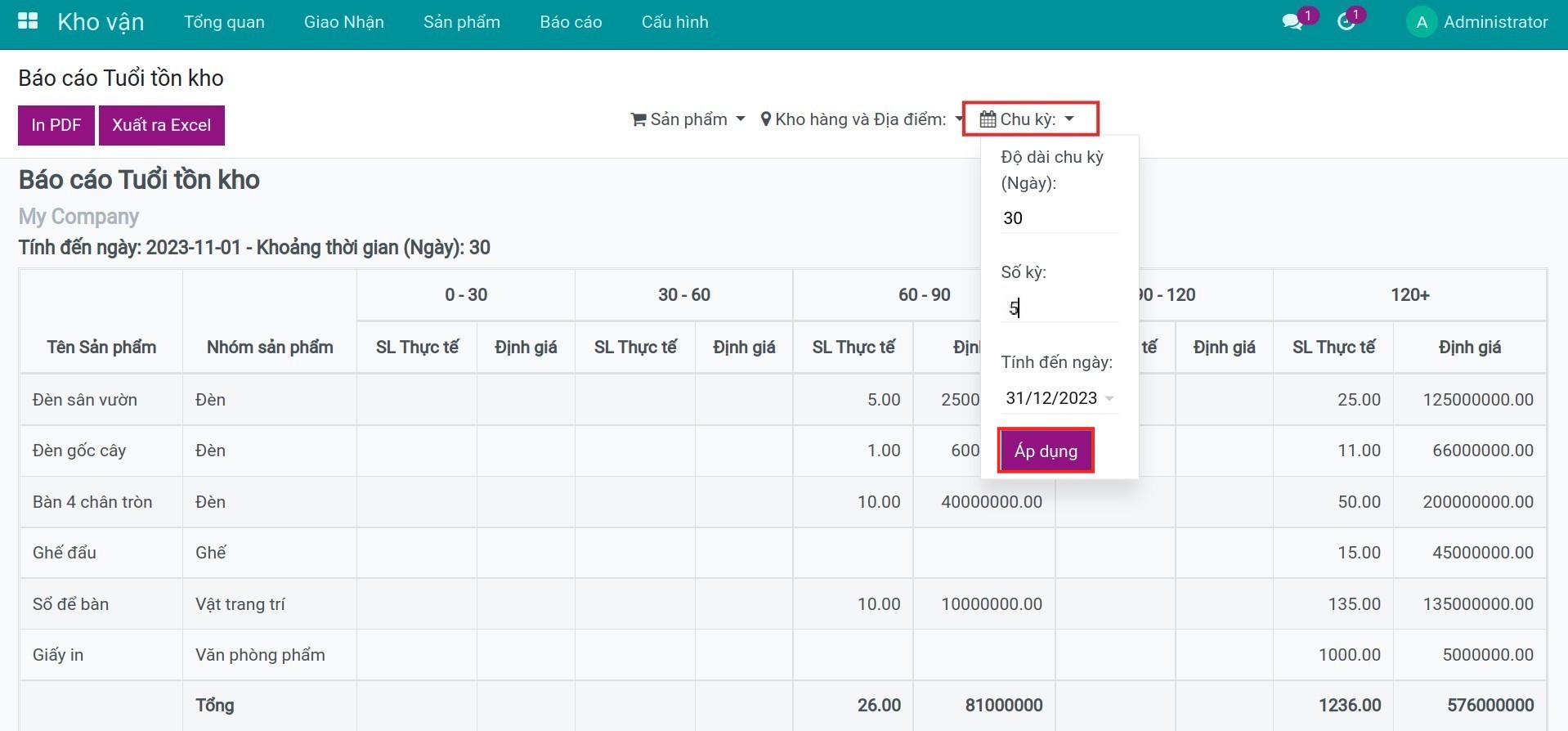
- Chu kỳ: bạn có thể lựa chọn độ dài của một chu kỳ (kéo dài bao nhiêu ngày mỗi chu kỳ), số kỳ và nhập ngày mà bạn muốn báo cáo hiển thị đến ngày đó.
Sau khi lựa chọn xong các tiêu chí trên, bạn sẽ thấy phần mềm hiển thị số lượng sản phẩm ở cột SL Thực tế và giá trị sản phẩm ở cột Định giá theo tiêu chí đã chọn, tương ứng với tuổi tồn kho của sản phẩm.
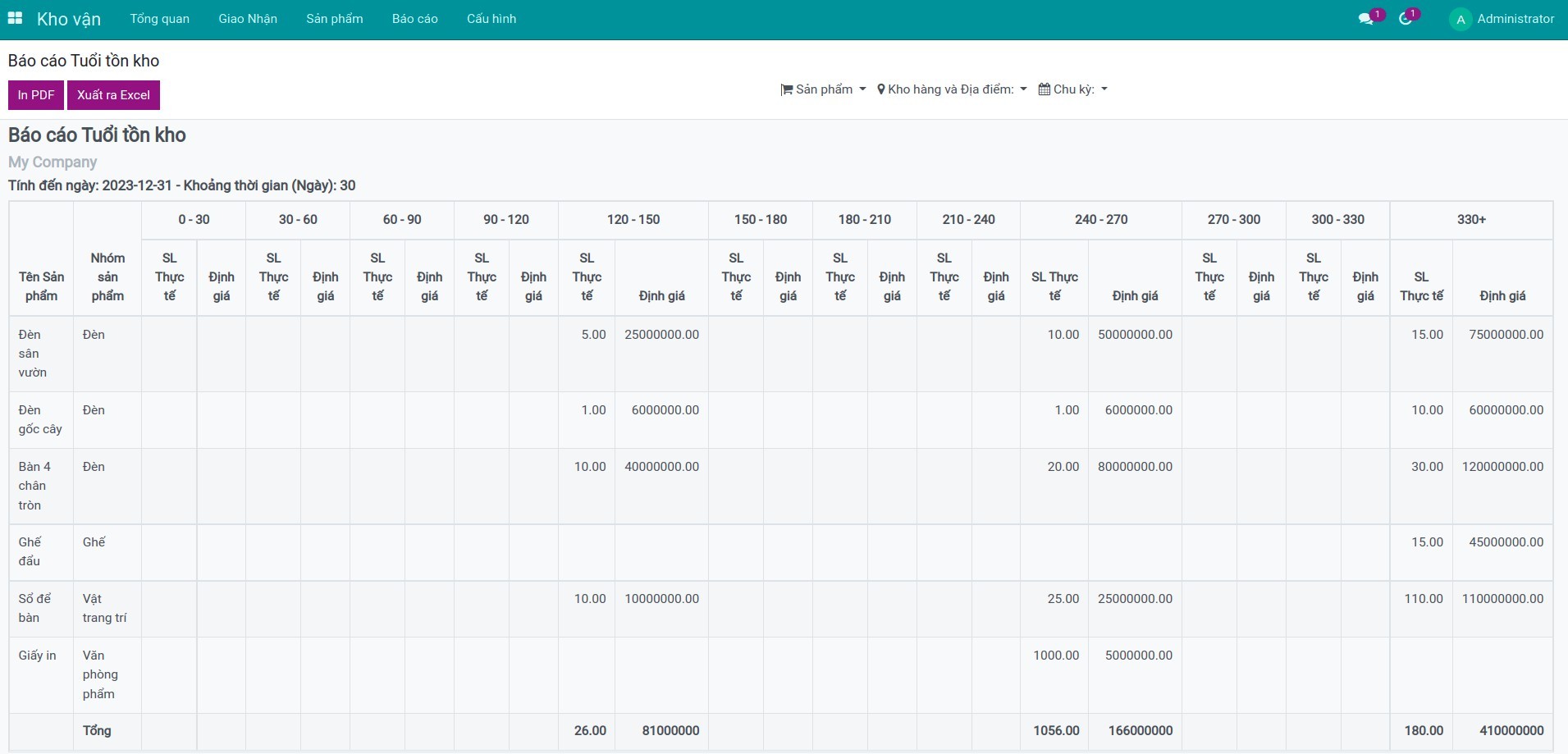
Ghi chú: Báo cáo tuổi tồn kho chỉ hiển thị các sản phẩm có kiểu sản phẩm là Tiêu dùng/Có thể lưu kho.
Phần mềm này và các tệp liên kết ("Phần mềm") được sử dụng (chạy, tuỳ biến, chạy sau khi được tuỳ biến) chỉ khi bạn mua được giấy phép có hiệu lực từ tác giả, điển hình như qua các Ứng dụng Odoo, hoặc trong trường hợp bạn nhận được thoả thuận bằng văn bản từ tác giả của Phần mềm (chi tiết tại tệp COPYRIGHT).
Bạn có thể phát triển các phân hệ Odoo có sử dụng Phần mềm như một Thư viện (thường là phụ thuộc vào, nhập vào và sử dụng nguồn của nó) nhưng không sao chéo bất kỳ mã nguồn hay tài liệu nào thuộc Phần mềm. Bạn có thể phân phối những phân hệ này theo giấy phép mà bạn lựa chọn, miễn sao nội dung giấy phép đó tương tích với điều khoản của Giấy phép Phần mềm Độc quyền Odoo (ví dụ: LGPL, MIT hay bất kỳ loại giấy phép phần mềm độc quyền nào tương tự vậy).
Nghiêm cấm phát hành, phân phối, cấp phép lại hoặc bán bản sao của Phần mềm hoặc bản sao Phần mềm đã được sửa đổi.
Thông báo bản quyền và chấp thuận nêu trên buộc phải được bao gồm trong tất cả các bản sao hoặc các phần quan trọng của Phần mềm.
PHẦN MỀM ĐƯỢC CUNG CẤP "NGUYÊN TRẠNG", KHÔNG BẢO ĐẢM DƯỚI BẤT KỲ HÌNH THỨC NÀO, ĐƯỢC THỂ HIỆN RÕ RÀNG HOẶC NGỤ Ý, KHÔNG GIỚI HẠN ĐẢM BẢO VỀ CÁC BẢO ĐẢM NGỤ Ý VỀ KHẢ NĂNG THƯƠNG MẠI, PHÙ HỢP VỚI MỤC ĐÍCH CỤ THỂ VÀ KHÔNG VI PHẠM. TRONG MỌI TRƯỜNG HỢP SẼ KHÔNG CÓ TÁC GIẢ HOẶC CHỦ SỞ HỮU BẢN QUYỀN NÀO CHỊU TRÁCH NHIỆM VỀ BẤT KỲ KHIẾU NẠI, THIỆT HẠI HOẶC TRÁCH NHIỆM PHÁP LÝ KHÁC NÀO TRONG PHẠM VI HỢP ĐỒNG, CÁC THIỆT HẠI HOẶC CÁCH KHÁC, PHÁT SINH TỪ, NGOÀI HOẶC CÓ LIÊN KẾT VỚI PHẦN MỀM HOẶC VIỆC SỬ DỤNG HOẶC KINH DOANH KHÁC TẠI PHẦN MỀM.