
Bộ sưu tập Sản phẩm
| Số dòng Code | 694 |
| Tên kỹ thuật | to_product_collection |
| Giấy phép | OPL-1 |
| Website | https://viindoo.com/apps/app/17.0/to_product_collection |
| Đọc mô tả cho | v 10.0 v 11.0 v 12.0 v 13.0 v 14.0 v 15.0 v 16.0 v 17.0 v 19.0 |
| Yêu cầu các App | Discuss (mail) |
| Các mở rộng | Bán hàng và Bộ sưu tập Sản Phẩm Điểm bán lẻ và Bộ sưu tập Sản phẩm |

Product Collection
Add collection to Products
Key Features
Built natively on Odoo/Viindoo to streamline real business operations:
To solve the mentioned problem, we provide the Product Collection feature
Benefits
Support businesses to organize and manage products by flexible themes (e.g. promotion products, seasonal collections, best-sellers,...), helping customers easily find and access desired products.
Improve online and in-store shopping experiences by grouping related products together, creating conditions for cross-selling and upselling strategies.
Support marketing teams to deploy campaigns promoting products by each collection, easily update content and strategies based on market trends.
Provide product filtering tools to help sales staff easily advise customers, particularly useful in fashion, beauty, and consumer electronics sectors.
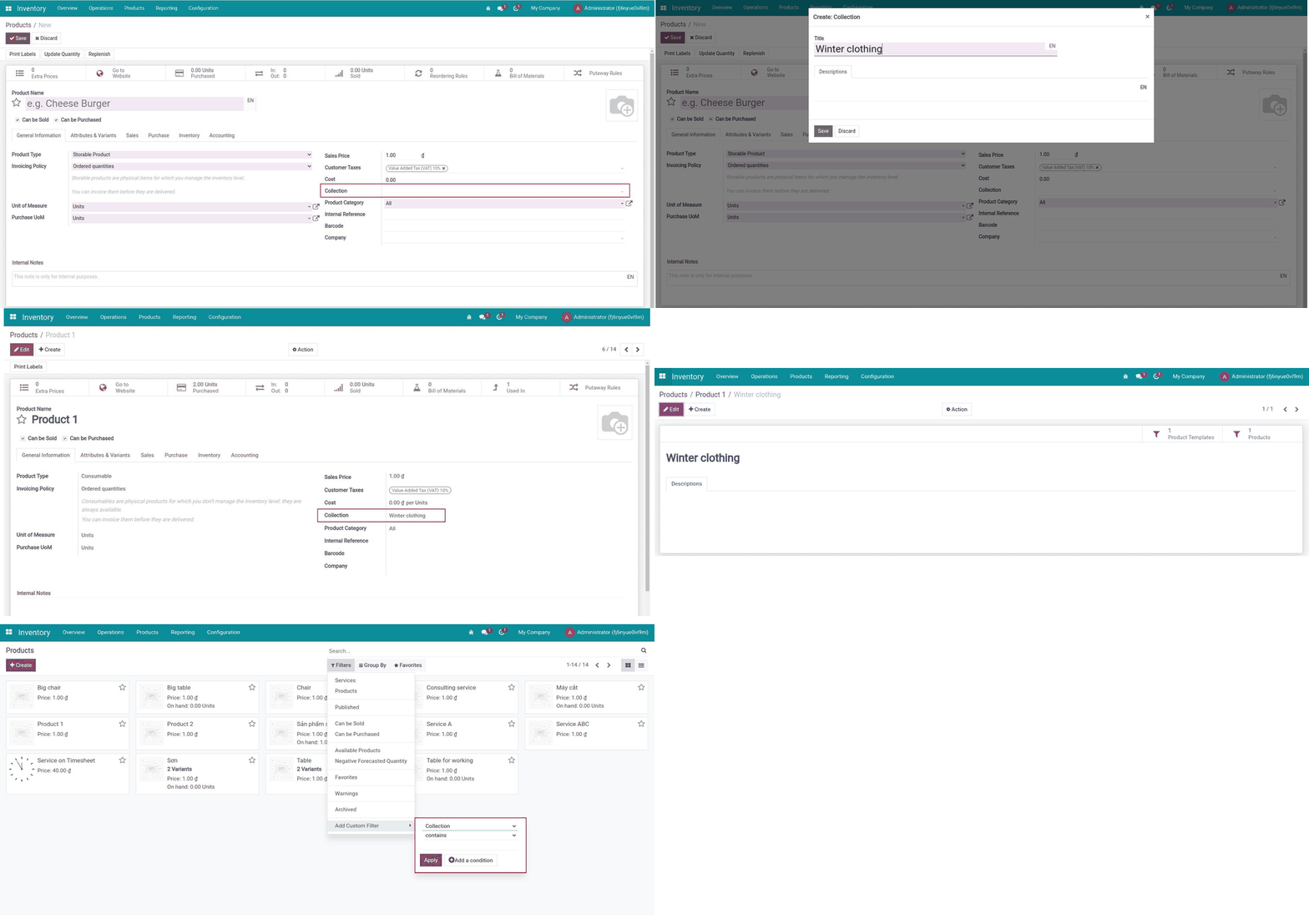
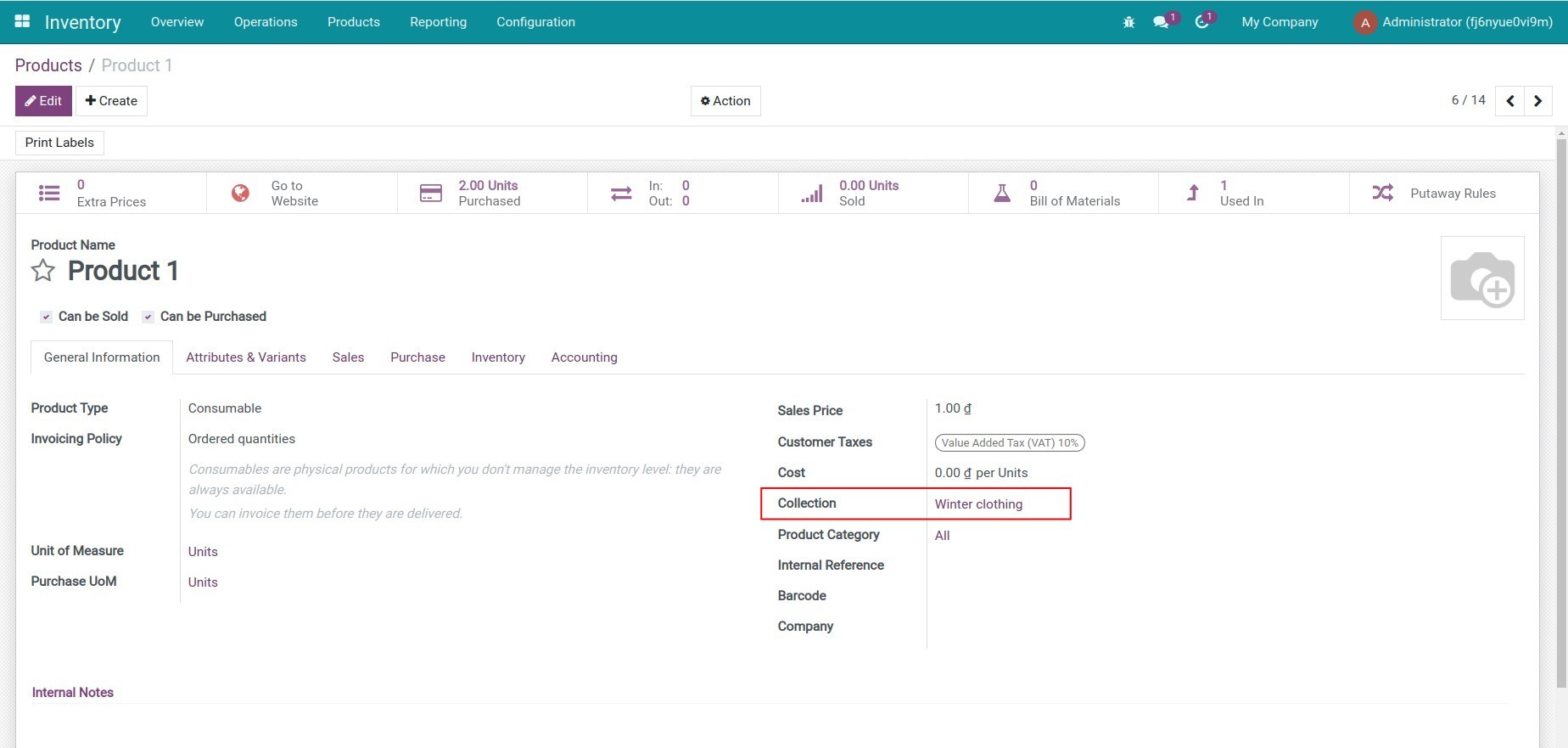
Collection field on the product detail
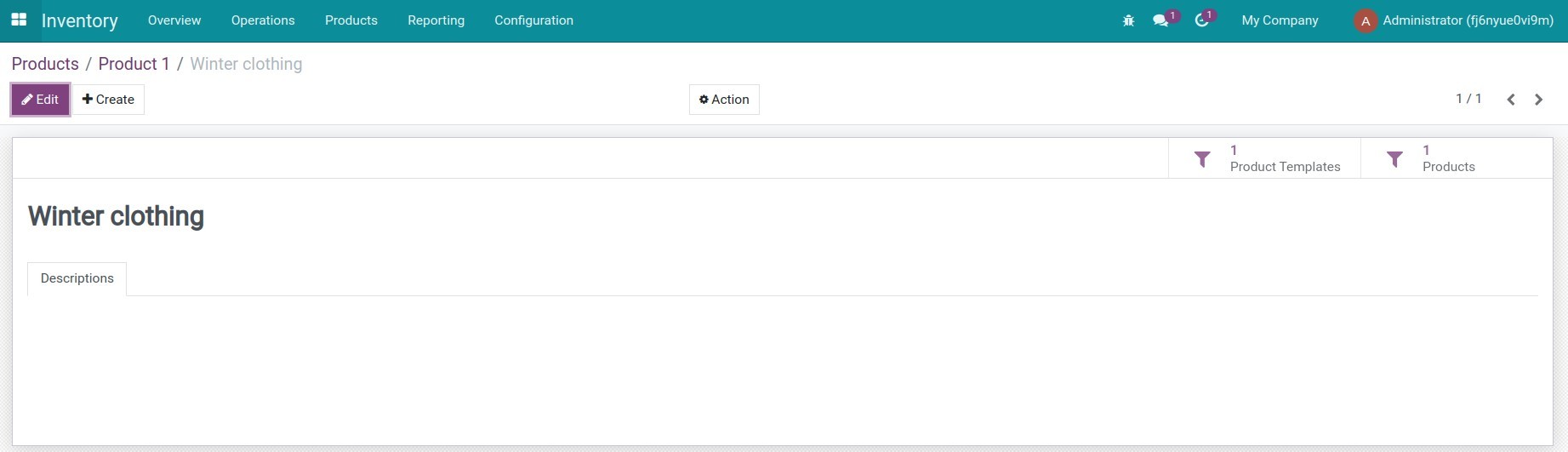
Create and edit collection
Them san pham vao bst
Collection view
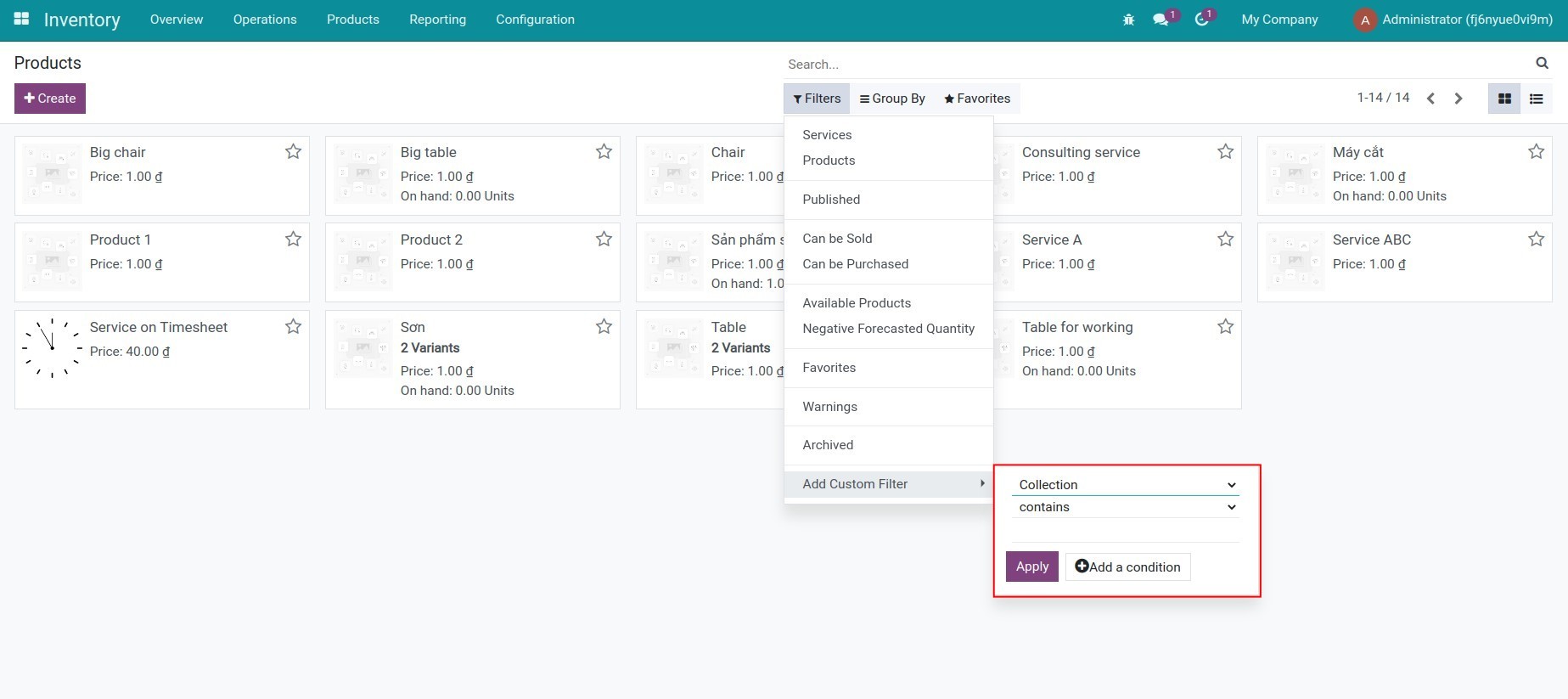
Search with collection
See Product Collection in Action
See how this module solves real business problems in a working Viindoo environment.
Need help with Product Collection?
For questions, implementation support, or consulting services, contact Viindoo.
Pre-Sales & Partnership
When contacting us, please include:
- Odoo/Viindoo version (CE/EE).
- Number of users and business scope.
- Other modules currently in use.
Technical Support
For faster troubleshooting, please provide:
- Order number or app reference.
- Odoo/Viindoo version & edition.
- Steps to reproduce the issue.
- Screenshots/logs if available.
Technical Requirement
Works Great With These Modules
Extend Product Collection with complementary Viindoo apps:
Point of Sales & Product Collection
Integrate Product Collection for Point of Sales
Module to_product_collection_posSales & Product Collection
Integrate Product Collection and Sales
Module to_product_collection_saleWho Should Use This Module?
Built for teams that need this capability fully integrated into their Odoo/Viindoo stack.
Retail businesses
Chain stores or supermarkets want to classify products by each campaign (promotion, best-sellers, new products,...).
E-commerce platforms
Need to organize products into easily searchable collections, improving shopping experiences for customers.
Fashion industry
Group products by season, trend, brand collection.
Beauty & skincare industry
Arrange products by product line (skincare, makeup, hair care, etc.) or by customer needs.
Consumer electronics industry
Group accessories, combo products suitable for each device line.
Furniture & decoration industry
Create collections by style (modern, classic, minimalist,...), helping customers easily choose suitable products.
This module is particularly useful for businesses with theme-based or seasonal marketing strategies, helping manage product catalogs flexibly and optimize revenue.
Cài đặt
- Truy cập Ứng dụng.
- Tìm từ khóa to_product_collection.
- Ấn Cài đặt.
Hướng dẫn sử dụng
Video hướng dẫn: Bộ sưu tập Sản phẩm
1. Tạo mới bộ sưu tập
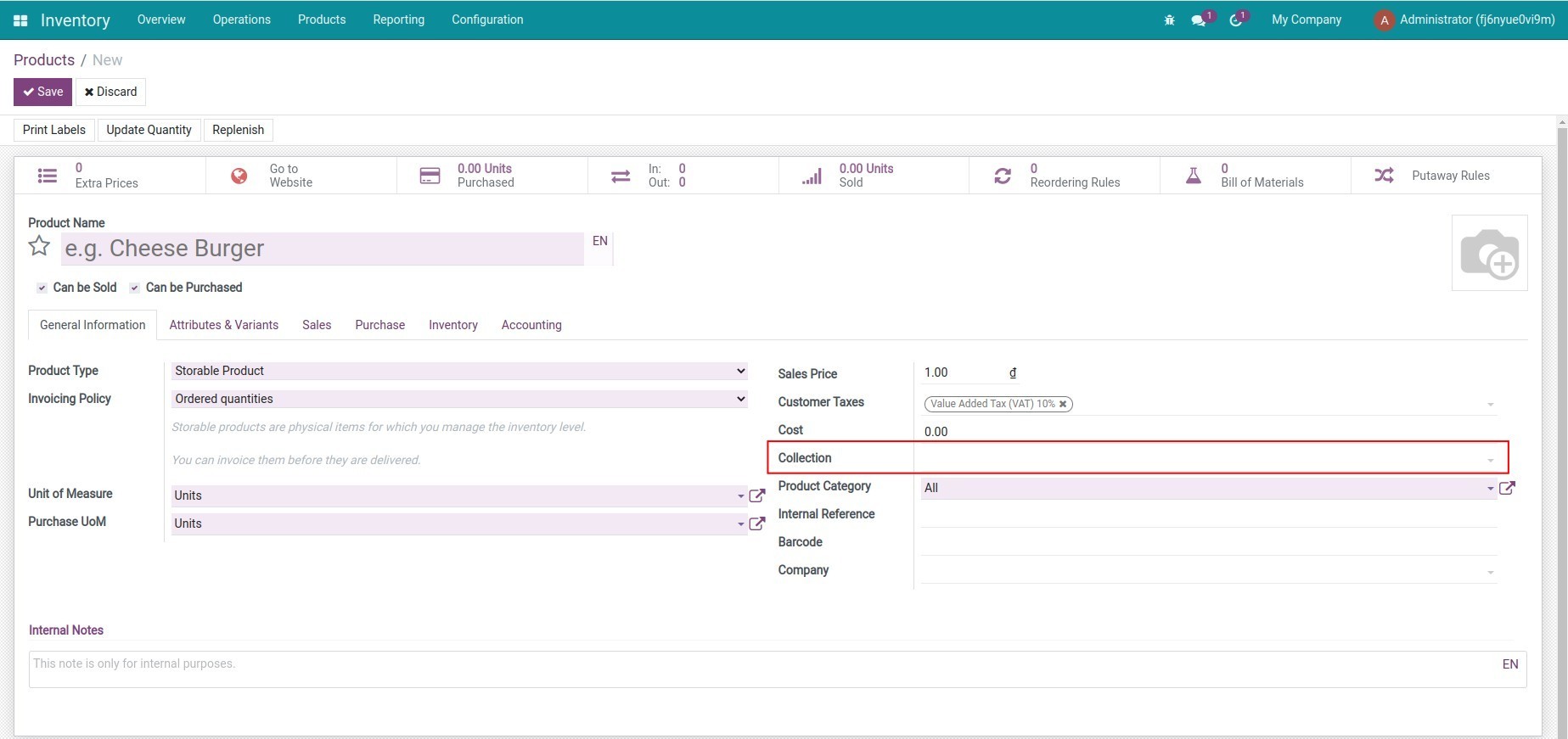
- Bước 1: Tạo mới sản phẩm, trên tab Thông tin Tổng quát bổ sung thêm trường Bộ sưu tập.

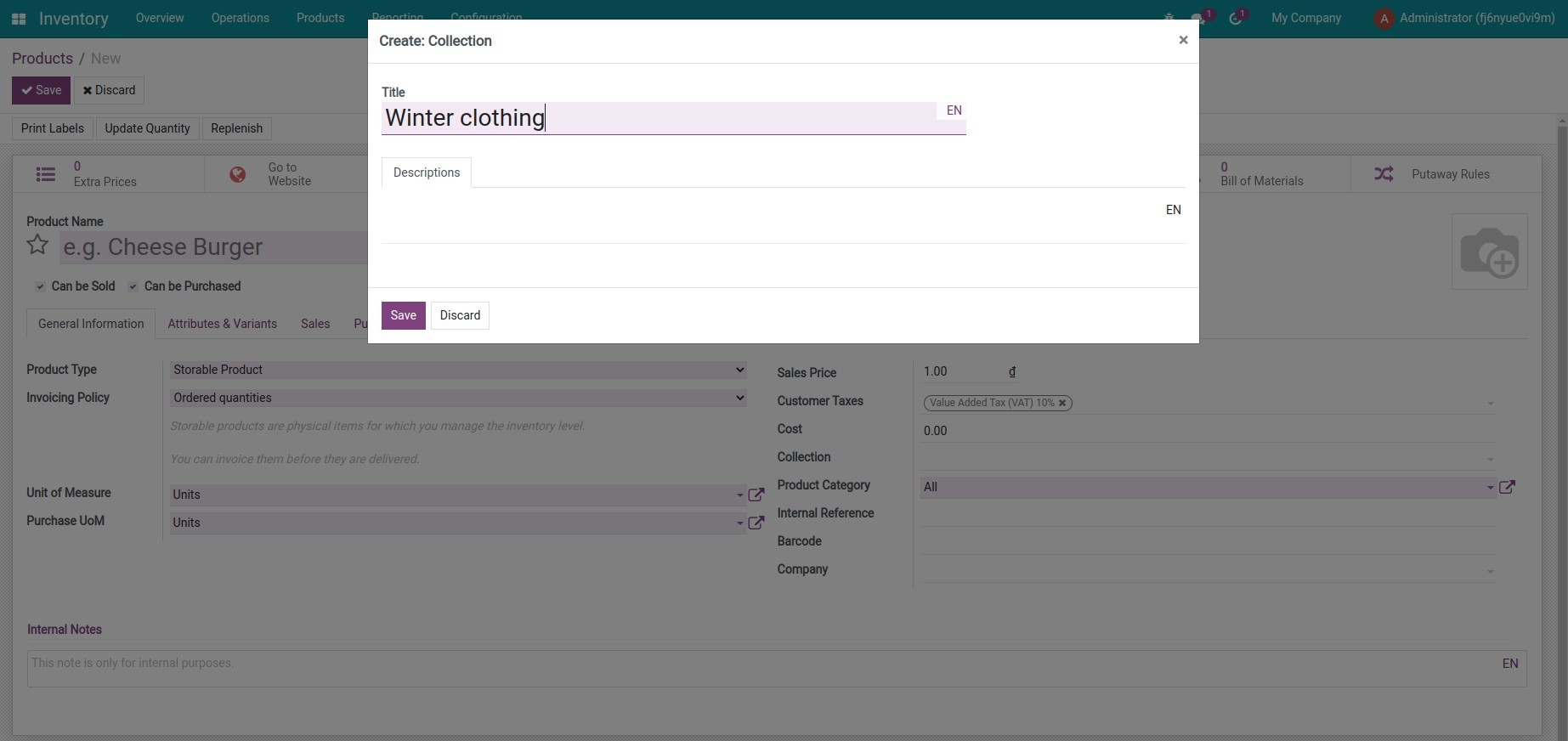
- Bước 2: Điền tên bộ sưu tập vào trường thông tin, lựa chọn Tạo và sửa. Hệ thống hiển thị giao diện thông tin của bộ sưu tập. Điền các thông tin và ấn Lưu.

2. Quản lý các mẫu sản phẩm và sản phẩm trong bộ sưu tập
Trên giao diện sản phẩm vừa được thêm vào bộ sưu tập, ấn vào Tiêu đề của bộ sưu tập. Hệ thống hiển thị thông tin bộ sưu tập đã tạo và nút thống kê các sản phẩm, mẫu sản phẩm thuộc bộ sưu tập này.

Lưu ý: Nút thống kê Sản phẩm chỉ hiển thị nếu tính năng Biến thể Sản phẩm được kích hoạt.
3. Tìm kiếm sản phẩm theo bộ sưu tập
Từ giao diện danh sách các sản phẩm, ấn Bộ lọc > Thêm Bộ lọc tùy chỉnh > Bộ sưu tập và điền Tiêu đề bộ sưu tập muốn lọc.

Lưu ý: Mô-đun này không cung cấp một menu riêng để quản lý các bộ sưu tập. Để thực hiện được điều đó, cần kết hợp với một mô-đun khác như:
Phần mềm này và các tệp liên kết ("Phần mềm") được sử dụng (chạy, tuỳ biến, chạy sau khi được tuỳ biến) chỉ khi bạn mua được giấy phép có hiệu lực từ tác giả, điển hình như qua các Ứng dụng Odoo, hoặc trong trường hợp bạn nhận được thoả thuận bằng văn bản từ tác giả của Phần mềm (chi tiết tại tệp COPYRIGHT).
Bạn có thể phát triển các phân hệ Odoo có sử dụng Phần mềm như một Thư viện (thường là phụ thuộc vào, nhập vào và sử dụng nguồn của nó) nhưng không sao chéo bất kỳ mã nguồn hay tài liệu nào thuộc Phần mềm. Bạn có thể phân phối những phân hệ này theo giấy phép mà bạn lựa chọn, miễn sao nội dung giấy phép đó tương tích với điều khoản của Giấy phép Phần mềm Độc quyền Odoo (ví dụ: LGPL, MIT hay bất kỳ loại giấy phép phần mềm độc quyền nào tương tự vậy).
Nghiêm cấm phát hành, phân phối, cấp phép lại hoặc bán bản sao của Phần mềm hoặc bản sao Phần mềm đã được sửa đổi.
Thông báo bản quyền và chấp thuận nêu trên buộc phải được bao gồm trong tất cả các bản sao hoặc các phần quan trọng của Phần mềm.
PHẦN MỀM ĐƯỢC CUNG CẤP "NGUYÊN TRẠNG", KHÔNG BẢO ĐẢM DƯỚI BẤT KỲ HÌNH THỨC NÀO, ĐƯỢC THỂ HIỆN RÕ RÀNG HOẶC NGỤ Ý, KHÔNG GIỚI HẠN ĐẢM BẢO VỀ CÁC BẢO ĐẢM NGỤ Ý VỀ KHẢ NĂNG THƯƠNG MẠI, PHÙ HỢP VỚI MỤC ĐÍCH CỤ THỂ VÀ KHÔNG VI PHẠM. TRONG MỌI TRƯỜNG HỢP SẼ KHÔNG CÓ TÁC GIẢ HOẶC CHỦ SỞ HỮU BẢN QUYỀN NÀO CHỊU TRÁCH NHIỆM VỀ BẤT KỲ KHIẾU NẠI, THIỆT HẠI HOẶC TRÁCH NHIỆM PHÁP LÝ KHÁC NÀO TRONG PHẠM VI HỢP ĐỒNG, CÁC THIỆT HẠI HOẶC CÁCH KHÁC, PHÁT SINH TỪ, NGOÀI HOẶC CÓ LIÊN KẾT VỚI PHẦN MỀM HOẶC VIỆC SỬ DỤNG HOẶC KINH DOANH KHÁC TẠI PHẦN MỀM.