

Sửa Nội dung Tuyển dụng Đăng Trên Website
bởi Viindoo
| Số dòng Code | 594 |
| Tên kỹ thuật | viin_website_hr_recruitment_website_editor |
| Giấy phép | OPL-1 |
| Website | https://viindoo.com/apps/app/17.0/viin_website_hr_recruitment_website_editor |
| Đọc mô tả cho | v 13.0 v 14.0 v 15.0 v 16.0 |
| Yêu cầu các App | Discuss (mail) Calendar (calendar) Online Jobs (website_hr_recruitment) Recruitment (hr_recruitment) Employees (hr) Website (website) |

Edit the Recruitment Content Posted On the Website
Allow the Website's Editor and Designer rights to edit the recruitment posts on the Website created by HR.
During the recruitment process, usually the HR department will be the one to receive and build recruitment content, then through channels such as website, Facebook,... to post jobs. When posting recruitment content on the website, you often want to design recruitment content in a way that is both attractive to candidates and SEO-friendly. Therefore, it will need the support of the marketing department to design and edit recruitment content when posting on the website. The viin_website_hr_recruitment_website_editor module was developed to solve the above need by providing an additional access rights feature that enables users with the Editor & Designer rights of the Website app to edit the recruitment content on the website.
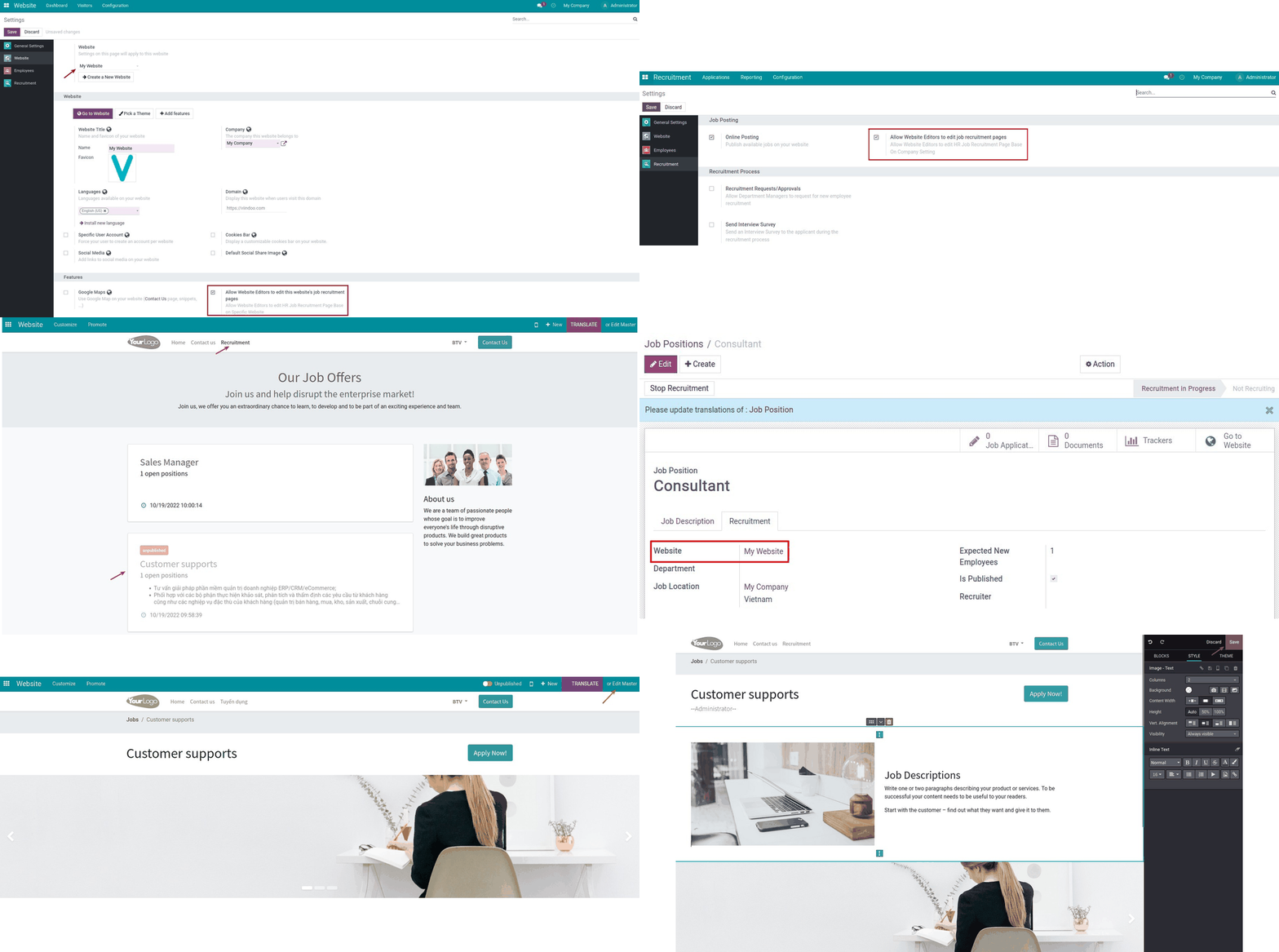
Key Features
Built natively on Odoo/Viindoo to streamline real business operations:
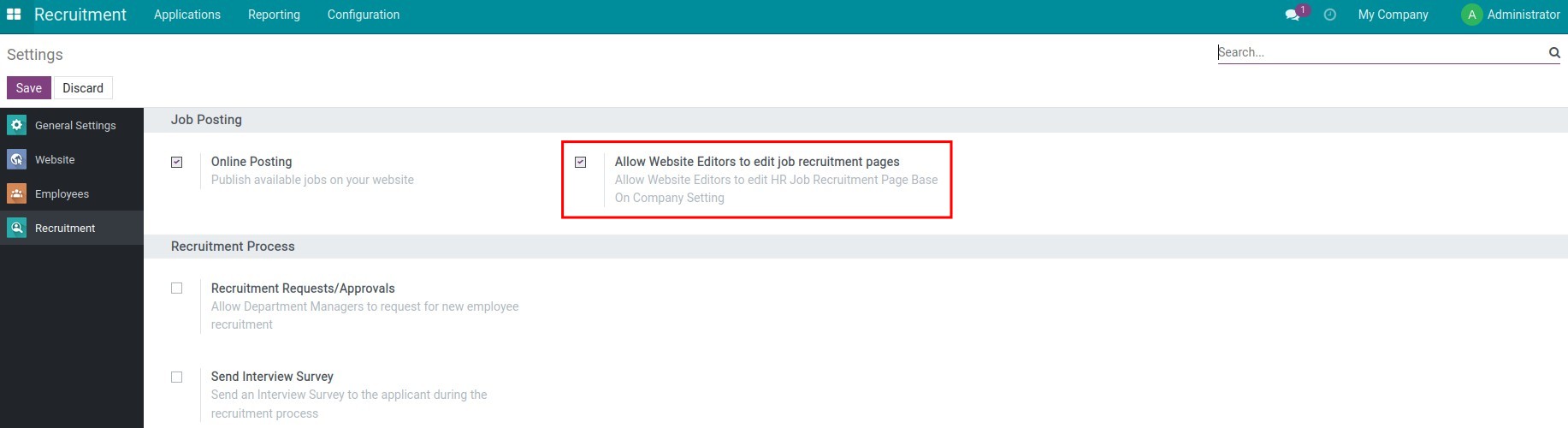
Provide the additional rights *Allow Website Editors to edit job recruitment pages* in the settings of Recruitment
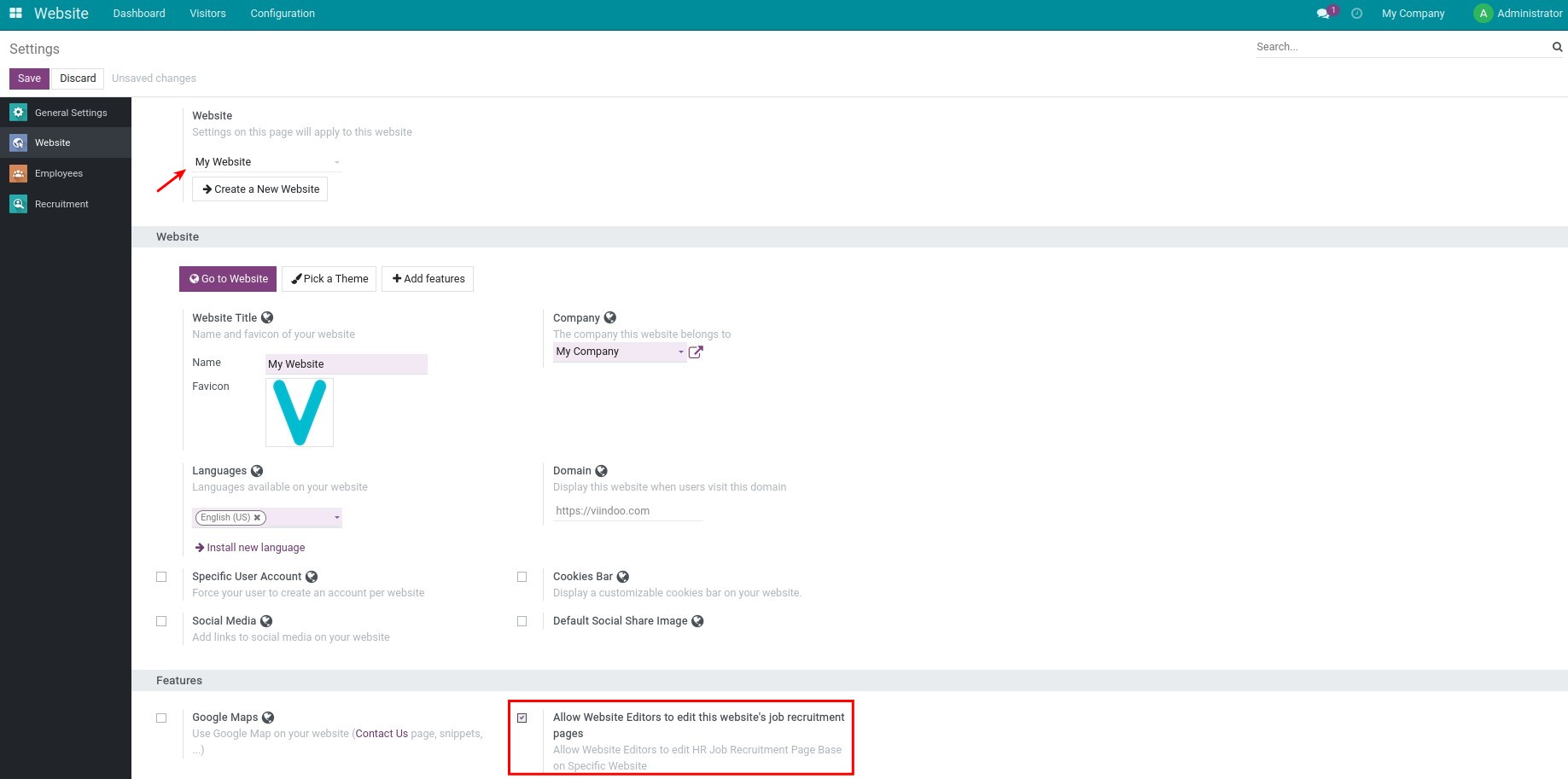
Provide the additional rights *Allow Website Editors to edit this website's job recruitment pages* in the settings of Website in case you manage the multi-websites and want to assign editing rights to the job postings on each website
Support the multi-company
Enable the feature for each website
Enable the feature
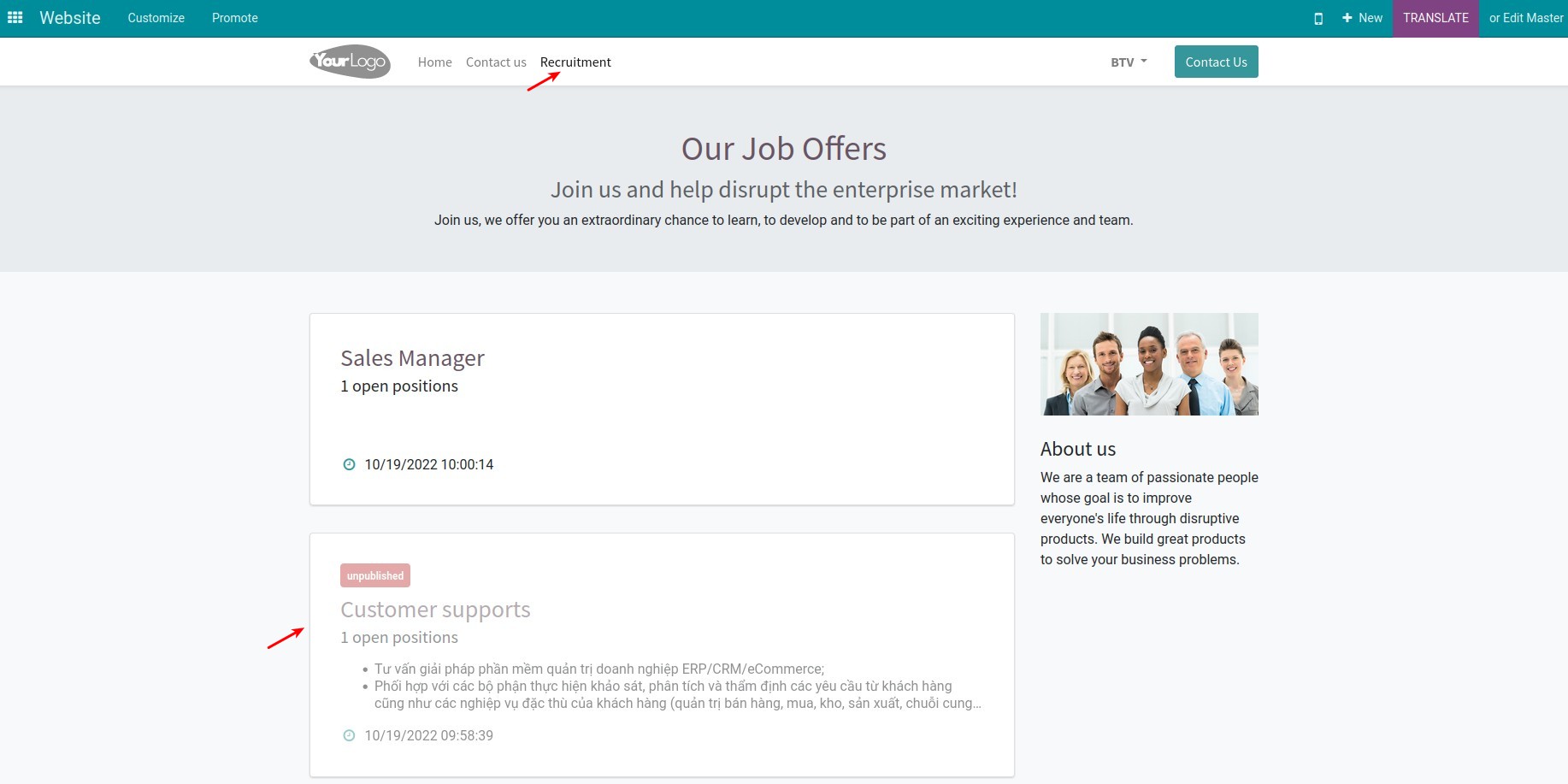
Select the recruitment post to design
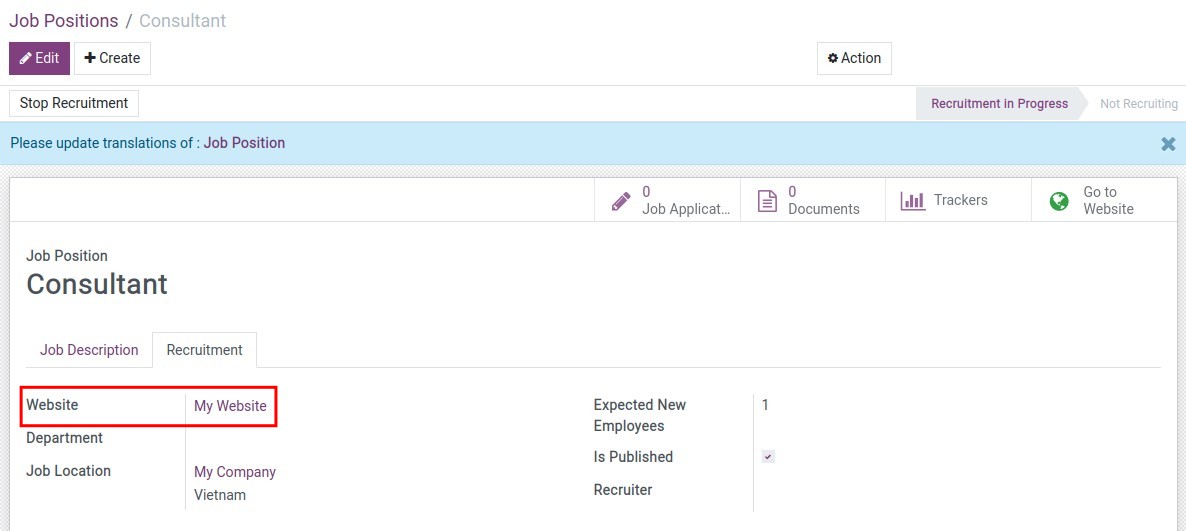
Choose the website to post the job posting
Design the recruitment content
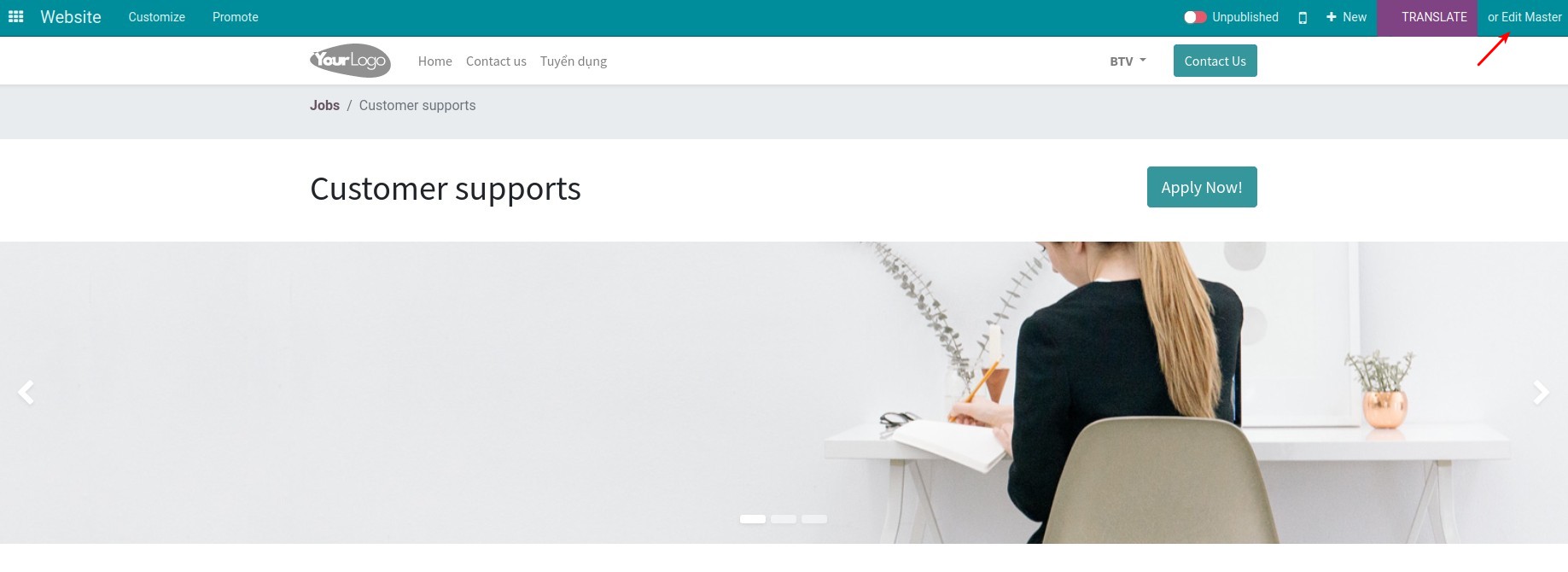
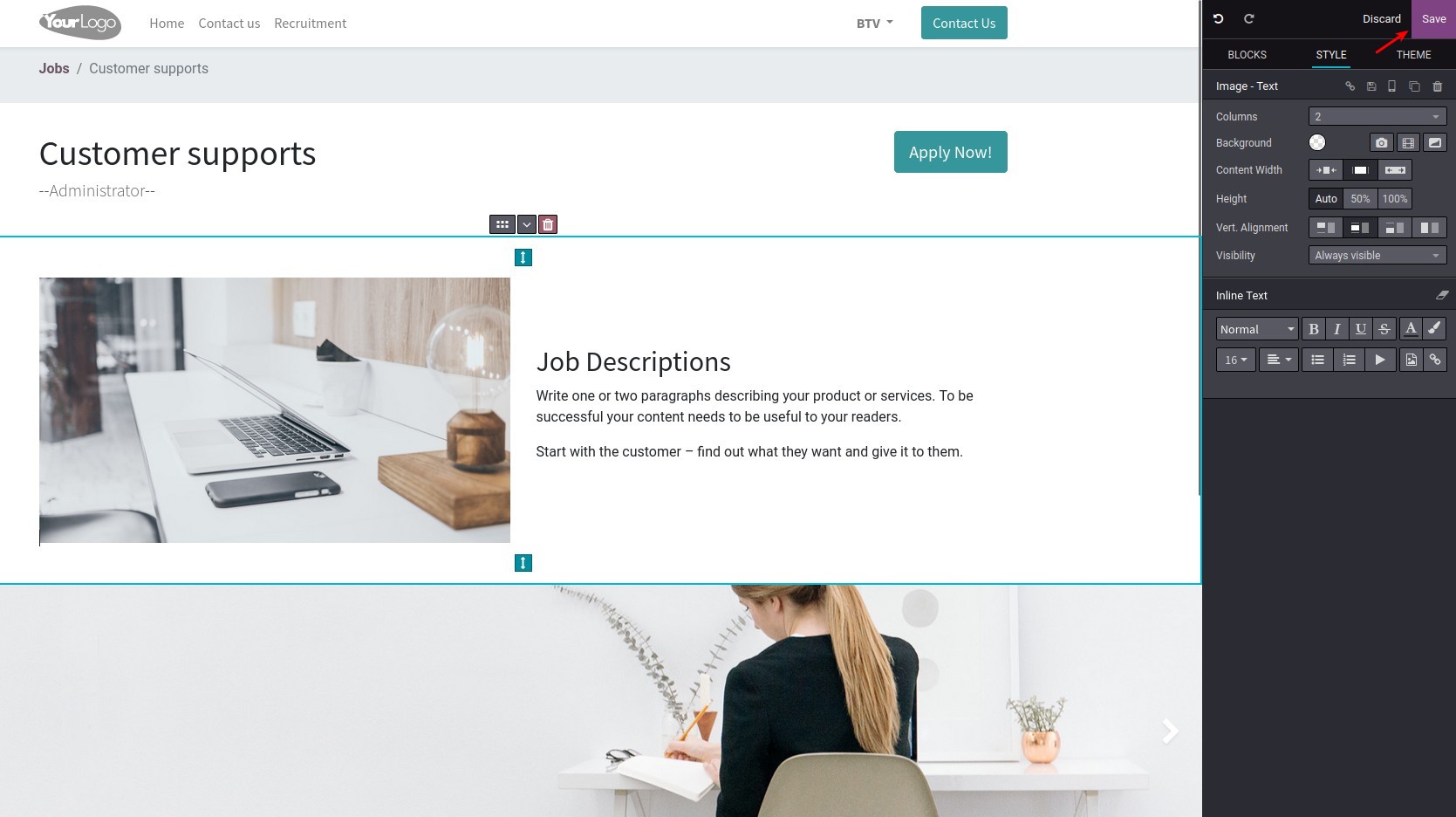
Design the recruitment content
See Edit the Recruitment Content Posted On the Website in Action
See how this module solves real business problems in a working Viindoo environment.
Need help with Edit the Recruitment Content Posted On the Website?
For questions, implementation support, or consulting services, contact Viindoo.
Pre-Sales & Partnership
When contacting us, please include:
- Odoo/Viindoo version (CE/EE).
- Number of users and business scope.
- Other modules currently in use.
Technical Support
For faster troubleshooting, please provide:
- Order number or app reference.
- Odoo/Viindoo version & edition.
- Steps to reproduce the issue.
- Screenshots/logs if available.
Technical Requirement
Who Should Use This Module?
Built for teams that need this capability fully integrated into their Odoo/Viindoo stack.
Executives & Business Owners
Need clear visibility into operations and a stack that scales without bespoke development.
Operations / Department Leaders
Want to streamline daily workflows, remove manual handoffs, and keep data consistent across teams.
Implementers & Odoo Partners
Looking for production-ready Viindoo modules to deliver projects faster and at lower risk.
Cài đặt
- Truy cập Ứng dụng;
- Tìm từ khóa viin_website_hr_recruitment_website_editor;
- Bấm chọn Cài đặt.
Hướng dẫn sử dụng
Video hướng dẫn: Sửa Nội dung Tuyển dụng Đăng Trên Website
Quản lý đơn website
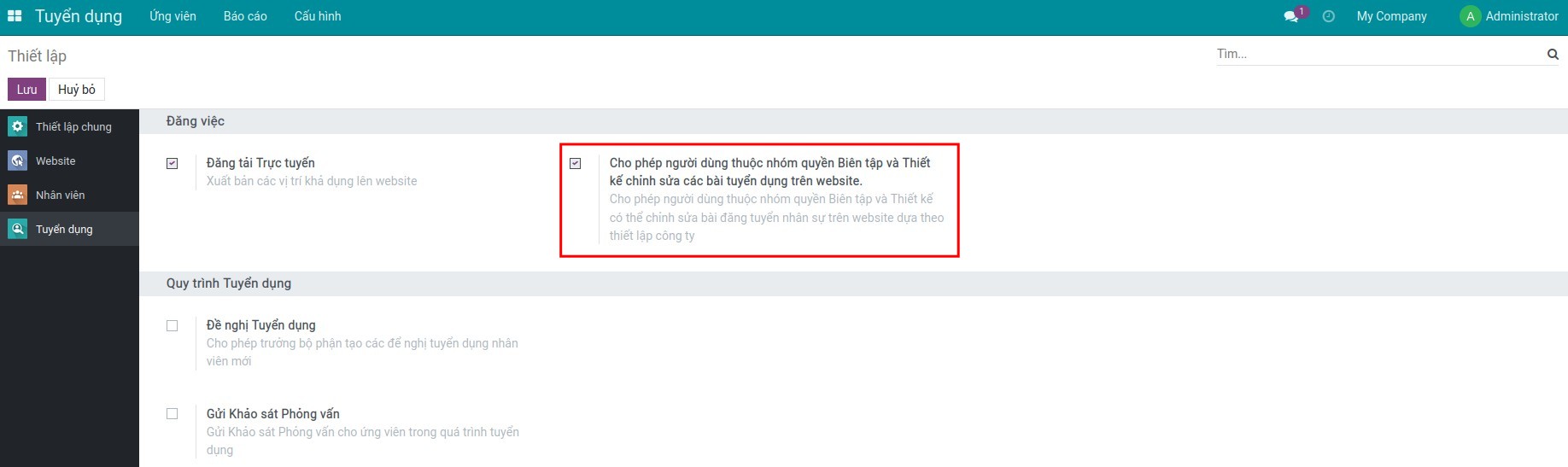
- Bước 1: Truy cập Tuyển dụng ‣ Cấu hình ‣ Thiết lập để kích hoạt tính năng Cho phép người dùng thuộc nhóm quyền Biên tập và Thiết kế chỉnh sửa các bài tuyển dụng trên website:
- Bước 2: Bộ phận nhân sự tạo nội dung tuyển dụng cho từng vị trí.
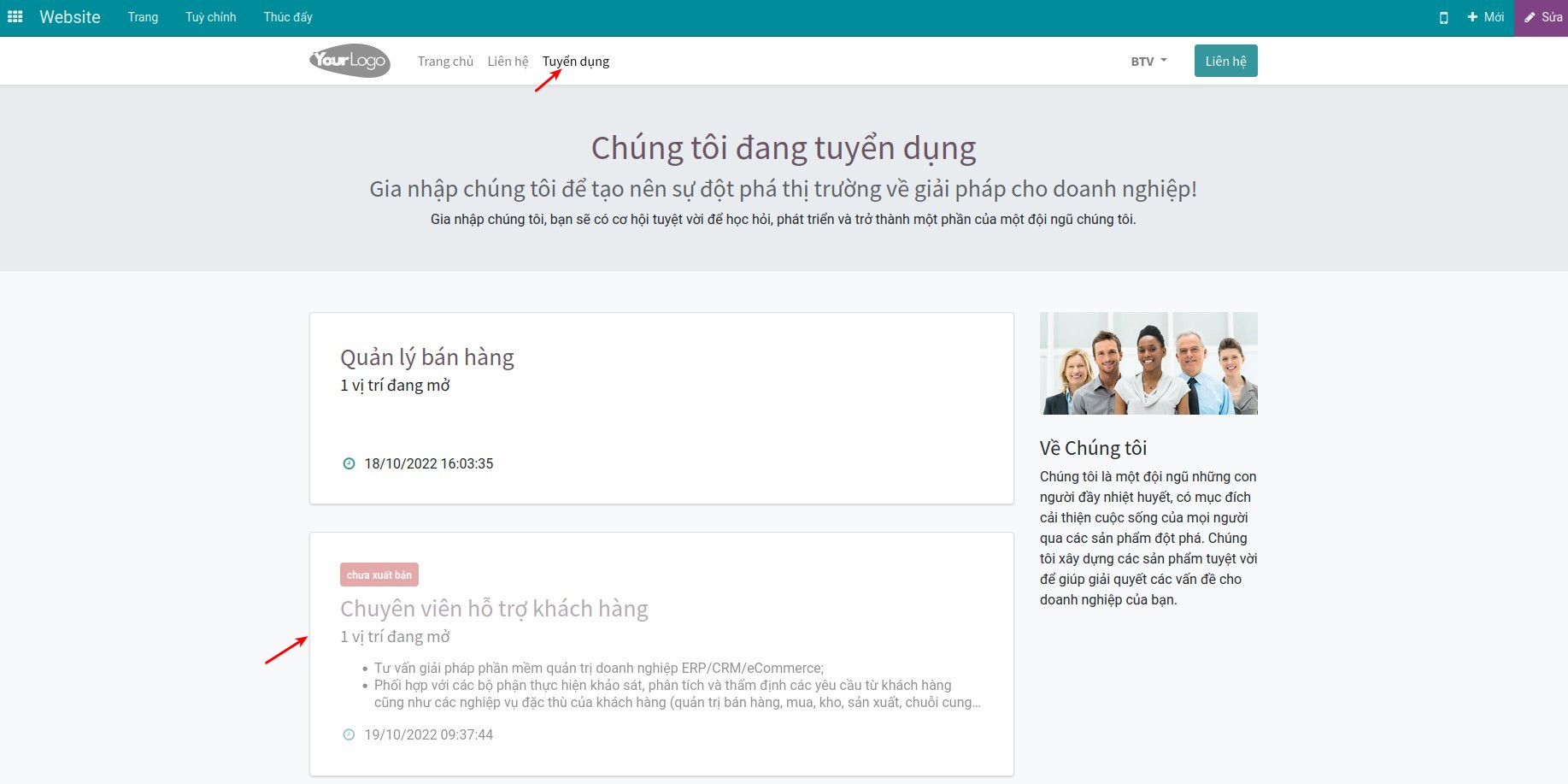
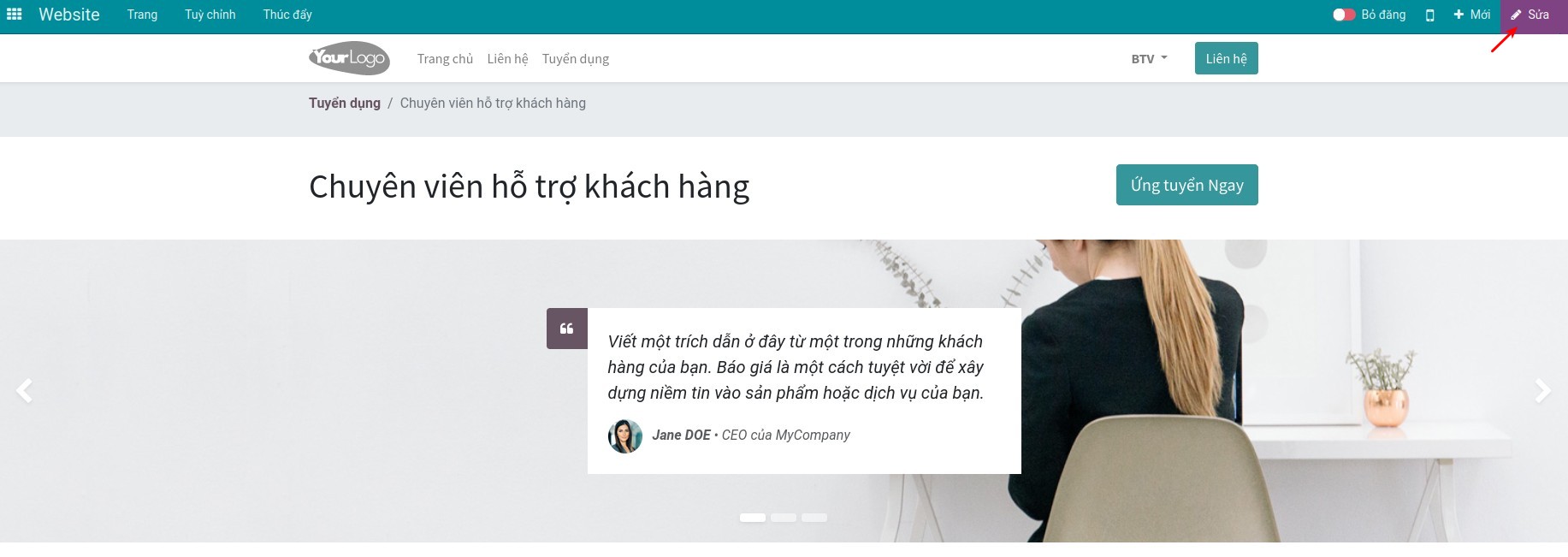
- Bước 3: Người dùng được phân quyền Biên tập & Thiết kế truy cập website của công ty, truy cập trình đơn Tuyển dụng sẽ thấy các nội dung tuyển dụng Đã được xuất bản và Chưa xuất bản. Lựa chọn nội dung tuyển dụng cần thiết kế, ấn Sửa để thiết kế nội dung chi tiết của bài đăng tuyển.
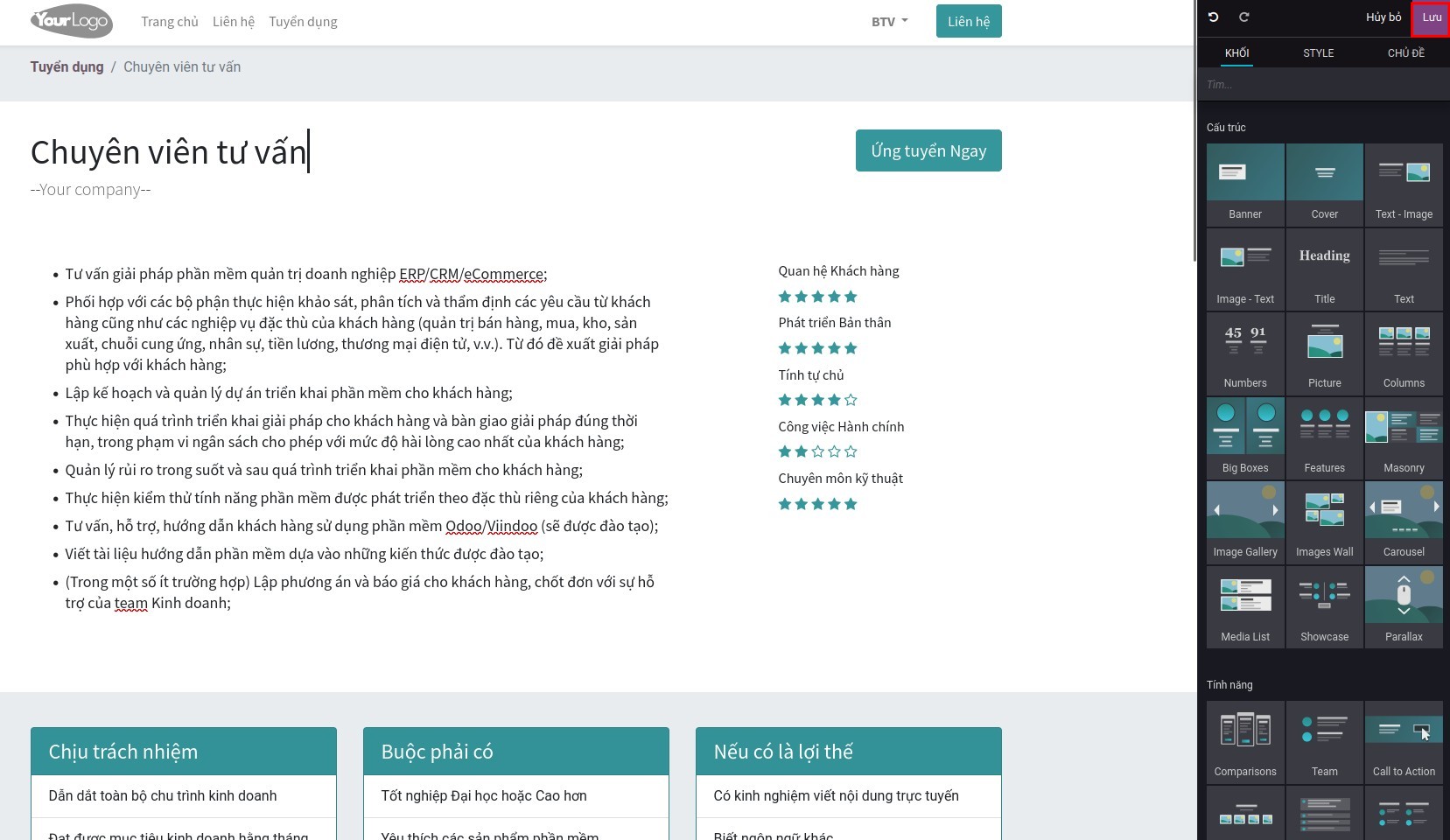
- Bước 4: Sau khi hoàn tất, ấn Lưu và Xuất bản lên website.
Quản lý đa website
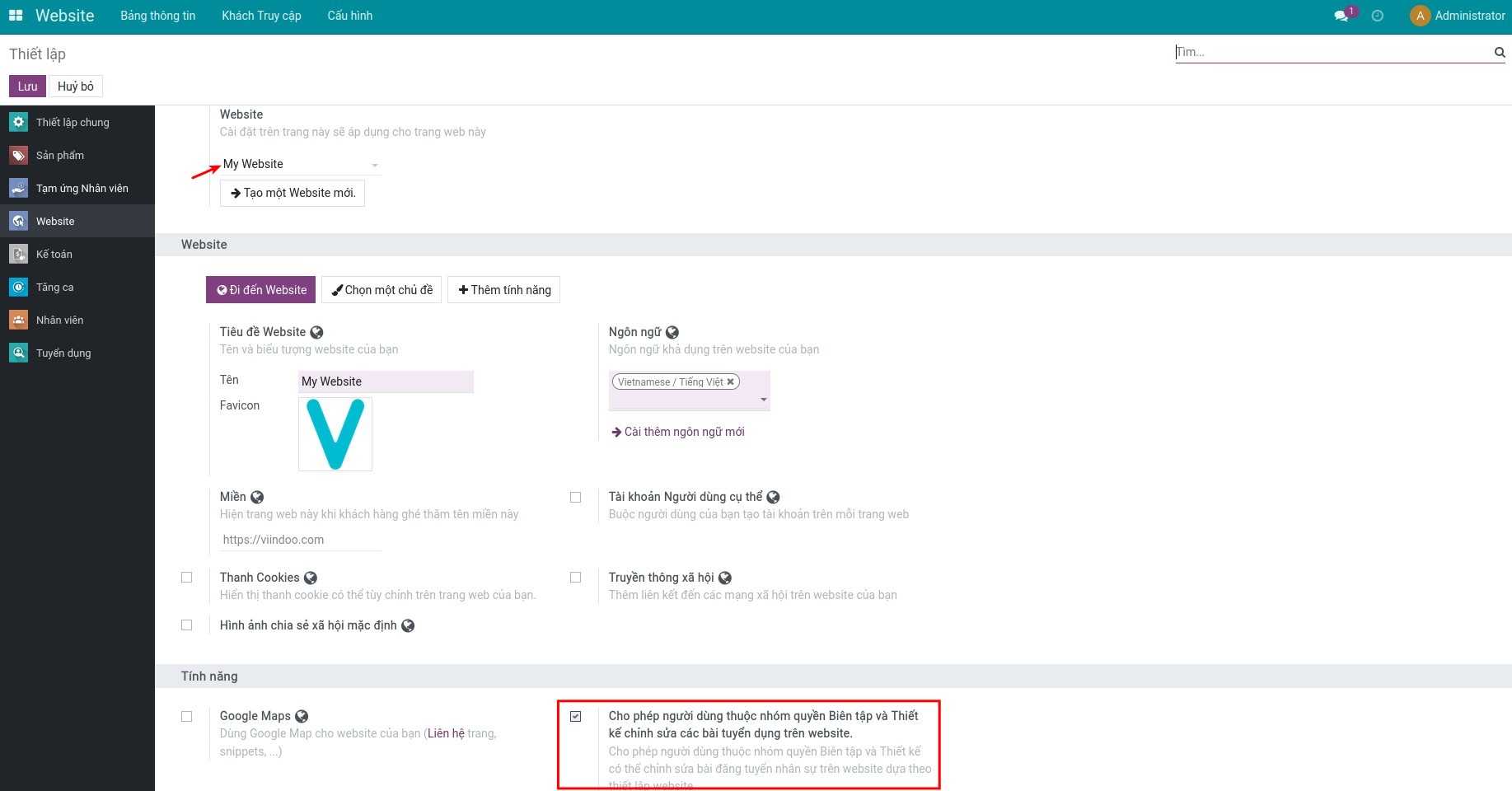
- Bước 1: Ngoài việc kích hoạt tính năng ở phần Tuyển dụng, bạn truy cập Website ‣ Cấu hình ‣ Thiết lập để kích hoạt Cho phép người dùng thuộc nhóm quyền Biên tập và Thiết kế chỉnh sửa các bài tuyển dụng trên website cho từng website mà bạn mong muốn.
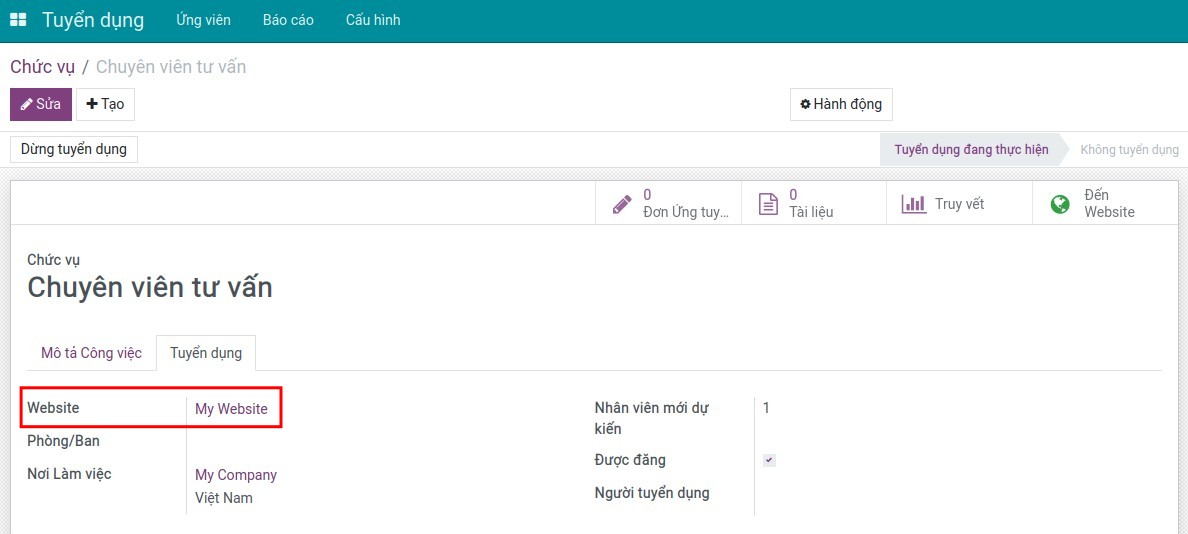
- Bước 2: Thực hiện tương tự như khi quản lý đơn website, nhưng tại tab Tuyển dụng bạn có thể chọn đăng tin tuyển dụng này ở website nào:
Lưu ý: Website được chọn cần được kích hoạt tính năng tại Bước 1.
- Thực hiện các thao tác thiết kế, chỉnh sửa và xuất bản nội dung tuyển dụng lên website.
Phần mềm này và các tệp liên kết ("Phần mềm") được sử dụng (chạy, tuỳ biến, chạy sau khi được tuỳ biến) chỉ khi bạn mua được giấy phép có hiệu lực từ tác giả, điển hình như qua các Ứng dụng Odoo, hoặc trong trường hợp bạn nhận được thoả thuận bằng văn bản từ tác giả của Phần mềm (chi tiết tại tệp COPYRIGHT).
Bạn có thể phát triển các phân hệ Odoo có sử dụng Phần mềm như một Thư viện (thường là phụ thuộc vào, nhập vào và sử dụng nguồn của nó) nhưng không sao chéo bất kỳ mã nguồn hay tài liệu nào thuộc Phần mềm. Bạn có thể phân phối những phân hệ này theo giấy phép mà bạn lựa chọn, miễn sao nội dung giấy phép đó tương tích với điều khoản của Giấy phép Phần mềm Độc quyền Odoo (ví dụ: LGPL, MIT hay bất kỳ loại giấy phép phần mềm độc quyền nào tương tự vậy).
Nghiêm cấm phát hành, phân phối, cấp phép lại hoặc bán bản sao của Phần mềm hoặc bản sao Phần mềm đã được sửa đổi.
Thông báo bản quyền và chấp thuận nêu trên buộc phải được bao gồm trong tất cả các bản sao hoặc các phần quan trọng của Phần mềm.
PHẦN MỀM ĐƯỢC CUNG CẤP "NGUYÊN TRẠNG", KHÔNG BẢO ĐẢM DƯỚI BẤT KỲ HÌNH THỨC NÀO, ĐƯỢC THỂ HIỆN RÕ RÀNG HOẶC NGỤ Ý, KHÔNG GIỚI HẠN ĐẢM BẢO VỀ CÁC BẢO ĐẢM NGỤ Ý VỀ KHẢ NĂNG THƯƠNG MẠI, PHÙ HỢP VỚI MỤC ĐÍCH CỤ THỂ VÀ KHÔNG VI PHẠM. TRONG MỌI TRƯỜNG HỢP SẼ KHÔNG CÓ TÁC GIẢ HOẶC CHỦ SỞ HỮU BẢN QUYỀN NÀO CHỊU TRÁCH NHIỆM VỀ BẤT KỲ KHIẾU NẠI, THIỆT HẠI HOẶC TRÁCH NHIỆM PHÁP LÝ KHÁC NÀO TRONG PHẠM VI HỢP ĐỒNG, CÁC THIỆT HẠI HOẶC CÁCH KHÁC, PHÁT SINH TỪ, NGOÀI HOẶC CÓ LIÊN KẾT VỚI PHẦN MỀM HOẶC VIỆC SỬ DỤNG HOẶC KINH DOANH KHÁC TẠI PHẦN MỀM.