
Thông tin đối tác cho từng Số Lô / Serial
| Số dòng Code | 600 |
| Tên kỹ thuật | viin_stock_lot_partner_infor |
| Giấy phép | OPL-1 |
| Website | https://viindoo.com/apps/app/17.0/viin_stock_lot_partner_infor |
| Đọc mô tả cho | v 16.0 |
| Yêu cầu các App | Discuss (mail) Inventory (stock) |
| Các mở rộng | Thông tin đối tác cho từng Số Lô / Serial - Dropshipping Báo Cáo Sửa Chữa Bảo hành Thiết bị Đối tác |

Partner Info on Lot/Serial
Add customer, supplier, and device service state information for each Lot/Serial Number.
Usually, businesses provide warranty and maintenance services for equipment (for example, boat engines, cars, tractors, etc.) have needed to store and control information about Customers, Suppliers, and the Area/Region in which the equipment is being operated (Service State) to serve some advertising campaigns and customer care after-sales services. Example: Carrying out free maintenance campaigns for engines and equipments of the company in a region/province/city. This module adds the following fields to Lot/Serial: Customer Vendor Service State.
Key Features
Built natively on Odoo/Viindoo to streamline real business operations:
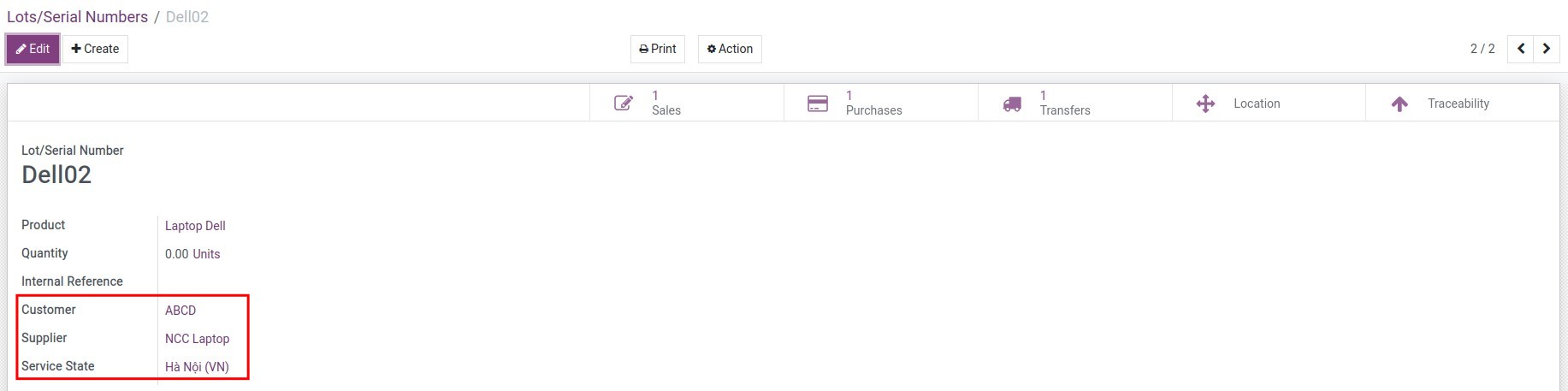
When the product is delivered, if the Destination Location is the Customer Location type, the customer name and service state will be updated when the transfer is confirmed
When the product is received, if the Source Location is the Vendor Location type, the Vendor Name will be updated when the transfer is confirmed
Update the service state, and names of the Supplier and Customer on the Serial number when the transfer is confirmed if the product's route is Dropshipping type. Accordingly, you will need to install the module `Partner Info on Lot/Serial - Dropshipping` (viin_stock_lot_dropshipping_partner_infor) to be able to enable this feature
Customer infor tracking products only support Serial tracking
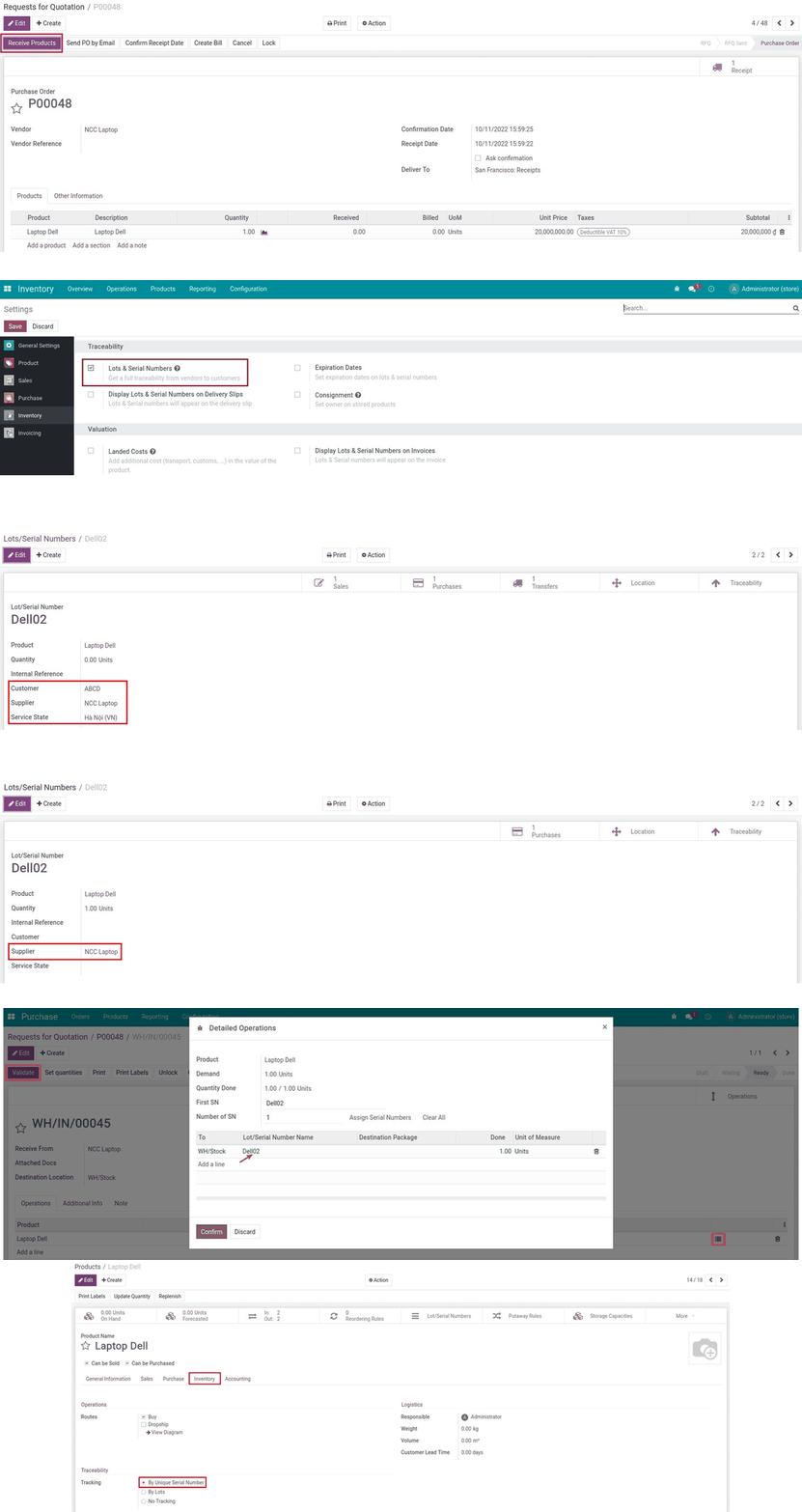
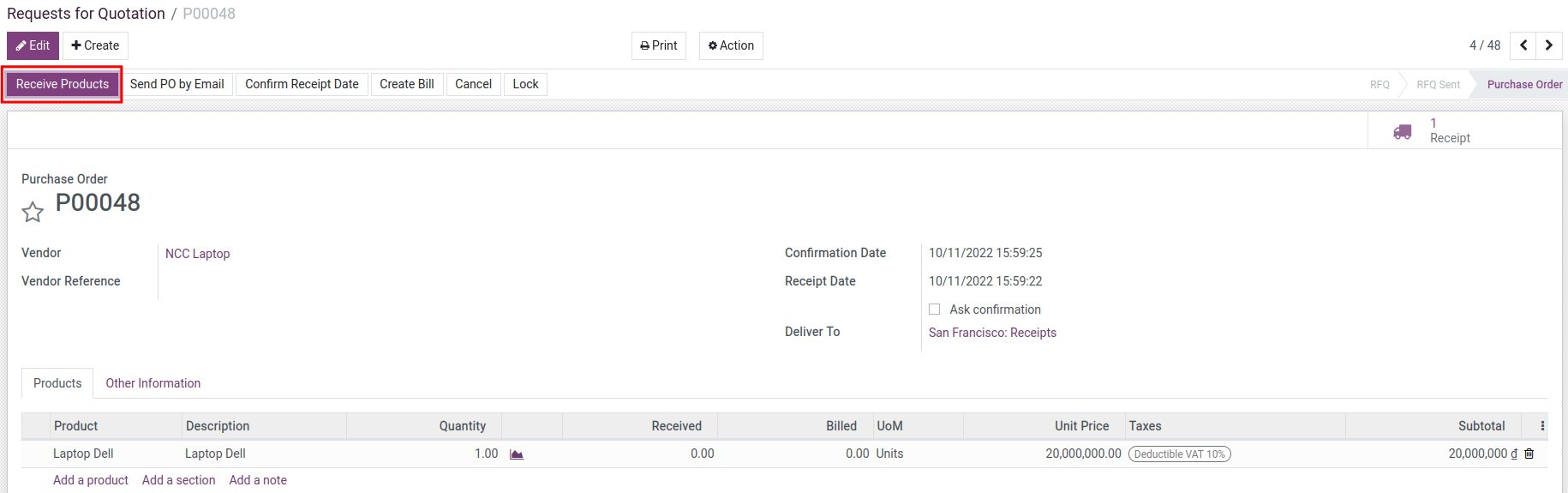
Create Purchase Orders
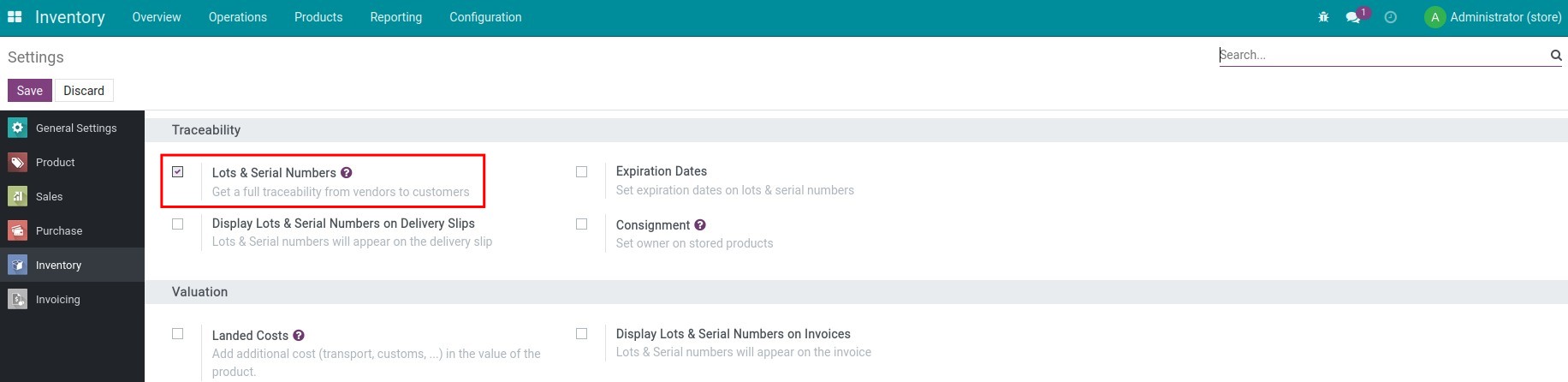
Enable lots/series tracking
Check customer information on the serial number
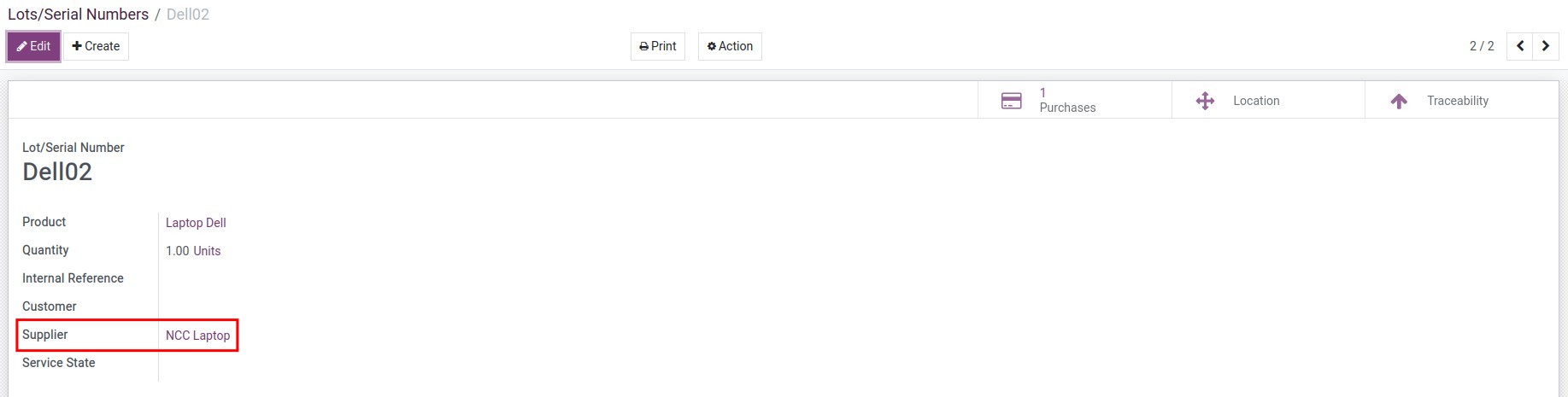
Check supplier information on serial number
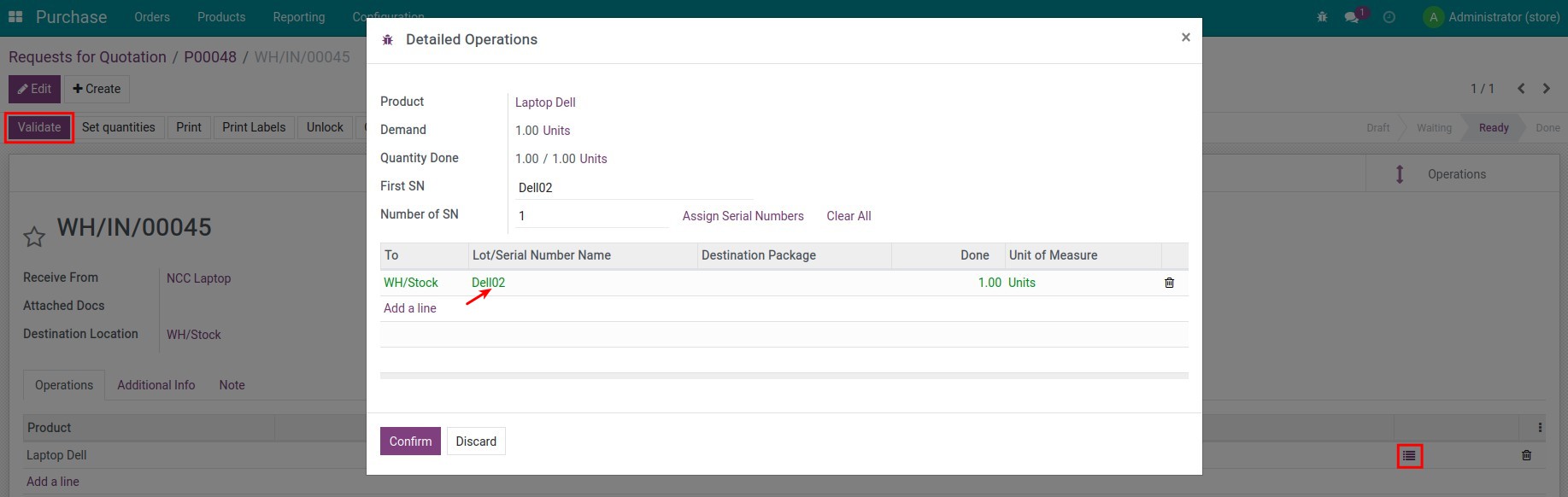
Enter the serial number and receive the product
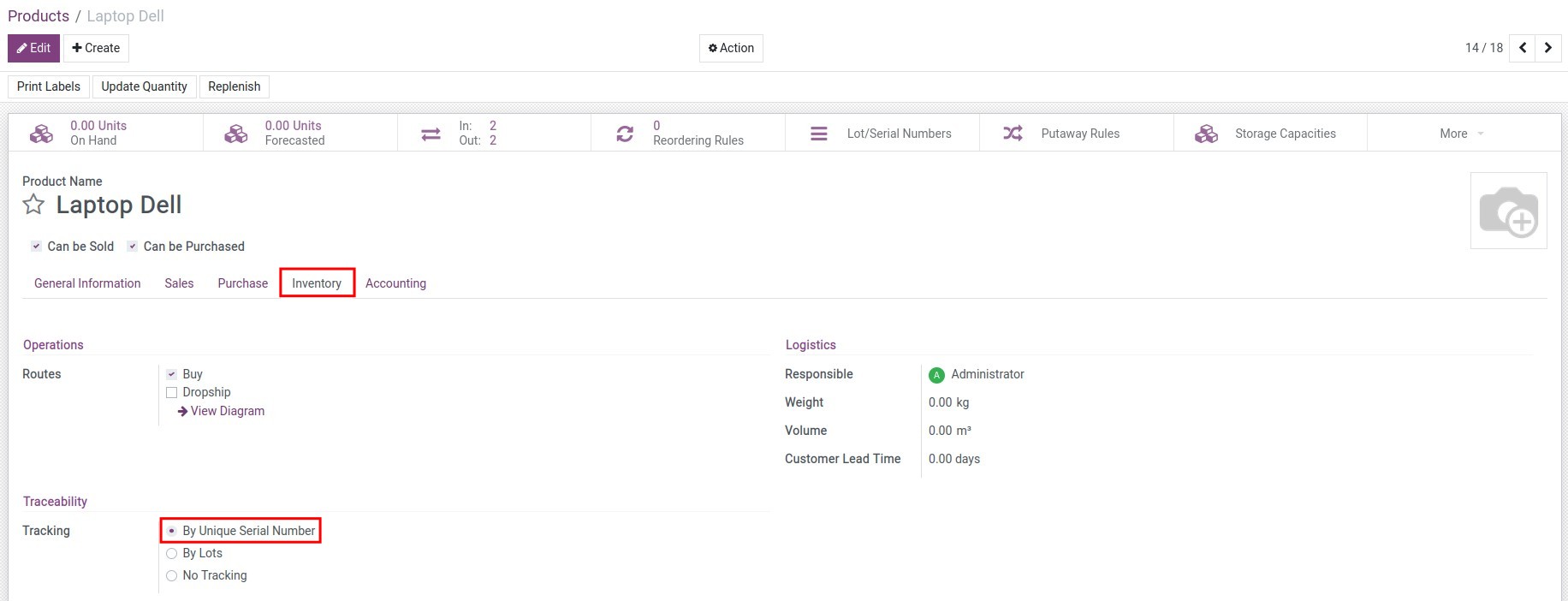
Enable lots/series tracking on the product
See Partner Info on Lot/Serial in Action
See how this module solves real business problems in a working Viindoo environment.
Need help with Partner Info on Lot/Serial?
For questions, implementation support, or consulting services, contact Viindoo.
Pre-Sales & Partnership
When contacting us, please include:
- Odoo/Viindoo version (CE/EE).
- Number of users and business scope.
- Other modules currently in use.
Technical Support
For faster troubleshooting, please provide:
- Order number or app reference.
- Odoo/Viindoo version & edition.
- Steps to reproduce the issue.
- Screenshots/logs if available.
Technical Requirement
Works Great With These Modules
Extend Partner Info on Lot/Serial with complementary Viindoo apps:
Equipment Warranty Partner
Add Vendor, Customer, Warranty Expiration information to Equipment
Module viin_equipment_warranty_partner_inforRepair Report
Add more information on repair orders and new comprehensive repair report
Module viin_repairPartner Info on Lot/Serial - Dropshipping
Partner Info on Lot/Serial - Dropshipping
Module viin_stock_lot_dropshipping_partner_inforWho Should Use This Module?
Built for teams that need this capability fully integrated into their Odoo/Viindoo stack.
Executives & Business Owners
Need clear visibility into operations and a stack that scales without bespoke development.
Operations / Department Leaders
Want to streamline daily workflows, remove manual handoffs, and keep data consistent across teams.
Implementers & Odoo Partners
Looking for production-ready Viindoo modules to deliver projects faster and at lower risk.
Cài đặt
- Truy cập Ứng dụng;
- Tìm từ khóa to_stock_production_lot_partner_infor;
- Bấm chọn Cài đặt.
Hướng dẫn sử dụng
Video hướng dẫn: Thông tin đối tác cho từng Số Lô / Serial
Thiết lập ban đầu
1. Kích hoạt tính năng truy vết theo Số Lô & Sê-ri
Truy cập Kho vận ‣ Cấu hình ‣ Thiết lập để kích hoạt tính năng truy xuất nguồn gốc theo Số Lô & Sêri:

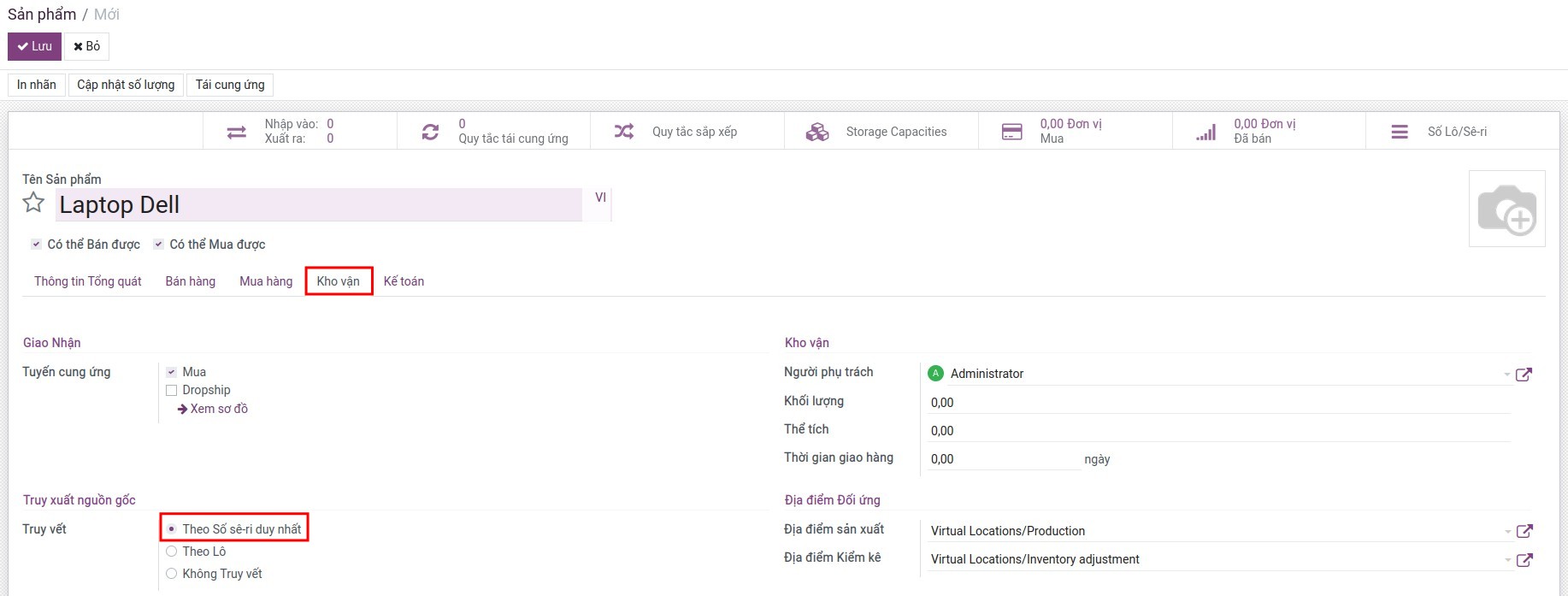
2. Tạo sản phẩm mới, kích hoạt truy vết theo Lô hoặc Số Sê-ri duy nhất trên sản phẩm
Truy cập Kho vận ‣ Sản phẩm ‣ Sản phẩm, ấn Tạo để tạo sản phẩm mới. Tại tab Kho vận, lựa chọn truy vết theo Lô hoặc Số Sê-ri duy nhất:
Luồng hoạt động
1. Tạo đơn mua hàng và nhập kho
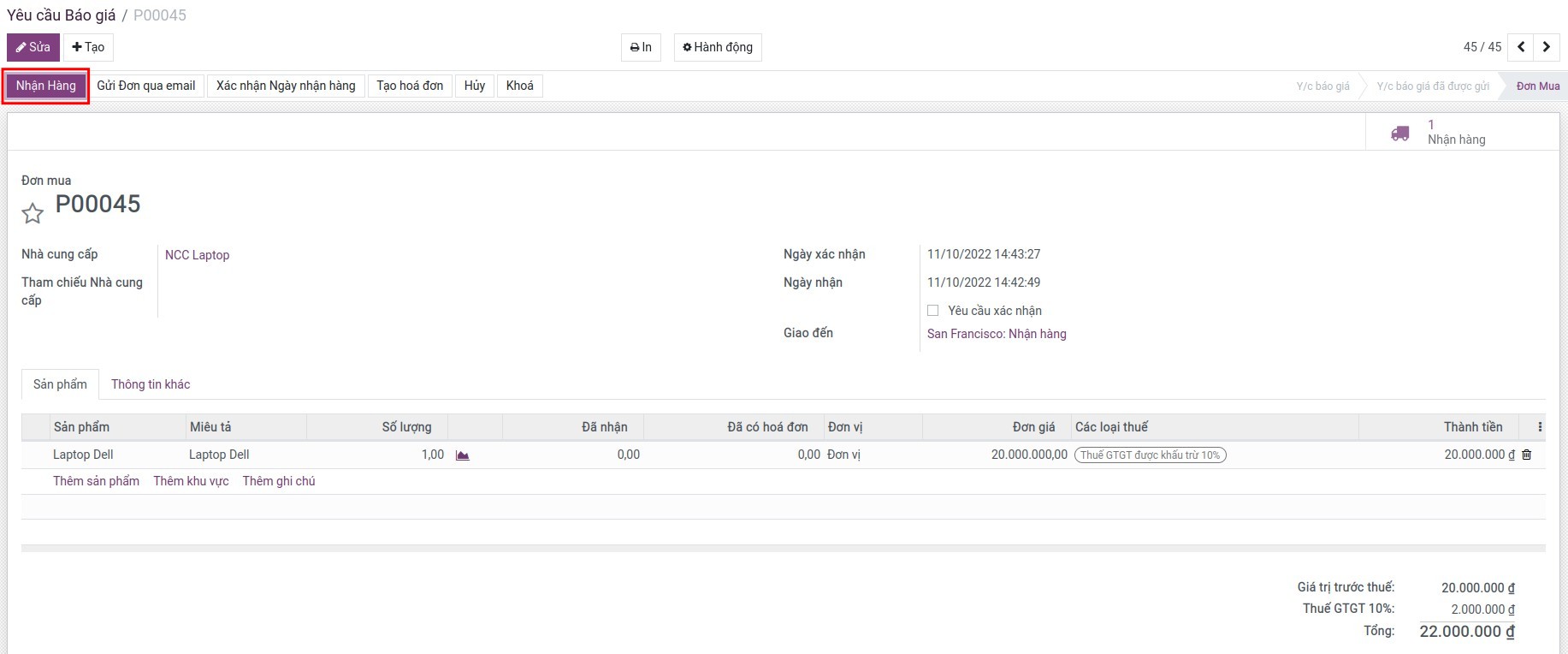
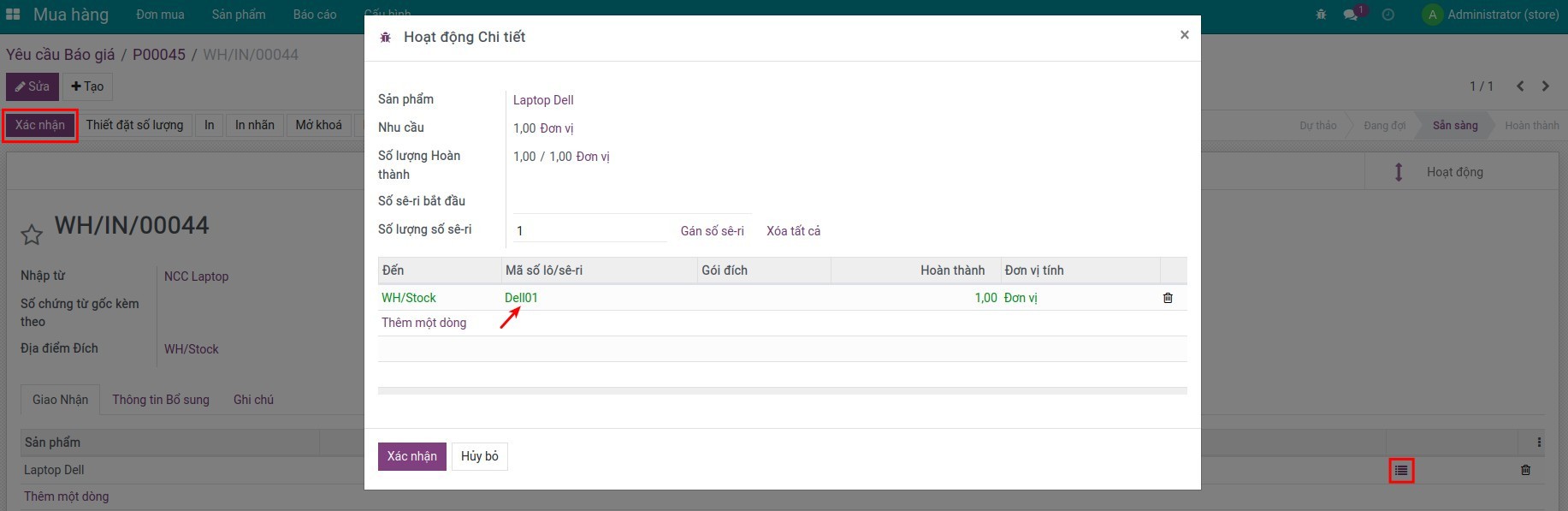
Truy cập Mua hàng ‣ Đơn mua, ấn Tạo sau đó Xác nhận để nhập kho:
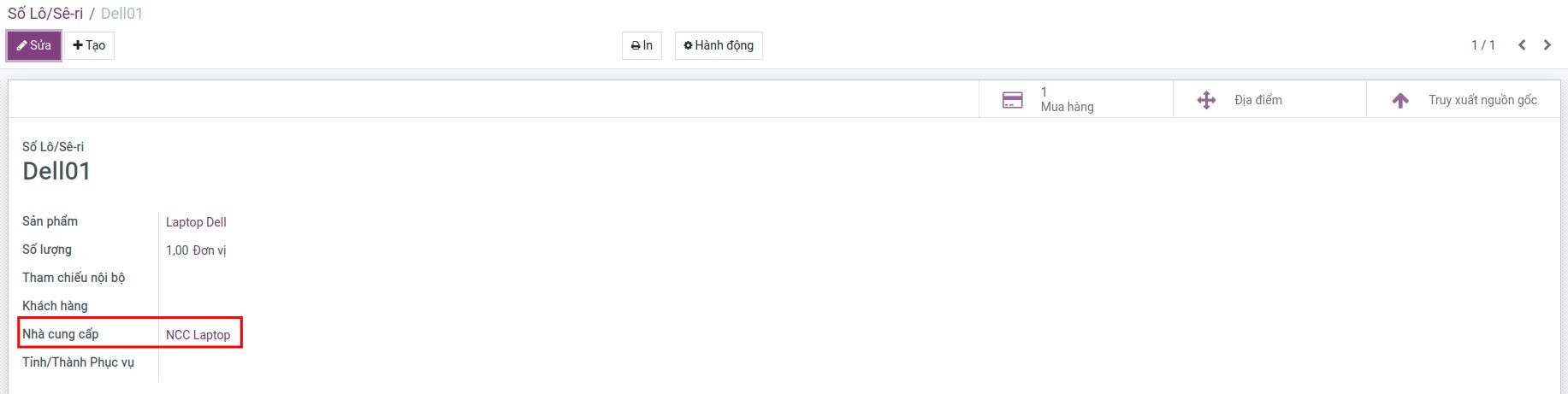
Truy cập Kho vận ‣ Sản phẩm ‣ Số Lô/sê-ri tìm và kiểm tra số Sê-ri vừa nhập kho sẽ có thông tin của Nhà cung cấp:
2. Tạo đơn bán và xuất kho
Thực hiện tương tự như trường hợp 1 nhưng với nghiệp vụ Bán hàng, sau đó kiểm tra Sê-ri vừa xuất kho sẽ có thông tin của Khách hàng:
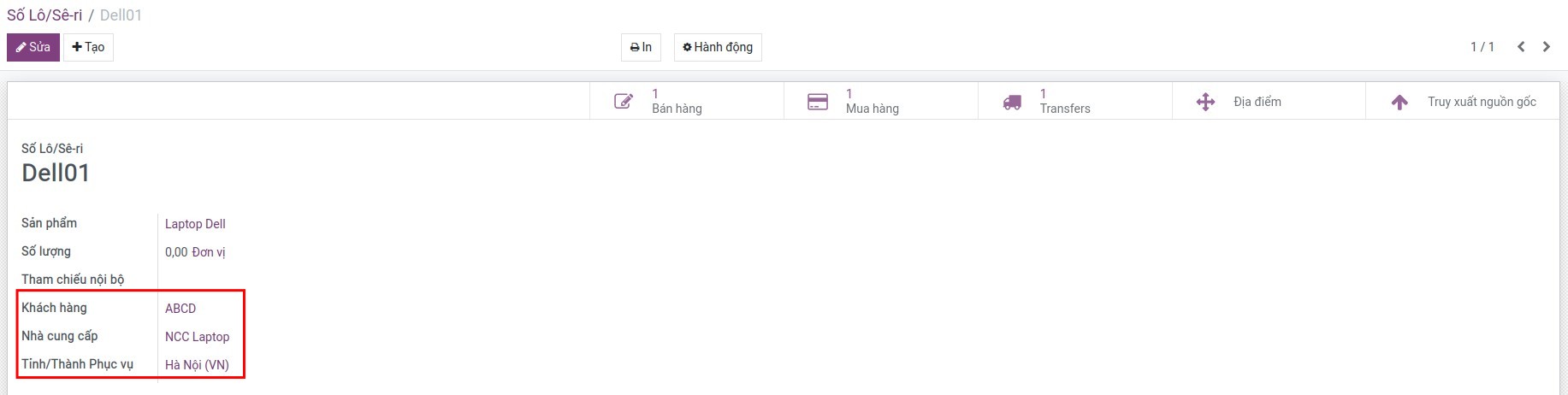
3. Giao hàng trực tiếp từ nhà cung cấp đến khách hàng
- Cấu hình sản phẩm với tuyến Dropshipping và thiết lập thông tin nhà cung cấp tại tab Mua hàng của sản phẩm.
- Khi khách hàng có nhu cầu về sản phẩm này, tạo đơn bán thì hệ thống sẽ tự động sinh ra đơn mua tương ứng.
- Xác nhận phiếu giao hàng từ Nhà cung cấp tới Khách hàng.
- Kiểm tra thông tin Lô/Sê-ri.
Tham khảo bài viết về sử dụng Dropship của Viindoo để hiểu hơn về quy trình giao hàng trực tiếp từ nhà cung cấp đến khách hàng.
Mô-đun này sẽ hữu ích khi bạn sử dụng Phần mềm quản lý thiết bị và sửa chữa hay Phần mềm quản lý bảo hành.
Phần mềm này và các tệp liên kết ("Phần mềm") được sử dụng (chạy, tuỳ biến, chạy sau khi được tuỳ biến) chỉ khi bạn mua được giấy phép có hiệu lực từ tác giả, điển hình như qua các Ứng dụng Odoo, hoặc trong trường hợp bạn nhận được thoả thuận bằng văn bản từ tác giả của Phần mềm (chi tiết tại tệp COPYRIGHT).
Bạn có thể phát triển các phân hệ Odoo có sử dụng Phần mềm như một Thư viện (thường là phụ thuộc vào, nhập vào và sử dụng nguồn của nó) nhưng không sao chéo bất kỳ mã nguồn hay tài liệu nào thuộc Phần mềm. Bạn có thể phân phối những phân hệ này theo giấy phép mà bạn lựa chọn, miễn sao nội dung giấy phép đó tương tích với điều khoản của Giấy phép Phần mềm Độc quyền Odoo (ví dụ: LGPL, MIT hay bất kỳ loại giấy phép phần mềm độc quyền nào tương tự vậy).
Nghiêm cấm phát hành, phân phối, cấp phép lại hoặc bán bản sao của Phần mềm hoặc bản sao Phần mềm đã được sửa đổi.
Thông báo bản quyền và chấp thuận nêu trên buộc phải được bao gồm trong tất cả các bản sao hoặc các phần quan trọng của Phần mềm.
PHẦN MỀM ĐƯỢC CUNG CẤP "NGUYÊN TRẠNG", KHÔNG BẢO ĐẢM DƯỚI BẤT KỲ HÌNH THỨC NÀO, ĐƯỢC THỂ HIỆN RÕ RÀNG HOẶC NGỤ Ý, KHÔNG GIỚI HẠN ĐẢM BẢO VỀ CÁC BẢO ĐẢM NGỤ Ý VỀ KHẢ NĂNG THƯƠNG MẠI, PHÙ HỢP VỚI MỤC ĐÍCH CỤ THỂ VÀ KHÔNG VI PHẠM. TRONG MỌI TRƯỜNG HỢP SẼ KHÔNG CÓ TÁC GIẢ HOẶC CHỦ SỞ HỮU BẢN QUYỀN NÀO CHỊU TRÁCH NHIỆM VỀ BẤT KỲ KHIẾU NẠI, THIỆT HẠI HOẶC TRÁCH NHIỆM PHÁP LÝ KHÁC NÀO TRONG PHẠM VI HỢP ĐỒNG, CÁC THIỆT HẠI HOẶC CÁCH KHÁC, PHÁT SINH TỪ, NGOÀI HOẶC CÓ LIÊN KẾT VỚI PHẦN MỀM HOẶC VIỆC SỬ DỤNG HOẶC KINH DOANH KHÁC TẠI PHẦN MỀM.