
Loại trừ bản ghi chấm công Nghỉ trên Phiếu lương
bởi Viindoo
| Số dòng Code | 445 |
| Tên kỹ thuật | to_hr_project_timesheet_timeoff_payroll |
| Giấy phép | OPL-1 |
| Website | https://viindoo.com/apps/modules/17.0/to_hr_project_timesheet_timeoff_payroll |
| Đọc mô tả cho | v 13.0 v 14.0 v 15.0 v 16.0 v 18.0 |
| Yêu cầu các App | Time Off (hr_holidays) Project (project) Discuss (mail) Employees (hr) Calendar (calendar) Employee Contracts (hr_contract) |
| Bao gồm Các phụ thuộc | Bảng lương Người thân của nhân viên Mô-đun Cơ Sở Tích hợp Chấm công với Bảng lương Hợp đồng Lao động (Viindoo) Quản trị Nhân sự Nâng cao Nhật ký Công việc Viin - Thời Gian Nghỉ Ứng dụng Phụ lục Cơ sở Hợp đồng - nhật ký công việc Chấm công Nghỉ cho Dự án Quản lý lịch làm việc & ngày nghỉ Viin - Nhật ký công việc nghỉ |

Absence is not paid twice
Timesheet lines that came from time off are excluded from payslip working time - so a paid absence is not counted as worked hours as well.
Exclude Time off Timesheet records on Payslip (technical name to_hr_project_timesheet_timeoff_payroll) is an Odoo 17.0 app for Odoo Community and Odoo Enterprise and Viindoo Cloud, built for payroll officer, employee, project manager, finance.
At a Glance
The facts of Exclude Time off Timesheet records on Payslip, version 0.1, in one place. Published by Viindoo.
How It Works
Three screens.
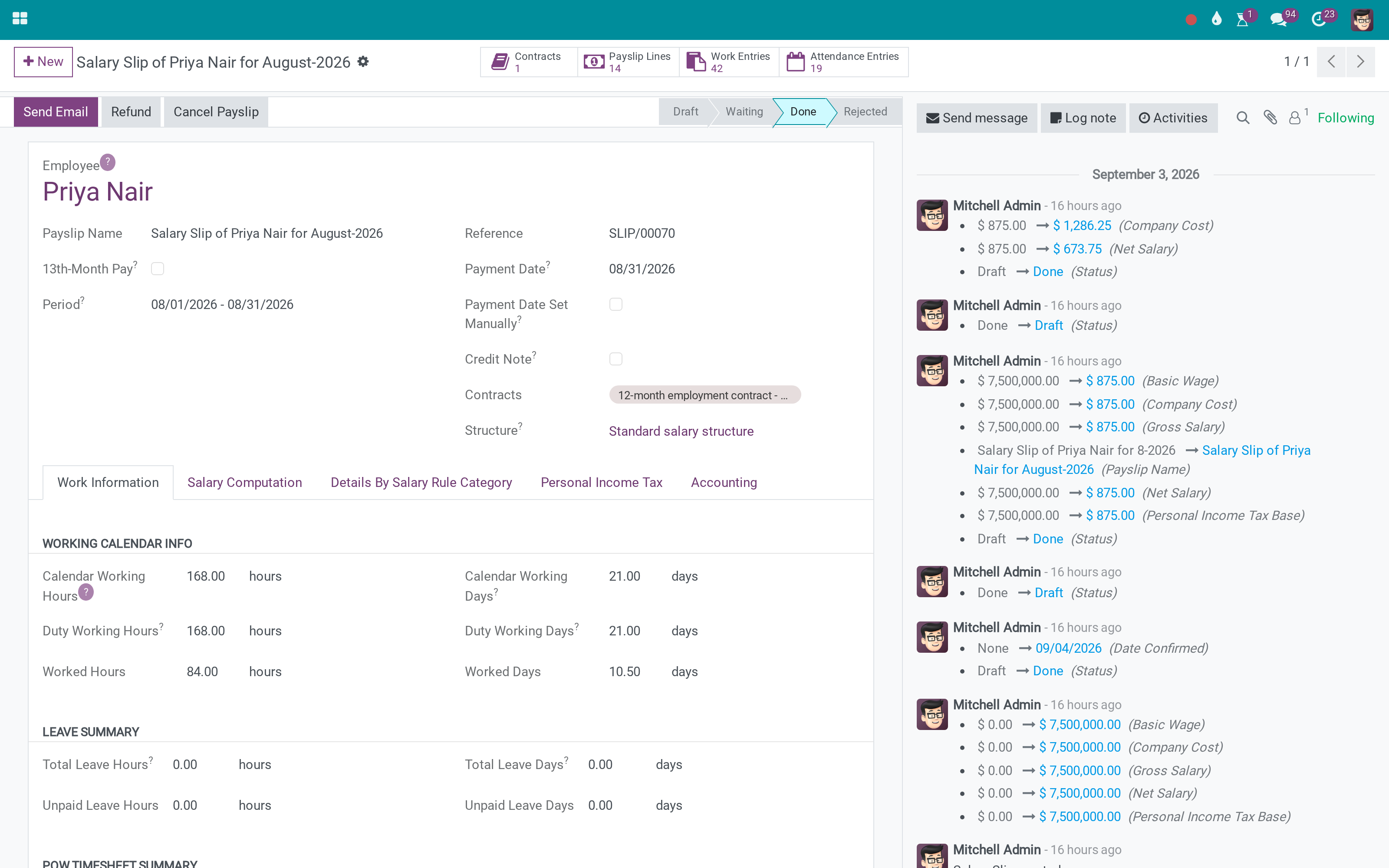
On the payslip
Working time that counts worked hours, not the ones an absence generated.
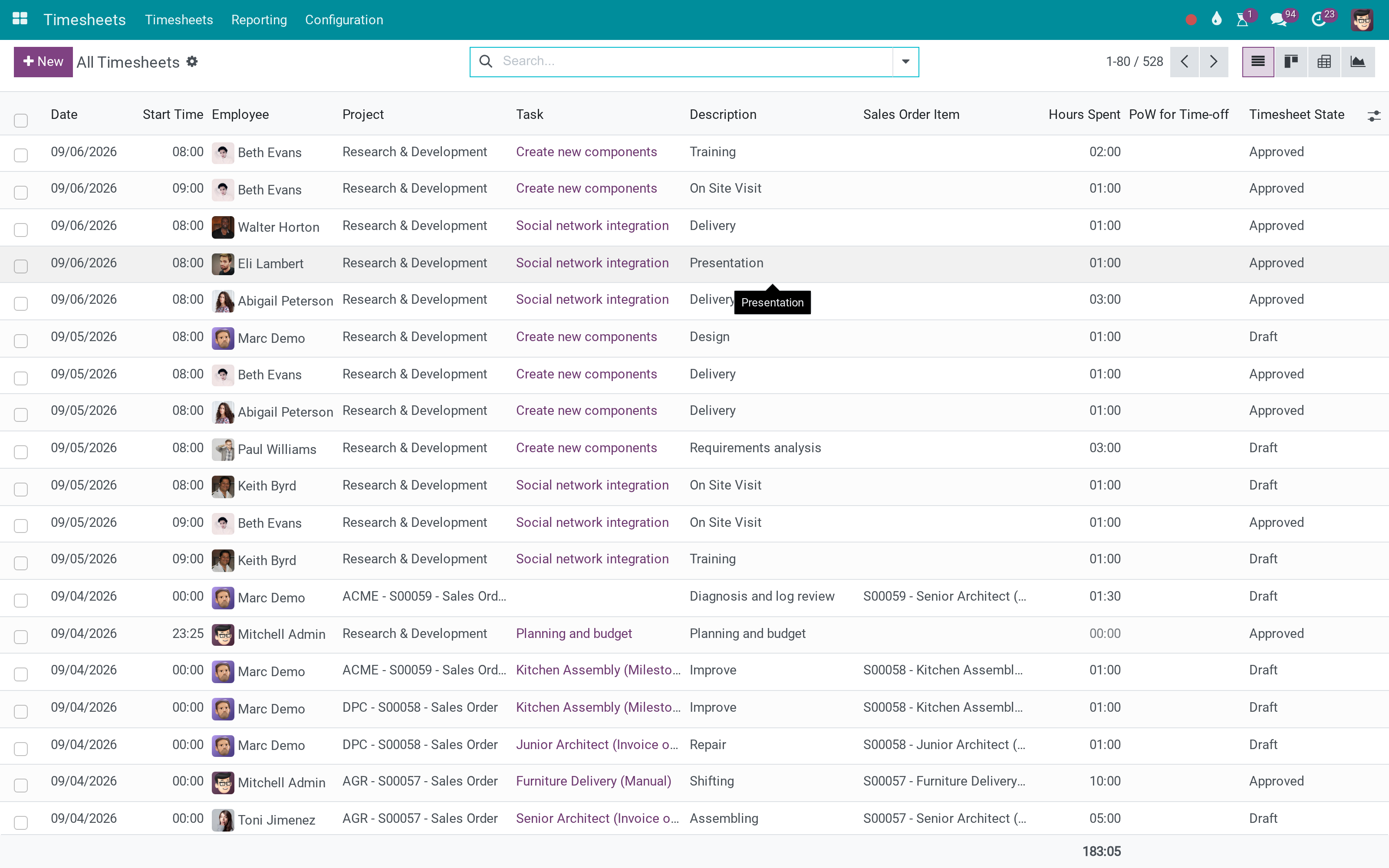
The timesheets it reads
The lines are still there for project cost - they are simply not counted twice.
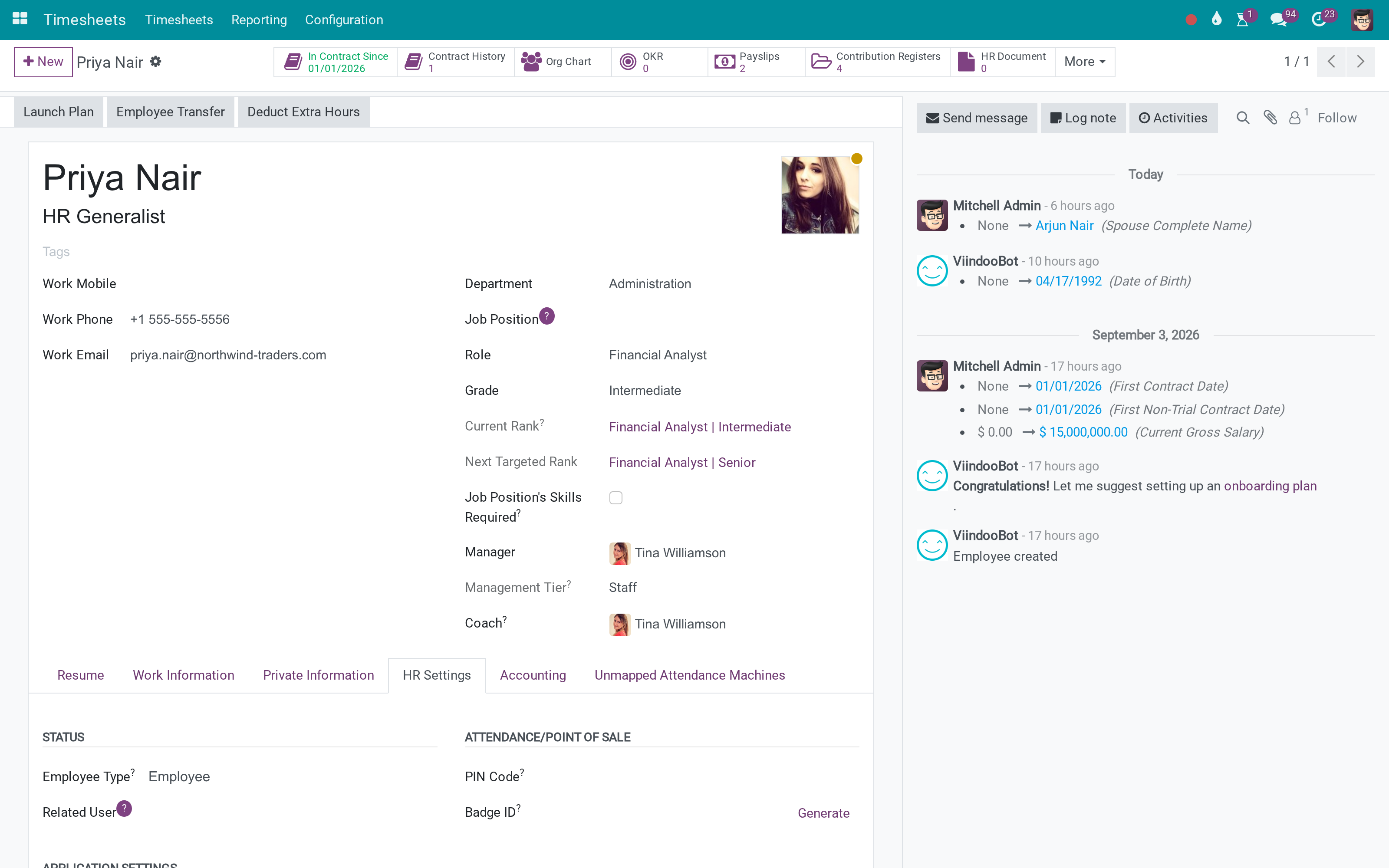
And the employee
Nothing to configure per person.
What You Get
Timesheet lines generated by time off excluded from payslip working time
Project cost still includes the absence
Applies to the payslips the standard payroll computes
No configuration - the rule is the point
Works with time-off timesheet generation as Odoo provides it
Ordinary worked timesheets are unaffected
More Screens
Everything below was taken on a database seeded with real business data, on this series - not a mock-up and not a screenshot from an older version.
Timesheets
What This App Does Not Do
Read this before you buy. Everything below is something the app deliberately leaves to another app or to you.
How much leave somebody has is the time off app's.
The effect is on the payslip figure, not on a new screen.
Salaried contracts that ignore timesheets are unaffected.
Already computed slips keep their figures.
Works Well With
Apps from the same stack, built to fit this one:
Who Should Use Exclude Time off Timesheet records on Payslip?
Payroll officer
Stops paying an absence twice.
Employee
Gets a payslip that matches the calendar.
Project manager
Keeps the absence in project cost, where it belongs.
Finance
Reconciles payroll and project cost without an adjustment.
Frequently Asked Questions
What does Exclude Time off Timesheet records on Payslip do?
Timesheet lines that came from time off are excluded from payslip working time - so a paid absence is not counted as worked hours as well.
What does Exclude Time off Timesheet records on Payslip not do?
It does not change leave entitlement. How much leave somebody has is the time off app's. It is a correction, not a report. The effect is on the payslip figure, not on a new screen. It applies where timesheets feed payroll. Salaried contracts that ignore timesheets are unaffected. It does not fix past payslips. Already computed slips keep their figures.
Who is Exclude Time off Timesheet records on Payslip for?
Payroll officer: Stops paying an absence twice. Employee: Gets a payslip that matches the calendar. Project manager: Keeps the absence in project cost, where it belongs. Finance: Reconciles payroll and project cost without an adjustment.
Which Odoo version and editions does it support?
Odoo 17.0 - Odoo Community, Odoo Enterprise, Viindoo Cloud. Upgrades to a newer Odoo series are a separate purchase for that series.
What does it depend on?
It installs on top of: to_hr_timesheet_payroll, viin_project_timesheet_leave. Odoo installs them with it.
How do I set it up?
Three screens.
What works well with it?
Timesheets in Payroll (to_hr_timesheet_payroll): Paying from recorded hours in the first place. Time Off on Projects (viin_project_timesheet_leave): Where the absence lands as cost. Time Off (viin_hr_holidays): The absences themselves.
Can I try it before buying?
Yes - the Live Preview button at the top of this page opens the module's own screen on a working database.
How do I get support?
Write to apps.support@viindoo.com with your Odoo version and the technical name to_hr_project_timesheet_timeoff_payroll; pre-sales questions go to sales@viindoo.com.
See Exclude Time off Timesheet records on Payslip in Action
Absence is not paid twice
Need help with Exclude Time off Timesheet records on Payslip?
For questions, implementation support, or consulting services, contact Viindoo.
Pre-Sales & Partnership
sales@viindoo.comWhen contacting us, please include:
- Odoo/Viindoo version (Odoo CE / Viindoo Editions).
- Number of users and business scope.
- Other modules currently in use.
Technical Support
apps.support@viindoo.comFor faster troubleshooting, please provide:
- Order number or app reference.
- Odoo/Viindoo version & edition.
- Steps to reproduce the issue.
- Screenshots/logs if available.
Upgrades to a newer Odoo series are a separate purchase for that series.
Technical Requirement
Changes log
0.1 - Latest on the 17.0 line
- Timesheet lines linked to a time off are excluded from the payslip's worked-hours computation.
Cài đặt
- Truy cập Ứng dụng;
- Tìm từ khóa to_hr_project_timesheet_timeoff_payroll;
- Bấm chọn Cài đặt.
Hướng dẫn sử dụng
Video hướng dẫn: Loại trừ bản ghi chấm công Nghỉ trên Phiếu lương
1. Kích hoạt tính năng tính lương theo giờ chấm công
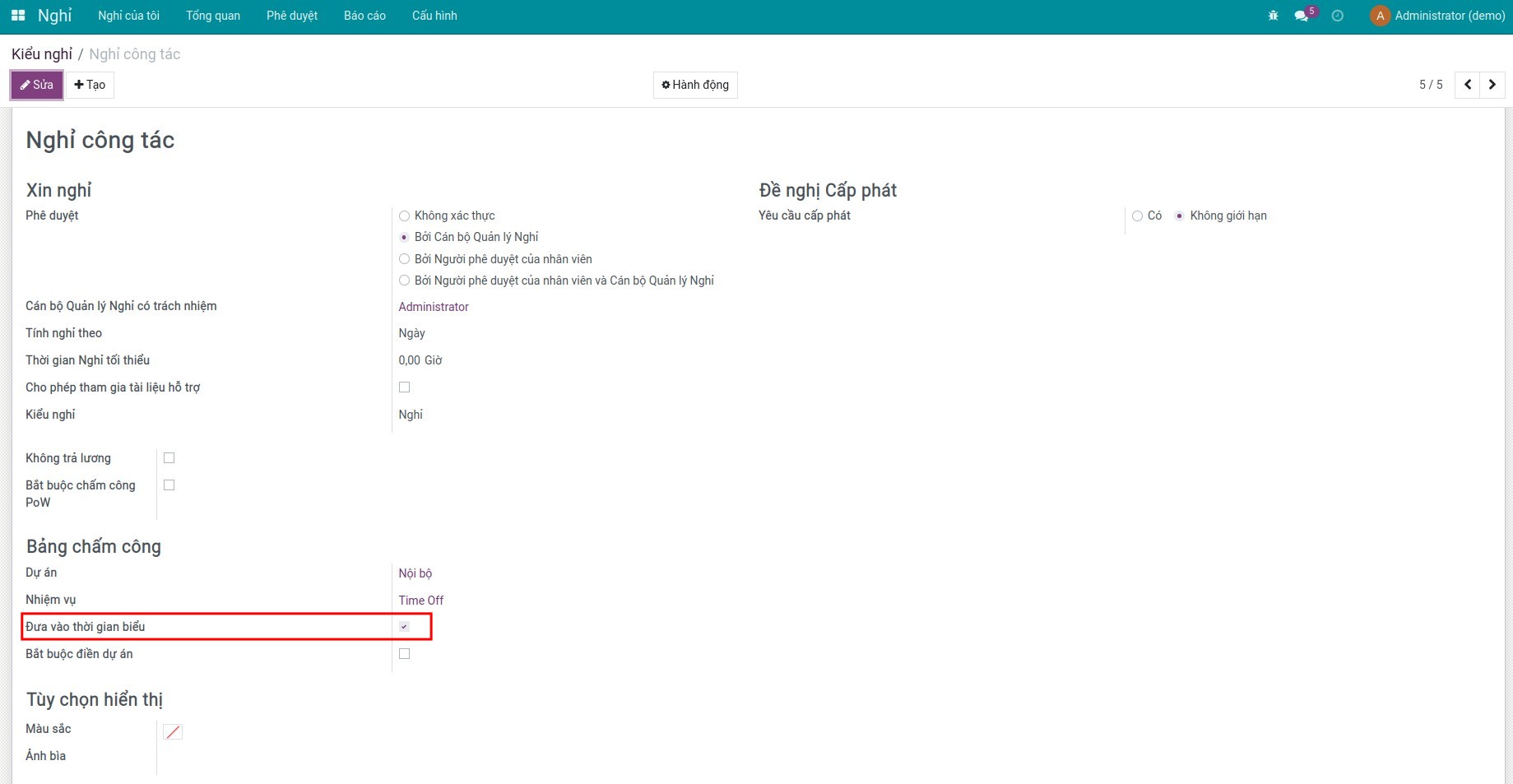
2. Kích hoạt tính năng tạo bản ghi chấm công cho phiếu Nghỉ
Truy cập Nghỉ ‣ Cấu hình ‣ Kiểu nghỉ để tạo mới hoặc chọn một kiểu nghỉ, kích hoạt tính năng Đưa vào thời gian biểu:
3. Tạo phiếu nghỉ
Truy cập Nghỉ ‣ Nghỉ của tôi ‣ Nghỉ của tôi để tạo mới một phiếu nghỉ:
Xem thêm tại bài viết Các bước tạo Phiếu xin nghỉ.
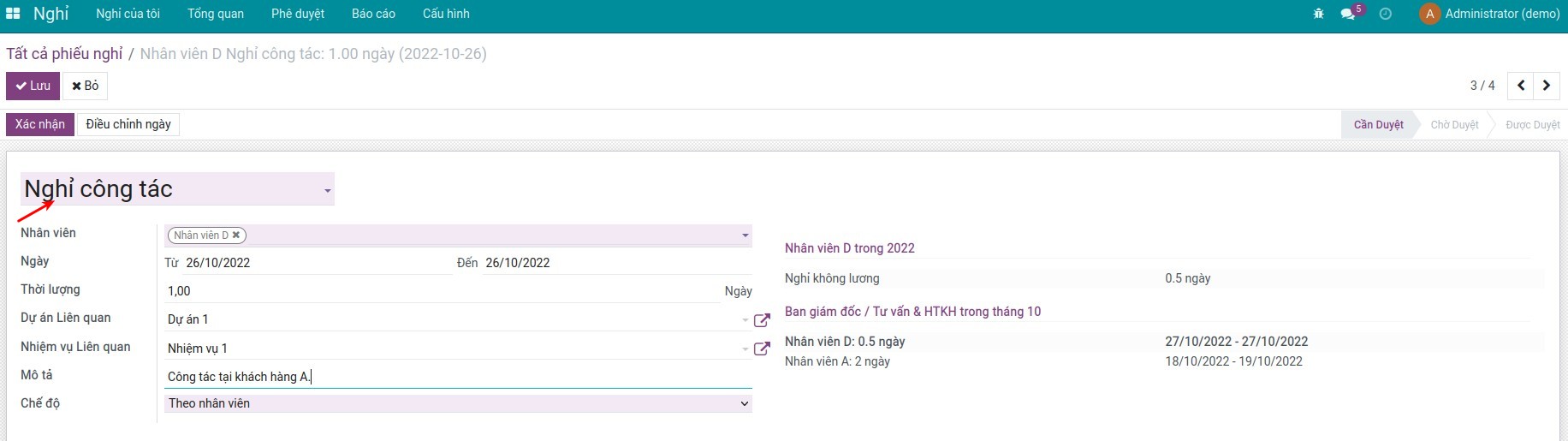
Xem thông tin về chấm công được sinh ra từ phiếu nghỉ:

4. Tạo phiếu lương
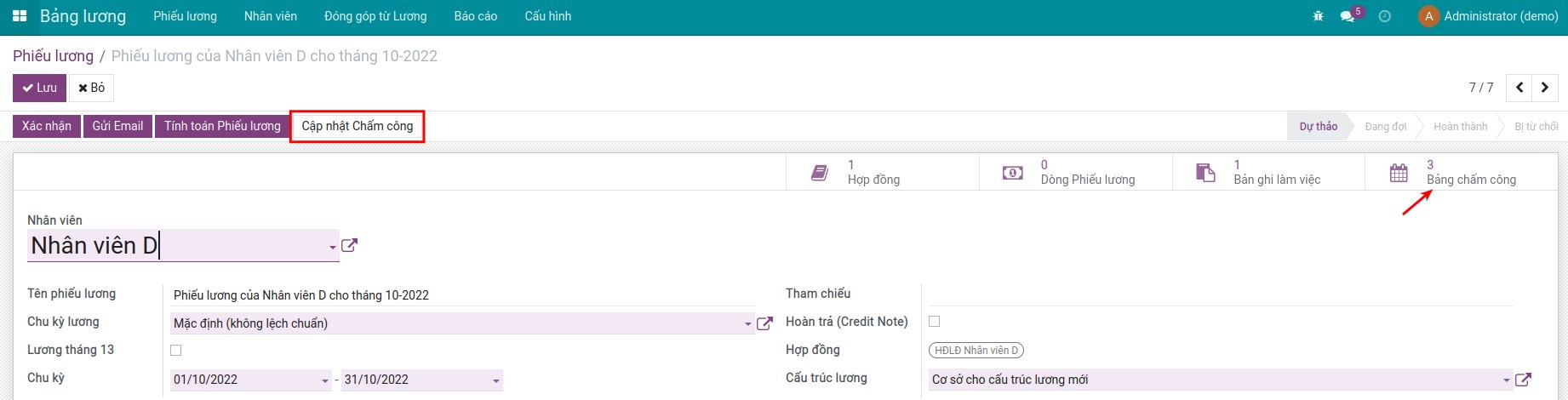
Truy cập Bảng lương ‣ Phiếu lương ‣ Phiếu lương để tạo mới phiếu lương cho nhân viên, ấn Cập nhật Chấm công trên phiếu lương sẽ thấy nút thống kê các bản chấm công - không bao gồm các bản chấm công đại diện cho phiếu nghỉ:

Phần mềm này và các tệp liên kết ("Phần mềm") được sử dụng (chạy, tuỳ biến, chạy sau khi được tuỳ biến) chỉ khi bạn mua được giấy phép có hiệu lực từ tác giả, điển hình như qua các Ứng dụng Odoo, hoặc trong trường hợp bạn nhận được thoả thuận bằng văn bản từ tác giả của Phần mềm (chi tiết tại tệp COPYRIGHT).
Bạn có thể phát triển các phân hệ Odoo có sử dụng Phần mềm như một Thư viện (thường là phụ thuộc vào, nhập vào và sử dụng nguồn của nó) nhưng không sao chéo bất kỳ mã nguồn hay tài liệu nào thuộc Phần mềm. Bạn có thể phân phối những phân hệ này theo giấy phép mà bạn lựa chọn, miễn sao nội dung giấy phép đó tương tích với điều khoản của Giấy phép Phần mềm Độc quyền Odoo (ví dụ: LGPL, MIT hay bất kỳ loại giấy phép phần mềm độc quyền nào tương tự vậy).
Nghiêm cấm phát hành, phân phối, cấp phép lại hoặc bán bản sao của Phần mềm hoặc bản sao Phần mềm đã được sửa đổi.
Thông báo bản quyền và chấp thuận nêu trên buộc phải được bao gồm trong tất cả các bản sao hoặc các phần quan trọng của Phần mềm.
PHẦN MỀM ĐƯỢC CUNG CẤP "NGUYÊN TRẠNG", KHÔNG BẢO ĐẢM DƯỚI BẤT KỲ HÌNH THỨC NÀO, ĐƯỢC THỂ HIỆN RÕ RÀNG HOẶC NGỤ Ý, KHÔNG GIỚI HẠN ĐẢM BẢO VỀ CÁC BẢO ĐẢM NGỤ Ý VỀ KHẢ NĂNG THƯƠNG MẠI, PHÙ HỢP VỚI MỤC ĐÍCH CỤ THỂ VÀ KHÔNG VI PHẠM. TRONG MỌI TRƯỜNG HỢP SẼ KHÔNG CÓ TÁC GIẢ HOẶC CHỦ SỞ HỮU BẢN QUYỀN NÀO CHỊU TRÁCH NHIỆM VỀ BẤT KỲ KHIẾU NẠI, THIỆT HẠI HOẶC TRÁCH NHIỆM PHÁP LÝ KHÁC NÀO TRONG PHẠM VI HỢP ĐỒNG, CÁC THIỆT HẠI HOẶC CÁCH KHÁC, PHÁT SINH TỪ, NGOÀI HOẶC CÓ LIÊN KẾT VỚI PHẦN MỀM HOẶC VIỆC SỬ DỤNG HOẶC KINH DOANH KHÁC TẠI PHẦN MỀM.