

HR Contracts (Viindoo)
by Viindoo
| Lines of Code | 3464 |
| Technical name | viin_hr_contract |
| License | OPL-1 |
| Website | https://viindoo.com/apps/modules/19.0/viin_hr_contract |
| Included Dependencies | Viindoo Base Base Addendum Viindoo Holiday & WorkDay Manager Safe IR Metadata Proxies |
| Extensions | Employee Seniority |

A contract with its history, its addenda and the transfers that changed it
Amendments as documents, a contract history that reads like one record, employee transfers that write themselves into it, and a change report across the workforce.
HR Contracts (Viindoo) (technical name viin_hr_contract) is an Odoo 19.0 app for Odoo Community and Odoo Enterprise and Viindoo Cloud, built for hr manager, hr officer, department manager, auditor.
At a Glance
The facts of HR Contracts (Viindoo), version 0.1.6, in one place. Published by Viindoo.
How It Works
Four screens.
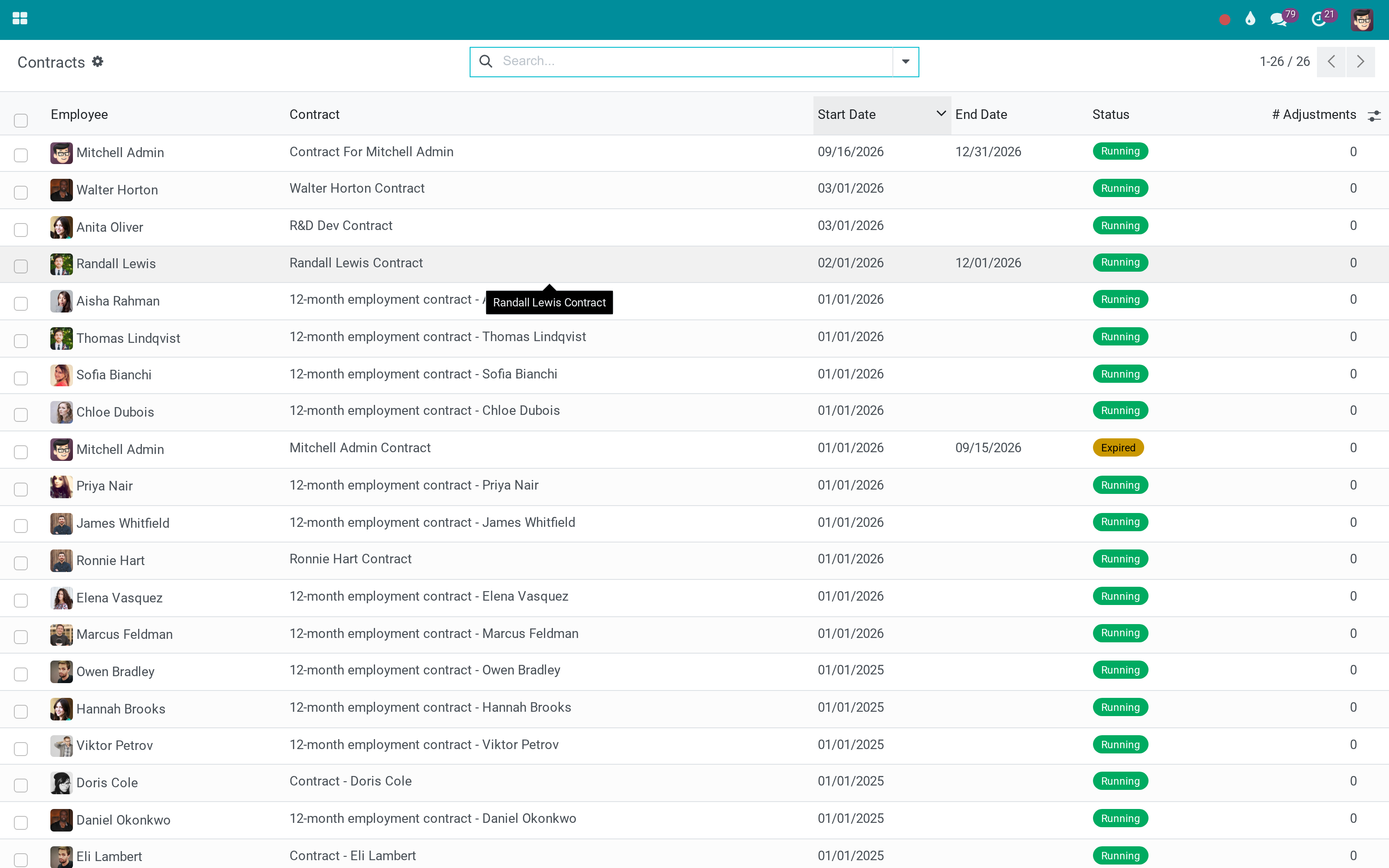
The employment, as one history
Each employee's contracts, renewals and amendments in one place, in the order they happened.
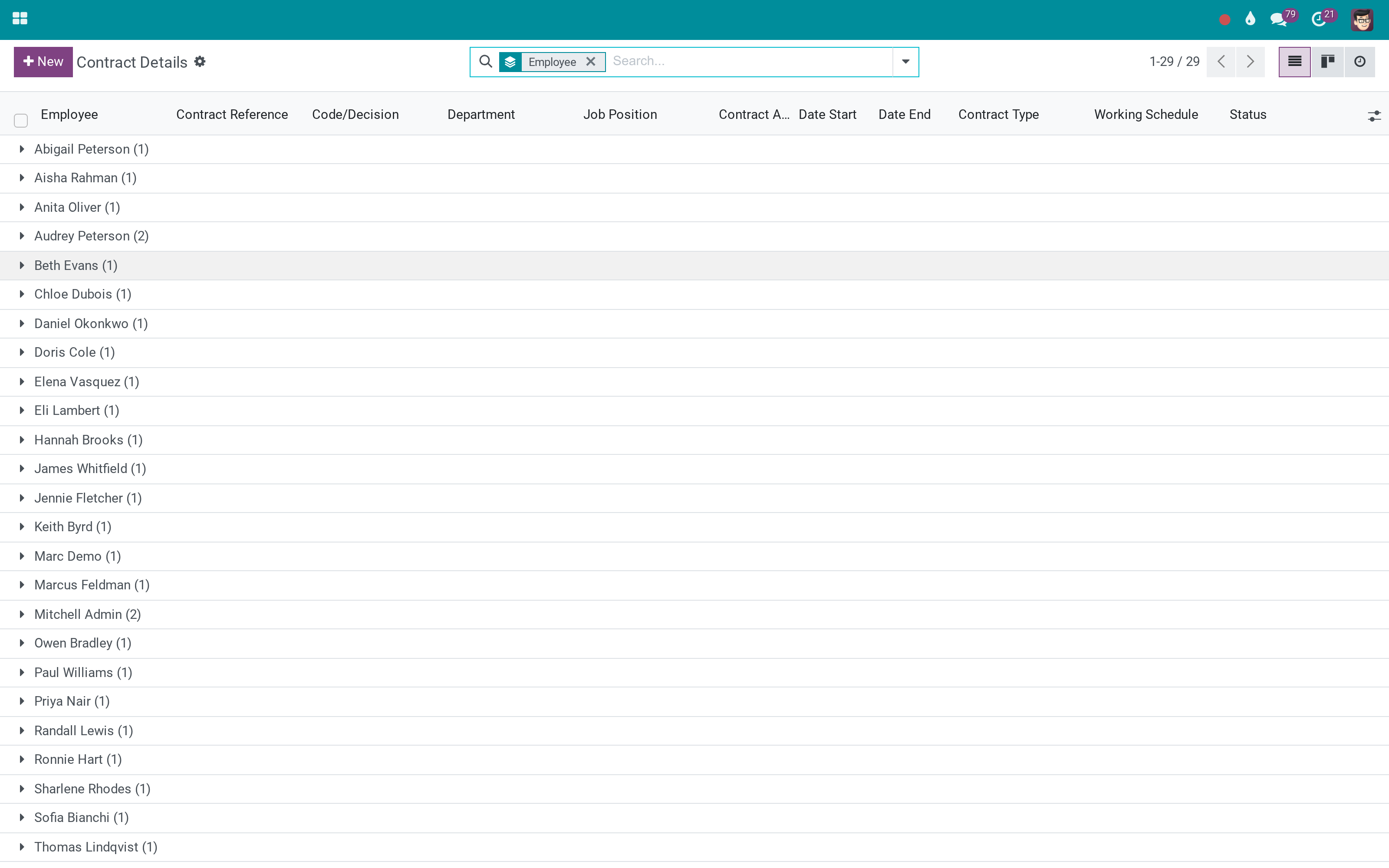
Contract details
Adjustments live as their own records under the contract, so the original terms stay readable.
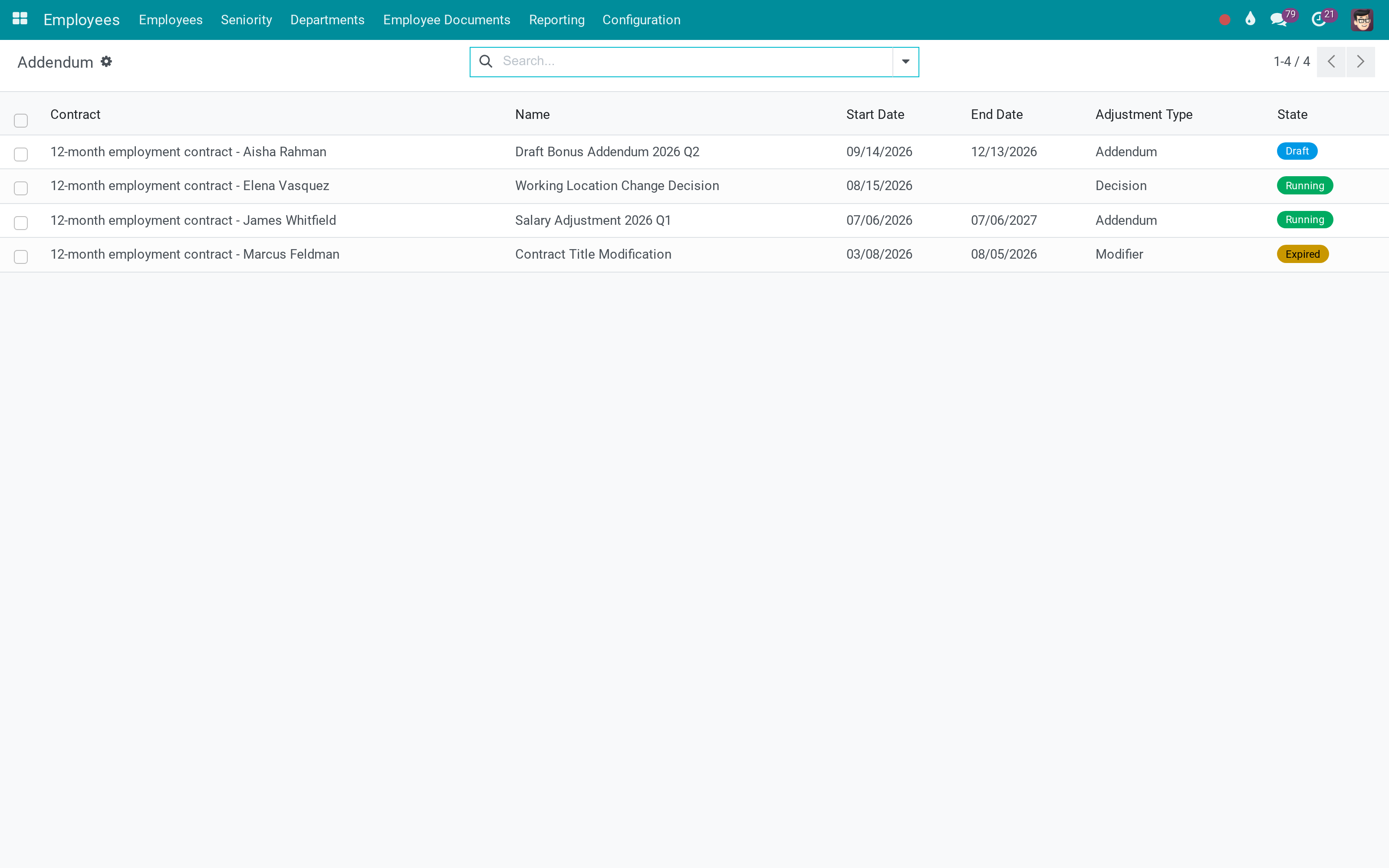
The amendments themselves
Reference code, type, validity dates and state - the document HR actually signs.
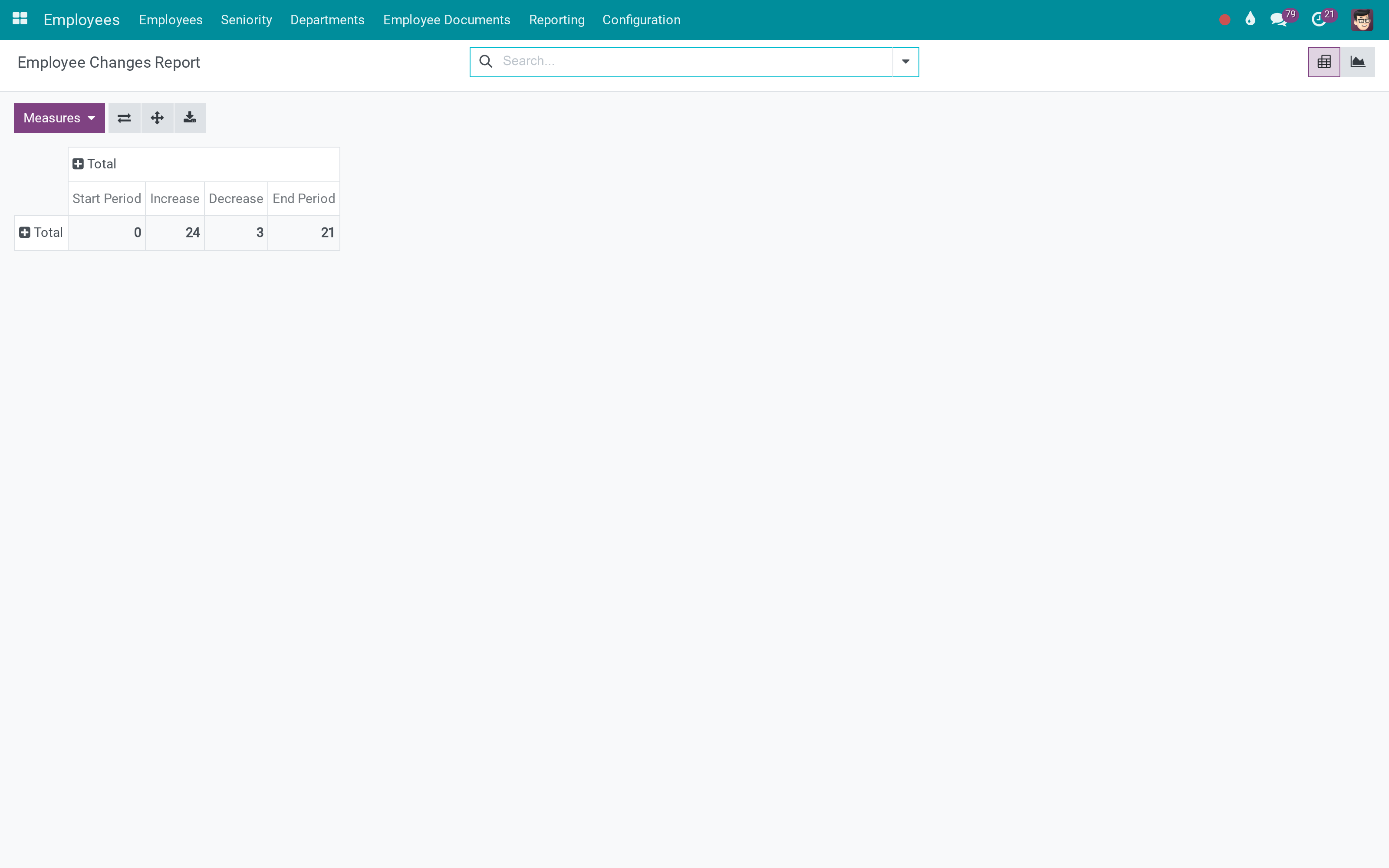
What changed, across the workforce
A period, and the moves, promotions and endings inside it.
What You Get
Addenda and decisions as records: reference code, type, validity, state
Adjustment contracts as children of the original, rather than edits to it
Contract history per employee, across renewals and amendments
Employee transfer: department, job or company, with the addendum created for it
An employee changes report over any period
Tracked fields on the contract, with a warning when display dates conflict
More Screens
Everything below was taken on a database seeded with real business data, on this series - not a mock-up and not a screenshot from an older version.
Addenda
What This App Does Not Do
Read this before you buy. Everything below is something the app deliberately leaves to another app or to you.
Payroll reads the contract; this app records how the contract came to say what it says.
An addendum is a record with a reference and dates; electronic signature is a separate app.
The receiving side has its own departments, jobs and officers - the wizard asks for them.
Draft, running, expired and closed stay Odoo's; the amendments sit alongside them.
Works Well With
Apps from the same stack, built to fit this one:
Who Should Use HR Contracts (Viindoo)?
HR manager
Issues an amendment as a document instead of editing a salary field.
HR officer
Reads a person's whole contractual history without opening five records.
Department manager
Requests a transfer that carries its own paperwork.
Auditor
Finds the decision behind every change, with dates and a reference.
Frequently Asked Questions
What does HR Contracts (Viindoo) do?
Amendments as documents, a contract history that reads like one record, employee transfers that write themselves into it, and a change report across the workforce.
What does HR Contracts (Viindoo) not do?
It does not compute salary. Payroll reads the contract; this app records how the contract came to say what it says. It does not sign anything. An addendum is a record with a reference and dates; electronic signature is a separate app. A transfer between companies needs both companies configured. The receiving side has its own departments, jobs and officers - the wizard asks for them. It does not replace Odoo's contract states. Draft, running, expired and closed stay Odoo's; the amendments sit alongside them.
Who is HR Contracts (Viindoo) for?
HR manager: Issues an amendment as a document instead of editing a salary field. HR officer: Reads a person's whole contractual history without opening five records. Department manager: Requests a transfer that carries its own paperwork. Auditor: Finds the decision behind every change, with dates and a reference.
Which Odoo version and editions does it support?
Odoo 19.0 - Odoo Community, Odoo Enterprise, Viindoo Cloud. Upgrades to a newer Odoo series are a separate purchase for that series.
What does it depend on?
It installs on top of: hr_contract, viin_resource, to_base, viin_base_addendum. Odoo installs them with it.
How do I set it up?
Four screens.
What works well with it?
Advanced HR Management (viin_hr): The HR foundation underneath. Payroll (to_hr_payroll): What the contract terms are paid from. Employee Change Tracking (to_employee_changes_tracking): The wider record of who changed what.
Can I try it before buying?
Yes - the Live Preview button at the top of this page opens the module's own screen on a working database.
How do I get support?
Write to apps.support@viindoo.com with your Odoo version and the technical name viin_hr_contract; pre-sales questions go to sales@viindoo.com.
See HR Contracts (Viindoo) in Action
Live demo: v19demo-int.viindoo.com/web#action=viin_hr_contract.viin_hr_contract_history_action
Need help with HR Contracts (Viindoo)?
For questions, implementation support or a custom feature, contact Viindoo.
Pre-Sales & Partnership
sales@viindoo.comUpgrades to a newer Odoo series are a separate purchase for that series.
All Viindoo apps: Viindoo Apps
Technical Requirement
Changes log
0.1.7 - Latest on the 17.0 line
- Adjustment contracts are children of the contract they amend, and the history reads across them.
- Employee transfer can create the addendum that documents it.
- A conflict between display start and end dates is warned about on the contract.
Installation
- Navigate to Apps;
- Search with keyword viin_hr_contract;
- Press Install.
Instruction
Instruction video: Viin HR Contracts
Navigate to Employees ‣ Employees ‣ All Contracts:
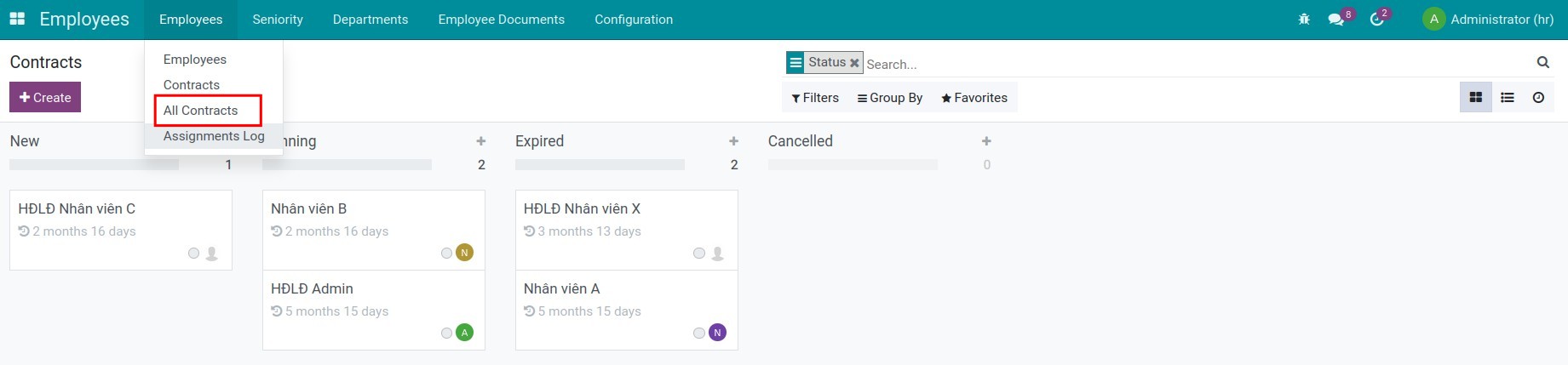
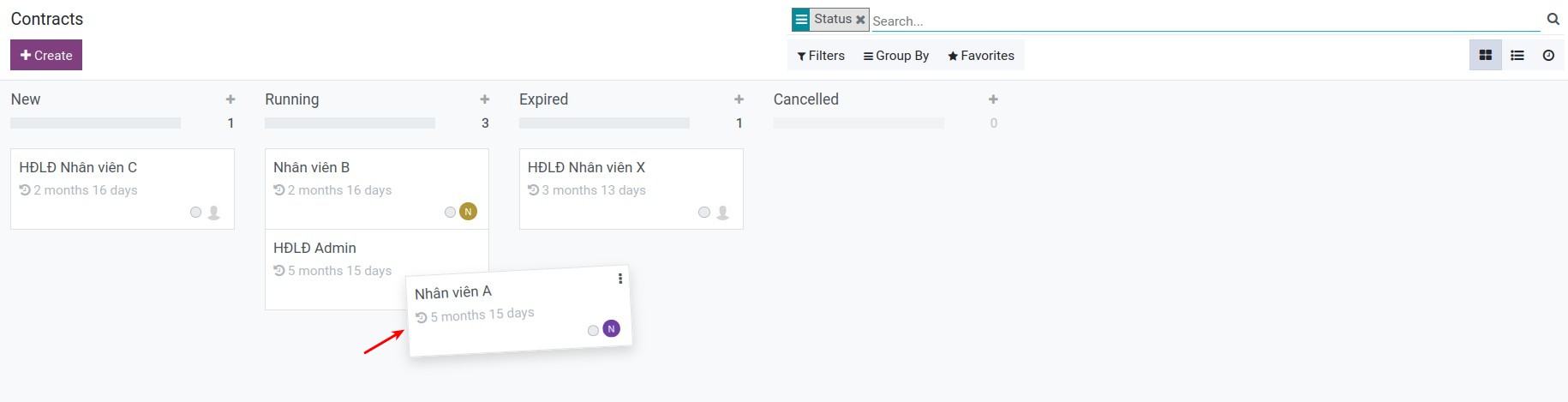
Here you can track the progress of the contract through the New, Running, Expired, and Cancelled stages. In addition, you can drag/drop contracts to stage transitions easily.
This software and associated files (the "Software") may only be used (executed, modified, executed after modifications) if you have purchased a valid license from the authors, typically via Odoo Apps, or if you have received a written agreement from the authors of the Software (see the COPYRIGHT file).
You may develop Odoo modules that use the Software as a library (typically by depending on it, importing it and using its resources), but without copying any source code or material from the Software. You may distribute those modules under the license of your choice, provided that this license is compatible with the terms of the Odoo Proprietary License (For example: LGPL, MIT, or proprietary licenses similar to this one).
It is forbidden to publish, distribute, sublicense, or sell copies of the Software or modified copies of the Software.
The above copyright notice and this permission notice must be included in all copies or substantial portions of the Software.
THE SOFTWARE IS PROVIDED "AS IS", WITHOUT WARRANTY OF ANY KIND, EXPRESS OR IMPLIED, INCLUDING BUT NOT LIMITED TO THE WARRANTIES OF MERCHANTABILITY, FITNESS FOR A PARTICULAR PURPOSE AND NONINFRINGEMENT. IN NO EVENT SHALL THE AUTHORS OR COPYRIGHT HOLDERS BE LIABLE FOR ANY CLAIM, DAMAGES OR OTHER LIABILITY, WHETHER IN AN ACTION OF CONTRACT, TORT OR OTHERWISE, ARISING FROM, OUT OF OR IN CONNECTION WITH THE SOFTWARE OR THE USE OR OTHER DEALINGS IN THE SOFTWARE.