
Facebook Social Marketing
by Viindoo
| Lines of Code | 3720 |
| Technical name | viin_social_facebook |
| License | OPL-1 |
| Website | https://viindoo.com/apps/modules/19.0/viin_social_facebook |
| Read description for | v 13.0 v 14.0 v 15.0 v 16.0 v 17.0 v 18.0 |
| Required Apps | Discuss (mail) |
| Included Dependencies | Viindoo Base Social Marketing API Request Logger |
Publish on your Facebook Pages and answer them, from the place your team already works
For marketing teams and community managers who run one or several Facebook Pages
Integrate the Social Marketing app with Facebook
Odoo Community · OPL-1 · English, Vietnamese
Adds Facebook to Social Marketing: its articles, approvals and notices reach your Pages.
What changes for your team
Posts Facebook accepts the first time
A video or a scheduled post is refused by Facebook, and the team finds out after the planned time.
→ While writing, the article states the files and the scheduling window Facebook accepts, shows the post as the Page will, and publishes a video as a Reel in one tick.
Messenger answered next to the rest of the work
Messages to the Page wait in another window until someone remembers to open it.
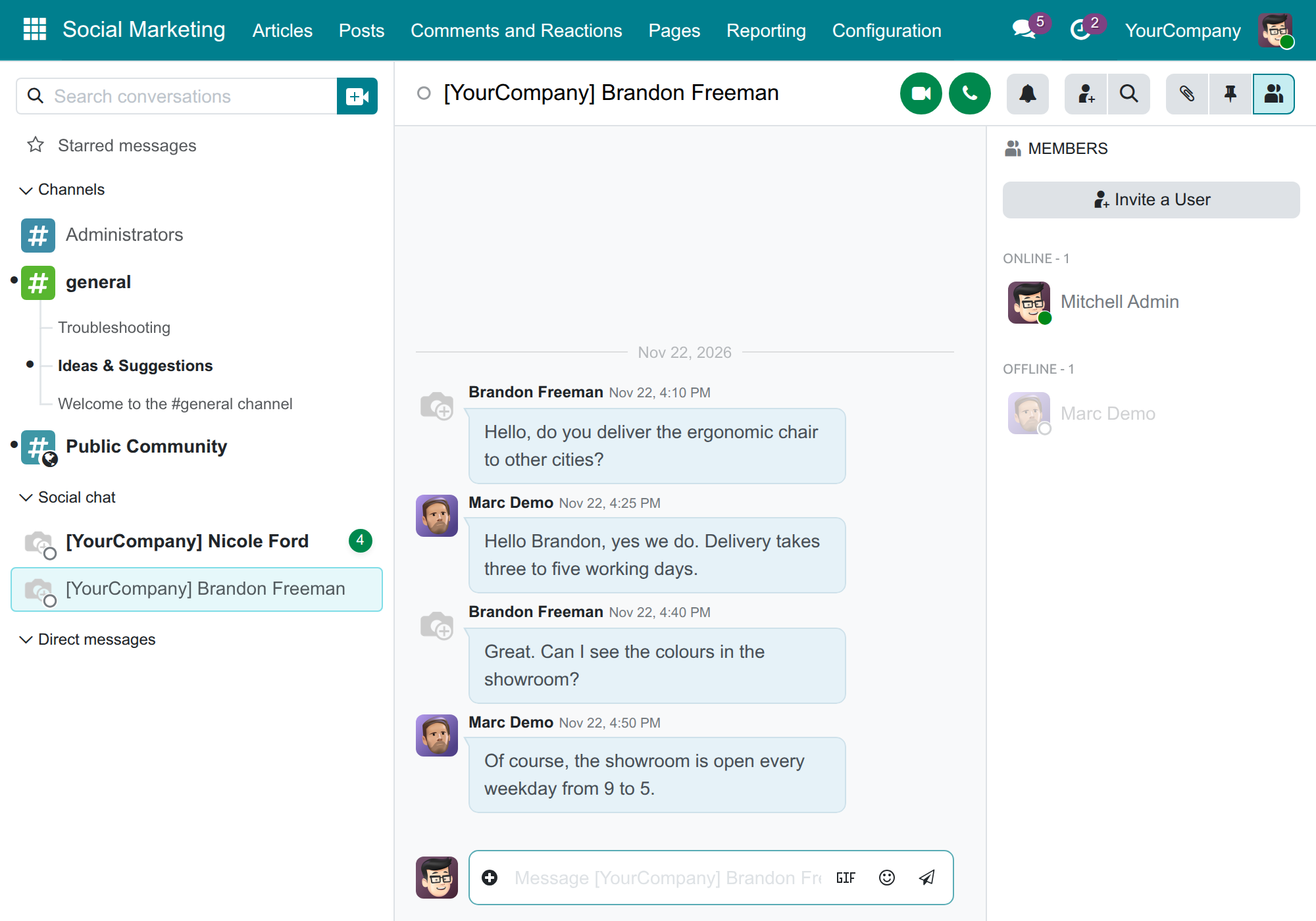
→ Each person who writes to the Page has a conversation in Discuss, received by the members of the Page, who answer there.
A connection you can check, not assume
Nobody knows whether Facebook really sends the comments of a Page until one goes missing.
→ The Facebook record shows whether it is connected and until when, the permissions Facebook granted, and whether Facebook sends the Page notifications to your database.
Features
Publishing
- ✓ Text, link, photo or one-video posts on several Pages
- ✓ Videos published as Reels
- ✓ Scheduled on Facebook, with the accepted window shown while writing
- ✓ Videos upload in the background; a failed post gives Facebook's reason
- ✓ A published post deleted from the Page from Odoo
Page activity
- ✓ Recent, scheduled and older posts synchronized with their likes, comments, shares
- ✓ Comments answered, liked, hidden or deleted from the post
- ✓ Page reviews refreshed on request
Messenger
- ✓ One Discuss conversation per person who writes
- ✓ A late reply sent again with Facebook's Human Agent tag
- ✓ Page message button switched on or off from Odoo
Connection
- ✓ Connection state, end date and granted permissions on one record
- ✓ Webhooks registered per Page, showing only what Facebook confirms
- ✓ Incoming notifications queued with their state and a Retry button
Built for daily use
- ✓ Facebook app credentials per company; secrets seen by system administrators only
- ✓ Each notification checked against your App Secret's signature
- ✓ When Facebook limits calls, scheduled work waits, then resumes by itself
- ✓ Posts removed on Facebook are archived, never deleted
Ready on day one
The Facebook connection
A Facebook record with the two addresses to copy into your Facebook app and a setup guide.
Background jobs
Video uploads continue on schedule, and a daily job archives the posts removed on Facebook.
What you set up first
Your own Facebook app with the Page permissions, its App ID and App Secret in Settings, then Link Account.
Before you decide
What do we need on the Facebook side?
Your own Facebook app, allowed to use the Page permissions listed in the Documentation tab, in Live mode, and a public HTTPS address for your database. Facebook grants the permissions, not the module. Without Advanced Access, which Meta grants after App Review and business verification, the app serves only the Pages of people who have a role on it.
Where does our data go?
From your server to Facebook, through your own Facebook app. Photos travel with the post as files, so Facebook does not need to reach your database to read them. Every call is kept in API Logs, with tokens and secrets masked.
Who can publish, and who sees the secrets?
Editors write and confirm articles; approvers publish and retry; the Social Marketing administrator links the account and the Pages. The App Secret and the Verify Token are visible to system administrators only.
Is there a limit on answering Messenger?
Yes, set by Facebook: a reply is accepted within 24 hours of the person's last message. After that it is sent once more with the Human Agent tag, accepted up to 7 days when your app has Advanced Access to that feature; otherwise the reply is refused with an explanation. Replies are text; files cannot be sent.
What does it take to install and run?
It installs on top of Social Marketing, and Odoo installs it together with that app. An administrator enters the Facebook app credentials, links the account and checks that each Page's webhooks are registered; the Documentation tab walks through each step.
Try it, then ask us
The Documentation tab of this listing explains every screen by role, and Live Preview opens the app on a demo database.
Pre-sales & partnership
viindoo.com/contactusTechnical support
viindoo.com/ticketFacebook Social Marketing - user guide
Who this guide is for: the people who prepare and publish posts on a Facebook Page from Odoo (editors and approvers), the Social Marketing administrator who connects the Page, and the system administrator who enters the credentials of the Facebook app. It describes what each of them sees and does; it does not require any knowledge of the software's internals.
Note
Extends Social Marketing: the articles, posts, notices, the webhook events and the general rules of publishing are described in the Social Marketing documentation. The call history behind the API Logs button is provided by API Request Logger. This guide covers what is specific to Facebook.
Overview
Facebook Social Marketing publishes the articles of Social Marketing on Facebook Pages (text, link, photos or one video), keeps the posts of the Page in Odoo, brings the comments, reactions and Messenger messages of the Page to Odoo, and lets the team answer them.
| Role | What they do | Access right to assign |
|---|---|---|
| System administrator | Enters the App ID, App Secret and Verify Token of the Facebook app; reads the history of calls to Facebook | Settings: Administration / Settings |
| Social Marketing administrator | Links the Facebook account, registers the webhooks of each Page, chooses whether people can message a Page, reads the webhook events received from Facebook | Social Marketing: Administrator |
| Editor | Writes articles for Facebook, reads and answers Messenger conversations | Social Marketing: Editor |
| Approver | Publishes articles, retries failed video posts, synchronizes the posts of a Page | Social Marketing: Approver |
The process: the administrators connect the Page once; an editor writes and confirms an article; an approver publishes it; Facebook answers (Posted or Failed); comments and messages sent to the Page come back to Odoo.
Setup (for the administrators)
Install the module
- Open Apps, search for Facebook Social Marketing and press Install. It requires Social Marketing.
- In Social Marketing ‣ Configuration ‣ Settings, the Facebook block shows Enable Social Facebook; tick it to publish on Facebook.
Facebook app permissions
Odoo talks to Facebook through version 27.0 of the Facebook Graph API. The Facebook app must be allowed to use these permissions: public_profile (identify the account that links the Pages), pages_show_list (list the Pages), pages_read_engagement and pages_read_user_content (read posts, comments and reactions), pages_manage_posts (publish posts), publish_video (publish videos), pages_manage_engagement (answer and moderate comments), pages_manage_metadata (register the webhooks) and, to work with Messenger, pages_messaging. Facebook delivers the notifications of a Page (comments, reactions, messages) only to an app that is in Live mode; an app still in Development mode receives only the test notifications sent from its dashboard. Facebook signs each notification with the App Secret (SHA-256 signature); Odoo accepts a notification only when its signature is valid for the App Secret of the company, so the App Secret typed in Odoo must be the one of the Facebook app that sends the notifications.
Without Advanced Access, the Facebook app serves only the Pages managed by people who have a role on the app. The Pages of other businesses, and the reply to a Messenger conversation after 24 hours (see Messenger conversations), need Advanced Access: Meta App Review and business verification of the company that owns the app. The Setup guide button next to this sentence on the Facebook record opens the steps.
Enter the credentials of the Facebook app (system administrator)
- Open Social Marketing ‣ Configuration ‣ Settings.
- In the block Facebook App, fill App ID and App Secret. Both are found in the App settings > Basic page of your app in Meta for Developers; the documentation icon next to the block title opens that site and the Setup guide button opens step-by-step instructions.
- Each company has its own Verify Token field; a new company starts with a random value. You can replace it with any value you like, as long as the same value is typed in the Facebook app when you declare the Webhook URL (next section).
- Press Save.
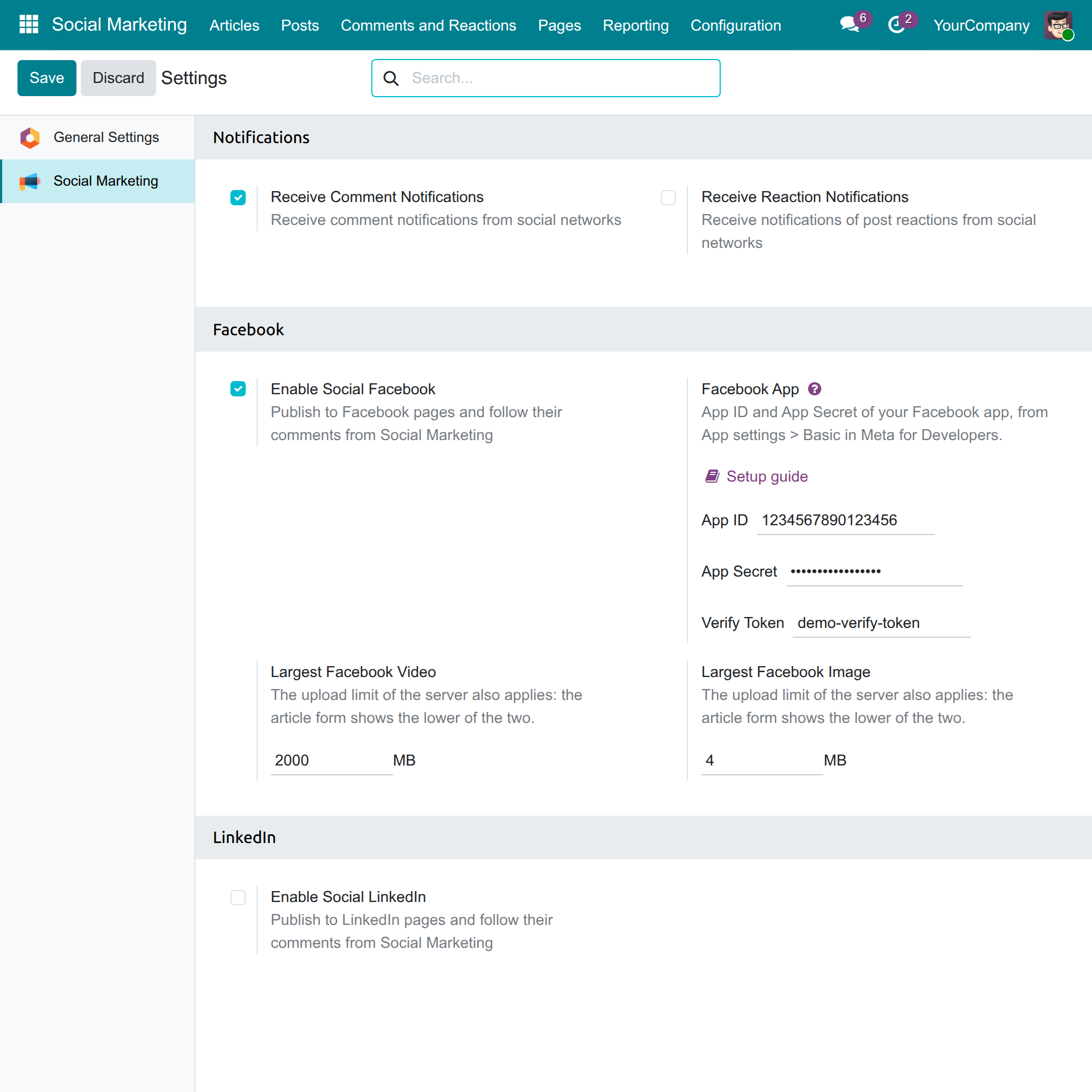
The App Secret and the Verify Token are visible only to system administrators.
Declare the addresses and link the account (Social Marketing administrator)
- Open Social Marketing ‣ Configuration ‣ Social Media and select Facebook.
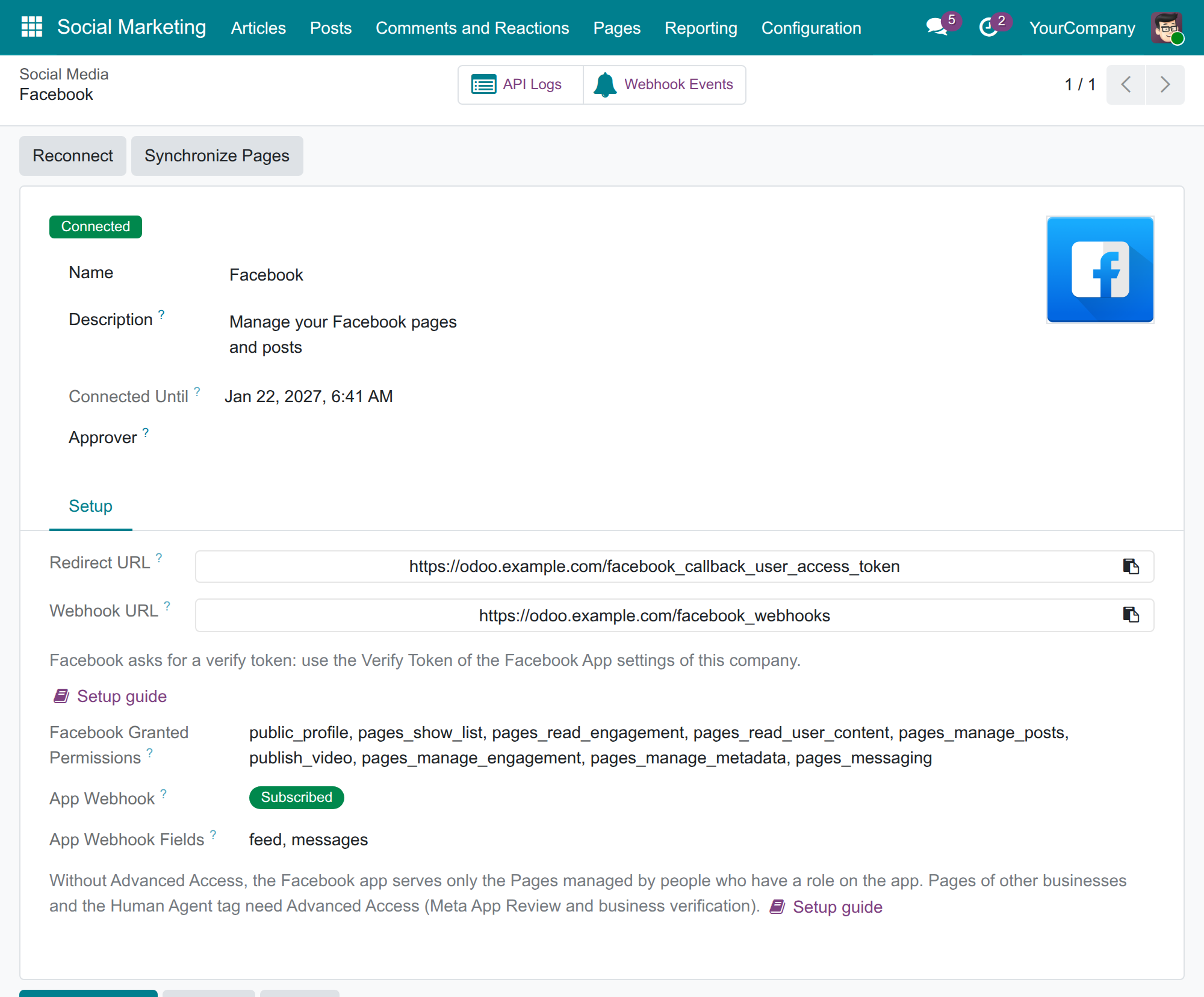
- Open the Setup page of the record, press the copy button of Redirect URL and paste it into the Facebook app, as a valid OAuth redirect address, before the next step.
- Press the copy button of Webhook URL and paste it into the webhook settings of the Facebook app. Facebook asks for a verify token: type the Verify Token of the settings of this company. One Webhook URL serves all companies of the database.
- Press Link Account and accept the permissions on the Facebook page that opens, then Synchronize Pages to read the Pages the account manages.
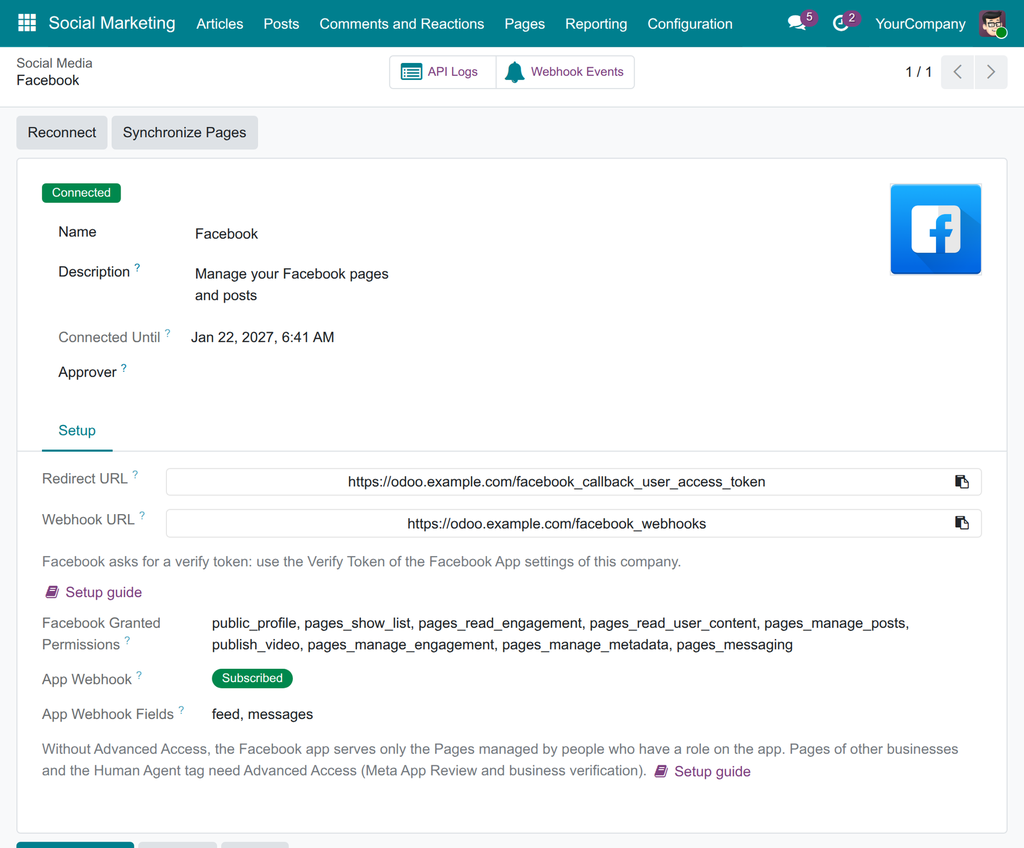
The record shows a yellow badge Not connected: press Link Account, or a green badge Connected once the account is linked. A connection whose token Facebook refuses is shown as not connected as well, until Link Account is pressed again; the Setup guide button next to the badge opens the instructions. Facebook accepts only HTTPS addresses: when the public address of the database is not HTTPS a warning is shown at the top of the record (see the Social Marketing documentation).
Once the account is linked and the Pages are synchronized, the record also shows (to the Social Marketing administrator):
- Connected Until: the date until which the connection stays valid, as Facebook reports it; it is shown only while the record is connected. Past that date press Reconnect. The Page permissions of the connection do not expire with the 90-day data access of the Facebook account, and the connection shows no end date when Facebook reports the token as non-expiring. Facebook may remove a permission the app has not used for 90 days.
- Facebook Granted Permissions (on the Setup page, shown once Facebook has reported permissions): the permissions Facebook reports for the linked account, read at Link Account and at each synchronization of the Pages. Compare it with the list in Facebook app permissions: a missing permission explains a refused publication or reading.
- App Webhook (on the Setup page, shown once the state is known): Subscribed when the Facebook app is subscribed to the Page notifications with the Webhook URL of this record (the fields it receives are listed in App Webhook Fields), Another Address when the app sends them to a different address, Not Subscribed otherwise. In the last two cases a warning says that Facebook does not send the comments and messages of the Pages to this database: in the Webhooks settings of the Facebook app, subscribe the Page object to the fields feed and messages with the Webhook URL of the record. The field appears after the first synchronization of the Pages. User Id of Facebook appears on the Setup page in debug mode only.
Calls limited by Facebook
When Facebook refuses a call because the app made too many, Odoo shows an ordinary warning, for example Facebook is limiting the calls of this app for now. Try again in about 17 minutes. (or Try again later when Facebook gives no wait; the scheduled jobs then wait one hour). The record shows, in a warning visible to the Social Marketing administrator, The social network limited the calls of this app. Scheduled synchronizations resume after followed by the time and the reason Facebook gave. Until that time:
- the scheduled jobs (synchronizations, the processing of webhook events, the check of removed posts) leave the connection alone, and the notifications wait without a failed attempt;
- a video or Reel that is being uploaded stays in Uploading; the time it waits is not counted against it, and the upload goes on by itself afterwards;
- an action you start yourself, such as Synchronize Posts, is still sent to Facebook.
The warning disappears when the time is over.
Register the webhooks of a Page
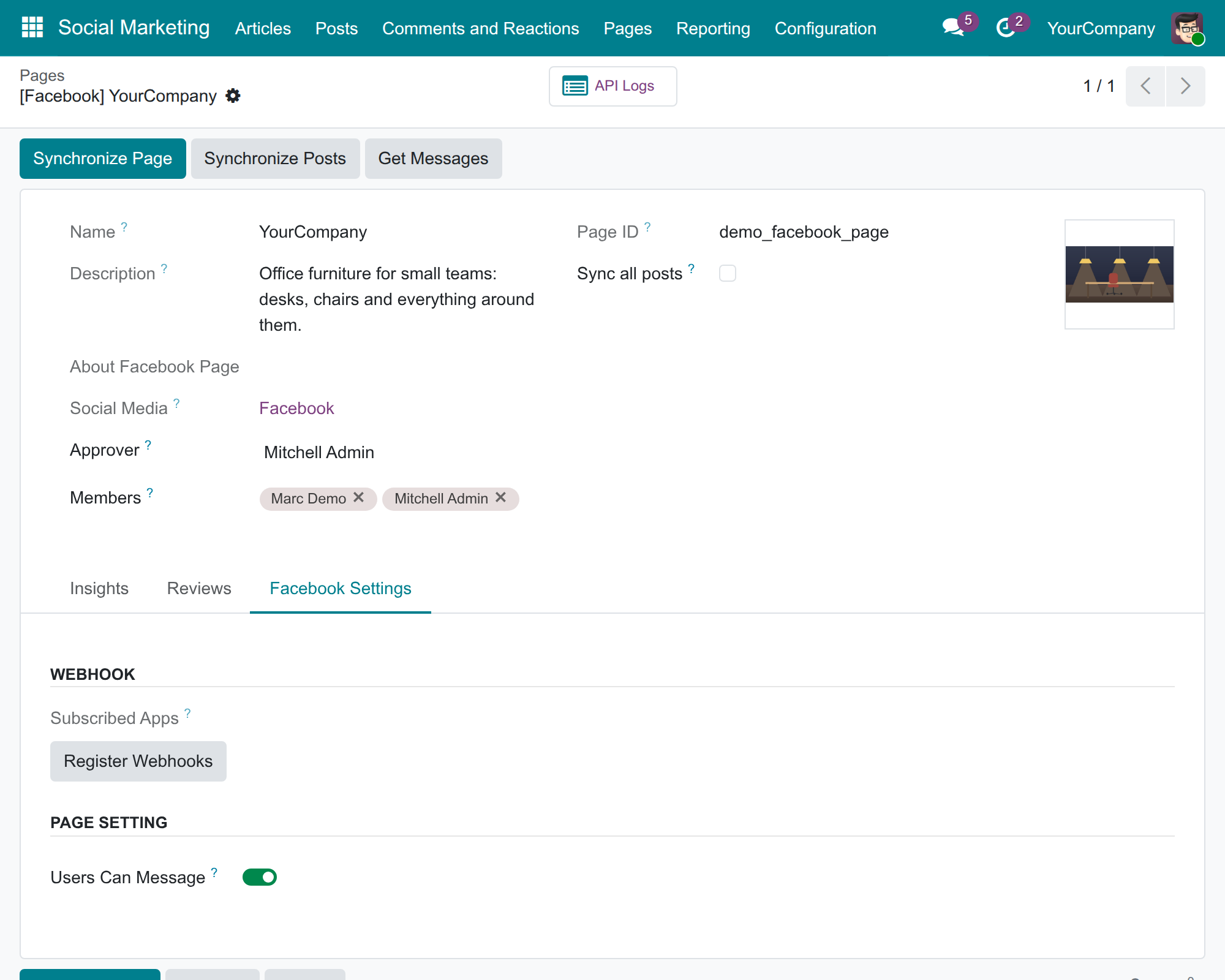
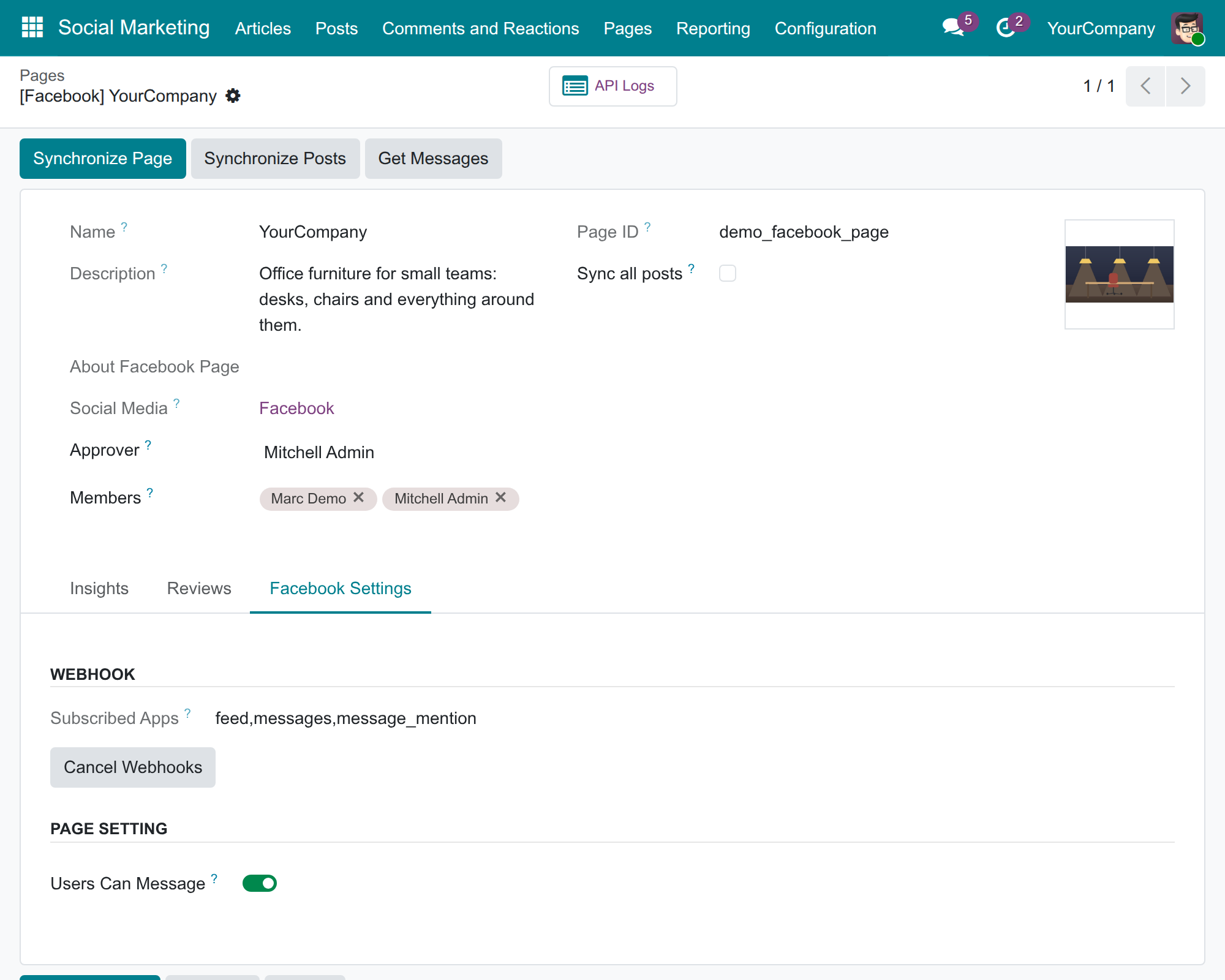
Open Social Marketing ‣ Pages, select the Page and open the tab Facebook Settings. The field Subscribed Apps lists only what Facebook itself confirms:
- Empty: Facebook sends nothing about this Page to Odoo - no comment, reaction or message arrives. Press Register Webhooks. If Facebook refuses, Odoo shows the reason given by Facebook; correct it (for example the permission or the mode of the app) and press the button again.
- Filled (for example feed, messages, message_mention): Facebook sends the notifications of the Page to Odoo. Cancel Webhooks stops them.
Linking the account or pressing Synchronize Pages also registers a new Page. A Page whose webhooks you cancelled stays cancelled.
Let people message a Page
The same tab Facebook Settings has the group Page Setting, shown to Social Marketing administrators, with one setting: Users Can Message. It tells whether people can message the Page with its message button on Facebook. Facebook holds this setting, so the switch shows what Facebook reports: it is read each time the Pages are synchronized (Synchronize Pages, or Synchronize Page on the Page).
- Open Social Marketing ‣ Pages, select the Page and open the tab Facebook Settings.
- Turn Users Can Message on or off. The change is saved at once and sent to Facebook.
- Odoo then asks Facebook for the value it holds. When Facebook refuses the change, Odoo shows Setup failed followed by the error code and Facebook's own words (for example a missing permission), and the Page keeps its previous value. When Facebook accepts the request but keeps its own value, Odoo shows Facebook accepted the request but did not apply the setting "Users Can Message": it keeps its value, and the Page keeps it too.
Nothing is sent to Facebook until you change the switch.
Editor: write articles for Facebook
The general steps to write, confirm and publish an article are in the Social Marketing documentation. When a chosen page is a Facebook Page, the article form adds the following.
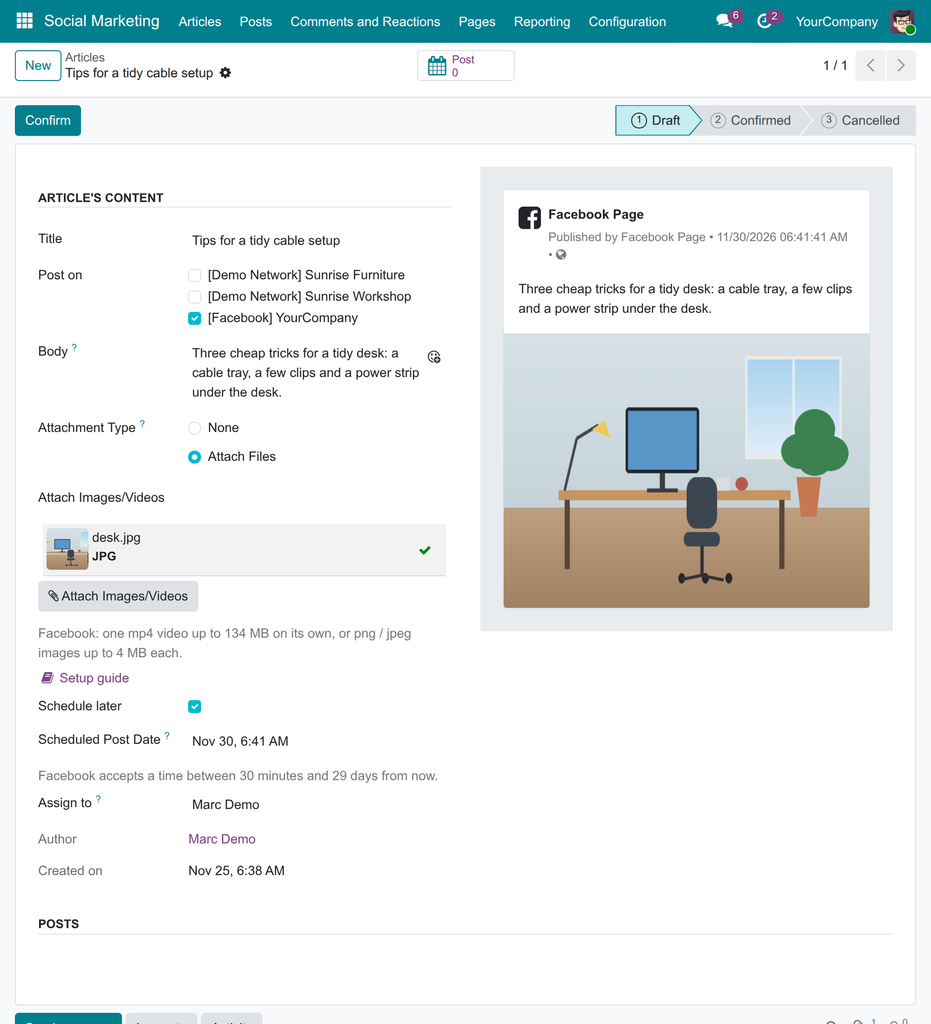
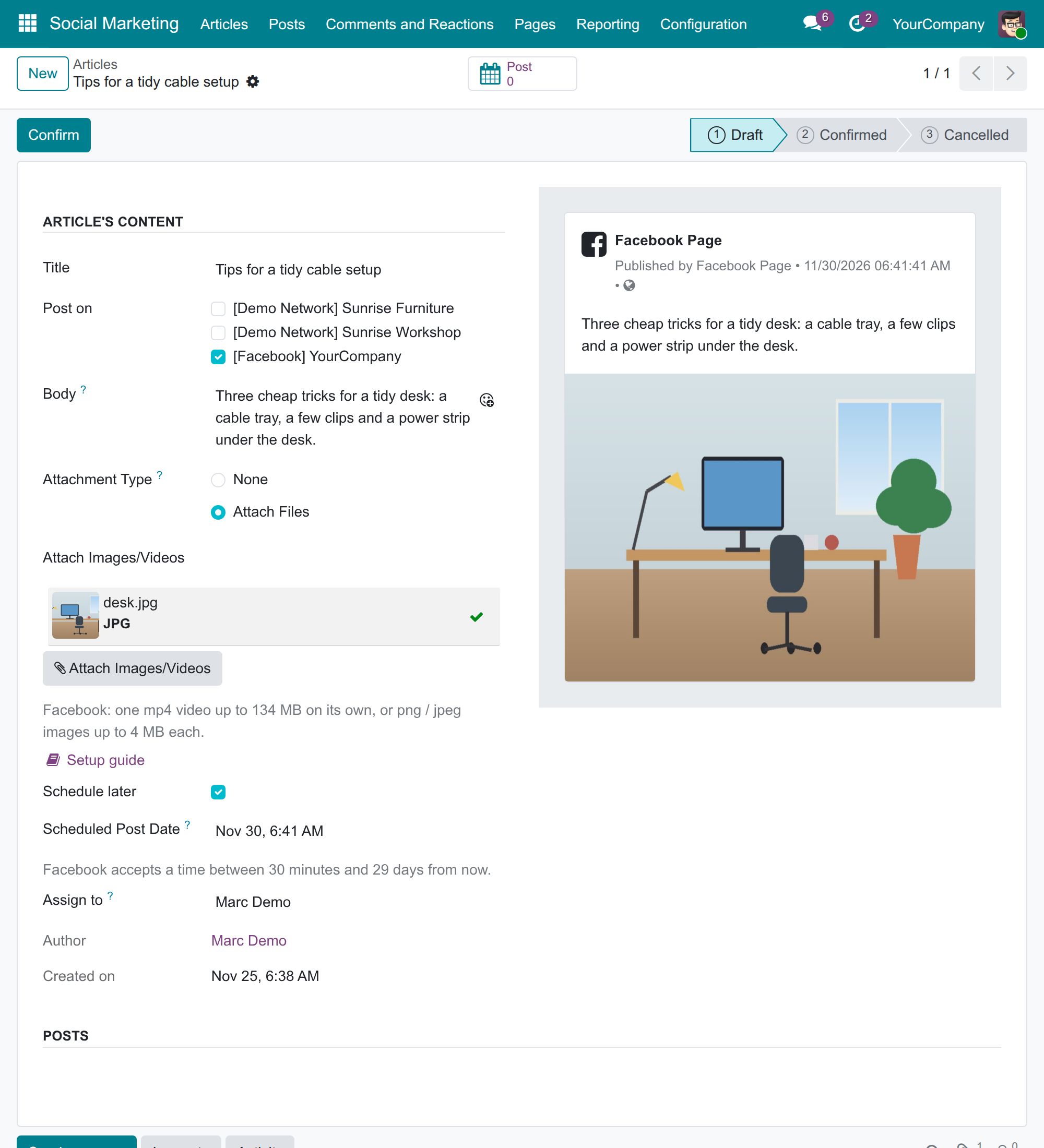
- Under the attachments, the limit line Facebook: one mp4 video up to ... on its own, or png / jpeg images up to ... each. gives the largest video and image Facebook can receive from this database. A video must be the only file of the article. Another format, a second file next to a video or a file over the limit is refused, with a message that says which file and why. The Setup guide button below opens the detailed rules.
- Schedule later and Scheduled Post Date publish at a given time. Under the date, the line Facebook accepts a time between 30 minutes and 29 days from now. (a text, photo or Reel post) or Facebook accepts a time between 30 minutes and 70 days from now. (a video that is not a Reel) gives the accepted range. Turning on Schedule later or typing the date never shows an error box.
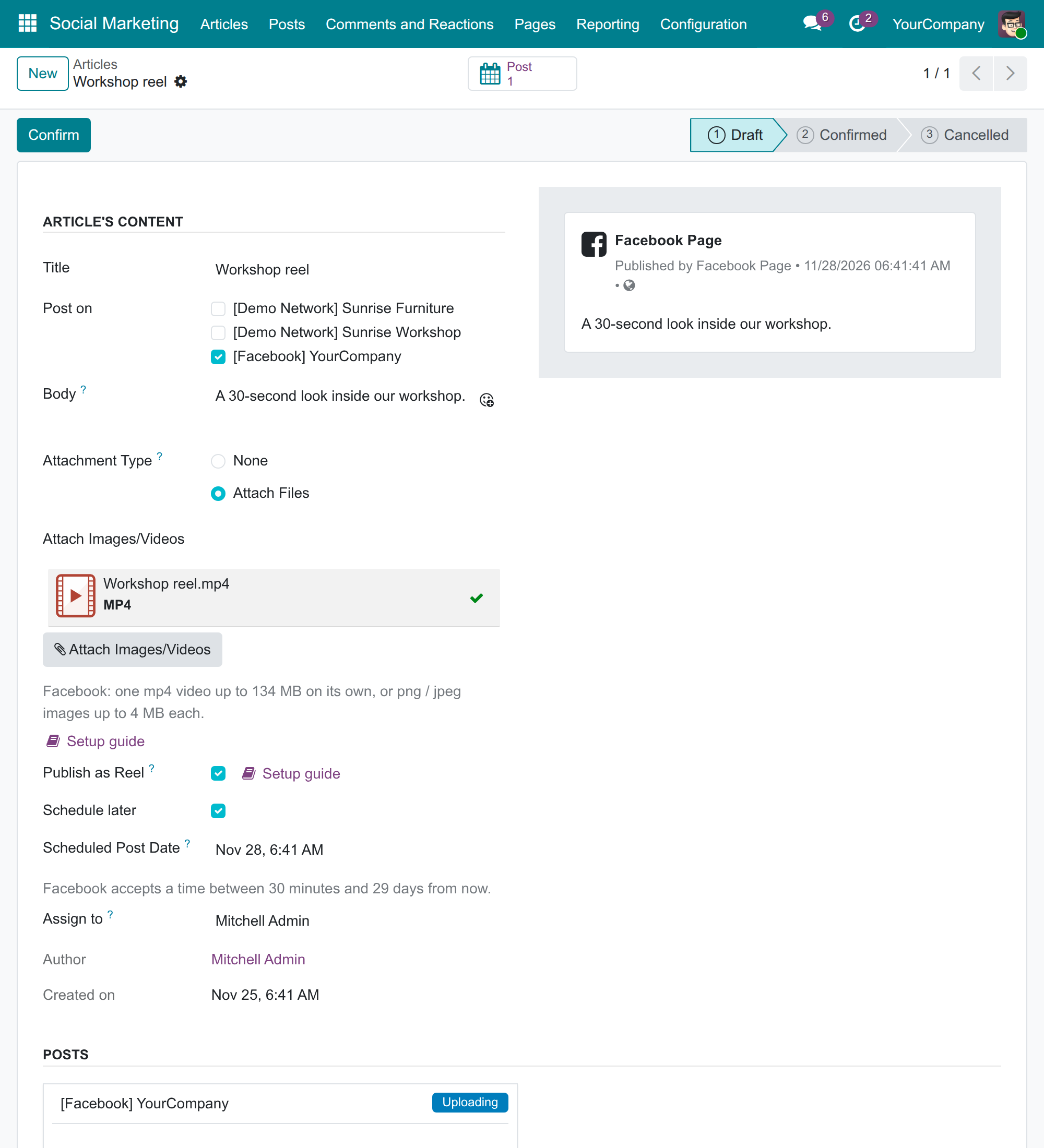
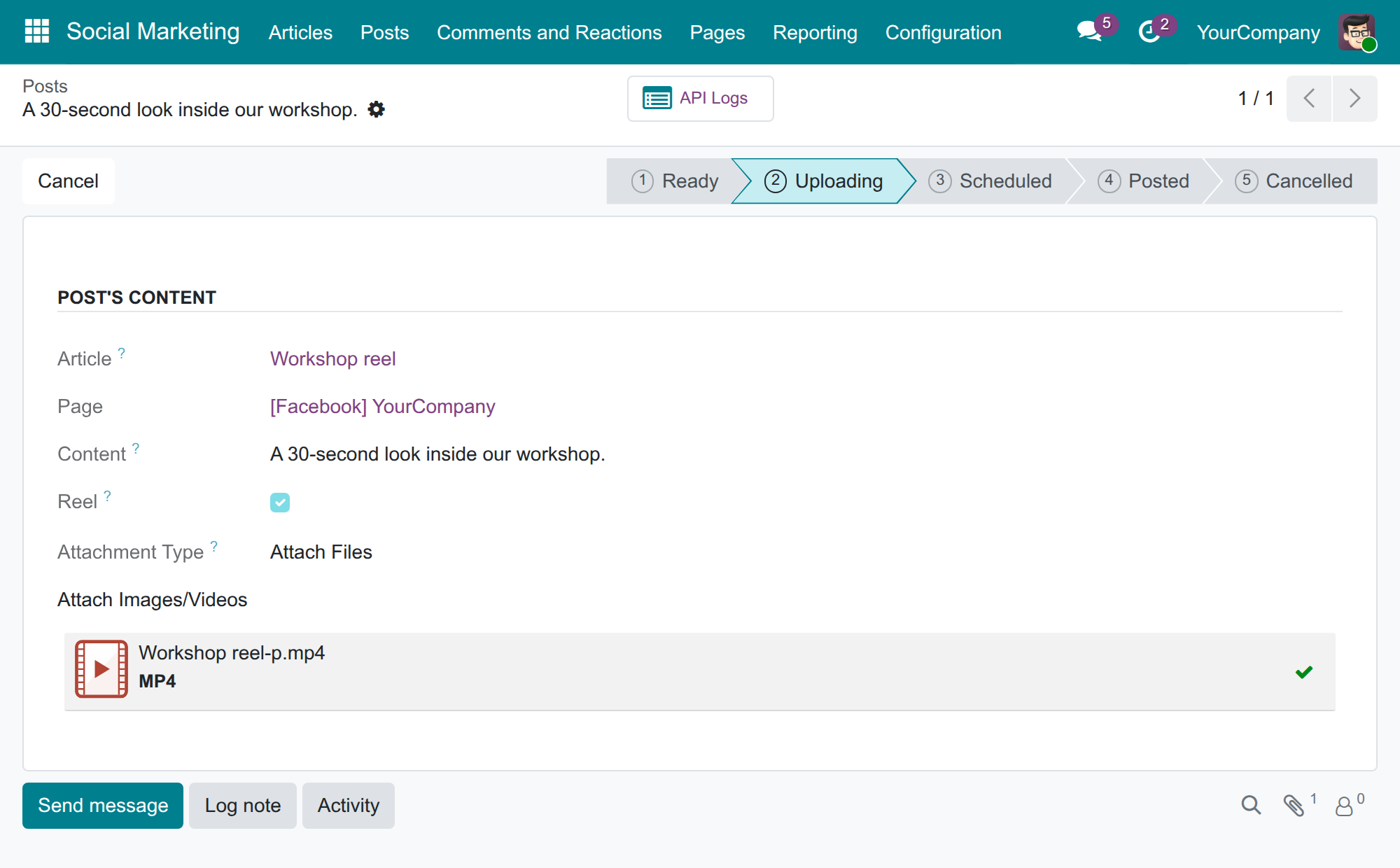
- Publish as Reel appears when the article has one video and at least one Facebook Page is chosen. Tick it to publish the video as a Facebook Reel instead of a regular video (Meta asks for a vertical mp4 video of 3 to 90 seconds; the Setup guide button below the box opens the details). With Schedule later, a Reel accepts a time between 30 minutes and 29 days from now, and the line under the date reads Facebook accepts a time between 30 minutes and 29 days from now. A time outside that range is refused when you confirm the article; untick Publish as Reel to use the 70-day range of a regular video. A scheduled Reel is published by Facebook at its time; the post turns Posted within the next run of the five-minute scheduled action. Other networks chosen for the same article publish the video as usual.
- When the article has a link, the preview shows the card of the linked page (its title and picture), read once when you save the link and kept. A link that cannot be reached never blocks the article: the preview shows the text of the article only.
- The Facebook preview on the right shows how the post looks on the Page: your text, the first image, and the time (the current time until a date is typed, then the scheduled date). The picture is shown also while the article is not yet saved.
Approver: publish and follow the posts
Publish
Open a confirmed article and press Post Now (shown to approvers and Social Marketing administrators). Each Facebook Page chosen gets one post. A text, link or photo post is sent at once (or scheduled on Facebook when Schedule later is on). The picture files travel with the post, one by one: Facebook does not need to reach the database to read them. When Facebook refuses the post, it becomes Failed with Facebook's message as the Failure Reason; fix the cause and press Retry. A video, or a Reel, is sent in the background, in several steps, so that you can keep working. A Reel goes through the same states as a video and is marked Reel on the post.
States of a Facebook post
| State | Meaning |
|---|---|
| Ready | Waiting to be published. |
| Scheduled | Facebook will publish the post at the chosen time, the Posts list shows its date, and the kanban card and the post form show the full time (Scheduled For, Scheduled by). |
| Uploading | The video or Reel is being sent to Facebook in the background. A scheduled action sends it every five minutes. While Facebook limits the calls of the app, the post waits in this state and goes on by itself afterwards. |
| Publishing | The video or Reel is sent and Facebook is processing it. The state changes by itself once Facebook answers. When Facebook does not act on the end of a Reel upload, Odoo sends it again a limited number of times. |
| Posted | The post is on the Page. View on Social opens it. |
| Failed | Facebook or Odoo could not publish. The Failure Reason is shown at the top of the post. |
| Cancelled | The post was dropped. |
A post that is being published cannot be cancelled, edited or deleted; wait for Posted or Failed. A post already on the Page cannot be cancelled: use Delete Post, which also removes it from Facebook.
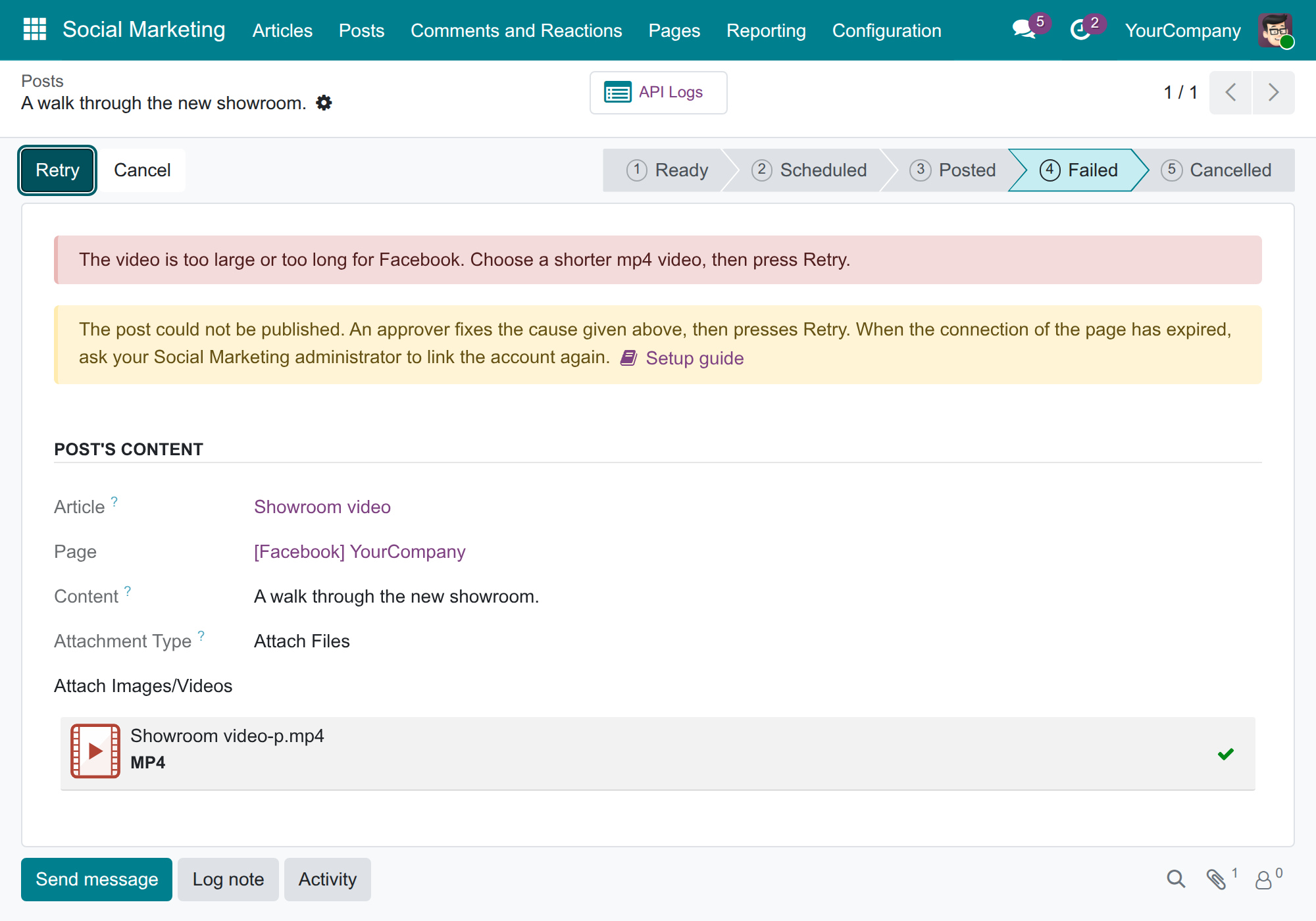
When a video post fails
- Open the post and read the Failure Reason. Typical reasons are shown in Facebook's words or in plain sentences, for example: the connection to the Page has expired or lacks the permission to publish (link the account again); the video is too large or too long; the video format is not accepted (select an mp4 video); the upload timed out; the video was blocked by the content policy of Facebook; the scheduled time came too close while the video was uploading (cancel the post and publish again with a later time). For a Reel that Facebook cannot process the reason reads Facebook could not process the video of this Reel. Check that the file is a valid mp4 video, then retry.
- When the reason says that Facebook did not confirm the end of the upload and names a video, the video may already be on the Page: check the Page before retrying.
- Fix the cause and press Retry (approvers only), or press Cancel to give up. The upload starts again.
The people concerned (author, assignee and the person who asked to publish) are notified. The API Logs button of the post shows what Facebook answered (see the system administrator's chapter).
When the sending of the file of a Reel is interrupted, the next run of the job reads from the upload address the offset Facebook holds and sends the rest of the file from that offset: the Reel is not started again. When Odoo cannot read the offset, it sends the whole file again from the first byte. A partial receipt, or an offset Facebook does not hold, is not a failure: the next run reads the offset again and goes on.
A Reel that is being uploaded shows the Uploading state and the ticked Reel box:
Hide and unhide a comment
In the post window, the menu of a comment offers Hide comment, and a hidden comment offers Unhide. A comment that the Page itself posted offers neither. When Facebook refuses to hide or unhide a comment, the message reads Facebook did not hide or unhide this comment: followed by Facebook's own words.
Synchronize the posts of a Page
On the Page (Social Marketing ‣ Pages):
- Synchronize Page reads the Pages of the connection again, as Synchronize Pages does on the Facebook record; a notification tells the pages found, new and archived.
- The likes of a post are the reactions Facebook shows on it, and the followers of the Page are the followers Facebook reports; both are read again at each synchronization.
- Synchronize Posts (only for a connected Page) reads the 100 most recent posts of the Page, including the posts scheduled on Facebook. The comment figure of a post counts the replies, as the post window does. A notification tells the pages synchronized, the new posts and the posts archived because Facebook no longer has them, and the screen refreshes. With no connected Page it warns to use Link Account first. When one Page hits a usage limit, a refused connection or an unreachable network, the notification names that Page; the other Pages still synchronize and nothing is paused. A video published from Odoo stays one single post linked to its article; the same video is never duplicated or archived by a synchronization. If Facebook refuses the reading of one Page, a readable message is shown.
- Synchronize Old Posts appears only when older posts remain; each press reads up to 500 older posts. The option Sync all posts (on Facebook Pages only) lets a daily scheduled action read them progressively.
Posts removed on Facebook
A post that you delete on Facebook, or move to its trash, is archived in Odoo - never deleted - and its state does not change. A daily scheduled action, Social: Archive Posts Removed from Facebook, checks every Page after reading its whole list of posts and scheduled posts; a Page that cannot be read is skipped and the other Pages are still checked. An archived post that Facebook lists again becomes active again.
Reviews of the Page
The tab Reviews of the Page lists the reviews people left on the Page. Refresh replaces the list with the reviews Facebook sends (a Page without reviews ends with an empty list) and View on Page opens the reviews on Facebook. When Facebook refuses to give the reviews (for example, a permission is missing), the reviews already stored are kept and the error returned by Facebook is shown. Only editors and above can refresh the reviews.
Messenger conversations
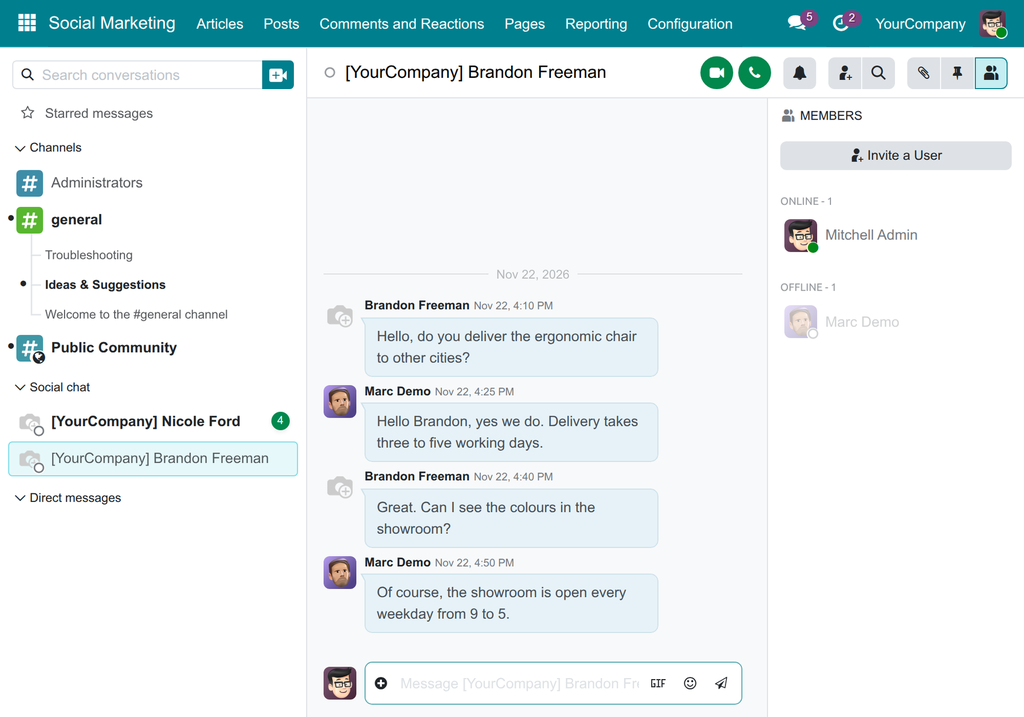
Editors (and above) who are members of the Page receive its Messenger conversations. To answer one, the user needs the Editor access right of Social Marketing and must be a member of the channel of the Page.
- On the Page, press Get Messages: Odoo reads the 25 most recent conversations (only the user assigned to the Page or a manager can do it); a notification tells the conversations read, the new conversations and the new messages. New messages also arrive by themselves once the webhooks are registered.
- Open Discuss. The conversations are in the category Social Conversation, one per person.
- Type your answer in the conversation and press Send.
A conversation appears without a picture when Facebook refuses to give the picture or the name details of the person; it can still be read and answered.
Facebook accepts a reply from the Page within 24 hours of the person's last message to the Page. After that, Odoo sends the reply once more with Facebook's Human Agent tag, which Facebook accepts for up to 7 days after the person's last message, provided the Facebook app has Advanced Access to the Human Agent feature (Meta App Review and business verification). When Facebook refuses it too, Odoo shows Facebook's own words, followed by Facebook accepts a reply from the Page within 24 hours of the person's last message. A reply written by a person is accepted within 7 days when the Facebook app has Advanced Access to the Human Agent feature (Meta App Review and business verification). The reply was not sent and is not saved in this conversation. The reply is not kept in the conversation. Any other refusal (for example an expired connection) shows Facebook's words and the same last sentence, without a second attempt. A refusal that is not a limit of the calls of the app (for example a warning about bothersome behaviour) does not pause the connection. Files cannot be sent in a reply. Names and messages written by people on Facebook are shown as plain text.
Troubleshooting
- Subscribed Apps is empty / nothing arrives from Facebook: press Register Webhooks and read the reason Facebook gives if it refuses. Check that the app is in Live mode and that the Webhook URL and the Verify Token were declared in the Facebook app.
- Link Account says the connection could not be verified: the message is a page of the web interface (company logo, the sentence in a red alert and a Back to Social Media button that returns to the record of the connection): press Link Account again. When the message says it failed, the system administrator reads the reason in API Logs.
- A post is Failed: read the Failure Reason, fix, press Retry.
- A reply to a Messenger conversation is refused: the person's last message is older than 24 hours and the Facebook app has no Advanced Access to the Human Agent feature (accepted up to 7 days), or Facebook gives another reason, which the message quotes.
- The record says the social network limited the calls of this app: wait for the time shown; the scheduled jobs resume by themselves and videos or Reels waiting in Uploading go on.
- A Reel is Failed: read the Failure Reason (for example the file is not a valid mp4 video, or the scheduled time is outside 30 minutes to 29 days), fix, press Retry.
- The reviews of the Page do not refresh: the error shown is Facebook's own (often a missing permission); the reviews already stored stay in the list.
- No comment or message arrives although the Page is registered: on the Facebook record, App Webhook is Not Subscribed or Another Address; subscribe the Page object of the Facebook app to feed and messages with the Webhook URL of the record.
- A post disappeared from the list: it was deleted or trashed on Facebook and is archived.
FAQ
Which Facebook files can I publish? One mp4 video on its own, or png / jpeg images. The limit line under the attachments of the article gives the largest sizes for this database.
Where do I change the largest file sizes? In Social Marketing ‣ Configuration ‣ Settings, block Facebook App: Largest Facebook Video and Largest Facebook Image (the value in MB follows each field). The upload limit of the server (system parameter web.max_file_upload_size), repeated in the help of each setting, also applies, and the article shows the lower of the two. A system administrator who raises it for larger videos raises the memory limits of the workers and the request size limit of the web server with it. While a file is attached, the server holds about the size of the file in memory for a few seconds; in one measurement, attaching a 287 MB video raised the memory of the server process from about 222 MiB to about 496 MiB for that time, and the background upload of the same video did not raise it.
How far ahead can I schedule? From 30 minutes up to 29 days from now for a text, photo or Reel post; up to 70 days from now for a video that is not a Reel.
Can I publish a video as a Reel? Yes: tick Publish as Reel on an article that has one video and a Facebook Page. Who can retry a failed post? Approvers and administrators.
Is a post deleted on Facebook deleted in Odoo? No, it is archived.
This software and associated files (the "Software") may only be used (executed, modified, executed after modifications) if you have purchased a valid license from the authors, typically via Odoo Apps, or if you have received a written agreement from the authors of the Software (see the COPYRIGHT file).
You may develop Odoo modules that use the Software as a library (typically by depending on it, importing it and using its resources), but without copying any source code or material from the Software. You may distribute those modules under the license of your choice, provided that this license is compatible with the terms of the Odoo Proprietary License (For example: LGPL, MIT, or proprietary licenses similar to this one).
It is forbidden to publish, distribute, sublicense, or sell copies of the Software or modified copies of the Software.
The above copyright notice and this permission notice must be included in all copies or substantial portions of the Software.
THE SOFTWARE IS PROVIDED "AS IS", WITHOUT WARRANTY OF ANY KIND, EXPRESS OR IMPLIED, INCLUDING BUT NOT LIMITED TO THE WARRANTIES OF MERCHANTABILITY, FITNESS FOR A PARTICULAR PURPOSE AND NONINFRINGEMENT. IN NO EVENT SHALL THE AUTHORS OR COPYRIGHT HOLDERS BE LIABLE FOR ANY CLAIM, DAMAGES OR OTHER LIABILITY, WHETHER IN AN ACTION OF CONTRACT, TORT OR OTHERWISE, ARISING FROM, OUT OF OR IN CONNECTION WITH THE SOFTWARE OR THE USE OR OTHER DEALINGS IN THE SOFTWARE.
Social Marketing administrator and system administrator: webhook events and call history
Webhook events
On the Facebook record, the Webhook Events button lists the notifications Facebook sent to Odoo, one event each; the list opens on the Failed ones, remove that filter to see them all. States: Pending (waiting; processed again automatically), Done (processed) and Failed (after five unsuccessful attempts, with the Failure Reason). Select a failed notification and press Retry once the cause is fixed (Social Marketing administrators only); it is processed again in the background. Comments and messages reach Odoo after a short delay for that reason. While Facebook limits the calls of the app, notifications stay Pending without counting a failed attempt and are processed once the wait is over.
API Logs
When a connection, a publication or a synchronization fails, the system administrator opens the API Logs button of the Facebook record, of the Page or of the post. It lists the calls made to Facebook with the HTTP method, the response status, the error message and the duration; a failed call is logged even though the user's action was cancelled. Tokens, codes and secrets are masked in the address, the request and the answer.