
Standard Quantity in Cost Analysis
by Viindoo
| Lines of Code | 470 |
| Technical name | viin_mrp_standard_consumption_account |
| License | OPL-1 |
| Website | https://viindoo.com/apps/modules/19.0/viin_mrp_standard_consumption_account |
| Read description for | v 15.0 v 16.0 v 17.0 v 18.0 |
| Required Apps | Manufacturing (mrp) Invoicing (account) Discuss (mail) Inventory (stock) |
| Included Dependencies | Advanced MRP Accounting Material Consumption Standards Viindoo Manufacturing Viindoo Base Viin Warehouse Web Gantt Viin Warehouse Accounting Viin Warehouse Accounting - Enterprise Presentation |

See where each order used more material than planned, inside its cost
For manufacturers whose cost accountants check material use against the bill of materials
See how far each material and by-product runs over its standard inside the order's cost.
Community Edition, Viindoo Cloud · OPL-1 · English, Vietnamese
Extends the cost analysis of Advanced MRP Accounting.
Reads the standards of Material Consumption Standards.
What changes for your team
Overrun shows on the cost line
Today: the bill of materials, the consumption and the cost sit on three screens, compared in a spreadsheet.
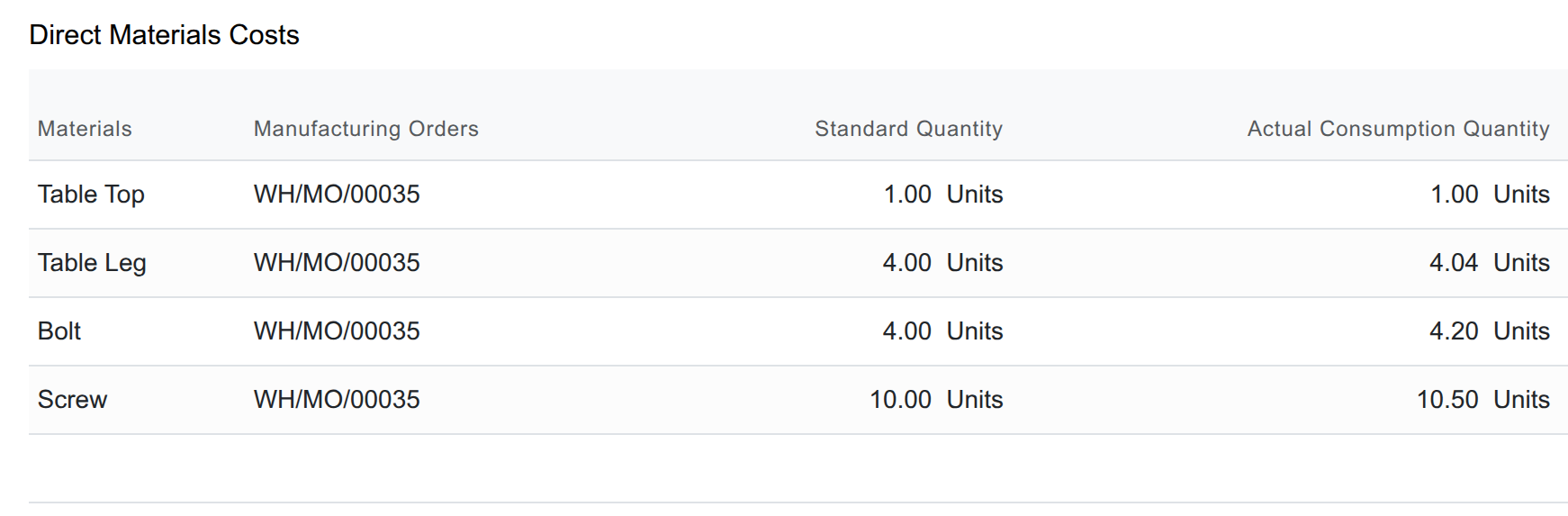
→ Each material of the order shows its standard beside what was consumed and what it cost, in the same unit.
Semi-finished goods compare row by row
Today: a semi-finished part hides the materials of the orders that made it.
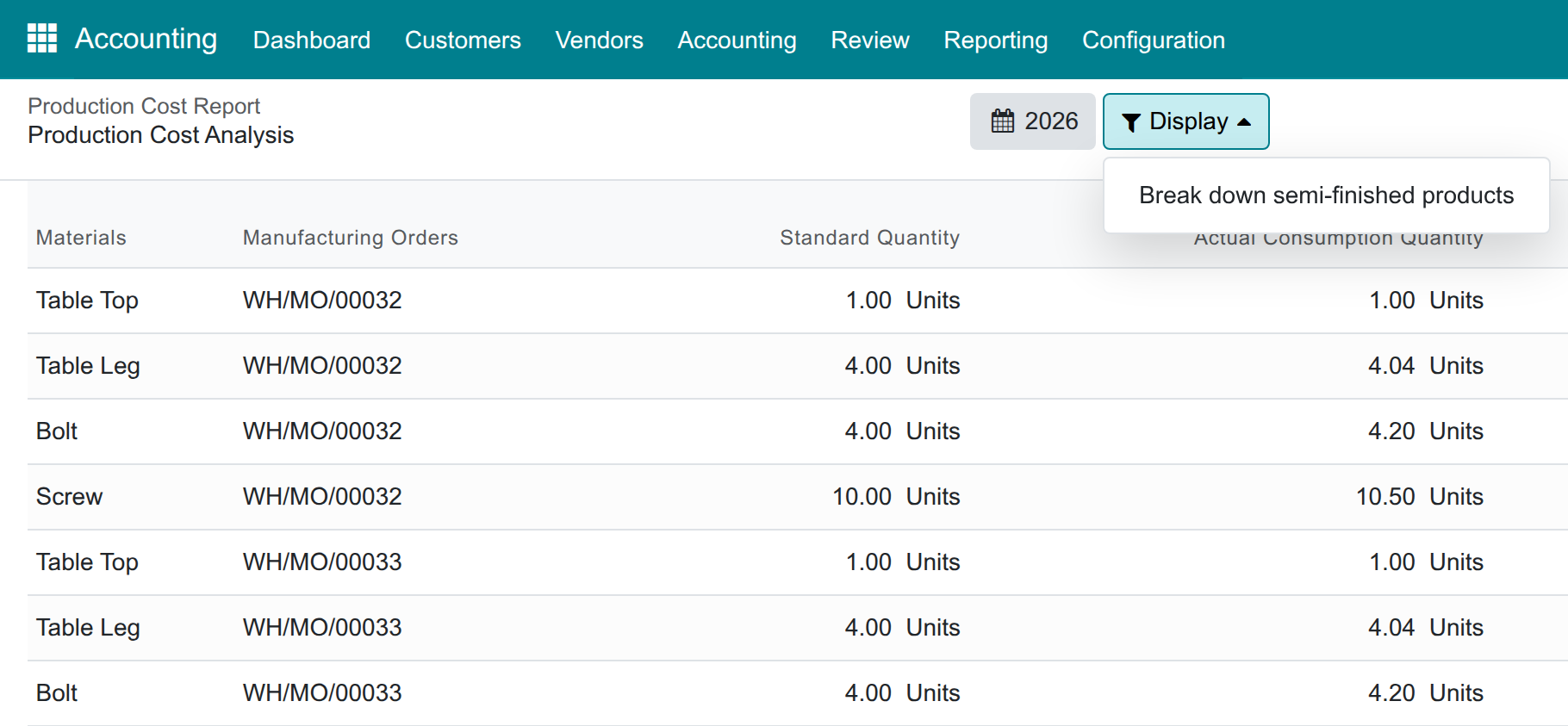
→ Broken down, each of those materials carries the standard of the share consumed, next to its actual quantity.
Nothing to enter twice
Today: standards are typed again wherever a comparison is needed.
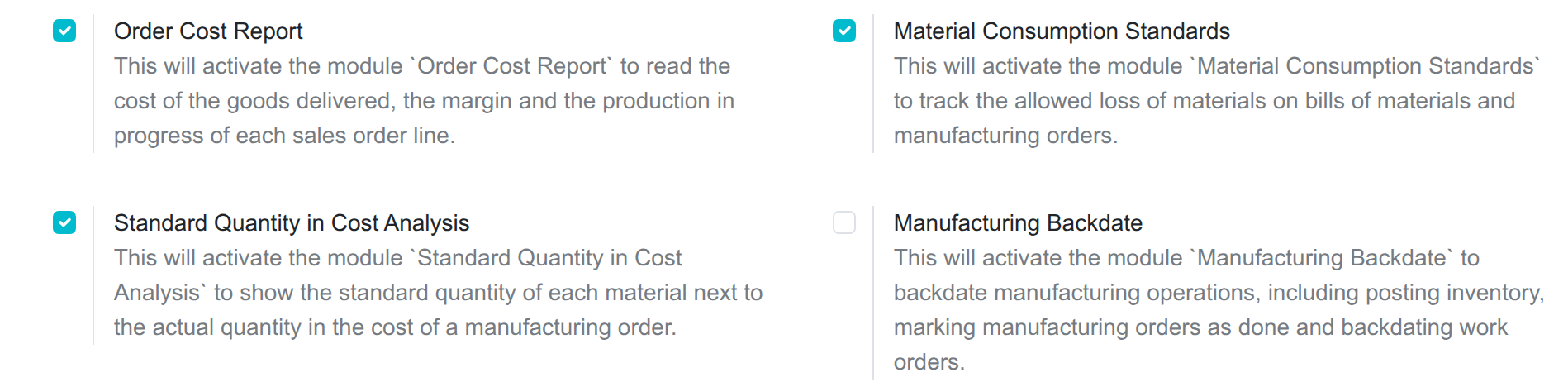
→ One option in the Manufacturing settings reads the standards already kept on your bills of materials.
What you see as a manager
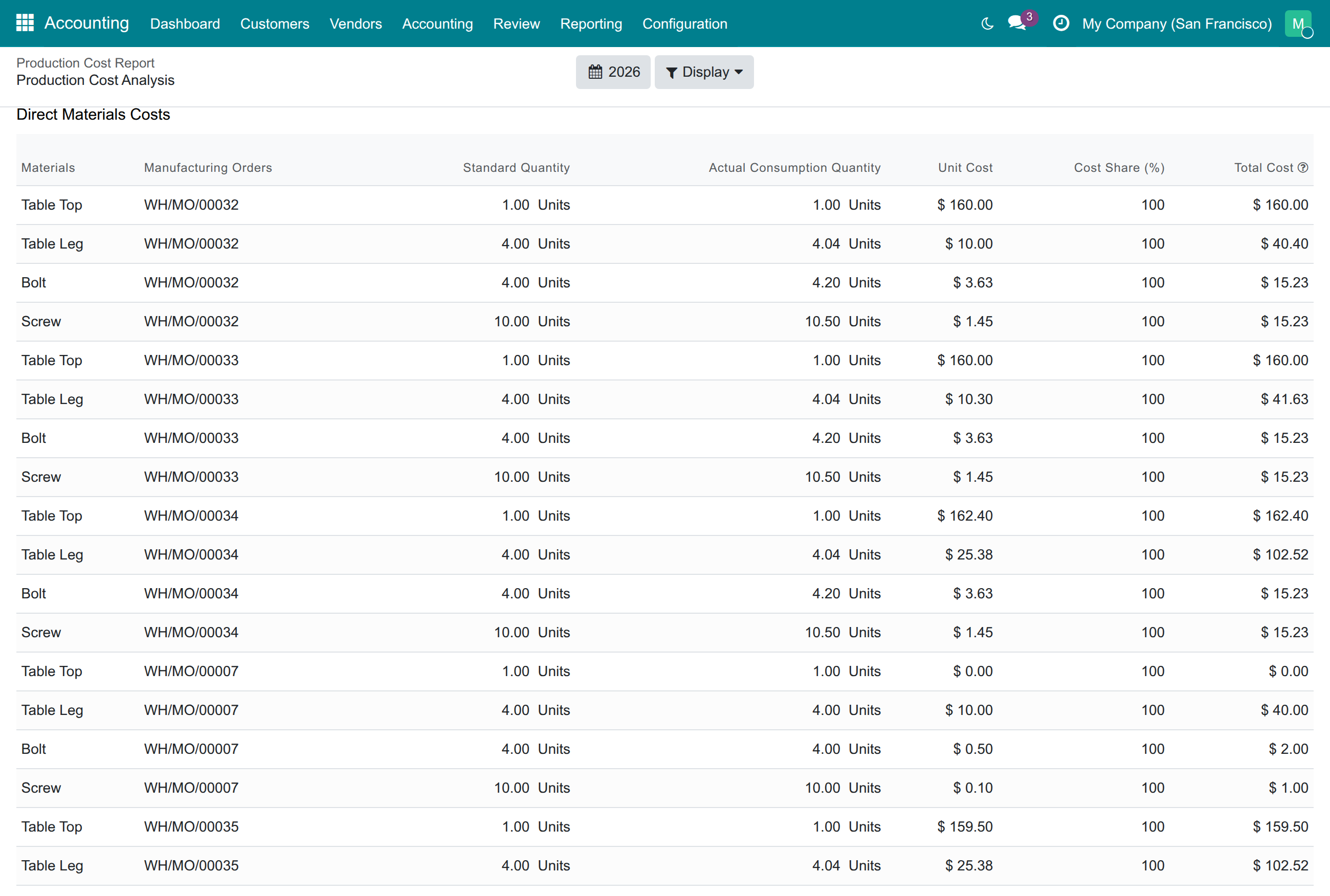
Which materials of a product keep running over their standard?
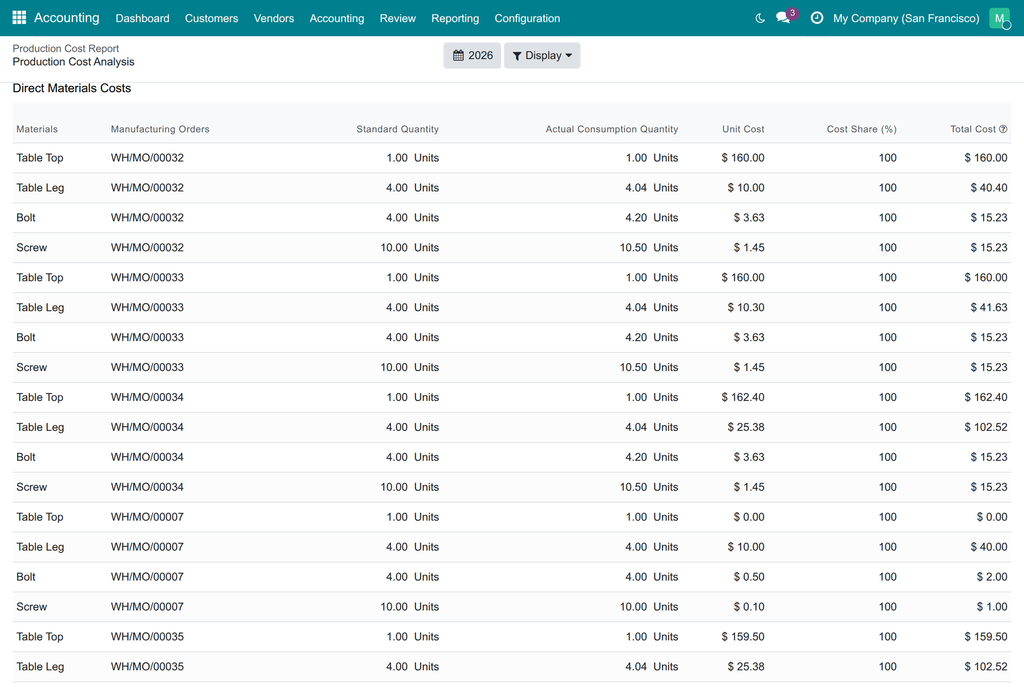
Opened from a product line of the Production Cost Report: every done order of the product in the chosen period, one row per material.
Features
Reading the standard
- ✓ Standard Quantity next to actual consumption, per material
- ✓ The same column in the By products table
- ✓ Each quantity with its unit
- ✓ Quantities follow your Product Unit precision
Where you read it
- ✓ Cost Analysis of a done manufacturing order
- ✓ Cost Analysis of a product, across its orders
- ✓ Each product line of the Production Cost Report
Totals you can trust
- ✓ A standard consumed over several moves counts once
- ✓ Components added outside the bill of materials show zero
- ✓ Semi-finished breakdown scales the standard like the actual quantity
- ✓ Rows the breakdown adds by itself show zero
Built for daily use
- ✓ Shown for comparison only: the cost follows actual consumption
- ✓ Read by users holding the accounting Readonly or Basic right
- ✓ No data, menu or access right of its own to maintain
Ready on day one
The column on the orders you already have
It reads the standards recorded on your done orders; there is nothing to import or build.
What the administrator sets first
Material Consumption Standards, then Standard Quantity in Cost Analysis, in the Manufacturing settings; and the accounting right of the people who read costs.
Before you decide
Does it change the cost of our orders?
No. It adds a column for comparison; the cost still follows the quantity actually consumed.
Where does the standard come from?
From the bill of materials, through Material Consumption Standards: the quantity without the loss you allow. A component added to an order outside its bill of materials has a standard of zero.
Can a total count a standard twice?
No. When one standard is consumed over several moves, it appears on its first row and the other rows show zero.
Who sees it?
Whoever may open the cost analysis: users with the accounting Readonly or Basic right, on done orders. The module adds no access right of its own.
What must be installed?
Advanced MRP Accounting and Material Consumption Standards. With both in place it installs itself. No extra Python package or server program.
Try it, then ask us
The Documentation tab walks the cost accountant and the administrator through the screens. Live demo: v19demo-int.viindoo.com
Pre-sales & partnership
viindoo.com/contactusTechnical support
viindoo.com/ticketStandard Quantity in Cost Analysis
Audience: cost accountants and chief accountants who read what a manufacturing order cost, production managers who control material consumption through that cost, and the system administrator who switches the feature on.
Note
Extends Advanced MRP Accounting - see its documentation: viin_mrp_account.
Note
Uses the standards of Material Consumption Standards - see its documentation: viin_mrp_standard_consumption.
Overview
The Production Cost Analysis of a manufacturing order lists the materials the order consumed and what they cost. This module adds the Standard Quantity next to the actual quantity of every material and by-product, so you see how much over the standard the order used inside its cost, on the same row, with the same unit.
The standard quantity is the quantity of the bill of materials without the loss you allow. You enter it on the bill of materials with Material Consumption Standards; this module only shows it.
How the work flows:
- The administrator turns the feature on in the Manufacturing settings.
- The production manager closes the manufacturing order.
- The cost accountant opens the Cost Analysis of the order and compares Standard Quantity with Actual Consumption Quantity.
| Role | What they do | Access right to assign |
|---|---|---|
| System Administrator | Turns the feature on | Administration / Settings |
| Cost accountant, chief accountant | Reads the cost analysis of an order and compares the standard with the actual quantity | Show Accounting Features - Readonly (or Basic) |
| Production manager | Closes the orders whose cost is analysed | Manufacturing / User or Administrator |
Setup (for the Administrator)
Installation
- Open Apps, search for Standard Quantity in Cost Analysis and click Install. Advanced MRP Accounting and Material Consumption Standards are installed with it if they are not yet there.
Turn the feature on
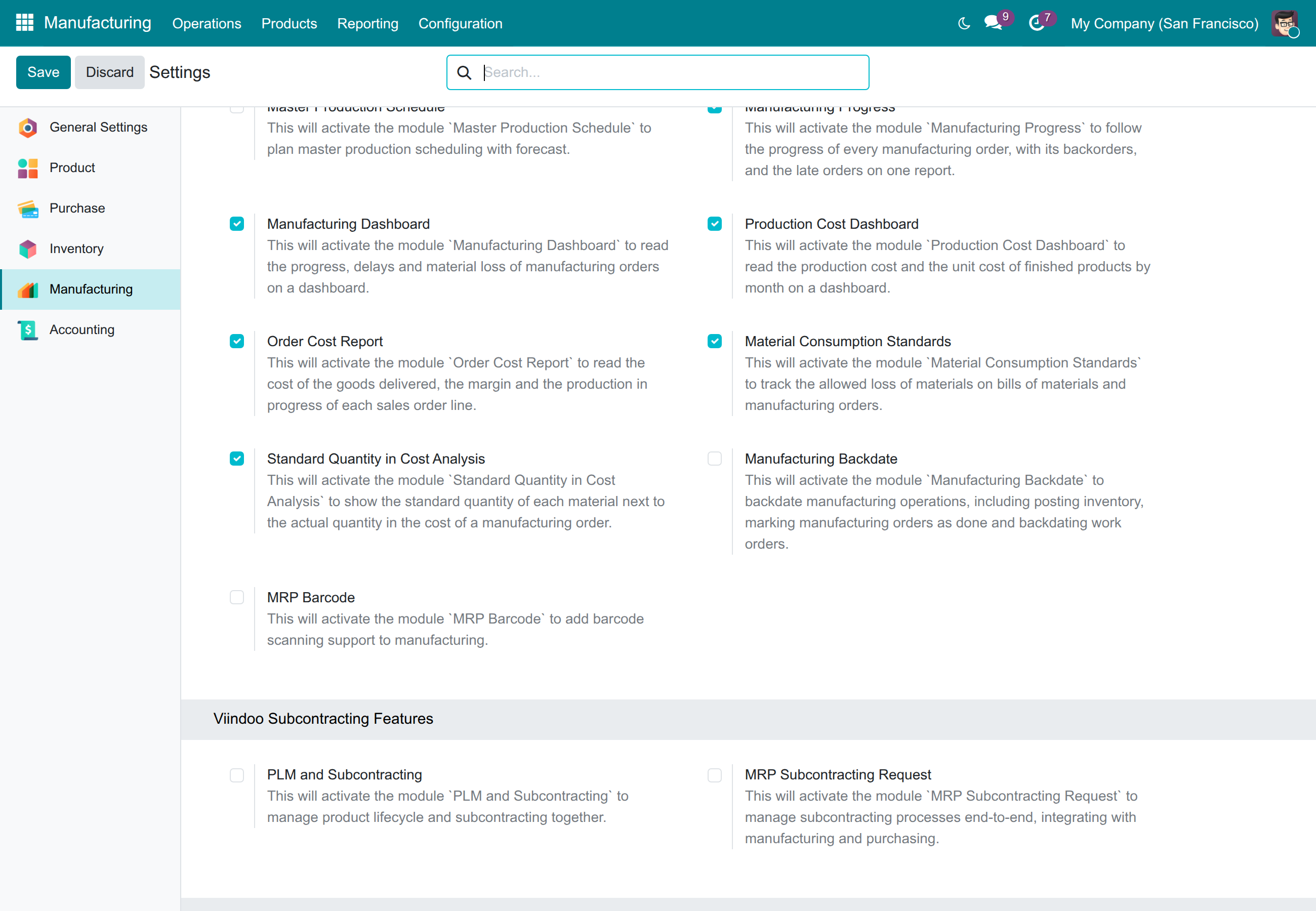
- Open Manufacturing > Configuration > Settings.
- Tick Standard Quantity in Cost Analysis and click Save. The option is offered once Material Consumption Standards is ticked.
Give people their access
In Settings > Users & Companies > Users, open the user and set the accounting access right of the people who read costs: Show Accounting Features - Readonly or Basic. These rights are listed in the user form when the developer mode is on.
Cost accountant: compare the standard with the actual quantity
Read the standard of an order
The cost analysis of an order is available once the order is done.
- Open Manufacturing > Operations > Manufacturing Orders and open a done order.
- Click Cost Analysis. When the screen is too narrow for all the buttons, the button is under More.
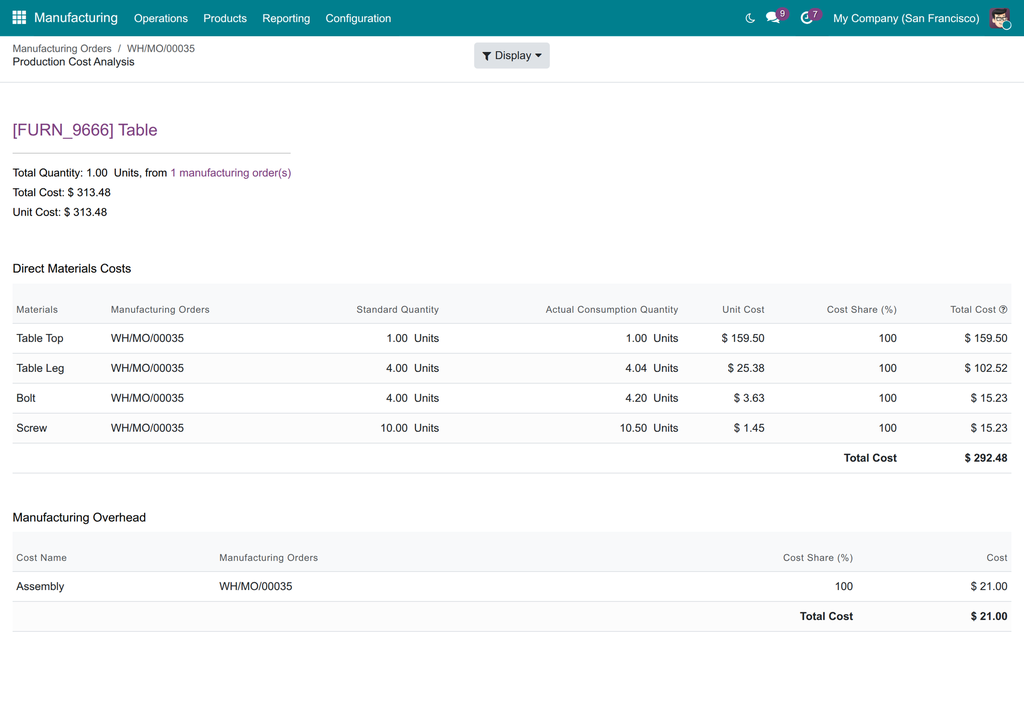
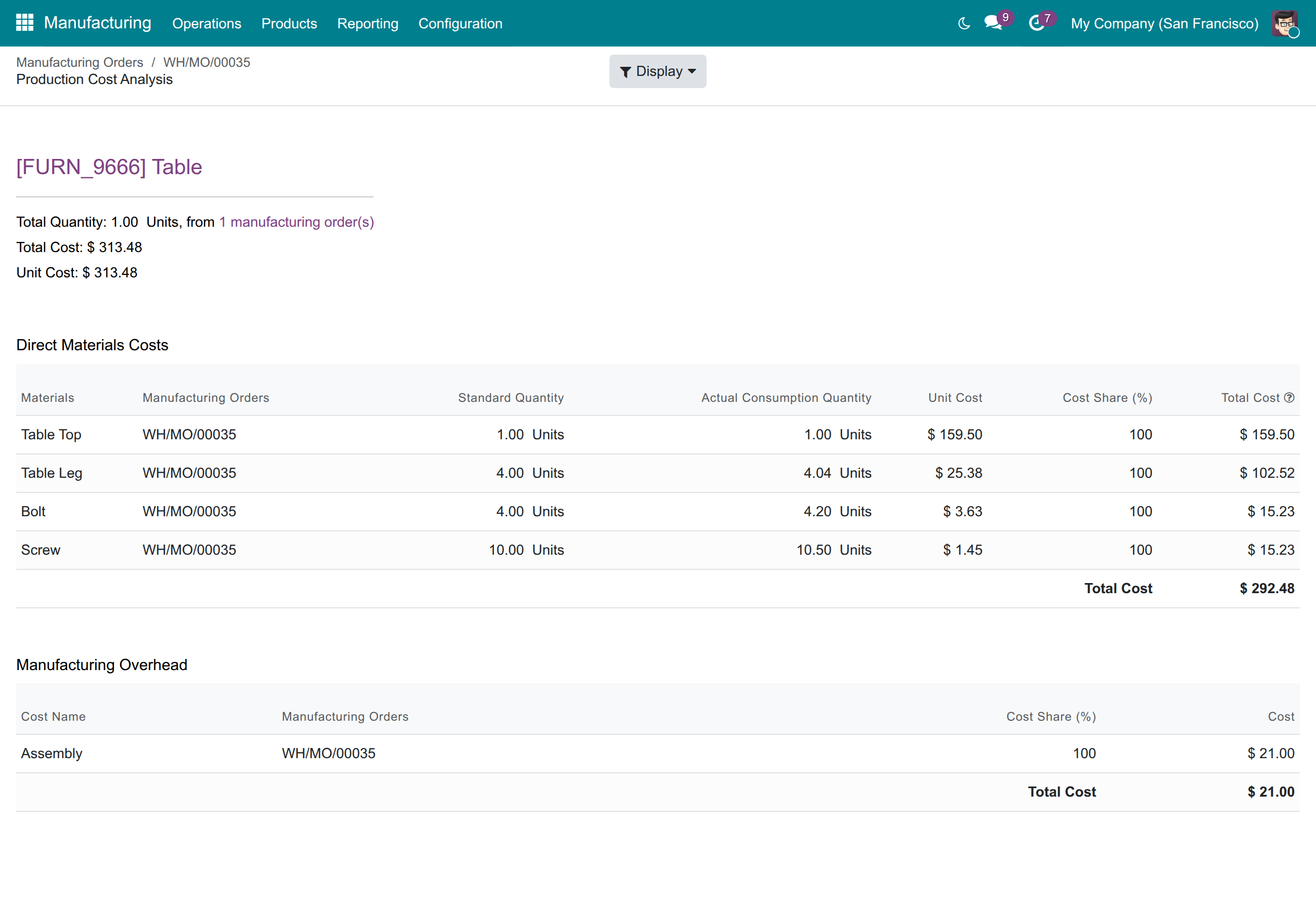
- In the table Direct Materials Costs, read Standard Quantity and Actual Consumption Quantity, each with its unit, for every material.
In the sample, the order WH/MO/00035 made one Table. The standard of Table Leg is 4.00 Units and the order consumed 4.04; Bolt has a standard of 4.00 and 4.20 consumed; Screw has 10.00 and 10.50. Over the standard shows on the row itself.
The By products table carries the same Standard Quantity column, beside the cost share of each by-product.
Read the standard on a product or a period
The same column appears on the Production Cost Analysis opened from the product form (Cost Analysis button) or from the Production Cost Report, where each row covers every order of the period. See the documentation of Advanced MRP Accounting for these screens.
Semi-finished products
- In the Production Cost Analysis, open Display and choose Break down semi-finished products.
- A semi-finished product the order consumed is replaced by the materials of the orders that made it. Each of those rows shows the standard of the part the order consumed, multiplied by the same share as the actual quantity, so both columns compare on the same row.
- The row Difference to the consumed value of the product, and a part received from another source, show a standard of zero.
Good to know
- A standard consumed over several stock moves appears once, on the first row; the other rows of that material show 0, so a sum of the column never counts it twice.
- A component added to an order outside its bill of materials has a standard of 0, shown with the unit of the row.
- Quantities follow the Product Unit precision of your company.
- The standard of an order is the one copied from the bill of materials when the order was confirmed.
Troubleshooting
| Problem | What to check |
|---|---|
| There is no Standard Quantity column | The option Standard Quantity in Cost Analysis is ticked in Manufacturing > Configuration > Settings, and the module is installed. |
| The option is not in the settings | Tick Material Consumption Standards and save first. |
| There is no Cost Analysis button on the order | The order is done and you hold Show Accounting Features - Readonly or Basic. |
| A material shows a standard of 0 | It has no standard on the order: it was added outside the bill of materials, or it is a second row of a standard consumed over several moves. |
FAQ
- Where do I enter the standard?
- On the bill of materials, with Material Consumption Standards. This module only shows it.
- Does the standard change the cost?
- No. The cost follows the actual quantity; the standard is for comparison.
This software and associated files (the "Software") may only be used (executed, modified, executed after modifications) if you have purchased a valid license from the authors, typically via Odoo Apps, or if you have received a written agreement from the authors of the Software (see the COPYRIGHT file).
You may develop Odoo modules that use the Software as a library (typically by depending on it, importing it and using its resources), but without copying any source code or material from the Software. You may distribute those modules under the license of your choice, provided that this license is compatible with the terms of the Odoo Proprietary License (For example: LGPL, MIT, or proprietary licenses similar to this one).
It is forbidden to publish, distribute, sublicense, or sell copies of the Software or modified copies of the Software.
The above copyright notice and this permission notice must be included in all copies or substantial portions of the Software.
THE SOFTWARE IS PROVIDED "AS IS", WITHOUT WARRANTY OF ANY KIND, EXPRESS OR IMPLIED, INCLUDING BUT NOT LIMITED TO THE WARRANTIES OF MERCHANTABILITY, FITNESS FOR A PARTICULAR PURPOSE AND NONINFRINGEMENT. IN NO EVENT SHALL THE AUTHORS OR COPYRIGHT HOLDERS BE LIABLE FOR ANY CLAIM, DAMAGES OR OTHER LIABILITY, WHETHER IN AN ACTION OF CONTRACT, TORT OR OTHERWISE, ARISING FROM, OUT OF OR IN CONNECTION WITH THE SOFTWARE OR THE USE OR OTHER DEALINGS IN THE SOFTWARE.