

Viin Map View
by Viindoo
| Lines of Code | 2025 |
| Technical name | viin_web_map |
| License | OPL-1 |
| Website | https://viindoo.com/apps/modules/17.0/viin_web_map?force_show=1 |
| Read description for | v 13.0 v 14.0 v 15.0 v 16.0 v 18.0 v 19.0 |
| Extensions | Viin CRM Contacts Map Viin Warehouse Employees Map Geo Route Map Viin Fleet Booking Map Viin Fleet Planning Map |

A map view for any model that has an address
The map engine behind the Viindoo map views: markers, numbered waypoints, routes, popups, and the geocoding that keeps coordinates filled.
Viin Map View (technical name viin_web_map) is an Odoo 17.0 app for Odoo Community and Odoo Enterprise and Viindoo Cloud, built for developer, administrator, every user, dispatcher.
At a Glance
The facts of Viin Map View, version 1.0.5, in one place. Published by Viindoo.
How It Works
Install a module that declares a map view, then switch to it.
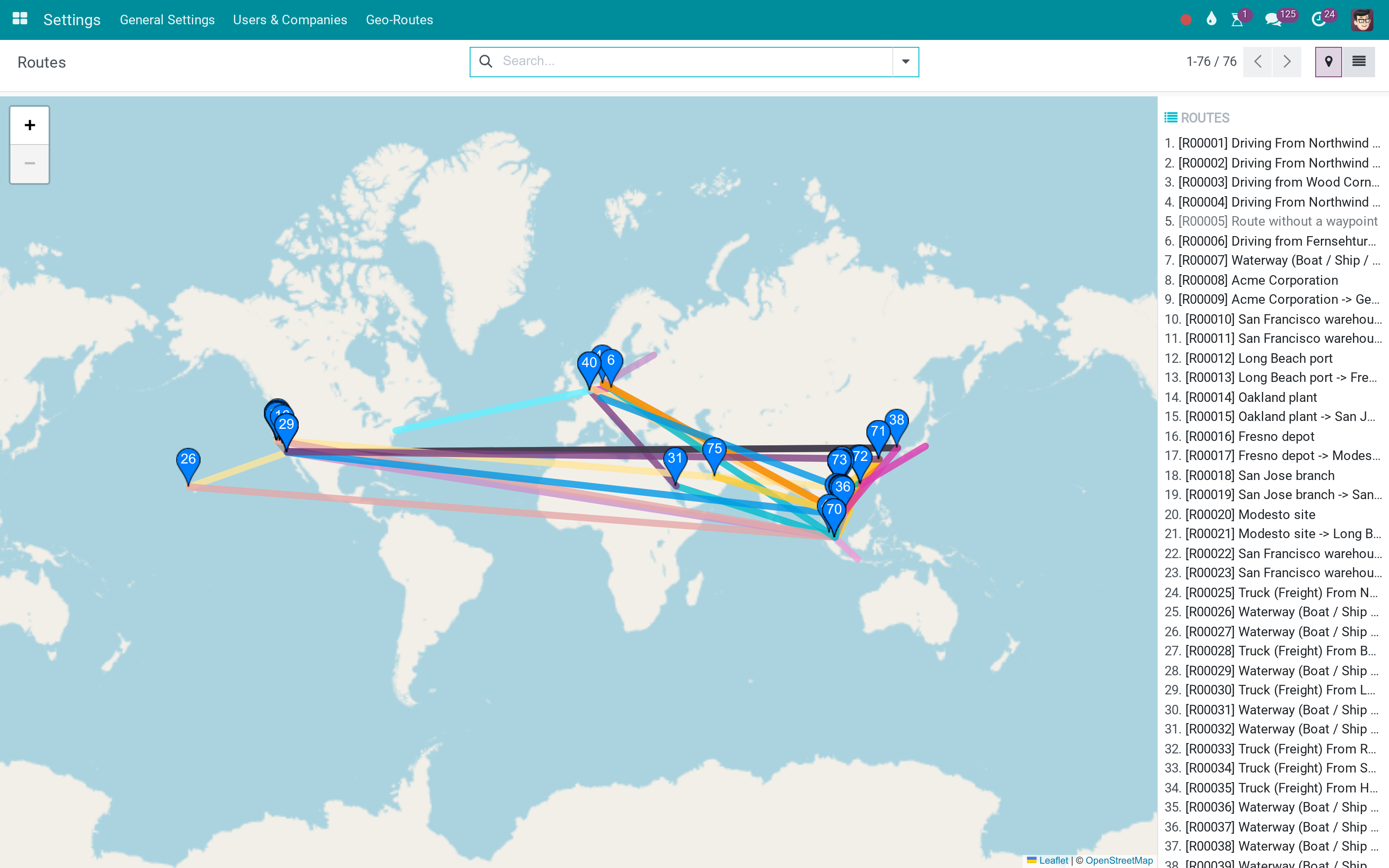
Routes with waypoints
Numbered stops and a polyline per route - the routing mode of the view.
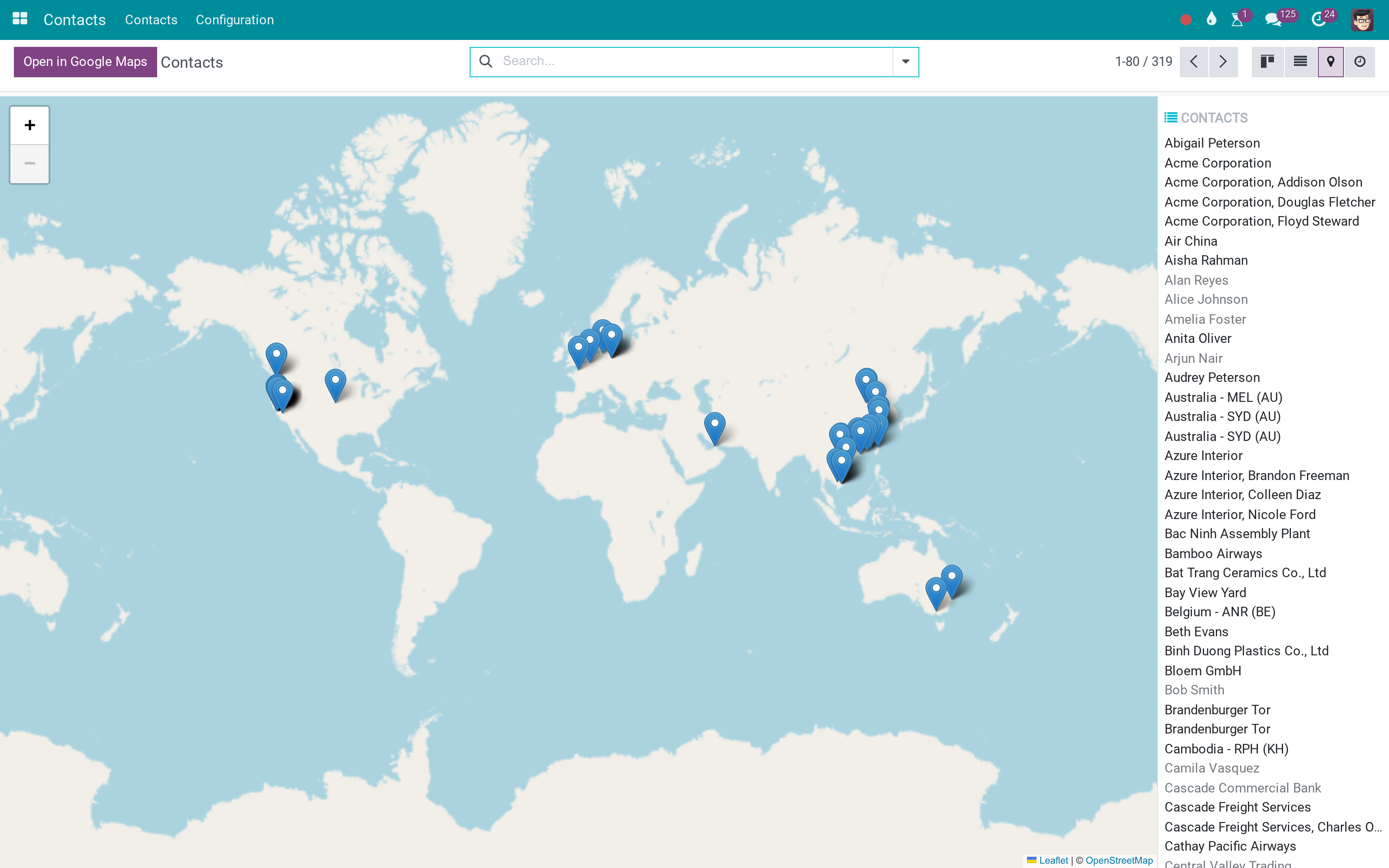
Records as markers
The plain mode: one marker per record, a sidebar with the names.
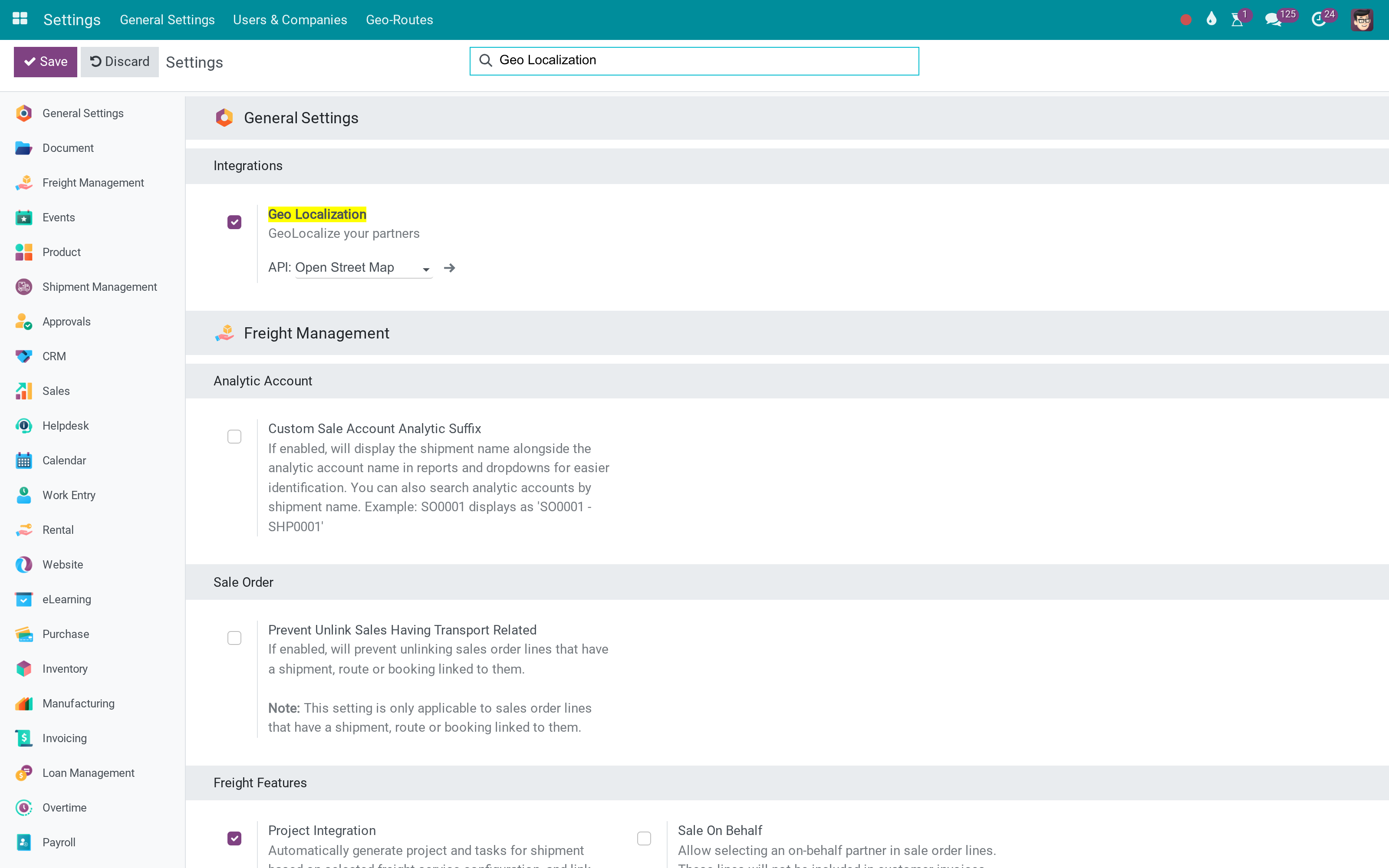
The settings
Geo Localization in General Settings: pick the provider. OpenStreetMap needs nothing; choose Mapbox or HERE and the token field appears, unlocking their tiles and driving directions.
What You Get
A viin_map view type with its own controller, model and renderer
Markers per record from a partner field; numbered markers and polylines when routing is on
Marker popups declared in the view arch, with Edit and Get directions
A sidebar listing the records on the map, and an Open in Google Maps button
Mapping address on contacts plus a daily coordinate-filling cron with failure cooldown
OpenStreetMap tiles by default; Mapbox or HERE keys in Settings for tiles and driving routes
More Screens
Everything below was taken on a database seeded with real business data, on this series - not a mock-up and not a screenshot from an older version.
Contacts on the map
What This App Does Not Do
Read this before you buy. Everything below is something the app deliberately leaves to another app or to you.
Contacts Map, Employees Map, the fleet and route bridges add the views.
Public OpenStreetMap geocoding is rate-limited; a Mapbox or HERE key is the reliable path.
Without a token the path between stops is a straight line.
A record without a partner address has no marker.
Works Well With
Apps from the same stack, built to fit this one:
Who Should Use Viin Map View?
Developer
Declares a map view in XML like any other view.
Administrator
Chooses the geocoder and pastes a token if there is one.
Every user
Switches to the map from the view switcher.
Dispatcher
Gets routes and stops drawn, not just points.
Frequently Asked Questions
What does Viin Map View do?
The map engine behind the Viindoo map views: markers, numbered waypoints, routes, popups, and the geocoding that keeps coordinates filled.
What does Viin Map View not do?
It shows nothing by itself. Contacts Map, Employees Map, the fleet and route bridges add the views. Geocoding depends on the provider you configure. Public OpenStreetMap geocoding is rate-limited; a Mapbox or HERE key is the reliable path. Driving routes need Mapbox. Without a token the path between stops is a straight line. Coordinates are stored on the contact, not the record. A record without a partner address has no marker.
Who is Viin Map View for?
Developer: Declares a map view in XML like any other view. Administrator: Chooses the geocoder and pastes a token if there is one. Every user: Switches to the map from the view switcher. Dispatcher: Gets routes and stops drawn, not just points.
Which Odoo version and editions does it support?
Odoo 17.0 - Odoo Community, Odoo Enterprise, Viindoo Cloud. Upgrades to a newer Odoo series are a separate purchase for that series.
What does it depend on?
It installs on top of: web, base_setup, base_geolocalize. Odoo installs them with it.
How do I set it up?
Install a module that declares a map view, then switch to it.
What works well with it?
Contacts Map (viin_contacts_map): Every contact on the map. Employees Map (viin_employee_map): Where the team lives. Geo Route Map (viin_geo_route_map): Routes and waypoints drawn.
Can I try it before buying?
Yes - the Live Preview button at the top of this page opens the module's own screen on a working database.
How do I get support?
Write to apps.support@viindoo.com with your Odoo version and the technical name viin_web_map; pre-sales questions go to sales@viindoo.com.
See Viin Map View in Action
A map view for any model that has an address
Need help with Viin Map View?
For questions, implementation support, or consulting services, contact Viindoo.
Pre-Sales & Partnership
sales@viindoo.comWhen contacting us, please include:
- Odoo/Viindoo version (Odoo CE / Viindoo Editions).
- Number of users and business scope.
- Other modules currently in use.
Technical Support
apps.support@viindoo.comFor faster troubleshooting, please provide:
- Order number or app reference.
- Odoo/Viindoo version & edition.
- Steps to reproduce the issue.
- Screenshots/logs if available.
Upgrades to a newer Odoo series are a separate purchase for that series.
Technical Requirement
Changes log
1.0.5 - Latest on the 17.0 line
- Aligned with the 17.0 models and views.
viin_web_map Documentation
Overview
The viin_web_map module allows you to integrate interactive maps into your Odoo system. It provides functionality for displaying locations and routes directly on the map, making it ideal for location-based applications. The module allows you to configure and visualize both individual locations (using markers) and routes (using waypoints).
Key Features
- Location Display: Display location data using markers on the map.
- Route Visualization: Visualize routes between multiple waypoints.
- Customizable Popups: Customize the information shown in map marker popups.
- Google Directions: Optionally show directions using the Google Directions API.
- Automatic Polyline Generation: Polyline is automatically generated from waypoints if not explicitly defined.
- Flexible Configuration: Easily configure and extend the map to suit your needs.
Installation
Install the viin_web_map module via the Odoo Apps interface or using the following command:
odoo-bin -c <config_file> -i viin_web_map
Configure the Maps API key for one of the map service providers - Mapbox, Google, or HERE - if you want to use the location services provided by them.
Usage
Configuring the viin_map View
The viin_map view can be used to display locations or routes on the map. Below are examples of how to configure the view for different use cases.
### Displaying Location Data
To display locations as markers on the map, you can configure the viin_map view for a model like res.partner. The view will display each partner as a marker on the map with relevant information shown in a popup.
Example of a viin_map view displaying locations:
<record id="res_partner_view_map" model="ir.ui.view">
    <field name="name">res.partner.view.map</field>
    <field name="model">res.partner</field>
    <field name="arch" type="xml">
        <viin_map res_partner="id">
            <marker-popup>
                <field name="name" string="Name"/>
                <field name="mapping_address" string="Address"/>
            </marker-popup>
        </viin_map>
    </field>
</record>
Explanation: - res_partner="id": The map uses the id field from the res.partner model to locate the partner on the map. - marker-popup: Specifies the fields to show in the marker popup, in this case, the partner’s name and mapping_address.
### Displaying Routes
To display a route between multiple waypoints, you can configure the viin_map view with the routing="true" attribute. If the polyline field is not explicitly defined, it will be automatically generated from the waypoints.
Example of a viin_map view displaying a route:
<record id="view_route_route_map" model="ir.ui.view">
    <field name="name">route.route.viin_map</field>
    <field name="model">route.route</field>
    <field name="arch" type="xml">
        <viin_map res_partner="address_from_id"
            routing="true"
            waypoint_field="waypoint_ids"
            polyline_field="polyline">
            <field name="waypoint_ids" />
            <field name="polyline" />
            <marker-popup>
                <field name="code" string="Ref."/>
                <field name="mapping_address" string="Instructions"/>
            </marker-popup>
        </viin_map>
    </field>
</record>
Explanation: - routing="true": Enables the route functionality, allowing the map to display a route between multiple waypoints. - waypoint_field="waypoint_ids": Defines the field that holds the list of waypoints used to calculate the route. - polyline_field="polyline": Optional. If omitted, the polyline will be auto-generated from the waypoints. - field name="waypoint_ids": Displays all the waypoints on the map.
### Automatically Generating Polyline from Waypoints
When you configure a route with waypoints but do not specify a polyline field, the polyline is automatically generated based on the coordinates of the defined waypoints. This allows you to visualize the route without manually defining the polyline.
Example:
<record id="view_route_route_map_auto_polyline" model="ir.ui.view">
    <field name="name">route.route.viin_map.auto_polyline</field>
    <field name="model">route.route</field>
    <field name="arch" type="xml">
        <viin_map res_partner="address_from_id"
            routing="true"
            waypoint_field="waypoint_ids">
            <field name="waypoint_ids" />
               <marker-popup>
                <field name="code" string="Ref."/>
                <field name="mapping_address" string="Instructions"/>
            </marker-popup>
        </viin_map>
    </field>
</record>
### Required Fields for Routing
When using routing="true", the following fields are required: - waypoint_field: Defines the waypoints for the route. - res_partner: Always mandatory in all viin_map views.
If polyline_field is not specified, it is automatically generated from the waypoints.
Error Handling
Ensure all required fields are defined in the viin_map view. Missing required fields, such as waypoint_field, will result in validation errors.
Customizing the Map View
You can customize the map by adding or modifying fields in the marker-popup or by introducing additional attributes to the viin_map tag.
Example of a custom map view:
<record id="view_custom_route_map" model="ir.ui.view">
    <field name="name">route.route.custom_map</field>
    <field name="model">route.route</field>
    <field name="arch" type="xml">
        <viin_map res_partner="address_from_id"
            routing="true"
            waypoint_field="waypoint_ids">
            <field name="waypoint_ids" />
            <field name="custom_field" string="Custom Info"/>
            <marker-popup>
                <field name="code" string="Ref."/>
                <field name="mapping_address" string="Instructions"/>
                <field name="custom_field" string="Additional Information"/>
            </marker-popup>
        </viin_map>
    </field>
</record>
This software and associated files (the "Software") may only be used (executed, modified, executed after modifications) if you have purchased a valid license from the authors, typically via Odoo Apps, or if you have received a written agreement from the authors of the Software (see the COPYRIGHT file).
You may develop Odoo modules that use the Software as a library (typically by depending on it, importing it and using its resources), but without copying any source code or material from the Software. You may distribute those modules under the license of your choice, provided that this license is compatible with the terms of the Odoo Proprietary License (For example: LGPL, MIT, or proprietary licenses similar to this one).
It is forbidden to publish, distribute, sublicense, or sell copies of the Software or modified copies of the Software.
The above copyright notice and this permission notice must be included in all copies or substantial portions of the Software.
THE SOFTWARE IS PROVIDED "AS IS", WITHOUT WARRANTY OF ANY KIND, EXPRESS OR IMPLIED, INCLUDING BUT NOT LIMITED TO THE WARRANTIES OF MERCHANTABILITY, FITNESS FOR A PARTICULAR PURPOSE AND NONINFRINGEMENT. IN NO EVENT SHALL THE AUTHORS OR COPYRIGHT HOLDERS BE LIABLE FOR ANY CLAIM, DAMAGES OR OTHER LIABILITY, WHETHER IN AN ACTION OF CONTRACT, TORT OR OTHERWISE, ARISING FROM, OUT OF OR IN CONNECTION WITH THE SOFTWARE OR THE USE OR OTHER DEALINGS IN THE SOFTWARE.