
Bank Exchange Rate Application for Loans
by Viindoo
| Lines of Code | 470 |
| Technical name | viin_loan_management_bank_currency_rate |
| License | OPL-1 |
| Website | https://viindoo.com/apps/app/18.0/to_loan_management |
| Read description for | v 16.0 v 17.0 |
| Required Apps | Invoicing (account) Discuss (mail) |
| Included Dependencies | Viindoo Base Accounting Foundation Advanced Bank Currency Rates Loan Management |
 Bank Exchange Rate for Loans
The right bank rate on every foreign-currency loan
For loans in a foreign currency, this add-on applies the bank selling rate to borrowings and the bank buying rate to lendings - so disbursements, repayments, interest, and refunds convert at the rate that actually applies.
Start a 15-day free trial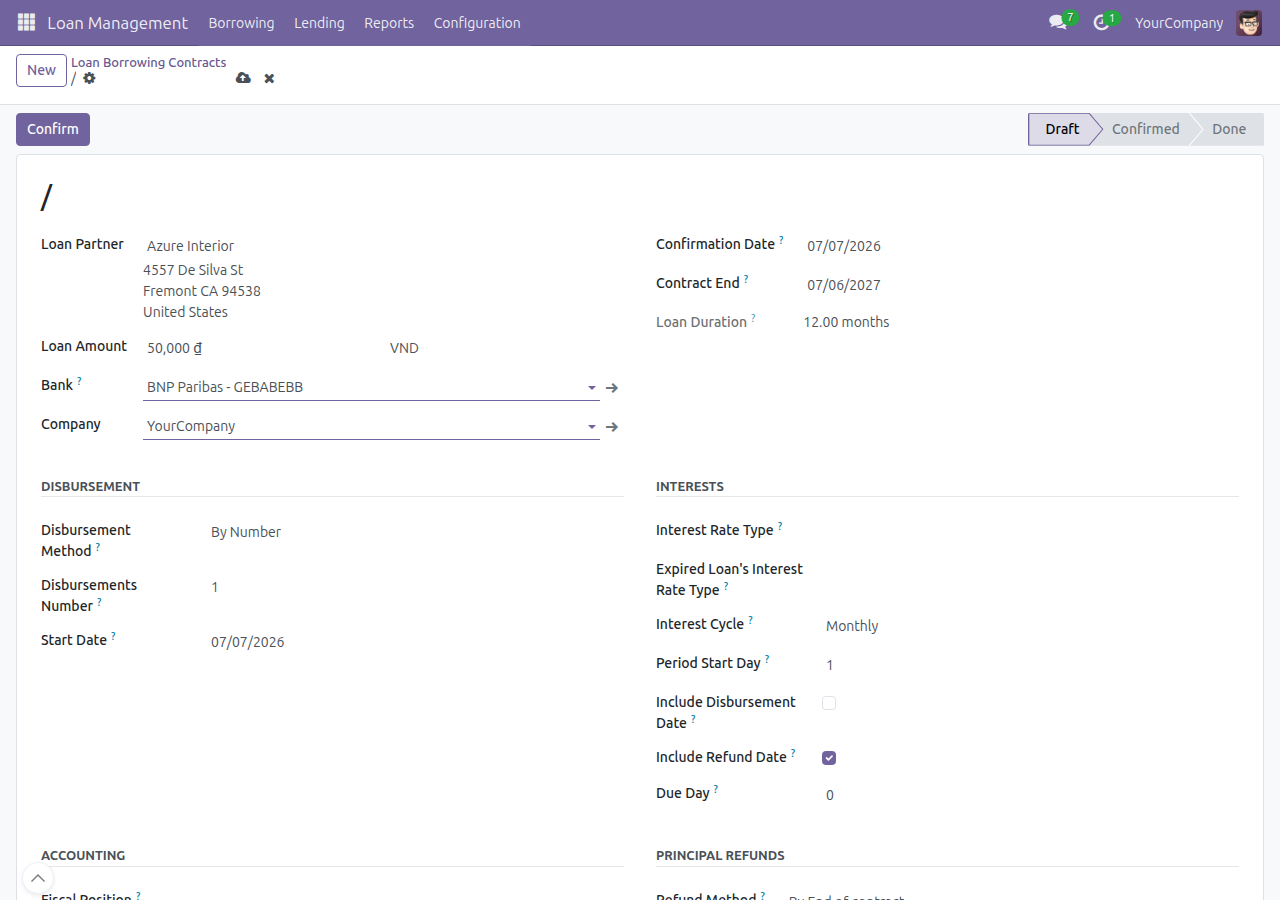
Selling rate for borrowing, buying rate for lending
Pick the bank on the loan contract; the app uses that bank's selling rate for money you borrow and its buying rate for money you lend, across every loan transaction.
Accurate currency conversion
Disbursements, repayments, interest invoicing, and refunds all convert with the correct bank rate, so exchange differences are recorded faithfully.
Installs automatically
The add-on activates with Loan Management when bank exchange rates are in use - no separate setup.
Key Features
Bank Selection on Loan Order
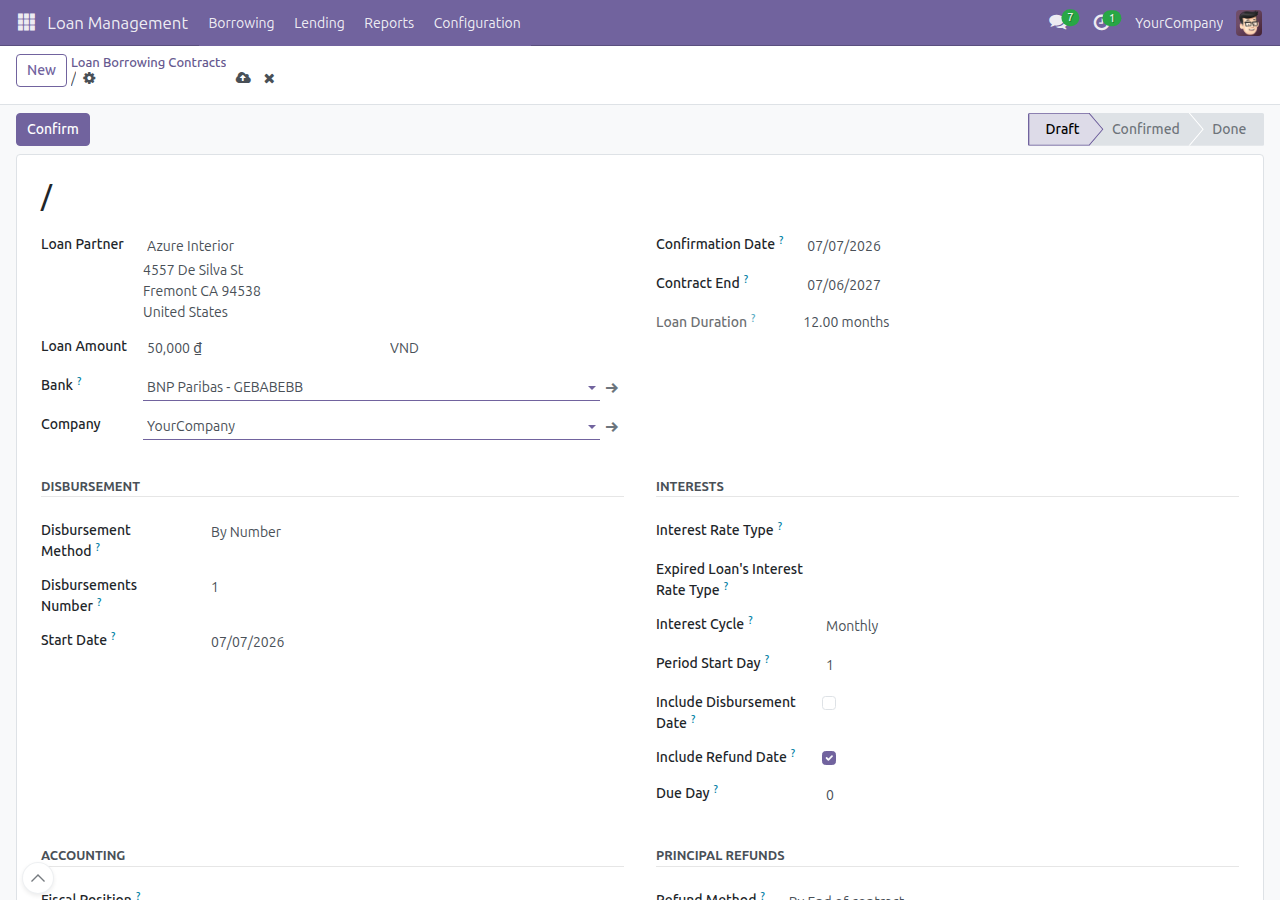
Pin a specific bank to a foreign-currency loan contract so that bank's own buy and sell rates - not a single company default - drive every transaction on that loan.
Correct Bank Rate on Disbursement
Borrowing disbursements convert at the bank's selling rate; lending disbursements convert at its buying rate, falling back to the company default bank when none is set.
Correct Bank Rate on Principal Refund
Borrowing refunds use the bank's selling rate; lending principal collected back uses its buying rate.
Correct Bank Rate on Interest Invoicing
Foreign-currency interest invoices apply the bank's selling rate for borrowings and its buying rate for lendings.
Correct Bank Rate on Interest Payment
Paying or reconciling an interest invoice - direct payment or Register Payment - applies the same bank selling/buying rate as the invoice.
Automatic Activation as a Bridge Module
Installs itself the moment Loan Management and Advanced Bank Currency Rates are both present - no manual install step, no extra menu.
Who Should Use This?
Businesses managing foreign-currency loans that must convert at the applicable bank rate rather than a single reference rate.
Technical Requirement
- Odoo version: 18.0
- Editions: Community, Enterprise
- Required modules: Loan Management, Advanced Bank Currency Rates
- License: OPL-1
Bank Exchange Rate Application for Loans
What it does
This app adds a single field, Bank, to loan contracts. On a loan in a foreign currency, pick the bank whose exchange rate should apply, and the app uses that bank's own rate everywhere the loan needs a currency conversion - disbursement, principal refund, interest invoicing, and interest payment. Borrowing contracts use the bank's selling rate; Lending contracts use the bank's buying rate.
The app adds no menu and no configuration screen of its own - only the Bank field on the existing loan contract form.
Installation
This app installs itself automatically - there is nothing to search for or install by name in Apps.
- Go to Apps.
- Search for and install Loan Management and Advanced Bank Currency Rates (install either one first, order does not matter).
- As soon as both are installed, this app activates automatically and the Bank field appears on loan contracts.
No further setup is required.
Usage
- Open Loan Management > Borrowing > Contracts (or Loan Management > Lending > Contracts) and open or create a contract in a foreign currency.
- In the Bank field, select the bank whose exchange rate should apply to this contract.
- Confirm the contract as usual.

From here on, the app automatically applies that bank's rate wherever the loan needs a currency conversion:
- Disbursement - the borrowing side uses the bank's selling rate, the lending side uses the bank's buying rate.
- Principal refund - same rate rule as disbursement.
- Interest invoicing - the invoice generated from an interest line uses the same rate rule.
- Interest payment - paying, or registering a payment on, that interest invoice uses the same rate rule.
If the Bank field is left empty, the app falls back to the default bank configured on the company.
FAQ
I don't see the Bank field on my loan contract. Why?
The field is only visible to users in the Multi-currency group. Ask an administrator to enable that access for you.
What happens if I leave the Bank field empty?
The app uses the default bank configured on the company instead. The loan still gets an exchange rate - just not a bank-specific one.
Does this app add a menu or a configuration page?
No. It only adds the Bank field to the existing loan contract form; everything else applies automatically once a bank is selected.
Which loans does this affect?
Only loans in a currency other than the company's own currency need a bank-specific rate. A loan in the company's own currency does not need any conversion.
This software and associated files (the "Software") may only be used (executed, modified, executed after modifications) if you have purchased a valid license from the authors, typically via Odoo Apps, or if you have received a written agreement from the authors of the Software (see the COPYRIGHT file).
You may develop Odoo modules that use the Software as a library (typically by depending on it, importing it and using its resources), but without copying any source code or material from the Software. You may distribute those modules under the license of your choice, provided that this license is compatible with the terms of the Odoo Proprietary License (For example: LGPL, MIT, or proprietary licenses similar to this one).
It is forbidden to publish, distribute, sublicense, or sell copies of the Software or modified copies of the Software.
The above copyright notice and this permission notice must be included in all copies or substantial portions of the Software.
THE SOFTWARE IS PROVIDED "AS IS", WITHOUT WARRANTY OF ANY KIND, EXPRESS OR IMPLIED, INCLUDING BUT NOT LIMITED TO THE WARRANTIES OF MERCHANTABILITY, FITNESS FOR A PARTICULAR PURPOSE AND NONINFRINGEMENT. IN NO EVENT SHALL THE AUTHORS OR COPYRIGHT HOLDERS BE LIABLE FOR ANY CLAIM, DAMAGES OR OTHER LIABILITY, WHETHER IN AN ACTION OF CONTRACT, TORT OR OTHERWISE, ARISING FROM, OUT OF OR IN CONNECTION WITH THE SOFTWARE OR THE USE OR OTHER DEALINGS IN THE SOFTWARE.