
Accounting & Financial Reports
| Lines of Code | 11023 |
| Technical name | to_account_reports |
| License | OPL-1 |
| Website | https://viindoo.com/apps/app/18.0/to_account_reports |
| Read description for | v 10.0 v 11.0 v 12.0 v 13.0 v 14.0 v 15.0 v 16.0 v 17.0 v 19.0 |
| Required Apps | Invoicing (account) Discuss (mail) |
| Included Dependencies | Account Counterparts Viindoo Base Accounting Foundation |
| Extensions | Accounting Reports - Vietnam Accounting |

Accounting Reports for Odoo
A practical reporting add-on for Odoo Community and Viindoo Cloud: financial statements, ledgers, partner aging, and audit-friendly exports.
Built on Odoo's standard architecture with a familiar UI and drill-down experience.
Key Features
Designed for CFOs, accountants, and implementation partners who need reliable numbers, clear traceability, and a smooth reporting UX.
Financial statements with comparisons
Balance Sheet, Profit & Loss, Cash Flow, Executive Summary, Tax reports - with period comparison and section/variant selection when applicable.
Drill-down & formula transparency
Open the underlying journal items and view a formula info popover on report lines to understand how figures are computed.
Selectable report currency
Choose an active currency as the report currency; values are converted at render time while keeping amounts with explicit currency fields intact.
Analytic group-by columns
Generate extra column groups by Analytic Plans/Accounts to analyze totals by cost objects - without changing Total columns.
Practical filters for real-life accounting
Hide zero lines, hierarchy view, and multi-company filtering to keep reports readable and aligned with how you review numbers.
Clean PDF/XLSX exports
Export to PDF or XLSX for management packs and auditors; PDF output hides interactive carets for a clean print.
Unposted moves alert
Warn when draft journal entries exist in the selected period and provide a direct link to review them.
Quick access to report settings
A settings (cogs) button lets consultants open the current report configuration right from the report screen.
Journal dashboard Kanban
Create and review journal entries directly from the accounting dashboard, with fast navigation to related information.
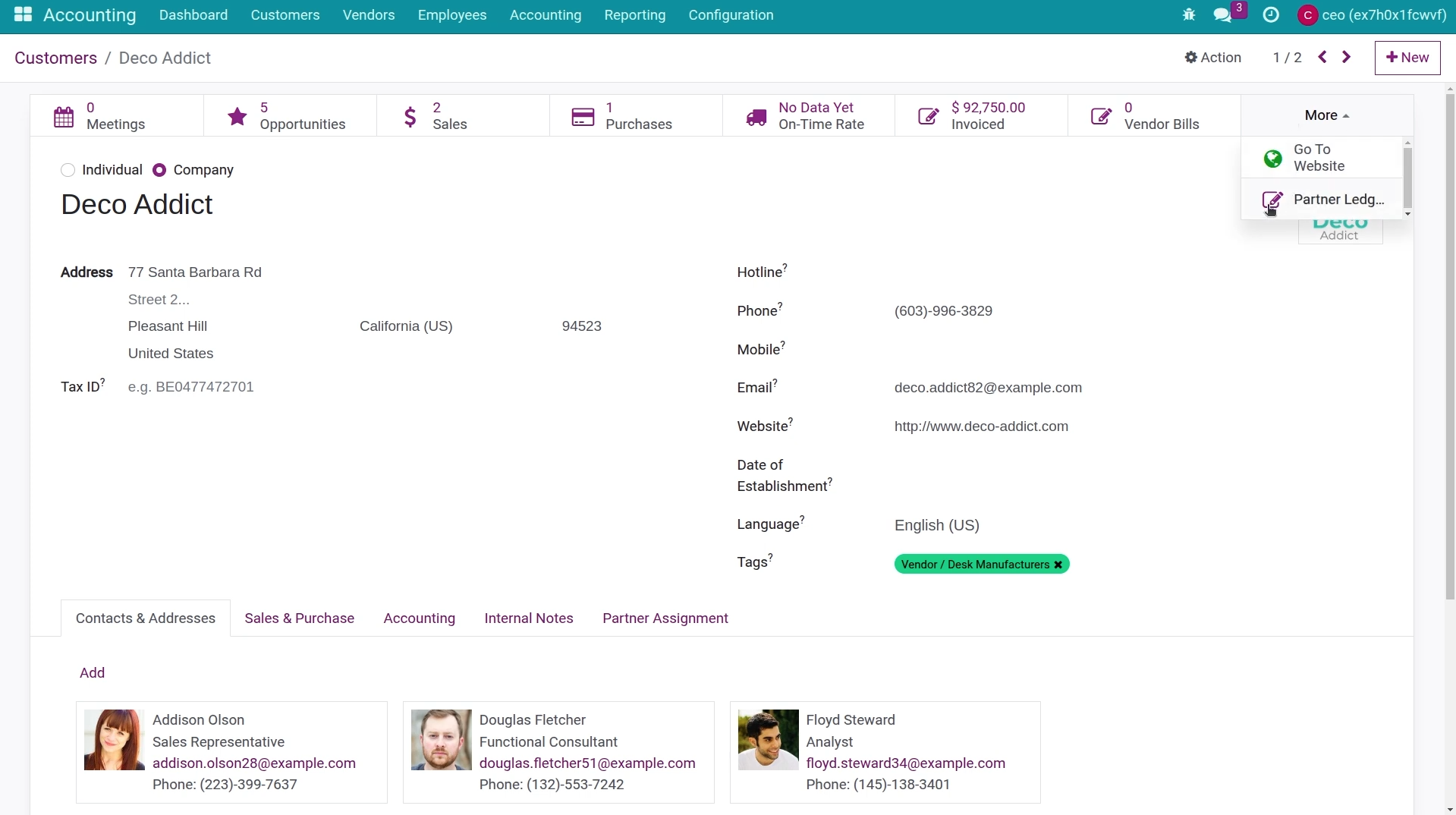
Partner aging on Contact
Open Aged Receivable/Payable from partner forms for faster collection and vendor reconciliation.
Recommended add-ons
Turn to_account_reports into a complete accounting reporting stack for Odoo Community - better controls, faster month-end, and Vietnam-ready statutory outputs when needed.
Accounting & Finance
Must-have for Odoo CEUnlock accountant-grade controls that make your reports trustworthy and audit-ready.
- Fiscal years and fiscal-year ending settings
- Lock dates (incl. hard lock) + auditable lock exceptions
- Posted datetime + manual direct entry tracking for audit trails
Account Reconciliation Widget
Faster month-endSpeed up bank and journal item reconciliation with practical workflows for daily accounting.
- Bank statement & cash register management (open/close balances)
- Statement entry reconciliation + direct payment recording
- Manual reconciliation and controlled reconciliation reversal
Core capabilities
Statement reports
Balance Sheet, Profit & Loss, Cash Flow, Executive Summary, and Tax report with period comparison.
Audit trail
General Ledger and Trial Balance with drill-down to journals for reconciliation.
Partner aging
Partner Ledger plus Aged Receivable/Payable accessible on contact forms.
Configurable criteria
Define formulas, data sources, and display options per report item to follow GAAP/VAS/IFRS policies.
Real-time data
Reports update automatically from posted entries; compare by week, month, year.
PDF/XLSX export
Print or download for management packs, audits, and banking submissions.
Assets Management
Fixed assets management that stays consistent with your financial statements.
- Depreciation schedules (linear, degressive, accelerated degressive)
- Auto-create assets from validated purchase invoices
- Auto-post depreciation journal entries
Budget Management
Plan, approve, and track budgets against actuals - great for management reporting.
- Budget planning and approval workflows
- Budget lines by analytic dimensions
- Variance tracking for costs and revenues
Account Automatic Transfer
Automate periodic transfer / allocation journal entries to make month-end faster and more consistent.
- Define transfer models (monthly/quarterly/yearly) with source and destination rules
- Allocate balances by percentages, partners, and analytic accounts
- Multiple transfer modes: balance-based, debit-to-credit, credit-to-debit
To avoid conflicts when using this Accounting Reports module, please uninstall Odoo's default Accounting Reports if it is installed.
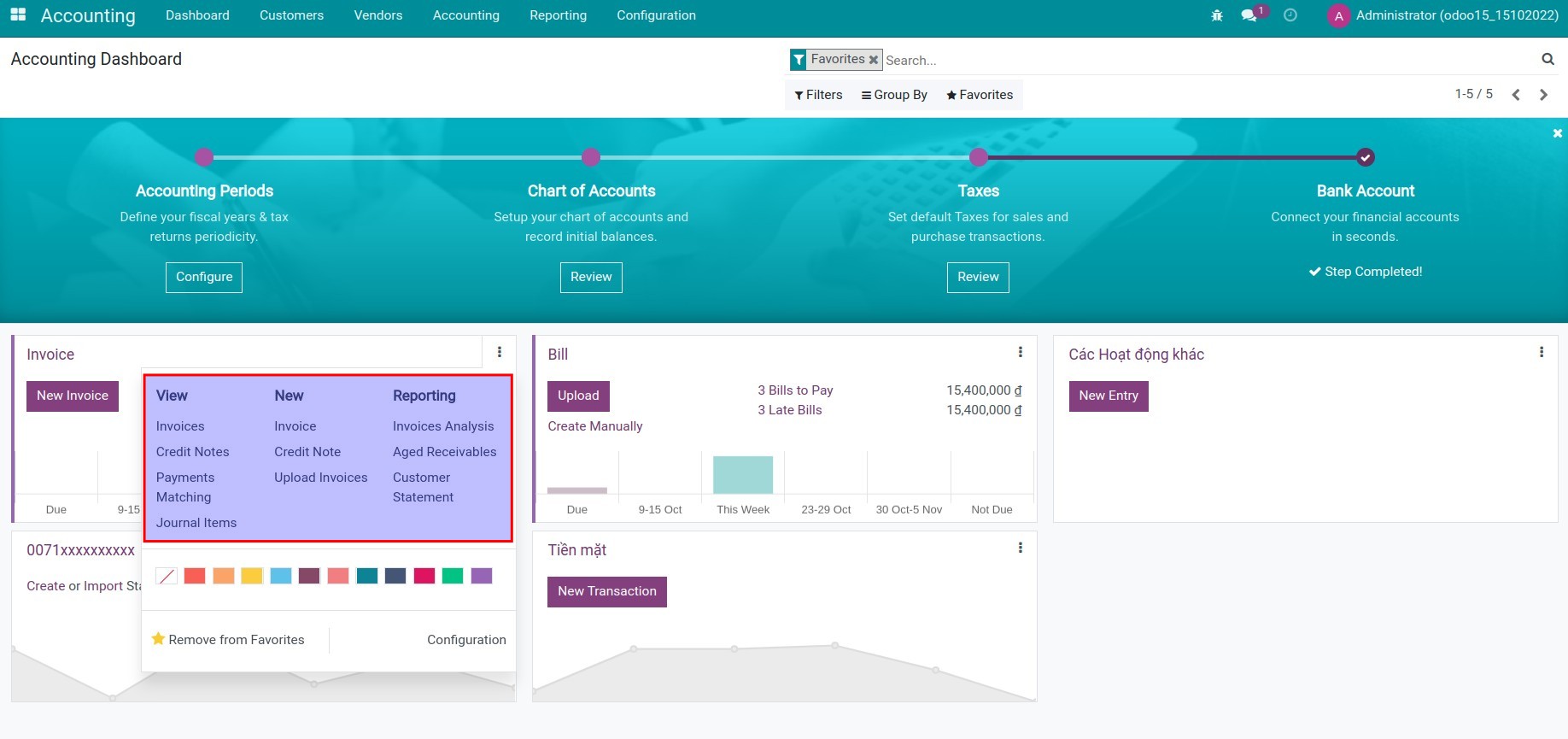
Allow view and create information related to journals on Kanban Journal Kanban: create and view entries directly from dashboard


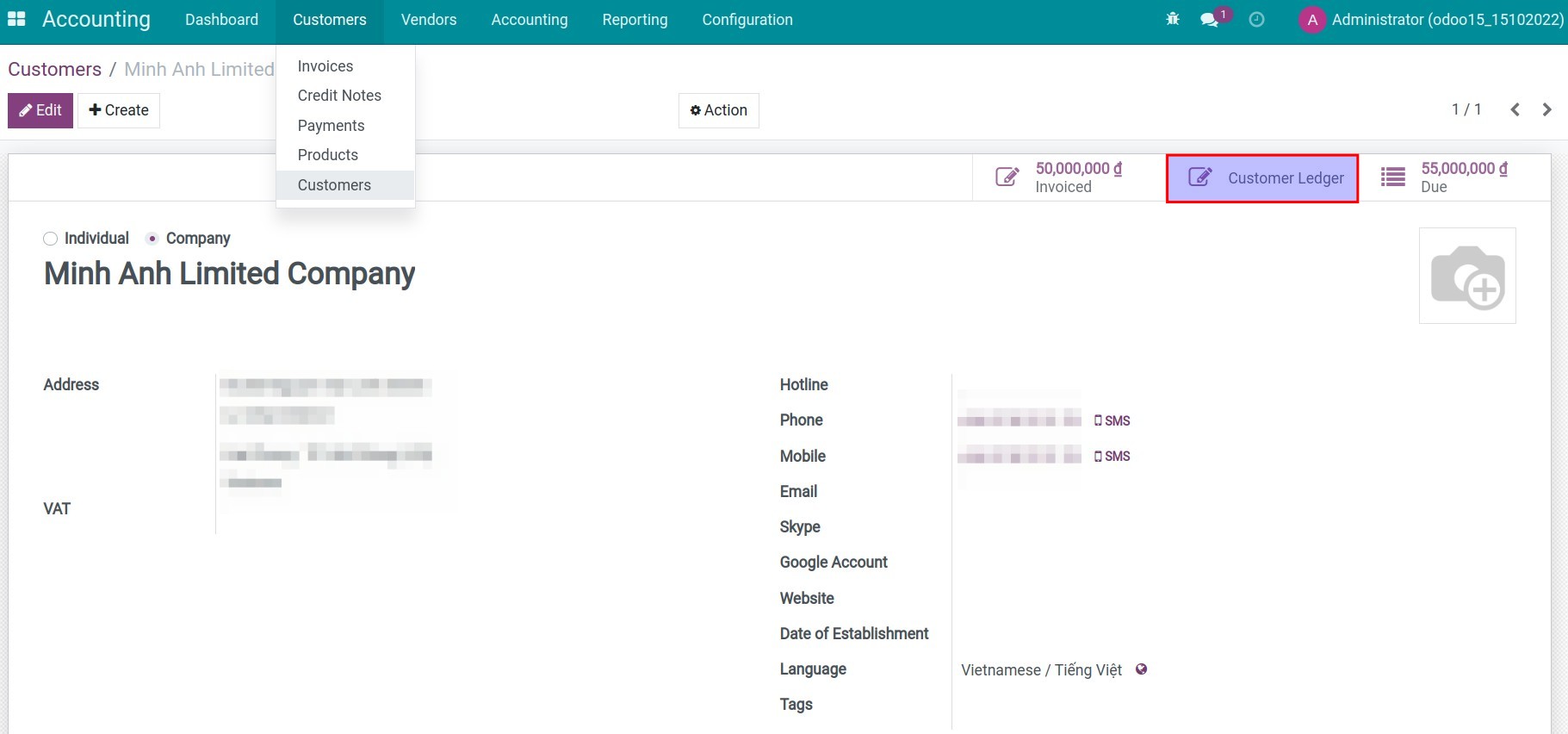
Manage payable and receivable in partner's contact View receivable/payable aging on contact


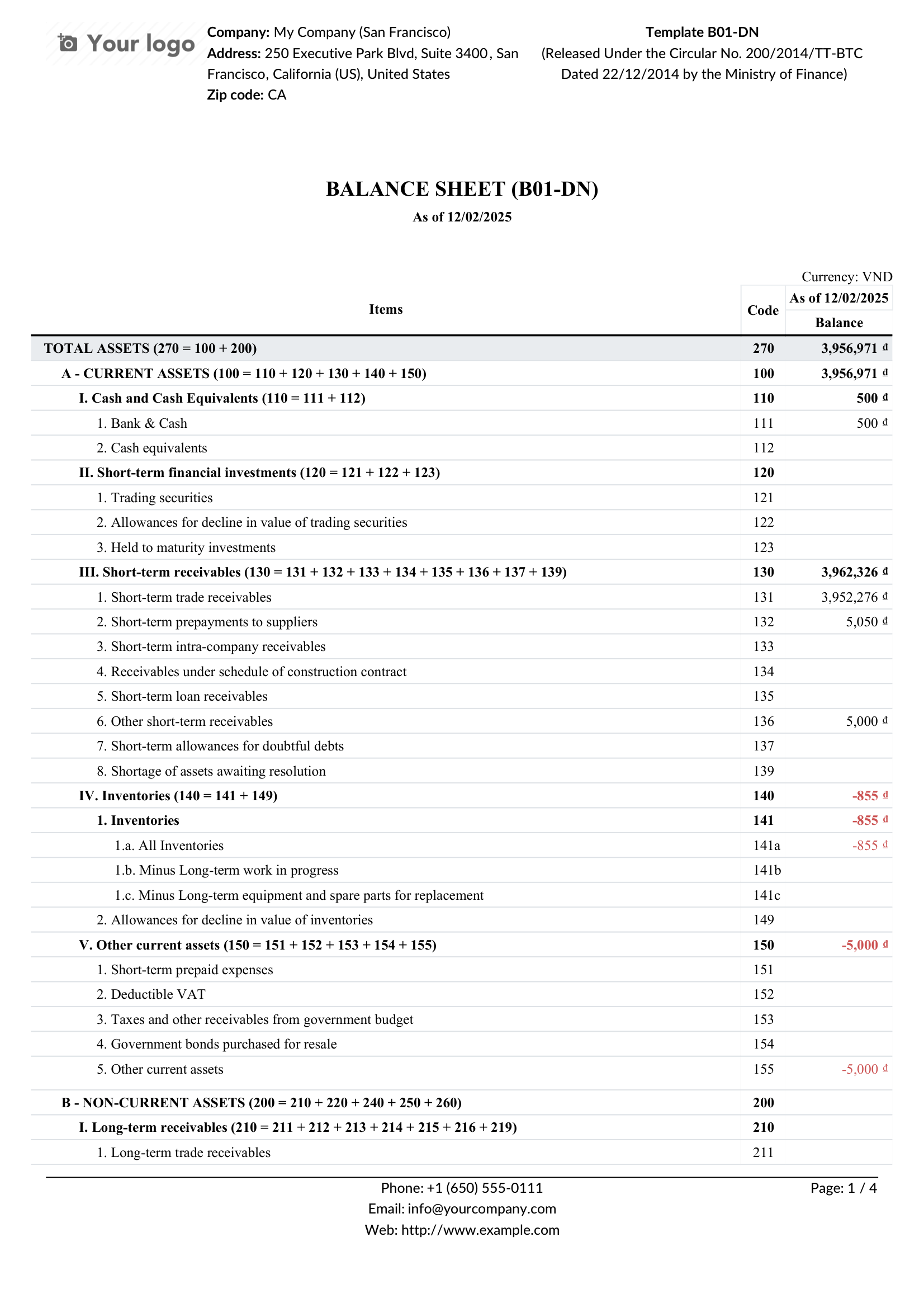
New report views with custom template Custom templates for financial statements

Allow printing and downloading reports in PDF, XLSX format Export financial reports to PDF or XLSX


Filter and compare data of different report types according to the selected period (week/month/year) Compare by period with interactive filters


Pre-Sales Question
Need help before purchasing? Share module name & version, edition (CE/EE), and the issue (trial, payment, installation). Attach screenshots if possible.
sales@viindoo.comSupport
For assistance, include your order number, issue description, expected resolution, and images/videos that replicate the issue.
apps.support@viindoo.comTechnical requirement
- Install the Accounting app as a prerequisite.
- Uninstall Odoo default Accounting Reports to avoid conflicts.
Changes log
- v1.1.4 - Updated the app description layout by replacing sliders/carousels with static sections, enlarging image captions, and improving support button readability.
Accounting Reports - Vietnam Accounting
Vietnam statutory reporting pack built on top of the reporting engine.
- VAS-ready financial statements (B01-DN, B02-DN, B03-DN)
- VAT declaration and Vietnam chart of accounts (TT99)
- PDF/Excel: general ledger, account detail, bank/cash books
Tip: Start with Accounting & Finance + Account Reconciliation Widget for the biggest day-1 impact, then add Account Automatic Transfer, assets/budgets/local packs as your accounting scope grows.
Benefits
Use standard formulas, consistent filters, and drill-down to reduce “Excel adjustments” and back-and-forth.
Formula info, unposted alerts, and clean exports make it easier to explain figures to auditors and management.
Report currency and analytic group-by columns help analyze performance across currencies and cost objects.
Standard report architecture (root/variant/sections) plus quick settings access reduce customization time and surprises.
Included reports
A ready-to-use report set that covers common financial statements, ledgers, and partner aging - with drill-down and export.
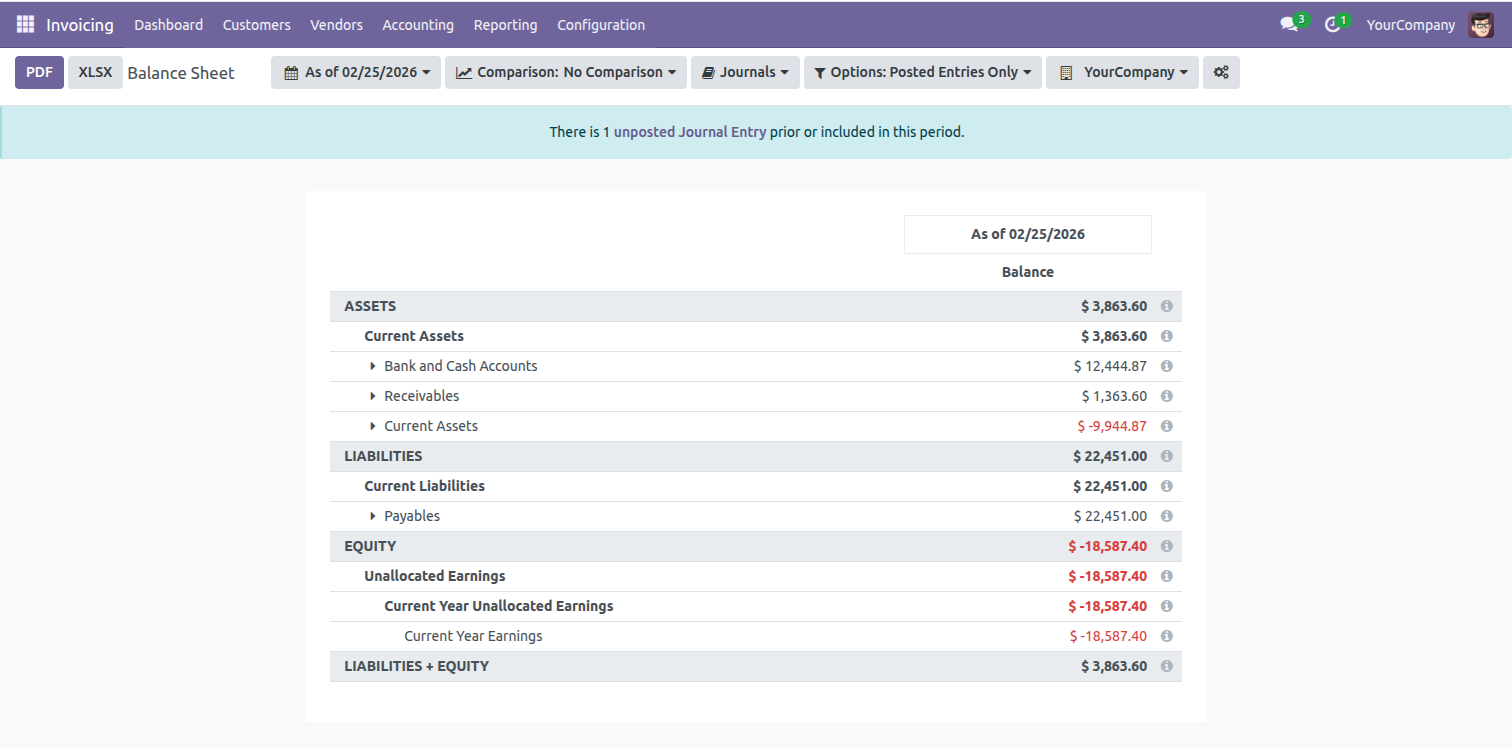
Balance Sheet
A classic statement of assets, liabilities, and equity.
- Hierarchy-friendly layout
- Period comparison
- Drill-down to journal items
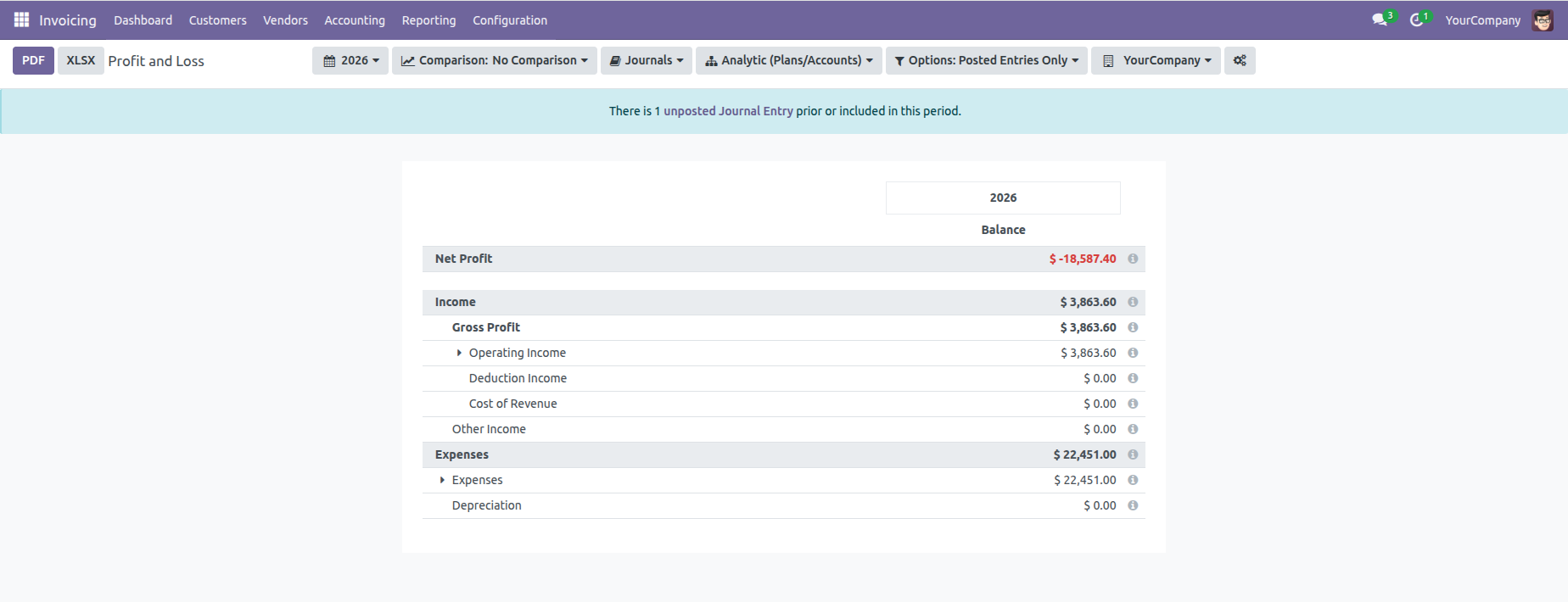
Profit and Loss
Income statement with configurable date range and comparison.
- Multi-column comparison
- Export to PDF/XLSX
- Drill-down to journal items
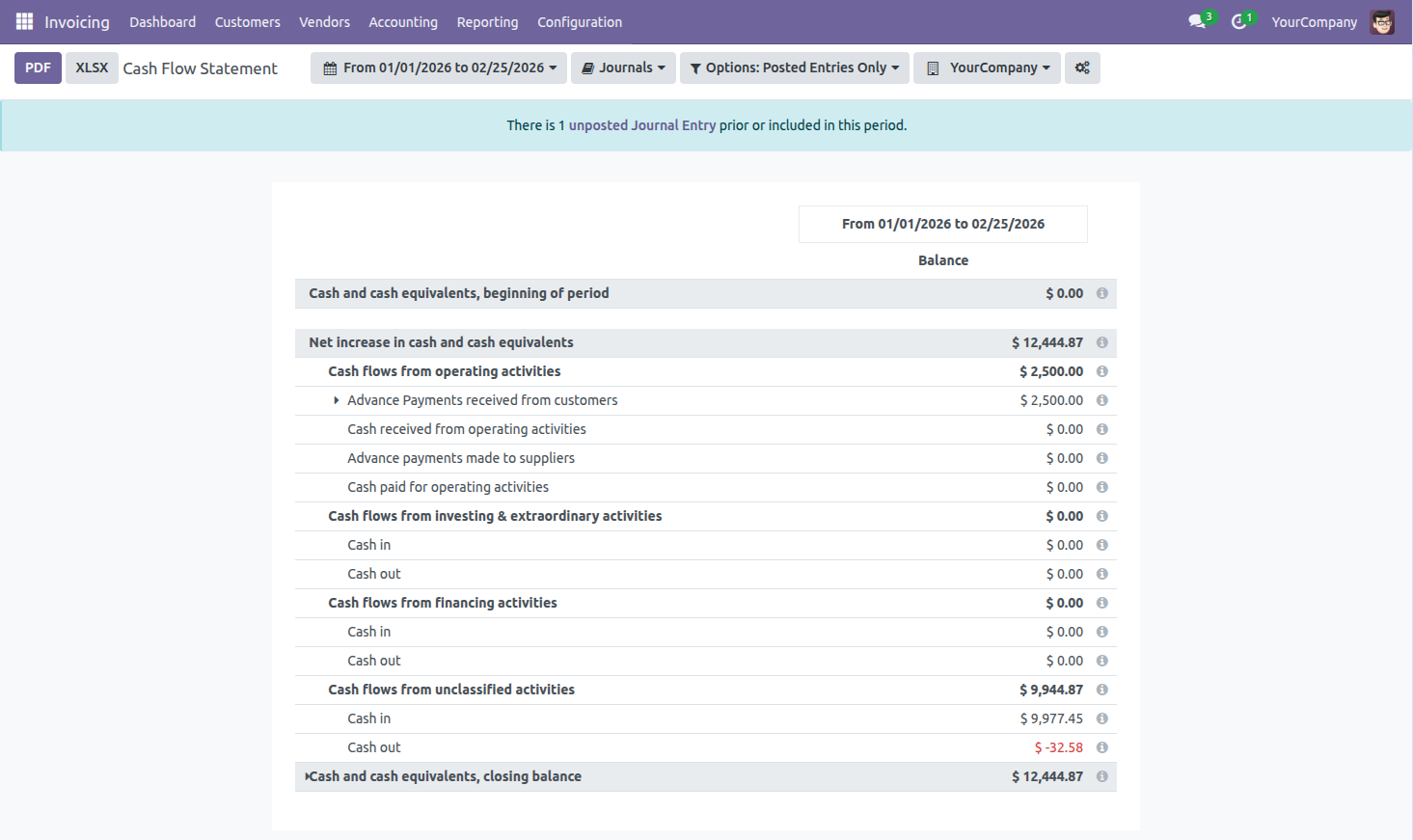
Cash Flow Statement
Cash flow view for operational, investing, and financing activities.
- Readable structure
- Comparison support
- Export-ready
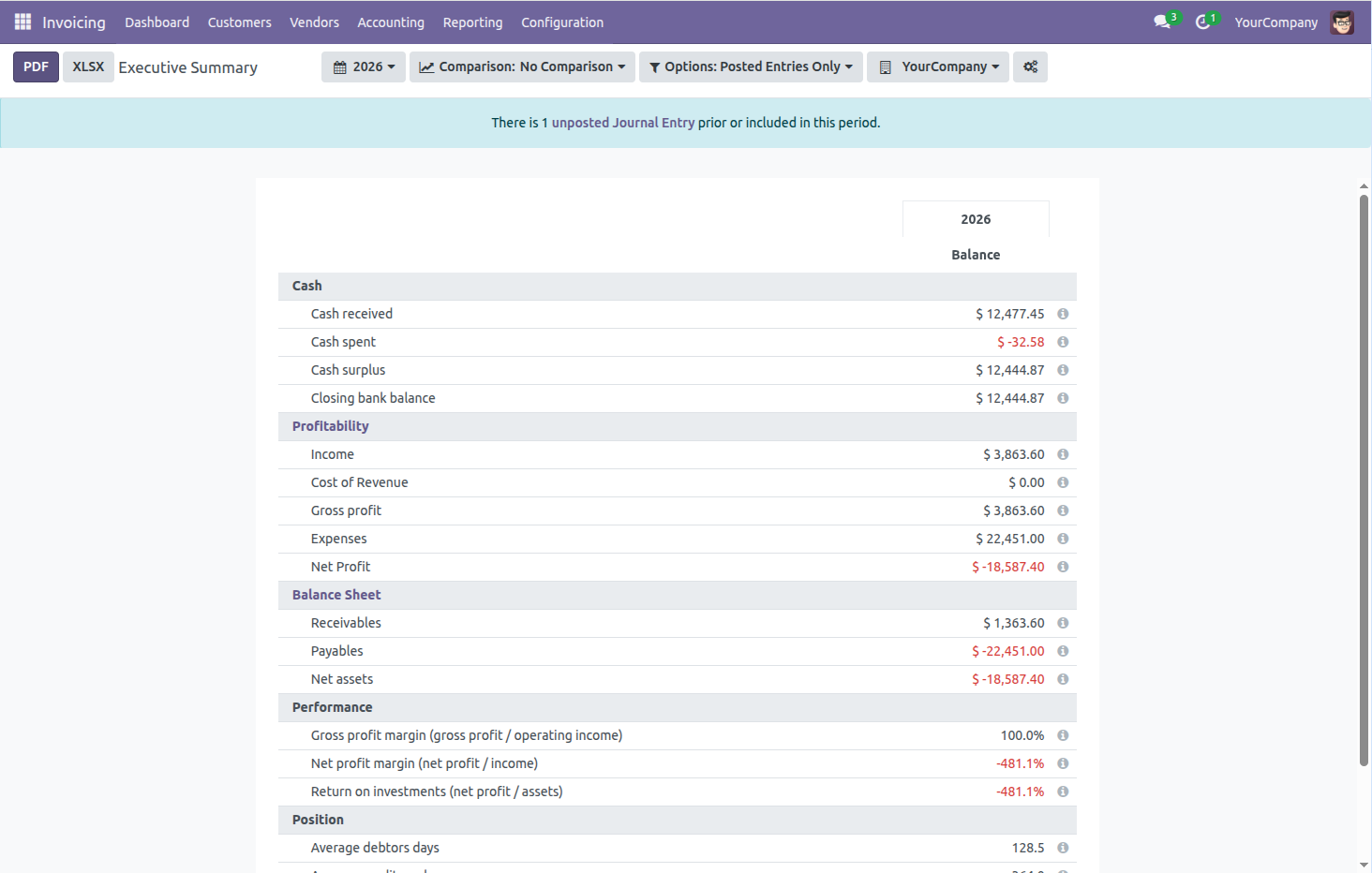
Executive Summary
High-level KPIs and highlights for quick review.
- Management-friendly overview
- Links to underlying lines
- Export-ready
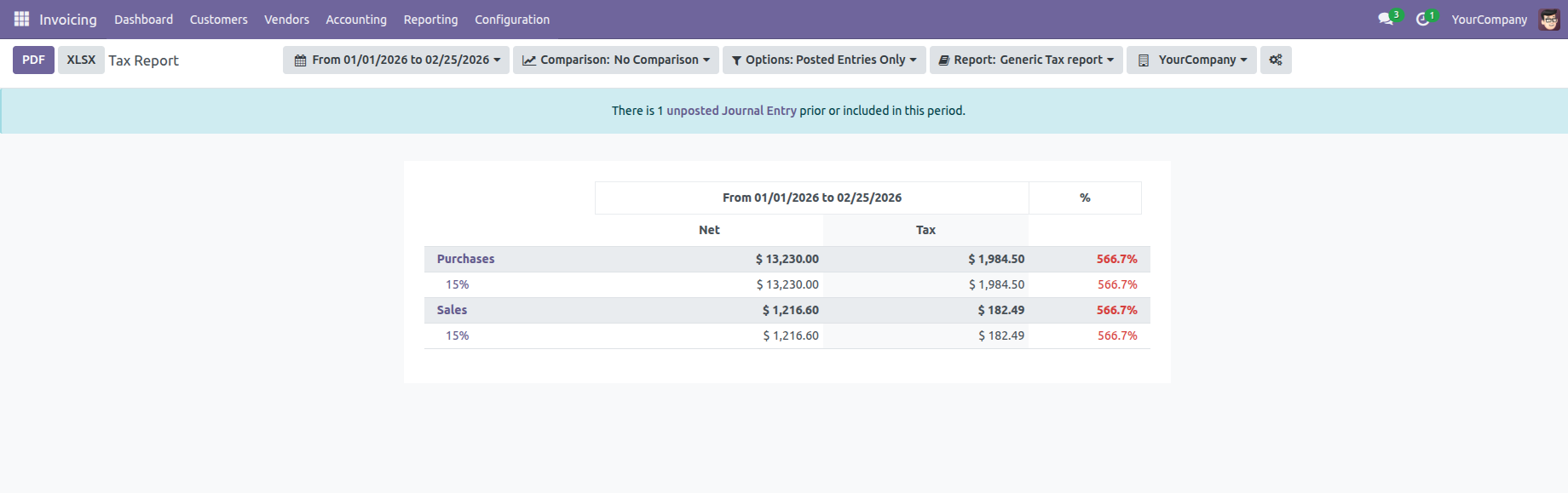
Tax Report
VAT/tax reporting view based on configured taxes and tax grids.
- Period-based view
- Drill-down lines
- Export to PDF/XLSX
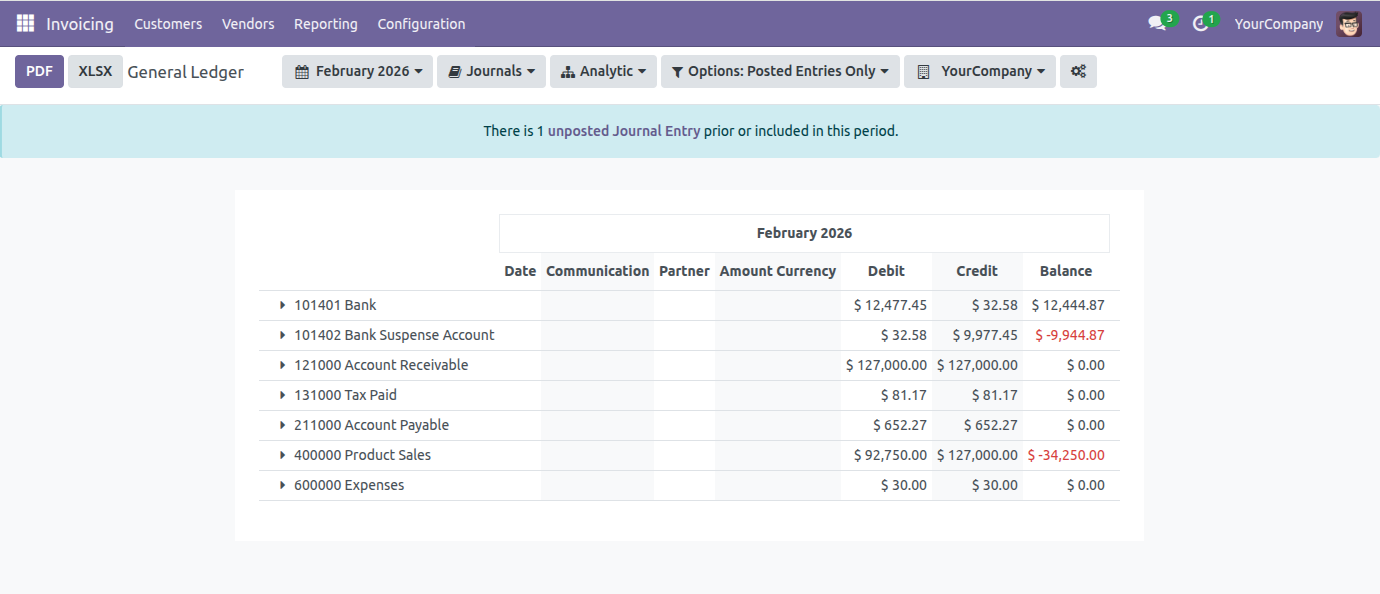
General Ledger
Detailed ledger with opening/ending balances and journal lines.
- Filter by journals/partners
- Expandable details
- Export-ready
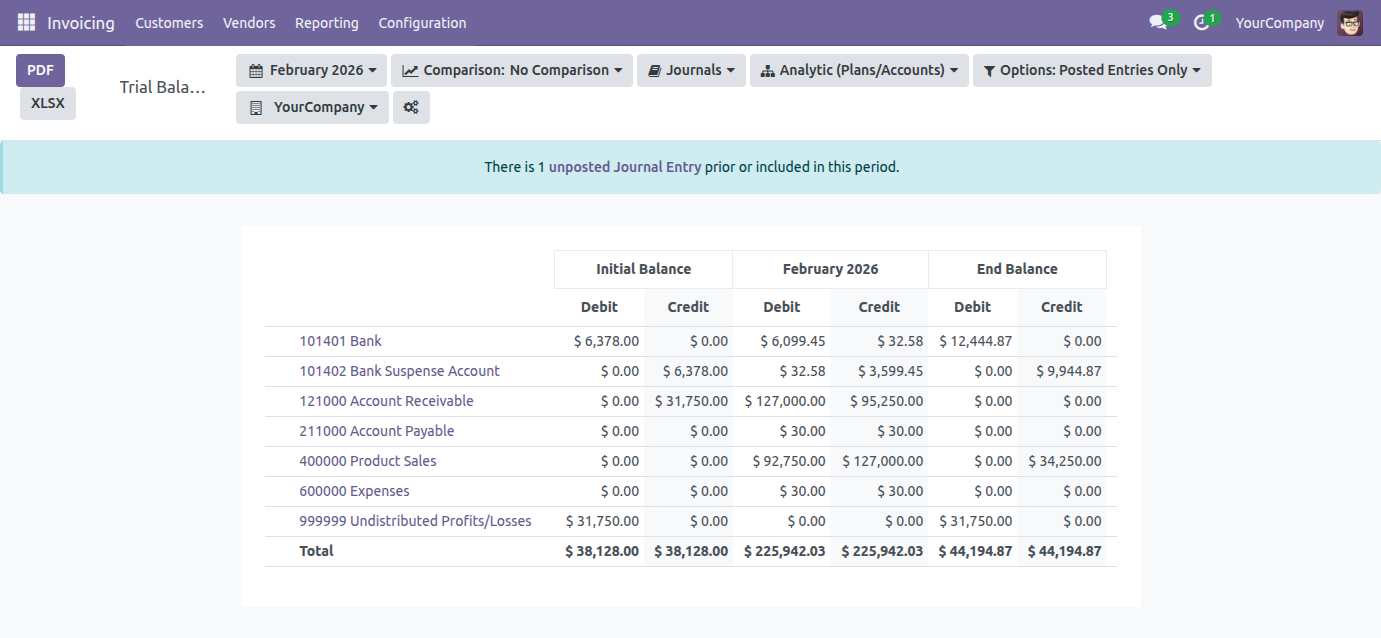
Trial Balance
Trial balance with debit/credit and balance totals.
- Fast validation of postings
- Comparison support
- Export-ready
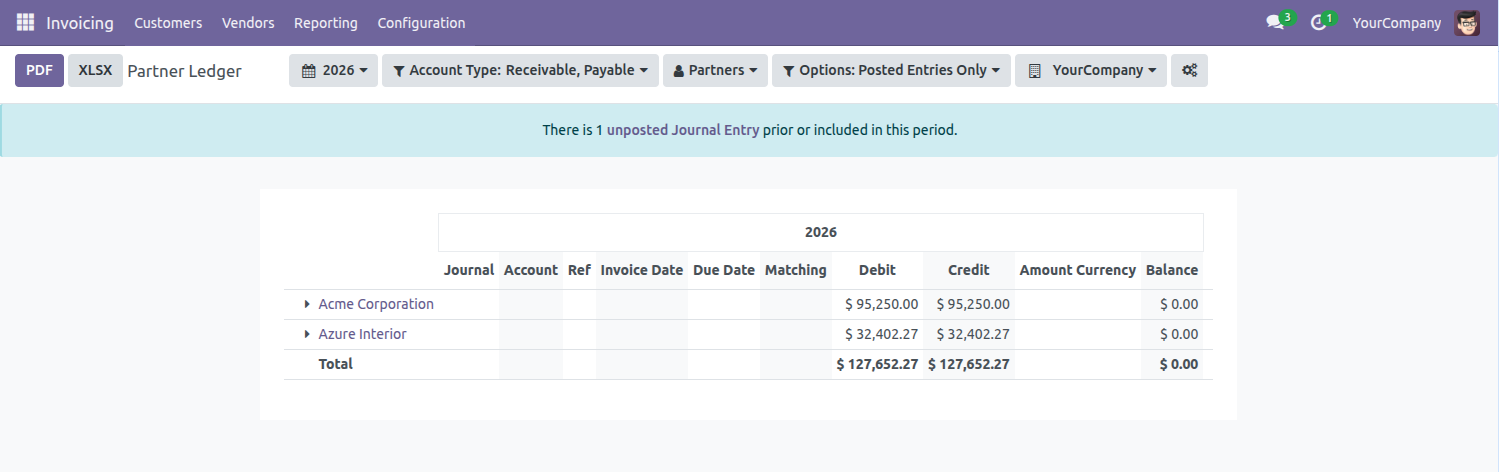
Partner Ledger
Partner ledger for receivables/payables tracking per partner.
- Partner-focused view
- Drill-down to entries
- Export-ready
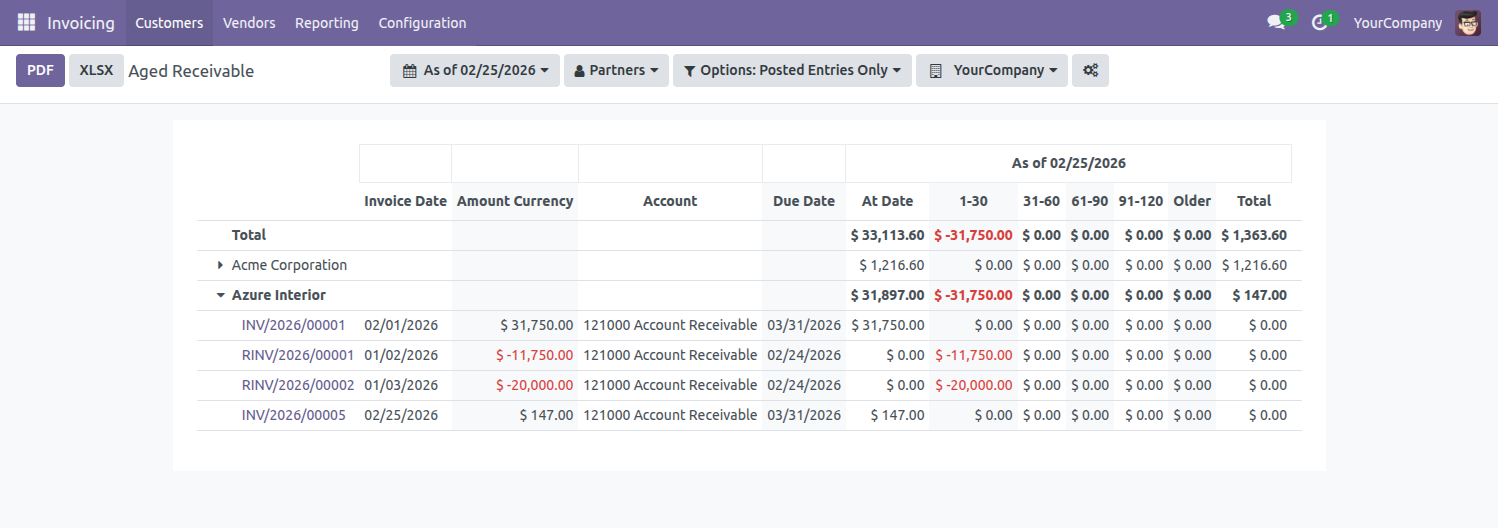
Aged Receivable
Aging analysis of customer receivables by due date buckets.
- Aging buckets
- Partner drill-down
- Export-ready
Aged Payable
Aging analysis of vendor payables by due date buckets.
- Aging buckets
- Partner drill-down
- Export-ready
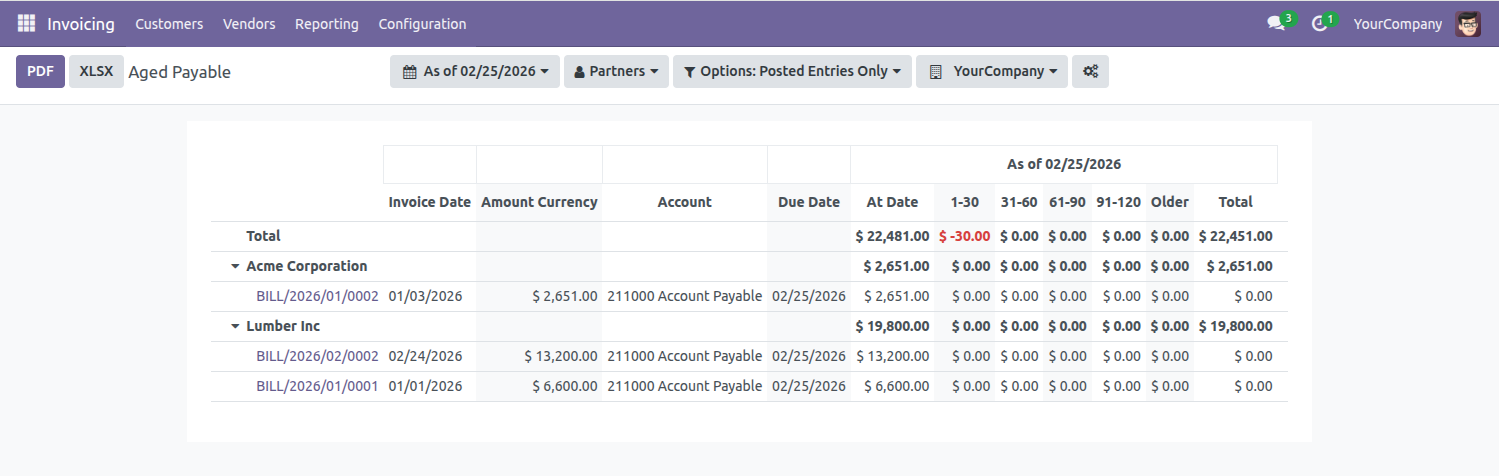
Everyday reporting conveniences
Built-in utilities that help accountants and consultants work faster during daily reporting:
- Partner aging available directly from Contacts
- Period comparison on the same report (current vs previous)
- Selectable display currency for financial reports
- Analytic group-by columns for management views
- Hierarchy view to expand/collapse levels like a real statement
- Hide zero lines to focus on material balances only
- Multi-company filter to review consolidated or shared accounting setups
- Formula info popover for easier report troubleshooting
- Alert for unposted journal entries that may affect results
- Quick access to report settings from the report screen
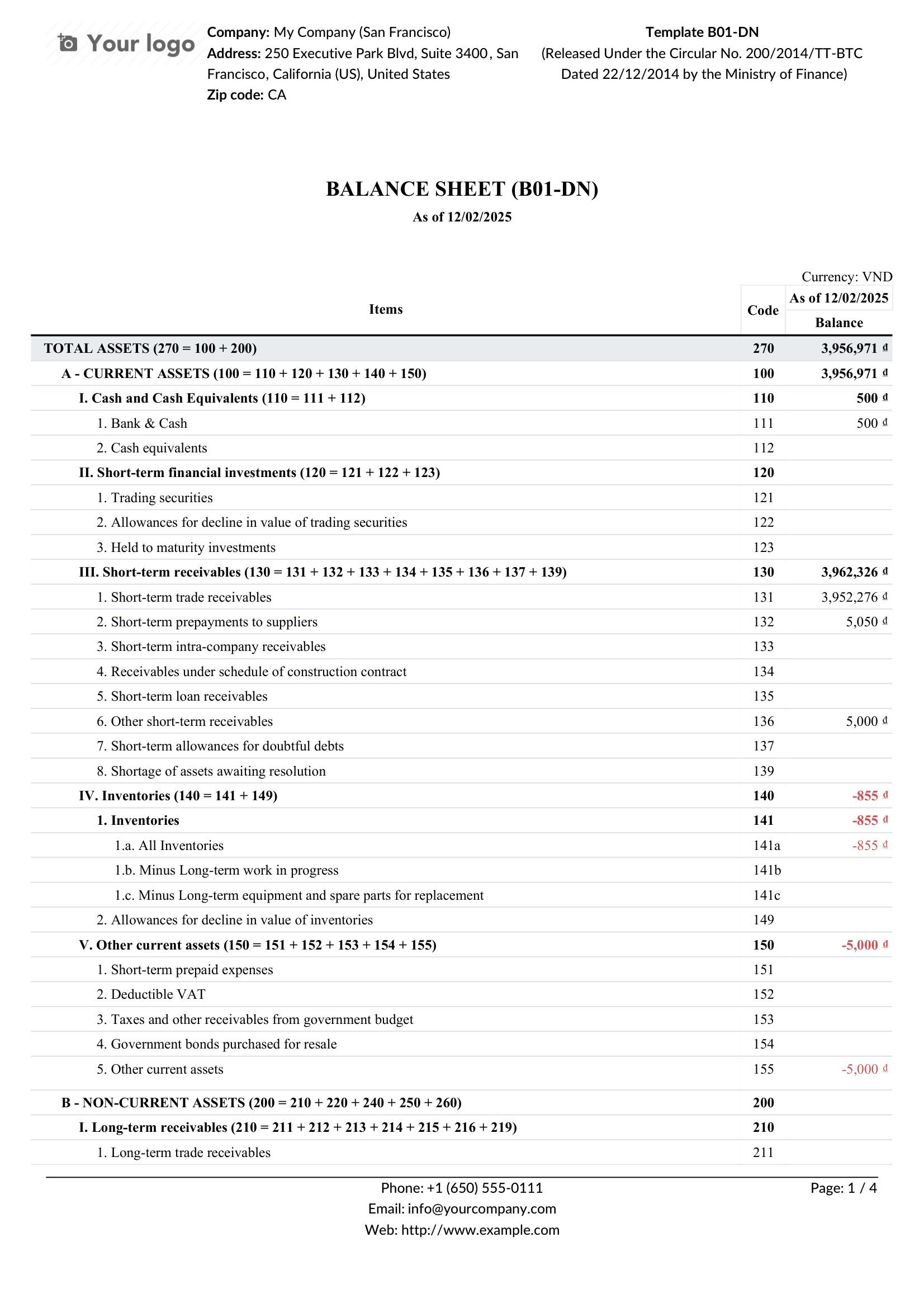
Custom templates & exports
More than a report pack, to_account_reports is
a developer-friendly reporting engine. Build any
accounting/financial report by configuring
account.report
,
account.report.line
, expressions, columns, and filters - then export it
consistently.
- Render reports with your own PDF templates for statements and management packs.
- Export to PDF/XLSX with clean output - interactive carets are hidden and headers stay consistent for printing.
- Reuse the same report definitions (lines/expressions/column groups) across companies and datasets.
- Extend with custom expressions and options to support local requirements without rewriting the UI.
Demo
This module is typically evaluated on your own accounting database because report content depends on your chart of accounts and postings.
If you want a guided demo for your use case, please contact Viindoo.
Need help with Accounting Reports?
For questions, implementation support, or custom features, please contact Viindoo.
Pre-Sales & Partnership
- Your Odoo Community or Viindoo Cloud version.
- Estimated users, key accounting processes.
- Other modules in scope (accounting, sales, inventory, etc.).
Technical Support
- App reference or order number.
- Odoo/Viindoo version & edition.
- Steps to reproduce and screenshots/logs.
Technical Requirement
Changes log
18.0.1.1.4 - Reporting UX & Transparency
- Selectable report currency.
- Analytic group-by columns (plans/accounts) without affecting totals.
- Formula info popover on report lines.
- Unposted journal entries alert with direct navigation.
- Quick settings button to open the current report configuration.
- Filters: hide zero lines, hierarchy, multi-company.
- Cleaner PDF export (hide interactive carets) and header refinements.
17.0.1.1.3
- Financial statements and ledger reports based on Odoo account.report.
- Partner ledger and aged receivable/payable.
- PDF/XLSX export.
Who should use this module?
Ideal for organizations that need reliable accounting reports with clear traceability - and for partners who implement Odoo Community and Viindoo Cloud accounting in real projects.
Accountants & CFOs
Need trustworthy financial statements, ledgers, and clear drill-down to source entries.
Odoo Community users
Want an enhanced reporting experience and exports without relying on Enterprise-only reporting features.
Implementation partners
Need practical features (settings shortcut, consistent options) to deliver accounting projects smoothly.
Installation
- Navigate to Apps.
- Search with keyword to_account_reports.
- Press Install.
Note: To have a full feature-related observation of this module, you need install Accounting app.
Instruction
Instruction video: Accounting Reports
1. View the journal-related information in the dashboard menu.
Go to Accounting app > Dashboard, choose any kanban. Each kanban card is correlative with one journal in the Accounting app at this interface.
2. View the receivable report on the customer's contact.
Go to Accounting app > Customers > Customers, press Customer Ledger.
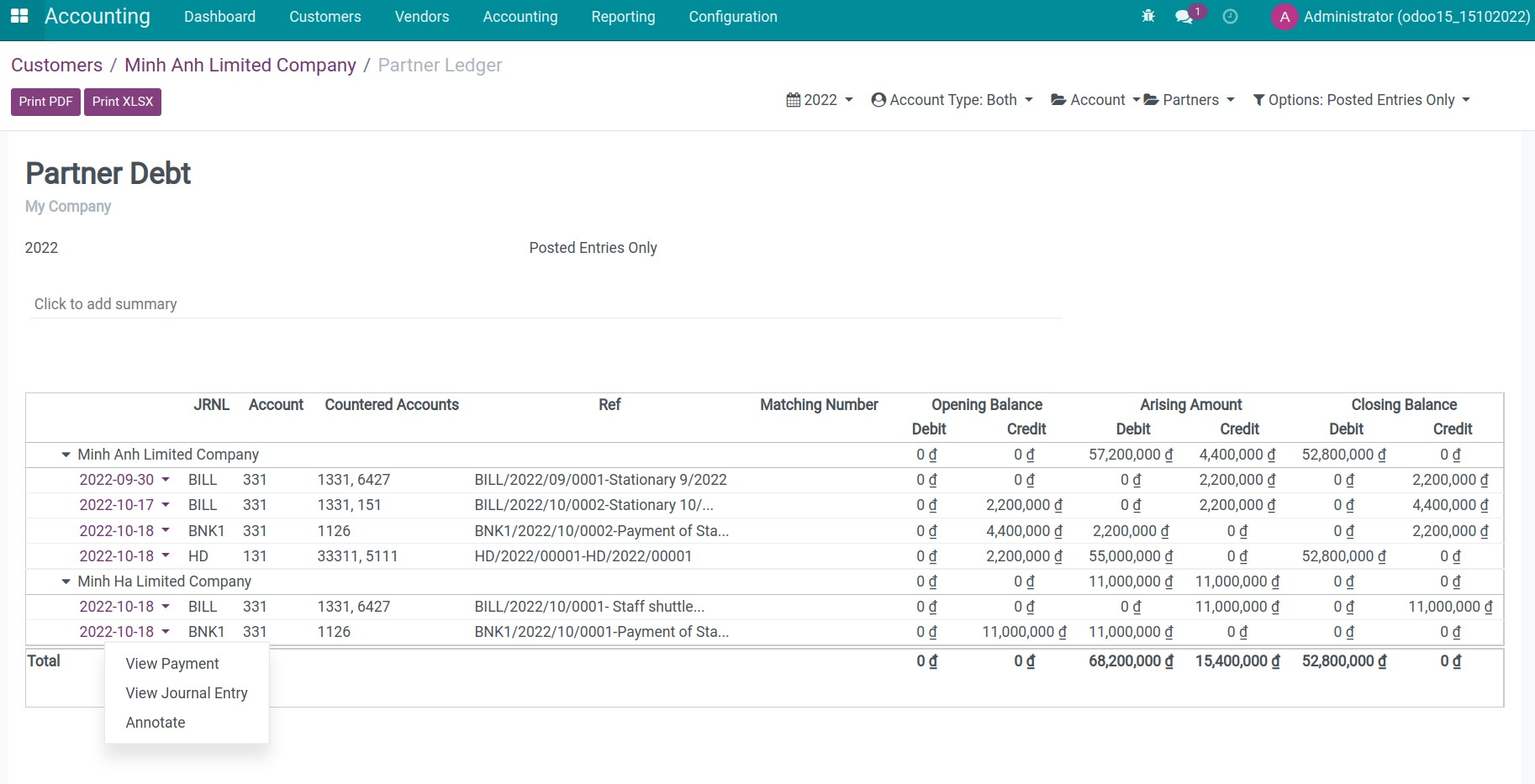
3. View the accounting reports.
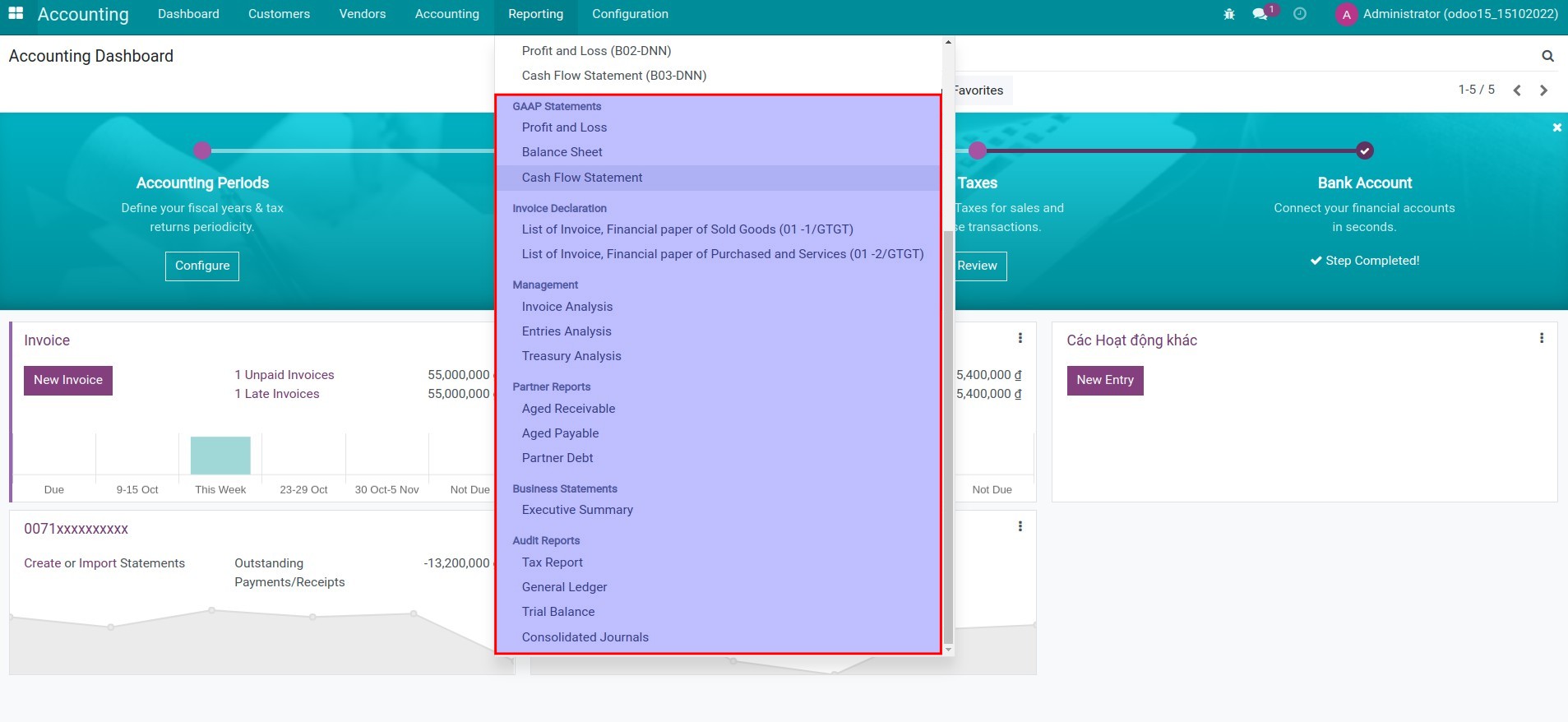
Go to Accounting app > Reports.
- GAAP Statements:
- Profit and Loss;
- Balance Sheet;
- Cash Flow Statement.
- Management reports:
- Invoice Analysis;
- Entries Analysis;
- Treasury Analysis.
- Partner Reports:
- Aged Receivable;
- Aged Payable;
- Partner Debt.
- Business Statements (Executive Summary).
- Audit Reports:
- Tax Report;
- General Ledger;
- Trial Balance.
- Note: In order to observer the financial reports according to Vietnam Accounting Standards (VAS), you need install module l10n_vn_viin_account_reports.
This software and associated files (the "Software") may only be used (executed, modified, executed after modifications) if you have purchased a valid license from the authors, typically via Odoo Apps, or if you have received a written agreement from the authors of the Software (see the COPYRIGHT file).
You may develop Odoo modules that use the Software as a library (typically by depending on it, importing it and using its resources), but without copying any source code or material from the Software. You may distribute those modules under the license of your choice, provided that this license is compatible with the terms of the Odoo Proprietary License (For example: LGPL, MIT, or proprietary licenses similar to this one).
It is forbidden to publish, distribute, sublicense, or sell copies of the Software or modified copies of the Software.
The above copyright notice and this permission notice must be included in all copies or substantial portions of the Software.
THE SOFTWARE IS PROVIDED "AS IS", WITHOUT WARRANTY OF ANY KIND, EXPRESS OR IMPLIED, INCLUDING BUT NOT LIMITED TO THE WARRANTIES OF MERCHANTABILITY, FITNESS FOR A PARTICULAR PURPOSE AND NONINFRINGEMENT. IN NO EVENT SHALL THE AUTHORS OR COPYRIGHT HOLDERS BE LIABLE FOR ANY CLAIM, DAMAGES OR OTHER LIABILITY, WHETHER IN AN ACTION OF CONTRACT, TORT OR OTHERWISE, ARISING FROM, OUT OF OR IN CONNECTION WITH THE SOFTWARE OR THE USE OR OTHER DEALINGS IN THE SOFTWARE.