
Vietnam E-invoice - Sale
by Viindoo
| Lines of Code | 643 |
| Technical name | l10n_vn_viin_einvoice_sale |
| License | OPL-1 |
| Website | https://viindoo.com/apps/app/17.0/l10n_vn_viin_einvoice_sale |
| Read description for | v 13.0 v 14.0 v 15.0 v 16.0 v 17.0 |
| Required Apps | Invoicing (account) Discuss (mail) |
| Included Dependencies | Vietnamese E-Invoice Integration Partner Budget Code Partner Identity Information Viindoo Base Accounting Foundation Legal Invoice Number API Request Logger |

Vietnam E-invoice - Sale
Automatically add Vietnamese descriptions when creating invoices from sales orders for compliance and efficiency.
Key Features
Built natively on Odoo/Viindoo to streamline real business operations:
Automatic Dual-Language Descriptions
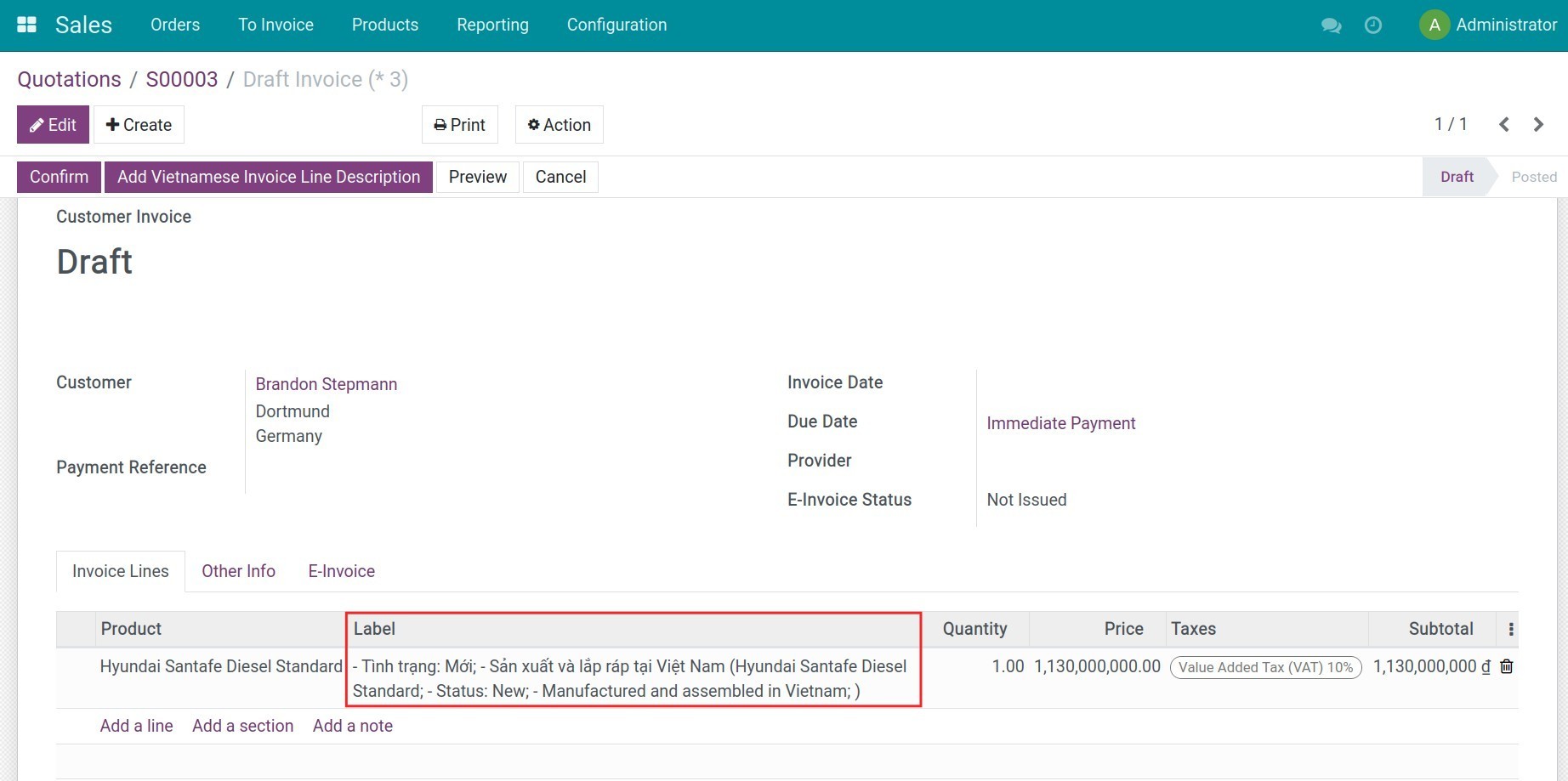
The moment a customer invoice is created from a sales order, each line description is filled in Vietnamese and the customer's own language - Vietnamese first, foreign language in parentheses - with zero manual typing.
Built for Vietnam's E-Invoice Compliance
Meets the Vietnamese-language requirement for e-invoice line descriptions automatically, for every invoice issued to a foreign-language customer.
Works With Any E-Invoice Provider
Provider-agnostic: the dual-language description is applied whenever the sale journal is linked to an active e-invoice provider - Viettel S-Invoice, VNInvoice or MISA meInvoice - through the unified E-Invoice interface.
No New Screens, No Setup
Nothing new to configure: no menu, no button, no field to fill in by hand. Install it alongside your existing Sales and e-invoice setup and it works.
Benefits
Guarantees every foreign-customer invoice line description meets Vietnam's e-invoice language requirement, without extra staff effort.
Removes the manual step of retyping or translating invoice line descriptions for every foreign-customer invoice.
Eliminates typos and inconsistent translations that come from manual dual-language entry.
Plugs directly into the unified E-Invoice engine, so the compliant description flows straight through to the e-invoice you issue.
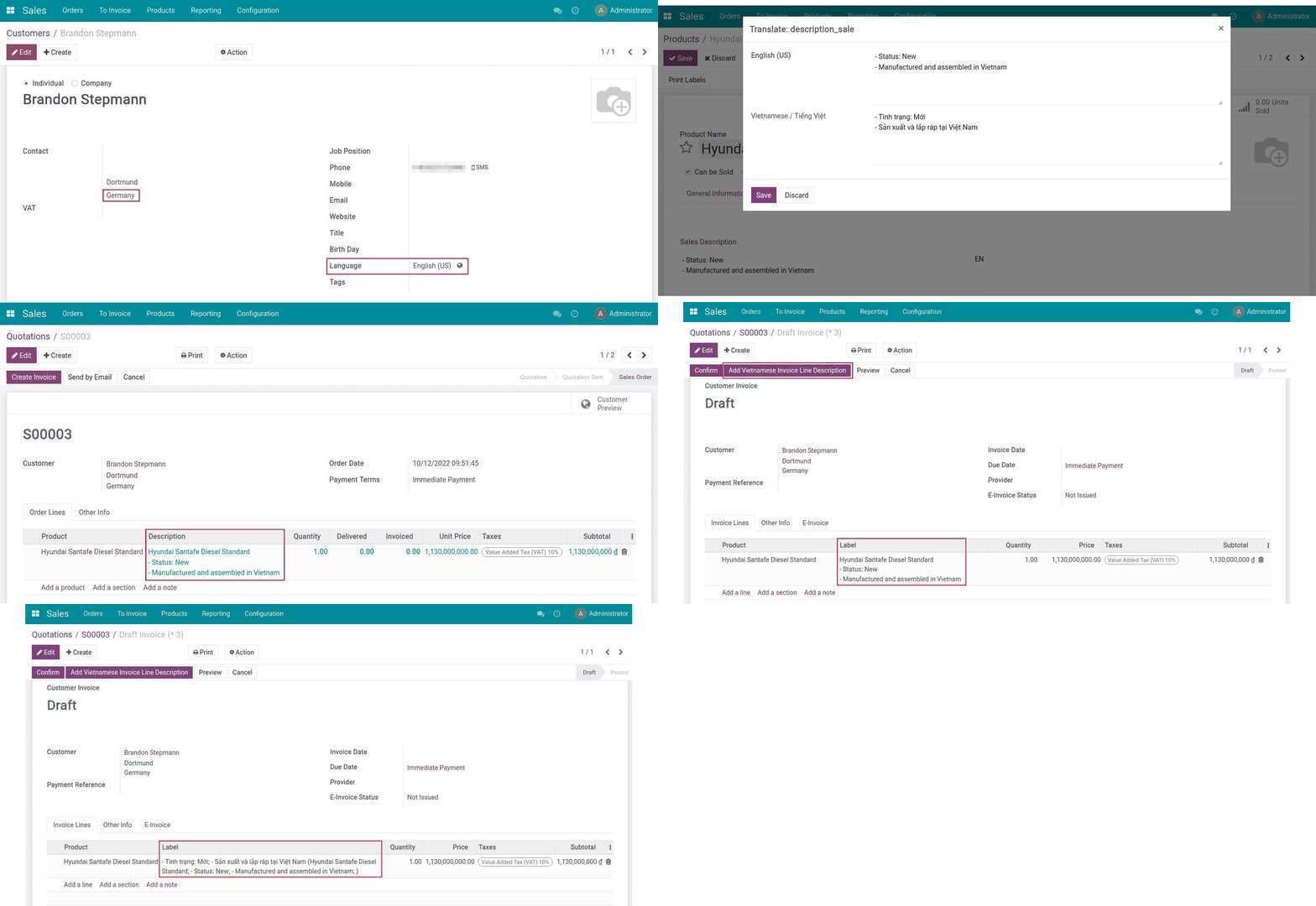
Create contact
Update sales description
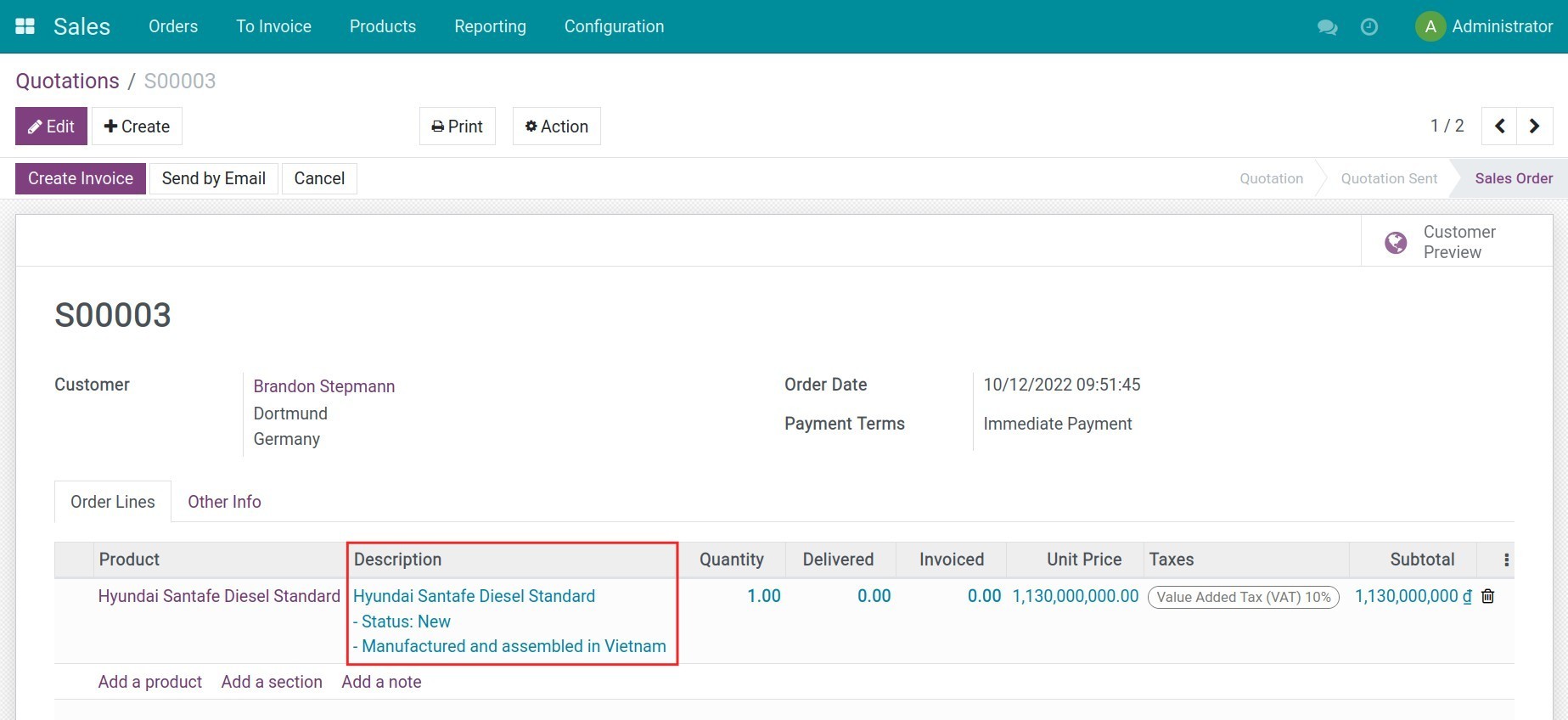
Create sales order
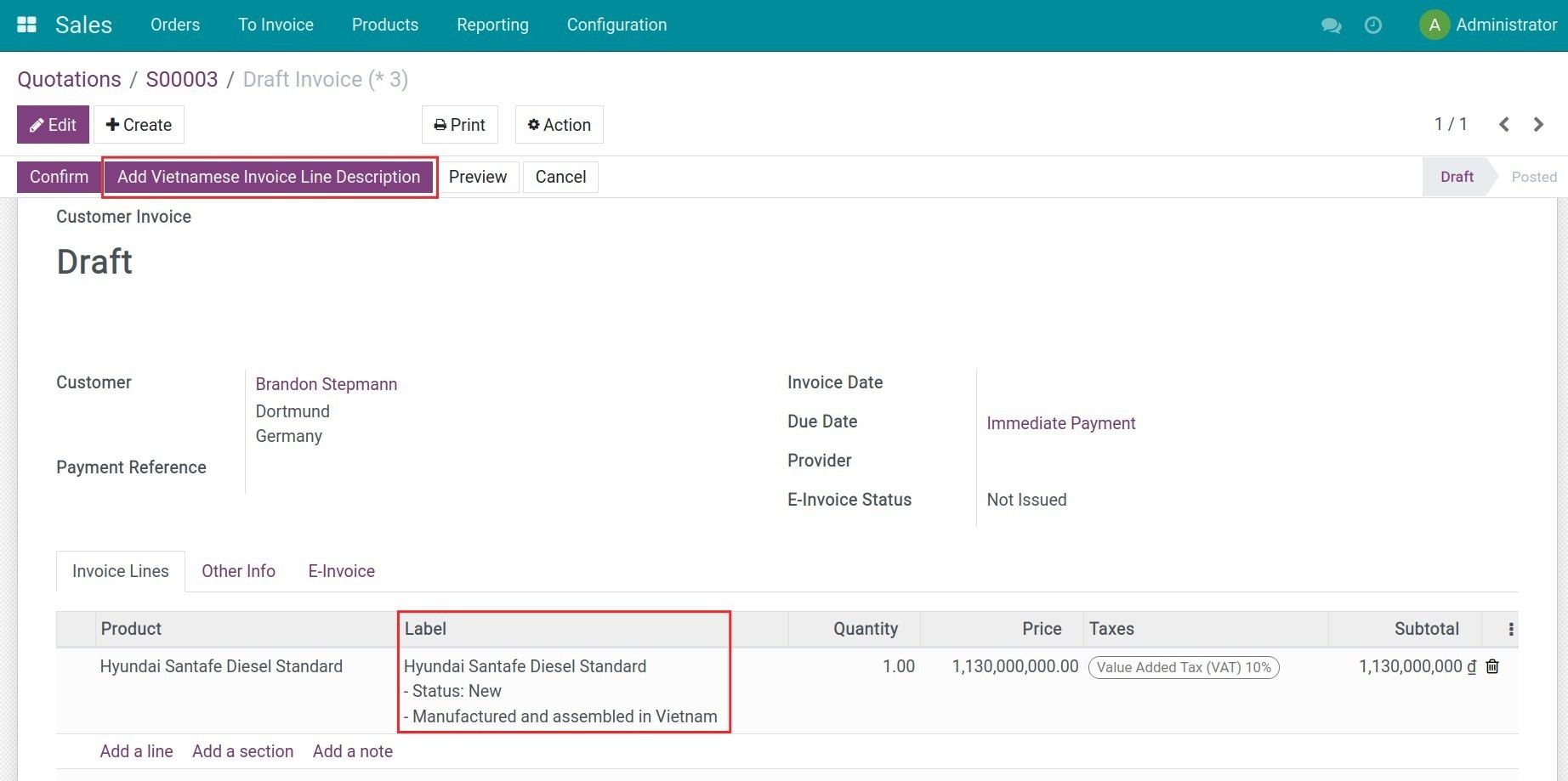
Vietnamese description added automatically
Invoice line with dual-language description
See Vietnam E-invoice - Sale in Action
See how this module solves real business problems in a working Viindoo environment.
Need help with Vietnam E-invoice - Sale?
For questions, implementation support, or consulting services, contact Viindoo.
Pre-Sales & Partnership
When contacting us, please include:
- Odoo/Viindoo version (CE/EE).
- Number of users and business scope.
- Other modules currently in use.
Technical Support
For faster troubleshooting, please provide:
- Order number or app reference.
- Odoo/Viindoo version & edition.
- Steps to reproduce the issue.
- Screenshots/logs if available.
Technical Requirement
Changes log
We continuously improve this module. Recent updates from the official Viindoo repository:
- 2026-07-05 Improved Upgraded to Odoo 18.0: the dual-language invoice-line hook was rewritten as a plain method override (no more monkey-patch), issued e-invoices now flow through the unified E-Invoice interface, and the dual-language output was re-verified byte-for-byte on 18.0.
- 2026-05-15 Added Added the App Store landing page and full end-user documentation.
- 2025-08-22 Improved Improved the dual-language logic to correctly support subscription and recurring sales orders.
- 2024-09-17 Added Added a demo video to the module listing.
- 2024-05-08 Fixed Fixed the invoice line label so any other module customizing it downstream is still respected.
Works Great With These Modules
Extend Vietnam E-invoice - Sale with complementary Viindoo apps:
Vietnamese E-Invoice Integration
The provider-agnostic backbone that powers configuration, issuance and tracking for every Vietnamese e-invoice provider - required for this module's dual-language description to reach an issued e-invoice.
Module l10n_vn_viin_ediVietnam Electronic Invoice Line Grouping
Provide options to issue an e-invoice on a detailed or line-grouped form.
Module l10n_vn_edi_line_groupingE-Invoice - Viettel S-Invoice Integrator
Issue Vietnamese e-invoices through Viettel S-Invoice on top of Odoo core, fully integrated with the unified E-Invoice interface.
Module l10n_vn_viin_accounting_sinvoiceShow EInvoice Information on POS Receipt
General information of the e-invoice on the POS receipt.
Module l10n_vn_viin_edi_posWho Should Use This Module?
Built for teams that need this capability fully integrated into their Odoo/Viindoo stack.
Businesses Operating in Vietnam
Companies needing to issue invoices compliant with Vietnamese e-invoice regulations.
Exporters and International Traders
Businesses that work with foreign customers and require dual-language invoice descriptions.
Accounting and Sales Teams
Users looking to streamline invoice creation and ensure accuracy with automated solutions.
Installation
- Navigate to Apps.
- Search with keyword l10n_vn_viin_einvoice_sale.
- Press Install.
Instruction
Instruction video: E-invoice - Sale
This module is a small bridge between Sales and Vietnam e-invoicing. When a customer invoice is created from a sales order, it automatically fills each invoice line description in BOTH Vietnamese and the customer's own language - no button to press, no manual edit - so the e-invoices you issue for foreign customers always carry a compliant Vietnamese description. The module adds no menu or tab of its own: the resulting invoice is issued, tracked, adjusted and replaced from the unified E-Invoice interface provided by the hub module (l10n_vn_viin_edi).
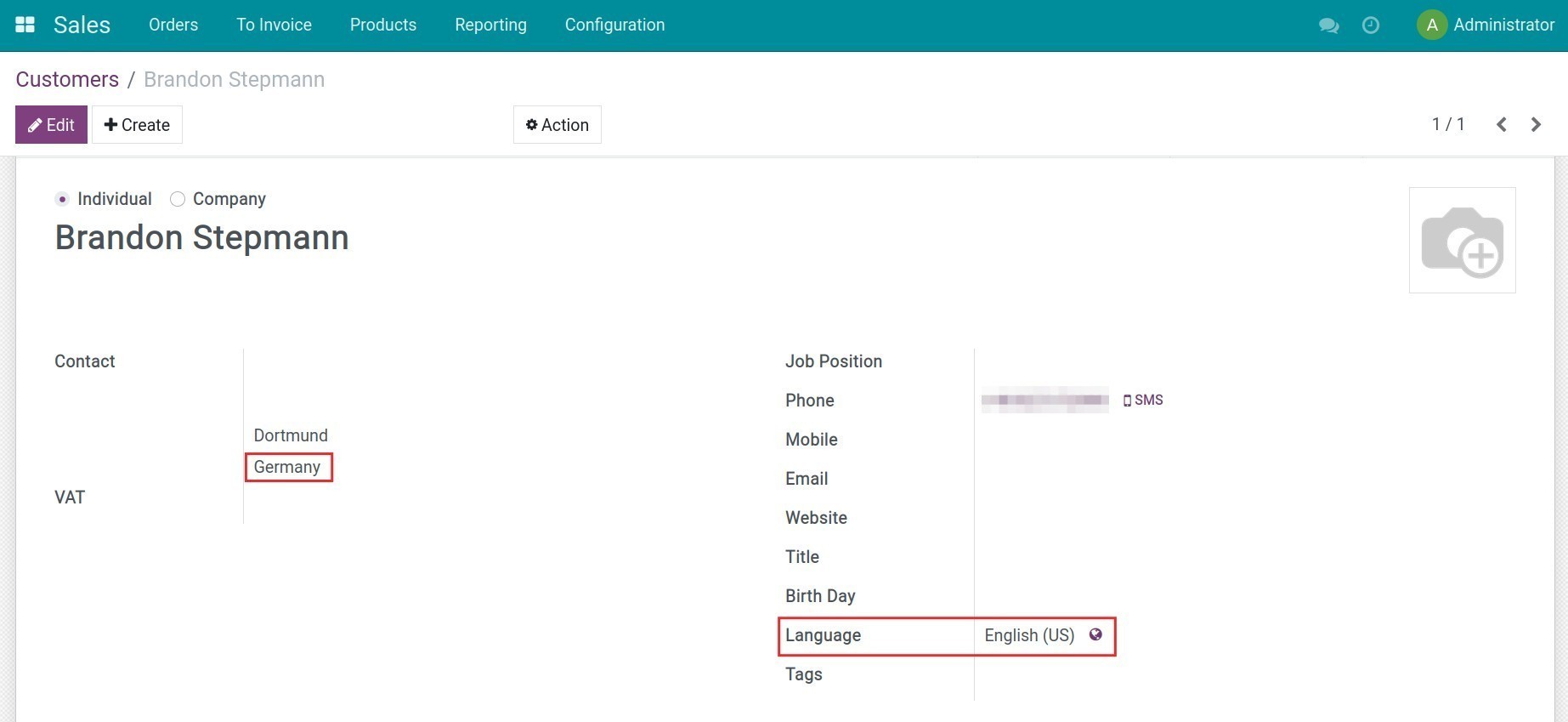
1. Create a foreign-language customer contact.
- Create a contact whose address is in a foreign country and whose communication language is different from Vietnamese.
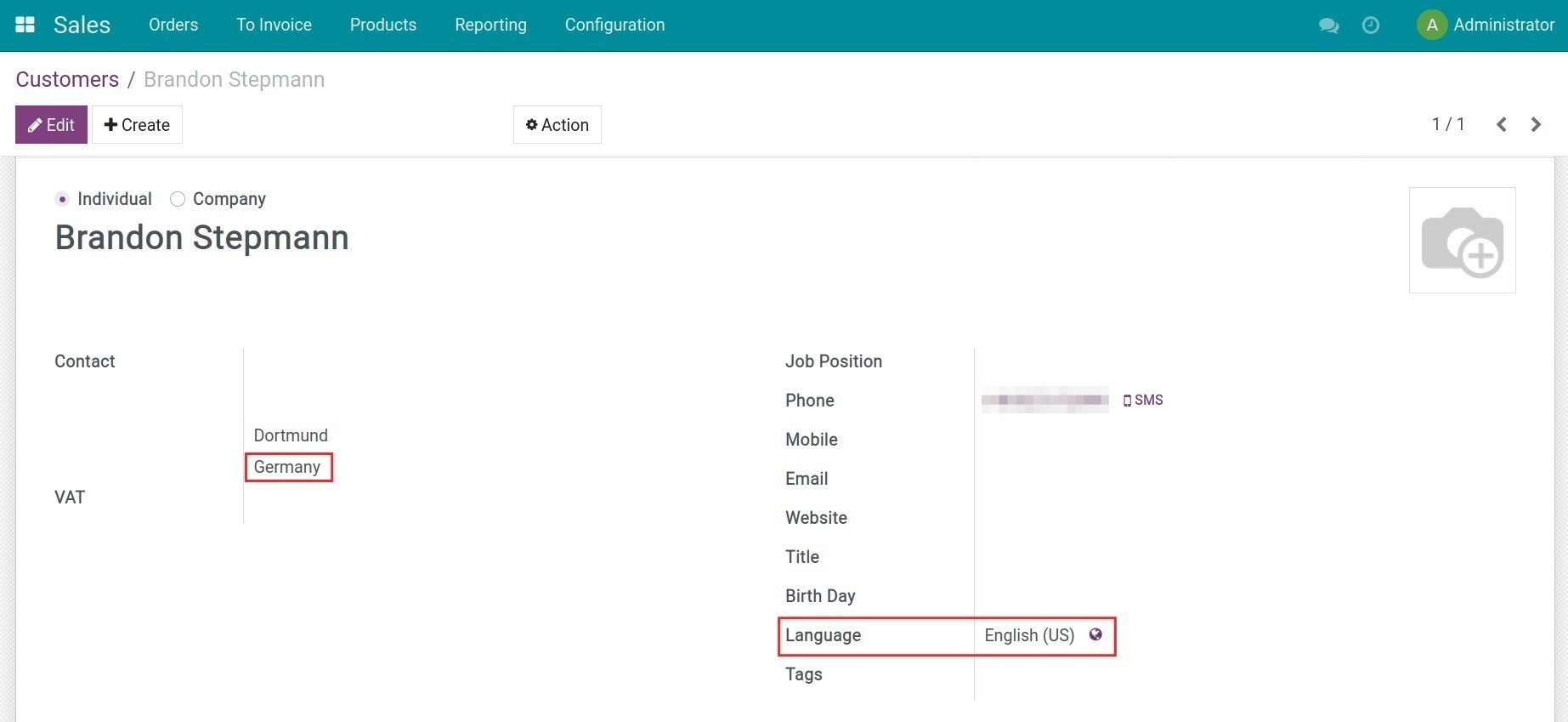
Note: Your database needs multiple languages activated for the customer's language to be selectable.
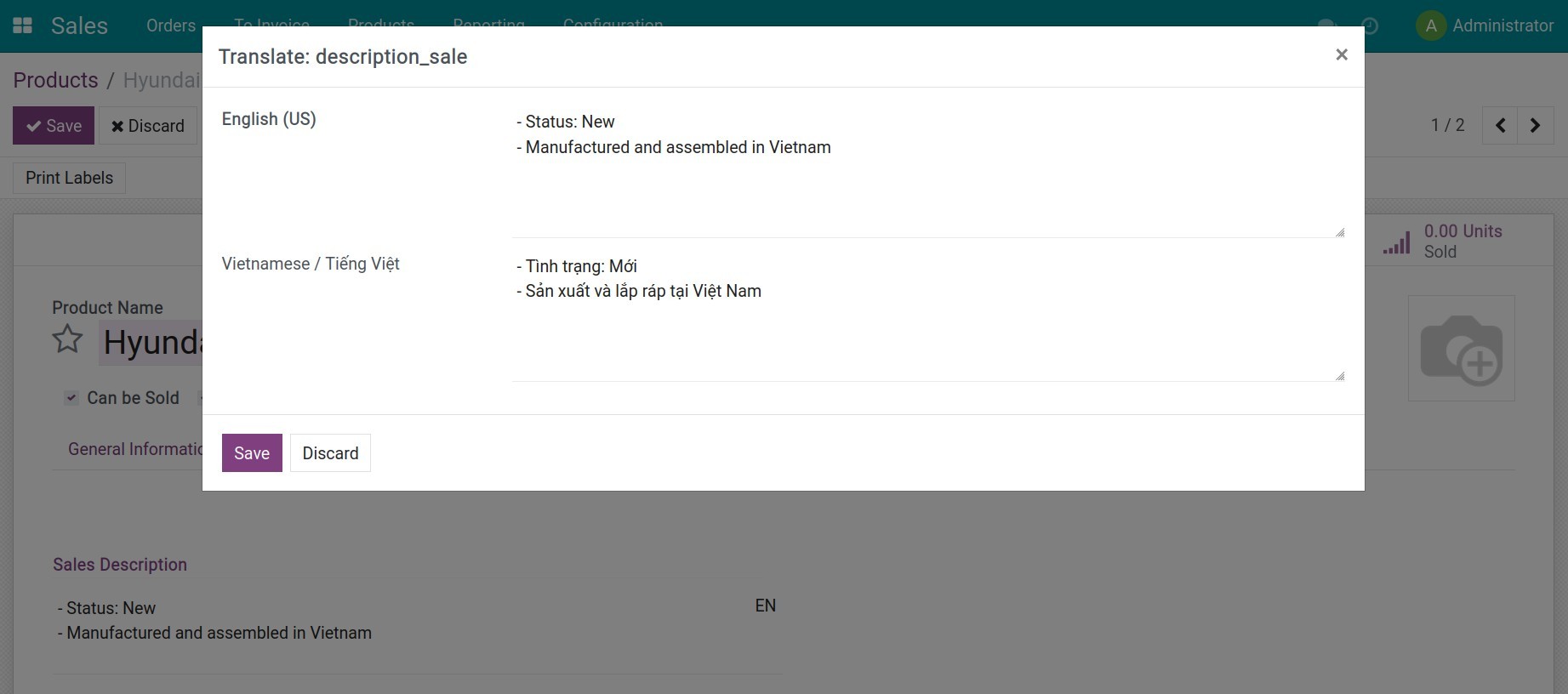
2. Fill in the product's sales description in Vietnamese and in the customer's language.
- Go to Sales > Products > Products, choose the product or press Create to create a new product.
- On the Sales tab, fill in the sales description for each activated language - including Vietnamese (vi_VN) and the customer's own language.
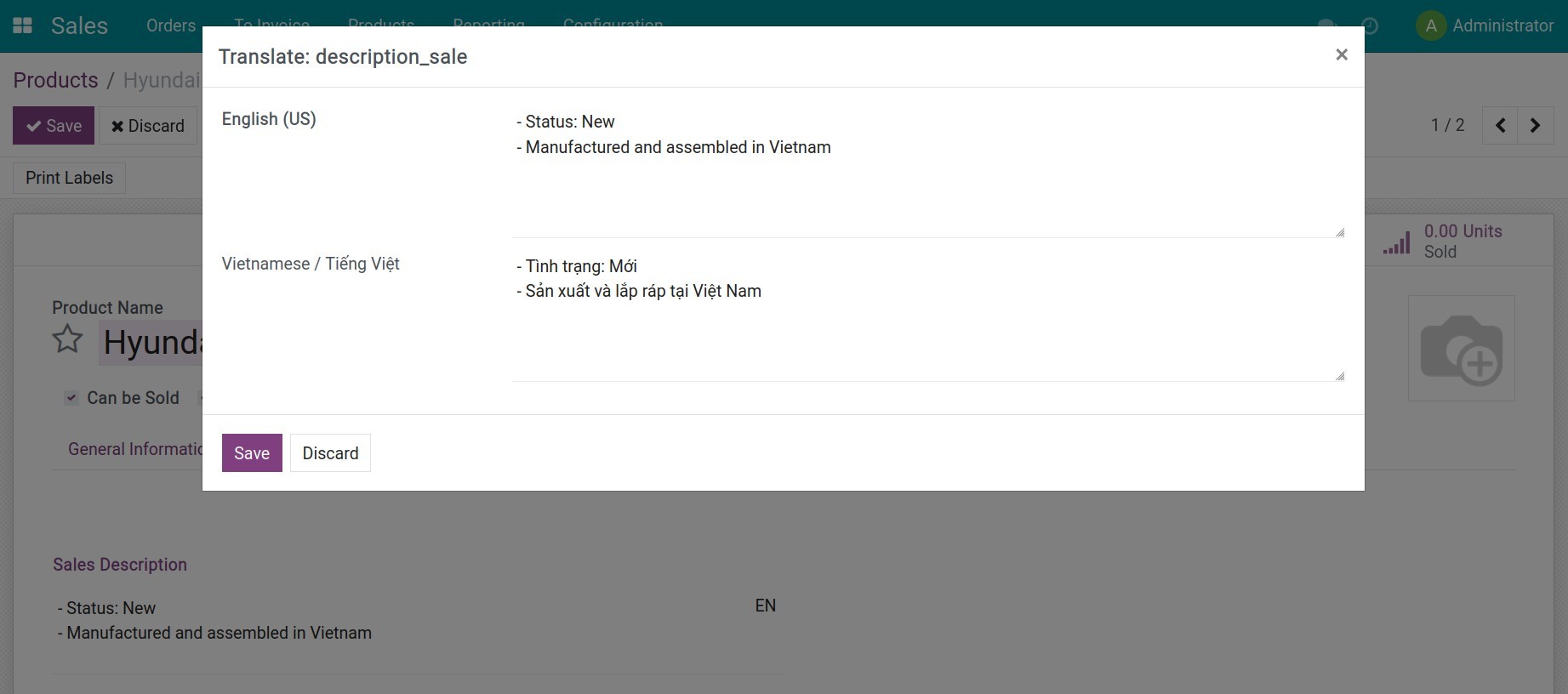
3. Confirm the sales order and create the invoice - the Vietnamese description is added automatically.
- Create a sales order for the foreign-language customer with the product line(s) above, then Confirm.
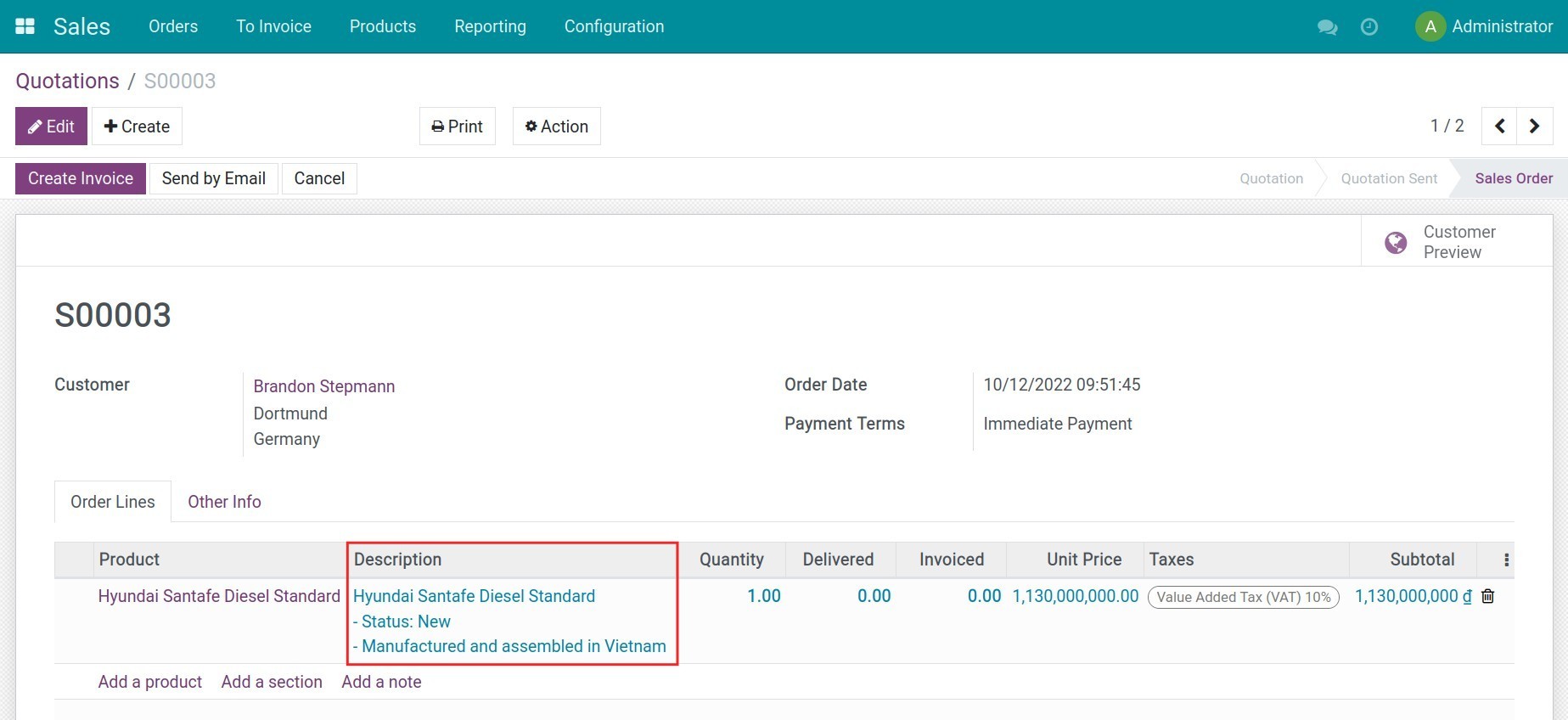
- Create the customer invoice from the sales order. As soon as the invoice line is generated, the module checks: the customer's language is not Vietnamese, the line has no description already forced by another module, AND the invoice's sale journal is linked to an active e-invoice provider (Viettel S-Invoice, VNInvoice or MISA meInvoice). When all three hold, the invoice line label is automatically rewritten to the Vietnamese description on the first line, followed by the original-language description in parentheses on the next line - with nothing to click.
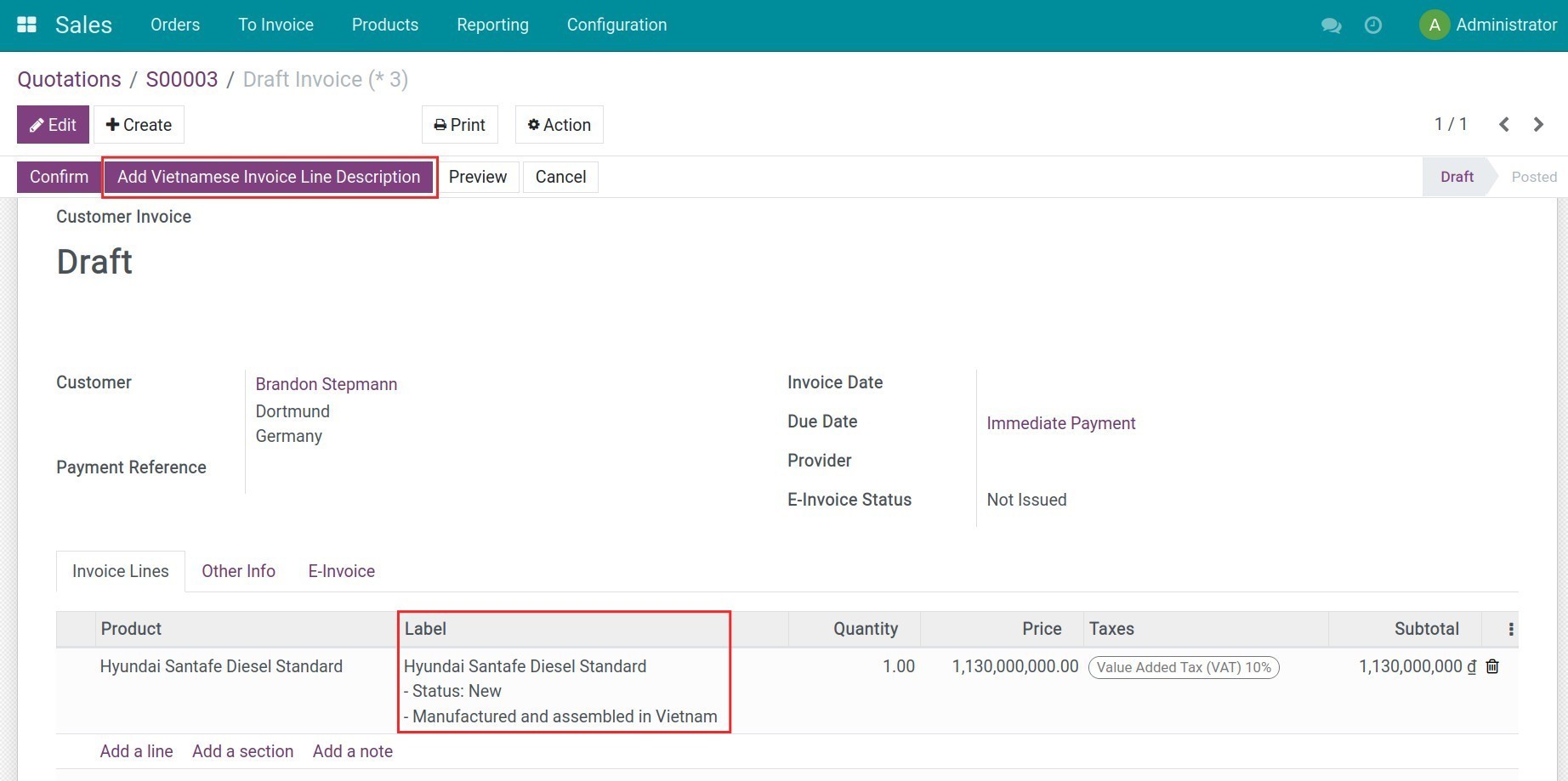
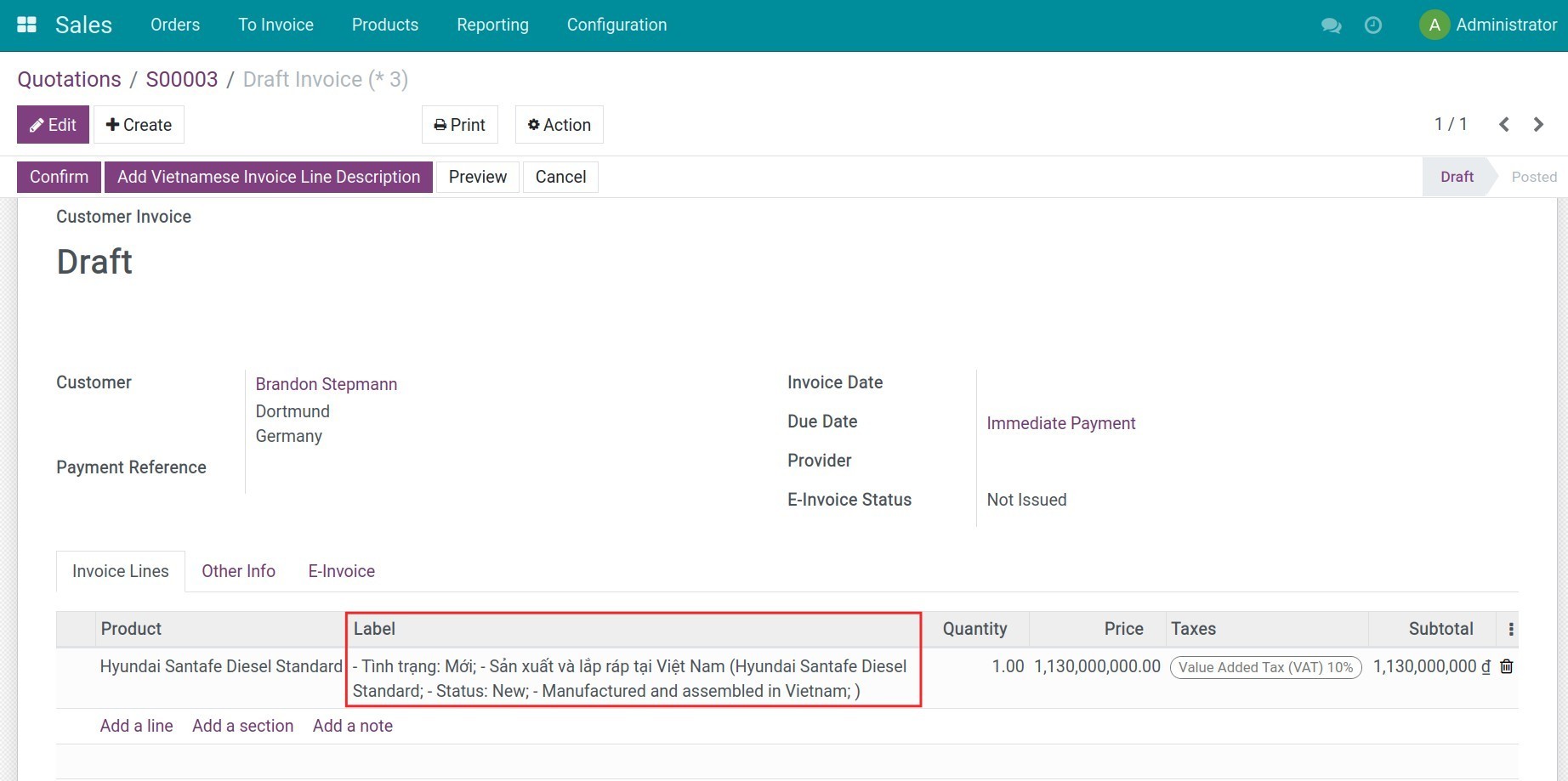
Once a provider module (Viettel S-Invoice, VNInvoice or MISA meInvoice) is installed, this invoice - now carrying its compliant Vietnamese/foreign-language line description - is issued, tracked, adjusted and replaced from the unified E-Invoice tab and menu; see the l10n_vn_viin_edi documentation for that shared interface.
Note for implementers: to skip the automatic dual-language description for a specific invoice-creation call, pass the context key add_invoice_line_name_vietsub=False.
This software and associated files (the "Software") may only be used (executed, modified, executed after modifications) if you have purchased a valid license from the authors, typically via Odoo Apps, or if you have received a written agreement from the authors of the Software (see the COPYRIGHT file).
You may develop Odoo modules that use the Software as a library (typically by depending on it, importing it and using its resources), but without copying any source code or material from the Software. You may distribute those modules under the license of your choice, provided that this license is compatible with the terms of the Odoo Proprietary License (For example: LGPL, MIT, or proprietary licenses similar to this one).
It is forbidden to publish, distribute, sublicense, or sell copies of the Software or modified copies of the Software.
The above copyright notice and this permission notice must be included in all copies or substantial portions of the Software.
THE SOFTWARE IS PROVIDED "AS IS", WITHOUT WARRANTY OF ANY KIND, EXPRESS OR IMPLIED, INCLUDING BUT NOT LIMITED TO THE WARRANTIES OF MERCHANTABILITY, FITNESS FOR A PARTICULAR PURPOSE AND NONINFRINGEMENT. IN NO EVENT SHALL THE AUTHORS OR COPYRIGHT HOLDERS BE LIABLE FOR ANY CLAIM, DAMAGES OR OTHER LIABILITY, WHETHER IN AN ACTION OF CONTRACT, TORT OR OTHERWISE, ARISING FROM, OUT OF OR IN CONNECTION WITH THE SOFTWARE OR THE USE OR OTHER DEALINGS IN THE SOFTWARE.