
Exclude Time off Timesheet records on Payslip
by Viindoo
| Lines of Code | 445 |
| Technical name | to_hr_project_timesheet_timeoff_payroll |
| License | OPL-1 |
| Website | https://viindoo.com/apps/modules/17.0/to_hr_project_timesheet_timeoff_payroll |
| Read description for | v 13.0 v 14.0 v 15.0 v 16.0 v 18.0 |
| Required Apps | Time Off (hr_holidays) Project (project) Discuss (mail) Calendar (calendar) Employees (hr) Employee Contracts (hr_contract) |
| Included Dependencies | Payroll Employee Relatives Viindoo Base Payroll Timesheet Integrator HR Contracts (Viindoo) Advanced HR Management Work Entry Viin Time-Off Work Entry - Contract Base Addendum Time-Off Project Timesheet Viindoo Holiday & WorkDay Manager Viin - Holiday Work Entry |

Absence is not paid twice
Timesheet lines that came from time off are excluded from payslip working time - so a paid absence is not counted as worked hours as well.
Exclude Time off Timesheet records on Payslip (technical name to_hr_project_timesheet_timeoff_payroll) is an Odoo 17.0 app for Odoo Community and Odoo Enterprise and Viindoo Cloud, built for payroll officer, employee, project manager, finance.
At a Glance
The facts of Exclude Time off Timesheet records on Payslip, version 0.1, in one place. Published by Viindoo.
How It Works
Three screens.
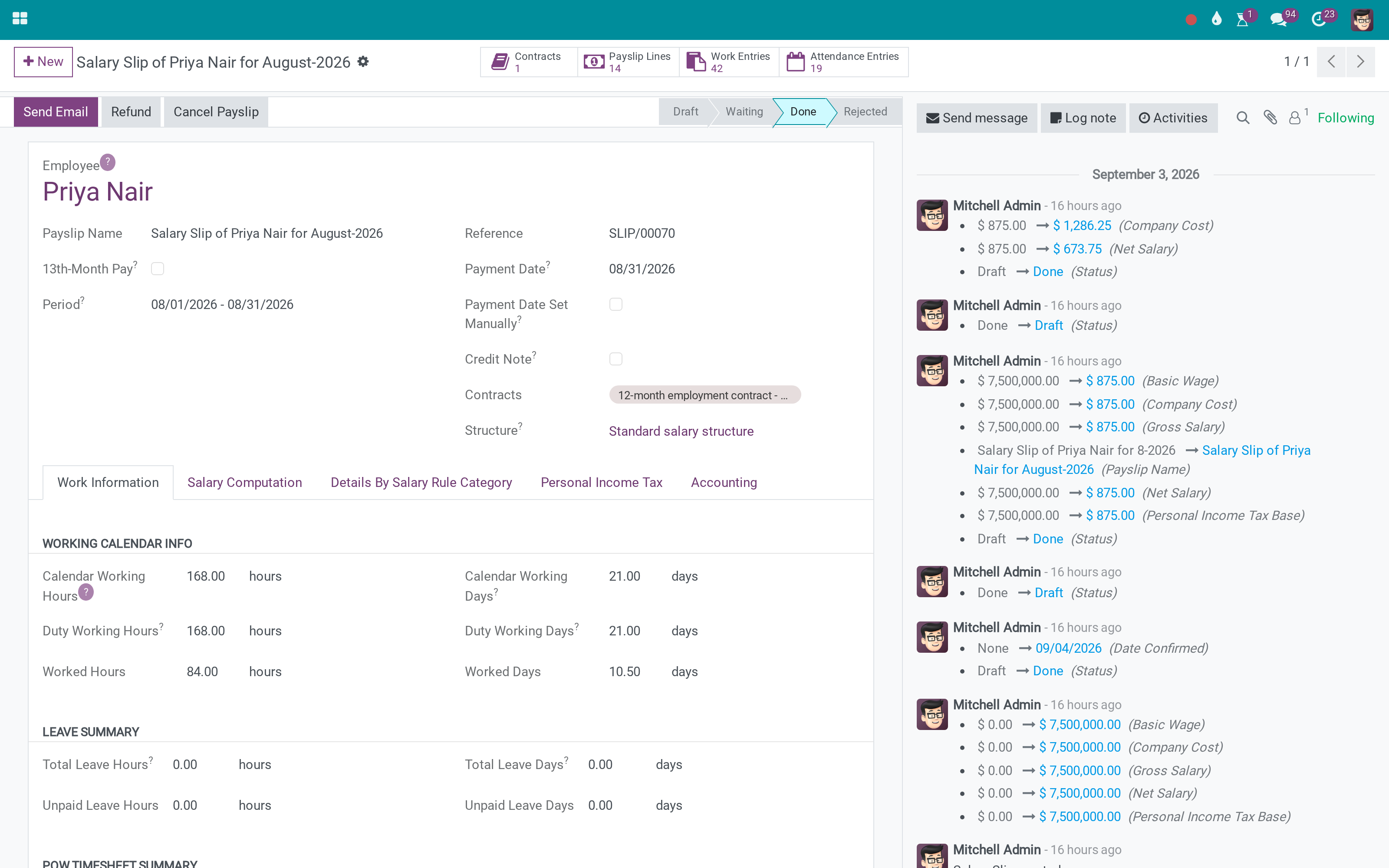
On the payslip
Working time that counts worked hours, not the ones an absence generated.
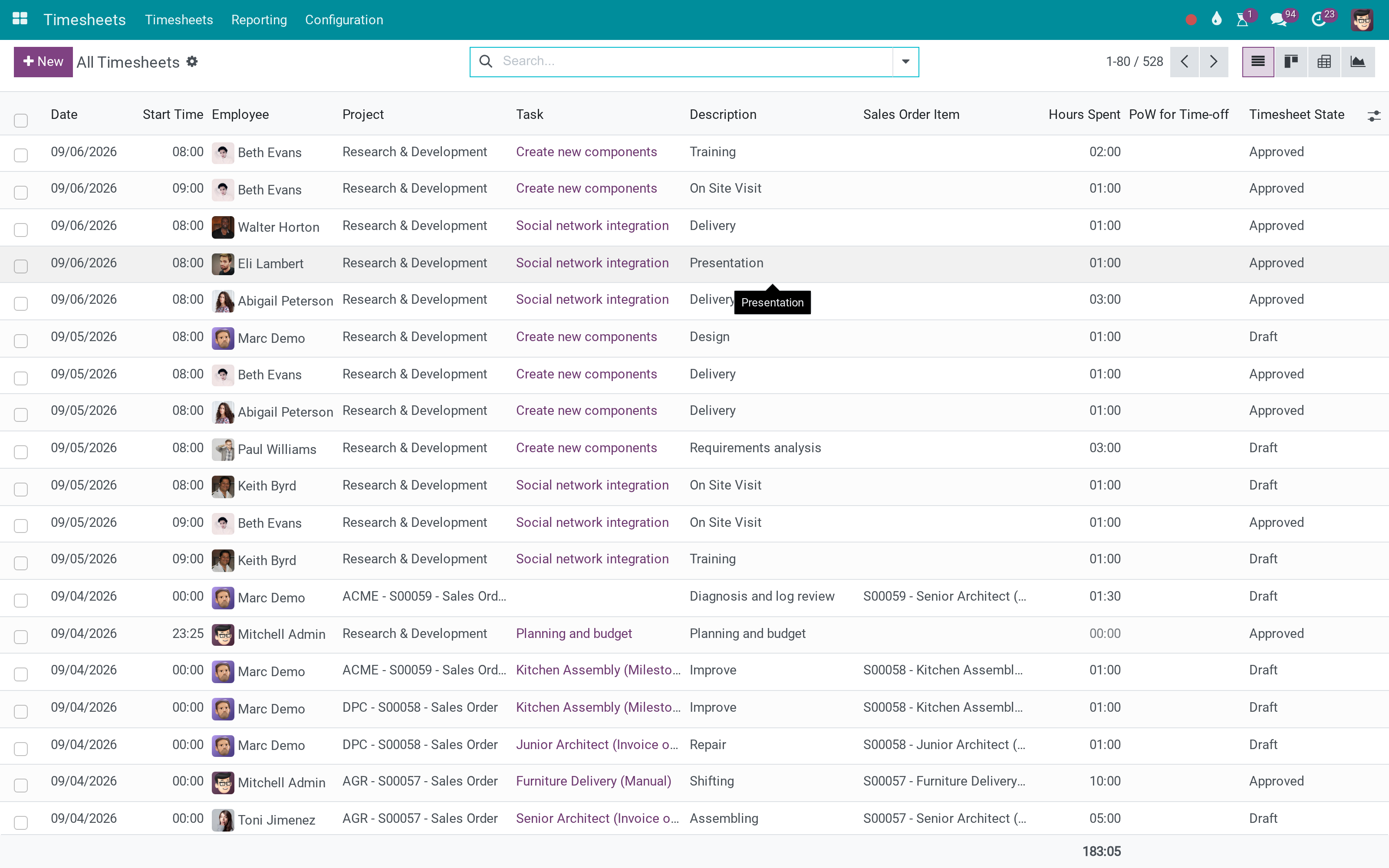
The timesheets it reads
The lines are still there for project cost - they are simply not counted twice.
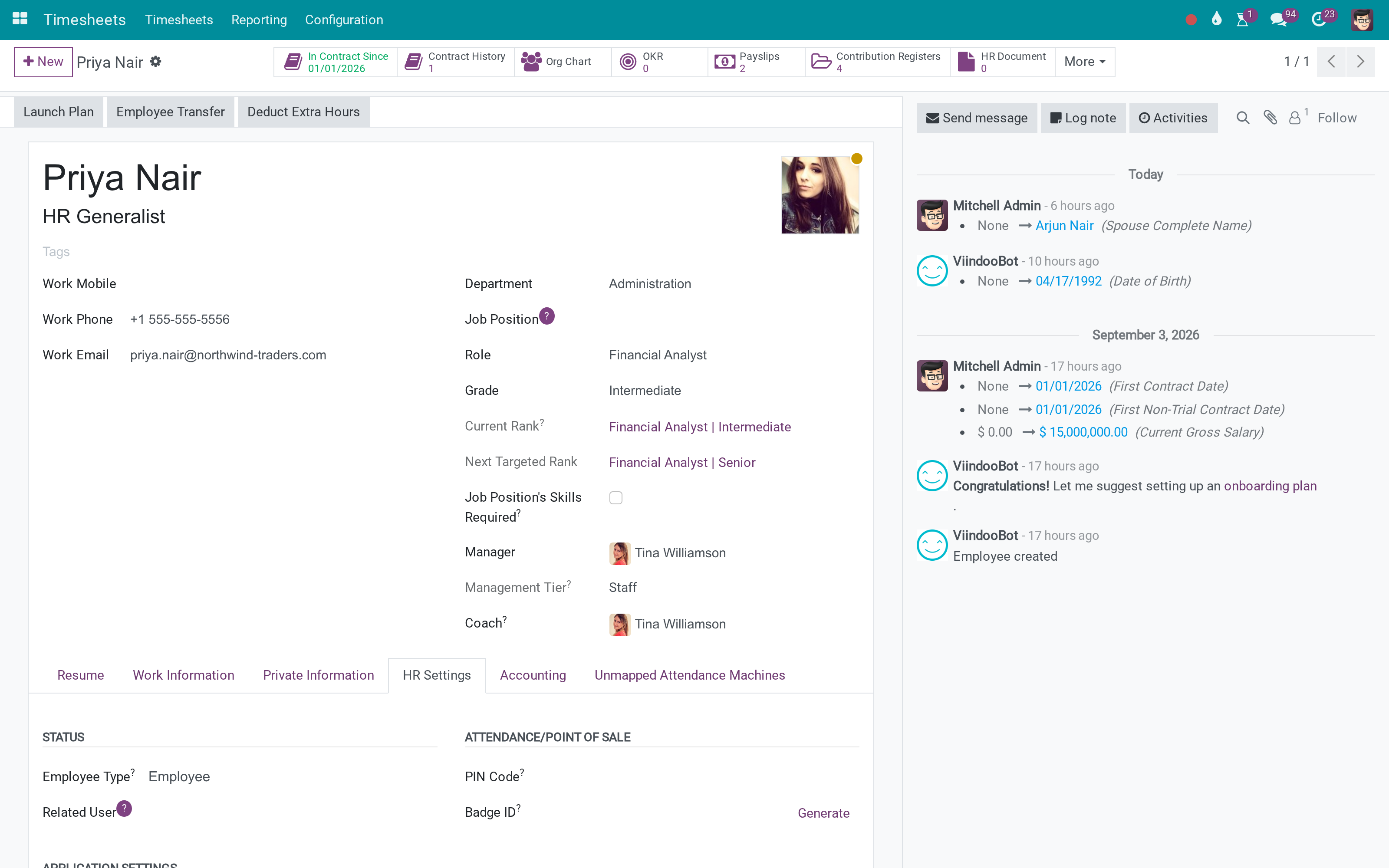
And the employee
Nothing to configure per person.
What You Get
Timesheet lines generated by time off excluded from payslip working time
Project cost still includes the absence
Applies to the payslips the standard payroll computes
No configuration - the rule is the point
Works with time-off timesheet generation as Odoo provides it
Ordinary worked timesheets are unaffected
More Screens
Everything below was taken on a database seeded with real business data, on this series - not a mock-up and not a screenshot from an older version.
Timesheets
What This App Does Not Do
Read this before you buy. Everything below is something the app deliberately leaves to another app or to you.
How much leave somebody has is the time off app's.
The effect is on the payslip figure, not on a new screen.
Salaried contracts that ignore timesheets are unaffected.
Already computed slips keep their figures.
Works Well With
Apps from the same stack, built to fit this one:
Who Should Use Exclude Time off Timesheet records on Payslip?
Payroll officer
Stops paying an absence twice.
Employee
Gets a payslip that matches the calendar.
Project manager
Keeps the absence in project cost, where it belongs.
Finance
Reconciles payroll and project cost without an adjustment.
Frequently Asked Questions
What does Exclude Time off Timesheet records on Payslip do?
Timesheet lines that came from time off are excluded from payslip working time - so a paid absence is not counted as worked hours as well.
What does Exclude Time off Timesheet records on Payslip not do?
It does not change leave entitlement. How much leave somebody has is the time off app's. It is a correction, not a report. The effect is on the payslip figure, not on a new screen. It applies where timesheets feed payroll. Salaried contracts that ignore timesheets are unaffected. It does not fix past payslips. Already computed slips keep their figures.
Who is Exclude Time off Timesheet records on Payslip for?
Payroll officer: Stops paying an absence twice. Employee: Gets a payslip that matches the calendar. Project manager: Keeps the absence in project cost, where it belongs. Finance: Reconciles payroll and project cost without an adjustment.
Which Odoo version and editions does it support?
Odoo 17.0 - Odoo Community, Odoo Enterprise, Viindoo Cloud. Upgrades to a newer Odoo series are a separate purchase for that series.
What does it depend on?
It installs on top of: to_hr_timesheet_payroll, viin_project_timesheet_leave. Odoo installs them with it.
How do I set it up?
Three screens.
What works well with it?
Timesheets in Payroll (to_hr_timesheet_payroll): Paying from recorded hours in the first place. Time Off on Projects (viin_project_timesheet_leave): Where the absence lands as cost. Time Off (viin_hr_holidays): The absences themselves.
Can I try it before buying?
Yes - the Live Preview button at the top of this page opens the module's own screen on a working database.
How do I get support?
Write to apps.support@viindoo.com with your Odoo version and the technical name to_hr_project_timesheet_timeoff_payroll; pre-sales questions go to sales@viindoo.com.
See Exclude Time off Timesheet records on Payslip in Action
Absence is not paid twice
Need help with Exclude Time off Timesheet records on Payslip?
For questions, implementation support, or consulting services, contact Viindoo.
Pre-Sales & Partnership
sales@viindoo.comWhen contacting us, please include:
- Odoo/Viindoo version (Odoo CE / Viindoo Editions).
- Number of users and business scope.
- Other modules currently in use.
Technical Support
apps.support@viindoo.comFor faster troubleshooting, please provide:
- Order number or app reference.
- Odoo/Viindoo version & edition.
- Steps to reproduce the issue.
- Screenshots/logs if available.
Upgrades to a newer Odoo series are a separate purchase for that series.
Technical Requirement
Changes log
0.1 - Latest on the 17.0 line
- Timesheet lines linked to a time off are excluded from the payslip's worked-hours computation.
Installation
- Navigate to Apps.
- Search with keyword ‘to_hr_project_timesheet_timeoff_payroll’.
- Press Install.
Instruction
Instruction video: Exclude Time off Timesheet records on Payslip
1. Enable the salary calculation by timesheets
2. Enable the creation of timesheets for time off requests
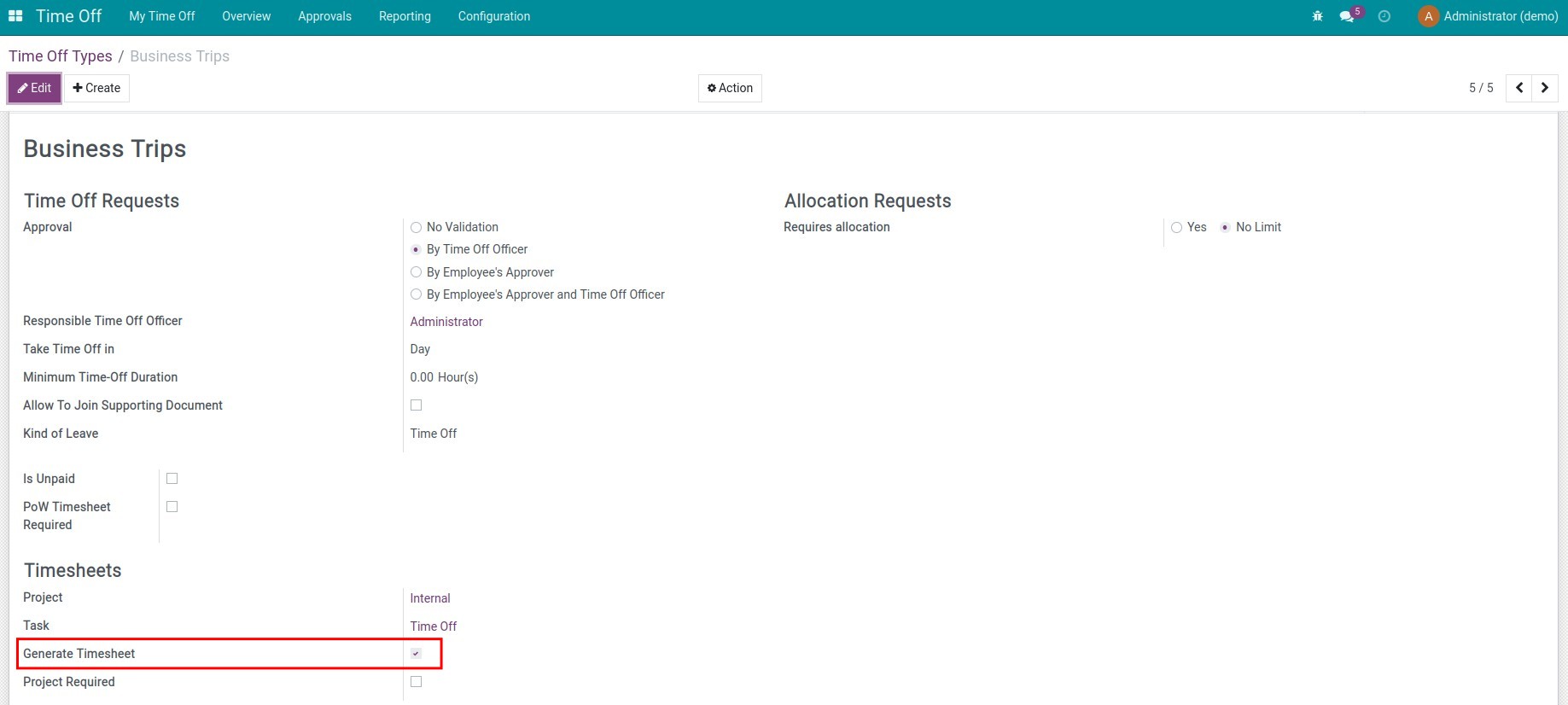
Go to Time off ‣ Configuration ‣ Time Off Types to create a new one or select a time off type, and activate the Generate Timesheet feature:
3. Create time off requests
Go to Time off ‣ My Time off ‣ My Time off to create a new time off request:
See more in the article How to create a time off request.
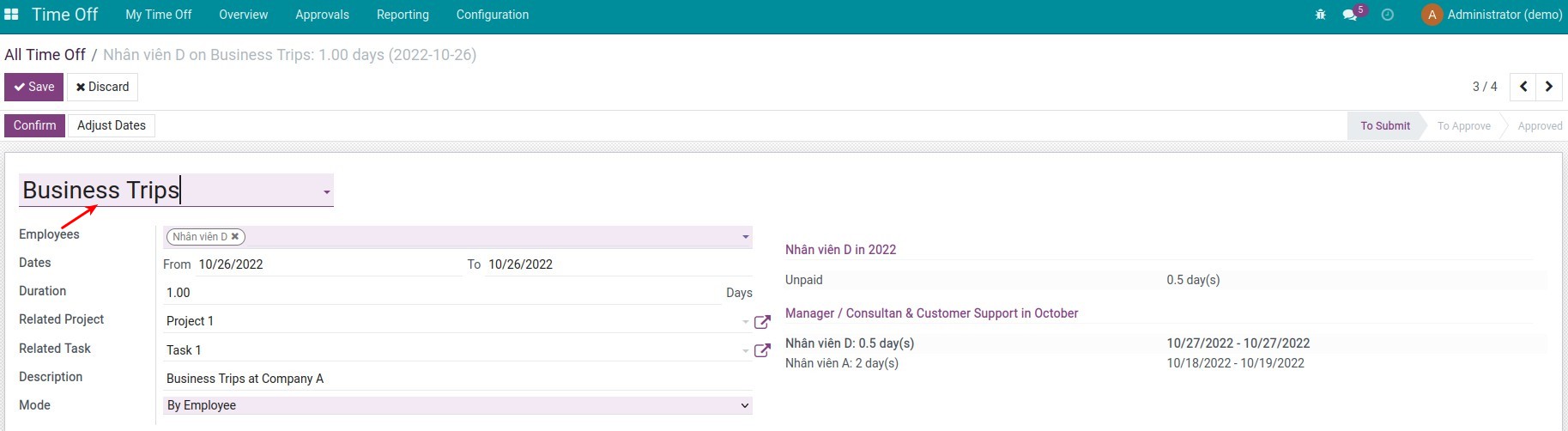
View the Time off timesheet records generated from the time off requests:

4. Create payslip
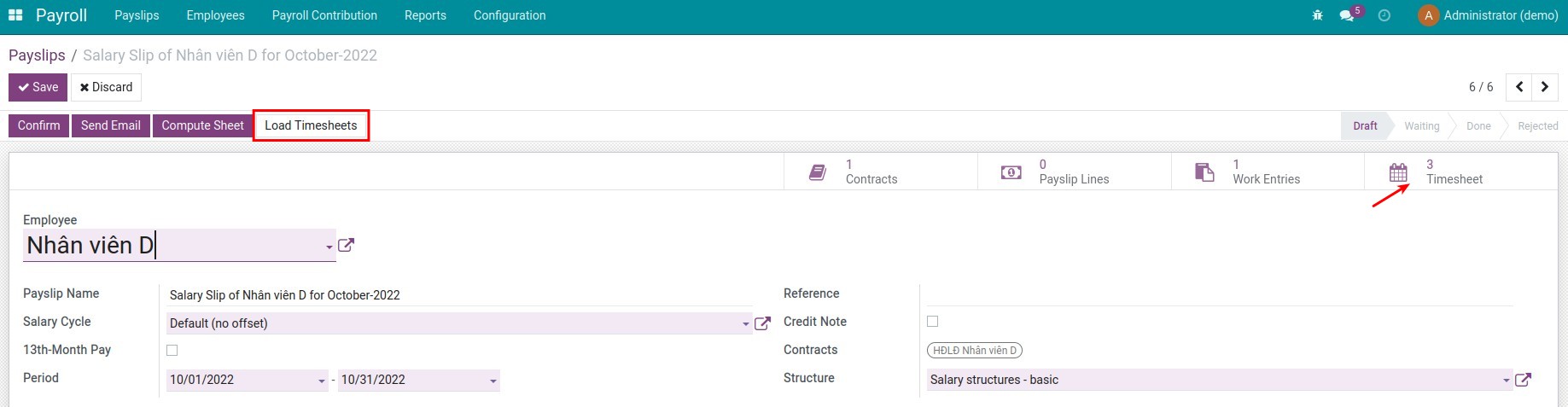
Go to Payroll ‣ Payslips ‣ Payslips to create a new payslip for an employee, press Compute Sheet to see a button for statistics of timesheets - not including timesheet records that represent time off on the payslip:

This software and associated files (the "Software") may only be used (executed, modified, executed after modifications) if you have purchased a valid license from the authors, typically via Odoo Apps, or if you have received a written agreement from the authors of the Software (see the COPYRIGHT file).
You may develop Odoo modules that use the Software as a library (typically by depending on it, importing it and using its resources), but without copying any source code or material from the Software. You may distribute those modules under the license of your choice, provided that this license is compatible with the terms of the Odoo Proprietary License (For example: LGPL, MIT, or proprietary licenses similar to this one).
It is forbidden to publish, distribute, sublicense, or sell copies of the Software or modified copies of the Software.
The above copyright notice and this permission notice must be included in all copies or substantial portions of the Software.
THE SOFTWARE IS PROVIDED "AS IS", WITHOUT WARRANTY OF ANY KIND, EXPRESS OR IMPLIED, INCLUDING BUT NOT LIMITED TO THE WARRANTIES OF MERCHANTABILITY, FITNESS FOR A PARTICULAR PURPOSE AND NONINFRINGEMENT. IN NO EVENT SHALL THE AUTHORS OR COPYRIGHT HOLDERS BE LIABLE FOR ANY CLAIM, DAMAGES OR OTHER LIABILITY, WHETHER IN AN ACTION OF CONTRACT, TORT OR OTHERWISE, ARISING FROM, OUT OF OR IN CONNECTION WITH THE SOFTWARE OR THE USE OR OTHER DEALINGS IN THE SOFTWARE.