
Polar Payment Provider
| Lines of Code | 1630 |
| Technical name | payment_polar |
| License | OPL-1 |
| Website | https://viindoo.com/apps/app/17.0/payment_polar |
| Read description for | |
| Required Apps | Invoicing (account) Discuss (mail) |
 Polar Payment Provider
Accept card payments from anywhere. Skip the VAT paperwork everywhere.
Polar becomes the legal seller to your buyer: it charges the card, calculates and remits VAT in the buyer's own country, issues the buyer's invoice, and pays your company the net amount - already booked into your accounts.
Why merchants choose Polar
No VAT registration, anywhere.
Polar sells to your buyer directly, so Polar - not you - registers for and remits VAT in the buyer's country. You never file a foreign VAT return because of a Polar sale.
Every fee lands in your books.
When a Polar payment settles, the module posts one balanced entry automatically: net cash into a dedicated Polar clearing account, the receivable cleared at the full gross amount, and Polar's platform fee booked to its own expense account. Your accountant can trace every euro from checkout to journal entry.
126 currencies, one configuration.
Polar can charge your buyer in any of its 126 supported currencies as Merchant of Record, so there is no per-currency setup on your side. A built-in minimum-charge check stops an under-the-limit checkout before it ever reaches Polar.
Set up once, guarded from day one
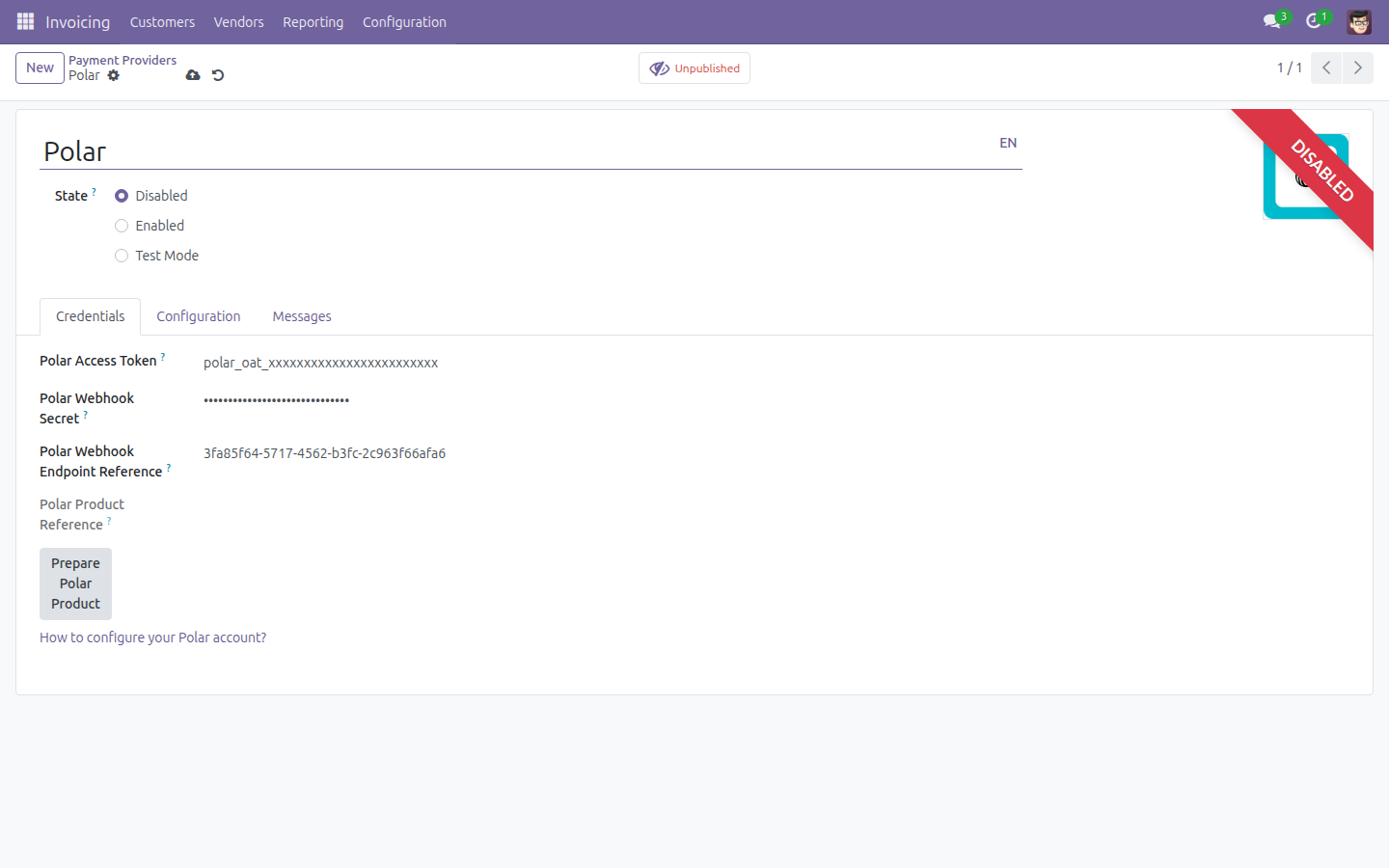
- Polar appears as a standard payment provider in Accounting > Configuration > Payment Providers, configured the same way as any other provider.
- The Access Token and Webhook Secret are entered once, restricted to system administrators, and the webhook secret is password-masked on screen.
- The shared, reusable product every checkout needs is provisioned automatically the moment you enable the provider. If Polar was briefly unreachable at that instant, a one-click "Prepare Polar Product" button retries it - most admins never need to touch it.
- Odoo refuses to switch Polar to live or test mode until both the clearing account and the fee expense account are configured - a missing account is caught at setup, not mid-payment.
- A non-blocking warning banner flags anything else worth a look (invoicing settings, an unprepared product) without stopping you from saving.
A checkout your buyers already trust
- Buyers are redirected to Polar's own hosted checkout page to enter their card - your Odoo database never sees or stores card data.
- Sandbox and production are switched automatically by the same Test/Enabled toggle every other Odoo payment provider already uses.
- When a buyer returns from checkout, Odoo re-confirms the result directly with Polar's API rather than trusting the return URL.
Built to keep transactions moving
- Every webhook Polar sends is signature-verified before Odoo trusts it; a forged or expired signature is rejected outright.
- A webhook Odoo can't parse is discarded and logged, never crashes the endpoint - so one bad delivery can't take down every other transaction relying on the same webhook.
- If what Polar reports doesn't match what Odoo expected on settlement, the transaction is flagged as an error instead of silently posting the wrong amount.
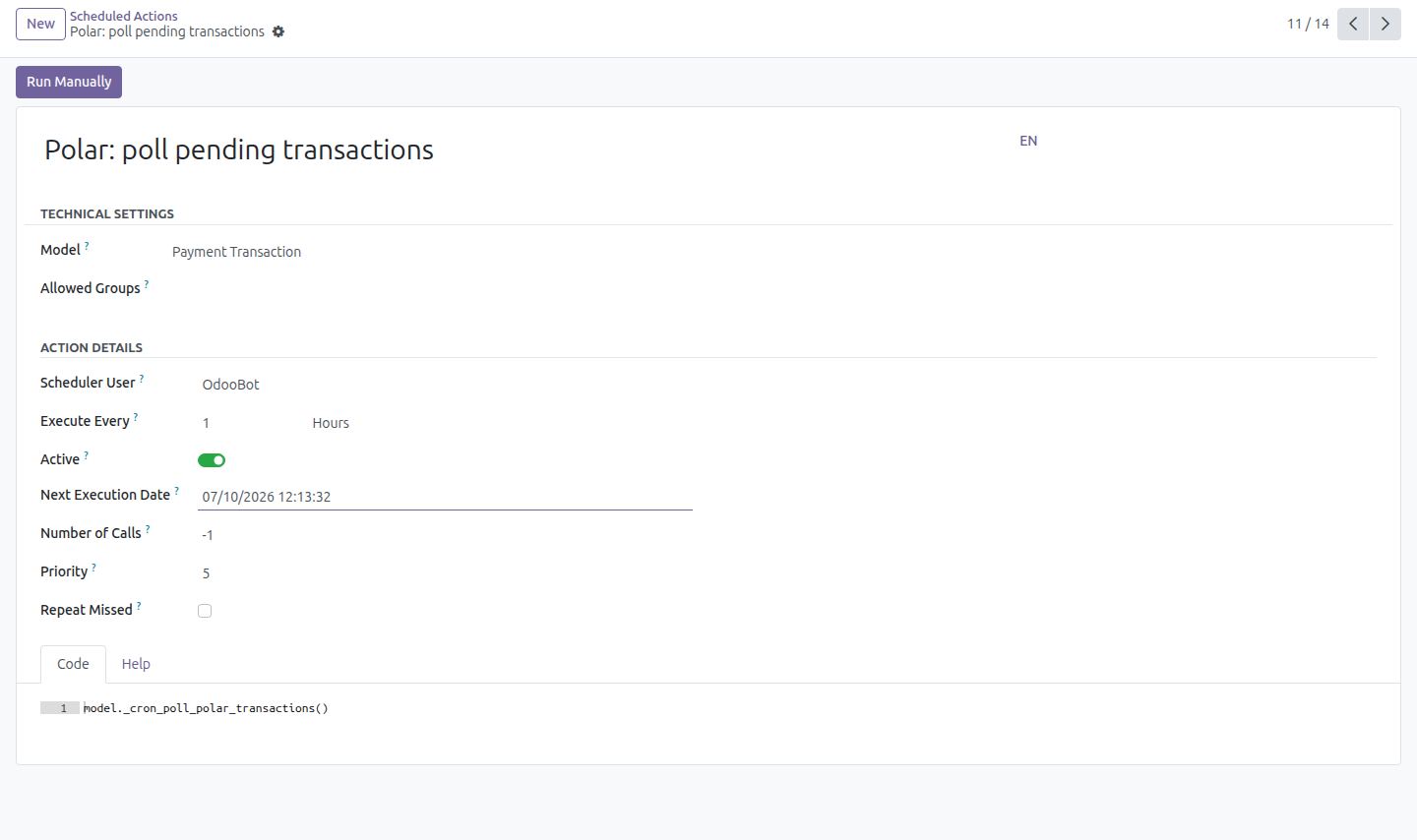
- An hourly scheduled action re-checks any transaction still pending directly against Polar's API - the safety net if a webhook is delayed, lost, or the endpoint stops receiving them.
- If Polar's API is rate-limited mid-run, the check simply picks up again next hour instead of failing the batch.
Refunds without leaving Odoo
Issue a full or partial refund from the same Refund action you already use for every other provider; Odoo calls Polar's API against the original order and tracks the refund as its own transaction until Polar confirms it.
How It Works
Activate Polar
Add your Organization Access Token and Webhook Secret from your Polar dashboard.
Point the accounting
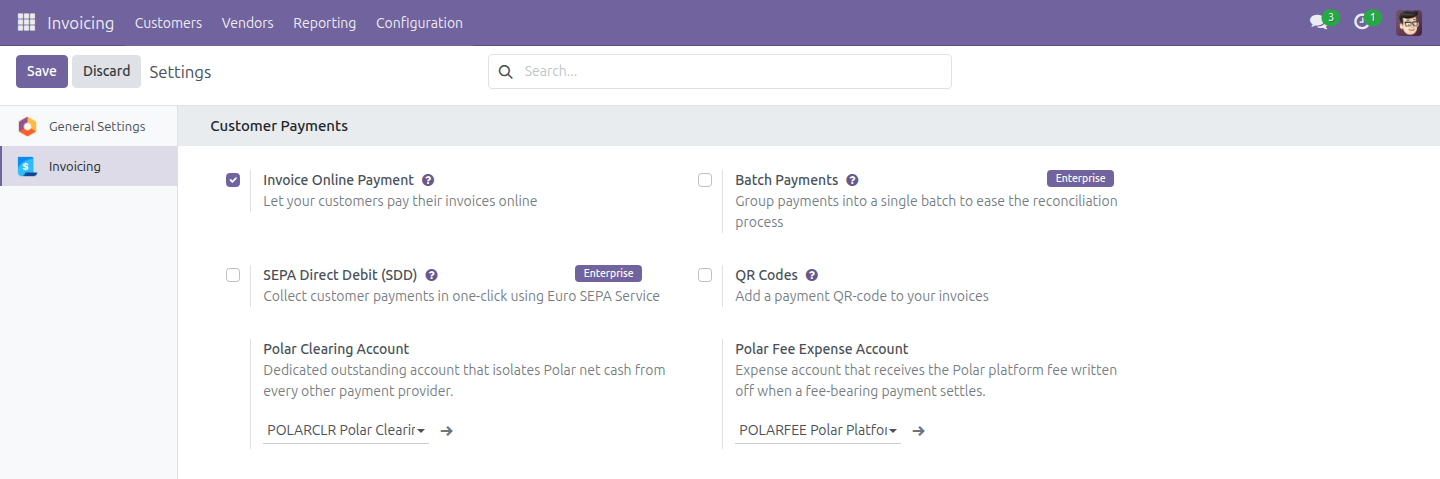
In Settings > Accounting, set the Polar Clearing Account and the Polar Fee Expense Account. From here, Odoo wires the clearing account onto the payment method automatically.
Go live
Switch the provider to Enabled. Odoo checks both accounts are set, then provisions the shared checkout product automatically before it lets you save.
Buyer pays
At checkout, the buyer is redirected to Polar, pays in their own currency, and receives their invoice from Polar as Merchant of Record.
Odoo settles automatically
The webhook (or, if one is ever missed, next hour's scheduled poll) confirms the order and books the net cash, gross receivable, and platform fee in a single entry.
Refund if needed
One click from the same transaction, exactly like any other provider.
From Checkout to Journal Entry
Most payment connectors stop at "payment received." This one keeps going into the ledger.
The moment Polar confirms an order paid, the module posts a single balanced payment move: the net amount Polar actually pays you lands in a dedicated Polar Clearing Account, the customer's receivable is cleared at the full gross amount, and Polar's platform fee is booked straight to an expense account you choose. Nothing is estimated after the fact, and nothing needs a manual journal entry.
If Polar reports its fee in a currency other than the one the buyer paid in, the module converts it before posting, so the entry is correctly valued - not just numerically balanced.
Because the clearing account is dedicated to Polar alone, your accountant can always tell Polar's net cash apart from every other payment provider's - which is what makes the next step, matching Polar's bank payout, straightforward: standard Odoo bank reconciliation, by date and amount, against that one account.
Scope & Good to Know
- Payout matching is a manual date-and-amount match, by design. Polar pays out in aggregate - one payout can bundle several orders - and does not expose a payout-to-order mapping to connected apps. The module isolates Polar's net cash in its own dedicated clearing account specifically so your accountant matches it with Odoo's standard bank-reconciliation widget, the same way as any other bank line.
- Disputes and chargebacks stay in Polar's dashboard. Polar does not send a dispute webhook, so a dispute shows up in your payout figures, not as a separate Odoo record.
- No saved cards. Each checkout is a fresh session on Polar's hosted page; there is no one-click repeat payment.
- If Polar ever stops delivering webhooks to your endpoint, the hourly scheduled poll keeps every pending transaction moving on its own - you re-enable the endpoint from the Polar dashboard when you're ready.
Technical Requirement
- Odoo 17 with the Accounting app installed.
- A Polar.sh organization with an Organization Access Token and a Standard-Webhooks signing secret.
- The Polar Clearing Account and Polar Fee Expense Account configured in Settings > Accounting before the provider can be enabled.
- Automatic Invoice turned on (Settings > Sales), so each Polar checkout produces an invoice. With it off, Polar still collects the full prepayment as Merchant of Record and the payment sits as an unreconciled customer prepayment until you invoice it manually - Odoo warns you on the provider form if Polar is active without it.
- Licensed under OPL-1.
Need help with Polar Payment Provider?
User Guide: Polar Payment Provider
This guide explains how to configure and use the Polar Payment Provider module for online payments through Polar.sh.
Note
Polar acts as a Merchant of Record. Polar takes the buyer's card payment, computes and remits VAT itself, issues its own invoice to the buyer, deducts a platform fee, and pays you the net amount. Odoo never sees the buyer's card details and never calculates VAT on a Polar sale: its job is to book the fee, isolate the net cash, verify Polar's webhooks, and let you refund from Odoo.
Installation
- Navigate to Apps.
- Search with the keyword payment_polar.
- Press Install.
Before You Enable Polar
Set up the accounting first
A Polar Clearing Account must be configured before the provider can be enabled - Odoo blocks activation otherwise, with a clear error message.
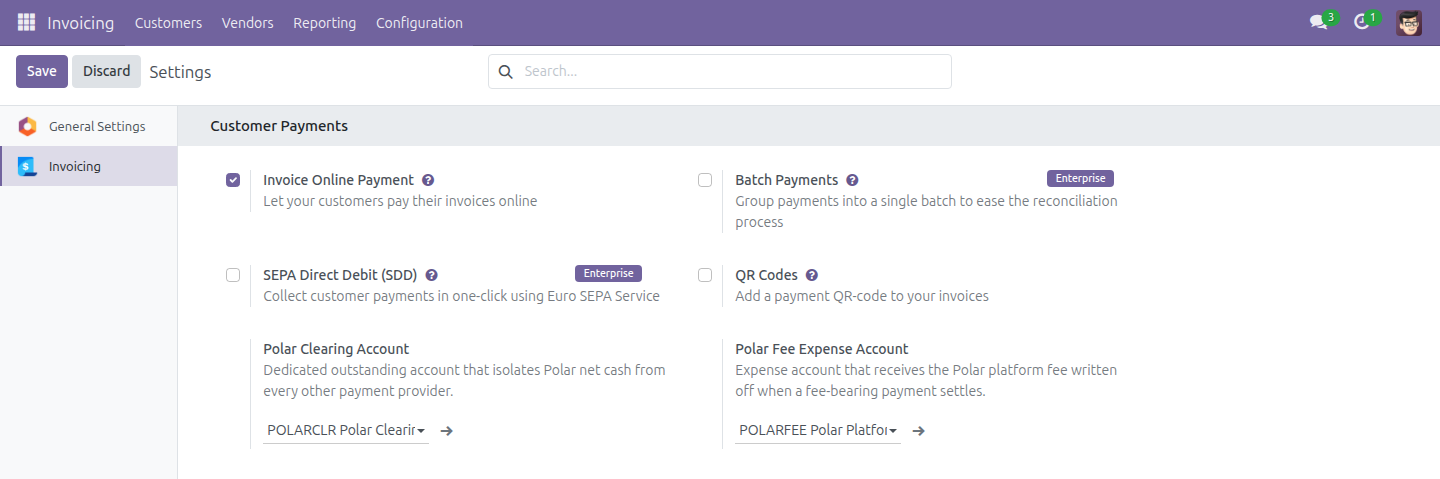
- Go to Settings, open the Invoicing tab (Accounting if you use the Accounting app), and scroll to Customer Payments.
- Fill in the two Polar fields:
- Polar Clearing Account: a dedicated, reconcilable account that isolates Polar's net cash from every other payment provider's cash.
- Polar Fee Expense Account: the expense account that receives the platform fee write-off whenever a fee-bearing payment settles.
Turn on Automatic Invoice
Polar collects the full payment as Merchant of Record, which can happen before Odoo has an invoice for the sale. Go to the Sales app > Configuration > Settings, open the Invoicing section, and turn on Automatic Invoice so every order paid online - including through Polar - is invoiced automatically as soon as the payment is confirmed.
Configure the provider
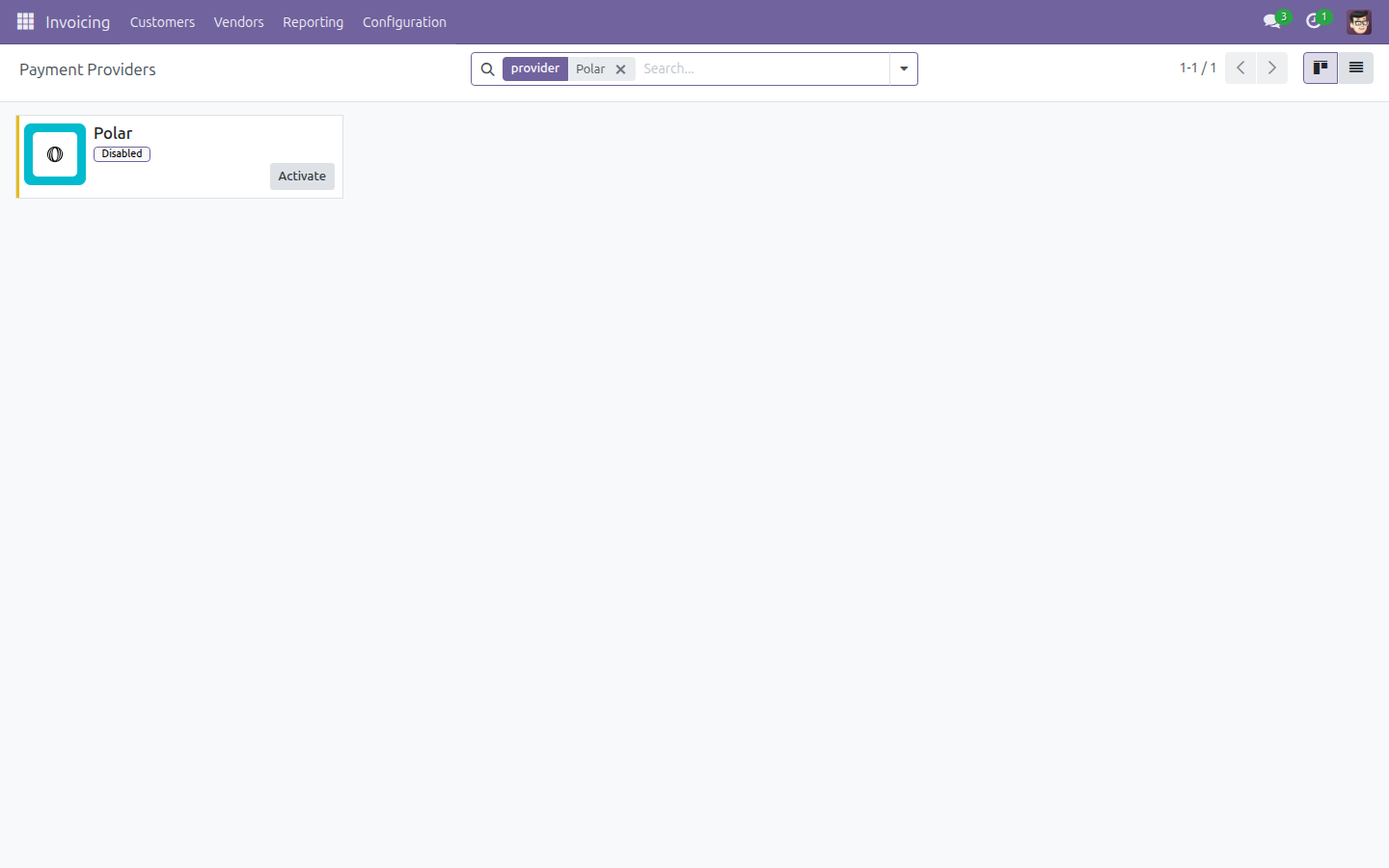
- Go to Invoicing (or Accounting) > Configuration > Payment Providers.
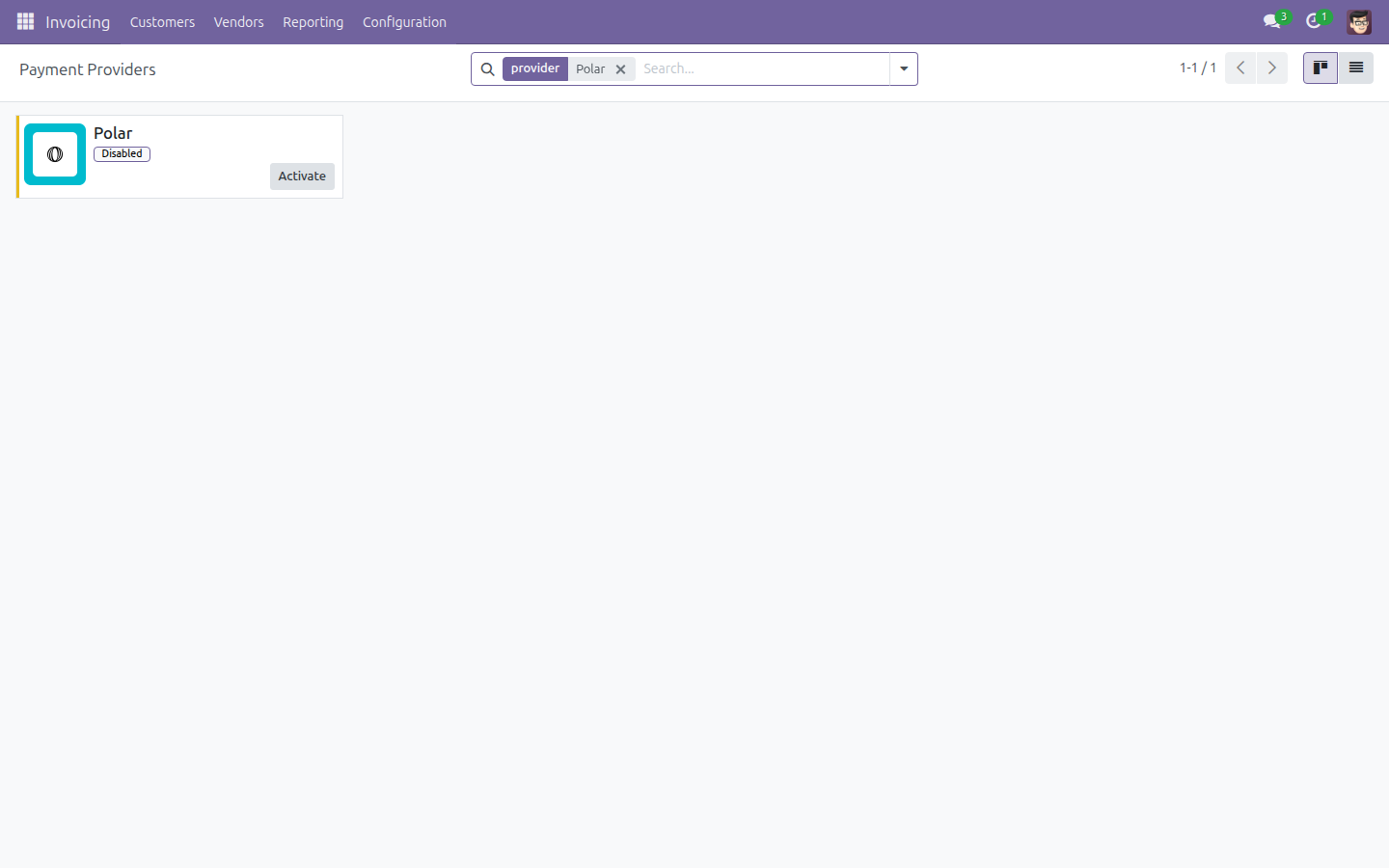
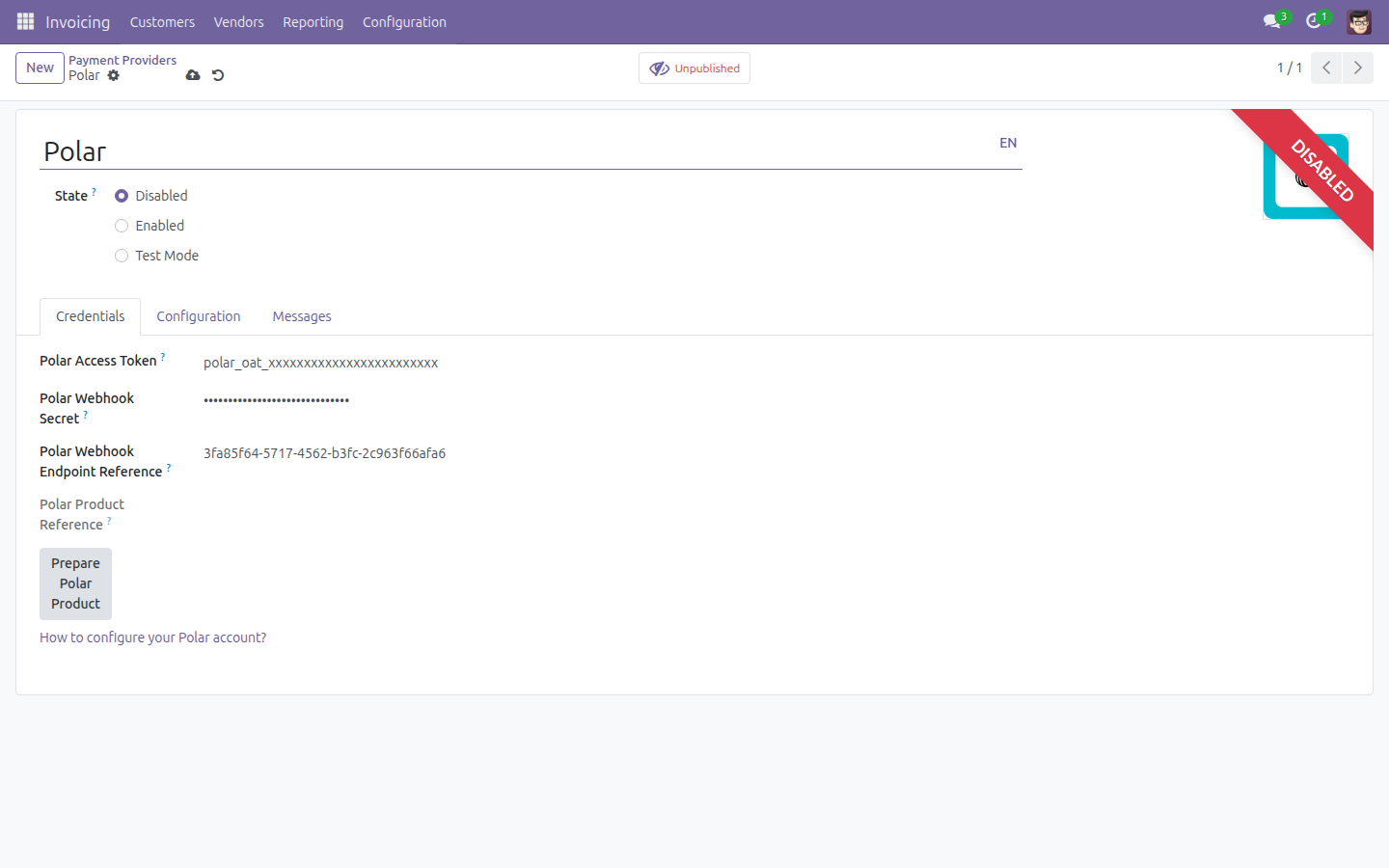
- Open Polar. On the Credentials tab, fill in:
- Polar Access Token: the Organization Access Token from your Polar dashboard, used to authenticate every API call.
- Polar Webhook Secret: the Standard-Webhooks signing secret from the Polar dashboard. Keep the whsec_ prefix - Polar signs with the raw prefixed secret, not the stripped one the generic Standard-Webhooks spec expects.
- Polar Webhook Endpoint Reference: optional. Copy this uuid from the same screen as your webhook secret in the Polar dashboard. When it is filled in, the hourly poll job reports in this provider's warning banner if Polar has disabled the endpoint. Leaving it blank changes nothing else - it is not required.
- In your Polar dashboard, register a webhook endpoint pointing at https://<your-odoo-domain>/payment/polar/webhook and subscribe it to the checkout.*, order.* and refund.* events.
- Set the provider's State to Test Mode or Enabled. Odoo routes every API call to Polar's sandbox while the state is Test Mode (or Disabled), and to Polar's production API only once it is Enabled - the same test/production toggle every other Odoo payment provider already uses. The moment you save it in either state, Odoo also provisions the one shared, reusable Polar product every checkout will reference - you do not do this by hand.
Note
An illustration of the provider in Test Mode or Enabled state is pending - it requires live Polar credentials to show.
How a Polar Checkout Works
When a buyer pays with Polar, Odoo creates a Polar checkout session for a single, tax-inclusive line item and redirects the buyer's browser to Polar's own hosted checkout page. Polar handles the card capture, the VAT calculation and its own buyer-facing invoice end to end; Odoo never collects or stores the card details.
A Polar checkout can present the buyer with, and charge them in, any of the 126 currencies Polar supports. As Merchant of Record, Polar computes and remits that jurisdiction's VAT itself - no currency-conversion configuration is needed for this, and none is allowed on a Polar provider. Before redirecting the buyer, Odoo also checks the amount against Polar's documented per-currency minimum charge and blocks with a clear message if it is too low, rather than letting the checkout fail on Polar's side.
When the buyer's browser returns from the hosted checkout, Odoo does not trust the returned parameters at face value: it re-fetches the authoritative checkout state directly from Polar's API before showing the buyer the payment status.
Note
An illustration of the hosted checkout page itself is pending - it is served by Polar, and reaching it requires live Polar credentials.
How Settlement Is Booked in Odoo
The moment Polar confirms an order is paid, Odoo books one balanced payment move automatically, with no manual journal work:
- Cash lands at the net amount (gross minus Polar's platform fee) in your Polar Clearing Account.
- The customer receivable clears at the full gross amount.
- The platform fee itself posts as an expense in your Polar Fee Expense Account, converted to your payment's currency first if Polar reported the fee in a different one.
Note
An illustration of the resulting journal entry is pending - producing one requires a real settled Polar payment.
Issuing a Refund
You can issue a full or partial refund of a settled Polar payment directly from the standard Odoo refund action on the transaction. Odoo calls Polar's refund API against the original Polar order and tracks the refund as its own transaction, staying pending until Polar confirms it succeeded.
Note
An illustration of the refund flow is pending - it requires a real settled Polar payment to refund.
The Hourly Poll Cron: Your Safety Net
Every hour, the Polar: poll pending transactions scheduled action re-checks every Polar transaction still in draft or pending from the last 7 days directly against Polar's API, and settles or updates it from that authoritative state.
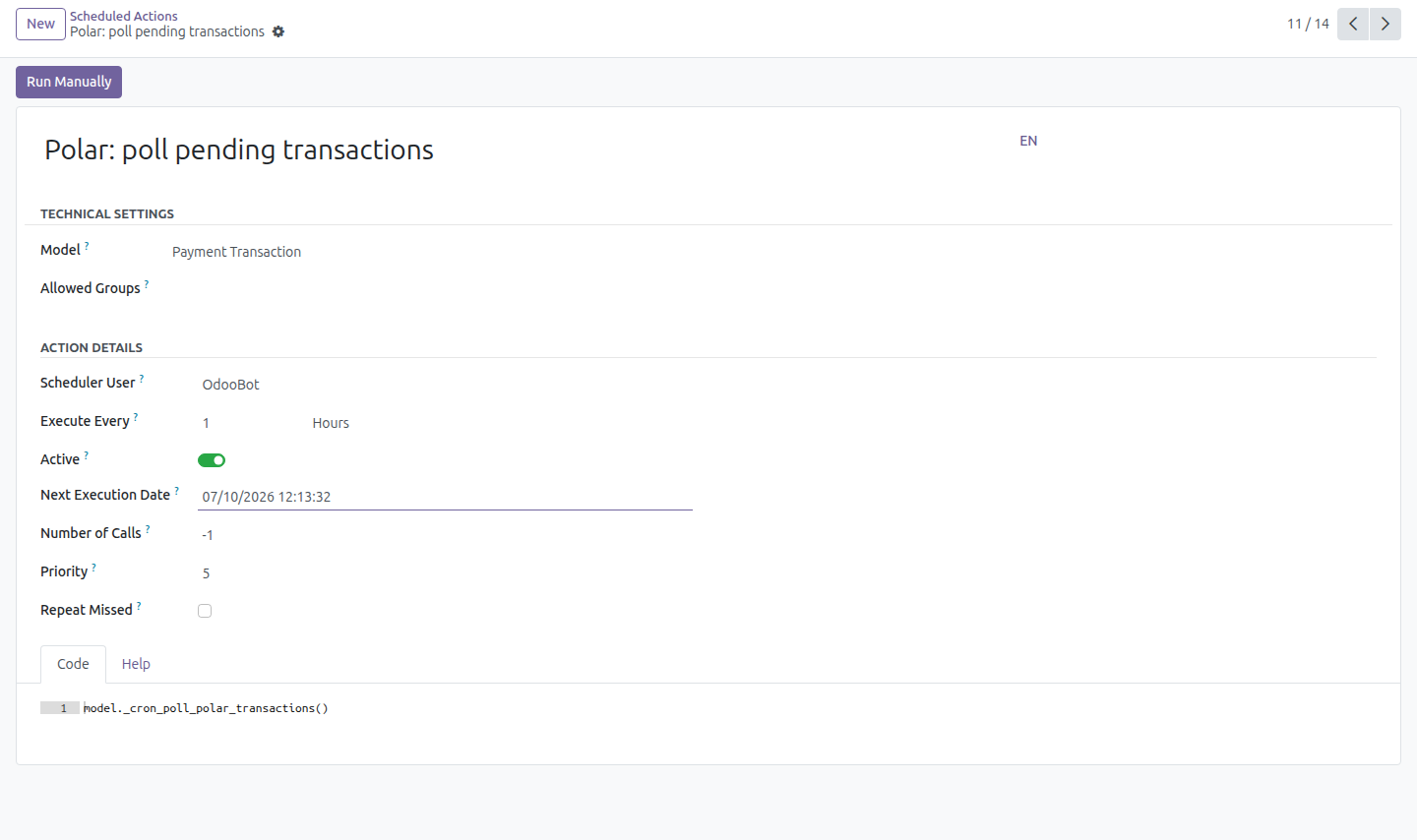
This is the safety net for a webhook delivery that never arrived - and, if Polar disables the endpoint after repeated delivery failures, the hourly poll keeps your transactions moving until you re-enable the endpoint from Polar's own dashboard.
Troubleshooting: Checkout Fails Right After Enabling
Odoo provisions the shared Polar product automatically the moment you enable the provider. If Polar was unreachable at that exact moment (for example, the access token was not valid yet), that automatic attempt is only logged as a warning - it never blocks saving the provider - and the product reference stays empty. The first checkout then fails with a clear error instead of charging anyone incorrectly.
To fix it, open the Polar provider and press Prepare Polar Product to retry. It is safe to press even if the product was already provisioned: the action does nothing if a product reference is already set.
What You Need to Know Before Going Live
Payout reconciliation is manual, by design
Polar's payouts API cannot be called with the access token an Odoo server holds, so Odoo can never learn which orders a given payout settled. This module does not try to guess: it isolates Polar's net cash in your dedicated Polar Clearing Account, and your accountant matches the bank deposit against that account in Odoo's own bank-reconciliation widget, using the amount and the date as the matching signal. This is a reconciliation heuristic, not an authoritative, order-by-order match - plan your reconciliation process accordingly.
Polar exposes no dispute or chargeback webhook
This module does not receive or process any dispute or chargeback event, because Polar does not emit a webhook for them. Disputes are handled entirely in Polar's own dashboard, and reach Odoo only indirectly, through the payout figures your accountant reconciles.
Turn on Automatic Invoice, or expect an uninvoiced prepayment
Polar collects the full payment as Merchant of Record before Odoo necessarily has an invoice for it. If Automatic Invoice (see Turn on Automatic Invoice above) is turned off, a Polar checkout lands in Odoo as an unreconciled customer prepayment until an invoice is created by hand. The Polar provider form warns about exactly this as long as the setting stays off; turn it on so every settled Polar payment is invoiced automatically.
This software and associated files (the "Software") may only be used (executed, modified, executed after modifications) if you have purchased a valid license from the authors, typically via Odoo Apps, or if you have received a written agreement from the authors of the Software (see the COPYRIGHT file).
You may develop Odoo modules that use the Software as a library (typically by depending on it, importing it and using its resources), but without copying any source code or material from the Software. You may distribute those modules under the license of your choice, provided that this license is compatible with the terms of the Odoo Proprietary License (For example: LGPL, MIT, or proprietary licenses similar to this one).
It is forbidden to publish, distribute, sublicense, or sell copies of the Software or modified copies of the Software.
The above copyright notice and this permission notice must be included in all copies or substantial portions of the Software.
THE SOFTWARE IS PROVIDED "AS IS", WITHOUT WARRANTY OF ANY KIND, EXPRESS OR IMPLIED, INCLUDING BUT NOT LIMITED TO THE WARRANTIES OF MERCHANTABILITY, FITNESS FOR A PARTICULAR PURPOSE AND NONINFRINGEMENT. IN NO EVENT SHALL THE AUTHORS OR COPYRIGHT HOLDERS BE LIABLE FOR ANY CLAIM, DAMAGES OR OTHER LIABILITY, WHETHER IN AN ACTION OF CONTRACT, TORT OR OTHERWISE, ARISING FROM, OUT OF OR IN CONNECTION WITH THE SOFTWARE OR THE USE OR OTHER DEALINGS IN THE SOFTWARE.