
Accounting Foundation
by Viindoo
| Lines of Code | 3814 |
| Technical name | viin_account |
| License | OPL-1 |
| Website | https://viindoo.com/apps/modules/19.0/viin_account |
| Read description for | v 14.0 v 15.0 v 16.0 v 17.0 v 18.0 |
| Required Apps | Invoicing (account) Discuss (mail) |
| Included Dependencies | Viindoo Base |
| Extensions | Affiliate Management Assets Management Accounting & Financial Reports Vietnamese E-Invoice Integration Foreign Trade, Logistics Account Counterparts On-behalf Payments Fleet Cost & Revenue Accounting Pos Refund Advance Advanced HR Expense Management Vietnam Chart of Accounts - Circular 99 and 133 HR Accounting Payment with Payment Lines Logistics Accounting Route Cost & Revenue Accounting Vietnam - Foreign Trade Payment Gateway Currency Conversion |

Money that moves between accounts stays traceable
Move a journal item to another account and the link back to where it came from is a record, not a memory. Plus the accounting pieces Odoo leaves out: fiscal positions that tell a company from an individual, separate other-receivable and other-payable accounts per partner, and trial-balance accounts that carry both sides.
Viindoo Accounting (technical name viin_account) is an Odoo 19.0 app for Odoo Community and Odoo Enterprise and Viindoo Cloud, built for accountant, chief accountant, auditor, implementer.
At a Glance
The facts of Viindoo Accounting, version 0.2.8, in one place. Published by Viindoo.
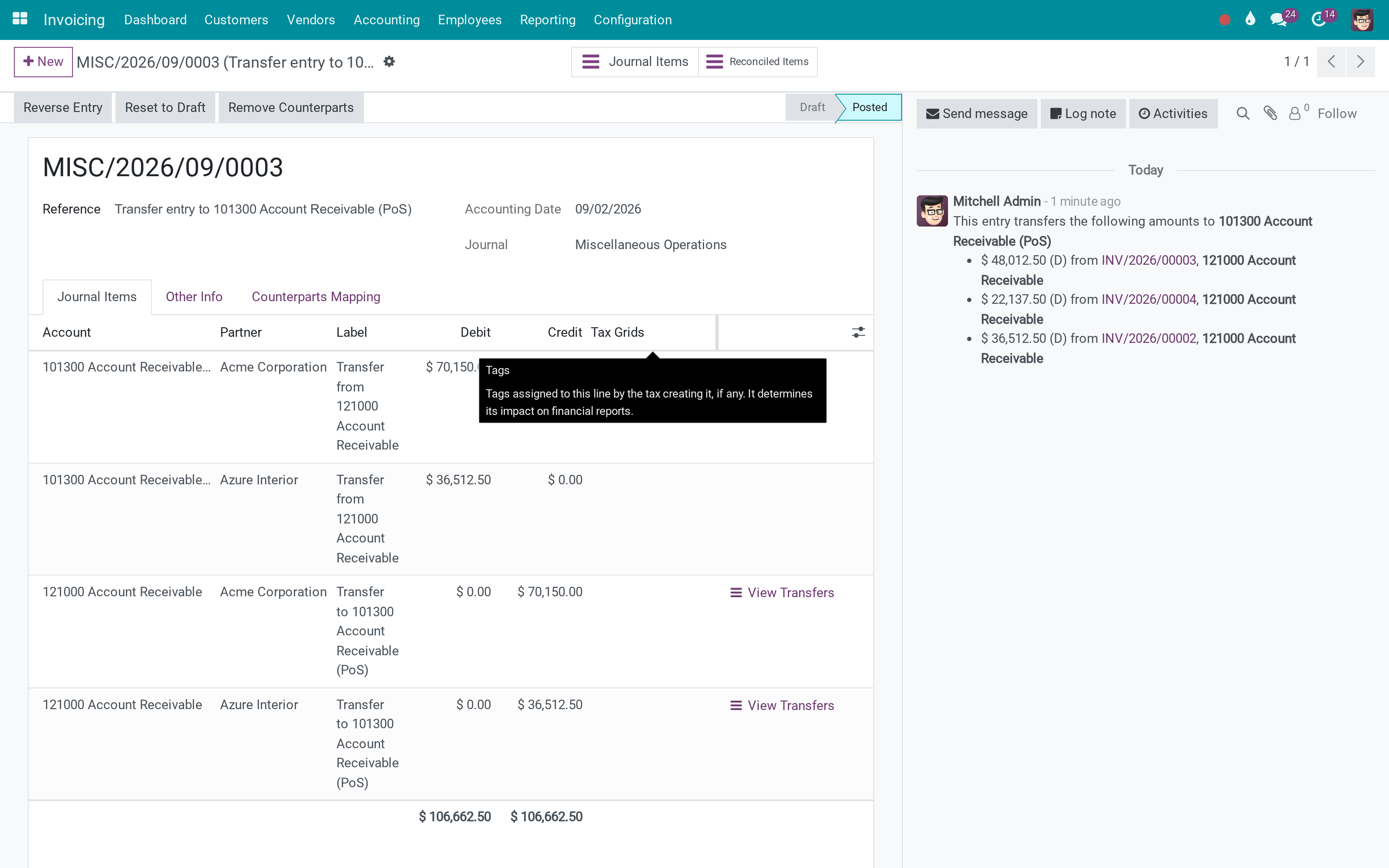
Key Features
Every accounting department moves entries: a receivable reclassified to another account, a cost pushed into the period it belongs to, money parked in a clearing account until it is allocated. Odoo can make the entry - the Automatic Entries wizard has done that for years - but afterwards nothing connects the new line to the old one, and three months later nobody can say which original invoice the balance in the transfer account came from. This app records that link. Each transfer writes an allocation: source line, destination line, amount, percentage, date and state, with a View Transfers button on both the entry and the journal item, and a list of every allocation in the database. An entry that is part of a transfer chain also refuses to be deleted, so the chain cannot be broken from the middle. Around that sit the accounting extensions the Viindoo apps rely on: a fiscal position that applies only to companies or only to individuals, other-receivable and other-payable accounts per partner, extra account types for financial reporting, and an account flag for the balances that legitimately show on both sides of a trial balance.
B2B and B2C fiscal positions
Apply a fiscal position only to companies, or only to individuals - the split VAT rules actually make.
Accounts for real reporting
Extra account types, and the flag for accounts that show on both sides of a trial balance.
Partner-level accounts
Other receivable and other payable per partner, alongside the standard receivable and payable.
Invoices and payments as usual
Nothing about the day-to-day changes: this layer sits under the invoicing you already run.
Payment gateway currency conversion: every cent of the difference has a home
When a payment provider charges in a currency other than your document currency, the amount the gateway charges rarely matches the document amount converted at your rate. That small gap used to land in a miscellaneous account, or get lost in a manual correction at month end.
In Settings > Accounting, the block Payment gateway currency conversion gives that gap its own Gain Account and Loss Account:
Record the conversion difference, meaning the amount the gateway charged minus the document amount converted at the Odoo rate on the payment date, in dedicated accounts instead of a catch-all.
Start working on day one: with the generic chart of accounts, the Gain account is pre-filled with Other Income (450000) and the Loss account with Other Expenses (650000). Change them to any account of your own chart in one click.
Keep two different things apart: the conversion difference stays separate from exchange gain/loss, which still posts to your company's exchange difference accounts when rates move between invoice and payment dates.
Set per company, so each entity in a multi-company group keeps its own accounts, and localization packages can pre-fill them for their own chart.
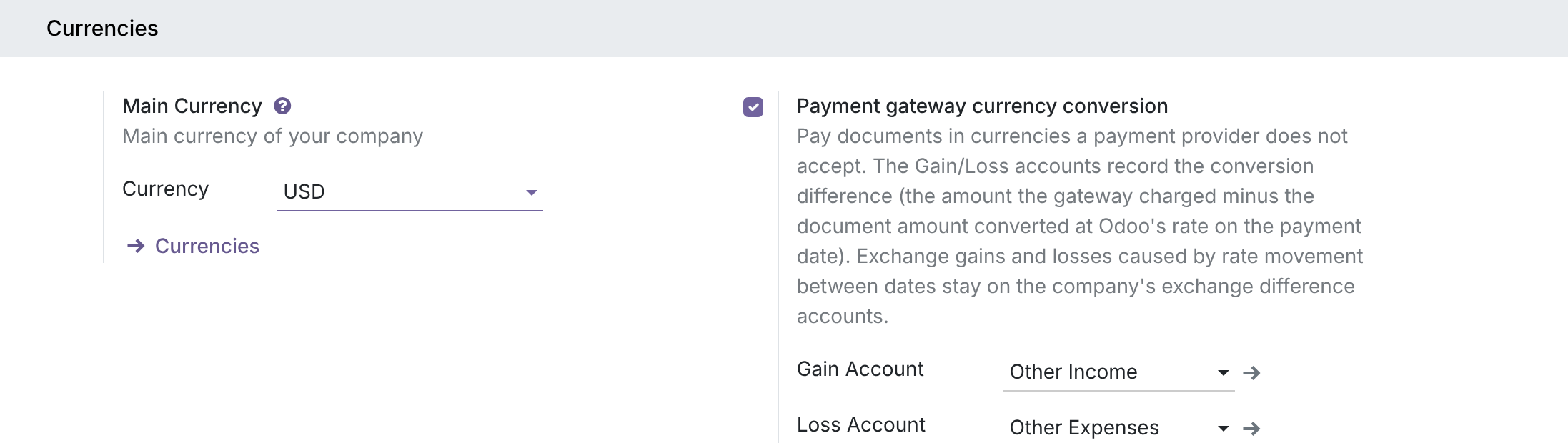
Note: the Gain and Loss fields appear once the Payment gateway currency conversion option is turned on in Settings.
How It Works
Three steps, on the screens an accountant already uses.
Move the entry the normal way
Select the journal items and run Odoo's own Automatic Entries - change account, or change period. Nothing new to learn; the difference is what gets written alongside.
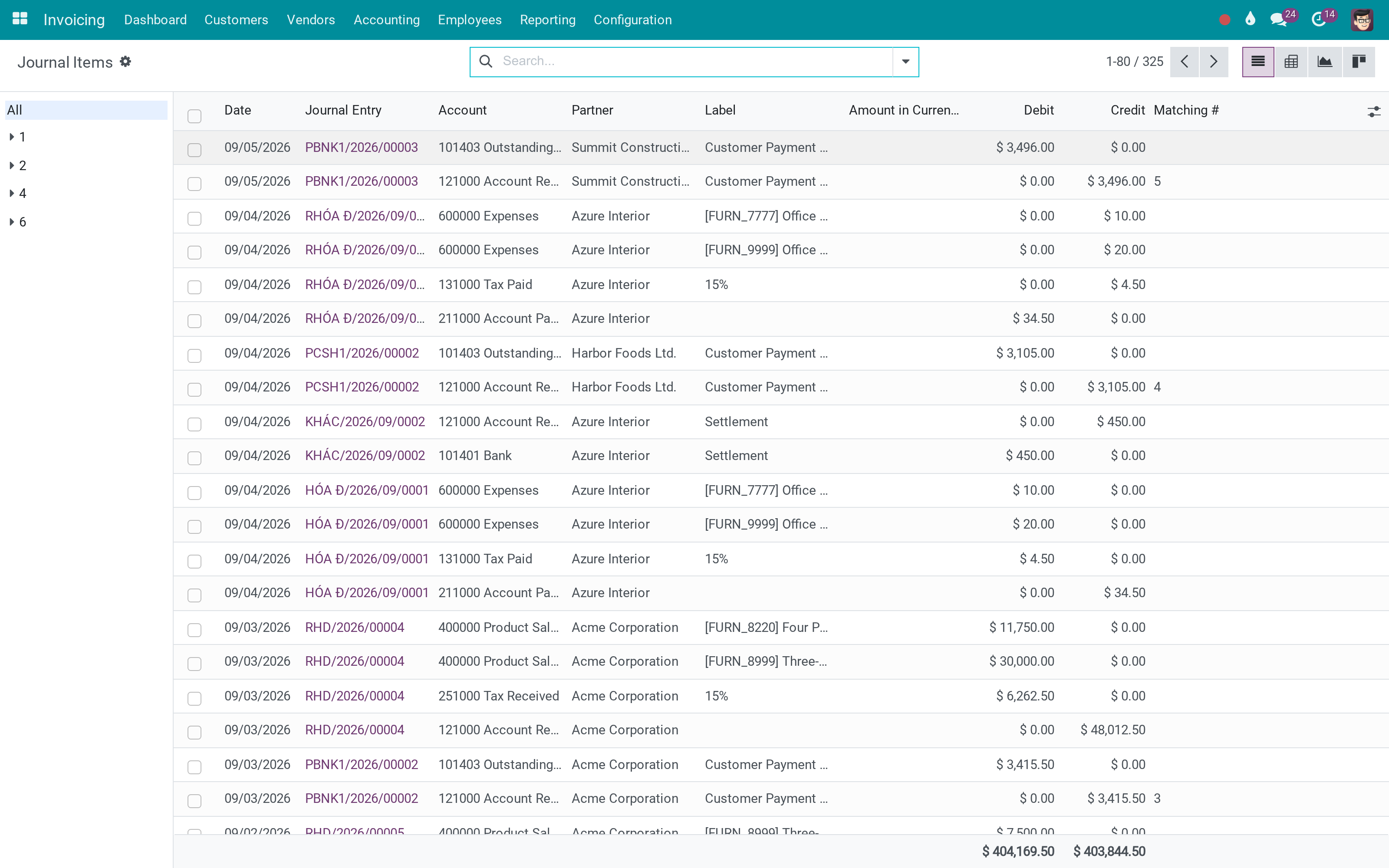
The link is recorded, not remembered
The generated entry carries a transfer allocation per line: which line it came from, how much of it, and what percentage. From either side, View Transfers opens the other end of the chain.
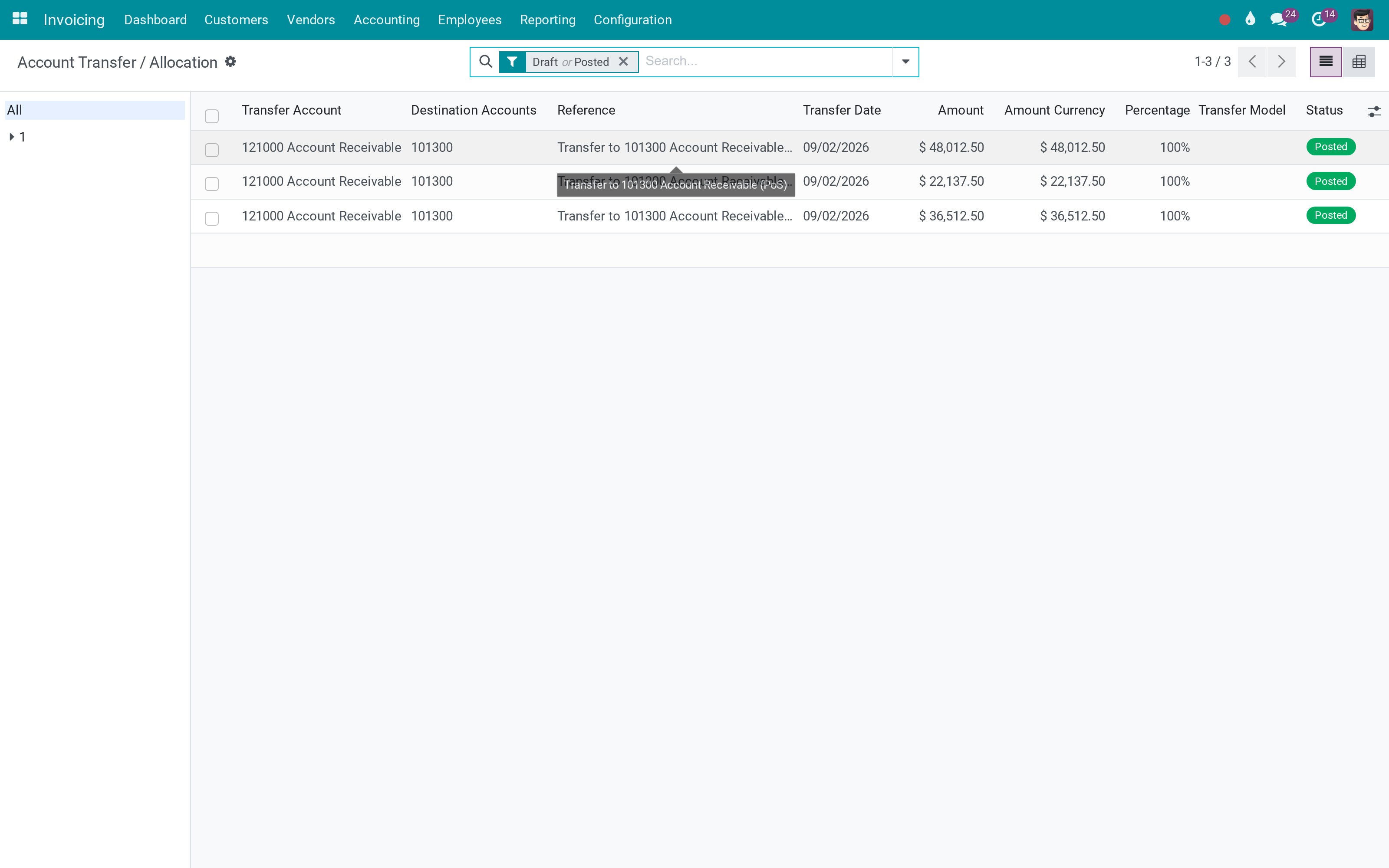
Read the whole clearing account
One list answers the question a transfer account always raises: what is this balance made of, and which entries put it there.
What You Get
Transfer allocations: every Automatic Entry records where the amount came from and what share of the original line it is
View Transfers on the journal entry and on the journal item - both directions of the chain
An entry that belongs to a transfer chain cannot be deleted, so the trail stays whole
Fiscal positions that apply only to companies or only to individuals - the B2B/B2C split core Odoo does not have
Other Receivable and Other Payable accounts per partner, company-dependent like the standard ones
Account types for financial reporting, and a flag for accounts that carry a balance on both sides in the trial balance
Account code validation and a log when a chart-template identity changes under you
Analytic grouping that returns the right totals when the analytic mixin is grouped
More Screens
Everything below was taken on a database seeded with real business data, on this series - not a mock-up and not a screenshot from an older version.
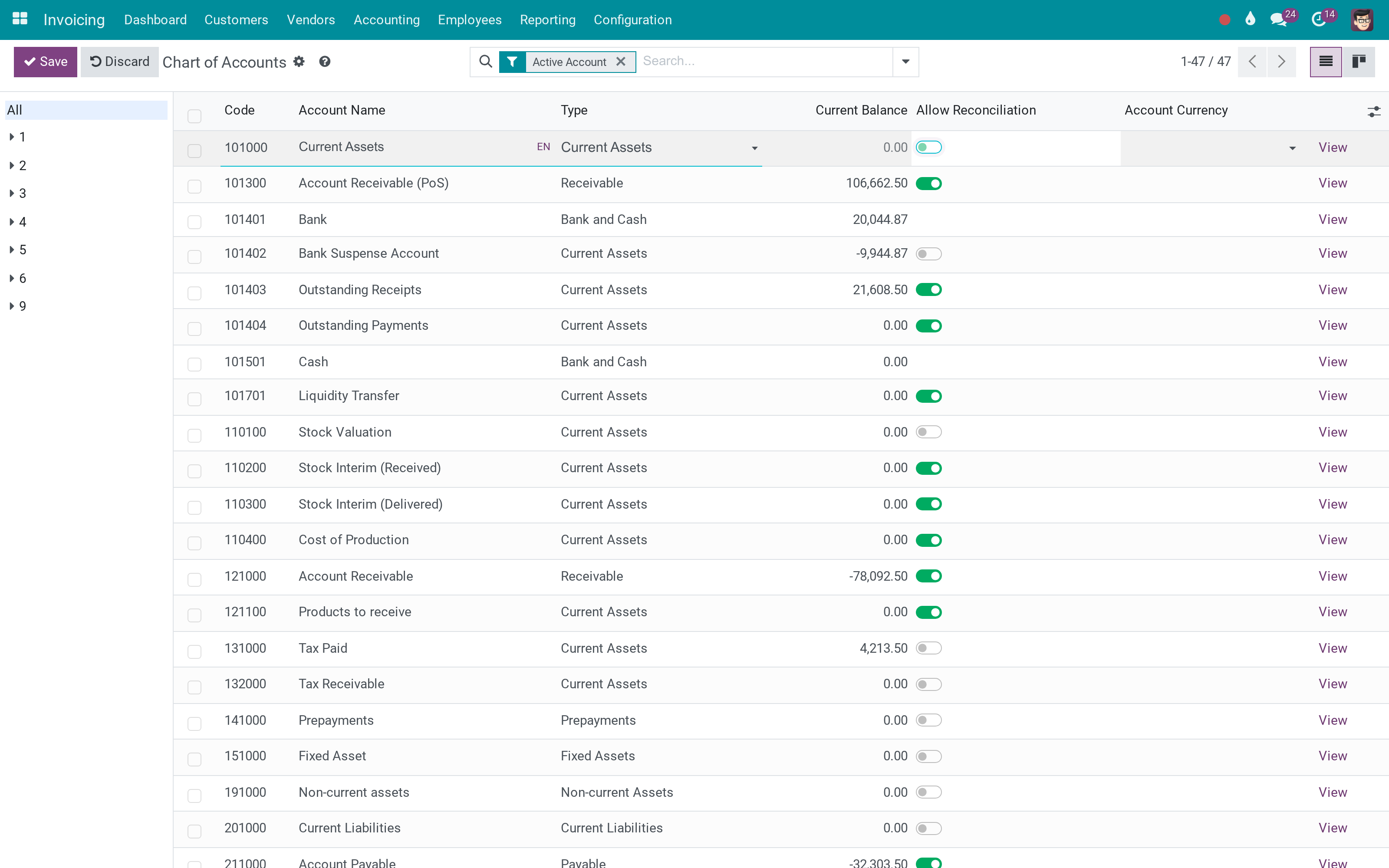
An account, with its type and reconciliation setting
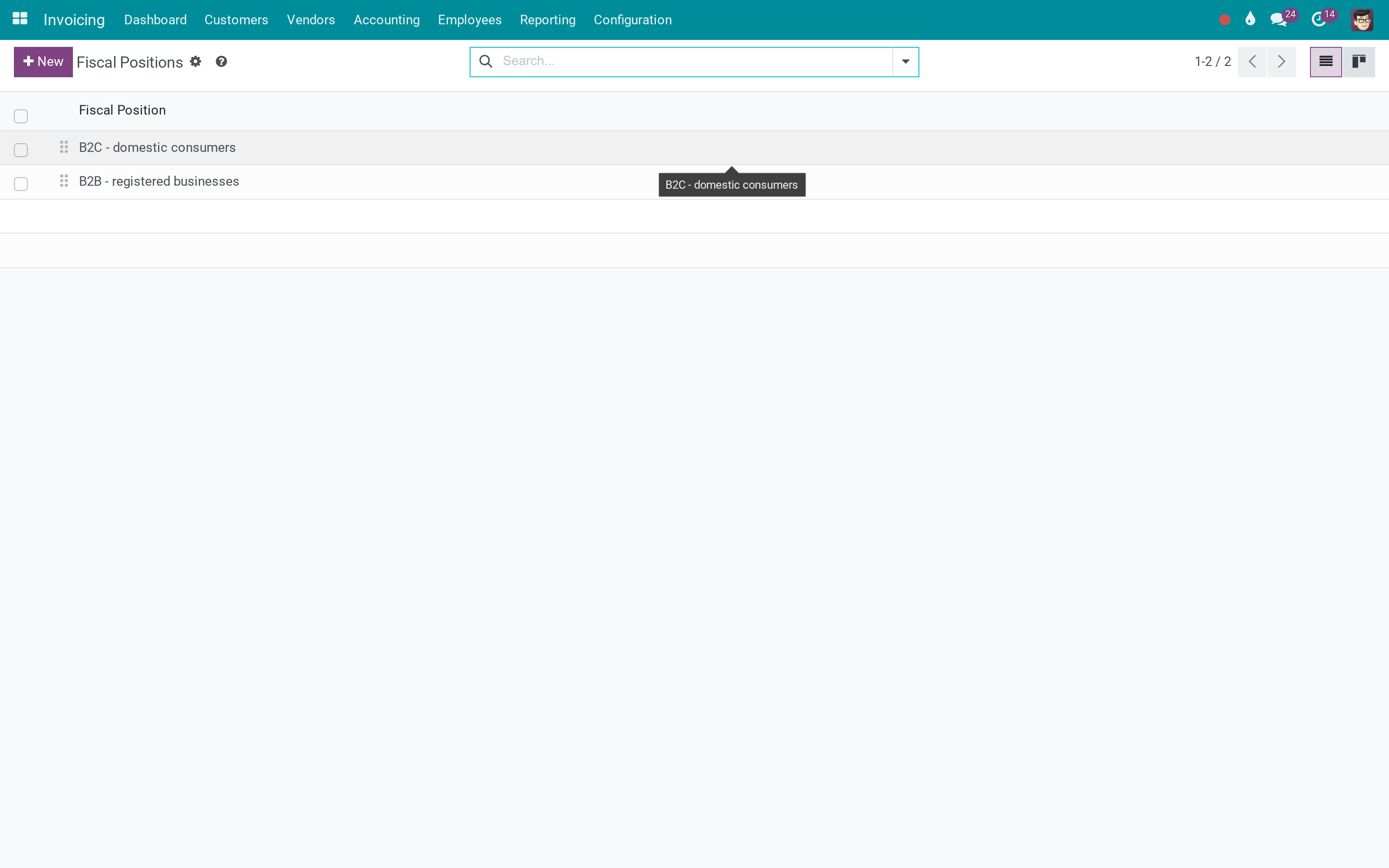
Fiscal positions, split by who they apply to
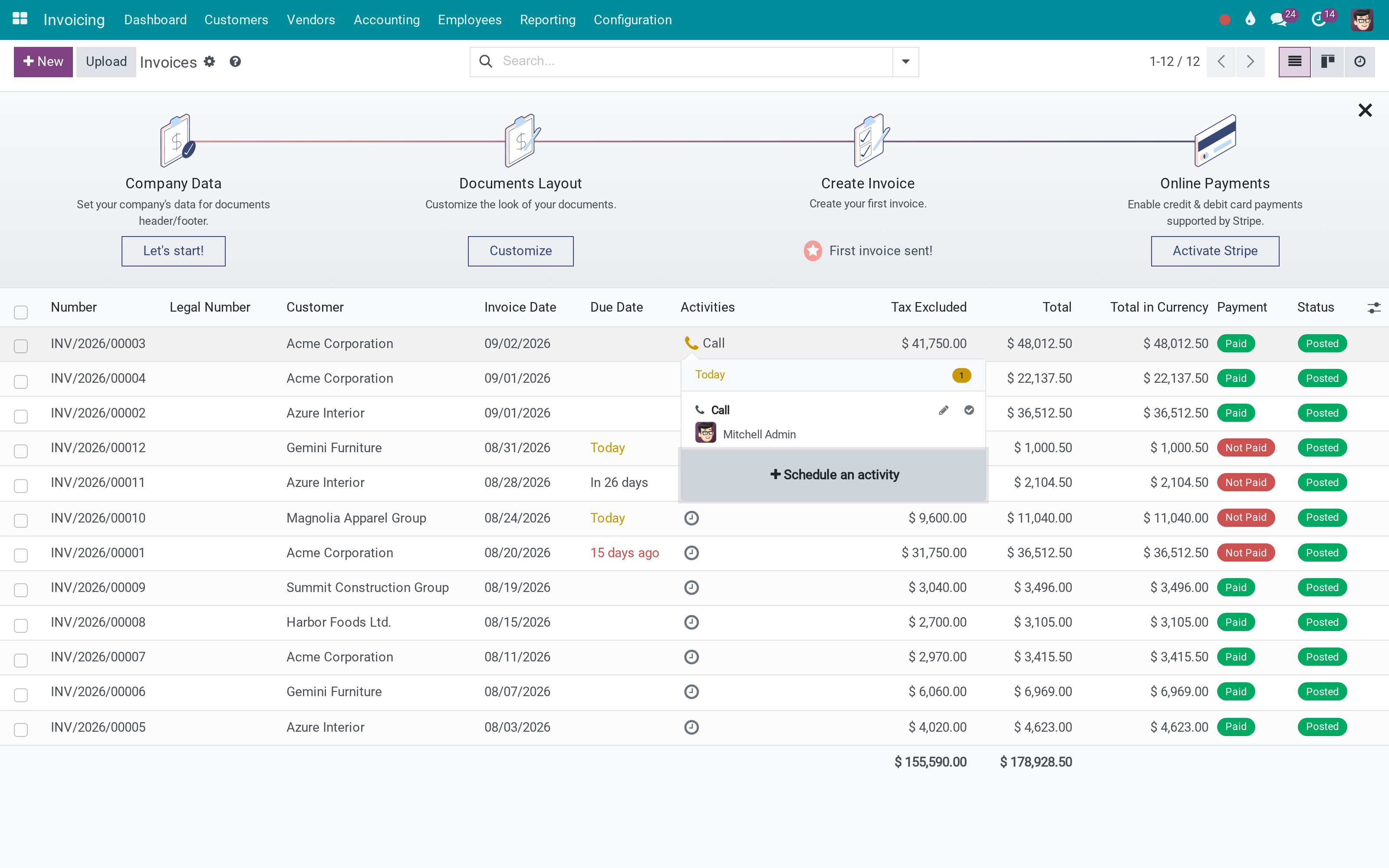
A customer invoice
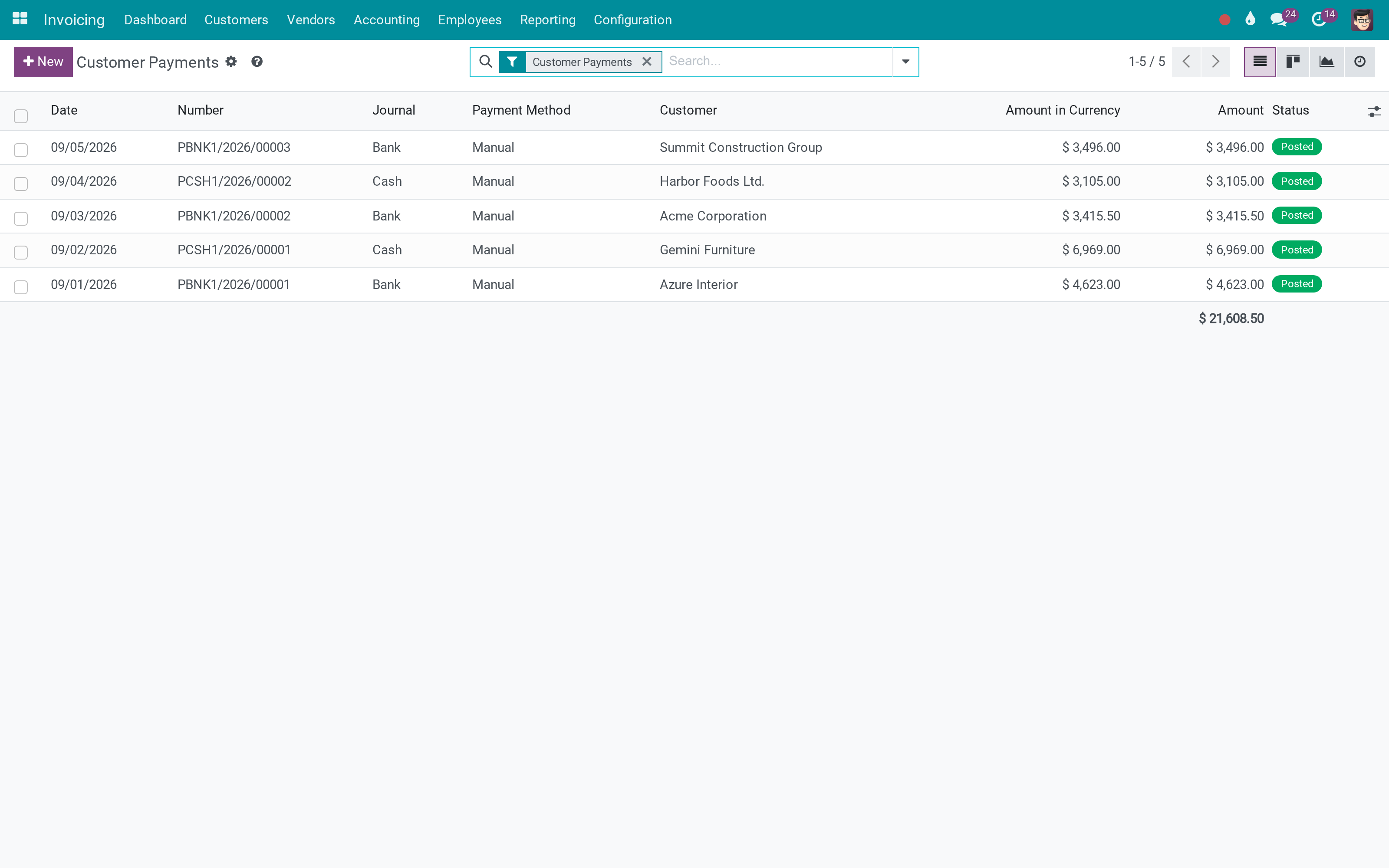
Payments against those invoices
Journal items across the company
What This App Does Not Do
Read this before you buy. Everything below is something the app deliberately leaves to another app or to you.
No country chart of accounts, no tax rules, no statutory reports - it is the customisation layer those sit on.
They are not created by payments or by reconciliation; the chain is recorded when an accountant deliberately moves an entry.
Odoo's own requirement: set the deferred expense and revenue accounts in Accounting settings, or the period change refuses the entry.
Trial balance, P&L and the rest come from Odoo's accounting reports or from the Accounting Analysis app.
Works Well With
Apps from the same stack, built to fit this one:
Reconciliation Widget
For matching what lands in the bank against what is open.
Account Reconciliation WidgetAccount Counterparts
Shows the other side of every entry, which pairs with the transfer trail.
Account CounterpartsWho Should Use Viindoo Accounting?
Accountant
Reclassifies an entry and keeps the audit trail without writing a note about it.
Chief accountant
Opens a transfer account and sees what each balance is made of.
Auditor
Follows a figure from the transfer account back to the invoice that created it.
Implementer
Gets the account, partner and fiscal-position extensions the rest of the Viindoo accounting apps build on.
Frequently Asked Questions
What does Viindoo Accounting do?
Move a journal item to another account and the link back to where it came from is a record, not a memory. Plus the accounting pieces Odoo leaves out: fiscal positions that tell a company from an individual, separate other-receivable and other-payable accounts per partner, and trial-balance accounts that carry both sides.
What does Viindoo Accounting not do?
It is not a localisation. No country chart of accounts, no tax rules, no statutory reports - it is the customisation layer those sit on. Allocations come from the Automatic Entries wizard. They are not created by payments or by reconciliation; the chain is recorded when an accountant deliberately moves an entry. Change Period needs the deferred accounts configured. Odoo's own requirement: set the deferred expense and revenue accounts in Accounting settings, or the period change refuses the entry. No financial reports of its own. Trial balance, P&L and the rest come from Odoo's accounting reports or from the Accounting Analysis app.
Who is Viindoo Accounting for?
Accountant: Reclassifies an entry and keeps the audit trail without writing a note about it. Chief accountant: Opens a transfer account and sees what each balance is made of. Auditor: Follows a figure from the transfer account back to the invoice that created it. Implementer: Gets the account, partner and fiscal-position extensions the rest of the Viindoo accounting apps build on.
Which Odoo version and editions does it support?
Odoo 19.0 - Odoo Community, Odoo Enterprise, Viindoo Cloud. Upgrades to a newer Odoo series are a separate purchase for that series.
What does it depend on?
It installs on top of: account, to_base. Odoo installs them with it.
How do I set it up?
Three steps, on the screens an accountant already uses.
What works well with it?
Reconciliation Widget (viin_account_reconciliation): For matching what lands in the bank against what is open. Account Counterparts (to_account_counterpart): Shows the other side of every entry, which pairs with the transfer trail. Viindoo Base (to_base): The shared library underneath, installed with it.
Can I try it before buying?
Yes - the Live Preview button at the top of this page opens the module's own screen on a working database.
How do I get support?
Write to apps.support@viindoo.com with your Odoo version and the technical name viin_account; pre-sales questions go to sales@viindoo.com.
See Viindoo Accounting in Action
Live demo: v19demo-int.viindoo.com/web#action=viin_account.action_account_transfer_allocation
Need help with Viindoo Accounting?
For questions, implementation support or a custom feature, contact Viindoo.
Pre-Sales & Partnership
sales@viindoo.comUpgrades to a newer Odoo series are a separate purchase for that series.
All Viindoo apps: Viindoo Apps
Technical Requirement
Changes log
0.2.5 - Latest on the 19.0 line
- Transfer allocations record both directions of a reclassification, with the percentage of the original line.
- Entries that are part of a transfer chain can no longer be deleted, so the trail cannot be broken from the middle.
- Fiscal positions can be restricted to companies or to individuals.
- Analytic grouping returns correct totals when grouped through the analytic mixin.
Installation
- Navigate to Apps.
- Search with keyword viin_account.
- Press Install.
Note: To see full features of the viin_account module, you need to install the Accounting app.
Instructions
Instruction video: Accounting Customization
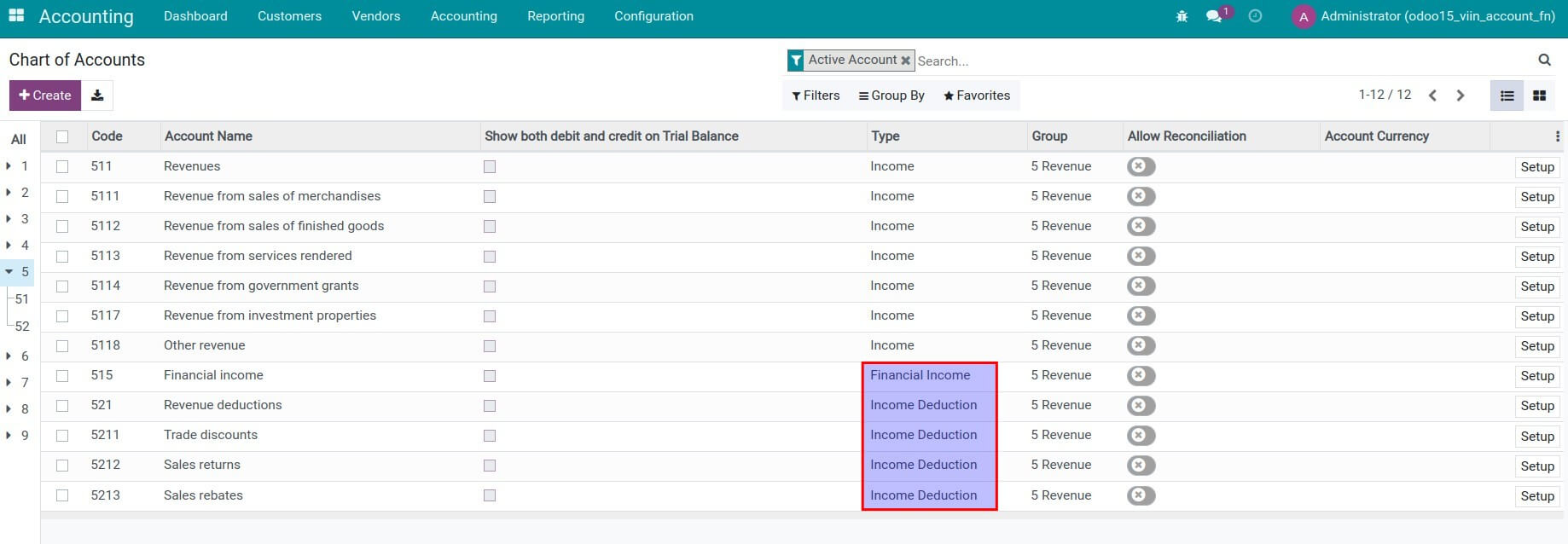
New account type
The Financial Income and Income Deduction are new account types added to the Chart of Accounts. This will support building data compilation rules for each target on the financial report right on the Accounting software.
Payment gateway currency conversion
For the System Administrator. Use this setting when customers pay documents in a currency that the payment provider does not accept. The provider charges a converted amount, and the difference between that amount and the document amount converted at Odoo's rate on the payment date is recorded on two accounts that you choose.
- Open Invoicing ‣ Configuration ‣ Settings and find the Currencies block.
- Tick Payment gateway currency conversion. The required app is installed and the Gain Account and Loss Account fields appear.
- Select the Gain Account. Only income or other income accounts can be selected.
- Select the Loss Account. Only expense or other expense accounts can be selected.
- Click Save.
Good to know:
- The conversion difference is the amount charged by the payment gateway minus the document amount at Odoo's rate on the payment date. It is posted to the Gain Account when positive and to the Loss Account when negative.
- Exchange gains and losses caused by rate movement between the document date and the payment date are not affected. They stay on the company's exchange difference accounts.
- With the generic chart of accounts, the Gain Account is pre-filled with Other Income (450000) and the Loss Account with Other Expenses (650000).
- If you reload the chart of accounts, the accounts you selected are kept.
Automatically apply a suitable fiscal position for each contact type
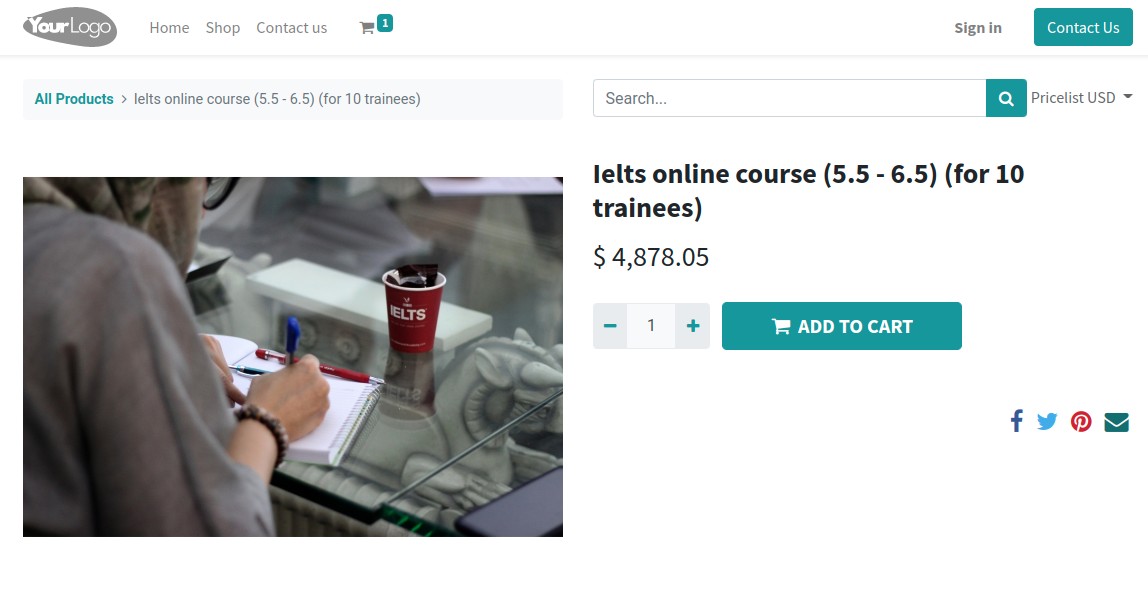
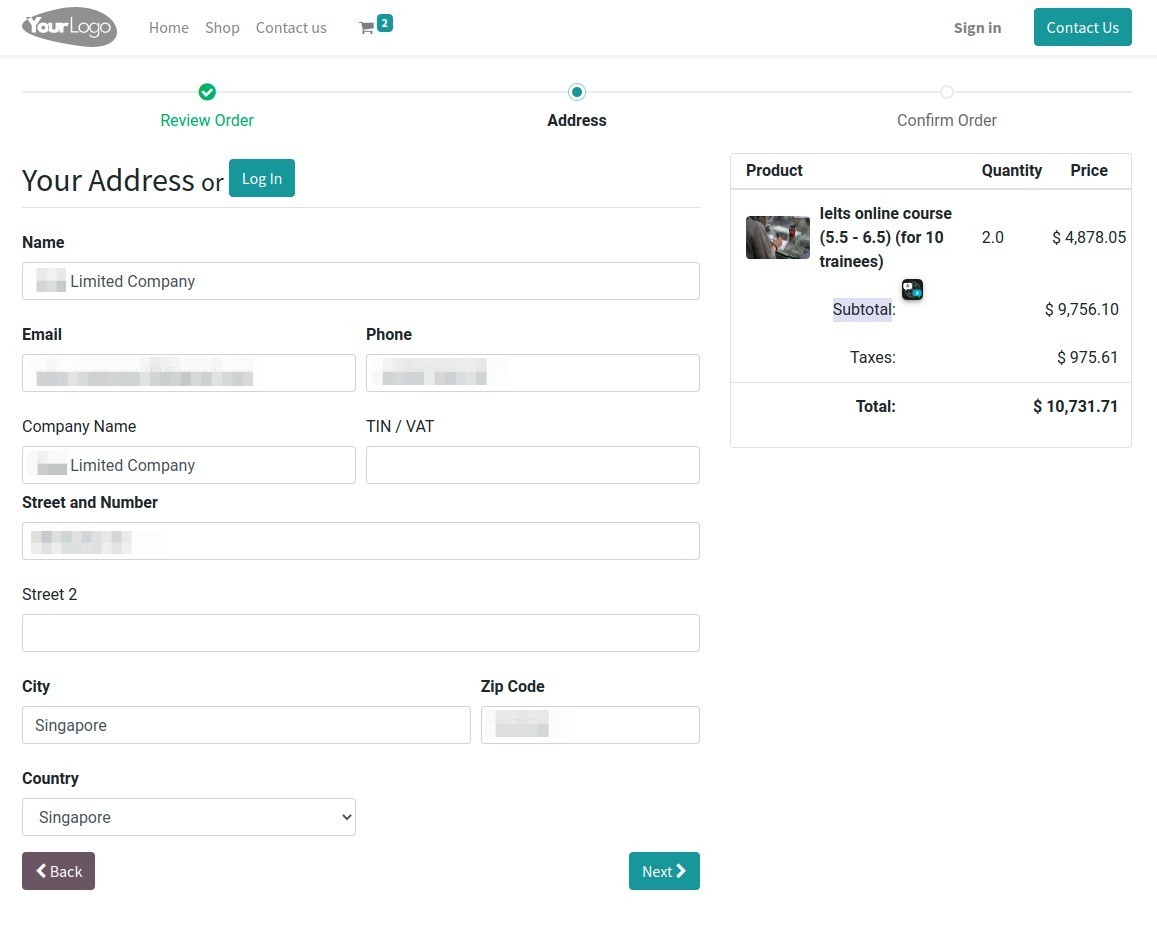
Example: You have an e-commerce business with customers who purchase products from your website.
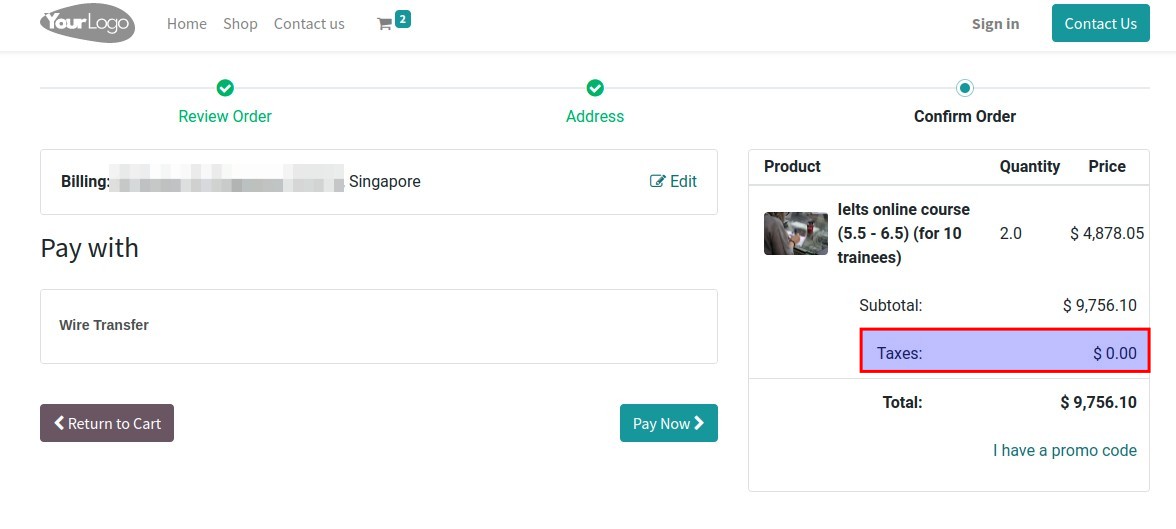
- Customer is a company, located outside of Vietnam, a VAT rate of 0% is applied;
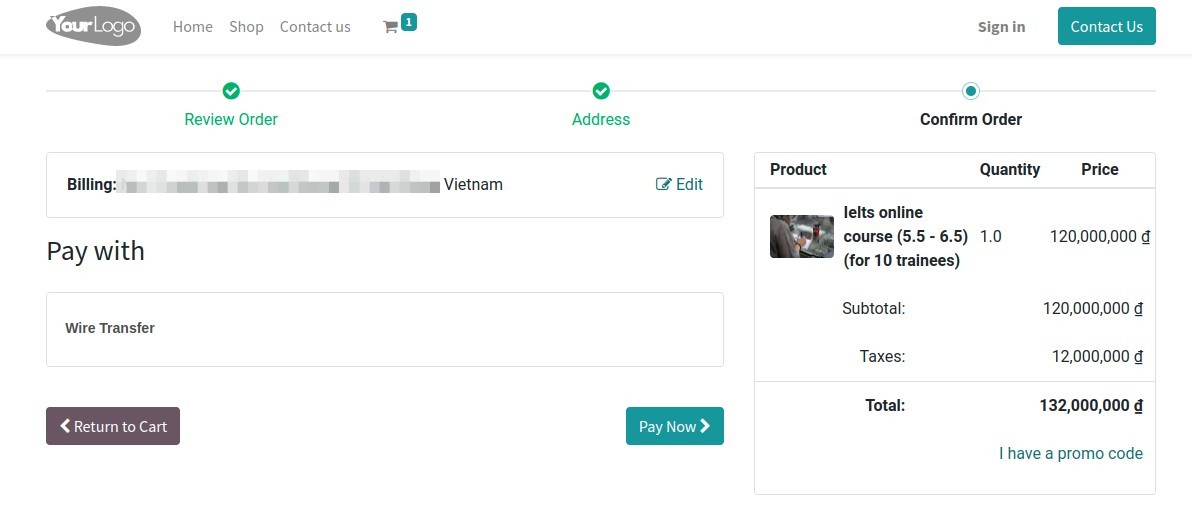
- Customer is a company, located in Vietnam, a VAT rate of 10% is applied.
Workflow on the software:
Note: To view the whole workflow in this example, you need to install the e-Commerce app;
Step 1: Configure fiscal position.
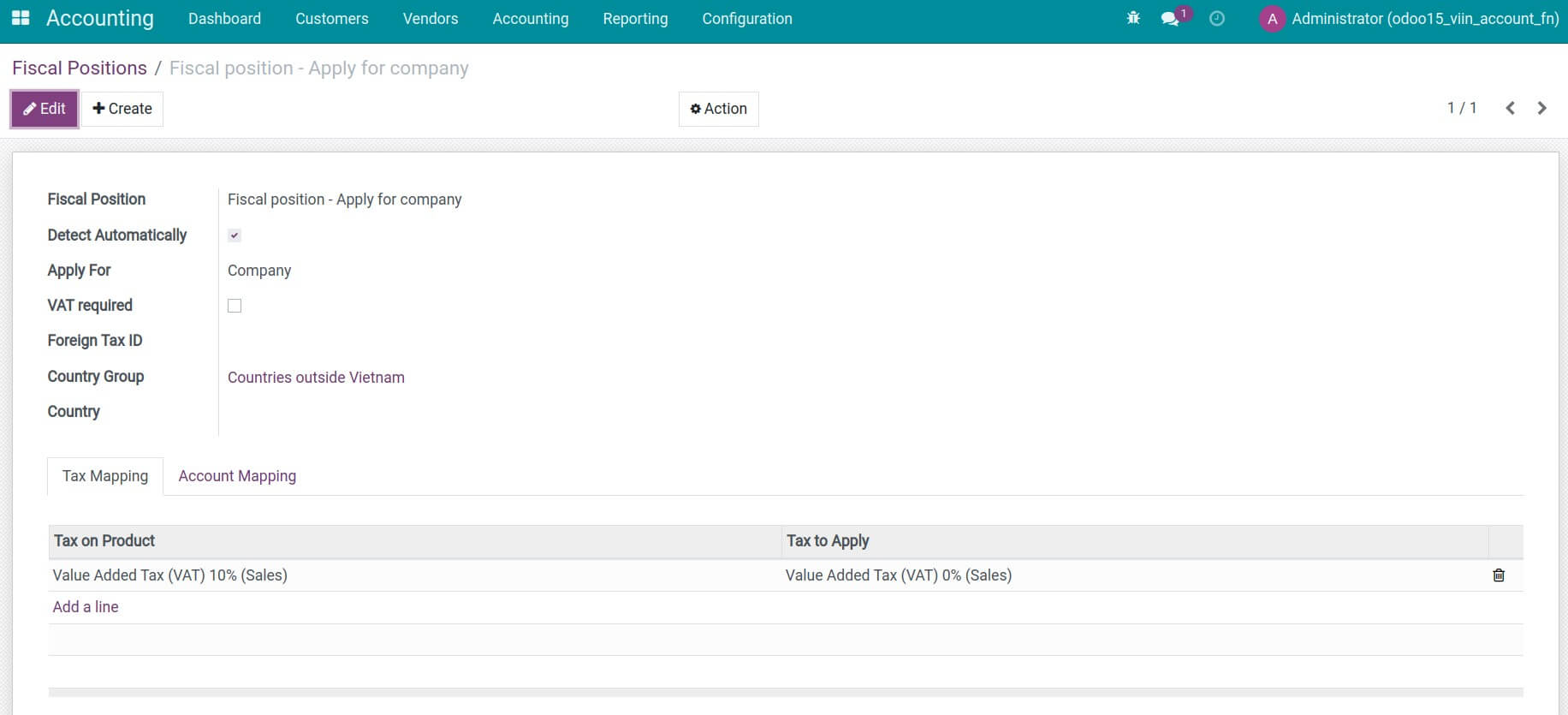
Step 2: Purchase products on the website, register customer's information and check customer invoices.
- Foreign customer: Based on the address provided by the customer at the purchasing step, their fiscal position will be automatically detected with the VAT rate of 0% that you have configured previously.
- Vietnamese customer: Fiscal position with a tax rate of 10% will be automatically recognized for customers residing inside Vietnam.
This software and associated files (the "Software") may only be used (executed, modified, executed after modifications) if you have purchased a valid license from the authors, typically via Odoo Apps, or if you have received a written agreement from the authors of the Software (see the COPYRIGHT file).
You may develop Odoo modules that use the Software as a library (typically by depending on it, importing it and using its resources), but without copying any source code or material from the Software. You may distribute those modules under the license of your choice, provided that this license is compatible with the terms of the Odoo Proprietary License (For example: LGPL, MIT, or proprietary licenses similar to this one).
It is forbidden to publish, distribute, sublicense, or sell copies of the Software or modified copies of the Software.
The above copyright notice and this permission notice must be included in all copies or substantial portions of the Software.
THE SOFTWARE IS PROVIDED "AS IS", WITHOUT WARRANTY OF ANY KIND, EXPRESS OR IMPLIED, INCLUDING BUT NOT LIMITED TO THE WARRANTIES OF MERCHANTABILITY, FITNESS FOR A PARTICULAR PURPOSE AND NONINFRINGEMENT. IN NO EVENT SHALL THE AUTHORS OR COPYRIGHT HOLDERS BE LIABLE FOR ANY CLAIM, DAMAGES OR OTHER LIABILITY, WHETHER IN AN ACTION OF CONTRACT, TORT OR OTHERWISE, ARISING FROM, OUT OF OR IN CONNECTION WITH THE SOFTWARE OR THE USE OR OTHER DEALINGS IN THE SOFTWARE.