
Vendor Price Lock

A locked vendor price cannot be changed on the order
Lock / Unlock on vendor pricelist lines; a locked price is loaded on the RFQ and only a Purchase Manager may save a different one.
Vendor Price Lock (technical name to_vendor_price_lock) is an Odoo 18.0 app for Odoo Community and Odoo Enterprise and Viindoo Cloud, built for purchase manager, buyer, vendor, finance.
At a Glance
The facts of Vendor Price Lock, version 0.1, in one place. Published by Viindoo.
How It Works
Lock the pricelist line; orders follow it.
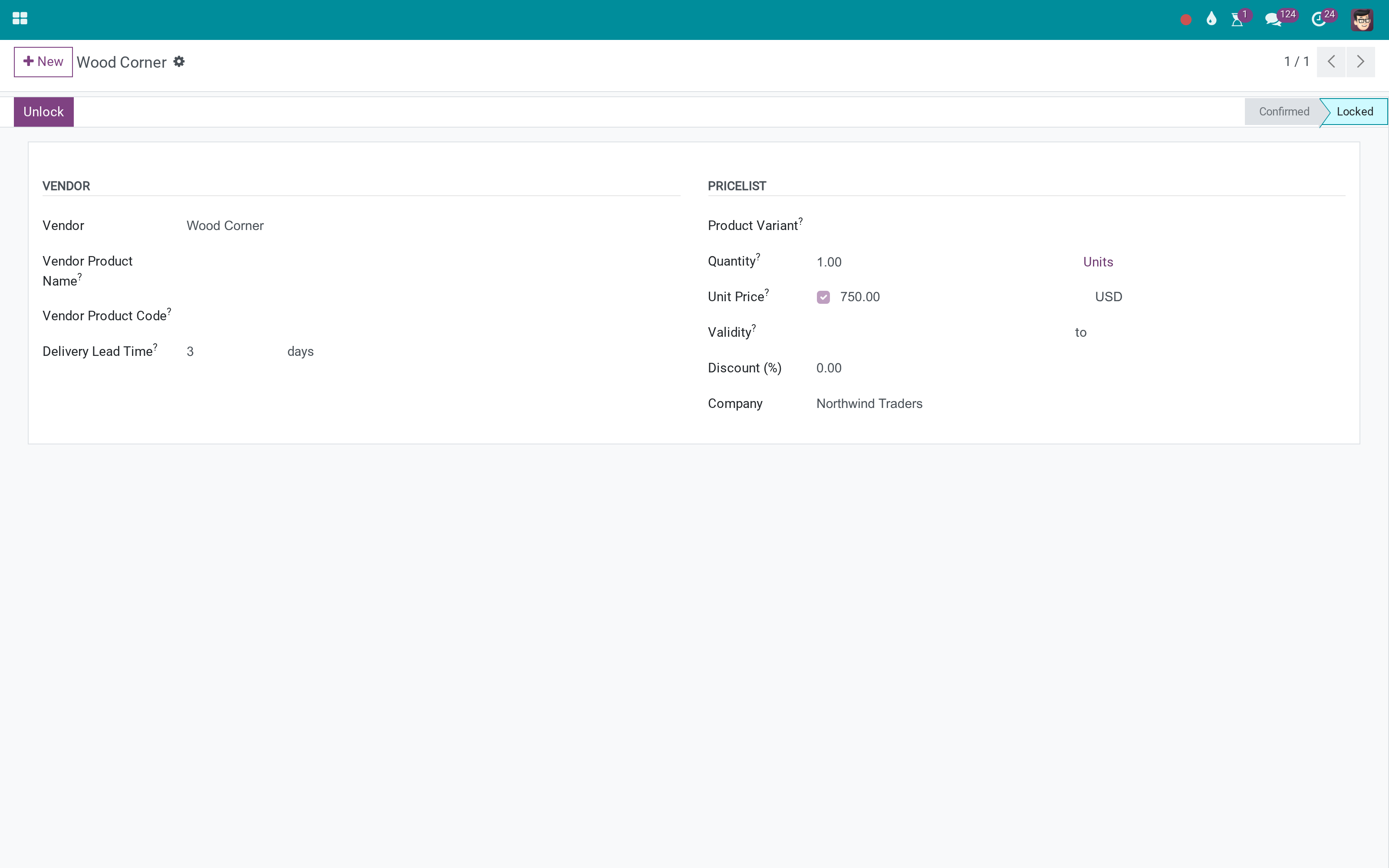
The locked line
Status Locked, an Unlock button for managers, the price tracked.
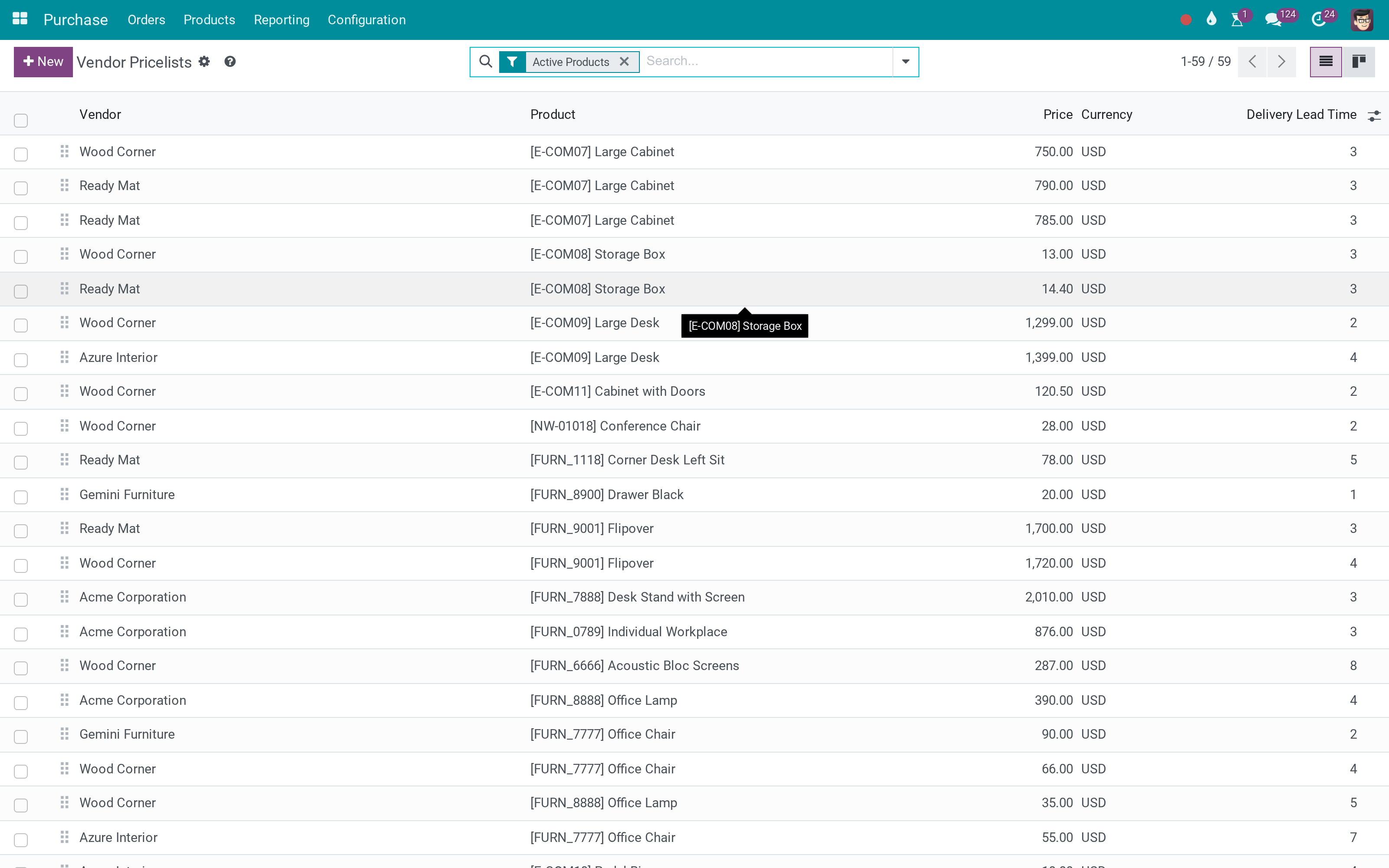
The pricelists
Which lines are locked, at a glance.
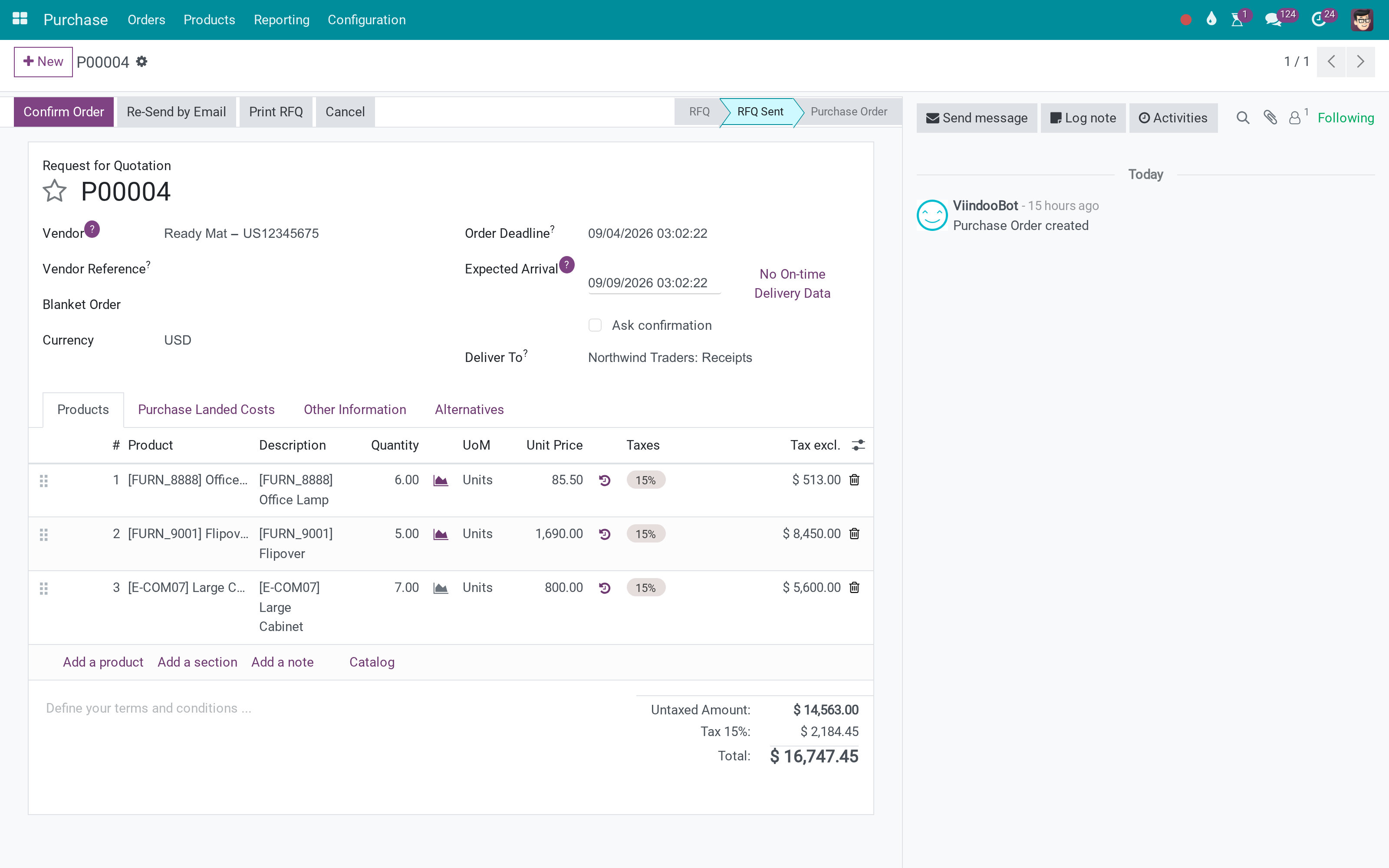
The order
Lines whose price comes from a locked pricelist cannot be changed by a buyer.
What You Get
Confirmed / Locked status on vendor pricelist lines, with Lock and Unlock buttons
Locked lines cannot be edited or deleted by non-managers
Unit price on RFQ and PO lines checked against the locked price on save
Purchase Managers keep full control
Chatter and tracking on the pricelist line: vendor, price, quantity, validity, lead time
Locked flag visible on the order line
More Screens
Everything below was taken on a database seeded with real business data, on this series - not a mock-up and not a screenshot from an older version.
Vendor pricelists
What This App Does Not Do
Read this before you buy. Everything below is something the app deliberately leaves to another app or to you.
The error appears when the line is saved, not while typing.
A product without a locked line is free.
The check converts before comparing.
Purchase Manager is the override.
Works Well With
Apps from the same stack, built to fit this one:
Cost access for purchasers
Buyers read cost, cannot edit it.
Product Standard Price Access - Purchase UserWho Should Use Vendor Price Lock?
Purchase manager
Locks what was negotiated.
Buyer
Orders at the contracted price.
Vendor
Gets orders at the agreed number.
Finance
Reads the price history on the pricelist line.
Frequently Asked Questions
What does Vendor Price Lock do?
Lock / Unlock on vendor pricelist lines; a locked price is loaded on the RFQ and only a Purchase Manager may save a different one.
What does Vendor Price Lock not do?
It checks on save. The error appears when the line is saved, not while typing. Only lines with a matching locked pricelist are checked. A product without a locked line is free. Currency and UoM conversions are respected. The check converts before comparing. Managers are exempt. Purchase Manager is the override.
Who is Vendor Price Lock for?
Purchase manager: Locks what was negotiated. Buyer: Orders at the contracted price. Vendor: Gets orders at the agreed number. Finance: Reads the price history on the pricelist line.
Which Odoo version and editions does it support?
Odoo 18.0 - Odoo Community, Odoo Enterprise, Viindoo Cloud. Upgrades to a newer Odoo series are a separate purchase for that series.
What does it depend on?
It installs on top of: purchase. Odoo installs them with it.
How do I set it up?
Lock the pricelist line; orders follow it.
What works well with it?
Sales Price Lock (to_sale_price_lock): The same idea on sales. Cost access for purchasers (to_product_standard_price_access_purchase): Buyers read cost, cannot edit it. Purchases Lines Numbering (to_purchase_line_numbering): Numbered order lines.
Can I try it before buying?
Yes - the Live Preview button at the top of this page opens the module's own screen on a working database.
How do I get support?
Write to apps.support@viindoo.com with your Odoo version and the technical name to_vendor_price_lock; pre-sales questions go to sales@viindoo.com.
See Vendor Price Lock in Action
Live demo: v18demo-int.viindoo.com/web#action=product.product_supplierinfo_type_action
Need help with Vendor Price Lock?
For questions, implementation support or a custom feature, contact Viindoo.
Pre-Sales & Partnership
sales@viindoo.comUpgrades to a newer Odoo series are a separate purchase for that series.
All Viindoo apps: Viindoo Apps
Technical Requirement
Changes log
0.1 - Latest on the 17.0 line
- Aligned with the 17.0 models and views.
Installation
- Navigate to Apps.
- Search with keyword to_vendor_price_lock.
- Press Install.
Instructions
Instruction video: Vendor Price Lock
Step 1: Create a vendor pricelist.
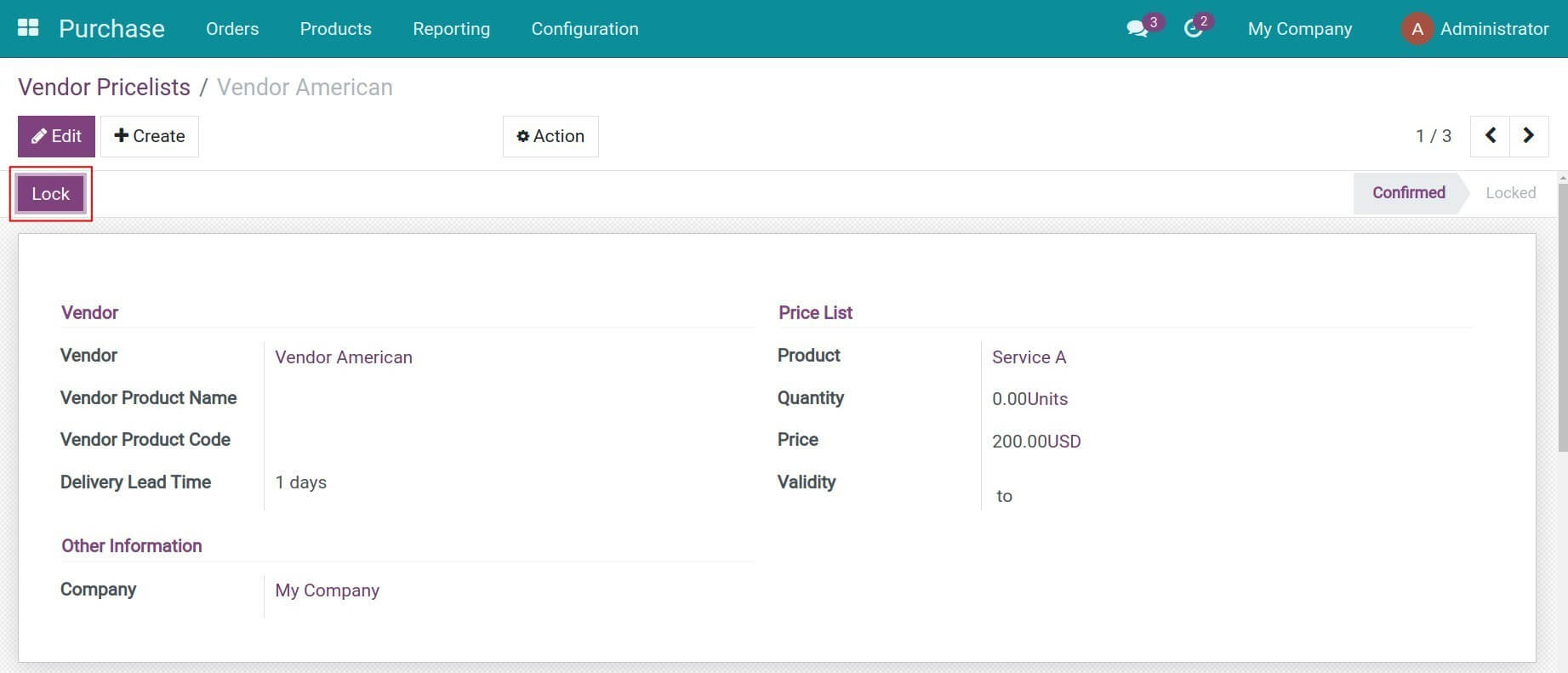
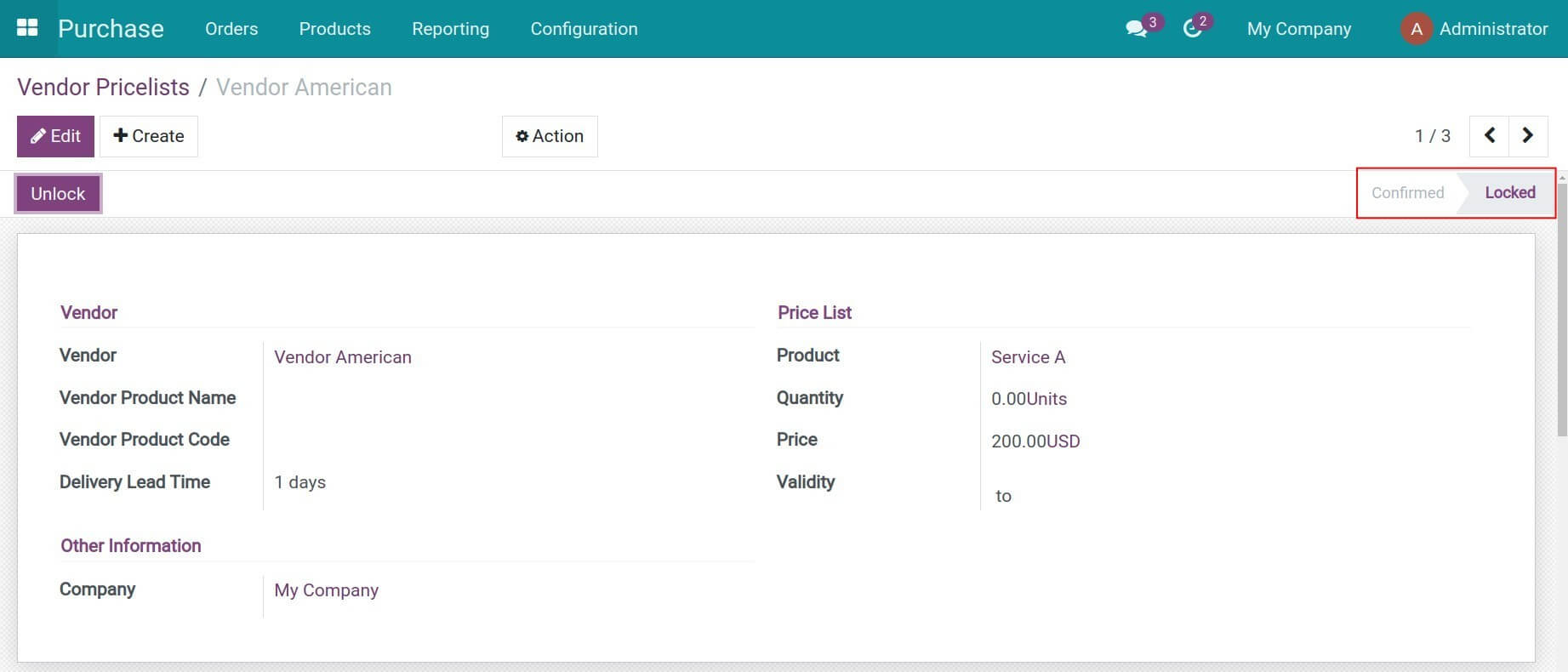
Step 2: Navigate to Purchase > Configuration > Vendor Pricelists and select a specific pricelist. Press Lock. The pricelist stage is changed from Confirmed to Locked.
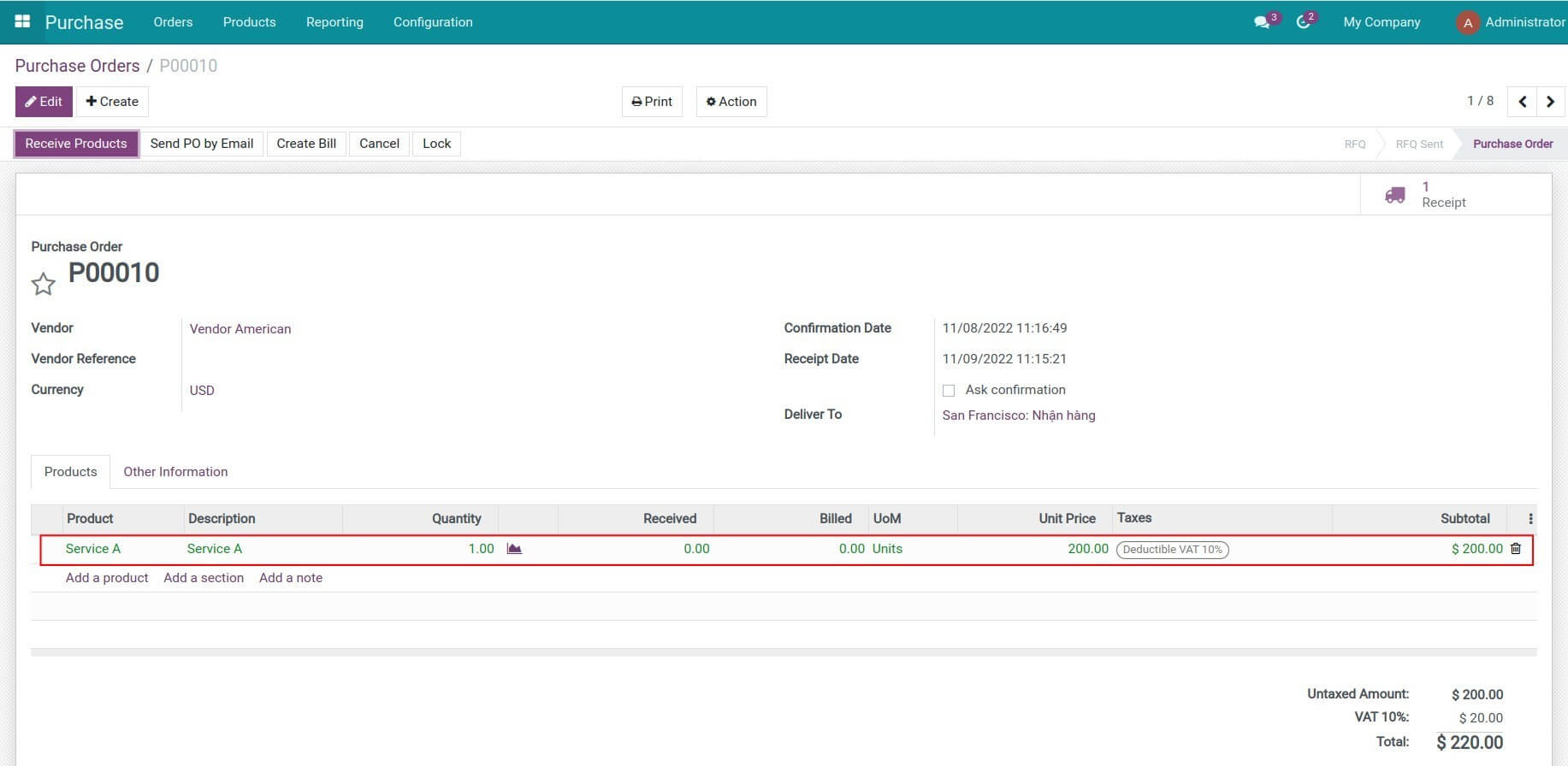
Step 3: Navigate to Purchase > Orders > Requests for Quotation, create a request for quotation for the vendor and product in the pricelist above. Press Confirm to convert the RFQ to a purchase order. The purchase order line on the RFQ now is changed to green.
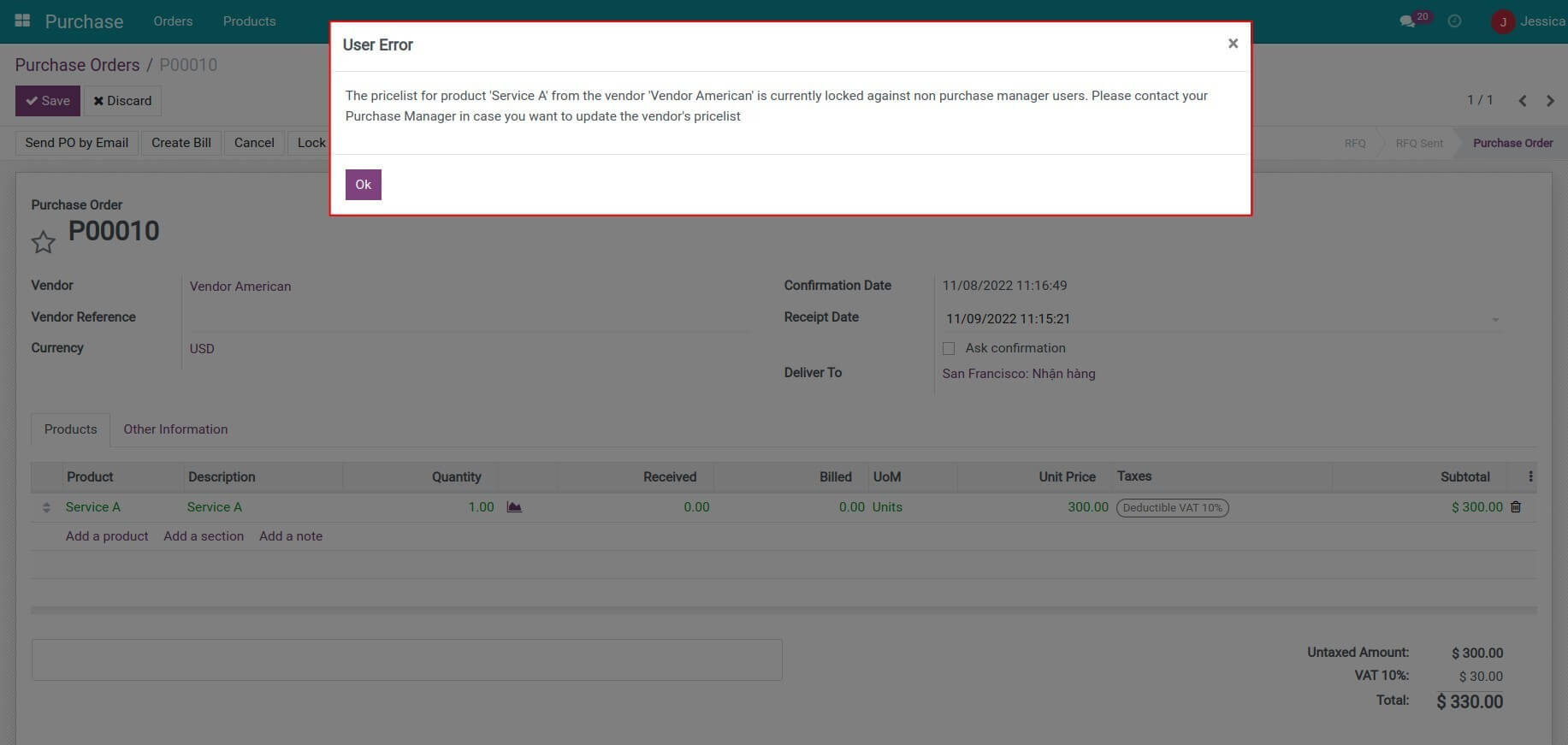
Step 4: A warning will pop up when a user with the Purchase/User access rights edits the vendor's pricelist on the RFQ/purchase order.
This software and associated files (the "Software") may only be used (executed, modified, executed after modifications) if you have purchased a valid license from the authors, typically via Odoo Apps, or if you have received a written agreement from the authors of the Software (see the COPYRIGHT file).
You may develop Odoo modules that use the Software as a library (typically by depending on it, importing it and using its resources), but without copying any source code or material from the Software. You may distribute those modules under the license of your choice, provided that this license is compatible with the terms of the Odoo Proprietary License (For example: LGPL, MIT, or proprietary licenses similar to this one).
It is forbidden to publish, distribute, sublicense, or sell copies of the Software or modified copies of the Software.
The above copyright notice and this permission notice must be included in all copies or substantial portions of the Software.
THE SOFTWARE IS PROVIDED "AS IS", WITHOUT WARRANTY OF ANY KIND, EXPRESS OR IMPLIED, INCLUDING BUT NOT LIMITED TO THE WARRANTIES OF MERCHANTABILITY, FITNESS FOR A PARTICULAR PURPOSE AND NONINFRINGEMENT. IN NO EVENT SHALL THE AUTHORS OR COPYRIGHT HOLDERS BE LIABLE FOR ANY CLAIM, DAMAGES OR OTHER LIABILITY, WHETHER IN AN ACTION OF CONTRACT, TORT OR OTHERWISE, ARISING FROM, OUT OF OR IN CONNECTION WITH THE SOFTWARE OR THE USE OR OTHER DEALINGS IN THE SOFTWARE.