

HR Employee Training
| Lines of Code | 1095 |
| Technical name | to_hr_training |
| License | OPL-1 |
| Website | https://viindoo.com/apps/modules/18.0/to_hr_training |
| Read description for | v 10.0 v 11.0 v 12.0 v 13.0 v 14.0 v 15.0 v 16.0 v 17.0 |
| Required Apps | eLearning (website_slides) Discuss (mail) Employees (hr) Website (website) Skills Management (hr_skills) |
| Included Dependencies | Viindoo Base HR Skills Framework Advanced HR Management HR Employee Grade HR Employee Role HR Employee Rank |

The courses this rank needs, and the ones the next rank will
Training linked to the competency framework: each skill level and each job position carries its courses, and every rank shows what to take now and what the promotion will require.
HR Employee Training (technical name to_hr_training) is an Odoo 18.0 app for Odoo Community and Odoo Enterprise and Viindoo Cloud, built for employee, manager, hr and l&d, recruiter.
At a Glance
The facts of HR Employee Training, version 0.1, in one place. Published by Viindoo.
How It Works
Attach once, read everywhere.
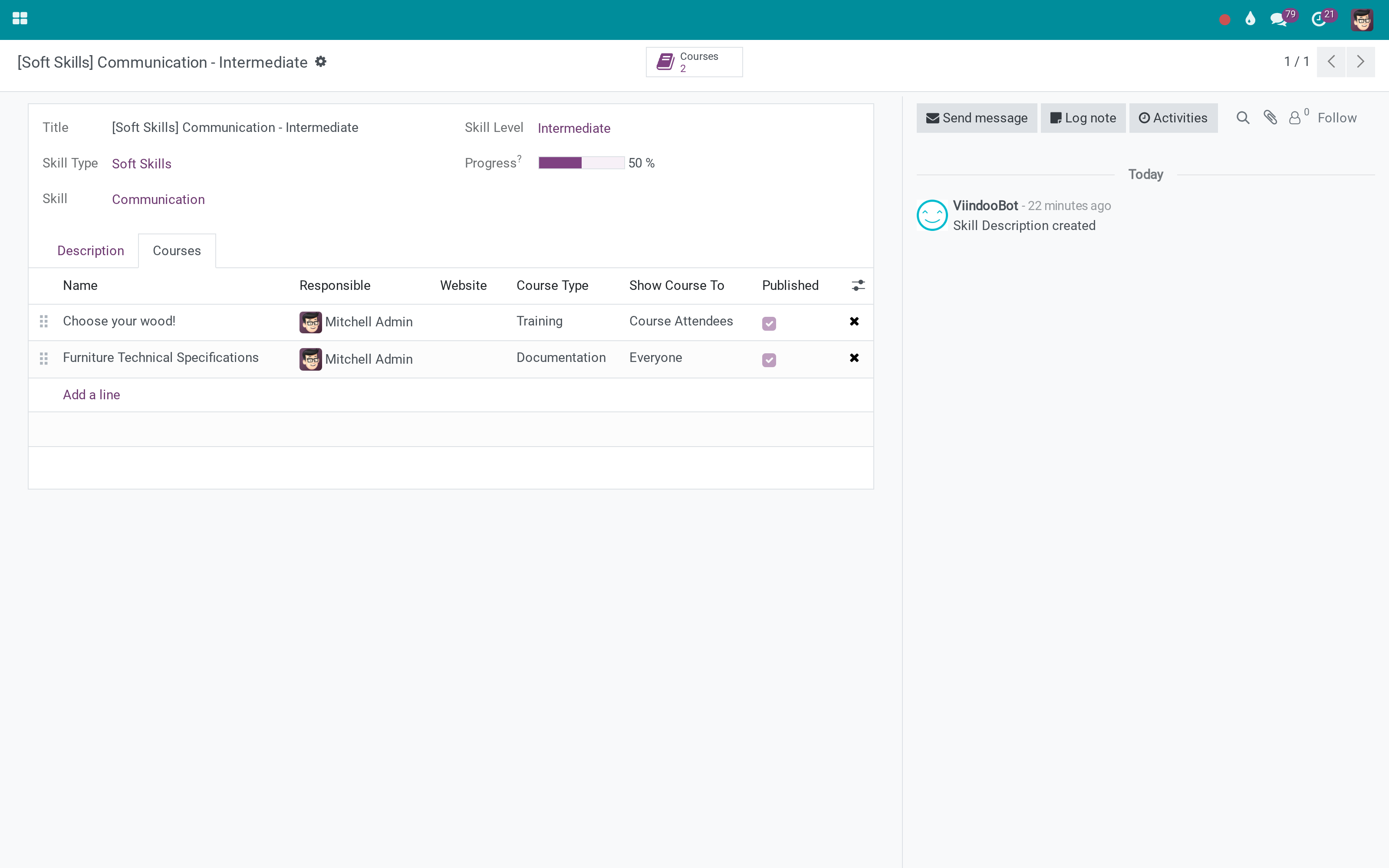
Courses on the competency
The link is made at the level, not at the skill - Communication at Advanced is not the same training as Communication at Elementary.
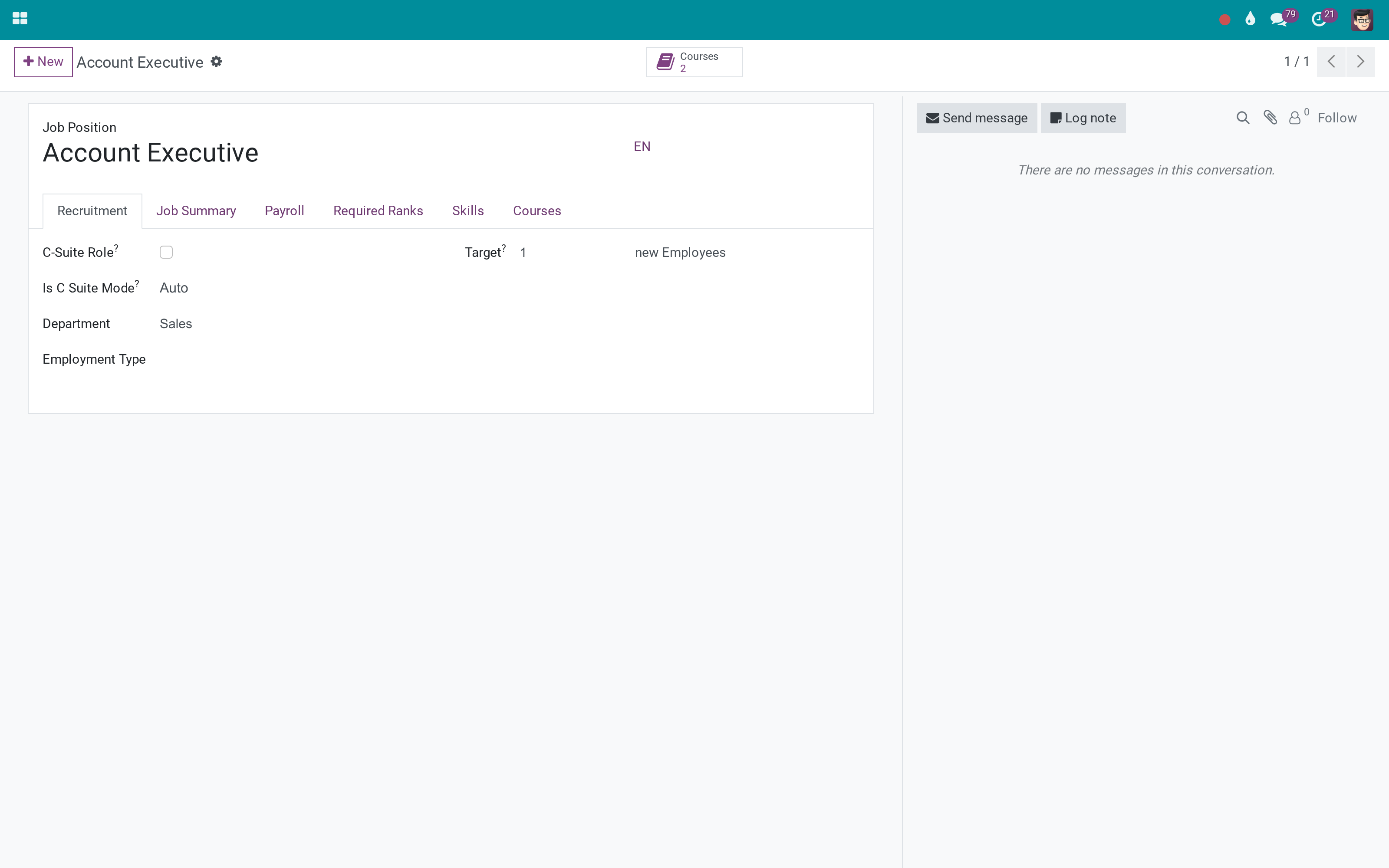
Courses on the job position
What the post itself requires - safety, tooling, process - independently of seniority.
The rank collects them
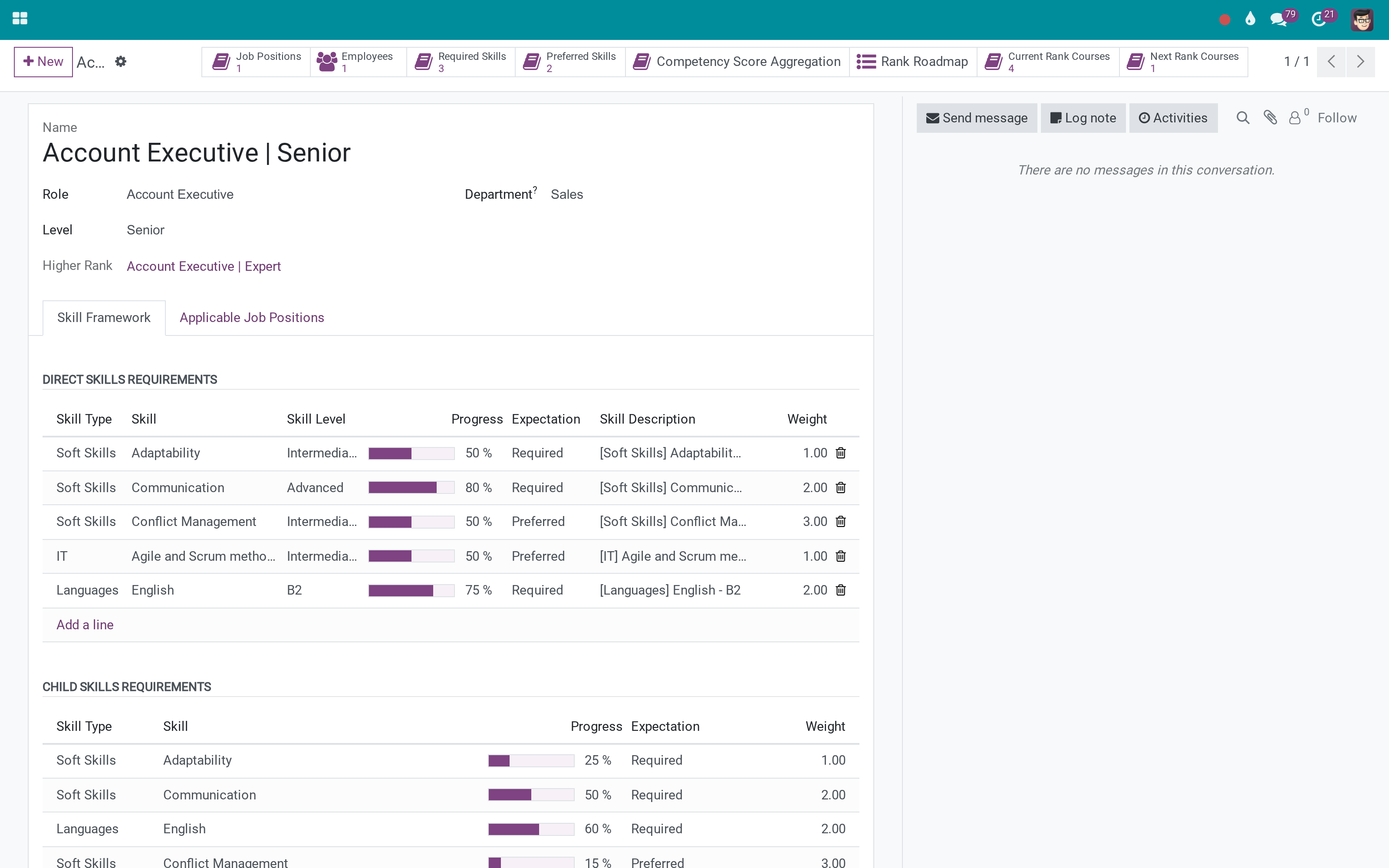
Two stat buttons: what this rank requires, and what the rank above adds. Both open the eLearning catalogue filtered to exactly those courses.
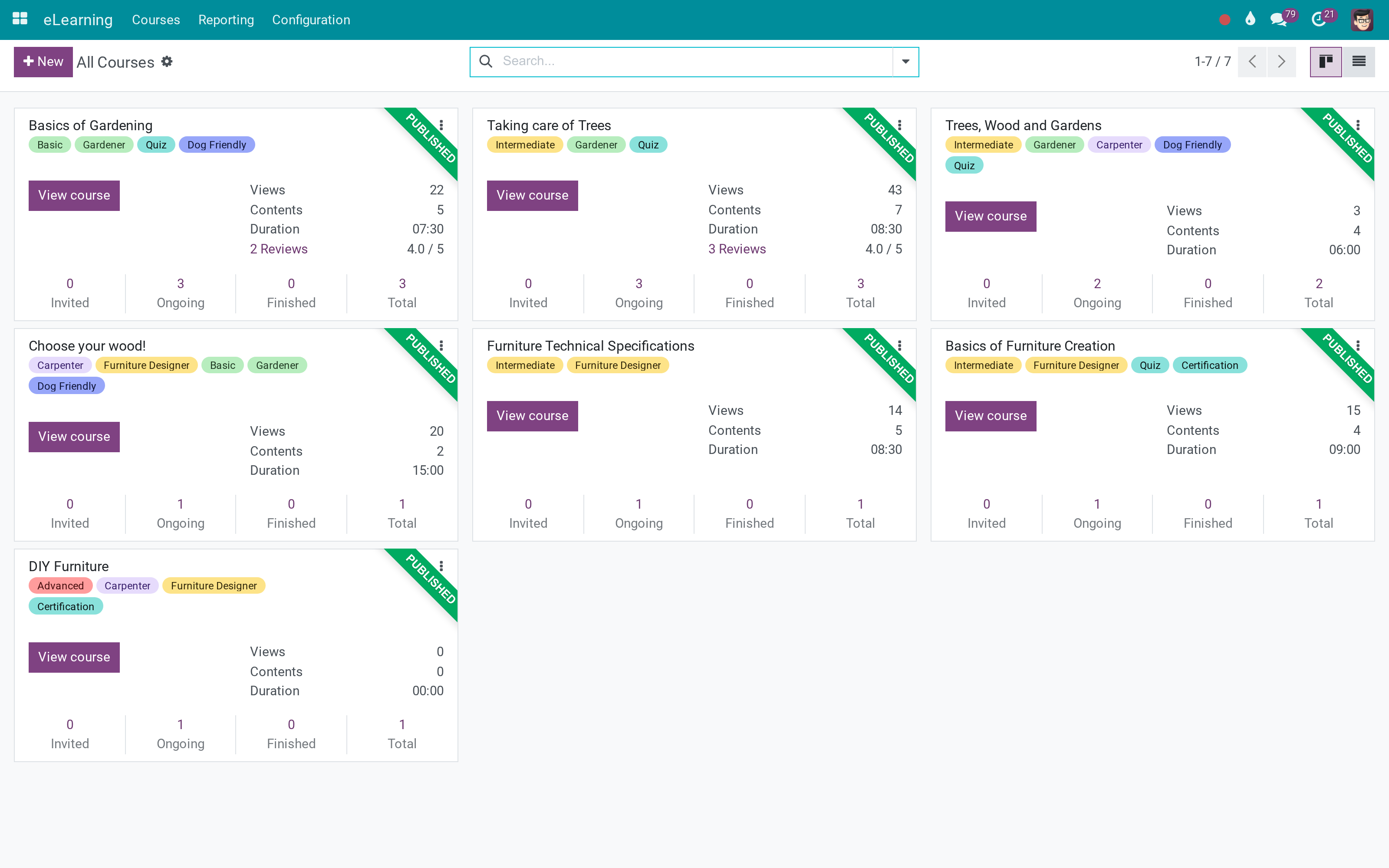
The catalogue itself
Nothing changes about how courses are built or followed - this only says which ones a rank needs.
What You Get
Courses on a skill level, so training is attached to a competency, not to a name
Courses on a job position, for what the post requires regardless of level
Current Rank Courses on the rank: everything the rank requires, collected
Next Rank Courses: what the rank above adds, with the overlap removed
The same two figures on the employee, from the rank they hold
A filter in the course list for the courses tied to the framework
More Screens
Everything below was taken on a database seeded with real business data, on this series - not a mock-up and not a screenshot from an older version.
The eLearning catalogue
What This App Does Not Do
Read this before you buy. Everything below is something the app deliberately leaves to another app or to you.
Progress lives in eLearning; this says which courses count.
No course is mandatory to reach a rank - the app makes the requirement visible, not blocking.
Courses attach to skill levels and job positions, which come from those apps.
The overlap with the current rank is removed on purpose; sequencing a curriculum is still human work.
Works Well With
Apps from the same stack, built to fit this one:
Who Should Use HR Employee Training?
Employee
Sees the courses for the rank they hold - and the ones the next rank adds.
Manager
Has a development plan that comes from the framework rather than from memory.
HR and L&D
Attaches the catalogue to competencies once, and every rank inherits it.
Recruiter
Knows what onboarding a post requires before the person starts.
Frequently Asked Questions
What does HR Employee Training do?
Training linked to the competency framework: each skill level and each job position carries its courses, and every rank shows what to take now and what the promotion will require.
What does HR Employee Training not do?
It does not track completion against the rank. Progress lives in eLearning; this says which courses count. It does not enforce anything. No course is mandatory to reach a rank - the app makes the requirement visible, not blocking. It needs the rank and skill framework. Courses attach to skill levels and job positions, which come from those apps. Next-rank courses are a difference, not a plan. The overlap with the current rank is removed on purpose; sequencing a curriculum is still human work.
Who is HR Employee Training for?
Employee: Sees the courses for the rank they hold - and the ones the next rank adds. Manager: Has a development plan that comes from the framework rather than from memory. HR and L&D: Attaches the catalogue to competencies once, and every rank inherits it. Recruiter: Knows what onboarding a post requires before the person starts.
Which Odoo version and editions does it support?
Odoo 18.0 - Odoo Community, Odoo Enterprise, Viindoo Cloud. Upgrades to a newer Odoo series are a separate purchase for that series.
What does it depend on?
It installs on top of: viin_hr_skill_framework, website_slides. Odoo installs them with it.
How do I set it up?
Attach once, read everywhere.
What works well with it?
Employee Ranks (viin_hr_rank): The ladder these courses are attached to. Skill Framework (viin_hr_skill_framework): The competencies and levels the courses close. Recruitment Skills (viin_hr_recruitment_skills_resume): The same framework applied to candidates.
Can I try it before buying?
Yes - the Live Preview button at the top of this page opens the module's own screen on a working database.
How do I get support?
Write to apps.support@viindoo.com with your Odoo version and the technical name to_hr_training; pre-sales questions go to sales@viindoo.com.
See HR Employee Training in Action
Live demo: v18demo-int.viindoo.com/web#action=viin_hr_rank.action_hr_rank
Need help with HR Employee Training?
For questions, implementation support or a custom feature, contact Viindoo.
Pre-Sales & Partnership
sales@viindoo.comUpgrades to a newer Odoo series are a separate purchase for that series.
All Viindoo apps: apps.odoo.com/apps/modules/browse?author=Viindoo
Technical Requirement
Changes log
0.1 - Latest on the 17.0 line
- Current and next rank courses are stored on the rank, so lists and filters can use them.
- Next-rank courses exclude what the current rank already requires.
Installation
- Navigate to Apps.
- Search with keyword to_hr_training.
- Press Install.
Instruction
Instruction video: HR Employee Training
Conception
- Position: These are job positions in each department, company. For example: Sales Manager, Consultant & Customer Support, etc.
- Role: A more detailed classification of the position, which can be based on expertise, responsibilities, roles in each job. For example, Consultant & Customer Support can be divided into 2 roles as Consultant and Customer Support Specialist.
- Level: Classified by level. For example: Intern, Trainee, Junior, Senior, etc.
- Rank: a manner to classify employees based on the employee's role and level. Rank = Role + Level. For example: Senior Consultant, etc.
Usage
Step 1: Create online courses.
Step 2 Manage the list of courses for each position.
- Go to Employees ‣ Configuration ‣ Job Positions, select a position in the existing list or create a new one.
- At the Courses tab, press Add a line to select the courses that the employee needs to be trained with this position. After selecting the list of courses, you will see them on the statistics bar of this position.

Step 3: Manage the list of courses for each skill.
- Go to Skills Framework > Skills > Skill Description, select a skill from the list.
- At the Courses tab, press Add a line to select the courses that the employee needs to learn for this skill. After selecting the list of courses, you will see the number of courses on the statistics bar of this skill.


Step 4: Build the skills framework for each rank.
- Go to Employees ‣ Configuration ‣ Ranks, select a rank from the available list or create a new one. (Note: enable developer mode).
- At the Skill Framework tab, press Add a line to assign the required skills to this rank. The system will automatically calculate the number of courses for this rank and the next rank in the statistics bar.


See the module HR Skills Framework. for more detail.
Step 5: Manage courses for each employee.
- Go to Employees ‣ Employees to select or create a new employee. At the tab HR settings, Payroll area, fill in the corresponding information in the fields:
- Job Position;
- Role;
- Grade.
- According to the configuration in steps 2 & 4, the system will automatically calculate and fill a list of courses for employees based on their positions and ranks.

This software and associated files (the "Software") may only be used (executed, modified, executed after modifications) if you have purchased a valid license from the authors, typically via Odoo Apps, or if you have received a written agreement from the authors of the Software (see the COPYRIGHT file).
You may develop Odoo modules that use the Software as a library (typically by depending on it, importing it and using its resources), but without copying any source code or material from the Software. You may distribute those modules under the license of your choice, provided that this license is compatible with the terms of the Odoo Proprietary License (For example: LGPL, MIT, or proprietary licenses similar to this one).
It is forbidden to publish, distribute, sublicense, or sell copies of the Software or modified copies of the Software.
The above copyright notice and this permission notice must be included in all copies or substantial portions of the Software.
THE SOFTWARE IS PROVIDED "AS IS", WITHOUT WARRANTY OF ANY KIND, EXPRESS OR IMPLIED, INCLUDING BUT NOT LIMITED TO THE WARRANTIES OF MERCHANTABILITY, FITNESS FOR A PARTICULAR PURPOSE AND NONINFRINGEMENT. IN NO EVENT SHALL THE AUTHORS OR COPYRIGHT HOLDERS BE LIABLE FOR ANY CLAIM, DAMAGES OR OTHER LIABILITY, WHETHER IN AN ACTION OF CONTRACT, TORT OR OTHERWISE, ARISING FROM, OUT OF OR IN CONNECTION WITH THE SOFTWARE OR THE USE OR OTHER DEALINGS IN THE SOFTWARE.