
Employee Documents
| Lines of Code | 1023 |
| Technical name | to_employee_documents |
| License | OPL-1 |
| Website | https://viindoo.com/apps/modules/19.0/to_employee_documents |
| Read description for | v 10.0 v 11.0 v 12.0 v 13.0 v 14.0 v 15.0 v 16.0 v 17.0 v 18.0 |
| Required Apps | Discuss (mail) Employees (hr) |
| Extensions | Fleet Drivers Management |

Every document an employee has, and when it expires
Passports, permits, licences and contracts as records - with who keeps the original, when it expires, and a reminder before it does.
Employee Documents (technical name to_employee_documents) is an Odoo 19.0 app for Odoo Community and Odoo Enterprise and Viindoo Cloud, built for hr officer, employee, compliance, department manager.
At a Glance
The facts of Employee Documents, version 1.0.4, in one place. Published by Viindoo.
How It Works
Three screens.
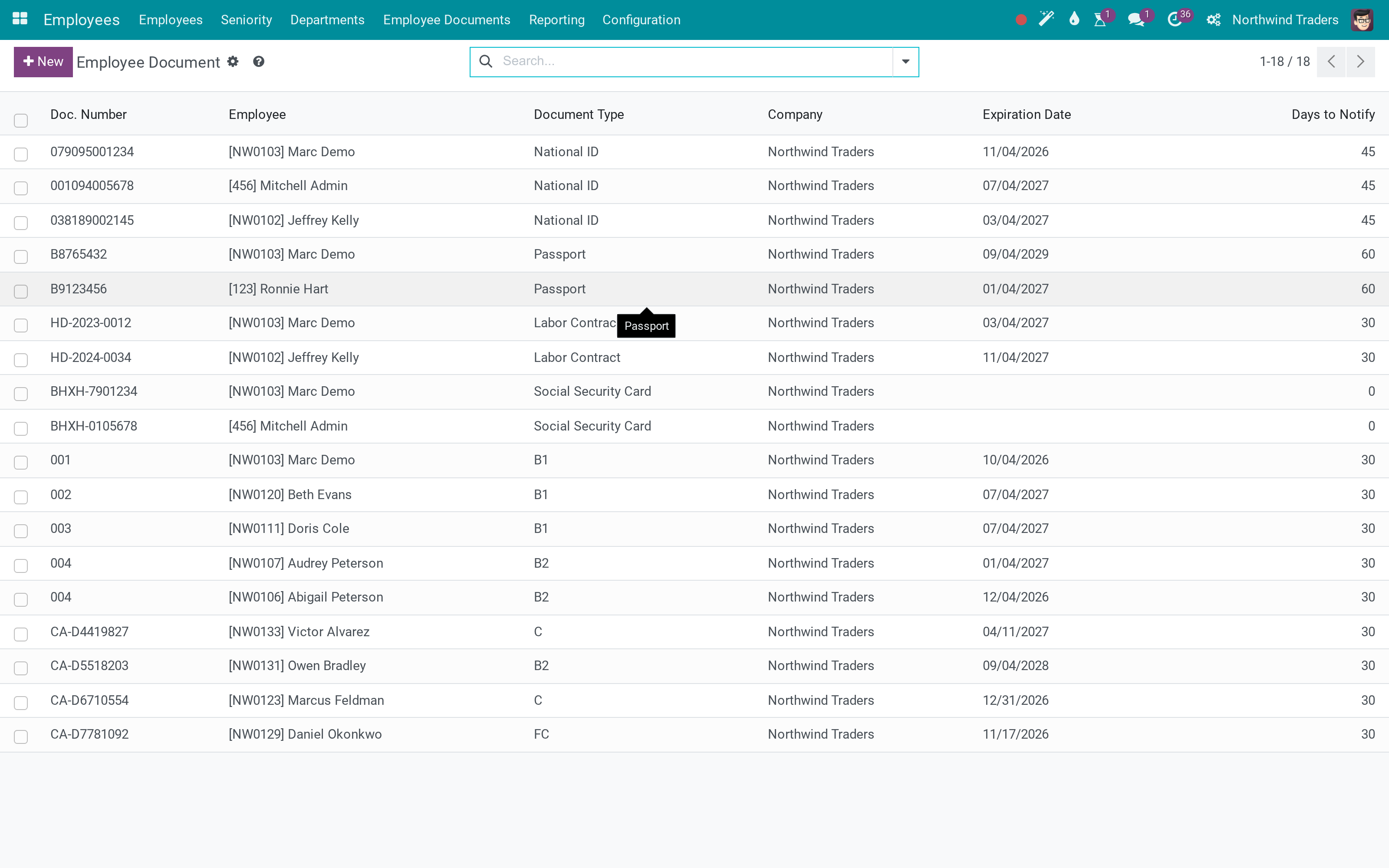
Every document, in one list
Employee, type, dates and who holds the original - sortable by expiry, which is the column that matters.
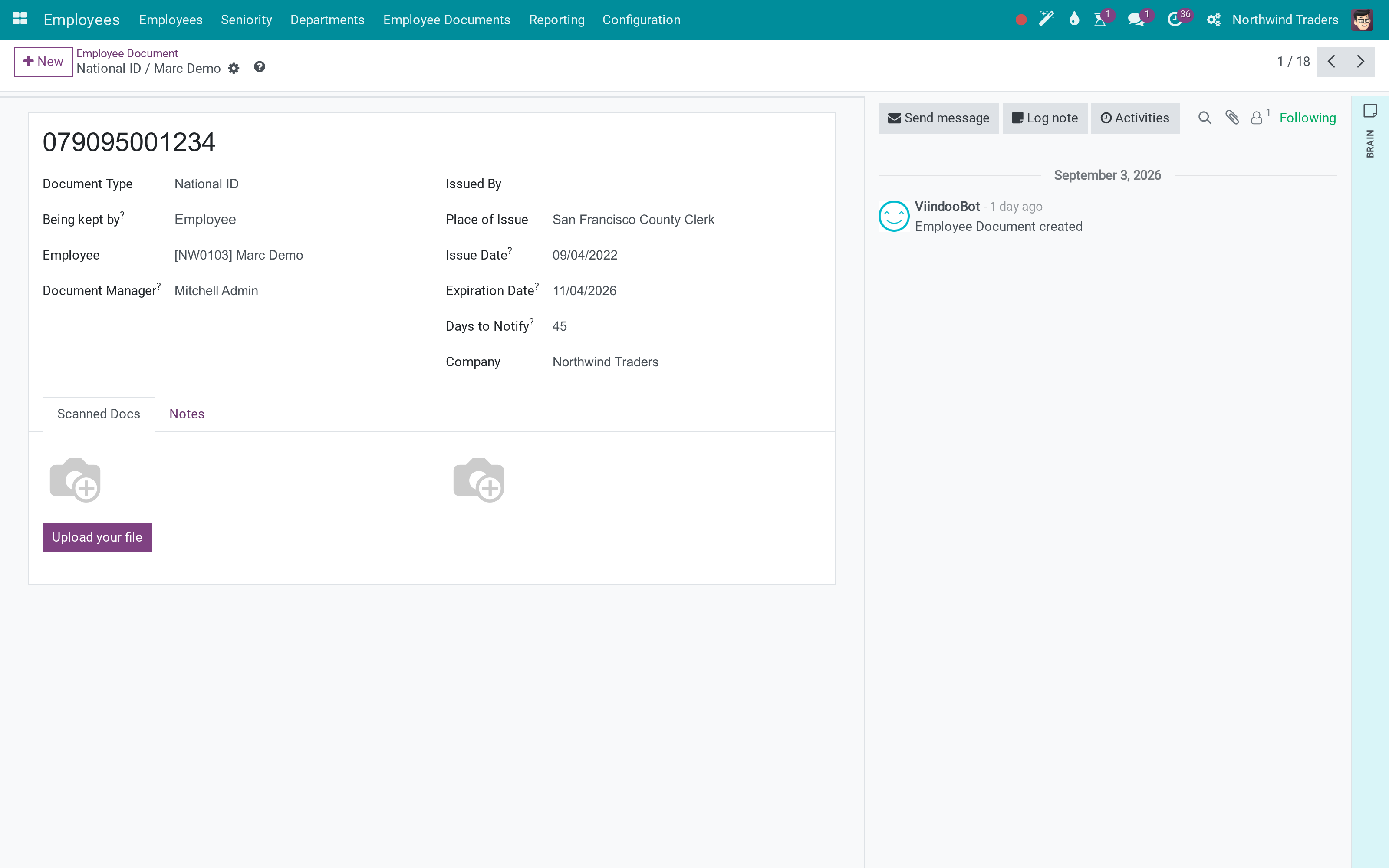
One document, in full
The number, the issuer, the dates, the notification lead time and the scan itself, with changes tracked.
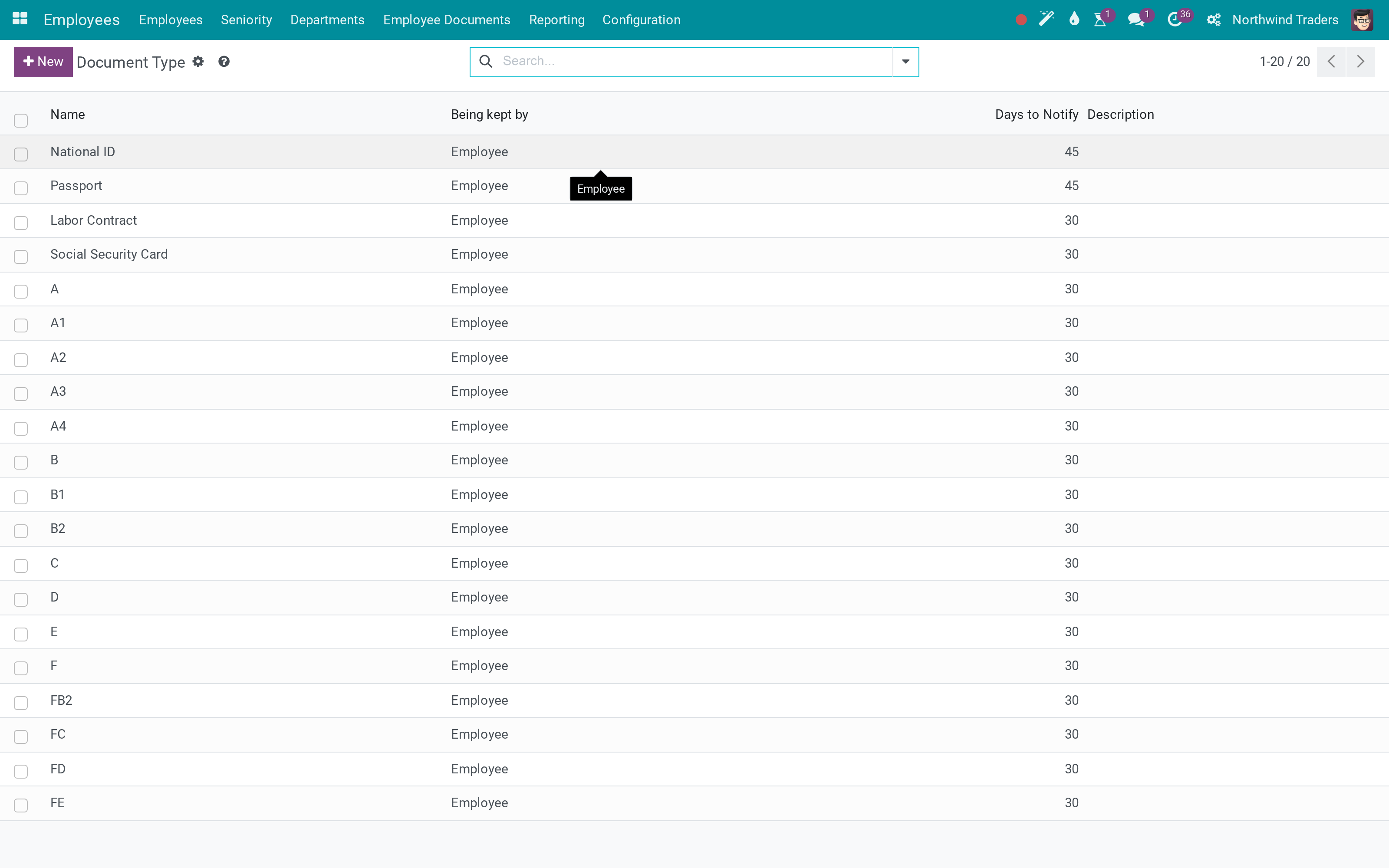
Types you maintain
A short catalogue - passport, work permit, driving licence - so the list stays reportable.
What You Get
Documents as records: number, type, issue and expiry date, issuer and place
Held by the employee or by the company, and returnable on termination
A notification a set number of days before expiry - zero turns it off
A document manager per record, responsible for it
The scan or PDF stored on the record, with images
A stat button on the employee, and document types you maintain
More Screens
Everything below was taken on a database seeded with real business data, on this series - not a mock-up and not a screenshot from an older version.
A document with its dates
What This App Does Not Do
Read this before you buy. Everything below is something the app deliberately leaves to another app or to you.
It reminds; the renewal is a human process.
One scan per document record - workspaces, rules and versions are the Documents app.
A wider distribution list is a mail template change, not a setting.
What is recorded is what somebody entered - the app makes the expiry visible, not the authenticity.
Works Well With
Apps from the same stack, built to fit this one:
Who Should Use Employee Documents?
HR officer
Sees what expires next month instead of finding out afterwards.
Employee
Is told before their permit lapses, not after.
Compliance
Can prove which originals the company holds, and gets them back at the end.
Department manager
Filters the team's documents by type and expiry.
Frequently Asked Questions
What does Employee Documents do?
Passports, permits, licences and contracts as records - with who keeps the original, when it expires, and a reminder before it does.
What does Employee Documents not do?
It does not renew anything. It reminds; the renewal is a human process. It is not a document management system. One scan per document record - workspaces, rules and versions are the Documents app. Notifications go to the employee and the manager. A wider distribution list is a mail template change, not a setting. It does not verify a document. What is recorded is what somebody entered - the app makes the expiry visible, not the authenticity.
Who is Employee Documents for?
HR officer: Sees what expires next month instead of finding out afterwards. Employee: Is told before their permit lapses, not after. Compliance: Can prove which originals the company holds, and gets them back at the end. Department manager: Filters the team's documents by type and expiry.
Which Odoo version and editions does it support?
Odoo 19.0 - Odoo Community, Odoo Enterprise, Viindoo Cloud. Upgrades to a newer Odoo series are a separate purchase for that series.
What does it depend on?
It installs on top of: hr. Odoo installs them with it.
How do I set it up?
Three screens.
What works well with it?
Employee Relatives (to_hr_employee_relative): The people behind the papers. Advanced HR Management (viin_hr): The HR foundation this sits on. HR Documents (viin_document_hr): When full document management is what you need.
Can I try it before buying?
Yes - the Live Preview button at the top of this page opens the module's own screen on a working database.
How do I get support?
Write to apps.support@viindoo.com with your Odoo version and the technical name to_employee_documents; pre-sales questions go to sales@viindoo.com.
See Employee Documents in Action
Live demo: v19demo-int.viindoo.com/web#action=to_employee_documents.action_employee_document
Need help with Employee Documents?
For questions, implementation support or a custom feature, contact Viindoo.
Pre-Sales & Partnership
sales@viindoo.comUpgrades to a newer Odoo series are a separate purchase for that series.
All Viindoo apps: apps.odoo.com/apps/modules/browse?author=Viindoo
Technical Requirement
Changes log
1.0.3 - Latest on the 17.0 line
- The notification date is computed and stored from the expiry and the lead time.
- Documents are company-checked against the employee they belong to.
Installation
- Navigate to Apps.
- Search with keyword to_employee_documents.
- Press Install.
Instruction
Instruction video: Employee Documents Instruction
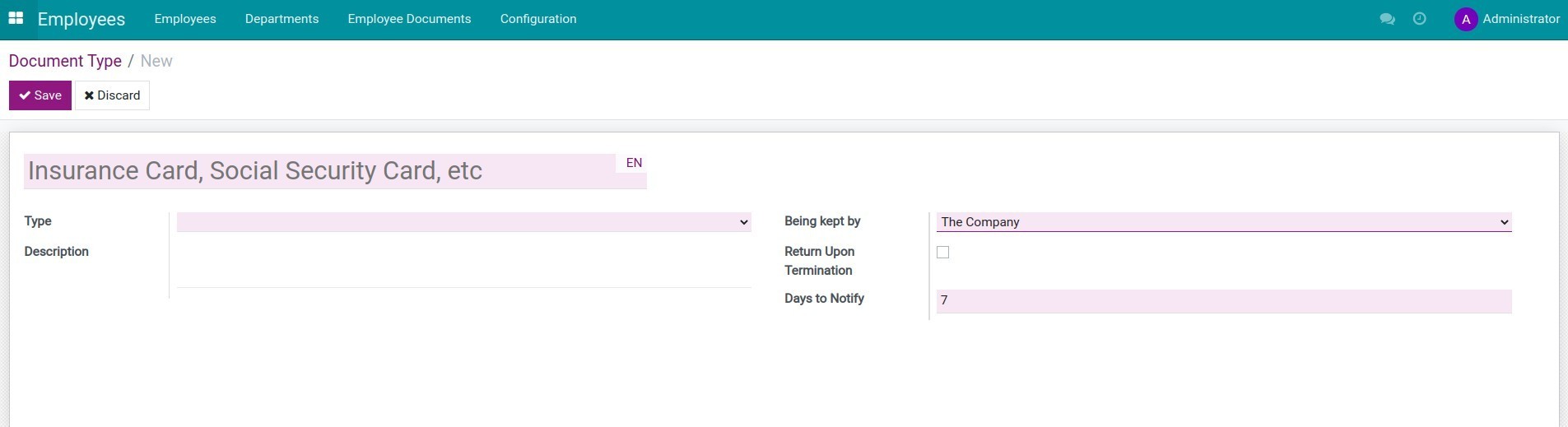
1. Create document type
Creating employee document types helps you categorize employee documents into different types such as Identity Card, Passport, Labor Contract, Social Security Card,... for effective HR documents storage and management.
Access the Employees app > Configuration > Document Type then press Create to create a new one or select an existing document type to edit.
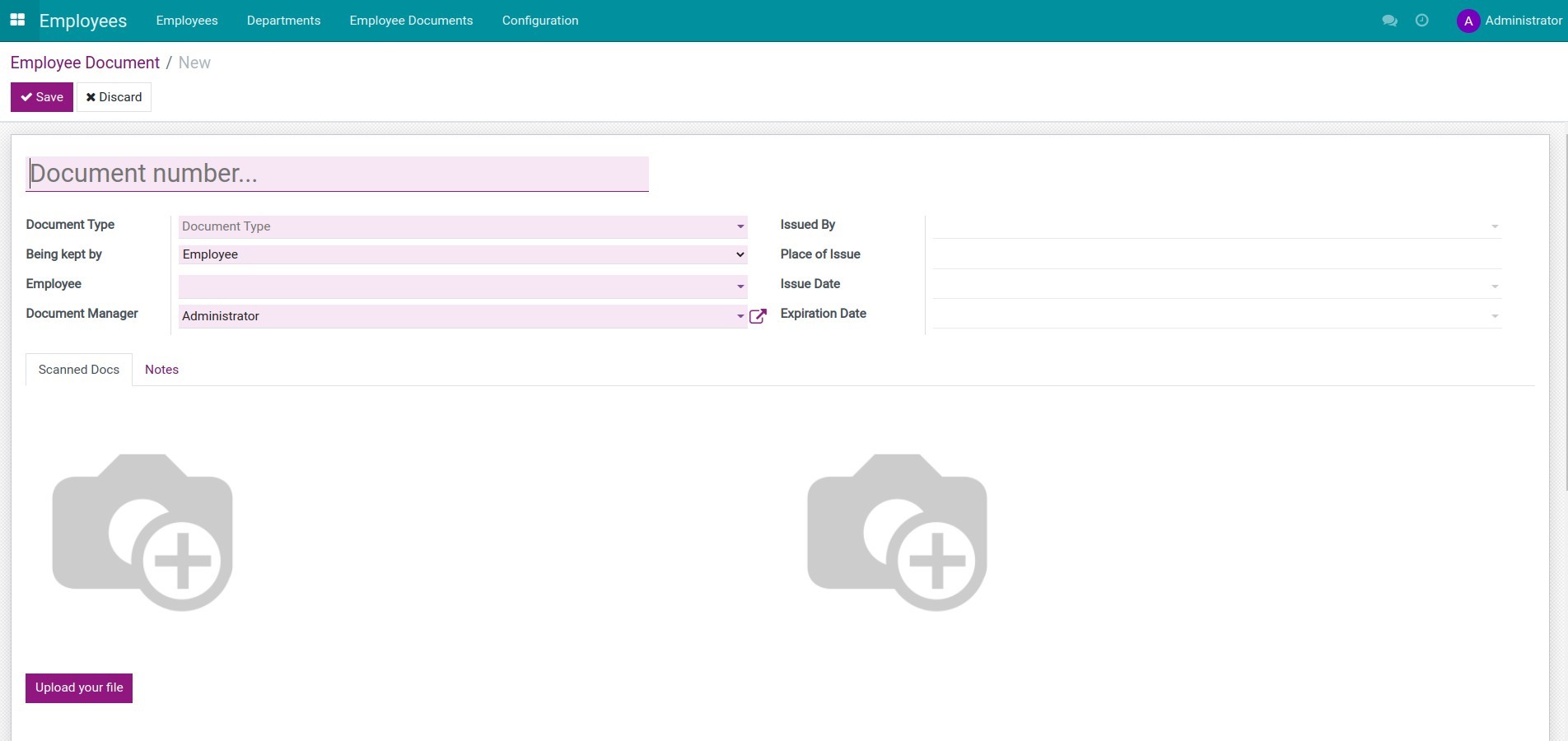
2. Create Employee Document
To create employee documents, you access Employees > Employee Documents > Create.
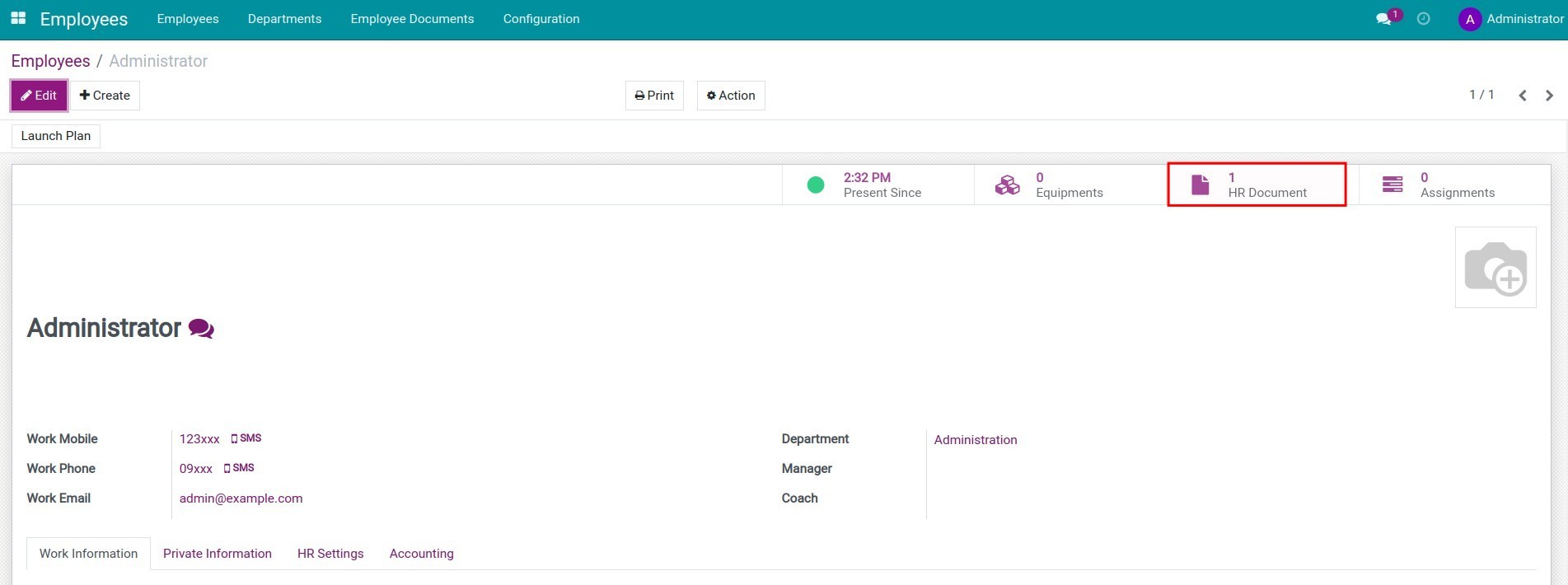
3. View document quantity on employee profile
Documents of an employee will be listed on their profile.
This software and associated files (the "Software") may only be used (executed, modified, executed after modifications) if you have purchased a valid license from the authors, typically via Odoo Apps, or if you have received a written agreement from the authors of the Software (see the COPYRIGHT file).
You may develop Odoo modules that use the Software as a library (typically by depending on it, importing it and using its resources), but without copying any source code or material from the Software. You may distribute those modules under the license of your choice, provided that this license is compatible with the terms of the Odoo Proprietary License (For example: LGPL, MIT, or proprietary licenses similar to this one).
It is forbidden to publish, distribute, sublicense, or sell copies of the Software or modified copies of the Software.
The above copyright notice and this permission notice must be included in all copies or substantial portions of the Software.
THE SOFTWARE IS PROVIDED "AS IS", WITHOUT WARRANTY OF ANY KIND, EXPRESS OR IMPLIED, INCLUDING BUT NOT LIMITED TO THE WARRANTIES OF MERCHANTABILITY, FITNESS FOR A PARTICULAR PURPOSE AND NONINFRINGEMENT. IN NO EVENT SHALL THE AUTHORS OR COPYRIGHT HOLDERS BE LIABLE FOR ANY CLAIM, DAMAGES OR OTHER LIABILITY, WHETHER IN AN ACTION OF CONTRACT, TORT OR OTHERWISE, ARISING FROM, OUT OF OR IN CONNECTION WITH THE SOFTWARE OR THE USE OR OTHER DEALINGS IN THE SOFTWARE.